ThreatLocker review: a zero-trust approach to endpoint security

ThreatLocker is a Zero Trust Platform that shifts from a detect-and-respond stance to a default-deny one – making everything much more secure. Its “allow what you need” and “block everything else by default” model aims to stop ransomware and risky code. It changes how businesses think about endpoints, scripts, and everyday software requests.
Founded in 2017, ThreatLocker has grown fast. At the time of writing this in March 2026, the company has over 700 employees and a global reach. My ThreatLocker review will give you an honest and transparent evaluation of this key service – covering its key features, pricing, user experience, and my own expert verdict.
ThreatLocker is widely used by organizations for tackling ransomware and minimizing damage from supply chain attacks. Its default-deny controls block untrusted execution before it even starts. ThreatLocker has a 4.8/5 rating on G2 (December 2025) – reviewers generally praise its policy control and support. ThreatLocker says each deployment includes a dedicated Solutions Engineer to help users set up their environment, with 24/7 Cyber Hero support afterward.
However, there is a trade-off – namely the steeper learning curve that naturally comes with the prevention-first model and high level of control. The setup process can also feel demanding at first.
ThreatLocker pros and cons
I’ve evaluated how this service performs under real-world scenarios. There are several advantages to using it, but some cons too.
How ThreatLocker differs from traditional antivirus
ThreatLocker differs from traditional antivirus solutions in one major way: it’s a prevention-first security model, as opposed to a classic detection model. Classic antivirus solutions scan files and the system for known suspicious patterns – or Indicators of Compromise (IoCs) – reacting once something seems malicious. ThreatLocker’s Zero Trust defense never gives unknown executables, scripts, and libraries a chance to run unless expressly permitted.
Allowlisting is the core – this module creates an allow-by-exception environment where only approved software runs. Furthermore, the Ringfencing module adds containment for what you already trust. For instance, even when Microsoft Word is allowed, this module stops it from calling PowerShell, limits access to files, or the internet. This is called reducing “living off the land” abuse.
Then, ThreatLocker Storage Control module controls how data moves. For instance, policies can restrict USB devices, network shares, and monitored folders – to stop sensitive files being copied, and so that malware can’t arrive via removable media. These modules – together – are as tight as security gets: Allowlisting for what runs, Ringfencing for interior containment, and Storage Controls for what’s read or written in storage. This form of filtered, smart defense is designed to block active threats. Another benefit is that you’ll see less unnecessary security alerts since everything is so locked down.
Key features breakdown
ThreatLocker has a rich set of key features. It’s helpful to dive deeper into those so you can know what to expect.
Application Allowlisting
With Allowlisting, unapproved applications, scripts, or libraries can’t run – blocking ransomware and other malware code. This usually begins in Learning Mode – where the agent inventories what’s already running and generates policies your organization can review before you apply it.
After enforcement, access can be requested via a popup. Administrators can approve or deny access based on context like who requested it and where it was launched from.

No matter if a process is launched by a normal user, administrator, or the system account, ThreatLocker blocks what’s not allowed at the kernel level. Time-based policies can temporarily permit software for a window of time, then automatically block it again when the policy expires.
Ringfencing
Ringfencing is for reducing the impact if a trusted tool is abused – containment for software you already trust – restricting how these applications interact with other applications, files, registry keys, and the internet.
Ringfencing controls are in-depth: you can restrict how apps interact with other processes, system registry keys, and network resources – key for stealthy fileless attack scenarios and “living off the land” behavior.
Ringfencing policies are included for many common apps like Office tools, PowerShell, and Zoom, that you can adjust to your environment. It can also be applied to custom applications. Since new vulnerabilities are always emerging, ThreatLocker publishes suggested policies to the ThreatLocker Community for administrators to adopt.
Elevation Control
This module handles privilege abuse, and it’s application-centric – without giving users local admin rights. Policies grant elevation to specific processes/applications so the task succeeds without user privilege expansion – reducing the impact if passwords are phished or endpoints are compromised.
You can request access to a restricted application – which administrators – or the Cyber Hero Team – can approve while applying elevation simultaneously. You can use time-limited elevation – or scheduled elevation maintenance mode – for installs and updates, so privileges don’t linger. Elevation can also be restricted by User or Group.
Zero Trust Endpoint Firewall and Storage Control
Zero Trust Endpoint Firewall is like a centrally managed endpoint firewall – with custom policies and dynamic ACLs to open ports if an approved connection is needed (and automatically close them). Storage Control helps teams restrict access to sensitive folders, file shares, and physical media like USB drives – so data is harder to copy or encrypt without permission.

Additionally, ThreatLocker has recently expanded its platform with Zero Trust Network Access and Zero Trust Cloud Access. These solutions extend the same default-deny philosophy to network connections and cloud environments – helping organizations control access to internal resources and SaaS applications without relying on traditional VPNs or broad trust assumptions.
Pricing and plans
ThreatLocker doesn’t publish public pricing tiers as such. Instead, the company uses a quote-based enterprise pricing model. The costs scale based on the number of endpoints/seats and the modules you enable – so you must contact sales for a custom offer. There’s 24/7/365 US-based support with an average response time of under 60 seconds for all customers at no additional charge.
Implementation and user experience
Regarding community feedback across Reddit and G2, I’ve found that ThreatLocker is a “love-hate” tool. Users say that it’s extremely effective once tuned in, but that the first phase is demanding.
More specifically, some admins on Reddit note that the initial rollout – up to the first 60 days – is spent refining Allowlisting and Ringfencing policies, learning how global versus per-group policies behave, and building an internal process for approval requests. For IT teams, this shows up as extra support tickets – especially in environments with lots of tools, scripts, browser extensions, and app updates.
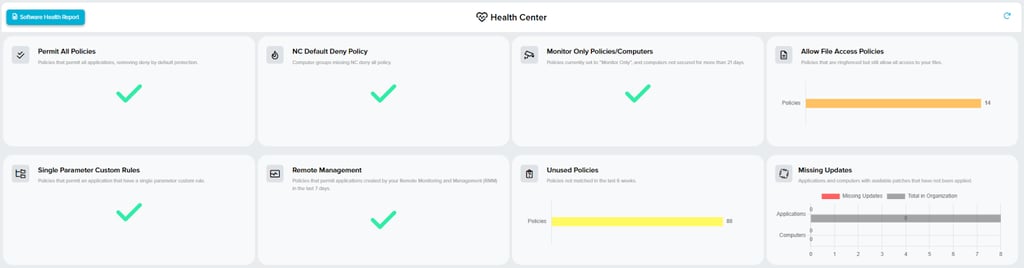
The situation is similar across G2 – users describe a steep learning curve and complex configuration – but also that the service works as advertised once the rules have settled in. Many users praise control depth, clear audit visibility, and Cyber Hero support.
What’s important to add is that ThreatLocker seems to shine most in securing legacy machines and apps – where patching may be an issue. For me, the takeaway from these reviews is that it’s crucial to set aside time for ThreatLocker – after which it’s likely that having the service in your business ecosystem will pay off.
Safety check: compliance and legal realities
It’s important to be transparent about ThreatLocker’s fine print – including the legal realities. Here’s what you must know:
- ThreatLocker does have SOC 2 certification in place, while ISO 27001 certification is currently in progress and expected to be completed later this year. As always, it’s best to confirm the latest compliance status with the vendor during evaluation.
- Section 9.1 of ThreatLocker’s ToS essentially tells you: “If your use of the tool causes ThreatLocker to get sued, you are financially responsible for their legal costs.”
- ThreatLocker collects extensive system telemetry – such as login usernames, hostnames, file access activity, file paths, hashes, and IPs. This is normal for cybersecurity services, and ThreatLocker explicitly says it sees the metadata, not sensitive file contents. Still, it’s important to know if your company is privacy-sensitive. Some telemetry can be turned off in the admin interface, according to ThreatLocker’s ToS – but that may hamper support.
- Another point that’s often overlooked is that ThreatLocker’s agreement basically says renewals can roll over unless cancelled in time.
Remember, these points alone shouldn’t sway your decision to try ThreatLocker – they’re just items to validate during procurement. Companies can work with ThreatLocker to form an agreeable ToS, and I suggest your legal team reviews Section 9.1 of ThreatLocker’s ToS.
As for privacy, I suggest your privacy/compliance teams go over what telemetry is collected, and how that affects your organization – like where that data will be stored, how long it’s retained, and anything else you require if your organization operates under GDPR/POPIA or other major data protection laws, and requires specific data residency arrangements. ThreatLocker can guarantee data residency for some countries, with datacenters throughout the world. Finally, regarding ThreatLocker’s automatic renewal terms and limitation of liability, I recommend you check this with your procurement and legal teams.
Final verdict
ThreatLocker is a powerful tool for organizations willing to invest time in configuration for maximum, Zero Trust security – a model many organizations worldwide are switching to as more advanced vulnerabilities arise. Many organizations use ThreatLocker already – and according to the reviews I’ve read, they like the service’s controls, multi-layered defenses, and audit system.
However, this isn’t a set-and-forget service – meaning, it could be a few weeks or more until all of the security rules have been dialed in for your organization. Ultimately, I recommend ThreatLocker for organizations prioritizing “prevention” over “response” which have the IT resources to manage the policies.
FAQ
How much does ThreatLocker cost per month?
ThreatLocker pricing is quote-based, meaning that there’s no standard cost per month listed on its website. On its pricing page, the company says the price is built around real endpoint count, required features, and other specifics and details. To get a quote for your organization, you must speak to one of ThreatLocker’s Cyber Hero team members to get your custom quote.
What are the cons of ThreatLocker?
ThreatLocker has a few cons you should consider, such as: complex setup and admin overhead, approval workflow, updates may cause surprise blocks, and slowdowns on certain workloads that create/write lots of small files. Also, there are tricky items in the ToS that legal teams should look at.
Is ThreatLocker better than traditional antivirus?
That depends on the system your organization uses, so it’s difficult to say if one’s better than the other. ThreatLocker is definitely stronger at preventing security issues and human error. Traditional antivirus is great for cleaning up known threats, while the ThreatLocker Zero Trust system is tuned for organizations where ransomware and unknown malware protection is paramount. Most organizations can benefit a lot from combining ThreatLocker with a traditional, solid antivirus system.