Cookiebot review


Staying compliant with privacy laws like GDPR and CCPA is essential for any website owner. With evolving regulations, platforms like WordPress, and increasing user expectations, privacy compliance has become a standard requirement. Failing to meet these standards can lead to fines and a loss of user trust.
Consent management platforms (CMPs) like Cookiebot are designed to simplify this process by helping websites meet legal requirements while giving users clear control over their data.
The impact Cookiebot has on your website depends on factors like its size and the regulations you need to follow. This review takes a detailed look at how Cookiebot handles consent management, usability, and pricing.
This article discusses Cookiebot and other consent management platforms for managing cookies and compliance with privacy laws. The content is provided for informational purposes only and does not constitute legal advice.
What is Cookiebot CMP?
Cookiebot by Usercentrics is a cloud-based consent management platform designed to help websites comply with global privacy laws like GDPR, CCPA, and LGPD. It automatically detects and controls cookies and trackers, ensuring that user data is only collected after valid consent is given.
The platform is ideal for small and mid-sized businesses that want a simple and reliable way to stay compliant. It works smoothly with Google Consent Mode v2, supports over 40 languages, and automatically adapts banners for different regions. Cookiebot also offers automatic cookie categorization, detailed consent logs, accessibility compliance, and integrations with major CMS platforms like WordPress and Shopify.
It’s crucial to note that CookieBot only provides the tools for privacy compliance; it remains the user’s responsibility to ensure that their website is compliant with privacy legislation.
Pricing and cost
Cookiebot’s pricing depends on the number of pages your domain has. All paid tiers include access to Cookiebot CMP’s full list of features. Note that plans automatically upgrade when the detected subpage count surpasses a pricing tier.
Compared with other consent management platforms, Cookiebot’s entry-level plans are budget-friendly, but pricing can quickly climb for large or high-traffic sites, making it costlier than some enterprise alternatives.
There’s a free plan for small websites with up to 50 subpages, though you only have limited features. You can also enjoy a 14-day free trial.
| Cookiebot plan | Coverage | Price |
| Premium Lite | 50 subpages for one domain | $8/month |
| Premium Small | 350 subpages for four or more domains | $16/month |
| Premium Medium | 3,500 subpages per domain | $34/month |
| Premium Large | 7,000 subpages per domain | $56/month |
| Premium Extra Large | Over 7,000 subpages per domain | $96/month |
What does Cookiebot do with cookies and trackers?
Cookiebot starts by scanning your website to detect all cookies and tracking technologies in use. Afterward, you can interact with its features, which include the following:
- Cookie classification. Cookiebot uses a library of over 13,000 pre-categorized cookies and trackers. Each entry lists its purpose and can be edited if required.
- Pre-consent blocking and signals. The CMP blocks cookies and trackers until the user provides consent. This feature supports Global Privacy Control and ad-tech consent modes.
- Consent banner customization. You can pick a banner template or create one from scratch using HTML, CSS, and JavaScript. You can also control the banner’s text, design, placement, language, and region so visitors see a notice suited to them.
- Cookie declaration module. You can embed a prebuilt section on your privacy page to list all cookies and let visitors adjust or withdraw consent.
- Consent analytics and tracking. Cookiebot tracks how visitors interact with the banner, provides reports, and supports A/B testing to optimize performance.
- Consent record-keeping. The CMP securely stores all consent logs, allows easy exporting for audits, and ensures you have a complete record of user approvals.
How Cookiebot handles consent and user control
Cookiebot lets visitors give explicit or implicit consent for cookies and allows them to adjust or withdraw choices anytime. It also provides consent notices tailored to different regions and their respective legislations, including the following:
Supported regulations (USA)
- California Consumer Privacy Act (CCPA)
- California Privacy Rights Act (CPRA)
- Colorado Privacy Act (CPA)
- Connecticut Data Privacy Act (CTDP)
- Utah Consumer Privacy Act (UCPA)
- Virginia Consumer Data Protection Act (VCDPA)
Supported regulations (International)
- Google Consent Mode
- Microsoft UET Consent Mode
- IAB Europe TCF 2.2
- General Data Protection Regulation (GDPR)
- Digital Markets Act (DMA)
- Federal Act on Data Protection (FADP)
- Lei Geral de Proteção de Dados (LGPD)
- Protection of Personal Information Act (POPIA)
In practice, Cookiebot provides granular control on multiple levels. For example, you can set different settings for users from specific regions. You can set stricter default settings for EU countries to comply with EU-specific legislation. Other features that benefit from this level of configuration include automatic scans, cookie permissions, language, cookie banners, and more.
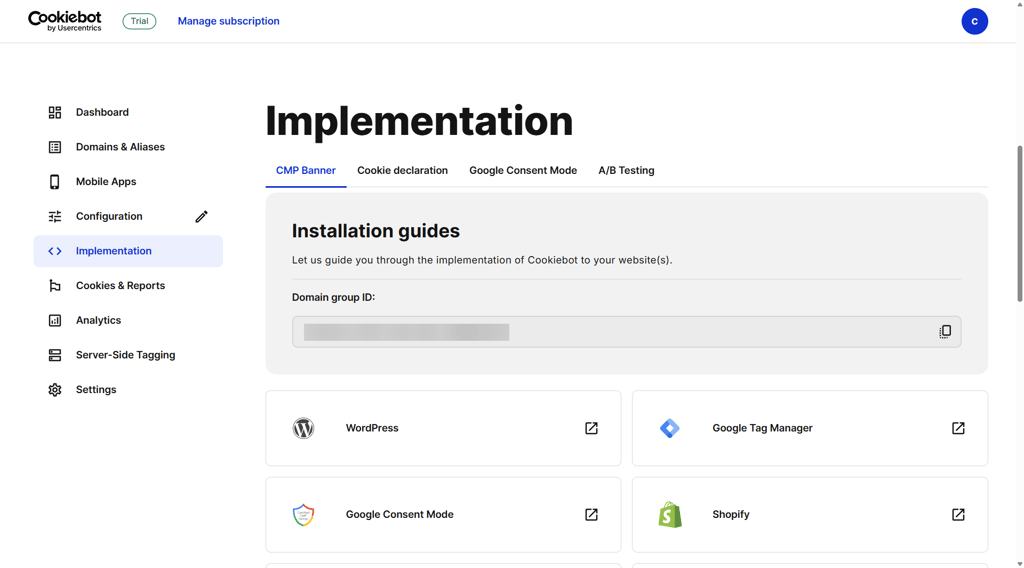
Integration with third-party apps is straightforward, and Cookiebot provides easy-to-follow guides for platforms like Google Tag Manager, WordPress, Shopify, Wix, Squarespace, Joomla, Drupal, and more. Implementation is simple; simply select a banner, add the script, and configure scans and consent settings.
How you can customize your cookie banner
Cookiebot offers wide banner customization through its Admin Interface and its different sections:
- Design. You can switch layouts between “dialog” and “bar,” choose slide-up or overlay effects, position the banner at the top or bottom, and set themes to light, dark, or custom. Buttons can be solid, outlined, or mixed, and you can optionally display your logo on the banner.
- Content. This tab lets you edit text fields, set the default language, or enable auto-detect to match visitors’ locations. The Privacy section allows toggling the privacy trigger, adjusting its color, theme, and position, and customizing the cookie declaration using default or custom templates.
- Legislation. Cookiebot includes presets for GDPR, CCPA, LGPD, POPIA, VCDPA, and more. You can further refine consent methods, distribution, and visitor regions.
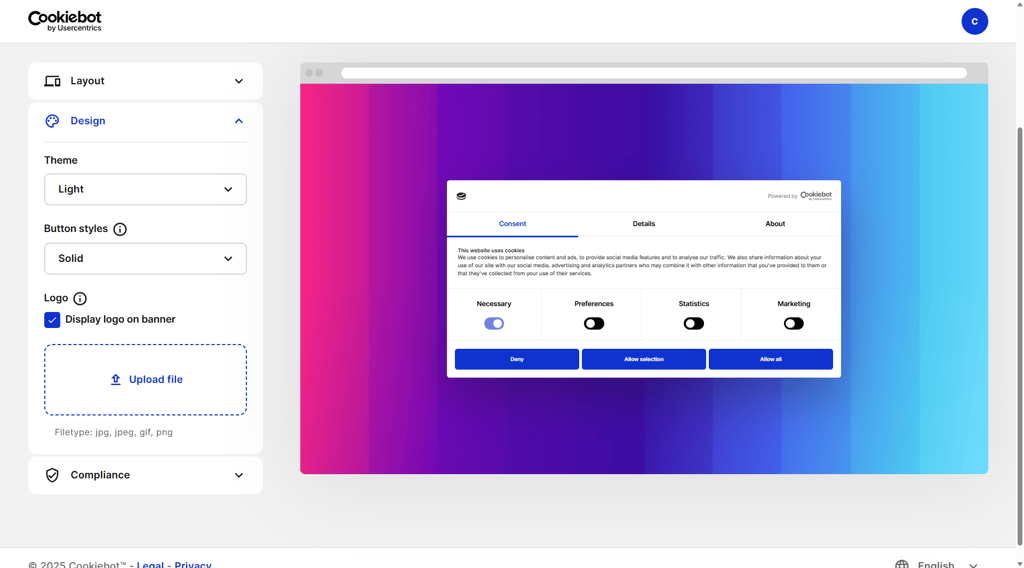
Cookiebot consent banner customization panel showing its Design options
My experience with installing and customizing the Cookiebot CMP banner was straightforward. I used the WordPress plugin and followed the step-by-step deployment instructions.
To illustrate the simplicity of the process, here are the steps I did:
- I created a Cookiebot account and claimed a 14-day free trial.
- I added my website through the Admin interface by entering my domain and confirming it.
- Next, I set up the banner configuration. I tested the default templates for GDPR and CCPA, which gave me a sense of the layout and design options.
- I connected the domain group ID for authentication. To do so, I went to Admin > Implementation and copied the group ID. Then, I opened the Cookiebot plugin in WordPress, went to Settings > General, and then pasted the group ID.
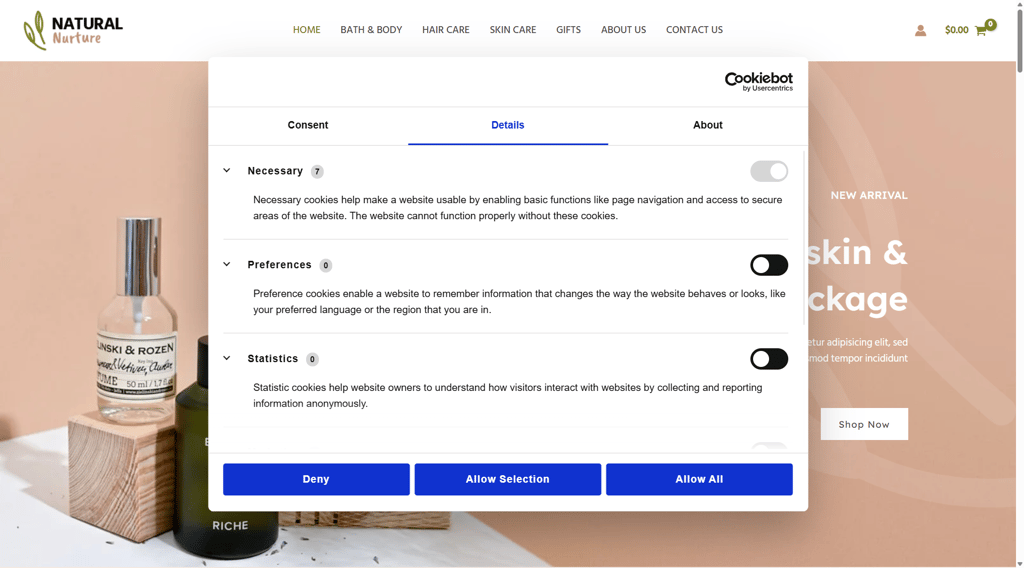
Once done, the banner and privacy trigger appeared immediately on my test site. All in all, I was able to easily specify which cookies I wanted users to see.
What's missing in Cookiebot CMP
Cookiebot CMP delivers strong automation and compliance features, but user feedback highlights areas where improvements could enhance the experience.
- User experience. Several reviewers from G2 note that the backend interface can feel outdated and unintuitive, which may slow configuration for less technical users. Clearer navigation and a more modern layout could reduce the learning curve and improve overall usability.
- Customer support. Some users on Trustpilot report challenges with support and documentation. While setup is generally straightforward, resolving account or technical issues can take longer than expected.
- Pricing. Pricing transparency has been flagged by several Trustpilot reviewers. Unexpected plan changes or subscription cost increases due to page count or domain additions have caused confusion.
Despite these areas for improvement, most reviewers on G2 and Trustpilot still appreciate Cookiebot CMP for how much it simplifies consent management. Many users highlight its reliable automation, wide legal coverage, and the way it helps keep websites organized and compliant without constant manual oversight.
Alternatives to Cookiebot
Choosing the right consent management platform can help your website stay compliant while giving visitors real control over their data. While Cookiebot CMP is popular, other tools may better fit your budget, technical needs, or customization preferences.
Here are three alternatives to consider:
- Termly is a user-friendly CMP that combines cookie scanning and policy generation for over 70 countries. However, it lacks customization compared to Cookiebot.
- CookieYes is Google-certified and designed for seamless integration with Google Consent Mode and IAB frameworks, but it has a steep learning curve.
- Iubenda provides customized branding, automated policy generation, and convenient pricing. However, its consent widget is difficult to implement.
Video review
Prefer video over reading? Check out our Cookiebot review below to see how it stacks up.
Conclusion
A consent management platform can help small- and medium-sized businesses to stay aligned with global privacy regulations and give website visitors control over their data. By simplifying compliance, reducing the risk of mishandling cookies, and supporting transparency, CMPs help brands build trust and credibility.
Cookiebot by Usercentrics is a solid choice for SMBs and agencies looking for an affordable, automated approach to consent management. Its automated cookie scanning and customizable banners make it a useful tool for managing consent across multiple domains. Websites serving multiple countries will also benefit from Cookiebot’s privacy legislation and multilingual support.
While it would benefit from better customer support and more transparent pricing, Cookiebot remains a good pick for most modest-sized organizations.
FAQ
Is Cookiebot legit?
Yes, Cookiebot is a legitimate consent management platform operated by Usercentrics. It’s Google-certified, supports major privacy frameworks like GDPR and CCPA, and integrates with IAB TCF v2.2.
Is Cookiebot free?
Yes, Cookiebot offers a permanent free plan for small websites with up to 50 subpages on a single domain. However, features are limited, so it’s recommended to upgrade to a premium plan to unlock advanced features like automated scans, detailed reporting, and extensive customization.