Protecting yourself from ransomware: a comprehensive guide to prevention and mitigation



 Follow us
Ransomware is one of the most profitable and rapidly growing cybercrimes of the past decade. This type of malware encrypts user files using various cryptographic techniques. In the end, if you’ve fallen victim to ransomware, you most likely find yourself having to pay a large sum of money as a ransom for the decryption of the files or unblocking of your device.
The first known ransomware attack dates back to 1989. That said, ransomware has since evolved into a sophisticated threat affecting individuals and businesses. Its prevalence is alarming, with data showing that government institutions, corporations, and even individuals can be targeted.
In today's digital landscape, protecting yourself from ransomware is more critical than ever. In this article, I explain ransomware and outline key ransomware risk mitigation measures to help you stay secure.
How to prevent ransomware attacks
Ransomware protection and prevention requires staying vigilant and taking active steps for precaution. While not all measures can defend against ransomware, it’s best to implement a mitigation plan comprised of many defense mechanisms.






Here are the best practices to prevent ransomware:
- Backups (3-2-1 rule). The most effective defense against ransomware is having secure, offline backups of your data. If ransomware locks your files, backups ensure you don’t have to pay a ransom. Follow the 3-2-1 backup strategy: keep three copies of your data, store them in two different locations, and make sure one copy is offline or in immutable storage. Regularly test your backups to confirm they work when needed.
- Keeping software and systems updated. Many ransomware attacks exploit security flaws in outdated software. Keeping your operating system, applications, and security tools updated closes these gaps and makes it harder for attackers to break in. Enable automatic updates where possible to reduce risk.
- Employee training and awareness. Many attacks rely on human mistakes, such as clicking phishing emails or opening infected files. Train employees to recognize phishing scams, avoid suspicious links, and report anything unusual to the IT department.
- Strong passwords and multi-factor authentication (MFA). Weak passwords let cybercriminals break in. Use long, unique passwords and enable MFA for extra protection. Even if a password is stolen, MFA blocks unauthorized access. To securely manage and store strong passwords across your business, consider using a password manager for business.
- Securing Remote Desktop Protocol (RDP). RDP allows employees to access workplace computers remotely but is a major entry point for ransomware attacks. If RDP is not necessary, disabling it is the safest option. When remote access is required, limit its use to authorized personnel and enforce strong passwords with MFA to prevent unauthorized logins. To add another layer of protection, use a trusted VPN for businesses to encrypt connections and block unwanted access. Changing the default RDP port reduces exposure to automated attacks, while limiting login attempts helps prevent brute-force attacks. Regular access log monitoring ensures early detection of suspicious activity.
- Limiting user permissions. Ransomware spreads faster when employees have unrestricted access to files. Follow the least privilege rule, giving employees access only to what they need. This prevents ransomware from spreading across the network.
- Using ransomware-specific antivirus protection. A ransomware-focused security tool can detect and block attacks before encryption starts. Endpoint Detection and Response (EDR) solutions provide real-time protection. For the best options, check out ransomware antivirus software.
- Air-tight email and file server security. Many ransomware attacks spread through infected email attachments. Without even realizing it, you may open a file that contains malware. I suggest blocking potentially dangerous file types like .chm, .lnk, and .js at your email gateway to prevent accidental execution. You can also limit user permission on shared network drives, which results in ransomware being unable to encrypt them.
- Network segmentation and Zero Trust security. I recommend separating critical systems from general network access. If ransomware infects one area, segmentation prevents it from spreading across the entire organization. Adopting a zero trust model ensures that no user or device is automatically trusted, adding another layer of security.
Why is ransomware a threat?
Ransomware attacks can impact both individuals and large enterprises, leading to various consequences. Statistics on ransomware highlight that anyone can become a victim given its widespread prevalence.

Source: Statista
The most severe consequence of ransomware is permanent data loss with no chance of recovery. Additionally, the financial burden of paying a ransom can be overwhelming. Data shows a sharp rise in ransomware payments in recent years, reaching $1.1B in 2023. Notably, even when victims pay, cybercriminals don’t always restore access or decrypt data.
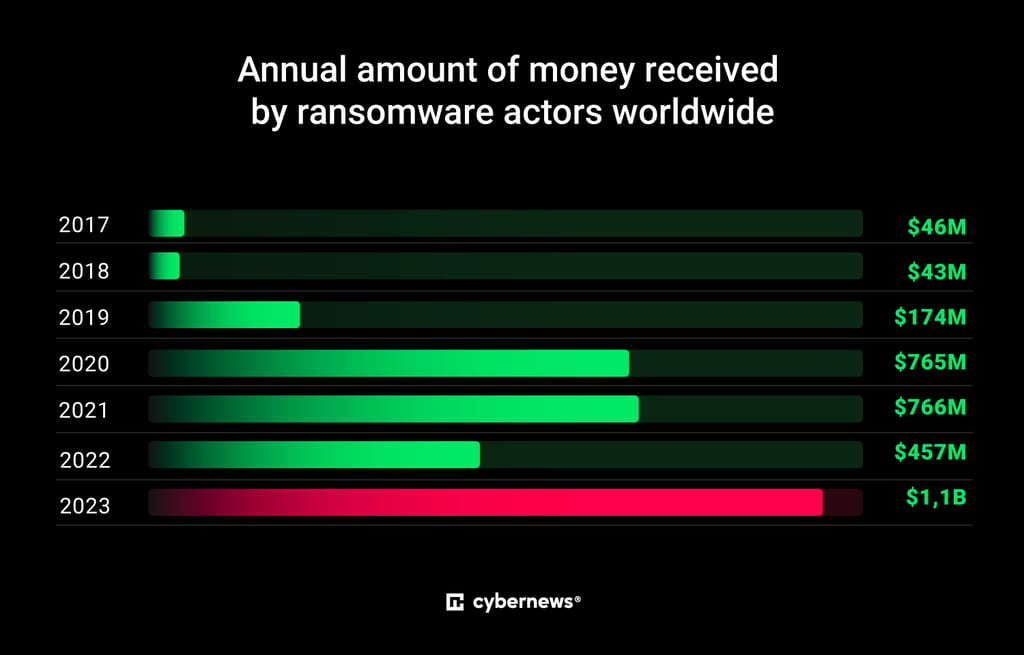
Source: Statista
For businesses, the impact of ransomware can be devastating. It often leads to significant financial losses, costly data recovery efforts, legal expenses, and regulatory fines. In the US, ransom payments by organizations saw a significant surge over the last 2 years, peaking at $850K in Q3 2023.

Source: Statista
Ransomware also often causes operational disruptions and prolonged downtimes, as businesses can be locked out of their systems or unable to access critical data. Furthermore, enterprises dealing with compromised sensitive customer data risk lawsuits and reputational damage, eroding customer trust, brand loyalty, and overall market presence.
Beyond financial and operational harm, scareware and other types of ransomware also rely on psychological manipulation, creating stress and anxiety that can take a toll on your overall well-being.
Identifying ransomware risks
Understanding the risks that make organizations and individuals vulnerable to ransomware is crucial for ransomware attack prevention. Cybercriminals exploit weaknesses such as outdated software, weak security measures, and human error to gain access to systems.
Here are the key vulnerabilities and areas you need to address to protect yourself from ransomware:
- Unpatched software. Outdated or unpatched software is a major entry point for ransomware on any OS or device. Statistics reveal that nearly half of ransomware cases stem from known software vulnerabilities. Cybercriminals frequently target Microsoft products, Fortinet VPNs, and file transfer systems with exposed weaknesses.
- Exposed remote services. Poorly secured Remote Desktop Protocol and VPN endpoints are common attack entry points, as they are susceptible to interception. If these services are accessible from the internet without strong authentication, they become easy targets for interception.
- Weak credentials and password reuse. Using weak or reusing passwords significantly increases the risk of credential-based attacks. Cybercriminals exploit compromised credentials found in data breaches to move within networks and deploy ransomware.
- Susceptibility to phishing and social engineering. Phishing emails can trick users into downloading malicious files or revealing login credentials. If unaware of these tactics, you may unknowingly grant cybercriminals access to sensitive systems or financial accounts.
How to combat ransomware
A well-structured ransomware response plan is crucial for minimizing damage and ensuring swift recovery. Whether you're an individual or part of a large enterprise, a quick and strategic response can help restore operations, isolate affected systems, and contain the attack to reduce negative impact.

Image generated by Midjourney AI
Vigilant monitoring and proactive security measures are key to preventing ransomware attacks. Regular risk assessments, system hardening, and employee training can significantly reduce vulnerabilities. By staying ahead of potential threats, you can minimize the risk of ransomware infiltrating your systems.
However, even with strong defenses, ransomware can still find its way in. This is why continuous monitoring is essential for early threat detection and risk mitigation. If ransomware is detected, immediately isolate affected systems to prevent its spread, especially in interconnected network environments.
To avoid paying a ransom in the event of an attack, maintaining regular backups of critical data is essential. Many overlook the importance of secure backups, which can leave them vulnerable to extortion. Storing backups on external drives or air-gapped cloud storage – ones that are disconnected from your network – helps prevent data loss. Additionally, regularly testing backup restoration ensures reliability in emergencies.
Ransomware defense tools and solutions
Strengthening ransomware prevention and mitigation often requires integrating third-party security measures into your infrastructure and devices. Firewalls and antivirus software are both critical components of a strong cybersecurity strategy. However, it’s important to note that they serve different purposes.
Regarding ransomware protection, a firewall provides network-level defense. It blocks unauthorized access, monitors and filters traffic, and prevents external threats from entering the system.
Meanwhile, an antivirus operates at the file and program level. If ransomware bypasses the firewall, the antivirus detects and neutralizes threats already present on the device. It scans for malicious software, removes infections, and helps prevent further system compromise.
When selecting an antivirus for anti-ransomware purposes, it’s best to look into providers that have real-time threat detection and removal capabilities, behavioral analysis tools, and automatic data backup and recovery options.
While some believe that either a firewall or an antivirus alone is sufficient, from my experience, a multi-layered approach is best. Combining and integrating both ensures robust protection, securing your system at both network and software levels.
What to do if you fall victim to ransomware
If you’ve fallen victim to a ransomware attack, swift action is critical. For large enterprises and businesses, working with a dedicated incident response team and IT department can help isolate affected devices from the network. If isolation isn’t possible, my suggestion is to immediately power down compromised devices.

Image generated by Midjourney AI
To prevent the further spread of ransomware, take shared drives offline and monitor for ongoing encryption. Document the ransom note with photos and record any anomalies for evidence. This will be useful when reporting the incident to law enforcement.
I strongly advise against paying the ransom, as it rarely guarantees data recovery. Instead, focus on restoring critical systems on a clean network, resetting affected accounts, and changing all passwords. Once the environment is secure, patch vulnerabilities, strengthen security protocols, and implement third-party security solutions like firewalls and antivirus software. If data recovery is possible, wipe infected devices and reinstall operating systems to fully eliminate ransomware.
After the immediate response, make sure to report the incident to local law enforcement. Thorough documentation of the attack, response measures, and timeline is essential. Additionally, notify software providers and cybersecurity agencies about vulnerabilities to help prevent similar attacks on others.
Conclusion
With malware constantly evolving and becoming more prevalent, ongoing vigilance is crucial in protecting against ransomware. Given its profitability, cybercriminals continuously refine their tactics, making proactive security measures essential. In addition to regular software updates and employee training, I highly recommend investing in advanced security tools like firewalls and antivirus software for an added layer of protection.
However, the most effective defense is continuous monitoring and awareness. Staying informed about emerging threats and adapting your cybersecurity practices accordingly can help mitigate ransomware risks. By fostering a security-first approach, you can safeguard your data and devices, reduce the risk of ransom demands and extortion, and minimize the impact of ransomware attacks.
