Best wireless CarPlay adapter in 2026: compare latency, pricing, compatibility, & more


You’re in your car, tired after a day at work, and you want to listen to some music on your way home. So, you take out the phone… and spend ages looking for the adapter, only to fail to plug it in on the first attempt. By the time you set everything up, you don’t even want to listen to music anymore. Now, imagine you had a wireless CarPlay adapter all along.
The demand for wireless CarPlay adapters has skyrocketed in the past few years. They allow drivers to go wireless with their CarPlay and declutter their cars. Instead of plugging in a cable for each drive, the adapter reconnects automatically, and you're good to go.
Naturally, I wanted to do my own research and find the top models. With the help of the Cybernews expert team, I analyzed and compared 24 wireless CarPlay dongles. I focused on their connectivity, compatibility, build quality, pricing, and unique use cases. After in-depth research, I identified the top six models, with Jemluse standing out as the winner. Check my full comparison below and discover the best wireless CarPlay adapter for you.
Best wireless CarPlay adapter – shortlist
- Symtype Wireless CarPlay Adapter – best for wide vehicle compatibility on a budget
- Acmount 2-in-1 Wireless CarPlay & Android Auto Adapter – best for dual-platform households
- Jemluse Wireless CarPlay Adapter for Apple iPhone (2024 upgraded) – best wireless CarPlay adapter overall
- Amzfeel Wireless CarPlay Adapter – the most compact wireless CarPlay adapter
- TERUNSOUI Wireless CarPlay Adapter – the lightest aluminum adapter for wireless CarPlay
- JDG Wireless CarPlay Adapter – best for preserving your phone battery
- Abune Mini Wireless CarPlay Adapter for iPhone – best when you use multiple cars
- MSXTTLY Wireless CarPlay Adapter – best for lasting use
The best wireless CarPlay adapters compared
Before jumping to individual reviews, take a look at how my top picks compare side by side. The table below highlights their pricing, connectivity, build quality, and other important factors.
| Model name | Connector type | Compatibility | Material | Weight | Best for | Multi-user support | Automatic connection | Audio latency | Price range | GPS passthrough |
| Symtype Wireless CarPlay Adapter | USB-A (+ USB-C adapter) | iOS 10+, iPhone 6+, cars 2015+ with wired CarPlay | Aluminum alloy + ABS plastic | 1.38oz | Wide vehicle compatibility on a budget | Yes | Yes | No | Affordable | Yes |
| Acmount 2-in-1 Wireless CarPlay & Android Auto Adapter | USB-A (+ USB-A & USB-C extension cables) | iPhone 6+ (iOS 10+), Android 11+, cars 2018+ with wired CarPlay/Android Auto | Zinc alloy + 6H glass | 1.44oz | Dual-platform households | Yes | Yes (3s auto-reconnect) | No | Medium | Yes |
| Jemluse CarPlay Adapter CTT168-1 | USB-A (+ USB-C adapter) | iOS 10+ and all cars that support wired CarPlay | Aluminum alloy housing with a plastic front | 2.88oz | Long drives with heavy CarPlay usage | Yes | Yes | No | Medium | Yes |
| Amzfeel CarPlay Mini Pro | USB-A (+ USB-C adapter and USB-A extension cable) | iOS 10+ and all cars that support wired CarPlay | Hard plastic with brushed cobalt finish | 2.08oz | Cars with difficult-to-access USB ports | Yes | Yes | No | Medium | Yes |
| TERUNSOUI Wireless CarPlay Adapter BY969N | USB-A (+ USB-C adapter) | iOS 10+ and all cars that support wired CarPlay | Aluminum alloy housing with plastic front | 0.64oz | Users looking for the most portable adapter | Yes | Yes | 0.01 | Medium | Yes |
| JDG Wireless CarPlay Adapter | USB-A (+ USB-C adapter) | iOS 10+ and all cars that support wired CarPlay | Hard plastic | 1.76oz | Preserving your phone battery | Yes | Yes | No | Affordable | Yes |
| Abune Mini Wireless CarPlay Adapter | USB-A | iOS 10+ and all cars that support wired CarPlay | Hard plastic with metal finish | 0.32oz | Fast reconnections | Yes | Yes | No | Affordable | Yes |
| MSXTTLY U2C-AIR Pro | USB-A (+ USB-A to USB-C adapter and USB-A extension cable) | iOS 11+ (not compatible with BMW or electric vehicles) | Hard plastic with metallic finish and copper alloy USB | 2.12oz | Users looking for lifetime technical support | Yes | Yes | No | Medium | Yes |
8 best wireless CarPlay adapters – our detailed list
Now, let's get a closer look at my top picks, evaluate their features, and see how they can help you switch to wireless CarPlay.
1. Symtype Wireless CarPlay Adapter – best for wide vehicle compatibility on a budget
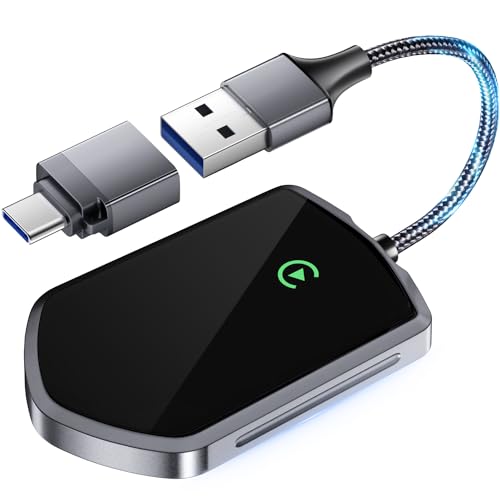
This Symtype wireless CarPlay adapter stands out for its broad compatibility and upgraded A7S chip that promises stable, zero-delay performance. With 5.8GHz Wi-Fi, Bluetooth 5.3, and an 8-core processor, this model targets those of you who want fast transmission speeds without paying way too much money for it.
Features and design
The Symtype wireless CarPlay adapter supports cars manufactured from 2015 onward that already have factory-wired CarPlay, and the device works really well with an iPhone 6+ running iOS 10 or later. The adapter connects via USB-A and includes a USB-A to USB-C adapter in the box, for better flexibility regardless of your vehicle’s port type.
The device uses 5.8GHz Wi-Fi and Bluetooth 5.3 to establish the connection, while the built-in A7S chip with an 8-core processor increases transmission rates by 40% and claims up to 10x faster speeds when using navigation, media, and messaging apps.
Also, the housing combines aluminum alloy and ABS plastic, and that combination gives the adapter a balance between durability and lightweight design. The device weighs only 1.38 ounces, so it won’t put pressure on your USB port or feel bulky inside the cabin.
Why I recommend it
I recommend this model if your main priority is compatibility and stable wireless performance across a wide range of vehicles. The adapter supports over 1000 vehicle models from 2015 onward, which makes it one of the more flexible options for drivers with older factory CarPlay systems.
The A7S chip, dual wireless technologies, and auto-reconnection feature make this adapter practical for everyday use, especially if you rely heavily on navigation, music streaming, Siri commands, and messaging. The device also preserves original car controls such as touchscreen input, voice commands, physical buttons, and knobs, so you don’t lose any native functionality after going wireless.
The included USB-C adapter also adds convenience, especially if you switch between vehicles with different port types.
User reviews
User feedback currently reflects a mixed experience, with the adapter holding a 3.3 out of 5-star rating based on 28 reviews. Some users praise the quick pairing process, stable connection, and lightweight design, especially considering the price range.
Other users mention inconsistent performance and occasional connection issues, which suggests that the experience may depend on the specific car model and infotainment system. The relatively small number of reviews also means long-term durability still lacks broader validation.
2. Acmount 2-in-1 Wireless CarPlay & Android Auto Adapter – best for dual-platform households
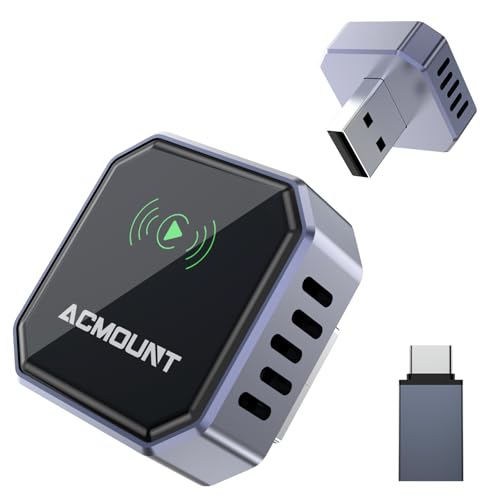
The Acmount 2-in-1 adapter is one of the products that ended up in this list because it converts both wired CarPlay and wired Android Auto into a fully wireless setup. This setup will help save you from constantly swapping cables between different phones. With dual-band Wi-Fi, Bluetooth 5.3, and a compact flush-fit design, this model targets drivers who switch between iPhone and Android and want one device that handles both.
Features and design
The Acmount wireless adapter works with iPhone 6+ and Android devices running Android 11+, as long as your vehicle already comes with factory-wired CarPlay or Android Auto. The manufacturer states that this device can support more than 1,000 vehicle models from 2018 or newer, although most vehicles from 2016 onward may also work if they include factory-wired support.
The adapter uses 2.4GHz and 5GHz dual-band chips combined with Bluetooth 5.3, and that setup allows the device to connect up to 30% faster than many standard adapters you can find. The first pairing takes around eight seconds, and after that, the adapter reconnects automatically in under three seconds when you start the car.
This device features an A7-class chip with SOC technology, and that hardware supports smooth multitasking while you run navigation, stream music, and take calls at the same time. The Acmount 2-in-1 adapter also includes built-in ESD protection, surge protection, and voltage protection, which shield the device from static electricity and power fluctuations during engine startup.
From a design standpoint, the housing combines aerospace-grade zinc alloy with high-strength 6H glass, and that combination gives the adapter a premium texture and solid durability. The tapered body sits flush inside the USB port and remains nearly invisible once it’s installed.
The adapter preserves full OEM-level functionality, including Apple Maps, Google Maps, Spotify, Siri, and Android Voice Assistant. The system also retains factory controls such as touchscreen input, steering wheel buttons, rotary knobs, and voice commands, so you don’t lose any native interaction after switching to wireless.
Why I recommend it
I recommend this model if your household uses both iPhone and Android devices and you want only one adapter that will cover both platforms. The 2-in-1 functionality removes the need to buy separate dongles or constantly switch hardware depending on who drives.
The under-3-second auto-reconnection also makes daily driving easier, especially if you make frequent short trips and simply don’t want to wait for the system to load. The compact flush design also adds another practical advantage, since the adapter will stay discreet inside the port and won’t interfere with your dashboard layout.
The added electrical protections and extended 24-month warranty provide an extra layer of reassurance, particularly if you drive in extreme temperatures or rely heavily on wireless connectivity daily.
User reviews
Many online feedback currently show a 3.8 out of 5-star rating based on less than 100 reviews, which indicates generally decent but, to be fair, not flawless performance. On the other hand, some users report that the adapter works really well, connects quickly after the initial pairing, and makes day-to-day use easy.
Other users report random disconnections and mixed compatibility results, particularly when using Android Auto. Truth to be told, those mixed reports can suggest that performance may depend on the specific vehicle model and infotainment system configuration.
3. Jemluse Wireless CarPlay Adapter – best wireless CarPlay adapter overall
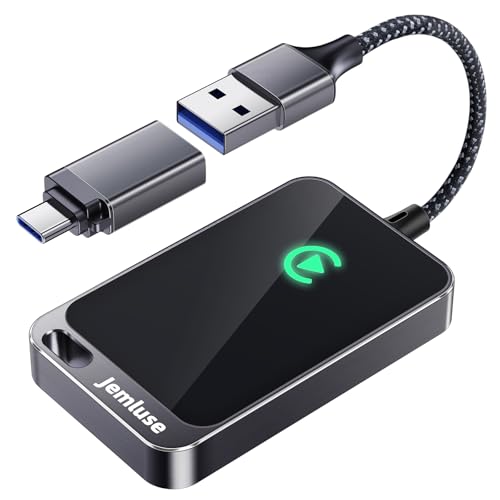
Jamluse is a true workhorse among wireless CarPlay adapters. It's my #1 pick for its seamless and stable performance paired with a durable and user-friendly design.
Design and features
With its fast auto connection, plug-and-play functionality, and full Siri, navigation, and media support, Jemluse is a well-balanced pick for intense and multi-functional use. Another plus is flexible controls that include touch and voice.
Its aluminum housing makes it much more durable than plastic adapters, and it can work in temperatures between -20°C and 70°C. It works with phones running iOS 10+ and supports all car models equipped with wired CarPlay.
Why I recommend it
It's ideal for long drives if you plan on using your CarPlay most of the way. You can set it up in under a minute and relax knowing you won't get any disconnects or lag. Quick and seamless pairing also makes it good for shorter stop-and-go city drives.
User reviews
Most users praise the device, noting its easy setup process, fast connection, and decent battery life. Some drivers, however, point out that the adapter may struggle when switching users or attempting to use several apps at the same time.
4. Amzfeel Wireless CarPlay Adapter – the most compact CarPlay adapter
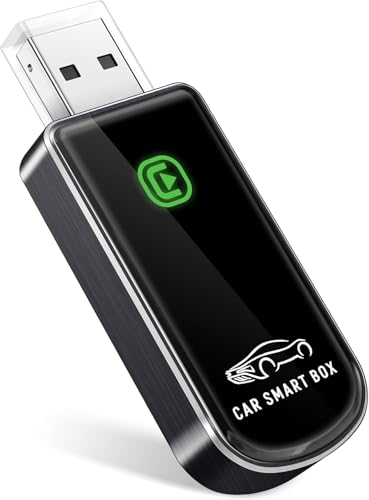
Compact, light and multi-functional, Amzfeel Mini Pro stands out both for its design and ease of use, as well as almost universal compatibility, covering over 800 car models and essential apps. It’s a reliable, well-rounded model, suitable for most car owners.
Features and design
Amzfeel is easy to set up and provides stable connectivity, as long as your Wi-Fi is up and running. It also comes with two extension cords, which makes the whole setup even more convenient.
Another plus is the plug-and-play functionality, along with auto reconnection after the initial pairing – even if your iPhone stays in your pocket.
Amzfeel wireless adapter is made of hard plastic with a metal finish. The overall design and build quality guarantee optimal performance, even in rough conditions. Similar to my top pick, this model supports all phones running iOS 10+ and cars with wired CarPlay.
Why I recommend it
Amzfeel Mini Pro is the most compact wireless CarPlay adapter, ideal for cars with hard-to-reach USB ports. It’s also a great pick if you prioritize design, and want your adapter to blend in seamlessly.
User reviews
The adapter gets plenty of praise from users online, with most drivers complimenting the ease of setup, smooth connection and little to no lags. On the other side, some customers also point out the adapter’s short lifespan – in certain cases, claiming it only lasted a few months. They also strongly recommend against leaving the adapter plugged in as it may critically hurt the performance and the battery.
5. TERUNSOUI Wireless CarPlay Adapter – the lightest and most portable metal CarPlay adapter
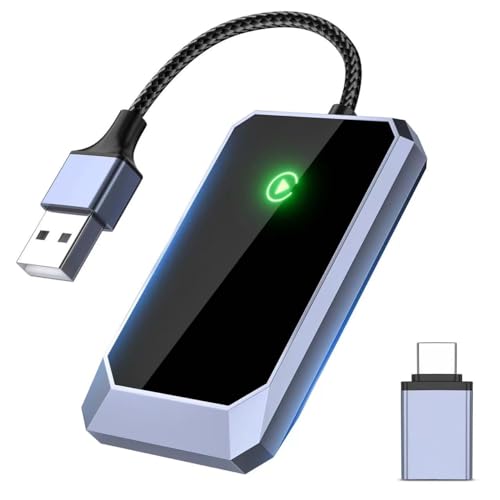
Light and easy to navigate, TERANSOUI is a decent pick for non-demanding use. While it doesn’t support all car models and won’t be suitable for older iPhones, casual drivers might find it just enough.
Features and design
TERANSOUI is the lightest aluminum wireless CarPlay adapter out there. You won't even feel it in your pocket. Unlike Amzfeel, though, it doesn't come with extension cords, and the built-in cable is quite short. So, I don't recommend it for cars with difficult-to-reach USB ports.
The setup is simple, and you'll enjoy your favorite CarPlay features with minimal lag and no disconnects. Due to its small size, TERANSOUI is not ideal for extremely long drives since it can get hot with overuse. If you're going on a longer trip, I recommend getting Jemluse.
That said, it still has its own fair share of benefits, including the auto reconnection feature, easy plug-and-play setup, impressive 0.01s latency, and compatibility with over 800 car models.
TERANSOUI is made of high-quality aluminum alloy with a hard-plastic front. It supports all phones running iOS 10+ and all cars with wired CarPlay (800+ models).
Why I recommend it
Not everyone needs a full-blown smart assistant as their adapter. If you’re not planning for long trips and keep your adapter usage limited to simple, less demanding tasks, TERANSOUI might be it – a balanced and affordable pick.
User reviews
Most users praise the device for its convenient, quick setup, ease of use, and reliable performance. While some drivers noticed a small audio delay and occasional connection issues, they also pointed out that it didn’t critically affect their experience and overall performance.
6. JDG Wireless CarPlay Adapter – best for preserving your phone battery
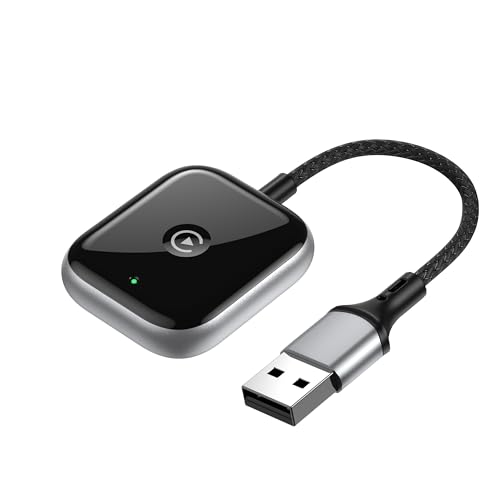
Although a bit limited compared to certain competitors, JDG is still a reliable budget-friendly option that covers most of CarPlay essentials – plug-and-play setup, smooth connection guaranteed by an integrated 5.8 GHz chip, and compatibility with most car brands.
Features and design
JDG wireless CarPlay adapter has the fastest connection times. It'll usually pair with your car in under 15 seconds. It's also ideal if streaming music through Apple Music or Spotify is one of your top priorities.
JDG is a Bluetooth-only adapter, which comes with a few trade-offs. It's trivially easy to set up, and more energy-efficient than its Wi-Fi counterparts. So, it'll make your phone battery last longer. On the other hand, you won't be able to run multiple apps simultaneously due to limited bandwidth.
JDG is made of hard plastic, so it's not as robust as my previous picks. However, the overall finish feels top-quality, according to numerous user reviews. It supports all iPhones with iOS 10+ and car models with wired CarPlay.
Why I recommend it
Despite certain limitations, JDG is still a solid pick for less demanding car setups and users on a budget who look for a price-to-quality balance and prioritize their devices’ battery life.
User reviews
Most users agree that the adapter’s performance is fair for its price, praising the ease of setup and reliable, even though not always stellar, performance. The biggest complaint was the lack of multi-functionality – with one driver noting he had to disconnect the adapter-phone pairing to simply answer calls.
7. Abune Mini Wireless CarPlay Adapter for iPhone – best for quick reconnections
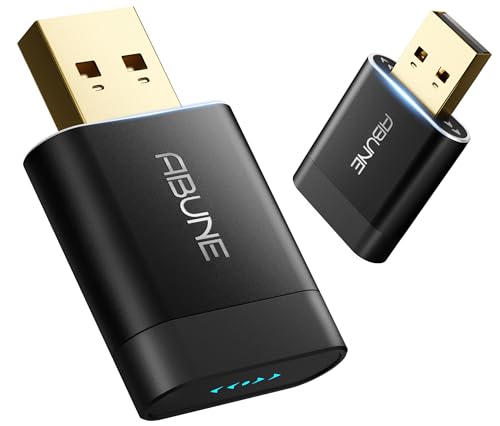
Abune Mini Wireless is a compact adapter with stylish design, impressive 5-second reconnection, and great app compatibility – supporting all available CarPlay apps, according to the manufacturer itself. It’s also suitable for multifunctional use, letting you answer the calls, listen to music, and use the GPS all at the same time.
Features and design
Abune Mini Wireless CarPlay adapter reconnects in just five seconds. It also supports both CarPlay and Android Auto, so if you have multiple cars with different systems, this is the dongle for you.
It's very compact and lightweight, which makes it easy to carry around but also misplace if you're not careful. According to customer and expert testimonials, it provides smooth connectivity with minimal lag and no disconnects.
Abune’s adapter is made of hard plastic with a metal finish, which explains its weight of only 0.32oz. It supports all phones with iOS 10+ and all car models with a wired CarPlay setup.
Why I recommend it
While Abune displays decent performance, my favorite thing about it is how easily it fits into your lifestyle, compatible with most apps, cars and iPhone models and iOS versions. It’s also a great pick for busy users who are often on the move and need a personal assistant-like solution.
User reviews
Most reviewers praise the device, noting ease of setup and use, smooth performance and flexibility, especially impressive for its moderate price. That said, some reviewers have noted a small – although not critical – connection delay, and a few even claimed they had disconnection issues.
8. MSXTTLY Wireless CarPlay Adapter – best for lifetime technical support
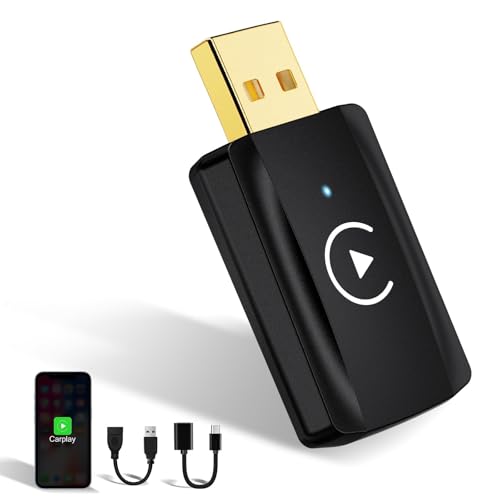
This model stands out for its reliability and resilience, with stable connections ensured by its 5G chip, dual-band Wi-Fi, and BT5.2 technology. With plug-and-play setup, auto reconnection, and impressive customer support, it's a practical solution for drivers who value performance and stability.
Features and design
The copper alloy USB guarantees high resistance to corrosion. The housing features a metal finish over hard plastic, which is a middle-of-the-road solution for durability.
This model is easy to set up and comes with a USB-C adapter and an extension cable. It provides fast connectivity with stable and smooth performance. It doesn't have the broad compatibility of my previous picks, though – you can't pair it with BMW models of any electric vehicle. Its iOS support also starts at version 11 instead of 10.
Why I recommend it
I really liked that MSXTTLY U2C-AIR Pro comes with lifetime technical support, which is a part of the company's commitment to user satisfaction. If you experience an issue even years after buying the dongle, you can still contact the support team and fix it.
User reviews
Most users praise the adapter, noting the easy, beginner-friendly setup process and reliable performance. Some drivers, however, also point out occasional lags and connection issues, with the severity of the issue ranging from review to review.
Other top wireless Apple CarPlay adapters worth considering
Above, I listed some of the top-ranking wireless Apple CarPlay adapters worth considering, however there are even more options on the market. Here are a few more reliable picks and what makes them stand out:
- Ottocast Ottoadapter MX: While a bit more expensive than other options, Ottoadapter MX stands out due to its easy setup process, plug-and-play functionality, and fast 14-second connection speeds. It also boasts high compatibility, which covers 99% of cars, according to the manufacturer itself.
- Motorola MA1: This is the only Google-licensed wireless car adapter for Android Auto, making Motorola MA1 one of the most reliable options for avid Android users. However, this is also the adapter’s biggest flaw, as it will not be compatible with CarPlay vehicles.
- AutoSky Pro: A more budget-friendly option, AutoSky Pro offers easy setup process, fast connection, and compatibility with over 600 vehicle models – perfect for users who prioritize price-to-quality balance. Sleek, compact design comes as a nice bonus, with a carbon fiber coat to protect the device from scratches.
- Teeran 2025 Pro: This option is perfect for long drives and intense use thanks to its heat dissipation technology that reduces temperature by 35% compared to other models. Teeran is also half smaller than most wireless adapters, making it great for a seamless fit into the car.
- Magic Box 3.0: Not only does this model support both CarPlay and Android Auto, it also extends the usual wireless adapter app pool by supporting Netflix, YouTube, Hulu and more. And when not driving, you can even plug it into your home TV, making it an all-in-one option.
How did we select the best wireless CarPlay adapters?
During my research for this guide, I focused on seven main factors:
- Compatibility (15%). I looked for adapters that support as many vehicles and infotainment systems as possible.
- Ease of setup (15%). Plug-and-play was a must for me. I wanted devices you can set up easily without any tech skills.
- Connection stability (20%). Latency, lag, and disconnects are major red flags when you're trying to go wireless.
- Performance (20%). I wanted to find out how each model handles the usual day-to-day tasks like audio playback, navigation, voice commands, and calls.
- Price vs. value (15%). Features and performance had to justify the price tag.
- Startup time (10%). I paid attention to how quickly each adapter connects to CarPlay. The less waiting it takes, the better.
- Dual-band support (5%). I checked if the devices supported both 2.4GHz and 5GHz Wi-Fi bands. This is crucial for smoother, faster and lag-free performance, especially in areas with wireless interference.
My final rankings are based on in-depth research and insights from reputable sources. I primarily focused on real user experiences and expert opinions. After analyzing 24 dongles, I found the top five wireless CarPlay adapters that deliver the best performance, reliability, and value.
What is a wireless Apple CarPlay adapter?
A wireless Apple CarPlay adapter is a simple USB device that switches your CarPlay system to a wireless connection. It lets you ditch the cable and connect your iPhone over Wi-Fi and Bluetooth. Wireless adapters can't add CarPlay to your vehicle, though; they can only help you go wireless.
After the initial pairing, your phone will connect to CarPlay whenever you start the car. Most adapters work seamlessly with default infotainment systems and provide access to Apple Maps, Siri, music, messages, and other content. I recommend checking the compatibility between your infotainment and the model you're looking to buy.
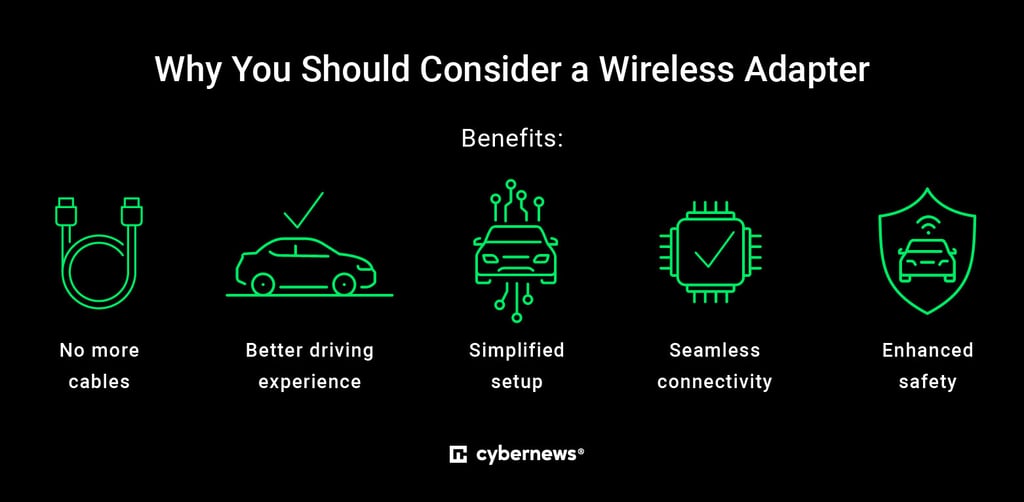
Going wireless will save you time, reduce the clutter in your car, and make every drive more convenient. This especially goes for shorter trips where you can just start your car and go instead of worrying about cables.
How does the Apple CarPlay adapter work?
A wireless CarPlay adapter connects your iPhone and infotainment system without a cable. It starts the connection via Bluetooth and then switches to Wi-Fi for better speed. It uses the same USB port you use for wired CarPlay.
This setup lets you enjoy CarPlay features without plugging in your phone. However, latency is always a concern with wireless connections, so I recommend sticking with reputable manufacturers. The best adapters have little to no delay when tapping icons, streaming music, or following GPS directions. That said, the overall performance also depends on the system in your vehicle.
Some high-end models also support OTA (Over-the-Air) firmware updates, which improve stability and performance. They also catch more bugs and future-proof your CarPlay.
Apple CarPlay vs. Android Auto: what's the difference?
Apple CarPlay and Android Auto are similar services, but there are some important differences:
- User interface: CarPlay has a simpler interface, similar to your iPhone's homescreen. Android Auto offers better customizability and more flexible widgets ever since the Coolwalk update.
- App support: You'll get all the popular apps with both platforms. That said, Android Auto offers a tighter integration with Google apps, and CarPlay is optimized for Apple-native services.
- Voice assistants: CarPlay uses Siri while Android Auto runs Google Assistant. In my experience, the latter is generally better at handling search queries.
- Compatibility: The cutoff point for CarPlay starts at iPhone 5 running iOS 7.1. The service currently supports 800+ car models. Android Auto needs Android 6.0 at the minimum, and it supports around 500 different vehicles.
- Battery consumption: Android Auto may put a heavier load on your phone’s battery, with many users reporting quick battery drain and heat buildup, especially during active use. Meanwhile, CarPlay is generally considered more power-efficient and less prone to overhearing – although not immune to it.
- Audio quality: While both platforms offer great sound quality, especially compared to Bluetooth, CarPlay is known for more balanced and consistent out-of-the-box audio levels. Android Auto, on the other side, may require adjusting volume settings.
- Flexibility: Android Auto stands out for its flexibility, with a broader range of smartphones, vehicle brands, and third-party apps supported. Meanwhile, CarPlay is more limited in terms of integration and compatibility, with fewer customization options as well.
Best CarPlay apps: which apps have Apple CarPlay functionality?
Apple CarPlay supports a number of popular apps across various niches. For navigation, I recommend Apple Maps, Google Maps, and Waze. They all have real-time traffic updates and voice navigation. Some other options include 2GIS, KakaoNavi, NAVER Map, NAVITIME, T Map, and TomTom. EV owners will be happy to see PlugShare, ChargePoint, and EnBW.
In the music & radio category, you'll find Apple Music, Spotify, YouTube Music, Amazon Music, Tidal, VOX, Pandora, SiriusXM Radio, and LiveXLive. If you enjoy podcasts, you'll love Apple Podcasts, Overcast, Stitcher, NPR One, and Downcast. Finally, CarPlay also supports Audible and Audiobooks.com.
You can also send and receive messages via WhatsApp and iMessage through Siri voice commands. Naturally, Apple CarPlay supports Siri, their built-in voice assistant.
Some other useful apps include Dunkin', Panera Bread, and Domino's in the food & drink category, Chevron, which lets you pay for fuel, and SpotHero, which finds parking, no matter where you go.
What to look for in the Apple CarPlay adapter?
The quality of your wireless CarPlay experience depends on your chosen adapter. Here are some essentials to consider before making any purchases:
- Vehicle compatibility. Make sure your adapter is compatible with your car.
- Connection type. Bluetooth-only and Bluetooth + Wi-Fi adapters both have their benefits and disadvantages. Keep that in mind while looking for the best model for you.
- Latency and performance. Low latency is a must if you want to avoid choppy performance.
- Ease of setup. Choose a plug-and-play device you can install with minimal effort.
- Firmware updates. OTA updates bring regular improvements to ensure smooth performance.
- Price and brand reputation. Compare different models and read their customer reviews to find the best value for your money.
- Audio quality. Look for adapters with high-quality digital audio without compression, lag or volume distortion, which is especially common among cheaper brands and models not optimized for CarPlay.
These factors can make or break your wireless CarPlay experience. Fast connectivity and low latency guarantee smooth performance, easy setup saves you time and effort, and OTA improvements keep your adapter up-to-date with the latest features.
Othe reviews from Cybernews:
Final word on best wireless CarPlay adapters
After extensive research, I concluded that Jemluse is the best wireless CarPlay adapter overall, ideal for long journeys and heavy CarPlay usage. If the USB port in your car is difficult to reach, Amzfeel CarPlay Mini Pro is the best choice for you, thanks to its generous extension cables. If you're looking for something light you can carry in your pocket and forget about it, I recommend the TERUNSOUI Wireless CarPlay Adapter.
To select the best CarPlay adapter for your goals, consider factors like audio quality, connection speed, plug-and-play functionality, third-party integrations and the overall value for money. Look for the option that fits your car and phone best, offering consistent performance for everyday use.
FAQ
Can I use a wireless CarPlay adapter in any car?
No, Apple CarPlay supports around 800 different models at the moment. Your vehicle has to support wired Apple CarPlay for the adapter to work. Wireless adapters only make your existing wired setup wireless, they don't add CarPlay functionality to cars.
Does a wireless CarPlay adapter affect audio or call quality?
No, if you're using a good wireless CarPlay adapter from a reputable brand. Cheaper or poorly made adapters may experience dropouts or lag, especially during calls.
Do wireless CarPlay adapters drain the phone battery faster?
Yes. Wireless CarPlay adapters can drain your phone battery faster. Unlike wired, wireless connection won't charge your phone, and wireless CarPlay relies on both Wi-Fi and Bluetooth to stay connected, which use more energy.
Is there any lag when using a wireless CarPlay adapter?
Potential lag depends on the quality of your adapter and the car's infotainment system. Top-tier models will cause minimal and barely noticeable lag. Your touchscreen and voice commands might have only a split-second delay compared to a wired connection.
Can I use a wireless CarPlay adapter with an Android phone?
No, wireless CarPlay adapters are intended specifically for iPhones and are not compatible with Android devices. For an Android phone, you'll need a wireless Android Auto adapter, such as Motorola MA1 that supports Android Auto exclusively, or PlayAIBox that supports both.
Are wireless CarPlay adapters worth the price?
Yes, if your car supports wired CarPlay, a wireless adapter is a great option for users who spend a lot of their time on the road and are looking for a smoother, more automated experience. They will save you the effort of plugging in and setting up your device every time, making the drive cord-free and more convenient.
Is it difficult to install a wireless CarPlay adapter?
No, most wireless CarPlay adapters like Jemluse are plug-and-play. This means you just need to connect the adapter to your car’s USB port and pair it up with your iPhone to start using. No additional or technical knowledge is required.
Do wireless CarPlay adapters support streaming apps?
Yes, CarPlay adapters usually support Apple-compatible apps, including streaming services like Apple Music, Spotify, and more. However, if the app is designed specifically for Android Auto you won’t be able to use it with your CarPlay regardless of the adapter.