Best Gmail alternatives for Canadians in 2026
Being behind major reports like The Mother of All Breaches and RockYou2024, our in-house cybersecurity experts and journalists provide unbiased, real-world testing and in-depth analysis.
We maintain complete transparency by openly sharing our testing methodologies with our audience.
Learn more
Most services you can sign up to offer Continue with Google as an option. Google has embedded itself deeply into our daily internet lives. It’s your email, your calendar, your cloud storage, and half the time, your login for everything else. Plus, it works on every device you own.
But convenience and privacy don’t always go hand in hand, and a growing number of Canadians are becoming more concerned. Gmail is also part of Google’s broader ecosystem of services and advertising, where information about your activity can help personalize the ads you see.
The good news is that other options have caught up. I tested five of the best Gmail alternatives for Canadians with the Cybernews research team, looking at privacy and encryption, ease of use, features, pricing, support, and more.
Top 5 Gmail alternatives for Canadians – shortlist
- Proton Mail – best overall Gmail alternative for Canadians
- Tuta – best alternative to Gmail for encrypted subject lines
- StartMail – best Gmail alternative for unlimited aliases
- Zoho Mail – budget-friendly Gmail alternative for Canadian small businesses
- Fastmail – fastest, most polished Gmail alternative
Why Canadians are looking for Gmail alternatives
Big tech data collection is one reason people are looking for secure email providers in Canada. Though Google stopped scanning the content of your emails to target ads back in 2017, your Gmail remains connected with the rest of the company’s ecosystem.
Depending on your account settings, your searches, YouTube activity, and location data can all contribute to a more personalized advertising experience. That’s why privacy-focused providers now feel like the next destination. Services built around encryption and minimal data collection now offer modern interfaces and useful features that don’t feel like a step backward, whether you plan to use them for work, school, or your everyday life.
Google is also US-based, so its data is subject to laws like the US Cloud Act, which allows law enforcement to request data regardless of where the server is physically located. For privacy-conscious Canadians, this raises questions about which laws govern their data and how authorities can access it.
Best Gmail alternatives for Canadians
The best Gmail alternatives for Canadians depend on what matters to you. Some people prioritize privacy and end-to-end encryption, while others just want an inbox that doesn’t serve them personalized ads. Some want aliases to keep their primary address off marketing lists, while others need business features to manage work emails.
I’ve picked five providers that cover these angles.
1. Proton Mail – best Gmail alternative for Canadians overall

| Starting price: | Mail Plus from $1.99/month (annually) |
| Top features: | End-to-end and zero-access encryption, Swiss jurisdiction, hide-my-email aliases, Easy Switch import, tracker blocking |
| Best for: | Canadians who want serious privacy without giving up a clean inbox UI |
| Current deal: | Black Friday! Get up to 60% OFF Proton Mail |
Proton Mail is my number one Gmail alternative for Canadians, and it's because it gets the hard part right. Messages between Proton users are end-to-end encrypted, while emails stored on Proton’s servers benefit from zero-access encryption, which means even Proton itself can’t read your inbox. It also operates under Swiss jurisdiction, with open-source code that independent experts can inspect and audit.
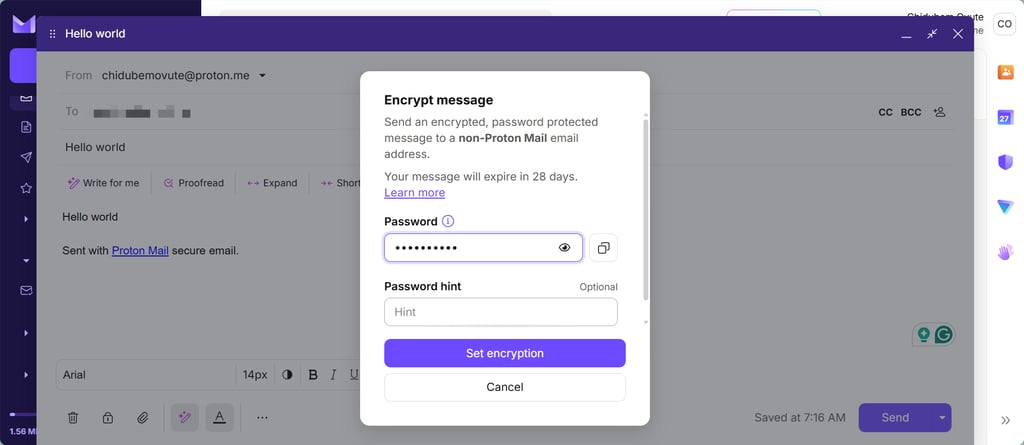
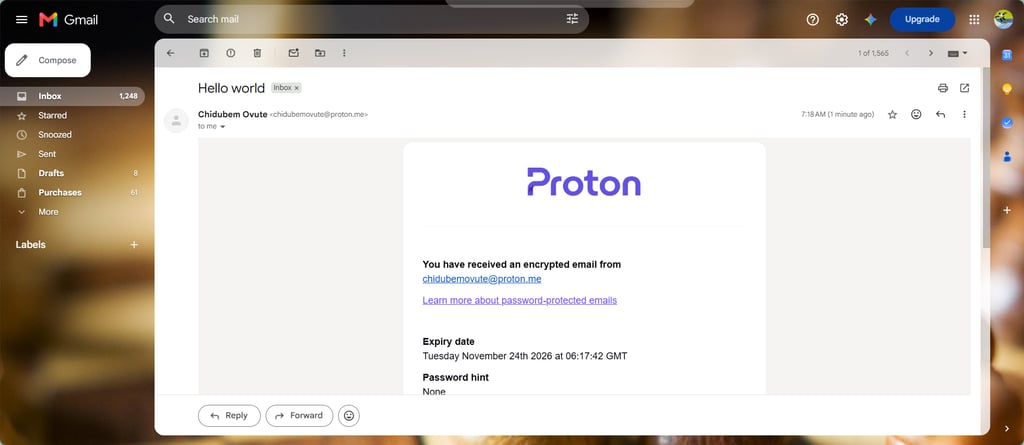
The service even lets you send encrypted messages to people who don’t use Proton. When you compose a message, you can use the lock icon to protect it with a password, which you share with the recipient through a trusted channel. The recipient gets an email with a link, enters the password, and reads the message through a secure portal. You can set an expiration date too, right down to a single hour.
The layout is intuitive, folders and labels work as expected, and clicking a link triggers a confirmation showing the full URL before it loads. Proton also blocks tracking pixels by proxying images through its own servers, so senders never learn your IP address when you open an email. I haven’t seen another service pull that off as cleanly.
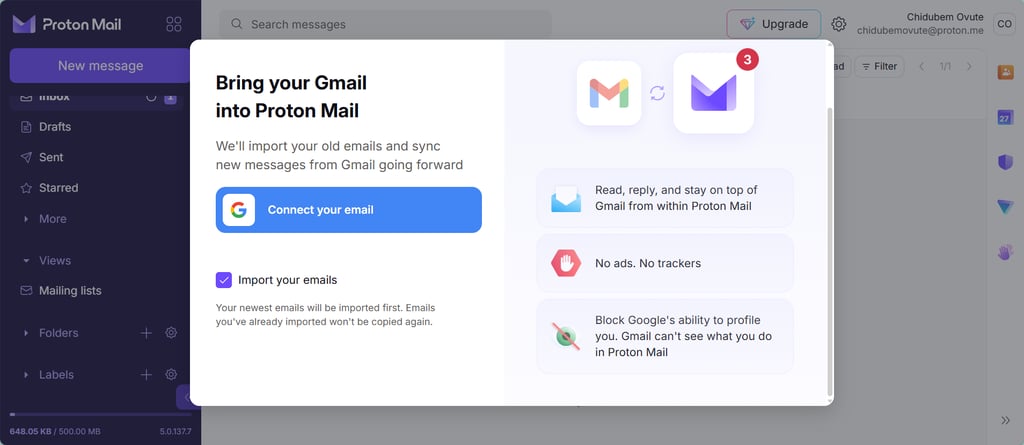
I expected switching to be the painful part, but it turned out to be surprisingly easy. Easy Switch imported my emails, contacts, and even my calendar from Gmail, and let me set up auto-forwarding. I could also send and receive emails from my old address within Proton, without going back to Google. Proton even supports OpenPGP, allowing encrypted communication with compatible external email providers.
Proton Mail is also part of a broad ecosystem, which makes the whole switch even easier. A single account gives you access to Calendar, Drive, Pass, and VPN, so you won’t need to find four separate replacements for Google. Proton has also expanded into workspace tools recently, including Docs, Sheets, and Meet for teams.
Though usable, the free plan is tight, as you only get 1GB of storage (500MB even before completing the onboarding checklist) and 150 messages a day. If you sign up for Mail Plus, it jumps to 15GB, and the daily cap is removed. Plus, you get 10 email addresses, a custom domain, and unlimited folders and labels.
2. Tuta – good Gmail alternative for encrypted subject lines

| Starting price: | Revolutionary from $3/month(annually) |
| Top features: | End-to-end encryption on subject lines, encrypted calendar and contacts, open source, German jurisdiction |
| Best for: | Canadians who prioritize encryption |
| Current deal: | Black Friday! Get up to 20% OFF Tutanota! |
Tuta is a good Gmail alternative for Canadians who care about encrypted subject lines. It’s built by a privacy-focused team in Germany. Everything runs on open-source code, and all data is encrypted at rest on German servers. Fun fact: not even Tuta can decrypt your mailbox.
Tuta doesn’t use PGP, so it can encrypt subject lines along with message bodies and attachments. I also liked how well the search functions on encrypted message bodies, plus the fact that contacts and calendar are encrypted too.
Tuta email also features the basics like password encryption, while stripping IP addresses from outgoing emails. You even have two-factor authentication and key verification.
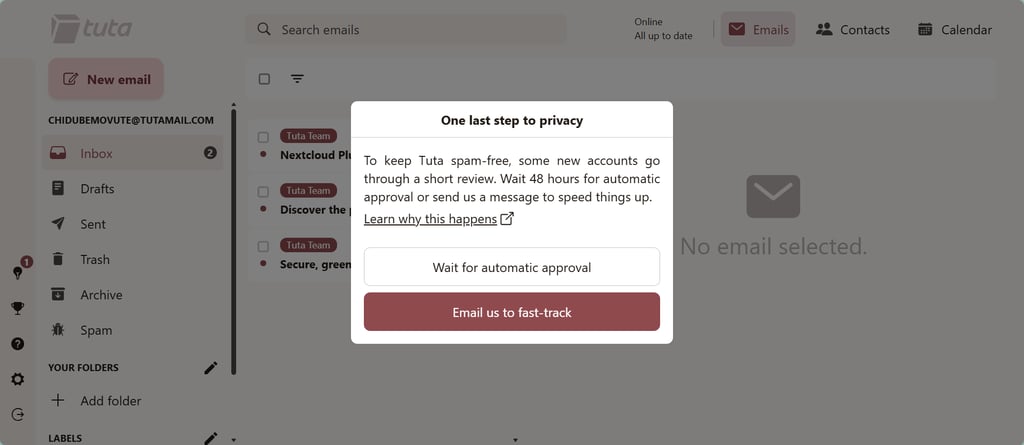
However, Tuta can be a real pain for new sign-ups. I had to wait over 48 hours for a manual check before I could do anything, even send an email or create an alias. Tuta is also working to expand its ecosystem, with Tuta Calendar now available and Tuta Drive in closed beta. Still, it’s not a match for Proton at this time.
3. Startmail – best Gmail alternative for simple, alias-based privacy
| Starting price: | $2.50/month |
| Top features: | Unlimited aliases including one-click burner aliases, PGP end-to-end encryption, password-protected emails, Dutch jurisdiction |
| Best for: | Canadians who want strong privacy and alias management without a wider ecosystem |
| Current deal: | Black Friday! Get StartMail, now 50% OFF! |
Startmail makes my list because it’s perfect for Canadians who care about privacy but don’t want to buy into a whole suite of apps to get it. There’s no calendar here, no cloud drive, or even a password manager or workspace tools, just a focused and encrypted email service for you.
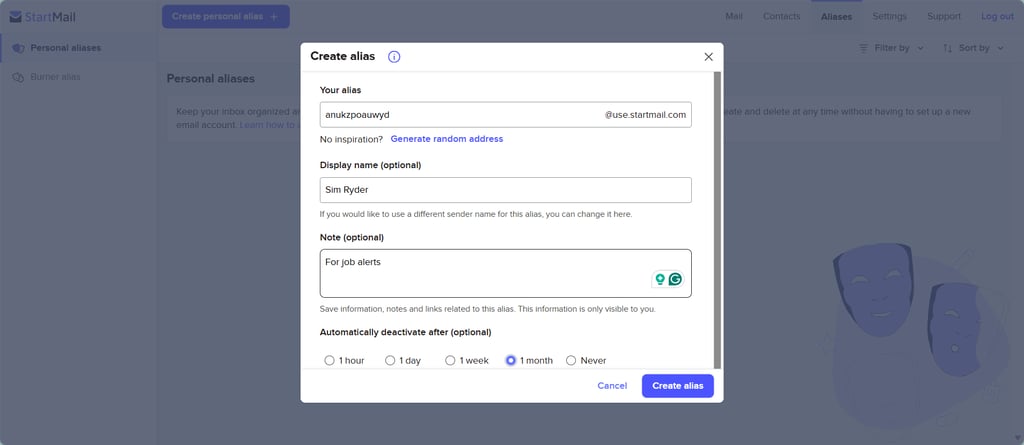
The aliases make Startmail stand out for me. I was able to create as many custom aliases as I wanted and didn’t even have to worry about the names since there was a name generator available. I also liked that you can just delete any aliases as soon as they start attracting spam. There’s even a one-click burner alias that self-destructs after an hour, and you can use it on stubborn sites like those that demand emails before white paper downloads.
For your actual privacy, PGP end-to-end encryption covers everything between Startmail users, including subject lines and attachments. There’s also the password-protected mail feature for recipients who don’t use encryption. The messages can stay available for up to 28 days.
Startmail is based in the Netherlands, sits on self-hosted servers in an ISO 27001-certified data center, and is fully GDPR-compliant. It blocks tracking pixels by default and hides the IP address in your outgoing headers. You don’t have to worry about ads, tracking, or data selling. If anonymity at signup also really matters to you, there’s an option to pay annually with Bitcoin, though you have to contact support for that.
Unfortunately, you don’t get a free tier, which might be a deal-breaker for an everyday user. Plus, you need to look elsewhere if you want a calendar or file storage bundled in.
4. Zoho Mail – Gmail alternative for Canadian freelancers and small businesses
| Starting price: | Mail Lite $1.00/month |
| Top features: | Custom domain email, 30GB storage on Workplace Standard, built-in SPF/DKIM/DMARC, Zia AI assistant, spam and phishing filtering |
| Best for: | Freelancers, entrepreneurs, and small teams who want business email and tools without Google |
| Current deal: | Black Friday! Get Zoho Mail for just $1/month! |
If you need a working business inbox alongside privacy, Zoho Mail is one of the top services. Custom domain support includes a professional address on your own domain, with SPF, DKIM, DMARC, and BIMI configured out of the box. This means you don’t have to figure out email authentication yourself and risk routing invoices to spam without knowing.
Moving over is smooth, too, because Zoho’s automated migration pulls in emails, contacts, and calendars from Google Workspace, Microsoft 365, or any IMAP provider. Their migration specialists even help at no extra charge. The service also lets you choose where your data will be stored, with almost a dozen data centers worldwide.
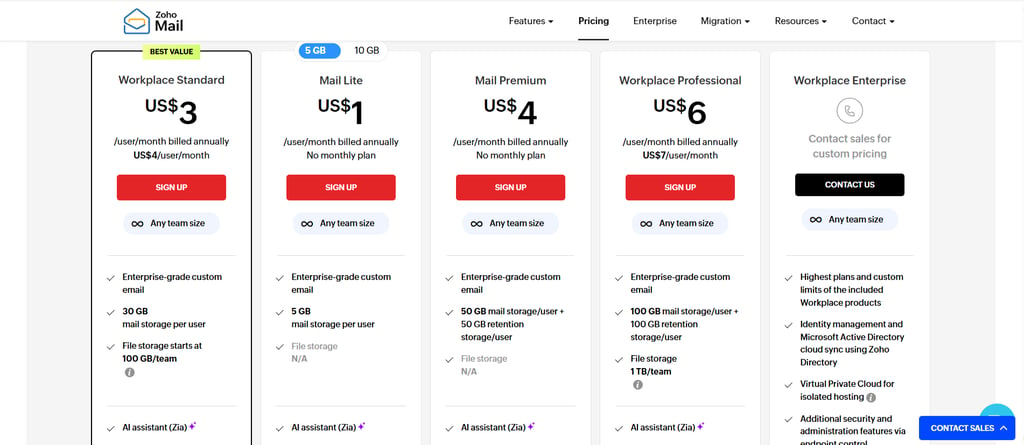
The price is also hard to argue with. Mail Lite comes in at $1.00/month/user, the cheapest on my list. If you decide to move up to Workplace Standard, you get the full suite of Calendar, WorkDrive, Writer, Sheet, Show, Cliq, Meeting, and Vault alongside your mail, and it’s still very fair at $3.
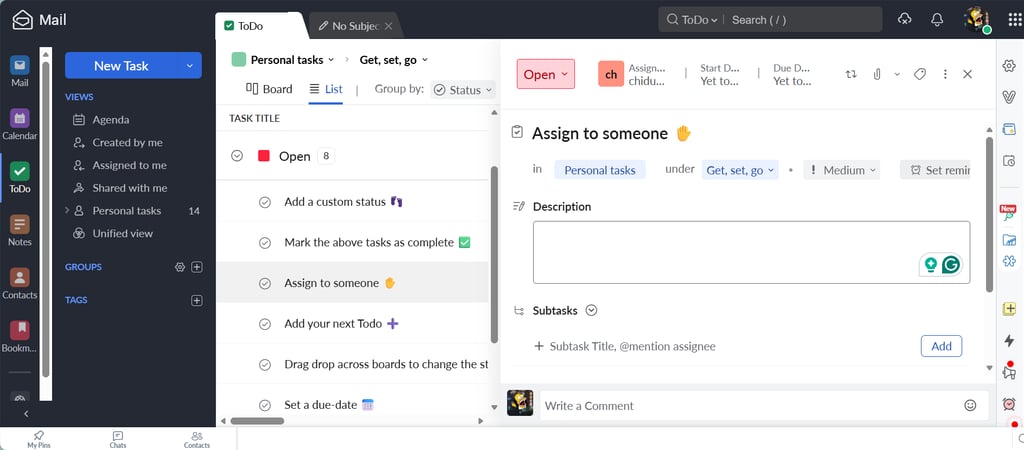
But the interface is where Zoho Mail Canada loses points for me. It feels clunky and dated. Plus, on more than one occasion, pages took a couple of seconds to load. There’s also so much on screen at once that finding something you need can take longer than it should. For the average user, Zoho Mail will feel more like a business tool than a personal email service.
5. Fastmail – best Gmail alternative for speed and usability
| Starting price: | Individual from $3.00/month(annually) |
| Top features: | Fast search, Masked Email, custom domains, offline support |
| Best for: | Users who want to move on from Gmail without giving up speed and convenience |
| Current deal: | Black Friday! Get Fastmail for just $3/month! |
If your main reason for leaving Gmail isn’t privacy but ads, tracking, and a business-like interface, Fastmail is a solid alternative. It’s been running for over two decades, and it shows.
The search function is one of the fastest around, pinning and snoozing work really well, and the calendar is well organized. I’ve lost count of how many times I’ve waited for Gmail to load search results, only for it to miss the exact email I was looking for. Fastmail genuinely felt like a breath of fresh air in this regard.
You also get the Masked Email feature to generate throwaway addresses while keeping your real one private. Fastmail has a polished native app for every platform, offline support for reading and drafting, scheduled sending, and private memos you can attach to a message as a reminder.
Privacy is not Fastmail’s strongest feature, though. You don’t get end-to-end encryption unless through PGP or S/MIME in third-party apps. The platform argues that it has omitted this feature due to trade-offs such as no previews, no full-text search, and no spam analysis. But if protecting message contents from the email provider is a priority, Fastmail probably isn’t the right choice.
There’s no free tier, either, and Fastmail is based in Australia, a member of the Five Eyes intelligence alliance. Australia also has laws governing government access to encrypted communications, which are worth understanding before you commit. Fastmail’s privacy policy also explains that it may share data with third-party service providers and transfer personal information to other countries.
Comparison table: best Gmail alternatives for Canadians
Here’s how the five providers compare on the things that actually matter when choosing secure Gmail alternatives in Canada.
| Provider | Best for | Free plan | End-to-end encryption | Custom domain support | Aliases | Mobile apps | Notable limitation |
| Proton Mail | Overall privacy and usability | ✅ Yes | ✅ Yes | ✅ Yes | ✅ Yes | ✅ Yes (iOS and Android) | Subject lines are encrypted, but not end-to-end encrypted |
| Tuta | Maximum encryption strength | ✅ Yes | ✅ Yes | ✅ Yes | ✅ Yes | ✅ Yes (iOS and Android) | No native PGP compatibility, signup review can take 48 hours |
| Startmail | Simple, alias-heavy privacy | ❌ No | ✅ Yes (via third-party apps) | ✅ Yes | ✅ Yes | ✅ Yes (iOS and Android) | No calendar, notes, workspace tools, or file storage, PGP subject lines aren't end-to-end encrypted by default |
| Zoho Mail | Freelancers and small businesses | ✅ Yes | ✅ Yes(requires manual configuration) | ✅ Yes | ✅ Yes | ✅ Yes (iOS and Android) | Interface feels clunky and dated |
| Fastmail | Speed and usability | ❌ No | ❌ No | ✅ Yes | ✅ Yes | ✅ Yes (iOS and Android) | No end-to-end encryption on native apps |

How to choose the best Gmail alternative in Canada
Start with the privacy policy before worrying about the feature list. You want to know how the company actually makes money. Subscription-funded providers have less incentive to monetize your data through advertising, while ad-funded services may raise more privacy concerns.
Next up, you need to confirm the encryption options and what you’re willing to give up in return. End-to-end is the strongest, but encryption offers strong protection. Depending on how it’s implemented, it can limit features such as full-text search and message previews. If your main concern is ad targeting rather than preventing the provider from accessing your messages, standard encryption may be enough.
Then decide whether you need a custom domain. If you’re a single user switching from Gmail, this probably isn't for you, but businesses may find it essential. This also ties to pricing and which features are offered in the free tier, if there is one. While you might not want to commit funds as an average user, consider the possibility that you might in the future, and go for services with paid plans within your budget.
Aliases and spam control are also important. With unlimited aliases, you can use a different address for every website and eventually find out which is selling your data. Still, check what’s bundled with the aliases feature and whether you get tools like calendar, file storage, and workspace platforms.
Finally, I always recommend testing the migration tools before you commit. Moving years of email is the step people often abandon, but it’s super important. You also want to confirm whether the provider offers forwarding during the transition.
Gmail vs secure email providers: what Canadians should know
Few services are as convenient as Gmail. It’s free with 15GB of storage and works on any device. You just have to be ok with being part of a broader advertising ecosystem, which people are increasingly growing uncomfortable with.
While not every Gmail alternative out there is fully end-to-end encrypted, many are funded by subscriptions rather than ads, so there’s no business reason to scan your messages. Most also block trackers and strip your IP address from outgoing emails.
It’s also wise to consider jurisdiction when making a decision, but architecture matters more. A provider in Switzerland or Germany offers stronger legal protections than one in the US or Australia. However, if the provider uses end-to-end encryption and cannot decrypt your messages, a court order alone may not be enough to give authorities access to their contents.
Is a Canadian email provider necessary?
The short answer is no, and if you pay attention only to that, you’ll miss out on many great options. Your focus should be on the privacy model, encryption options, and the legal environment in which the service operates. If you decide to register with an ad-funded provider because it’s based in Canada, rather than a Swiss one funded by subscriptions, you’re almost running back to what you were trying to escape.
Conclusion
Ultimately, the best Gmail alternative really depends on what you’re trying to fix. Tuta goes the farthest on encrypted subject lines, while Startmail wins on aliases. Zoho Mail offers business-focused tools, and Fastmail is worth considering if you want a polished everyday email experience.
But for most Canadians, Proton Mail is the strongest overall option because it combines end-to-end and zero-access encryption on every plan, audited open-source code, and a really clean interface while being based in Switzerland.
The ongoing Gmail connection also means you can migrate gradually, and a single Proton account gives you access to Mail, Drive, Pass, and VPN, while Proton Unlimited unlocks the premium features with 500GB of shared storage. It’s the closest thing to a Gmail replacement without making you choose between privacy and usability.
FAQ
What is the best Gmail alternative for Canadians?
Proton Mail is the best overall pick for most Canadians. It brings together end-to-end and zero-access encryption, Swiss jurisdiction, and a smoother UI that doesn’t feel like you’re downgrading.
Is Proton Mail better than Gmail for privacy?
Yes, Gmail’s business model relies on advertising, which means your inbox is part of a broader data ecosystem. Proton is funded by subscriptions, uses zero-access encryption so it can’t read your messages, and is ad-free.
Are there free Gmail alternatives in Canada?
Yes, Proton Mail has a free tier that offers 1GB storage after completing the onboarding checklist and lets you send up to 150 messages daily, while receiving is unlimited. Tuta and Zoho also offer free plans, with the latter offering custom domains for up to five users.
Should Canadians use a local email provider?
No, it’s not necessarily important. The focus should be on the provider’s privacy model, encryption approach, and the legal environment it operates in. Your number one criterion should be the platform’s architecture before jurisdiction.
Which Gmail alternative is best for small businesses in Canada?
Zoho Mail is the strongest value pick for small businesses, as it supports custom domains with SPF, DKIM, DMARC, and BIMI built in. It also starts at $1 per month and bundles office apps and file storage.