My new website has thousands of visitors, and all of them are malicious
It’s really not a great time to launch anything on the open internet. One slip, and you’re toast.

Image by Cybernews.

 Follow us
- An empty website received 73,000 monthly bot requests, including 6,000 in one afternoon.
- A few malicious IP addresses generated thousands of requests each while probing nonexistent sensitive files and administration pages.
- Website owners should block sensitive paths and confirm they never return a successful 200 response.
Key Takeaways by nexos.ai, reviewed by Cybernews staff.
When I started a website, I didn’t expect it to blow up. But visitors went crazy. They seemed obsessed with my 404 page and hit it via so many different non-existent paths.
It’s 2:30 p.m., July 22nd, 2026. Six thousand requests hit my recently created website.
It is just a couple of dummy HTML pages on Cloudflare with nothing meaningful in them. I only use the domain for my home lab certs, and deployed an empty HUGO template for fun.
I check what’s going on. Someone’s malicious bot.






I expand the statistics for the whole month – it’s a whopping 73,000 requests. None of them is human. My site is a bot magnet.
They come and go in huge spikes. A random IP address probes nearly every known sensitive path to see if it can get anything of value. It makes thousands of requests before it leaves.



Stay updated with our latest stories and follow us on social media
Be the first to discover new stories, ideas, and updates from our team.
Yes, the internet has always been hostile by default, but the autonomous AI agents are really inflating the hostile traffic to an unseen extent.
Had I actually deployed anything on this website with exposed credentials or API access, a single mistake, a single exposed sensitive document, or a larger file, I could risk going bankrupt.
Any web admin is likely seeing the same. But if you plan to launch only your first website, you'd better make sure nothing sensitive is accessible to bots.
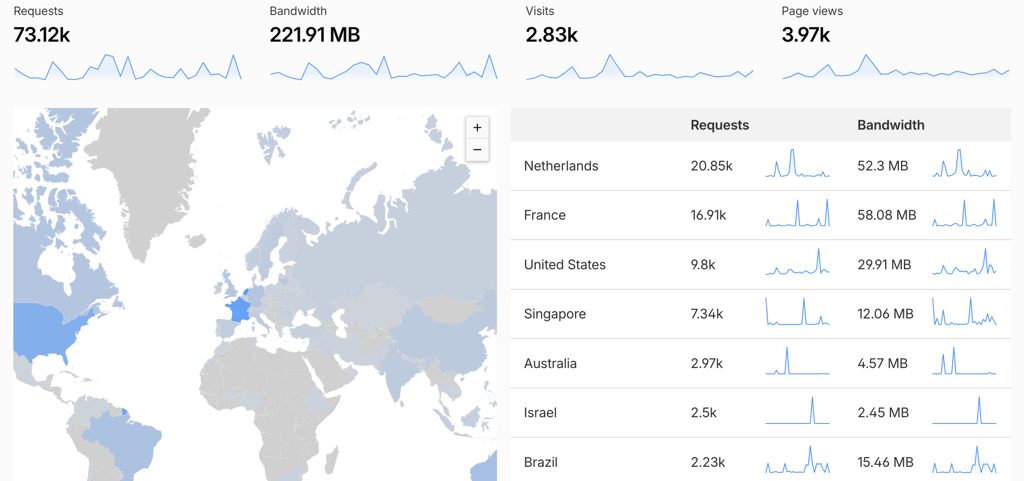
My dear visitors, why are you all malicious?
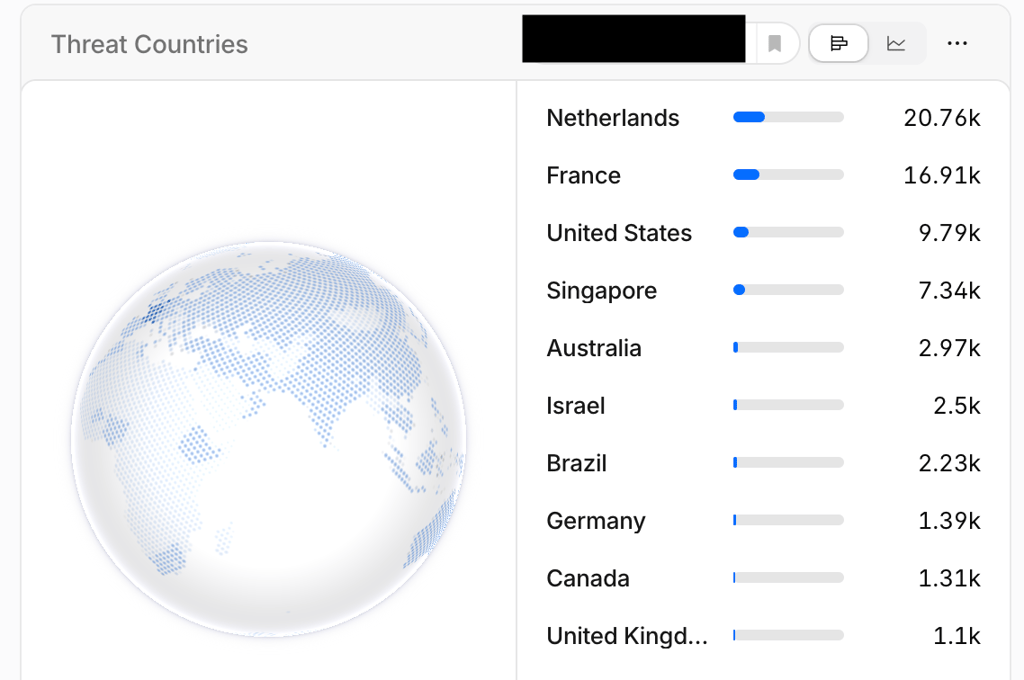
Only a handful of IPs are responsible for thousands of queries each.
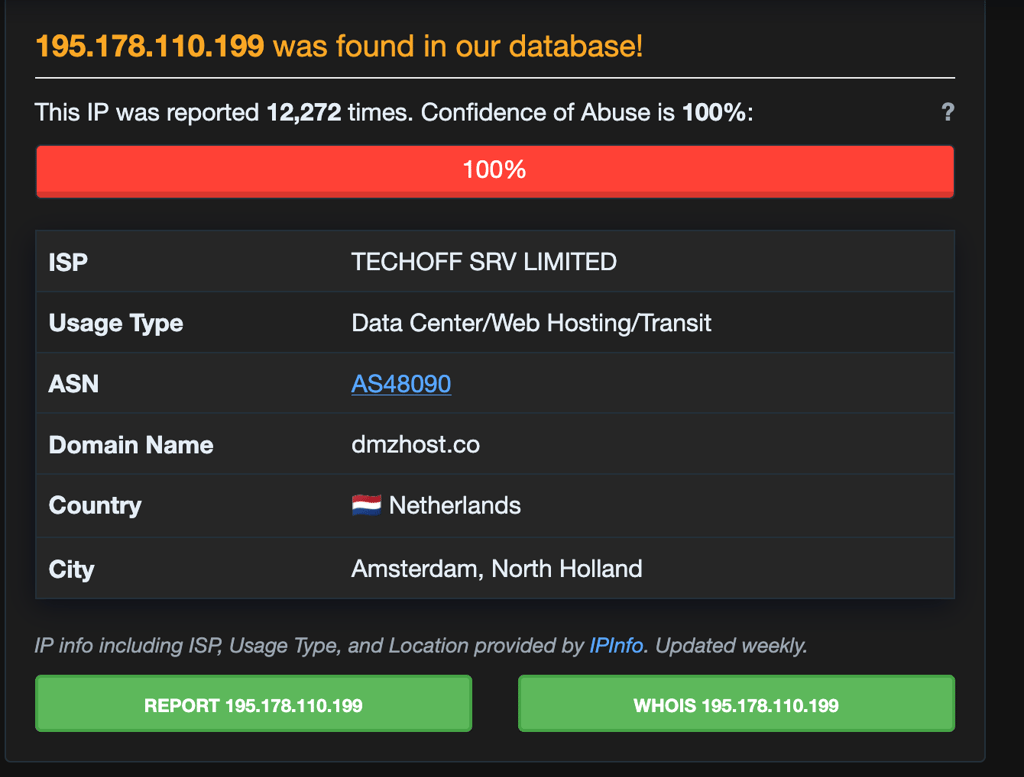
An IP address from a data center in the Netherlands, 195.178.110.199, visited my site only 2 times in the past week, but during the brief period, it raked in over 8,670 requests.
AbuseIPDB, a free service that lets you check IP activity history, shows that this IP has been reported 12,272 times. Other users report detecting a “severe and dangerous web attack” originating from this IP address.
Another IP, 185.177.72.10, also shows up as a single blip in the stats with 5,870 requests. It ran through a list of dozens of potentially vulnerable endpoints and disappeared.
This IP from a French data center company is also flagged as 100% malicious by thousands of reports.
And the list goes on – another day, another IP.
185.177.72.12, an IP with 100% confidence of abuse, visits my site once and sees a 404 error 5,500 times.
45.148.10.67 was especially interested in AWS credentials and configs, probing various paths dozens of times.
There is also a visitor from Singapore, 173.239.196.98, attempting to brute force servers, leaving after another couple of thousand requests.
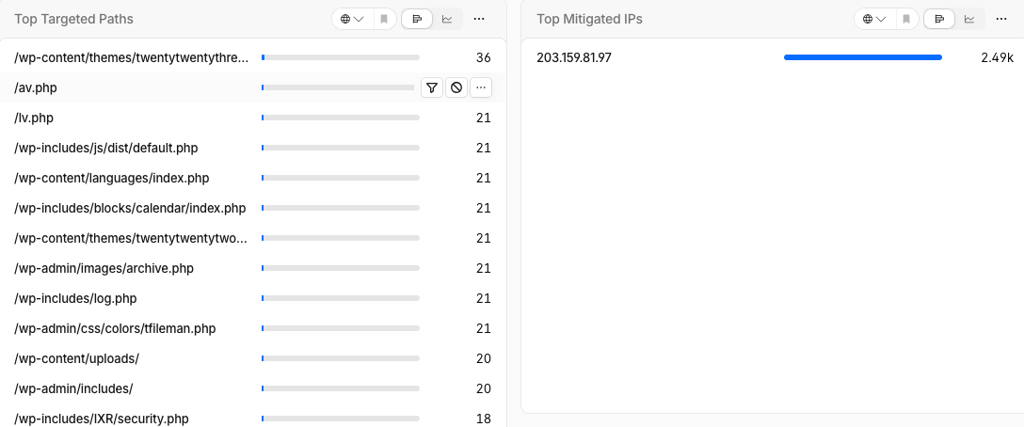
This Israeli guest, 203.159.81.9, was obsessed with the WordPress features on my site, not that there were any.
The US is also a big market for my blog. 103.168.66.237 from Texas comes looking for .env files, dashboards, profiles, or settings, but receives three integers, or is blocked by WAF/presented a challenge.

Most of the IPs probably won’t show up again, meaning I need to work more on user retention.
The most popular browsers (user agents) of my readers include curl/8.7.1, TLM-Audit-Scanner/1.0, or blank user agent. Generic Mozilla/5.0 Chrome, Firefox, or Safari “browsers” are also very common, as well as Go-http-client/1.1.
GoogleBot only checked my site 296 times out of 73,000.
Jokes aside, an empty “Hello world” .com website provides a pretty good picture of what bots are actually looking for – had it deployed an actual service, it would be disproportionately skewed toward bots targeting that specific instance.
My site is just static Hugo output with no backend, API, .env files, or admin panels. There’s nothing to find.
What are bots targeting?
SSH keys, database dumps, .env files, admin panels? All of them.
These were the endpoints most targeted by bots in my website over the past 30 days, and they draw a good picture of what must be protected:
- /.env – 544 hits. No surprise there. This is an environment configuration file for frameworks and platforms such as Laravel, Node.js, Rails, etc. It's never meant to be publicly accessible. An exposed .env file will expose any API keys, database passwords, secret tokens, or other credentials it contains to bots.
- Environment file variants (/.env.local, /.env.backup, /.env.bak, /env.save) – 835 hits in total. Common environment configuration files or their backups.
- /wp-login.php – 350 hits. This is the default path to the WordPress administration panel, exposing the website to brute-force or other attacks. It should be protected with IP restrictions/WAF.
- /.git/config – 343 hits. A configuration file from a Git repository, which should always be blocked. It might expose the repository’s source code, commits, and other sensitive information.
- /.git/HEAD – 242 hits. This file identifies the current branch of a Git repository and should also always be blocked. It exposes source information, commits, and potentially sensitive information.
Over the past 7 days, bots were also highly focused on these endpoints:
- /deploy.yml – 121 hits. CI/CD pipelines deployment configuration file, often containing hostnames, deploy keys, and potentially environment secrets. While not necessarily sensitive, it shouldn’t be left in the public web directory.
- /secrets.txt~ – 115 hits. These filenames are associated with code/text editor backup files, and might contain information accidentally used during development. Shouldn’t be ever stored publicly.
- /migrations/.env.production.backup – 110 hits. Appears to be a backup copy of a production environment configuration file that should always be removed.
- Bots search many other pathways for potential .env files – 100-110 hits each: /uploads/.env.old.src; /protractor/.env.dev.disabled; /vue/.env.tmp.archived.
- /credentials.yaml; /credentials.json.disabled; /config.properties – 90-110 hits each. Direct guess for a credentials file name, that might contain cloud provider keys, database logins, etc.
- /lib/ssh/id_rsa-hotfix – 110 hits. A likely place to find SSH private keys that grant unauthorized access to the server or services.
- /api/config/tsconfig.json – 110 hits. A TypeScript configuration file that may reveal internal API structure.
- /prevlaravel/sftp-config.json – 100 hits. Bots are looking for an SFTP configuration file that might expose credentials.
- /scripts/database.sql._ – a possible full database dump or backup.
- /resources/views – this path is commonly used by web frameworks to store application templates.
- /id_rsa.temp – temporary copy of SSH private key file.
And it appears that each malicious IP address checks its own set of dozens, or even hundreds, of endpoints. These bots likely crawl millions of domains in search of vulnerabilities. The actual cyberattack would begin after they find any.
If you are launching your first website, check whether any of the common sensitive paths return a 200 OK response.