CleanYourTV project explodes on GitHub as thousands hack their TVs back
Owners are reclaiming their TVs by nuking manufacturer apps, tracking, and ads
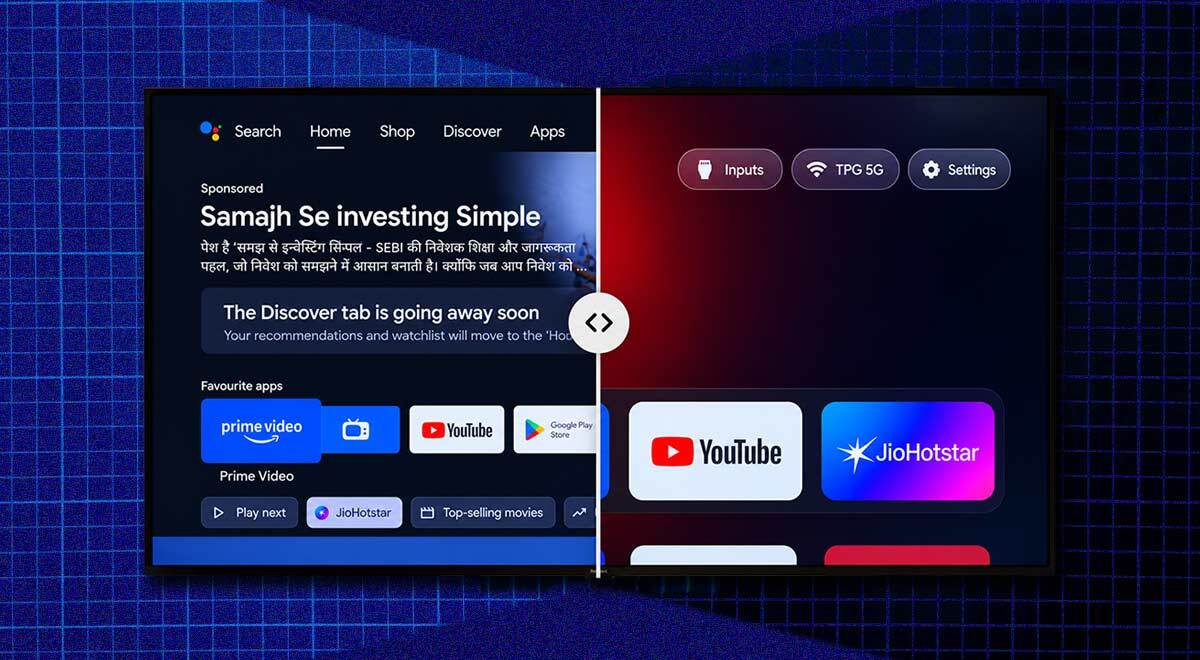
CleanYourTV project. Image by Cybernews, screenshot from cleanyour.tv.

 Follow us
- CleanYourTV has gained over 41,000 GitHub stars in less than 10 days.
- The project helps users remove smart TV ads, tracking, and unwanted apps with AI-guided tools.
- Version 3 supports about 300 TV models from 83 brands, including Android and Google TVs.
- Debloating can break features, but the project says most changes are reversible.
Key Takeaways by nexos.ai, reviewed by Cybernews staff.
Ten days ago, a developer got so fed up with ads on his parents’ Xiaomi TV, that he decided to use Claude Code to strip down all the annoyances. Now, the CleanYourTV project has over 40,000 stars on GitHub and supports hundreds of TV models.
TV owners have had enough of ads, tracking, bloatware, and manufacturers bragging about owning “the glass.”
They’re taking matters into their AI’s hands – letting Claude Code connect to a TV and disable undesirable features.
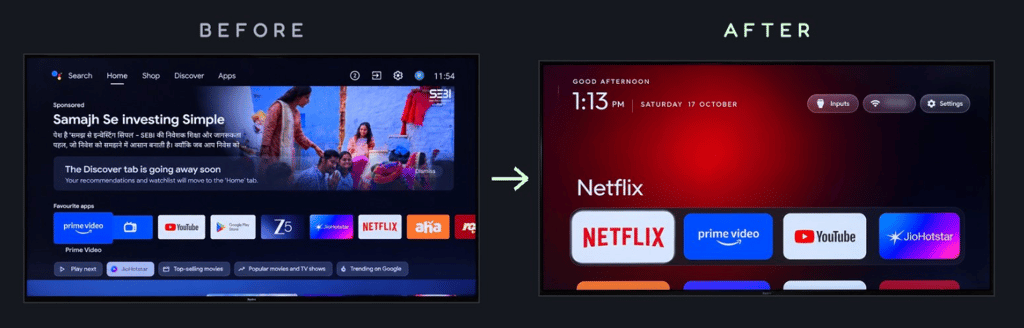
At the pinnacle of the wider movement now stands CleanYourTV, an open-source project that started with a single viral post on X. The project offers AI prompts and tools to debloat Android or Google TVs, removing ads and tracking, and leaving them with a clean Apple TV-style home screen.




In less than 10 days, the repo has attracted a massive community of over 600 contributors, amassed over 41,000 stars, thousands of commits, and forks.
The project has released version 3, which now covers around 300 TV models from 83 brands, and the maintainer, Gathin (@gathint), says people have tested them on their own TVs.
The massive collection of tools and guides helps disable tracking and ads on Android devices, Google TVs, and non-Android TVs from Samsung, LG, Roku, and others.
And it all started with a single viral tweet.
“Vibecoded my parents’ TV this afternoon! It was showing a sponsored ad before you could even get to Netflix. Gave Claude Code the model number, it found the TV on WiFi, removed 25 Xiaomi packages, and wrote a new launcher. Looks like an Apple TV now lol,” reads the post that accumulated 8.6 million views on X.
Many other creators on YouTube are also sharing their own stories about how they removed ads and bloatware using AI.
Hacking your TV comes with risks: some features might stop working. However, bricking is unlikely, and the process is often reversible – nothing is permanently deleted.
Most methods rely on using Android Debug Bridge (ADB) – a built-in Android tool for sending terminal commands – to disable unwanted packages and replace the launcher.
“No root, no cable, nothing uninstalled, and a one-line restore if you change your mind,” the CleanYourTV repo promises.
A single prompt to get an AI assistant started
The repo revolves around a detailed prompt for an AI assistant – it can be Claude Code, Codex, Gemini, or any other. The users are basically instructed to enable ADB on their TVs, clone the project, open it with an AI assistant, paste the prompt, and follow along.
The master prompt instructs the AI agent to connect to the TV, back up the existing setup, prepare a recovery script, identify bloatware, ask the owner what to keep and what to disable, replace the stock launcher, verify, and even add optional security features, such as DNS filtering to block ads.
The repo contains a massive toolkit that AI agents can use, depending on the TV model. The growing library of scripts can also be used by owners who are debloating their TVs by hand, which requires much more involvement.
The examples folder contains tested debloat lists for each tested model, saving tokens and time that would be required to discover the bloat from scratch.
The procedure “takes about fifteen minutes” and stops TVs from working against their owners.
“No sponsored rows, no ‘Discover’ nags, no analytics phoning home, no apps you never asked for,” the readme says.

Check if your data was exposed
Find out if your email and related personal information have appeared in known data breaches.
While most Android TV and Google TVs are fully supported, Fire TVs and a few China-market TCL sets refuse to accept or even install a third-party launcher.
TVs with custom OSes, such as Samsung (Tizen), LG (webOS), Roku, Vizio, and Hisense VIDAA, do not support ADB, but the website cleanyour.tv provides guides for manually disabling many tracking features and showcases other tools, some of which may require rooting.
The main drawback is that firmware updates are likely to bring back the unwanted apps, ads, and telemetry. The project anticipates this and includes a tool to compare what an update undid and reapply the debloating.
The project is also developing a phone app that allows debloating TVs without a computer or a coding agent.
After the recent TV privacy findings, this is a must,Gathin said.
“After the recent TV privacy findings, this is a must,” Gathin said.
Cybernews has reported extensively on smart TV tracking. For example, researchers found LG TVs logging voice and scanning household devices, and Samsung was accused of spying on users and then sharing data with 400+ partners.
Researchers also found that Automatic Content Recognition (ACR) tracking has crept into the core firmware of modern-day smart TVs. Some users even started ripping microphones out of their devices.
Are these modifications safe?
The CleanYourTV GitHub repo claims that nothing is flashed, rooted, or deleted – packages are only disabled in the user profile. However, there’s always a risk that disabling a package might break some services or features. Users are also left trusting their AI agents not to make unintended changes.
“If the TV no longer starts far enough for that, or for ADB, a factory reset from its recovery menu is usually the way back,” the repo warns.
Some users reported their TVs restarting in a loop after a debloat or other issues, listed in a lengthy troubleshooting guide.
The developers also advise closing ADB access after the procedure.
Some users raised concerns about “debloated” TV security on the Cybersecurity community subreddit. Most cyber pros assured that running less software on the TV is nearly always safer than running all the bloatware.
“A debloated anything behind a firewall will almost always be more secure. Saying anything else is nonsense fearmongering. And let’s be real, how good is the security in a 10-year-old TV trying to grab ads and send personal data externally anyway?”” one member noted.
Another cyberpro argued that debloated TVs are “at least as secure as the baseline,” but most likely more secure, because “there is just less bloat and bs hanging around.”
“In a world where LG uses those smart TVs to spy on people, they couldn't care less about security threats. And most debloats I've seen are not really their own software, they are just disabling stuff you can't reach with the GUI,” yet another commenter said.
The trend of AI-assisted modification might loosen TV manufacturers’ grip on their software ecosystems.
Many users claim that modifications bring additional benefits, such as reduced RAM usage and faster interface performance. Some users even go further, instructing their AI agents to build additional tools, such as screensavers or dashboards.

Ernestas Naprys is a senior journalist at Cybernews covering information security, open-source software, hardware, data breaches, vulnerabilities, hacking, and digital privacy. With 12 years of journalism experience, his reporting combines technical research with hands-on experimentation, helping readers understand complex cybersecurity risks and technologies. Before joining Cybernews, Ernestas worked as a financial markets reporter at Verslo Žinios and as a business journalist at 15min and DELFI. He was recognized as Lithuania's Journalist of the Year in 2018 for his analysis of EU investments.