YouTuber rips microphones out of his LG OLED to stop smart TV spying
There are better ways to stop your TV from listening in, though.
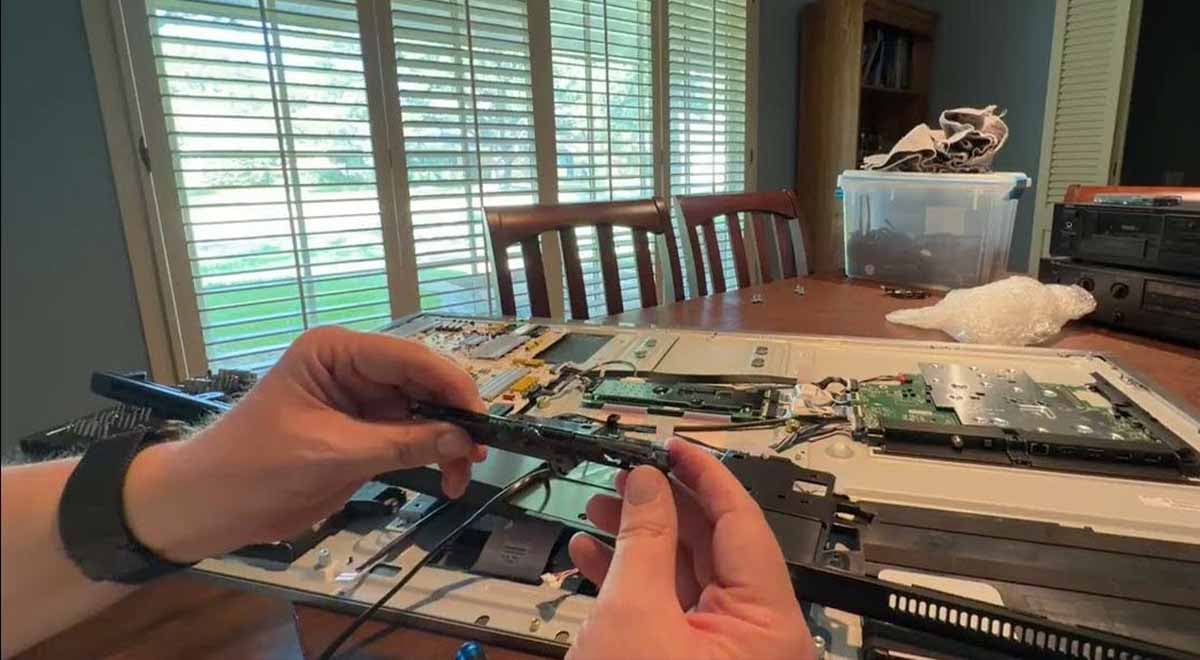
Image by tfm55x, YouTube

 Follow us
- YouTuber tfm55x removed two microphones and disconnected wireless hardware from his LG G6 OLED.
- He acted after a Gamers Nexus investigation raised concerns about LG smart TV data collection.
- LG denied recording ambient conversations but confirmed its TVs can identify content played through live TV and HDMI.
- Privacy experts recommend safer steps: keep TVs offline or turn off viewing data and personalized ads.
Key Takeaways by nexos.ai, reviewed by Cybernews staff.
One LG OLED owner has responded to concerns surrounding smart TV data collection by opening his new television and physically removing or disabling some of the hardware.
YouTuber tfm55x dismantled his LG G6 OLED after watching a US-based investigation by Gamers Nexus into LG's smart TV platform and its data collection practices.
During the teardown, as documented in a recently posted YouTube video, tfm55x disconnected his television's wireless module and removed two tiny microphones from a circuit board inside the set.
He is heard addressing the smart TV manufacturer, saying: "You don't own the glass on this one. I flatly refuse to pay that much money for a television and then have you snooping."






This is my official non acceptance of the terms of your agreement,– YouTuber tfm55x sends LG a message.
Taking back ownership
The YouTuber said that he had originally planned to put the TV on its own VLAN – a virtual local area network that can be used to isolate a device from others on a home network and more tightly control its network traffic.
But after watching Gamers Nexus’ investigation which accused the TV manufacturer of snooping on viewers and passing on their data to advertisers, he said he decided to take a more physical approach.
TV teardown
Talking viewers through the process, tfm55x first removed the back of the television, which is held in place by numerous small screws.
He warned that anyone opening the set would need to take particular care around a plastic section running along the bottom because cables are routed through it.
Inside, he identified two cables running from the main system board towards the bottom of the television. One was connected to what he identified as the TV’s WiFi and Bluetooth module.
Tfm55x then pointed to a small opening along the bottom bezel containing another circuit board. On it were two tiny microphones, each barely larger than a dot on the end of a finger.
Tfm55x used a hot-air rework station and flux to remove the components and warned viewers against attempting the modification without the necessary skills and equipment.
Don’t attempt this if you don’t know what you’re doing,– warns YouTuber Tfm55x
He added that he’d ditched the TV’s remote control and planned to operate the display through his existing home assistant setup.
In a later update, he reassured viewers that the procedure did not kill his TV and proved it by showing his modified TV switched on and screening content.
LG investigation
The show running on tfm55x’s TV was, of course, the original Gamers Nexus investigation into LG TVs.
It reported that LG TVs could capture microphone audio while in standby, scan local networks for nearby devices, and store voice command data for later transmission.
LG later denied that its TVs record ambient conversations, but confirmed its automatic content recognition (ACR) technology can identify content played through live TV and HDMI, with data potentially used for audience measurement, and, with consent, advertising.
Here’s how to actually stop smart TV spying
Even if the LG OLED TV works without ripped microphones, do not attempt to do such an experiment at home.
There are other, more reliable ways to protect your privacy. Recently, Proton, a Swiss privacy company, published a helpful reminder on how to prevent your TV from listening in.



Stay updated with our latest stories and follow us on social media
Be the first to discover new stories, ideas, and updates from our team.
The obvious yet very simple suggestion is to never connect your TV to the internet. Use external streaming devices for that.
Always spend some time to find the opt-out. Check your settings and turn off anything labeled viewing information, ACR, smart interactivity, or personalized ads.
Note that these settings might be buried deep within the settings.