9 best DeepSeek VPS hosting providers in 2026: why Contabo wins
Our in-house experts conduct independent, hands-on testing and transparent reviews of VPS hosting providers by using real server environments, and industry-recognized benchmarking methods to ensure impartial and evidence-based assessments
Using the same criteria for all VPS services, we share our detailed methodologies and testing practices to help customers compare performance, reliability, scalability, and overall value before choosing a virtual private server.
Learn more
For many AI enthusiasts, including me, using DeepSeek online isn’t an option – it collects every input to train its models, while the controversy around its connection to the Chinese government is quite alarming. At the same time, DeepSeek is by far the most powerful LLM that can be run locally for free. With the introduction of DeepSeek Harness, you can also use DeepSeek for agentic workflows that require persistent tools, sessions, and runtime environments.
The catch is that running DeepSeek on a home computer will quickly max out the system. The perfect workaround is to set up a private virtual private server (VPS), which keeps your data under your control while giving the AI all the power it needs to run smoothly. The same VPS infrastructure can support both running DeepSeek models and deploying DeepSeek Harness agent workflows, depending on the resources and configuration you need.
The Cybernews research team and I assessed over 20 VPS hosting providers to find the best 9 for DeepSeek hosting. Below, you’ll find what they’re best for, their pricing, and characteristics for running different DeepSeek models and deploying DeepSeek Harness workflows.
9 best VPS for DeepSeek hosting in 2026
- Contabo – best 1-click setup for 14B DeepSeek
- LiquidWeb – best managed DeepSeek VPS for enterprises
- Hostinger – easy AI-assisted setup for personal use of mid-weight models
- IONOS – cheap VPS for light DeepSeek models
- RunPod – premium GPU hosting
- Vast.ai – cheap GPU hosting for undistilled DeepSeek
- ScalaHosting – high-performance DeepSeek models with custom resource allocation
- InMotion Hosting – best VPS with unmetered bandwidth



Our in-house VPS research team and expert writers work together to regularly test VPS hosting services across different use cases and provide accurate, up-to-date insights. Learn more about how we test and evaluate virtual private servers.
Not sure which VPS hosting provider to choose? Answer 3 quick questions, and we’ll help you find the best fit from our tested providers.


Find VPS hosting match
Three simple questions. We’ll point you the right pick. No email, no sign up.
What will you use your VPS for?
What matters most to you?
How experienced are you with VPS hosting?
Best VPS pick for your needs

Hostinger VPS
Get your VPS up and running quickly with an easy-to-use control panel, one-click apps, and beginner-friendly management. A strong fit for automation tools, AI apps, and users who want less manual setup.
Best VPS pick for your needs

Contabo
Get more server resources for your money, with flexible VPS configurations suited to demanding workloads. A good choice for game servers, larger projects, and experienced users who want more control.
Best VPS pick for your needs

Bluehost VPS
Run websites, web apps, and AI projects on a straightforward VPS setup without unnecessary complexity. It works well for users who are comfortable managing a VPS but still want a relatively simple hosting experience.
DeepSeek vs DeepSeek Harness VPS requirements
DeepSeek is an AI company and a family of LLMs designed for tasks like reasoning, coding, text generation, and analysis. On the other hand, DeepSeek Harness can turn an AI model into a working, autonomous agent. So, the difference is really an LLM model vs agent infrastructure.
The difference also affects VPS requirements. Running DeepSeek models requires enough CPU, RAM, storage, and, sometimes, GPU resources to handle model inference. Meanwhile, Deepseek Harness needs a VPS that can reliably run the agent environments, including its tools, sessions, storage, and workflows.
For lightweight DeepSeek models up to 14B parameters, a CPU-based VPS with at least 8 vCPU cores and 16GB of RAM can be sufficient, while larger 32B and 70B models require significantly more memory and GPU resources for practical performance.
For DeepSeek Harness hosting, prioritize VPS plans with sufficient CPU and RAM, persistent storage, Docker or container support, and full root access, especially if you plan to run long-running or automated agent workflows.
If you want to run both on the same VPS, you’ll need to choose a plan based on the model’s requirements and leave extra resources for the agent.
What is DeepSeek hosting, and do you need one?
DeepSeek hosting means renting private server infrastructure, such as CPUs or dedicated GPUs, to run DeepSeek's open-source AI models yourself rather than using them online. In this context, it’s mostly about distilled DeepSeek versions – smaller, highly efficient models trained to mimic the reasoning power of the massive DeepSeek LLM so they can run on non-data-center hardware at an adequate price. If the non-distilled version has 671B parameters, the distilled ones range from 1.5B to 70B.
Choosing the best LLM hosting for your specific needs ensures you get fast text generation, absolute data privacy, and total control over how the AI is configured.
However, keep in mind that hosting DeepSeek Harness involves more than serving model weights: the infrastructure also needs to support the agent runtime, tools, sessions, files, sandboxes, and persistent workflows. Those are core parts of the official Harness architecture.
Best VPS for DeepSeek hosting 2026 – detailed review
1. Contabo – best 1-click setup for DeepSeek-R1:14B
| Rating: | |
| Price: | From $47.20/month to meet minimal requirements |
| Money-back guarantee: | ✅ Yes, 14 days |
| Special deal: | Get Contabo for just $5.28/month! |
Contabo is a cloud virtual dedicated server (VDS) provider with 1-click setup for DeepSeek-R1:14B, the most optimal model with balanced reasoning and cost-efficiency. Contabo’s 1-click setup with Ollama means immediate DeepSeek deployment, while VDS provides higher performance with your own dedicated RAM, storage, and CPUs (unlike standard VPS, where you share some resources with other users).
Contabo is also a strong option for self-hosting DeepSeek Harness, as its dedicated resources, Docker support, SSH access, and CI/CD capabilities provide the flexibility needed for persistent agent workflows.
I like that Contabo also lets you manually install and configure all the other distilled DeepSeek models, including the heavy-weight R1:32B. Moreover, it has data centers in 11 locations worldwide, so you can choose the one closest to you. Even though it’s not a managed service, Contabo’s support team is available 24/7 via live chat to help you with any problem.
What’s important to me is privacy: every Contabo plan includes DDoS protection, a firewall, and the possibility to install SSH keys. If you’re building a commercial app, you can set up Docker and a CI/CD pipeline on a cheaper Contabo VPS to protect your AI engine via isolation.
Pricing and features
Contabo has a few VDS plans optimal for hosting DeepSeek:
- VDS XL is a good fit for DeepSeek-R1:14B, as it costs $90.40/month and offers 16 vCPU cores, 64GB RAM, and 480GB NVMe
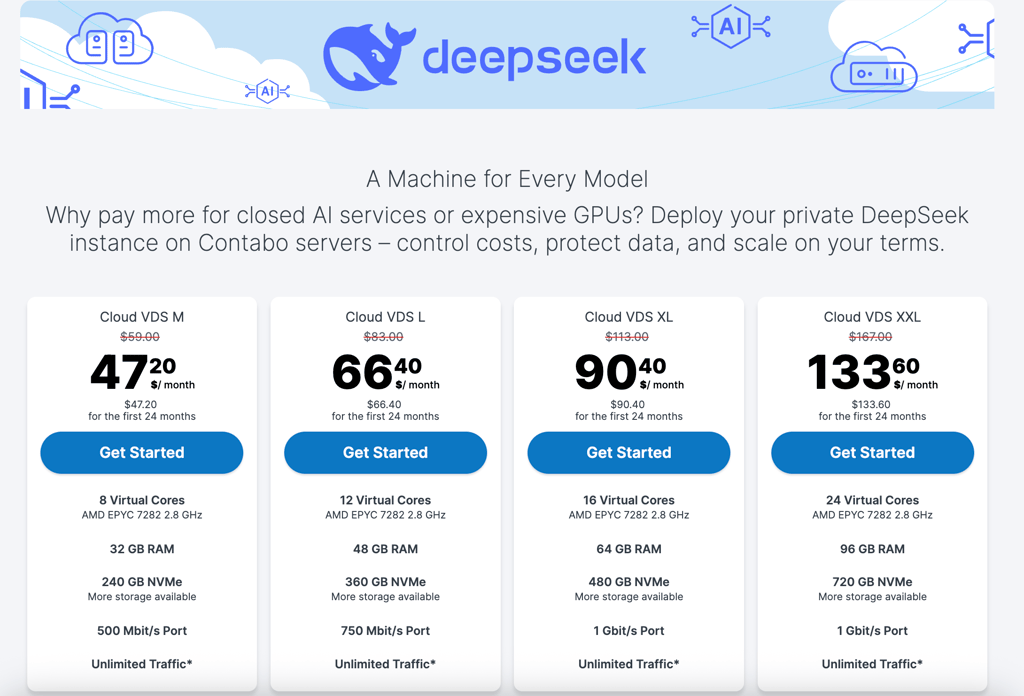
Contabo offers the best price-to-performance ratio for hosting the DeepSeek 14B model. Also, its large RAM allocation allows running even the heavy 32B-parameter model affordably. Contabo isn’t the right choice if you plan to scale to dedicated GPUs.
2. Liquid Web – best managed DeepSeek VPS for enterprises

| Rating: | |
| Price: | $72.50/month to meet minimal requirements |
| Money-back guarantee: | ✅ Yes, 30 days for CPU hosting; ❌ No for GPU hosting |
| Special deal: | Get up to 50% OFF Liquid Web VPS |
LiquidWeb provides enterprise-grade VPS hosting that can handle DeepSeek models of up to 32B parameters. I like that it has diverse configurations for your server setup, so you can choose the parameters you need and scale them up and down on the go. Liquid Web can also work well for DeepSeek agent hosting, particularly if you want to run persistent agent workflows while having the provider handle much of the underlying server management.
Since LiquidWeb’s VPS doesn’t have a 1-click DeepSeek install, you can run your model on any LLM runner, like vLLM, Ollama, or llama.cpp, and use LiquidWeb's root access to configure advanced AI settings. Unlike with Contabo, you don’t have to worry about infrastructure; instead, you can opt for fully managed VPS hosting from $39.00/month, with LiquidWeb handling server management, monitoring, and security patches.
I love that all inbound traffic is unmetered and all plans have decent bandwidth (from 2TB), which is perfect for text-only workloads. LiquidWeb also has GPU hosting, which can run the heavy R1-Distill-Llama-70B. Even though it’s more expensive than VPS, it has pre-installed NVIDIA drivers, Docker, and native Ollama integration.
Pricing and features
LiquidWeb has plans centered around CPU, memory, and general-purpose. While you can definitely run lightweight models on cheaper plans, here are the CPU-focused plans suitable for larger DeepSeek models:
- 6 vCPU cores,16GB RAM, and 440GB SSD storage cost $72.50/month
- 6 vCPU cores, 24GB RAM, and 540GB SSD storage cost $89.00/month
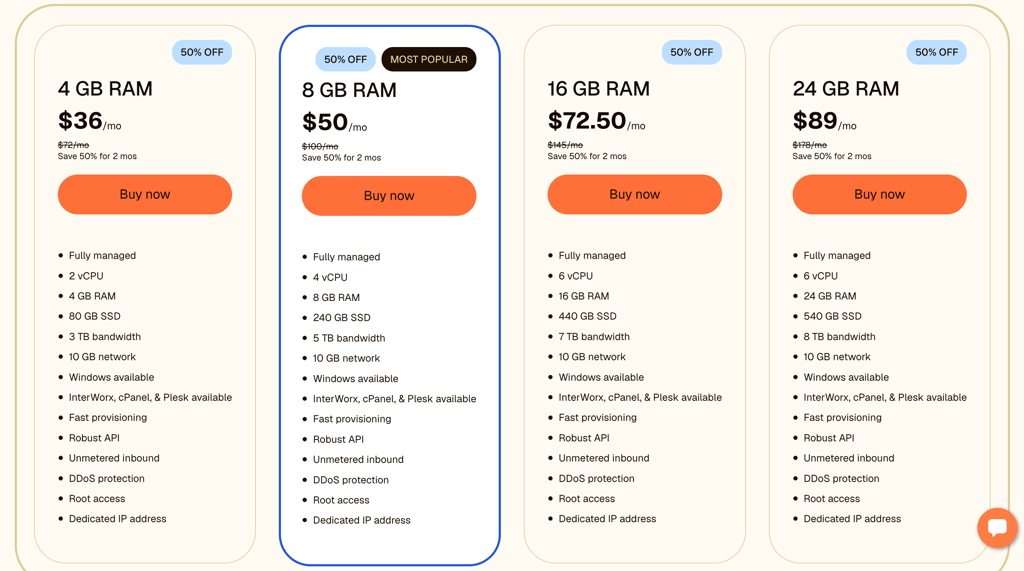
LiquidWeb is among the best VPS hosting providers for businesses processing highly sensitive data, including DeepSeek. It’s the right choice if you need a fully managed team of sysadmins to handle OS updates, firewall security, and hardware monitoring. For personal use, LiquidWeb’s price is too high.
3. Hostinger – easiest AI-managed setup of medium-weight models for personal use

| Rating: | |
| Price: | From $12.99/month to meet minimal requirements |
| Money-back guarantee: | ✅ Yes, 30 days |
| Special deal: | Get up to 73% OFF Hostinger VPS |
Hostinger is the best option for easy hosting up to 14B models at an affordable price. Also, it’s one of the few providers offering free weekly backups. Hostinger is a good fit for DeepSeek Harness VPS deployments because its 1-click Docker setup, root access, and pre-installed tools make it easier to run persistent agent workflows.
I like Hostinger’s AI-managed VPS – it means you just describe an issue, and the AI handles the necessary tasks for you, such as troubleshooting, configuring servers, or monitoring resources. That’s why Hostinger is great for beginners, and you don’t need to pay extra for human-managed services.
My favorite thing about Hostinger is its 1-click Docker setup, while its Ubuntu 24.04 64-bit OS comes with Ollama and Open WebUI (the ChatGPT-like interface) preinstalled. It all makes setting up and configuring DeepSeek infrastructure super easy.
On its most optimal DeepSeek plan, Hostinger offers 32TB of bandwidth, which is very strong for self-hosting, even if your AI web interface runs 24/7. For security, there are customizable firewalls and DDoS protection.
Pricing and features
For the best performance of DeepSeek 14B and lighter models, I’d recommend the most powerful Hostinger plan:
- KVM 8 costs $25.99/month and has 8 vCPU cores, 32GB RAM, and 400GB NVMe storage
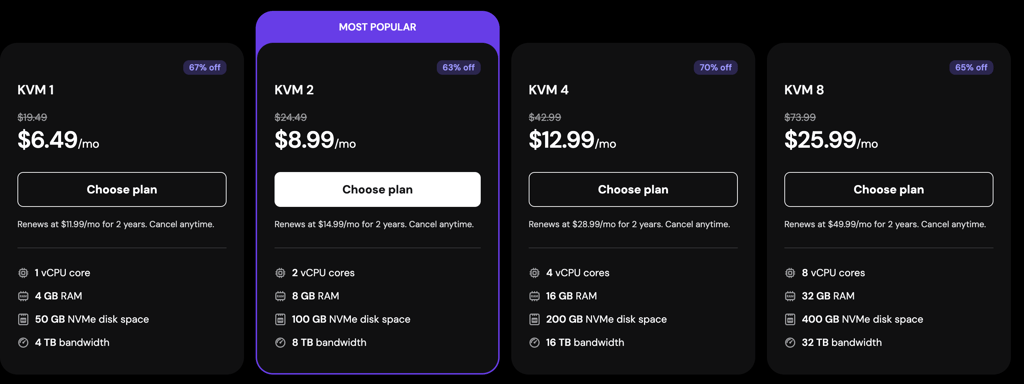
Go for Hostinger if you want an easy setup for the light and medium-weight DeepSeek model (ideally 8B or 14B), thanks to its 1-click setup for Ollama and WebUI. But if you’re building a high-traffic, public-facing AI app, Hostinger isn’t the right choice because of its strict limits on intensive CPU usage.
4. IONOS – best cheap hosting for lightweight DeepSeek models

| Rating: | |
| Price: | From $8.00/month to meet minimal requirements |
| Money-back guarantee: | ✅ Yes, 30 days |
| Special deal: | Get up to 94% OFF IONOS |
IONOS is the cheapest hosting provider that can host up to 14B-parameter DeepSeek models, guaranteeing high performance. All IONOS plans offer NVMe storage, which is much faster than SSD, so your DeepSeek will load in seconds.
IONOS can also support self-hosting DeepSeek Harness, with open root access giving you the flexibility to configure Docker, dependencies, and the agent environment yourself.
I was surprised that, even though it's cheap, IONOS doesn’t cap data transfer – every plan includes unlimited traffic on a 1 Gbit/s connection. It’s useful if you connect your DeepSeek model to a commercial app or automation pipeline, so you don’t need to worry about paying extra.
IONOS doesn’t have a 1-click setup for DeepSeek or Ollama, but the open root access lets you configure the AI model architecture however you like. Also, every plan includes a customizable firewall and DDoS protection.
I like that IONOS also offers GPU servers. They start at $1.79/hour and can run the heaviest DeepSeek model at high performance.
Pricing and features
For the best performance, I’d recommend more resource-heavy IONOS plans:
- VPS XL costs $15.00/month and has 8 vCPU cores, 15GB RAM, and 480GB NVMe storage
- VPS XXL costs $22.00/month and has 12 CPUs, 24GB of RAM, and 7200GB of NVMe storage
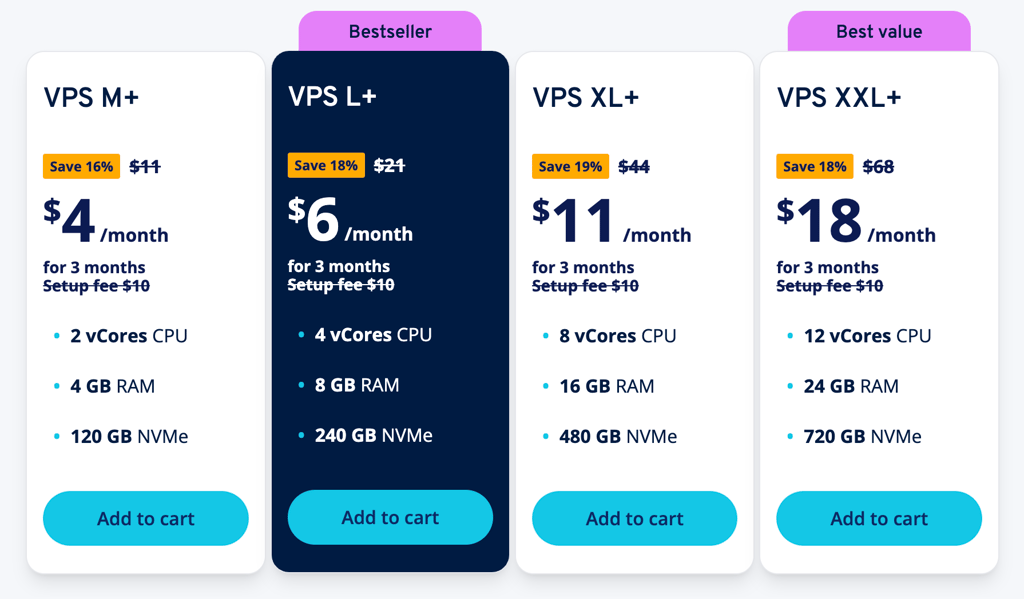
Go with IONOS if you need a cheap server for lightweight DeepSeek models. It won’t suit mature developers who want to use large AI models rigorously.
5. RunPod – GPU DeepSeek hosting for mature developers

| Rating: | |
| Price: | From $0.99/hour to meet minimal requirements |
| Money-back guarantee: | ❌ No |
RunPod is the best option for hosting large DeepSeek models for data-heavy use. Here, you can rent a Pod, a secure, isolated virtual machine with GPUs, to run your AI model 24/7. It is also well suited for DeepSeek agents’ workloads that require GPU acceleration, isolated environments, and scalable infrastructure for demanding agent workflows.
Pods include 1-click, ready-made templates with pre-configured KoboldCPP environments for DeepSeek models with up to 14B parameters. Larger models require a more extensive manual setup.
I really like RunPod’s Serverless endpoints with auto-scaling, which give you a custom URL to plug your DeepSeek into other software. With them, you don’t need to run a full-fledged GPU 24/7. Instead, the system will automatically scale your server capacity up and down, based on demand, to avoid sudden server crashes or paying for idle time.
RunPod also gives you real-time visibility over logs, monitoring, and metrics. Moreover, it lets you pay per second, so if you want to try a massive Pod to test the DeepSeek-Llama-70B, you can play with it for 40 minutes, shut it down, and pay only $3.33.
Pricing and features
You can host DeepSeek-Llama-70B and the lighter models on one of the cheapest pods:
- L40S costs $0.99/hour or $0.00028/s and has 16 vCPU cores, 94GB RAM, 48GB vRAM, and 480GB NVMe storage
Storage is charged separately, starting at $0.05/GB/month.
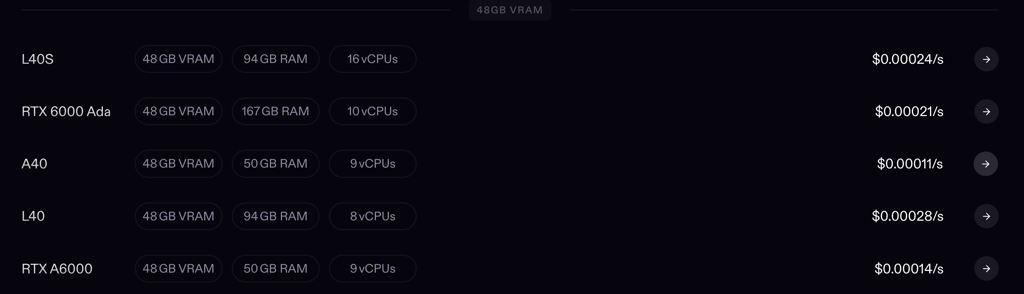
RunPod is best for seasoned developers who want a dedicated GPU to run any DeepSeek model 24/7 or a Serverless endpoint to plug an AI model into another software. Beginners may struggle with RunPod’s setup.
6. Vast.ai – cheap GPU hosting to run undistilled DeepSeek models

| Rating: | |
| Price: | From $28.122/hour (the price varies based on the available GPUs) |
| Money-back guarantee: | ❌ No |
Vast.ai is the only GPU hosting provider that has a 1-click template for full DeepSeek models with 671B parameters. Generally, Vast.ai is an auction-based GPU marketplace that connects you directly with independent ISO 27001-certified data centers and hosts who rent their idle hardware at highly discounted rates.
If you want to host DeepSeek Harness, Vast.ai allows you to do it. Though, its manual environment and dependency management make it better suited to experienced developers.
Moreover, I like the simplicity of Vast.ai’s preconfigured models: you pick the hybrid-thinking DeepSeek V3.1, the sparse-attention DeepSeek V3.2 Exp, or DeepSeek OCR, and Vast.ai offers you the most suitable GPUs available. Then, you pay and start chatting with DeepSeek. All the pre-configured models run on vLLM, but you can also manually set up your own LLM runner and preferred DeepSeek model.
All your workloads run inside Linux Docker instances, so they’re separate from the host system and from other users' containers. I think Vast.ai is perfect only for those with DevOps experience, as you may need to manually manage your environment, dependencies, and model inference setup. Also, you must be proactive about your data backups since you’re renting from third-party data centers.
Pricing and features
The prices and GPU choices change every minute. For example, you can host DeepSeek-3.2-Exp on:
- 8xB200 costs $28.122/hour and has 192 CPU cores, 179GB vRAM, and 2TB SSD storage
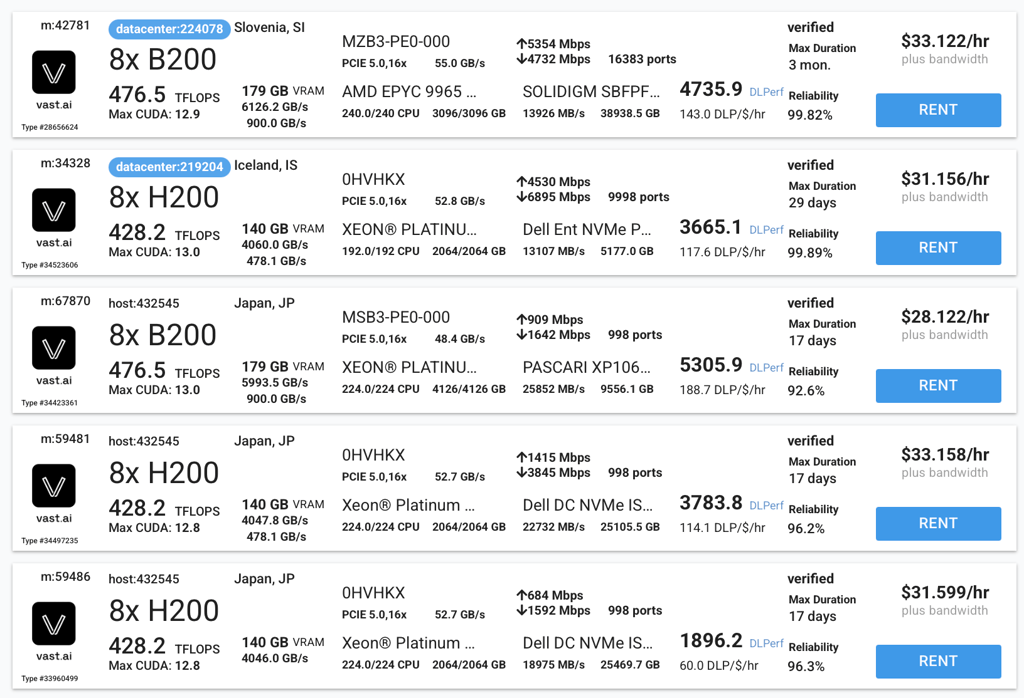
Vast.ai is perfect for DevOps enthusiasts who want to run full DeepSeek models at a lower price. However, it’s definitely not a fit for beginners who need lightweight distilled models.
7. ScalaHosting – best flexible VPS with custom resource allocation

| Rating: | |
| Price: | From $39.95/month to meet minimal requirements |
| Money-back guarantee: | ✅ Yes, 30 days |
| Special deal: | Get up to 63% OFF ScalaHosting VPS |
ScalaHosting is a popular VPS provider, offering enterprise-grade AMD EPYC processors with ultra-fast speeds up to 4.1 GHz that let DeepSeek models respond faster. On top of that, you get automatic daily backups and unlimited bandwidth. This provider can also support DeepSeek Harness hosting when you need flexible CPU, RAM, and storage allocations for persistent agent workflows.
I appreciate the flexibility of ScalaHosting’s pricing plans, which let you buy a custom plan with dedicated CPUs, storage, and RAM. In my experience, scalability is easy, too, and you can tweak some parameters on the go.
ScalaHosting is CPU-based, but it can run all distilled DeepSeek models exceptionally fast. Also, unlike Hostinger, ScalaHosting doesn’t throttle your server if it works at maximum capacity for too long.
It has users’ favorite free SPanel, which has built-in server and security monitoring and backup management. Also, ScalaHosting offers both managed and unmanaged services. So, you can choose to have access to a 24/7 technical team that helps you monitor your server and troubleshoot issues.
Pricing and features
Since the number of each parameter can be customized, I give you an example of the perfect configuration of the two most popular models:
- 8 CPU cores, 32GB RAM, and 50GB SSD storage cost $64.56/month and are ideal for running DeepSeek-R1-Distill-Llama-14B
- 20 CPU cores, 128GB RAM, and 150GB SSD storage cost $185.26/month and are ideal for running DeepSeek-R1-Distill-Llama-32B
128GB RAM is excellent for running 32B models without paying the premium hourly rates of a GPU. As for 70B parameters, this plan can technically run it, but be ready that it’ll be slow.
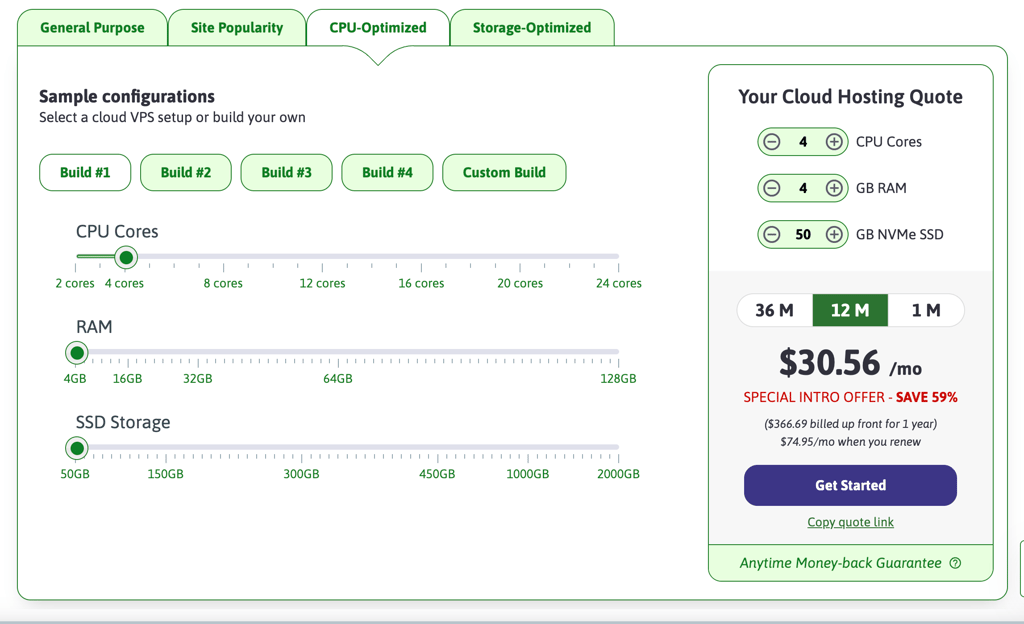
ScalaHosting is best if you want a high-speed CPU server with an excellent control panel, fully managed technical support, and zero performance throttling. It won’t suit those who want a raw LLM or Docker-first platform or GPU acceleration for AI workloads.
8. InMotion Hosting – best VPS with unmetered bandwidth

| Rating: | |
| Price: | From $9.99/month to meet minimal requirements |
| Money-back guarantee: | ✅ Yes, 90 days |
| Special deal: | Get up to 63% OFF InMotion Hosting VPS |
InMotion Hosting offers both managed and unmanaged VPS hosting for DeepSeek with fast NVMe storage and unmetered bandwidth, even on the top-tier plans. InMotion Hosting can also work for DeepSeek agent hosting, particularly if you want managed VPS infrastructure and enough bandwidth for agents running persistent, high-traffic workflows.
In my opinion, its managed plan is perfect for beginners because it gives you dedicated time with a technical team. So, if you are struggling to configure your firewall or install base dependencies for your AI environment, InMotion will do it for you.
InMotion is perfect for running R1-Distill-Qwen-7B and R1-Distill-Llama-14B flawlessly, with a lot of headroom for your operating system and web interface. The best feature of InMotion is its 90-day money-back guarantee, the longest among all hosting providers on my list.
Pricing and features
You can easily run lighter models on cheaper plans, while the following plan is better suited for stable performance with DeepSeek-14B:
- 12 vCPU cores, 24GB RAM, and 360GB NVMe storage cost $29.99/month within a 3-year subscription
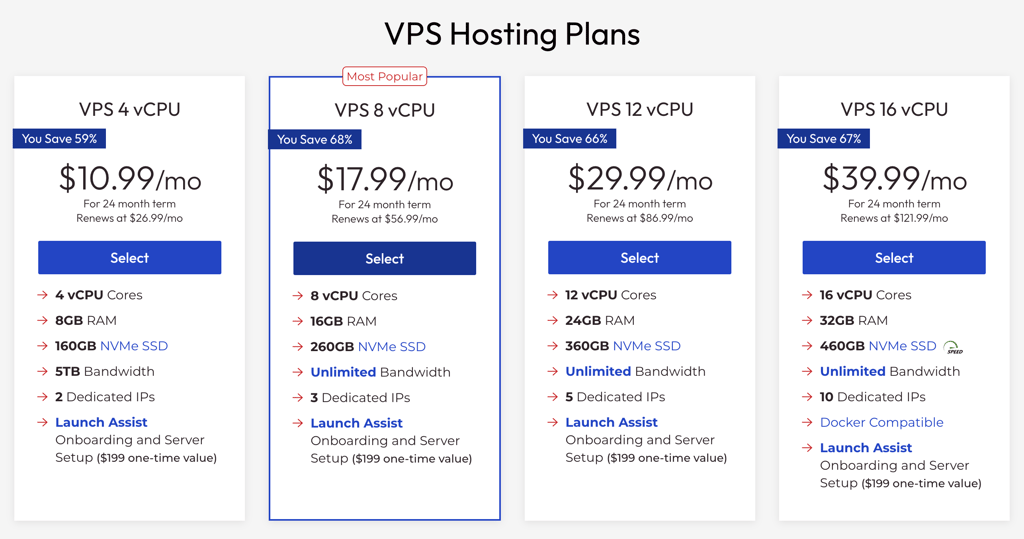
InMotion is best if you’re building an app that sends and receives massive amounts of text 24/7 – its unmetered bandwidth is one of the best among VPS providers. It’s not for you if you want an easy 1-click setup and aren’t ready to pay $199.00 for the server configuration managed for you.
9. DigitalOcean – best for fast-scaling businesses

| Rating: | |
| Price: | From $0.25/hour for a CPU droplet to meet minimal requirements |
| Money-back guarantee: | ❌ No |
| Special deal: | Available now for only $4.00! |
DigitalOcean offers hosting on droplets, highly configurable virtual machines. The best thing is that its GPU droplets have a 1-click setup for undistilled DeepSeek R1 and distilled Llama-8B and Qwen-7B models, with a pre-configured operating system and API endpoints.
DigitalOcean is also a flexible option for hosting DeepSeek Harness, with configurable droplets that let developers scale the resources allocated to persistent agent workloads as their needs grow.
As for the manual setup, you can run either lightweight 1.5B–14B models on CPU droplets or buy an AI-focused GPU droplet for 32B and 70B DeepSeek models. Moreover, for enterprise use, DigitalOcean offers Bare Metal multi-node GPU clusters that can handle the raw, uncompressed DeepSeek versions.
If you don't want to manage your server at all, you can go for a fully managed, serverless GenAI platform. There, you just pay per million tokens to use DeepSeek R1 as an API for your app.
Pricing and features
I give you an example of DigitalOcean’s CPU and GPU droplets, so you can choose what you need:
- A CPU droplet with 8 vCPU cores, 16GB RAM, and 100GB SSD storage is perfect for R1-distill-14B and costs $0.25/hour or $168.00/month
- A GPU droplet with AMD Instinct MI300X×8 that includes 20 vCPU cores, 192GB RAM, and 720GB NVMe storage is perfect for R1-distill-70B and costs $1.99/GPU/hour
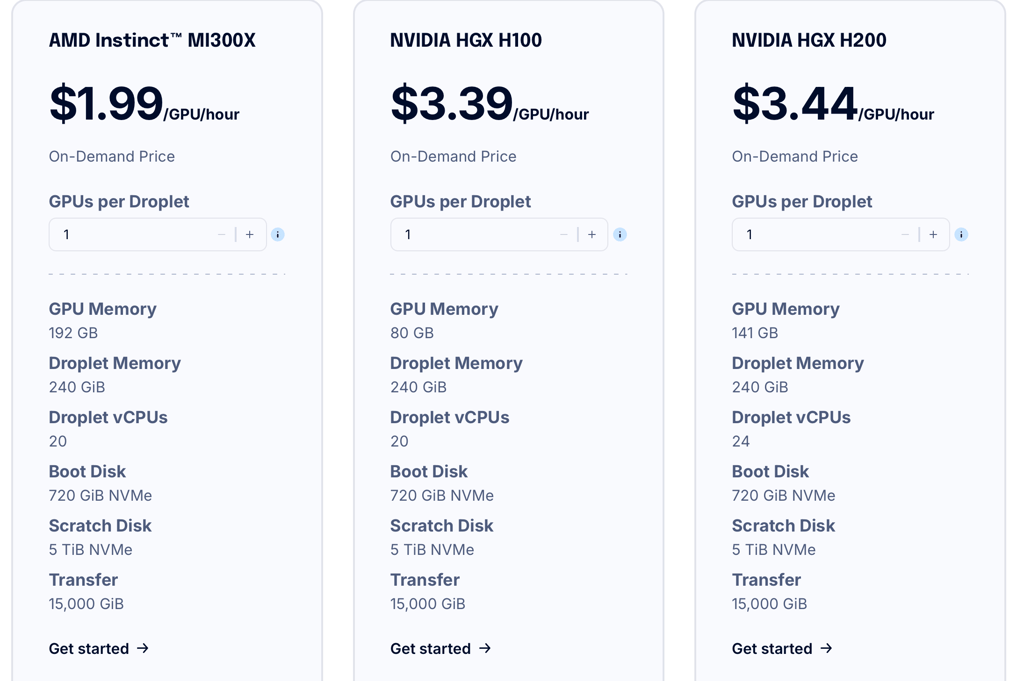
It’s perfect if you want to start with the cheaper DeepSeek-8B model on a CPU droplet and instantly migrate your architecture to massive GPU clusters when needed. It’s not the right choice if you want to run a DeepSeek 24/7, as the price will quickly build up.
How to choose DeepSeek VPS
You should start by choosing the right model for your needs. Hosting the massive models gets expensive fast, and if you're just using them for personal projects, you probably won't need their full capabilities. That's why DeepSeek-R1-14B is the most practical choice, as it’s highly capable, and it’s easy to find an affordable VPS that can run it.
Generally, a standard CPU-based VPS can perfectly handle the lightweight 1.5B to 14B distilled models. 32B models are still manageable if you max out VPS capacity, but the heaviest 70B models require renting a GPU to run flawlessly.
The problem is that a 20-core CPU server can run the 32B model at a steady, readable pace of 3–5 words per second. 70B will also technically work without crashing, but it will generate responses at a rate of only 1–2 words per second. When you're chatting with an AI, this delay feels slow and frustrating.
Here’s a quick table with the approximate resource requirements for each distilled model:
| Model | GPU vRAM | vCPU | System RAM | Storage |
| R1-Distill-Qwen-1.5B | 2GB | 4+ cores | 8GB | 5GB SSD |
| R1-Distill-Qwen-7B | 5GB | 8+ cores | 16GB | 20GB SSD |
| R1-Distill-Qwen-14B | 9GB | 8+ cores | 16GB (minimum); 32GB (ideal) | 30GB SSD |
| R1-Distill-Qwen-32B | 20GB | 12+ cores | 32GB (minimum); | 70GB NVMe |
| R1-Distill-Llama-70B | 40–46GB | 16+ cores | 64GB (minimum); | 150GB NVMe |
Importantly, DeepSeek Harness does not necessarily need to run the DeepSeek model on the same VPS. If Harness connects to an external model or API, the VPS mainly needs to support the agent runtime and its associated tools and workflows. If you self-host both the model and Harness on the same server, however, you’ll need to account for the model’s CPU, RAM, GPU, and vRAM requirements in addition to the resources required by the agent runtime.
Final thoughts
The VPS choice for DeepSeek totally depends on the model you’d like to host. The larger models are better suited to intensive work and require more resources, while the smaller ones (up to 14B) are sufficient for personal use. Here’s my quick decision guide:
- 1-click installation for DeepSeek-R1:14B – Contabo
- Managed DeepSeek hosting with custom resource-allocation – LiquidWeb
- Easy AI-assisted setup with Ollama pre-installed – Hostinger
- Cheap for lightweight models – IONOS
- Premium GPU hosting for developers – RunPod
- Cheap GPU hosting for undistilled DeepSeek – Vast.ai
- Custom resource allocation – ScalaHosting
- Unmetered bandwidth and a 90-day money-back guarantee – InMotion Hosting
- Fast-scaling from CPUs to GPUs – DigitalOcean

FAQ
Can you host your own DeepSeek server?
Yes, DeepSeek releases open-weight models like R1 that you can freely download and deploy on your own infrastructure. You just need a server with sufficient RAM for budget CPU inference or dedicated NVIDIA GPUs for high-speed performance.
How much does self-hosting DeepSeek cost?
A basic CPU VPS for lightweight distilled models can be as cheap as $8.00/month, like IONOS. However, hosting the massive, uncompressed 671B model requires enterprise-grade multi-GPU clusters, which cost $1,000/month or more.
Can I host DeepSeek locally?
Yes, you can host DeepSeek locally on a computer if it has enough RAM and GPU to handle the chosen model’s size. But just like with OpenClaw hosting, you don’t need to max out your personal computer. There’s an option to have a private instance of DeepSeek on a remote VPS server, giving you total control and data privacy without taking up your own computer's resources.