How to automate your business email with OpenClaw in 2026
Our in-house experts conduct independent, hands-on testing and transparent reviews of VPS hosting providers by using real server environments, and industry-recognized benchmarking methods to ensure impartial and evidence-based assessments
Using the same criteria for all VPS services, we share our detailed methodologies and testing practices to help customers compare performance, reliability, scalability, and overall value before choosing a virtual private server.
Learn more

Email is one of the most important communication channels for businesses. As a company grows, it receives more customer questions, invoices, meeting requests, and internal updates. Many of these messages are repetitive and suitable for AI automation to summarize conversations, draft responses, and trigger actions.
I worked with the Cybernews research team to evaluate how well OpenClaw email automations work in practice. To run OpenClaw reliably for business email automation, you’ll also need a stable hosting environment - especially if you're processing customer emails at scale. This is why many businesses choose VPS solutions like Hostinger, which provide consistent uptime and control over email workflows.

In this guide, I explain how OpenClaw works, what you can do with it, how to deploy it securely, and how to use it to automate your business email workflows.
What is OpenClaw email automation?
Openclaw is an AI agent framework that can help automate emails. It connects directly to your existing email accounts and works with your email provider rather than replacing it. Once connected via IMAP and SMTP, it monitors incoming messages and can perform automated actions based on your setup.
The system uses LLMs to draft replies, summarize long email threads, classify messages, and trigger workflows you’ve set up. For instance, it can identify whether an email is a support request, a sales inquiry, or a billing issue, and respond or route it accordingly.
A key advantage is that OpenClaw can be self-hosted using Docker. This allows it to run on infrastructure you control, rather than relying on a third-party SaaS service. For businesses handling sensitive communication, self-hosting provides greater control and visibility over how email data is processed.
What can you do with OpenClaw?
OpenClaw can be configured in different ways depending on your business needs. Below are some practical use cases and examples.
- Automate customer support replies. If your team regularly answers questions about shipping times, refunds, or account access, OpenClaw can generate reply drafts automatically. Support agents can review and send them, reducing response time while keeping quality control.
- Summarize long email threads. Client conversations often span multiple replies. Instead of reading every message in detail, OpenClaw can produce a short summary highlighting key points and pending actions. This is particularly useful for managers joining ongoing discussions.
- Auto-tag and route emails. OpenClaw can categorize emails as “Sales,” “Support,” or “Finance,” and forward them to the appropriate department. For growing teams without a full ticketing system, this helps keep inboxes organized.
- Create AI-driven workflows. For example, when an invoice arrives, OpenClaw can forward it to accounting and send a confirmation reply. If certain keywords appear, it can notify a manager automatically.
- Build an internal AI email assistant. Instead of full automation, teams can use OpenClaw to suggest replies, extract action items, or summarize conversations before responding manually. In many cases, this hybrid model works best for client communication.
How OpenClaw works
OpenClaw connects to your inbox and continuously monitors incoming emails. When a new message arrives, it reads the content and sends relevant information to an LLM through an API.
AI analyzes the intent and context of the email, and based on predefined rules, OpenClaw generates an action, such as drafting a reply, creating a summary, applying a label, or triggering a workflow. It can either send the response automatically or prepare it for review.
Because OpenClaw is self-hosted, the system runs on infrastructure you manage. Emails do not need to pass through an external SaaS automation provider. When properly configured, connections use encrypted IMAP and SMTP protocols, and API communication is secured through private keys. This provides businesses control over both automation logic and data handling.
How to connect OpenClaw to your business email
OpenClaw needs an environment that can run continuously, handle background processes, provide root access, and support advanced configuration. Standard shared hosting cannot provide these capabilities, so it isn’t a reliable option.
You could run OpenClaw locally on your own machine, but the automation would only work while the device remains powered on and connected to the internet. If your computer sleeps, restarts, or loses internet connectivity, automation stops. Running it directly on your desktop can also create security risks if the setup isn’t properly isolated.
For most businesses, VPS hosting provides the most stable solution. It allows OpenClaw to operate 24/7 without relying on personal devices and separates the automation system from your local environment. This setup reduces risk and provides more predictable performance, especially when interacting with LLMs.
Hostinger offers KVM virtualization that further improves reliability by providing hardware-level isolation. Each VPS has its own kernel, virtual CPU, RAM, and storage, so performance isn’t affected by other virtual machines on the same host. This isolation is especially useful for AI workloads and long-running automations, keeping them consistent and stable.
Docker simplifies deployment by running OpenClaw inside a container. This keeps dependencies separate from the server, makes setup straightforward, and allows the environment to be easily replicated or rebuilt if needed. Configuration files remain persistent, and sandboxing options can limit CPU, memory, and network access for additional sessions.
In terms of resources, a basic gateway with one channel can run on 1 vCPU and 1GB RAM. For smoother performance and future expansion, 2–4GB of RAM is recommended. If you plan to enable browser automation or multiple channels, additional memory helps maintain stability. A modern Ubuntu LTS or Debian-based system with Docker Engine and Docker Compose v2 is ideal.
Here’s how you can deploy OpenClaw on Hostinger using their 1-click installation:
- Choose a VPS plan. Select a KVM VPS with at least 2GB RAM and 1–2 vCPUs for stable performance.
-
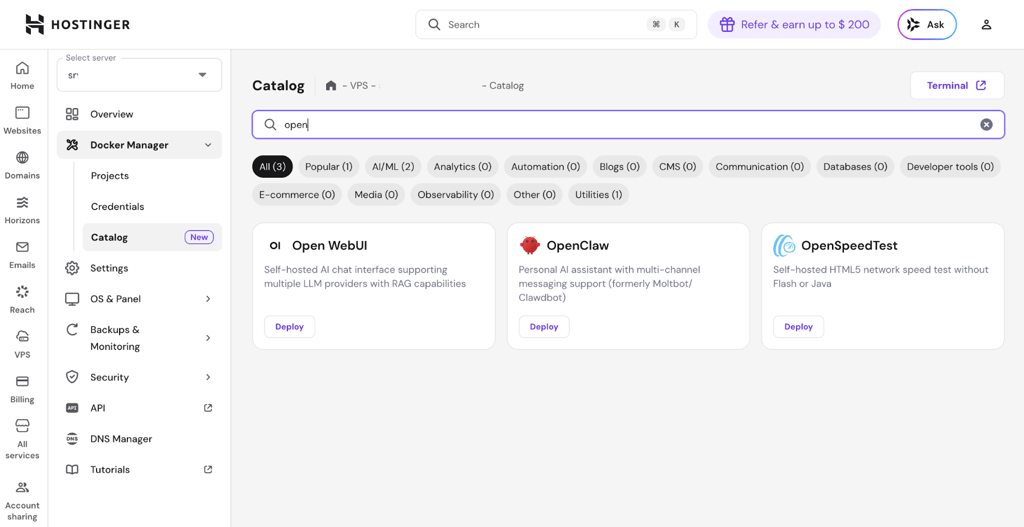
Launch OpenClaw. Search for “OpenClaw” in the Hostinger marketplace, click install, and wait while the system sets up Docker and the container.
-
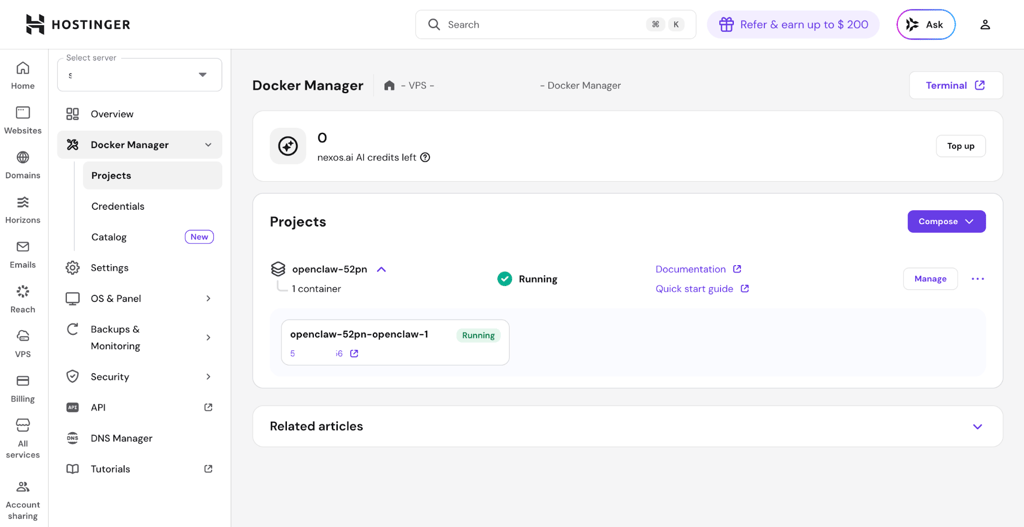
Monitor deployment. Once deployed, the VPS dashboard will show OpenClaw as running and ready.
-
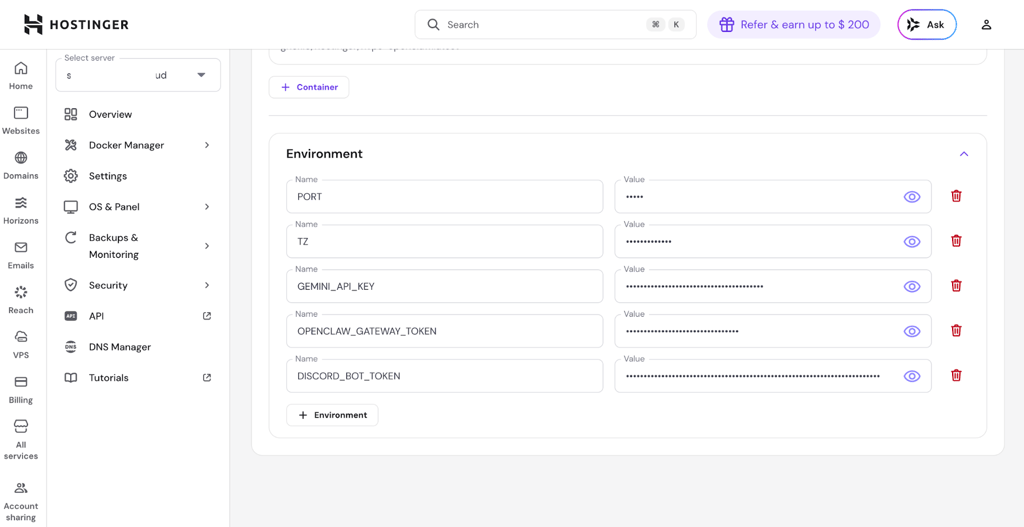
Configure the environment. Set your LLM API key, preferred channels, and other environment variables via the Hostinger panel or VPS terminal.
- Access OpenClaw. Log in to the OpenClaw dashboard to connect your email via IMAP/SMTP, configure workflows, and start automation.
- Verify functionality. Send a test email to confirm OpenClaw can read, summarize, draft replies, and trigger workflows.
Is OpenClaw email automation secure?
OpenClaw is built for self-hosted deployment, which means you control where your data is stored and processed. This gives you more oversight compared to fully managed SaaS automation tools.
Security depends on proper configuration. Your API keys for LLM access must be kept private, as exposing them could allow someone to misuse your account. It’s also important to control access to the server by setting firewall rules to block unwanted connections and to limit SSH access to trusted IPs. Additionally, email connections should always use encrypted IMAP and SMTP protocols, and the OpenClaw gateway should never be exposed publicly without authentication.
To help avoid common mistakes and protect sensitive data, here’s my recommended security checklist:
- Use HTTPS for web access
- Set strong, unique passwords
- Store API keys securely in environment variables
- Restrict SSH access to trusted IPs
- Configure firewall rules properly
Final verdict: is OpenClaw right for your business?
OpenClaw is well-suited for businesses that want control over their email automation infrastructure and prefer a self-hosted solution. It allows you to automate replies, summaries, and workflows while keeping data on the infrastructure you manage.
The setup requires more hands-on work, but it also provides flexibility and customization. For teams already comfortable using VPS environments and Docker, the learning curve is manageable.
If your business handles a high volume of structured or repetitive email communication, OpenClaw can reduce manual workload and improve response efficiency. Whether it is the right choice depends on how much control and infrastructure management you are willing to take on.
FAQ
Can I use OpenClaw with Gmail?
Yes, OpenClaw can work with Gmail. You can connect it using IMAP with an App Password or configure OAuth access through Google Cloud Console. Once connected, it can read messages, generate summaries, draft replies, and apply labels just like with other email providers.
Is OpenClaw better than SaaS email automation tools?
It depends on your priorities. SaaS tools are generally easier to set up and maintain. OpenClaw requires server management but provides greater flexibility, customization, and data control. If privacy and infrastructure ownership are important for your business, OpenClaw may be the better option.