Best VPS for AI agents in 2026
Our in-house experts conduct independent, hands-on testing and transparent reviews of VPS hosting providers by using real server environments, and industry-recognized benchmarking methods to ensure impartial and evidence-based assessments
Using the same criteria for all VPS services, we share our detailed methodologies and testing practices to help customers compare performance, reliability, scalability, and overall value before choosing a virtual private server.
Learn more
Platforms like ChatGPT or Gemini are good for one-off tasks and conversations, but hosting your own AI agent gives you more control over when it runs, what tools it accesses, and how it handles your data. It also lets you build agents that trigger workflows, connect to APIs, or run continuously in the background without you making a new request.
The right VPS depends on how your AI agent works: API-based agents need sufficient CPU, RAM, and storage to run frameworks, databases, and background services, while local-model agents require significantly more resources to run AI models directly on the server.
In this article, I compare the 6 best VPS for AI agents, explain which is best suited for each, and walk through the testing and ranking criteria I used.
6 best VPS providers for AI agents in 2026
| Provider | Best for | Visit provider | Pricing | AI agent support |
| Contabo | Best overall value for resource-heavy AI agents | Visit Contabo | From $5.28/month | Ollama, LangChain, CrewAI, n8n, OpenClaw, Docker |
| Hostinger | Overall AI agent hosting | Visit Hostinger | From $5.84/month | Hermes, LangChain, CrewAI, n8n, Agent Zero, OpenClaw |
| Hetzner | Local CPU-heavy AI agents | Visit Hetzner | From $5.99/month | Ollama, LangChain, CrewAI, RabbitMQ, ChromaDB |
| Vultr | GPU scalability | Visit Vultr | From $2.50/month | LangChain, CrewAI, n8n, Redis, Llama, Hermer |
| DigitalOcean | Production deployments | Visit DigitalOcean | From $4.00/month | LangChain, CrewAI, n8n, pgvector, Open WebUI |
| Akamai Cloud | Research and web scraping | Visit Akamai Cloud | From $36.00/month | Playwright, Selenium, Puppeteer, Celery, Docker |



Our in-house VPS research team and expert writers work together to regularly test VPS hosting services across different use cases and provide accurate, up-to-date insights. Learn more about how we test and evaluate virtual private servers.
Not sure which VPS hosting provider to choose? Answer 3 quick questions, and we’ll help you find the best fit from our tested providers.


Find VPS hosting match
Three simple questions. We’ll point you the right pick. No email, no sign up.
What will you use your VPS for?
What matters most to you?
How experienced are you with VPS hosting?
Best VPS pick for your needs

Hostinger VPS
Get your VPS up and running quickly with an easy-to-use control panel, one-click apps, and beginner-friendly management. A strong fit for automation tools, AI apps, and users who want less manual setup.
Best VPS pick for your needs

Contabo
Get more server resources for your money, with flexible VPS configurations suited to demanding workloads. A good choice for game servers, larger projects, and experienced users who want more control.
Best VPS pick for your needs

Bluehost VPS
Run websites, web apps, and AI projects on a straightforward VPS setup without unnecessary complexity. It works well for users who are comfortable managing a VPS but still want a relatively simple hosting experience.
What does an AI agent need from VPS hosting?
Before choosing a VPS, it's important to understand where your AI agent runs its language model, because this determines how much computing power you'll need. There are two main approaches: API-based agents and local-model agents.
API-based agents use the VPS to run automation scripts, manage task queues, and store memory. When the agent needs to think, it makes a quick API call to an external provider such as OpenAI, Claude, or Gemini. This means you only need a small, inexpensive VPS.
Local-model agents, on the other hand, use the VPS to do all the work and host the AI model directly on the server. Generating AI responses locally requires significantly more computing power, so you'll need a VPS with plenty of RAM or dedicated GPU hardware.
Regardless of which approach you choose, a VPS must support the rest of the AI agent's ecosystem. It needs enough CPU and RAM to run the agent runtime, reliable networking for tool connections such as APIs or web scraping, background workers to process long-running tasks, fast storage for databases and vector memory, enough disk space for logs, secure storage for API keys and credentials, and monitoring tools that automatically restart the agent if something goes wrong.
The table below compares the hardware requirements of both approaches.
| API-based agents (cloud models) | Local-model agents (self-hosted) | |
| LLM execution | External APIs (OpenAI, Anthropic, Gemini) | On the VPS via engines like Ollama or vLLM |
| Primary VPS role | Orchestrating tasks, managing state, and tool calls | Running heavy neural network math and orchestration |
| CPU requirements | Modest, 2 to 4 vCPUs | Heavy, 8 or more vCPUs if CPU-only |
| RAM requirements | 4GB to 8GB (for Docker, DBs, and runtime) | 16GB to 64GB (model weights consume massive RAM) |
| GPU needed? | ❌ No | ✅ Yes, highly recommended for usable speeds |
| Best for | Lower budget, faster setup, maximum model quality | Data privacy, offline compliance, zero per-token fees |
Best VPS for AI agents – detailed reviews
I picked the five best VPS providers for AI agents by evaluating CPU performance, RAM, storage, ease of deployment, scalability, pricing, and reliability. Together with the Cybernews research team, I tested each provider to identify the best option for different AI agent workloads.
1. Contabo – best overall value for resource-heavy AI agents
| Rating: | |
| Best for: | Resource-heavy and local-model AI agents |
| VPS type: | Unmanaged VPS |
| CPU, RAM, and storage | Up to 18 vCPU, 96GB RAM, 900GB NVMe on Performance plans |
| Docker support: | ✅ Yes |
| One-click templates: | ✅ Yes |
| Root access: | ✅ Yes |
| Backups/snapshots: | Manual snapshots, automated backups as add-ons |
| Security basics: | DDoS protection included on all plans, firewall configuration left to user |
| Starting price: | $13.00/month |
| Money-back guarantee: | ✅ Yes, 14 days |
| Special deal: | Get Contabo for just $5.28/month! |
Contabo is my top pick for AI agents that need more consistent CPU performance and RAM than a budget VPS can reliably deliver, without jumping straight to GPU pricing. Its Core VPS line already offers the best RAM-per-dollar on this list, but for agents doing real local processing (running Ollama, generating embeddings, or handling multiple background workers), Contabo’s Performance VPS tier is the better fit: it moves to the latest generation AMD EPYC CPUs, consistent NVMe I/O, and higher network bandwidth, starting at $13.00/month.
Why Contabo is good for AI agents
Contabo's Core VPS plans are unmatched for API-based agents on a budget. The entry tier already gives you 4 vCPUs and 8GB RAM for under $5.28/month, more than enough to run LangChain or CrewAI alongside n8n and a vector database. However, Core VPS uses shared vCPUs, so CPU-heavy workloads such as local embeddings or multi-worker background processing can experience performance variability under load.
That's why I recommend considering Contabo’s Performance VPS tier. It's built for exactly this kind of resource-heavy agent work (local model inference via Ollama, document processing pipelines, or research agents running multiple concurrent tasks) with more consistent CPU allocation than the Core line. Contabo also offers a free 1-click OpenClaw installer directly in the Customer Control Panel, which removes the manual Docker setup step entirely for that specific use case.
Performance, scaling, and limits
Contabo's NVMe storage is standard across both tiers, which matters for agents that frequently read/write vector embeddings and logs. Considering that Contabo's Core VPS uses shared vCPUs, CPU steal can appear under heavy concurrent load. However, the Performance VPS tier exists specifically to address that limitation for agent workloads that can't tolerate it.
Contabo doesn't offer dedicated GPU instances like Vultr does, so for agents running larger local models (Llama 70B-class) or processing images/videos, you'd still need to look elsewhere. For CPU-based local inference with smaller quantized models, or for API-based agents that just need more headroom than Core VPS reliably provides, Performance VPS is a strong middle ground.
2. Hostinger – best overall VPS for AI agents
| Rating: | |
| Best for: | API-based AI agents |
| VPS type: | Unmanaged VPS |
| CPU, RAM, and storage | Up to 8 vCPU, 32GB RAM, 400GB NVMe SSD |
| Docker support: | ✅ Yes |
| One-click templates: | ✅ Yes |
| Root access: | ✅ Yes |
| Backups/snapshots: | Manual snapshots and automated backups |
| Security basics: | DDoS protection, firewall, KVM isolation |
| Starting price: | From $5.84/month |
| Money-back guarantee: | ✅ Yes, 30 days |
| Special deal: | Get up to 73% OFF Hostinger VPS |
Hostinger is one of my top recommendations for API-based agents because it provides the needed amount of CPU, RAM, and fast NVMe storage to run your agent, automation workflows, vector databases, and supporting services. It also stands out for its affordable pricing and beginner-friendly hPanel.
Why Hostinger is good for AI agents
Hostinger is best suited for AI agents that use external LLM APIs because the VPS does not need to run the AI model itself. Instead, it handles the software around the agent, such as the agent framework, automation workflows, vector database, and background tasks, while services like OpenAI, Anthropic, or Gemini generate the AI responses, which keeps hardware requirements lower.
The KVM 2 plan is my recommended plan to start, and it works best for one or two Dockerized AI agents. It has enough memory to run frameworks like LangChain or CrewAI, together with services such as n8n, ChromaDB, and Redis. The included 100GB NVMe storage is also enough for vector embeddings, conversation history, logs, and Docker volumes.
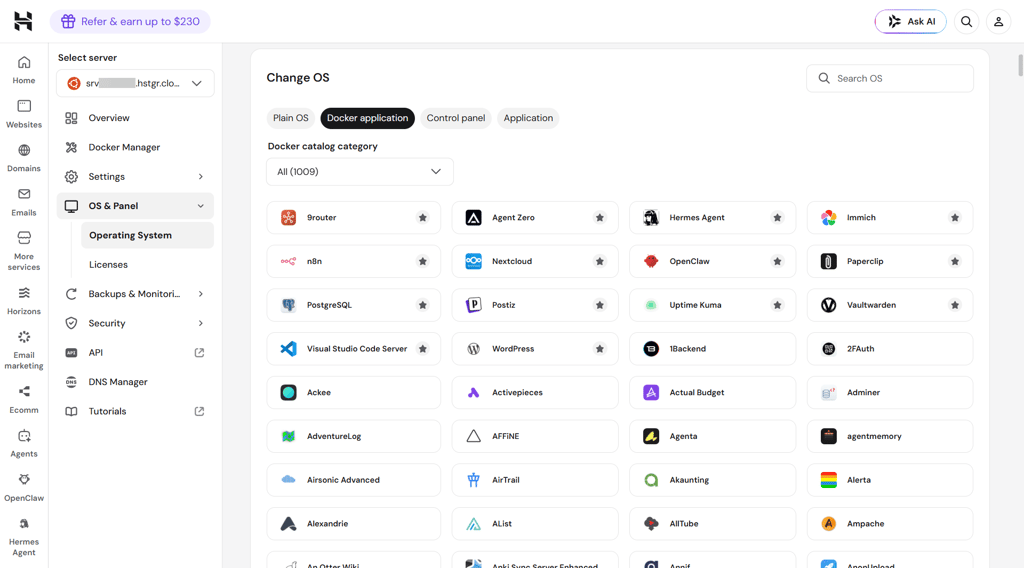
During my testing, the KVM 2 plan handled this setup smoothly, and I also tested one-click templates for n8n, Agent Zero, OpenClaw, and Ollama, which made the deployment faster than installing manually. If your agent starts running multiple workflows at the same time, scraping websites continuously, or serving many users, you can upgrade to the KVM 4 plan, which provides more memory to keep services reliable and responsive.
Performance, scaling, and limits
Hostinger performed consistently well in our VPS testing, and achieved 100% uptime, 99.71% reachability, and handled over 13,500 requests without HTTP failures. It also delivered more than 60,000 read IOPS, which helps AI agents retrieve vector embeddings and write logs quickly.
For most API-based AI agents, 8GB RAM is enough, but if you plan to run multiple agents or store larger knowledge bases locally, 16GB RAM is a better choice because vector databases and background services typically consume memory before CPU resources become the limiting factor.
Hostinger doesn't offer GPU VPS plans, so it's best suited for agents that call external AI APIs. If you want to run models like Llama, Mistral, or Qwen directly on your server instead of using an API, you'll need a provider with GPU instances, such as Vultr.
3. Hetzner – best for resource-heavy AI agents

| Rating: | |
| Best for: | Resource-heavy AI agents |
| VPS type: | Cloud VPS |
| CPU, RAM, and storage | Up to 84 vCPU, 192GB RAM, 960GB NVMe SSD |
| Docker support: | ✅ Yes |
| One-click templates: | ❌ No |
| Root access: | ✅ Yes |
| Backups/snapshots: | Snapshots and backups |
| Security basics: | Firewall, private networking, DDoS protection |
| Starting price: | From $5.99/month |
| Money-back guarantee: | ❌ No |
| Special deal: | Available now for only €1.60! |
Hetzner is a good choice for AI agents that need more CPU resources for local processing. For example, it can run lightweight Ollama models, generate embeddings for a knowledge base, process uploaded documents, or handle large scraping and research workflows directly on the VPS.
Why Hetzner is good for AI agents
Hetzner's higher CPU performance makes it a strong fit for AI agents that perform resource-heavy background tasks instead of relying on cloud AI APIs. For example, you can use it to run Ollama with smaller quantized models, manage document processing pipelines, or continuously crawl websites before sending the final results to an LLM. This helps tasks complete faster, especially when running multiple workers at the same time.
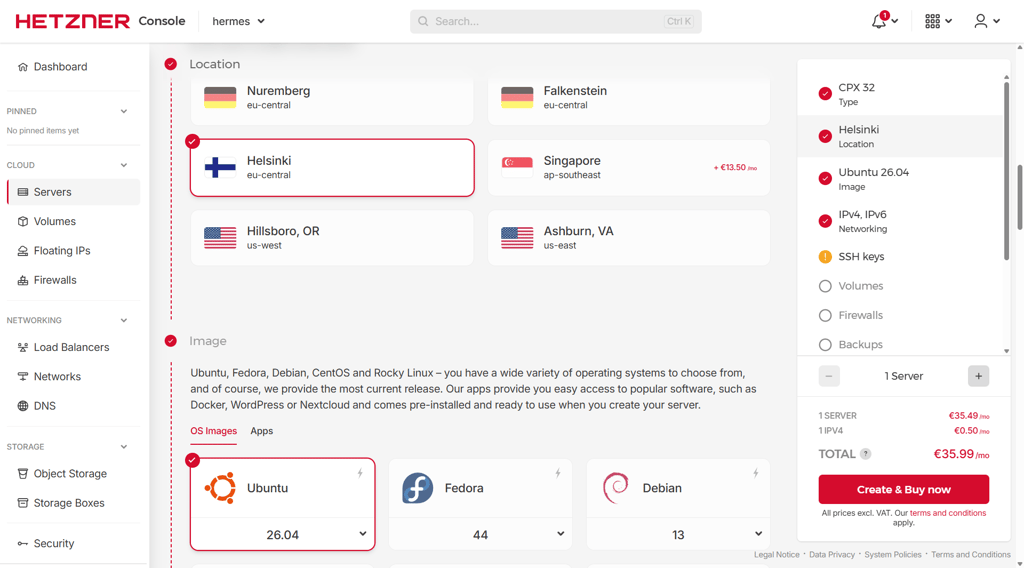
For most users, I recommend starting with the CPX32 plan (4 vCPU, 8GB RAM). It provides enough resources to run an AI framework alongside supporting services such as RabbitMQ for managing queued tasks, Loki for storing logs, and a local vector database. If your knowledge base grows over time, you can attach a Hetzner Volume to add SSD storage without migrating to a new server.
Performance, scaling, and limits
Hetzner stands out because it offers more CPU cores and RAM than many similarly priced VPS providers. This gives your agent more resources to process queued tasks, convert documents into embeddings, or run several background services simultaneously.
An 8GB RAM VPS is enough for a single AI agent and its supporting tools. If you begin serving multiple users, processing larger datasets, or running several agents at once, upgrading to a higher-tier VPS or a dedicated server provides the extra CPU and memory needed to maintain performance.
The main limitation is GPU support. While smaller Ollama models can run on the CPU, larger models like Llama 70B or AI agents that process images and video require a GPU-enabled provider.
4. Vultr – best for scalable AI agents with GPU upgrades

| Rating: | |
| Best for: | AI agents that may need GPU acceleration |
| VPS type: | Cloud VPS, GPU cloud |
| CPU, RAM, and storage | Up to 96 vCPU, 256GB RAM, 6.4TB NVMe SSD |
| Docker support: | ✅ Yes |
| One-click templates: | ✅ Yes |
| Root access: | ✅ Yes |
| Backups/snapshots: | Snapshots and backups |
| Security basics: | Firewall, private networking, DDoS protection |
| Starting price: | From $2.50/month |
| Money-back guarantee: | ❌ No |
| Special deal: | Available now for only $2.50! |
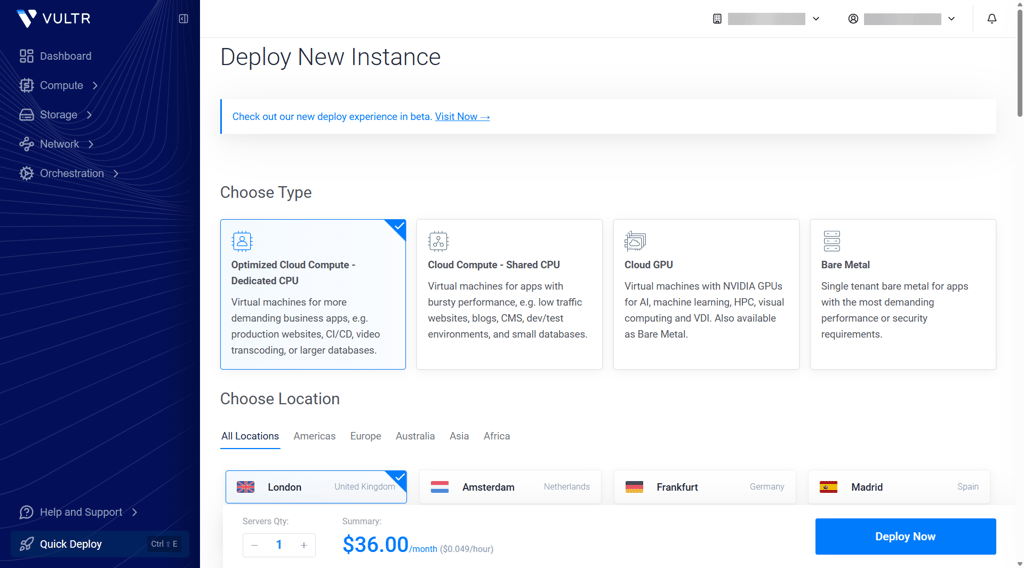
Vultr is useful for AI agents that may eventually need GPU resources. For example, you can first run a research agent using an external LLM API while the VPS handles automation, memory, and scheduled tasks. If you later switch to a local model like Llama or add image processing, you can move the workload to a GPU server on the same platform.
Why Vultr is good for AI agents
Vultr provides the resources to run AI agent software, including its code, automation workflows, memory storage, and background tasks. For example, you can host a LangChain or CrewAI agent, run n8n workflows, store agent memory in a vector database, and use Redis to manage tasks that need to run in the background.
A High Performance Cloud Compute plan with 2 vCPU and 4GB RAM is a reliable starting point for smaller AI agents. This plan can handle an agent that uses an external LLM API while the VPS manages workflows, stored data, scheduled jobs, and integrations with other services.
If your agent starts processing larger amounts of data, running multiple workflows at once, or handling more users, you will be able to move to a larger Vultr instance. When you need to run local models such as Llama, use image recognition, or process other AI workloads that require GPU acceleration, you can switch to Vultr's GPU instances without moving your entire setup to another provider.
Performance, scaling, and limits
A 2 vCPU, 4GB RAM Vultr instance is enough for smaller AI agents that use external LLM APIs. This gives the VPS enough resources to run the agent's code, Docker containers, automation workflows, background jobs, and supporting services such as Redis queues for managing tasks that do not need to run immediately.
Vultr's NVMe storage can store agent memory, vector database files, conversation history, and application logs. However, if your agent collects large datasets or keeps a growing knowledge base, you may need additional storage or a larger instance to avoid running out of space.
As your workload increases, CPU and RAM become the main limits. For example, an agent that processes thousands of documents, runs multiple workflows at once, or serves many users may need a larger cloud instance with more memory and processing power. If you want to run local LLMs like Llama, add image recognition, or process video, choose a GPU instance rather than a standard VPS, as these workloads require dedicated AI hardware.
5. DigitalOcean – best for production-ready AI agents
| Rating: | |
| Best for: | AI agents with managed infrastructure |
| VPS type: | Cloud VPS, GPU cloud |
| CPU, RAM, and storage | Up to 96 vCPU, 256GB RAM, 6.4TB NVMe SSD |
| Docker support: | ✅ Yes |
| One-click templates: | ✅ Yes |
| Root access: | ✅ Yes |
| Backups/snapshots: | Snapshots and backups |
| Security basics: | Firewall, private networking, DDoS protection |
| Starting price: | From $4.00/month |
| Money-back guarantee: | ❌ No |
| Special deal: | Available now for only $4.00! |
DigitalOcean is a good choice for AI agents that need reliable production infrastructure. This could be a customer support agent who can run its core application on a Droplet, store long-term memory and embeddings in a managed database, and use background workers to process tasks without overloading the main server.
Why DigitalOcean is good for AI agents
DigitalOcean makes it easier to separate your AI agent's components as your project grows. The Droplet can run your agent code, Docker containers, and automation workflows, while managed services handle data storage, vector search, and background processing.
A Basic Droplet with 2 vCPU and 4GB RAM is a good starting point for smaller AI agents. It can run frameworks like LangChain or CrewAI, automation tools such as n8n, and supporting services. For continued agent memory, using Managed PostgreSQL with pgvector keeps embeddings and conversation history separate from the application server, making upgrades easier.
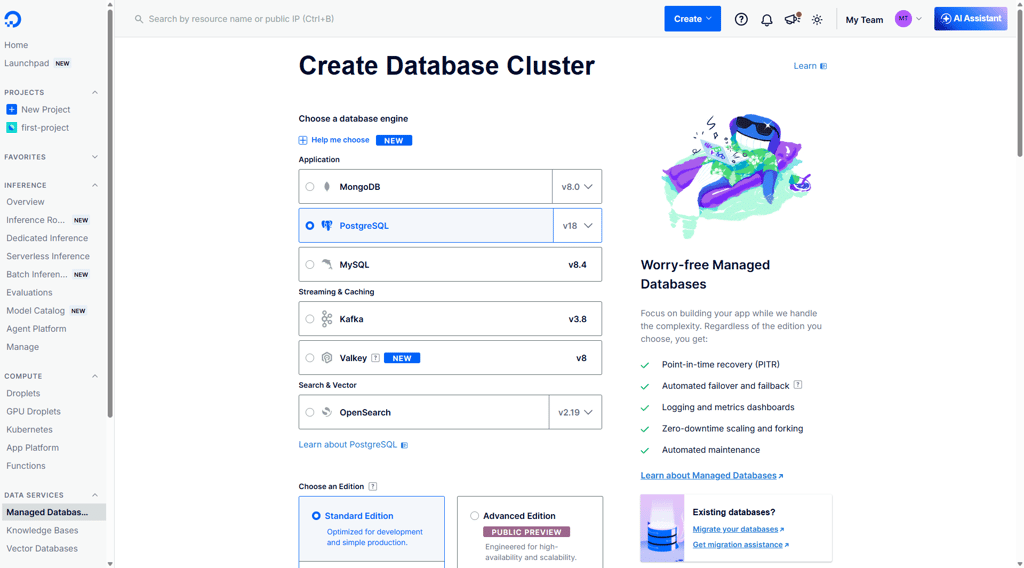
DigitalOcean also offers one-click deployments for tools like Docker, n8n, and Open WebUI, which can reduce setup time when building an AI agent environment.
Performance, scaling, and limits
A 4GB RAM Droplet is suitable for AI agents that handle tasks like answering user requests, triggering workflows, or connecting multiple APIs. As usage grows, CPU and memory become important when processing larger datasets, running more background jobs, or serving more users simultaneously.
Keeping vector databases, logs, and larger datasets on managed storage helps prevent the Droplet from running out of disk space. You can then scale compute resources separately without rebuilding your agent setup.
DigitalOcean is better suited for agents that use external AI APIs rather than running local models. If you need to run Llama, Qwen, image generation, or other GPU-heavy workloads directly on your server, choose GPU infrastructure instead.
6. Akamai Cloud (formerly Linode) – best for AI research and web-scraping agents

| Rating: | |
| Best for: | AI research, monitoring, and web-scraping agents |
| VPS type: | Cloud VPS, Dedicated CPU, GPU instances |
| CPU, RAM, and storage | Up to 256 vCPUs, 512GB RAM, and 7.2TB storage |
| Docker support: | ✅ Yes |
| One-click templates: | ❌ No |
| Root access: | ✅ Yes |
| Backups/snapshots: | Snapshots and backups |
| Security basics: | Cloud Firewall, DDoS protection, VLAN networking |
| Starting price: | From $36.00/month |
| Money-back guarantee: | ❌ No |
I recommend Akamai Cloud if you plan to host an AI agent that continuously collects information from the web. For example, a research agent monitoring news websites, a price-tracking agent comparing products across online stores, or a competitor-monitoring agent scanning websites before sending the collected information to an LLM.
Why Akamai Cloud is good for AI agents
Akamai Cloud is well-suited for AI agents that rely on automated browsers, such as Playwright, Selenium, or Puppeteer. These agents consume a lot more CPU resources than a typical API-based agent because they load and interact with full web pages. Dedicated CPU plans help keep scraping jobs responsive by providing consistent processor performance, even during long-running workloads.
I recommend starting with a Dedicated CPU plan with 2 vCPU and 4GB RAM. It provides enough resources to run a single research or monitoring agent, along with supporting services such as Celery for background task queues and Docker containers. If your agent stores large amounts of scraped content, Block Storage lets you expand storage capacity on the same server.
Performance, scaling, and limits
A 2 vCPU, 4GB RAM instance is suitable for smaller web-scraping agents, but browser automation can quickly increase CPU and memory usage. If your agent crawls many websites simultaneously, processes thousands of pages each day, or serves multiple users, upgrading to a larger Dedicated CPU or High Memory instance helps maintain consistent performance.
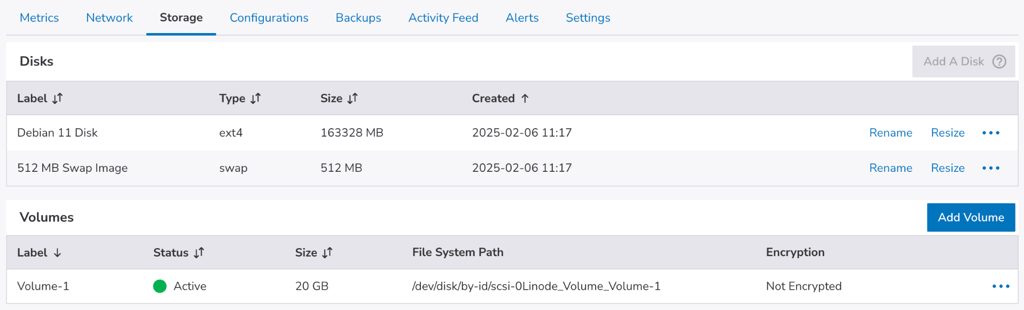
For persistent data, Block Storage is useful for storing scraped documents, datasets, screenshots, and application logs without filling the VPS's disk space. If you later add local image analysis or other AI workloads that require GPU acceleration, Akamai Cloud also offers GPU instances, although the selection is more limited than providers focused on AI infrastructure.
How to choose a VPS for AI agents
Choosing a VPS for an AI agent depends on what your agent actually runs on the server. If it uses APIs from OpenAI, Anthropic, or Gemini, you don't need a powerful GPU. Instead, prioritize enough resources to run your agent's code, automation workflows, databases, and background services reliably.
For most AI agents, 4GB to 8GB of RAM will be enough to run Docker containers, vector databases, Redis queues, and frameworks like LangChain or CrewAI. If you plan to host multiple agents, larger knowledge bases, or heavy document processing, choose 16GB RAM or more.
Look for Docker support and root access, as they make it easier to deploy AI frameworks and supporting tools. Features like cron jobs, webhooks, and background workers are also important because they let your agent run scheduled tasks or react automatically to new events.
Security and reliability matter too, so choose a VPS with a firewall, backups, and snapshots so you can quickly recover your agent if an update or configuration change goes wrong.
Finally, pick a provider that lets you upgrade CPU, RAM, and storage as your workload grows. Only consider GPU hosting if you plan to run open-source models like Llama or Qwen locally. For AI agents that rely on external LLM APIs, a standard VPS is usually sufficient.
Final thoughts
The best VPS for AI agents depends on how your agent works and how you expect it to grow in the future. If you’re building resource-heavy AI agents, Contabo offers the best balance of performance and affordability, making it the best choice for most users.
For API-based agents, I'd recommend Hostinger, and if your agent performs more processing locally, Hetzner’s strong CPU resources are the better fit. Vultr is ideal if you expect to upgrade to GPU workloads, while DigitalOcean suits production deployments that benefit from managed databases and storage. For research, monitoring, and web-scraping agents, Akamai Cloud provides reliable dedicated CPU performance.
Most importantly, instead of choosing the most powerful VPS, choose one that matches your AI agent’s workload and provides easy scaling options.
FAQ
Can AI agents run on a VPS?
Yes. Most AI agents run well on a VPS because the server hosts the agent's code, automation workflows, databases, and background tasks. If your agent uses cloud AI models like OpenAI or Anthropic, the VPS doesn't need to generate AI responses itself – it simply coordinates the services that make the agent work.
Do AI agents need GPU hosting?
No, not always. Most AI agents that use external AI APIs don't benefit from a GPU because the language model runs on the provider's infrastructure. GPU hosting only becomes necessary if you want to run open-source models like Llama or Qwen locally, or process AI workloads such as image or video analysis.
How much RAM does an AI agent VPS need?
It depends on your workload. For a single API-based AI agent, 4GB to 8GB RAM is usually enough to run Docker containers, automation tools, vector databases, and background services. If you're running multiple agents, larger knowledge bases, or local AI models, 16GB RAM or more is a better starting point.
Is Docker best for AI agent hosting?
Yes. Docker makes it easier to deploy and manage AI agents by keeping each service in its own container. For example, your AI agent, vector database, Redis queue, and automation platform can run independently, making updates simpler and reducing software conflicts.
Can I run multiple AI agents on one VPS?
Yes, as long as the VPS has enough resources. Multiple AI agents can share the same server if there is sufficient CPU, RAM, and storage available. As you add more agents, background jobs, or users, upgrading to a higher-tier VPS helps maintain consistent performance.