Best Ollama VPS hosting in 2026
Our in-house experts conduct independent, hands-on testing and transparent reviews of VPS hosting providers by using real server environments, and industry-recognized benchmarking methods to ensure impartial and evidence-based assessments
Using the same criteria for all VPS services, we share our detailed methodologies and testing practices to help customers compare performance, reliability, scalability, and overall value before choosing a virtual private server.
Learn more

Ollama is one of the simplest tools to run open-source LLMs like Llama, Qwen, and Mistral without relying on a paid API. However, running Ollama on a personal laptop is not always the best choice, especially if you need the model to stay online, handle agent tasks, or remain separate from your everyday device.
That’s why an Ollama VPS can be a better option. Remote hosting gives you 24/7 uptime, cleaner security separation, SSH access, and more room to scale resources when a local setup starts to struggle.
In this guide, I break down the 8 best Ollama VPS hosting providers in 2026, compare their setup options, and explain what server resources you actually need for self-hosting Ollama.
8 Best Ollama VPS providers in 2026
- Contabo – best Ollama VPS for raw resources per dollar
- Hostinger – best Ollama VPS for beginners
- DigitalOcean – best Ollama VPS for developers
- Vultr – best Ollama VPS for scalable deployments
- InterServer – best affordable VPS for Ollama
- Kamatera – best Ollama VPS for hardware customization
- OVHCloud – best Ollama VPS for privacy and compliance
- Hetzner – best Ollama VPS for hardware value



Our in-house VPS research team and expert writers work together to regularly test VPS hosting services across different use cases and provide accurate, up-to-date insights. Learn more about how we test and evaluate virtual private servers.
Finding the right VPS hosting doesn't have to be complicated. Answer 3 simple questions, and we'll recommend an option that fits your needs.


Find VPS hosting match
Three simple questions. We’ll point you the right pick. No email, no sign up.
What will you use your VPS for?
What matters most to you?
How experienced are you with VPS hosting?
Best VPS pick for your needs

Hostinger VPS
Get your VPS up and running quickly with an easy-to-use control panel, one-click apps, and beginner-friendly management. A strong fit for automation tools, AI apps, and users who want less manual setup.
Best VPS pick for your needs

Contabo
Get more server resources for your money, with flexible VPS configurations suited to demanding workloads. A good choice for game servers, larger projects, and experienced users who want more control.
Best VPS pick for your needs

Bluehost VPS
Run websites, web apps, and AI projects on a straightforward VPS setup without unnecessary complexity. It works well for users who are comfortable managing a VPS but still want a relatively simple hosting experience.
What is Ollama, and why do you need hosting for it?
Ollama is a tool that runs large language models on hardware you control. In simple terms, Ollama lets you download and run hundreds of models, such as Qwen, Llama, Mistral, Gemma, without paying tokens for every AI API prompt.
Hosting Ollama on a VPS moves the workload from your everyday laptop to a dedicated remote server. This gives you cleaner separation from personal files and easier remote access through SSH, bots, agents, or internal tools. It also means your Ollama setup can stay online without relying on your laptop’s battery, Wi-Fi, or performance.
However, the right VPS depends on the models you want to run. Small models can work on a CPU VPS for basic prompts, while larger models need more RAM, stronger CPUs, or GPU hosting for faster responses. Further, I explain the main hosting types and help you decide which setup fits your Ollama workload.
Best VPS for Ollama 2026 – detailed reviews
Below, I review the best VPS providers for Ollama based on setup difficulty, server resources, pricing, and how well each option fits real Ollama use cases. I also point out their strengths and weaknesses so you can pick the best VPS Ollama hosting in 2026 for your specific needs.
1. Contabo – best Ollama VPS overall

| Rating: | |
| Setup time: | 15–20 minutes (manual install) |
| Starting price: | $5.28/month |
| Plan for Ollama: | Cloud VPS Plus 4, from $13.00/month |
| Money-back guarantee: | 14 days |
| Special deal: | Get Contabo for just $5.28/month! |
Contabo is the best Ollama VPS for anyone prioritizing raw specs over convenience. It doesn't have a one-click Ollama installer as Hostinger does, but it beats every other provider on my list in terms of RAM and CPU per dollar, often by a wide margin.
Here are the main points that stood out during testing:
- Resource allocation is Contabo’s biggest strength. The Cloud VPS 6 plan gives you 6 vCPU cores and 12GB RAM for $7.20/month, more RAM than Hostinger's comparable KVM 2 plan at a similar price, and well ahead of InterServer's 4-slice tier too. Moreover, for workloads that need more consistent CPU performance, such as running larger models or handling concurrent requests, Contabo's Performance VPS tier steps up to faster AMD EPYC CPUs and higher-priority resource allocation, starting from $13.00/month.
- NVMe storage is standard across the Performance VPS range, which matters when pulling and loading larger models like Llama or Mistral, so disk I/O doesn't become a bottleneck.
- Contabo is fully self-managed with full root access, so installing Ollama means running the standard curl install script over SSH – the same manual process as Kamatera, OVHcloud, and Hetzner.
- Data centers span 11 locations in total, including Germany, the US, and the UK, providing reasonable location flexibility to reduce latency to your Ollama endpoint.
Contabo’s pricing starts at $5.28/month for the Cloud VPS 4 (4 vCPU, 8GB RAM) plan on Contabo’s Core VPS tier, but for comfortable Ollama use with room for larger models, I'd recommend the Cloud VPS Plus 4 at $13.00/month: 6 AMD EPYC vCPU cores, 8GB RAM, and 150GB NVMe, undercutting most comparable plans on this list. Contabo also includes free DDoS protection on every plan, and a 14-day money-back guarantee to test the setup.
2. Hostinger – best Ollama VPS for beginners

| Rating: | |
| Setup time: | 5–10 minutes with the one-click installer |
| Starting price: | $5.84/month |
| Plan for Ollama: | KVM 2, from $8.09/month |
| Money-back guarantee: | 30-day |
| Special deal: | Get up to 73% OFF Hostinger VPS |
Hostinger is the best Ollama VPS for beginners because it handles most of the manual setup. Besides that, Hostinger offers one of the best value-for-money feature sets for a lightweight Ollama VPS.
Here are the main points that stood out during testing:
- The biggest advantage is the one-click setup. I did not need to go through the usual Linux installation flow, which makes Hostinger a good option for users who want to try Ollama without spending much time in the command line.
- In my tests, I used the KVM 2 plan with 2 vCPU cores, 8GB RAM, and 100GB NVMe storage. At $8.09/month, it offers a lot for Ollama setup compared to many developer-focused providers, especially since the fixed VPS pricing avoids the hourly GPU costs you’d see with options like DigitalOcean or Vultr.
- Hostinger uses NVMe storage, which helps when pulling models, loading them, and working with local Docker files, logs, or agent data. Its VPS data centers also span Europe, Asia, North America, and South America, so users can choose a server location closer to them during setup to further reduce latency.
- Ollama can run models such as Llama, Gemma, Qwen, and Mistral on Hostinger if the selected VPS plan has enough RAM and storage. In my test, Gemma 4 ran successfully, with responses taking about 15 seconds to form on the CPU-only KVM 2 plan.
Similarly with all of the providers in my list, the starting pricing is not quite fit for Ollama hosting. While Hostinger’s pricing starts at $5.84/month, for actual use, KVM 2 is the better starting point at $8.09/month because it gives more room for models, files, and basic always-on tasks. Hostinger also includes a 30-day money-back guarantee, so you can test the setup before committing long-term.
2. DigitalOcean – best Ollama VPS for developers

| Rating: | |
| Setup time: | 15–20 minutes |
| Starting price: | $4.00/month |
| Plan for Ollama: | Droplet with 8GB RAM and 160GB storage, from $48.00/month |
| Money-back guarantee: | No |
| Special deal: | Available now for only $4.00! |
DigitalOcean is the best Ollama VPS for developers because it gives you more control over how the server is built, accessed, and scaled. You can start with the Ollama with the Open WebUI Marketplace app, manage the Droplet through SSH, use snapshots before changing the setup, and move to larger CPU or GPU resources as the project grows.
Here are the main points that stood out:
- DigitalOcean’s main advantage is control. It lets developers choose between shared CPU, dedicated CPU, memory-optimized, storage-optimized, and GPU Droplets.
- During testing, the Marketplace app provided a working Ollama WebUI without a lengthy manual setup. After deployment, I could open the interface in a browser, pull a model, and still use SSH if I needed more control.
- Droplets can be rebuilt, resized, snapshotted, or scaled as the project changes, which helps if you start with Phi-3 or Gemma and later move to larger Llama, Qwen, or Mistral models.
- For more resource-intensive Ollama workloads, DigitalOcean also offers GPU Droplets. These are great once CPU-only hosting becomes too slow, albeit at a much higher price.
Pricing starts at $4.00/month for a small basic Droplet, but that is not enough for regular Ollama use. However, for an actually usable Ollama setup, I would look at the 8GB RAM and 160GB storage tier for $48.00/month. GPU Droplets start much higher, with the RTX 4000 Ada option listed at $0.76/GPU/hour.
4. Vultr – best Ollama VPS for scalable infrastructure

| Rating: | |
| Setup time: | 10–20 minutes |
| Starting price: | From $30.00/month |
| Plan for Ollama: | Cloud VPS with 16GB RAM, from $24.00/month |
| Money-back guarantee: | No |
| Special deal: | Available now for only $2.50! |
Vultr is a good fit for Ollama if you expect your setup to grow over time. You can start with a regular VPS for lightweight models and move to larger VPS or GPU plans as performance needs increase.
Here are the main points that stood out:
- Vultr’s main strength is its wide range of infrastructure. It offers standard Cloud VPS plans, larger VPS slices, dedicated resources, bare metal, and Cloud GPU, so you are not locked into one hosting type as your Ollama setup grows
- Vultr is more technical than, say, Hostinger, but that can be useful for developers. During testing, I gained root access, Linux control to manage Ollama models, environment variables, and remote access.
- Its global infrastructure is another advantage for shared access. With 32 data center locations, you can place the VPS closer to you for reduced latency.
- Overall, I would use Vultr more for team or developer setups rather than for a first Ollama test. Its VPS plans are self-managed, so you are expected to be comfortable with SSH, Linux commands, firewall rules, and model management.
Pricing starts at $2.50/month for a small Cloud VPS, but I would not use that plan for regular Ollama hosting. For a more practical setup, the 8-slice plan at $24.00/month gives 16GB RAM and 320GB storage. Vultr also offers GPU options, but, similarly to all GPU-based options in the market, they can get very costly.
5. InterServer – best Ollama VPS for budget setups

| Rating: | |
| Setup time: | 15–20 minutes |
| Starting price: | From $3.00/month |
| Plan for Ollama: | 4 slices, from $12.00/month |
| Money-back guarantee: | No |
| Special deal: | Get Interserver VPS for just $3.00/month |
InterServer is the best affordable VPS for Ollama because its slice-based pricing keeps costs low and predictable. It is not built with one-click AI deployment, but it gives you a cheap self-managed server for testing small models, private assistants, and RAG projects.
Here are the main points that stood out to me:
- InterServer’s main advantage is price control. While VPS plans start at $3.00/month, usable Ollama plans start with the 4-slice setup at $12.00/month and include 2 cores, 8GB RAM, 160GB SSD storage, and 8TB transfer, which is unusually generous, even for affordable VPS providers.
- I also like that resources scale gradually. Instead of moving to a completely different plan, you can add more slices as your Ollama rig grows to fix any bottlenecks that could be encountered.
- Full root access makes it easy to install Ollama, Open WebUI, Docker, or other AI tools. It is a more hands-on setup than Hostinger, but it gives complete control over the environment.
- InterServer works best for smaller models, development environments, internal tools, and RAG projects. Its CPU-based VPS plans can run Llama, Gemma, Qwen, and Mistral models.
As mentioned earlier, InterServer’s cheapest plan starts at $3.00/month but offers only 2GB of RAM, which won’t be enough for Ollama. During InterServer review, I found that the actual starting point would be closer to $12.00/month, which is still affordable, but there is no money-back guarantee, as you get with Hostinger, so you must choose the right amount of resources.
6. Kamatera – best Ollama VPS for hardware customization

| Rating: | |
| Setup time: | 10–15 minutes |
| Starting price: | From $4.00/month |
| Plan for Ollama: | 8GB RAM and 100GB storage, from around $32.00/month |
| Money-back guarantee: | No, but there is a 30-day free trial |
| Special deal: | Get Kamatera now, starting at only $4.00/month |
Kamatera is the best Ollama VPS for hardware customization because it lets you build the server around the model exactly you want to run. Instead of choosing a fixed VPS tier, you can adjust CPU, RAM, storage, traffic, and location to a tee before deployment.
Here are the main points that stand out about Kamatera VPS for Ollama:
- Kamatera’s biggest advantage is granular control. You can start with a small test server, then raise RAM, CPU, or storage as your Ollama setup moves from tiny models to larger local LLMs.
- The pre-built Ollama App Image can shorten the setup process, but Kamatera is still more technical than Hostinger. It is better for users who are comfortable choosing resources, managing the OS, and working with SSH.
- It works well for testing different Ollama configurations because billing can be hourly or monthly. The 30-day free trial also gives you room to test server sizes before keeping one long term.
- Kamatera also gives strong location coverage, with data centers across North America, Europe, Asia, and the Middle East. This helps place Ollama closer to users, tools, or internal apps that connect to it.
Kamatera’s pricing starts at $4.00/month, but again, the entry setup is too weak for regular Ollama hosting. For actual use, I would look at its custom server builder and would go with at least 8GB RAM and enough NVMe storage for models, logs, and Open WebUI data, which starts at around $32.00/month.
7. OVHCloud – best Ollama VPS for privacy and compliance

| Rating: | |
| Setup time: | 10–15 minutes |
| Starting price: | From $4.54/month |
| Plan for Ollama: | VPS-3, from $12.32/month |
| Money-back guarantee: | No traditional money-back guarantee |
OVHcloud is a good Ollama VPS choice if privacy, predictable billing, and network protection matter more than a polished beginner setup. It gives you a self-managed VPS with root access, NVMe storage, unlimited traffic, daily backups, and built-in anti-DDoS protection.
Main points that stood out about OVHcloud VPS for Ollama:
- Its strongest point is infrastructure protection. Anti-DDoS is included by default, which is useful if you connect Ollama to bots, web tools, or a private API that could receive outside traffic.
- The VPS plans include daily backups, which is rare at this price. That helps protect model files, configs, logs, and Open WebUI data if an update or server change breaks the setup.
- OVHcloud also offers Cloud GPU instances for larger needs, such as training or AI workloads. Options include NVIDIA V100S, A10, L4, L40S, H100, and even H200 GPUs. That said, they are much more expensive, starting at $0.60/hour.
- It is still a more manual provider than Hostinger. There is no direct one-click Ollama VPS app, so users should expect to install Ollama through the terminal or Docker and configure access themselves.
Similarly to all of the providers in the list, while VPS pricing starts at $4.54/month, I would look at VPS-3 from $12.32/month for a more functional Ollama experience. It includes 6 vCores, 12GB RAM, 100GB NVMe storage, unlimited traffic, and 1Gbps public bandwidth. For larger models or faster response times, OVHcloud GPU or dedicated server options are a better fit.
8. Hetzner – best Ollama VPS for hardware value

| Rating: | |
| Setup time: | 15–20 minutes |
| Starting price: | €1.60/month |
| Plan for Ollama: | CX43, from $19.09/month |
| Money-back guarantee: | No |
Hetzner is a good Ollama VPS if you want robust server specs for the price and do not need a guided setup. It gives you a clean Linux server with root access, so Ollama, models, firewall rules, and Open WebUI are all configured manually.
Here are the main points that stood out about Hetzner Ollama VPS:
- Hetzner’s main strength is sheer price-to-performance. Compared to more polished cloud platforms, Hetzner gives you more RAM, CPU, storage, and traffic at lower monthly prices.
- The trade-off is convenience. Hetzner does not include a one-click Ollama installer or beginner-focused AI dashboard, so setup, security, Open WebUI, and model management are fully on the user.
- On the other hand, I like Hetzner for its privacy policy. It is headquartered in Germany, offers GDPR-compliant hosting, and runs GPU servers in certified data centers in Germany and Finland.
- While Hetzner’s standard VPS plans are CPU-based, they are better for lightweight workloads, testing, and private assistants than for fast inference. GPU servers are available, but, like the rest of the providers, they sit in a much higher price range.
Pricing starts at $1.60/month, but I would treat the 4GB RAM plan as a test server only. For regular Ollama use, CX43 is the better pick, with 16GB of RAM and 160GB of storage.
How to pick Ollama VPS?
Ollama VPS hosting works best when you tailor the VPS based on the model you will actually use. Here are the key points to consider when picking a VPS for Ollama:
| Ollama use case | Optimal server choice | Plan examples | ✅ Usage | ❌ Main limit |
| Small private chatbot | 8GB RAM, 40–80GB storage, CPU VPS | Hostinger KVM 2, OVHcloud VPS-2 | Short prompts, tiny or heavily quantized models, low request volume | Usable, but not a comfortable start for larger models |
| Regular Ollama assistant | 16GB RAM, 80–200GB storage, 4+ vCPU | Hostinger KVM 4, InterServer 8 slices | Better starting point for daily Ollama use, Telegram bots, and small to mid-size models | CPU-only responses can still be slow |
| AI agent or coding helper | 16–32GB RAM, 160GB+ storage, stronger CPU | Hostinger KVM 8, InterServer 8–16 slices | More room for agent tools, logs, repeated calls, and longer context | Not ideal for heavy coding tasks without GPU acceleration |
| Several models on one VPS | 32GB+ RAM, 300GB+ storage, strong sustained CPU | Hostinger KVM 8, InterServer 16 slices | Better for storing multiple Qwen, Llama, Mistral, or Gemma models | CPU-only servers are limiting |
| Flexible resource scaling | Custom CPU, RAM, and storage, starting around 16GB RAM | Kamatera custom server, Vultr Cloud VPS slices | Useful when the workload may grow, and you want to resize later | Costs rise as CPU, RAM, and storage increase |
| Ollama for Telegram bots, browser tasks, or web search tools | 16GB+ RAM, firewall controls, backups, DDoS protection | OVHcloud VPS-3 or VPS-4, Hetzner General Purpose | Better when Ollama powers a Telegram bot, web search tool, browser automation, or other always-online workflow | Needs stronger security because outside services can reach the setup |
| Faster local model responses | GPU VPS matched to model size, quantization, and context length | DigitalOcean RTX 4000 Ada GPU Droplet, Vultr NVIDIA L40S | Best when slow replies are a problem or when the model is too large for a regular VPS. | GPU pricing is much higher than standard VPS hosting |
The most important thing is to decide before choosing any VPS, such as Contabo, Hostinger, or DigitalOcean, how much actual work Ollama needs to handle and how fast you need the replies to be.
A simple bot can run on fewer resources, while coding agents or document tools need more RAM, storage, and sometimes GPU power. Then compare each plan by cost, speed, and capacity.
For simple assistants, Telegram bots, and low-volume automation, a CPU-only VPS is the most affordable way to run Ollama. Fixed VPS plans keep monthly costs predictable and avoid hourly GPU pricing. The trade-off is speed, as replies can take longer with larger prompts or models.
This is where GPU hosting comes in. A GPU VPS costs more, but it can make Ollama respond faster and handle larger models more smoothly. It makes the most sense for coding agents, long document analysis, or workloads where slow replies would interrupt the workflow.
Of course, security is also part of the setup. Ollama runs an API that other tools can connect to. If that API is exposed on a public server without protection, someone else could send requests to your model. Keep Ollama behind SSH, firewall rules, private networking, or login-protected access before connecting it to bots, agents, or remote tools.
How to install Ollama on a VPS
Installing Ollama on a VPS is simple if your provider offers a one-click installer. Before going into the manual setup, I’ll show the easier Hostinger method first, since Hostinger lets users deploy Ollama through its VPS application templates.
Ollama itself is lightweight, but the AI models are not. In my test, I ran Ollama on a Hostinger VPS with 8GB RAM, 2 vCPU cores, and 100GB storage.
This guide is for illustration purposes only. Cybernews is not responsible for the user’s server setup, exposed APIs, passwords, tokens, or model activity. Keep access credentials private, avoid exposing Ollama directly to the public internet, and secure the VPS before connecting it to bots, agents, or remote tools.
Option 1. Installing Ollama with Hostinger’s one-click installer
-
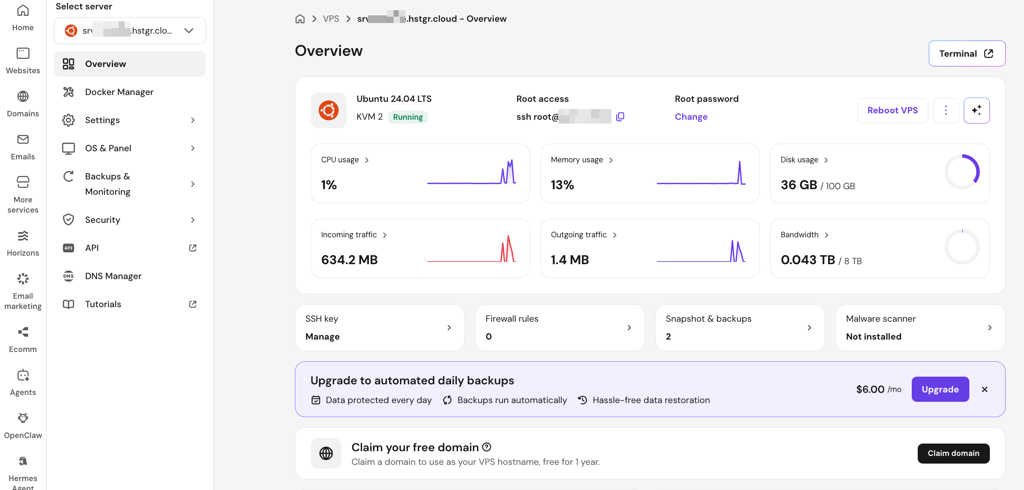
Access your VPS in hPanel. Log in to Hostinger and open your VPS in hPanel.
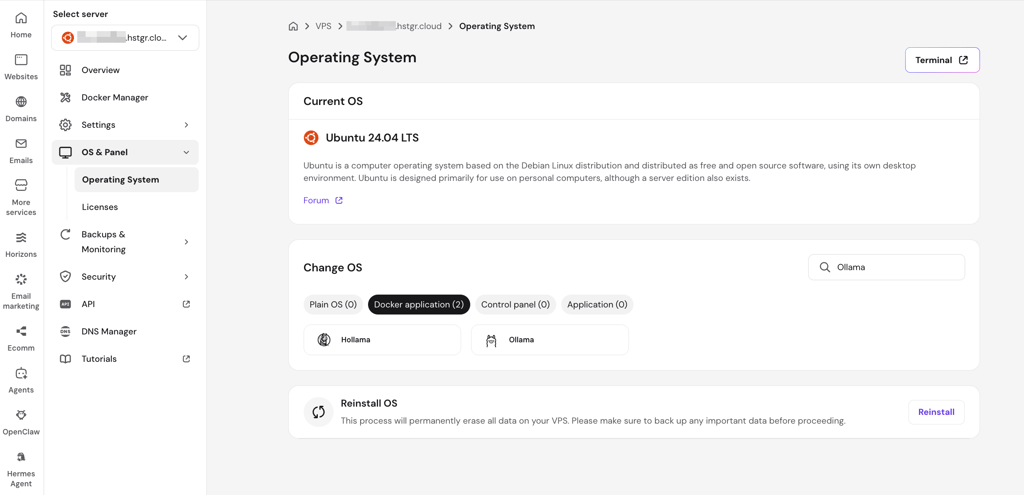
- Go to the operating system settings. In the VPS menu, go to OS & Panel > Operating System.
-
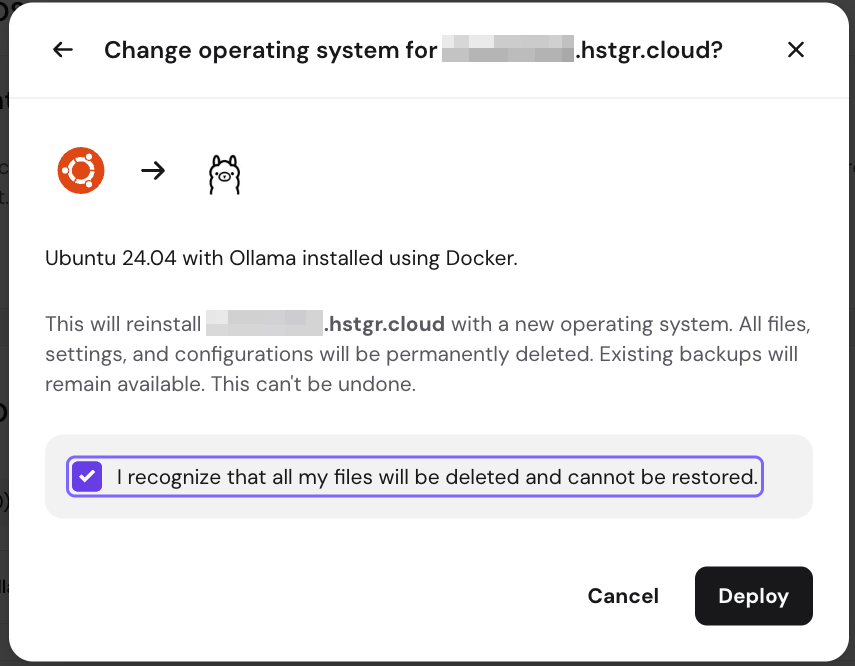
Select the Docker application. Choose the Docker application option and search for Ollama.
-
Follow the on-screen deployment steps. Hit deploy and follow the instructions in hPanel. Once the installation finishes, Ollama is ready for model setup.
Option 2. Installing Ollama manually on a VPS
Step 1. Open your VPS terminal
Log in to your VPS through SSH or use the terminal provided by your host. On Hostinger, for example, you can open the VPS terminal directly from the dashboard.
Step 2. Install Ollama
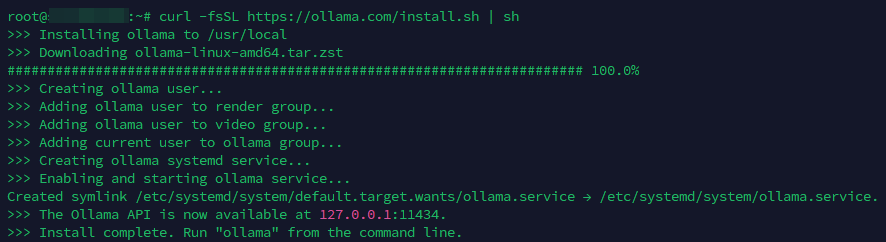
In the terminal, run the Ollama installation command:
curl -fsSL https://ollama.com/install.sh | sh
The installation usually takes under a minute. If the VPS has no GPU, Ollama may show a CPU-only warning. This does not mean the setup failed. It only means responses will rely on the VPS CPU.
Step 3. Open Ollama
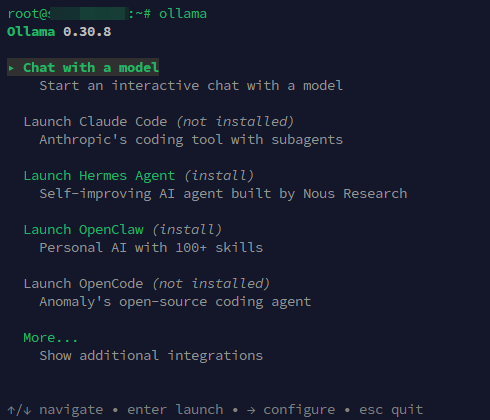
After installation, open Ollama:
ollama
Step 4. Download a model
Choose a model. For example:
ollama pull gemma4

After the download finishes, check the installed models:
ollama list
Step 5. Run a quick test
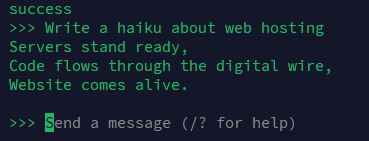
Start the model with:
ollama run gemma4
Then send a short prompt, such as:
Write a haiku about web hosting
Ollama runs a local API that other tools can connect to. Keep it local by default, and do not expose it to the public internet without access controls, such as firewall rules, private networking, or a protected proxy.
Final thoughts
Overall, the best Ollama VPS depends on how you plan to use it. A small private chatbot does not need the same setup as a coding assistant, Open WebUI deployment, or heavier local model workflow.
Here’s how I’d choose:
- Contabo – best Ollama VPS in terms of resource allocation
- Hostinger – easiest place to start with Ollama
- DigitalOcean – better for developers and Open WebUI projects
- Vultr – best when the setup may need to scale later
- InterServer – cheapest practical CPU-based option
- Kamatera – most flexible for custom server specs
- OVHcloud – strongest privacy and network protection mix
- Hetzner – best raw hardware value for technical users

FAQ
What is Ollama hosting?
Ollama hosting means running Ollama on a remote server instead of your personal computer. This lets you keep open-source LLMs available 24/7 for assistants, bots, coding tools, or private workflows without your own hardware.
How much RAM do I need for deploying Ollama on a VPS?
For regular Ollama VPS hosting, 8GB RAM is a starting point. However, while an 8GB VPS can work for tiny or heavily quantized models, a 16–32GB VPS gives more room for smoother use, longer prompts, and agent workflows.
Do I need technical knowledge to deploy Ollama?
Yes, some technical knowledge helps. You should be comfortable using SSH, Linux commands, firewall rules, and basic server setup. Managed VPS tools or marketplace installs can reduce the work, but Ollama hosting still needs manual configuration.
What are the best Ollama use cases?
Ollama works best for private chatbots, Telegram bots, coding helpers, document summaries, simple automation, and local model testing. A CPU VPS suits lighter tasks, while GPU hosting is better for faster replies, larger models, or repeated AI agent calls.