InterServer review 2026: my honest insights
Our in-house experts conduct internal independent, hands-on testing and transparent reviews of web hosting providers by using custom-built tools or utilizing industry-recognized tools and methods to ensure impartial and evidence-based assessments.
Using the same criteria for all services, we share our detailed methodologies and practices to help customers make informed hosting decisions.
Learn more

InterServer has been around since 1999, which may be surprising to some, as it’s not one of the most talked-about hosting providers. I recently tested InterServer again – specifically the WebHosting plan, with price starting from $2.50/month.
As always, I followed the official Cybernews method for testing website hosting providers – evidence based, with user experience as the main focus. In this InterServer review, I discuss pricing and plans, ease of use and setup, performance, security, and customer support. Continue reading to find out if InterServer is worth your attention, too.
InterServer hosting review 2026: the verdict
✅ The best thing about InterServer was its performance and the advanced security features included for free. The host is a good option for those looking for affordable and secure high-performance hosting.
❌On the other hand, the dashboard and Direct Admin control panel are poorly designed, confusing to navigate, and some features are difficult to find. Beginners and users not familiar with Direct Admin should avoid InterServer, or choose cPanel hosting.
| ⭐ Rating: | |
| 💵 Price: | From $2.50/month |
| 📑 Uptime guarantee: | 99.9% |
| ⚙️ Hosting types: | Shared, VPS, reseller, and dedicated hosting |
| 🌎 Server locations: | The US |
| 👨💻 24/7 live support: | Yes |
| 🔥 Coupons: | - |




Our in-house research team and expert writers work hand in hand to regularly test hosting services and provide accurate and fact-checked information. Discover the ins and outs of how we test and evaluate website hosting providers.
Pros and cons of InterServer
InterServer pricing and plans – 5/5
InterServer's shared hosting starts at $2.50/month, which is affordable and provides unlimited resources. Competitor prices, like GoDaddy’s basic plan, can cost 4.99, so InterServer is a good option if you're trying to keep your costs low.
InterServer provides various hosting options, such as shared hosting, ASP.NET hosting, VPS, dedicated servers, colocation, and data storage. Below you’ll see the most popular plan prices and what they’re best for.
| Hosting type | Starting price | Best for |
| Standard web hosting | From $2.50/month | Small websites, personal blogs, portfolios, and small business sites. Available both with Direct Admin and cPanel control panels. |
| E-Commerce web hosting | From $2.50/month | Small online stores, startups, and growing eCommerce businesses |
| Boost web hosting | From $9.95/month | Websites needing more power, like commonly visited blogs, online stores, and business sites. Available both for cPanel and Direct Admin. |
| ASP.NET hosting | From $8.00/month | Sites and applications requiring Windows-based hosting |
| WordPress VPS | From $3.00/month | Developers, agencies, or businesses running highly customized WordPress sites |
| Storage VPS | From $3.00/month | File storage, backups, media hosting, and archiving |
For a long time, InterServer only offered a single shared hosting plan. But it has since introduced 3 additional plans: Boost 2, Boost 4, and Boost X.
They all come with the same core features like free SSL certificates, weekly backups, security tools, and unlimited websites and emails. The difference between each plan is how much server power it includes. The standard plan is good for small websites, while Boost 2 and Boost 4 work better for busier sites or small online stores, and Boost X is the most powerful option made for bigger projects.
If you change your mind, there’s a 30-day money-back guarantee. And if you want to save more, you can find InterServer coupons here.
Overall, I think InterServer’s pricing is affordable, but as with many competitors, I recommend choosing a longer hosting period initially, as during renewal, the price starts at $7.00/month.
InterServer ease of use – 3.5/5
Below, I review InterServer’s plan purchasing and server setup process, and go over the features that the host offers.
InterServer purchase and setup process
Purchasing an InterServer web hosting plan and setting up my account on InterServer was a pretty quick process. It was also straightforward, and I didn’t experience any issues. Here’s what the process looks like step by step:
-
First, I created an InterServer account by filling in my details. Right after that, I got a login code via email to complete the registration.

-
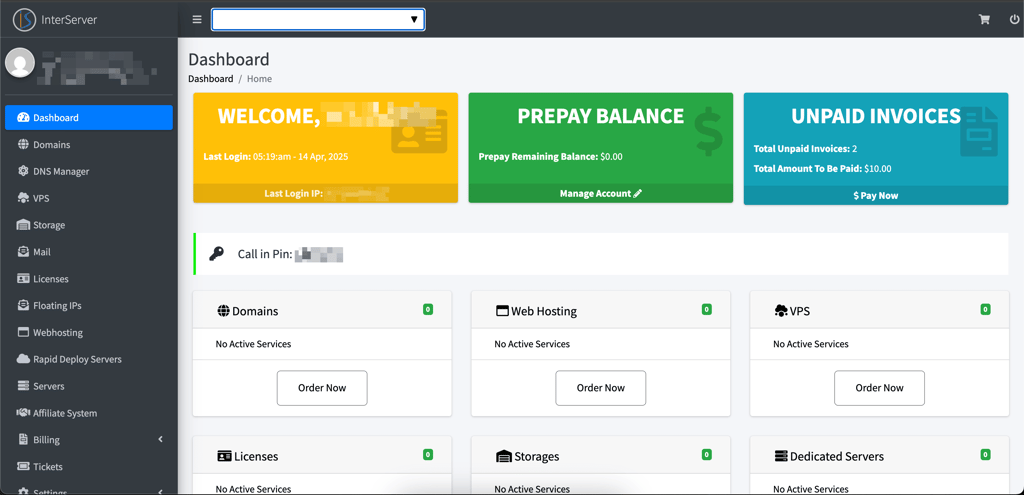
Once I logged in, I was directed to the main user management area, called My Interserver. This is where I could see all my web and VPS hosting accounts, domains, invoices, and more. The dashboard itself is pretty okay to navigate, if not super intuitive.
-
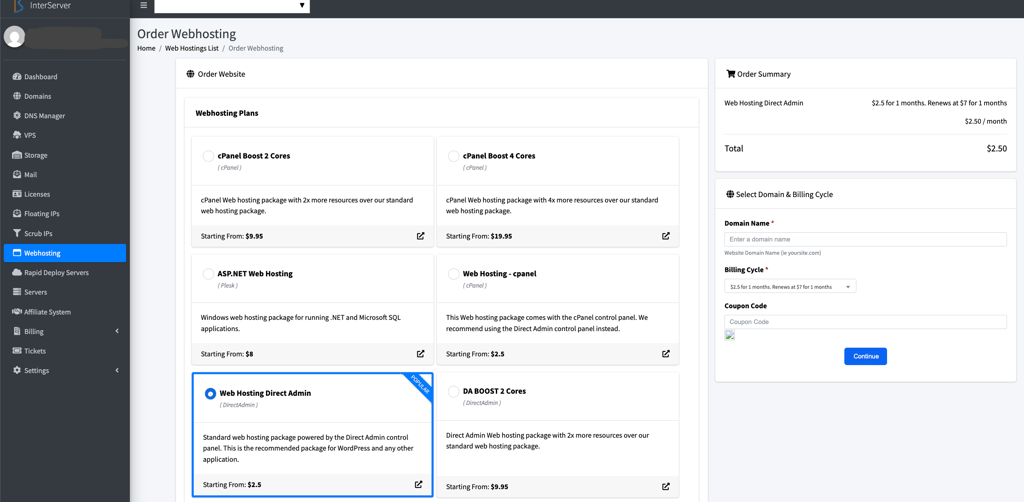
In my management area, I could order any needed services. I picked the cheapest shared hosting plan. It let me choose my control panel, and since DirectAdmin is recommended over cPanel, I went with that for this review.
-
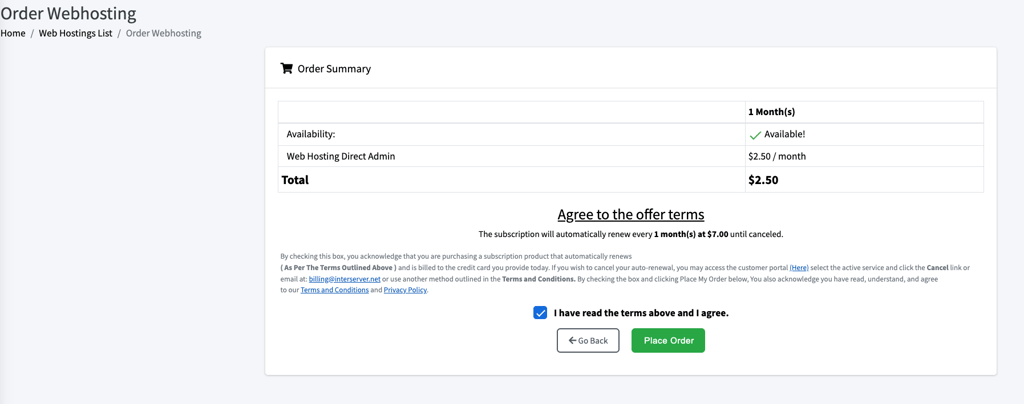
After filling in details like the domain name, I proceeded to checkout. After agreeing to terms and conditions, I placed an order and filled in my payment details. Shortly after, I had the web hosting plan purchased. I liked that there were no aggressive upselling attempts, or features and services randomly added to my order. The InterServer buying process was the most seamless and straightforward experience I’ve had in a while.
-
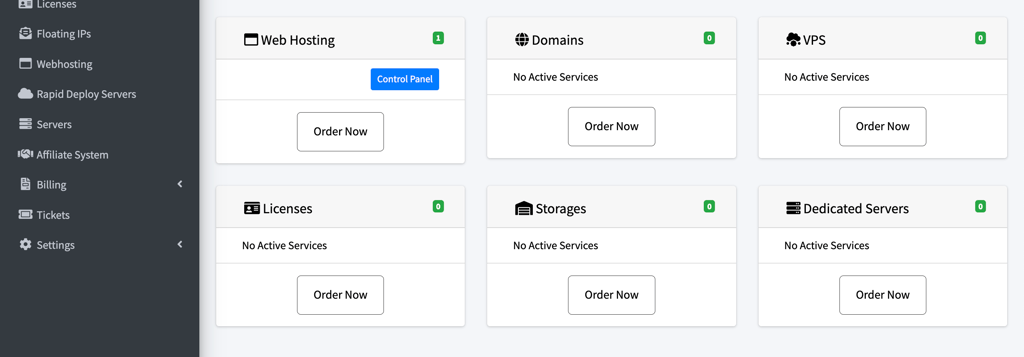
Once I was done, I could see a blue Control Panel button appear, which took me to DirectAdmin to manage my website. I liked that I could access the control panel with only one click.
While the overall setup process was quick, I found the dashboard confusing. There are a lot of options, but some important features aren’t easy to find.
For instance, there’s no clear way to transfer a domain when purchasing a plan. You have to enter the domain in the search bar. If the domain is taken, you get a message to proceed only if you own the domain.
Further, in the control panel, I checked the SSL certificates, which were apparently enabled by default. However, the interface is kind of poorly designed – I couldn’t tell whether the certificates were activated or if I had to do anything additional. For a first time user, this would be really confusing.
Competitors like Hostinger make this much more straightforward, with the transfer option easily visible in hPanel.
InterServer control panel
InterServer gives you the choice between cPanel and DirectAdmin, but if you go with its recommended option like I did, you’ll use DirectAdmin.
DirectAdmin isn’t as intuitive as cPanel, but it has similar features and isn’t overly complicated. The layout is organized into sections like Account Manager, E-mail Manager, advanced and extra features, and Softaculous Apps Installer.
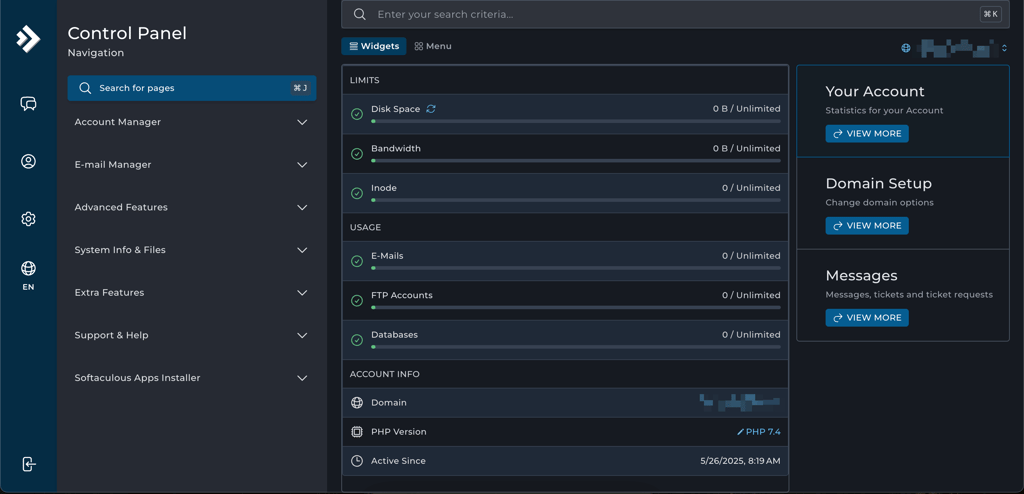
I noticed that not everything is easily visible, as some tools are hidden away in dropdown menus, and it can take a bit of digging to find what you need the first time around.
DirectAdmin is lightweight, fast, and less resource-heavy than cPanel, which is probably why some hosts recommend it. However, if you’ve used cPanel before, there is a learning curve.
Further, compared to some proprietary control panels, such as hPanel by Hostinger, I have to say that neither Direct Admin nor cPanel are very intuitive nor easy to navigate. All features are there, and you have control over the hosting environment, but the experience isn’t as seamless as I would like it to be.
Creating a website with InterServer
Once I explored InterServer’s dashboard and Direct Admin, I decided to try and create a website. Here’s how this process looked:
- From the dashboard page, I clicked on the Control Panel button visible in the web hosting widget. It opened the Direct Admin control panel in a new tab.
-
For my website, I wanted to use WordPress, so I scrolled down and found the Softaculous Apps Installer. There is also an option to use InterServer’s website builder called SitePad.
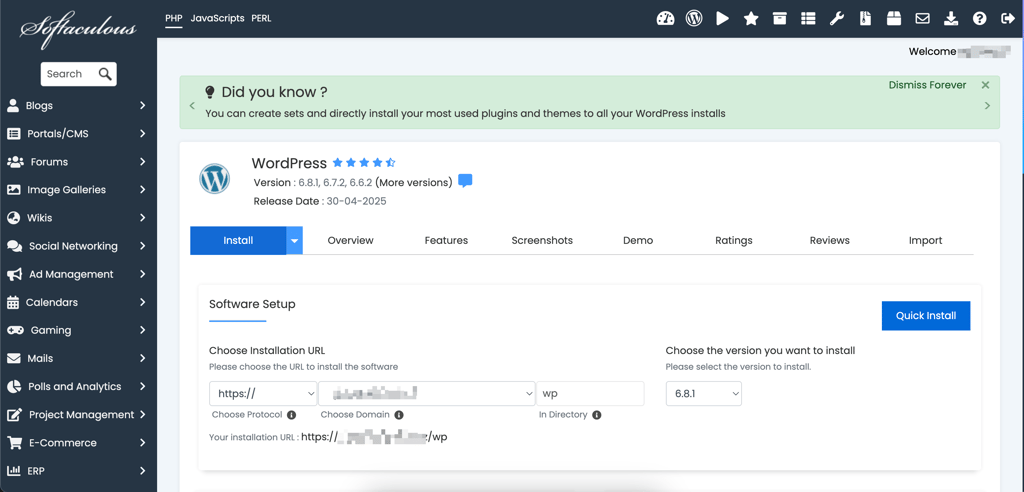
- All I had to do was click Install, choose my domain, set up my admin username and password, and give my site a title
- Once the installation was done, I got a link to my WordPress dashboard and my live website
InterServer email hosting
One of the key things for a successful business website is a professional email, which is very simple to set up with InterServer. Its shared hosting plans include unlimited email accounts, which is a standout feature compared to other providers like GoDaddy. For example, GoDaddy only offers an email trial and later charges $1.99/month per user.
InterServer provides a variety of tools for email management. You can customize autoresponders, create mailing lists, and even track the deliverability. To create and reach your email account, do it via E-mail Accounts.
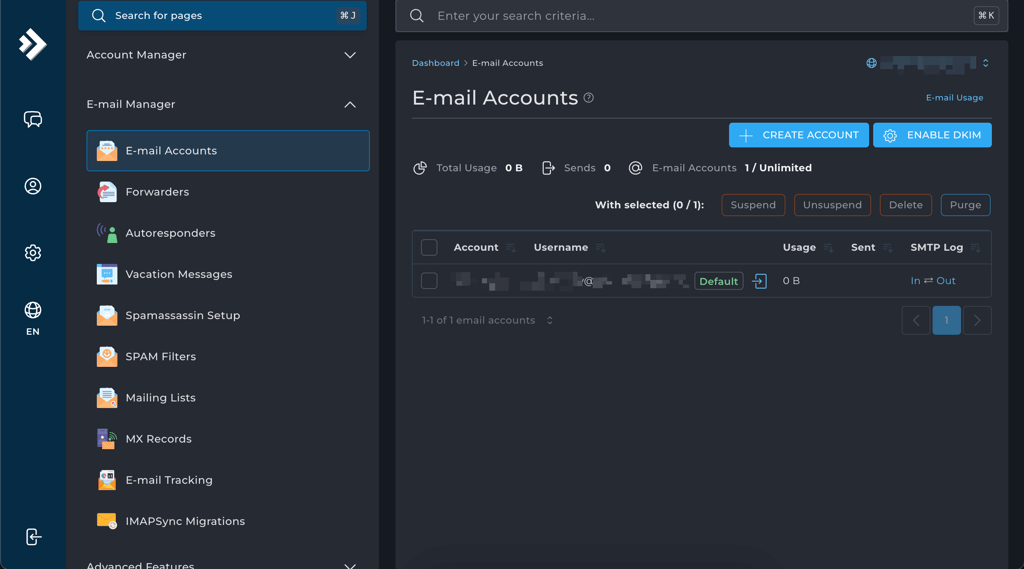
The email manager provided by InterServer is good for day-to-day mailing. However, it won’t be enough for businesses who want to execute big marketing campaigns, since InterServer does not offer any additional marketing tools. In that sense, it is quite disappointing in comparison to, for example, Hostinger, which offers a full-fledged email marketing feature Hostinger Reach.
All in all, InterServer is okay to use, and day-to-day tasks like installations or email management are done in a matter of seconds. While both the dashboard and the Direct Admin control panel would benefit from better design and be made easier to navigate, I have no complaints regarding the overall functionality. On the other hand, the features like business email are very basic, so you would have to rely on third-party tools or apps for marketing campaigns or eCommerce.
InterServer hosting performance – 4.5/5
Like most competitors, InterServer promises a 99.9% uptime guarantee and states that you will experience no performance issues. To see how true that is, I asked the Cybernews research team for help with performance testing. They ran multiple tests involving uptime monitoring, speed testing, and stress testing.
For the tests, the research team used the Grafana observability platform to monitor uptime and conduct stress tests. The uptime and server response time monitoring took 2 weeks in total. The stress tests and page speed tests were done on the same day.
InterServer uptime and response time
InterServer uses Cloudflare’s global network to help keep websites online and running smoothly. In our tests, we saw 1% uptime as the site stayed up the whole time with no outages at all.

InterServer speed
On its website, InterServer says your website will load quickly, as its servers aren’t overloaded and its network is route-optimized for faster delivery. So we put that to the test.
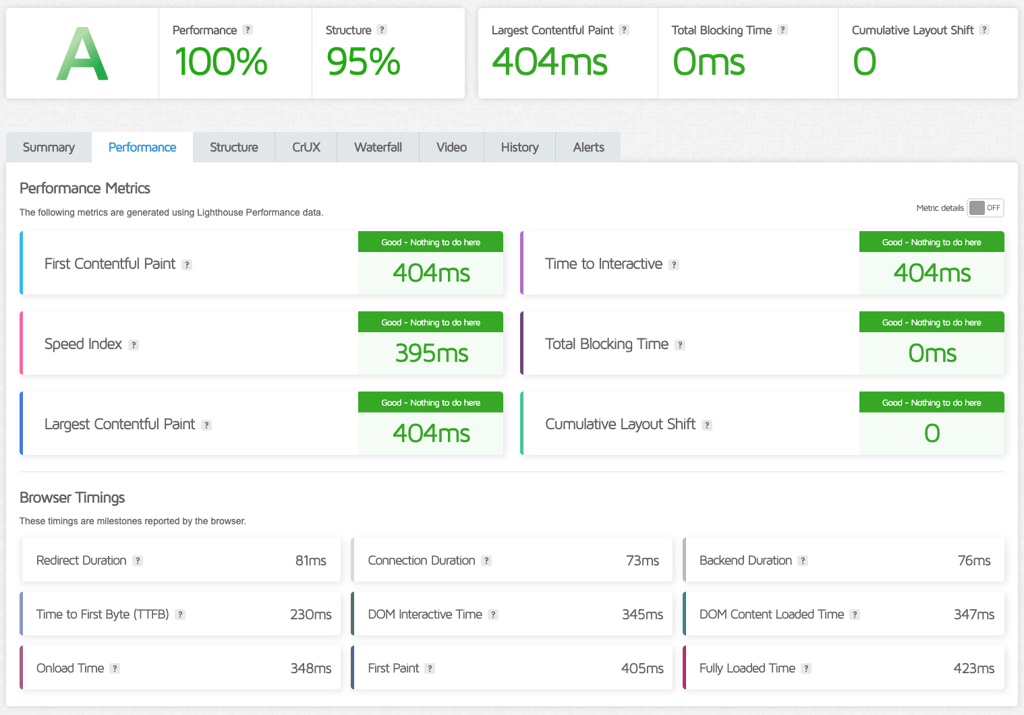
When testing InterServer's speed, the speed index was 0.395s, which is actually an excellent result. By comparison, Hostinger is a lot slower than InterSever, at more than 3.5s. Overall, this is one of the best speed testing results we’ve seen in a while.
InterServer stress testing
In the first test, the Cybernews research team simulated 50 users visiting the site at the same time. InterServer passed the stress test really well, with 0 HTTP failures while maintaining an excellent 9ms P95 response time. In total, the host handled more than 14k requests, with around 48 requests per second.
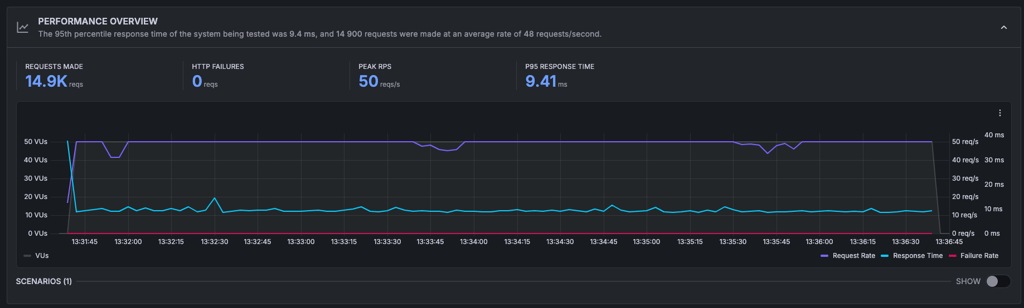
The results show that InterServer is fully capable of handling loads of traffic while maintaining a stable and fast connection. This is also an expected performance from a good host. By comparison, SiteGround, a host known for its excellent overall performance and reliability, handled around 37 requests per second, with a little more than 11k requests in total, 0 HTTP failures, and a P95 response time of 311ms. Therefore, InterServer performed almost exceptionally well.
Overall, InterServer showed great performance. With a 100% uptime and excellent stress testing results, the host proved its servers are more than capable of handling surges in traffic, and overall can reliably keep your website up and running. The site load time was slower than some other well-known high-performance hosts, but stayed within the acceptable range.
InterServer security – 5/5
InterServer offers a solid set of security features, especially for a budget-friendly hosting provider. . Here’s a list of standard security features you have access to when purchasing the InterServer Web Hosting with Direct Admin plan:
- InterSchield security suite. The in-house security solution includes an automatic virus scanner, a malware database to check against malicious attacks, DDoS and other attack protection, and a firewall powered by machine learning.
- A free Let’s Encrypt SSL Certificate. Most providers include this in their plans, and it’s always nice to know these things are taken care of.
- Weekly backups. All shared hosting plans include automated weekly backups managed via JetBackup, and it stores 4 backup copies. If you upgrade to Boost 2 or Boost 4, you also get daily backups included.
- Cloudflare. You can integrate the Cloudflare content delivery network, which comes with DDoS attack protection.
InterServer comes with a wide range of tools so that you can keep your website safe. I appreciate the fact that not just standard features, such as the SSL certificate, are free, but also the more thorough in-house solutions for a highly secure web hosting experience.
InterServer customer support – 3/5
If you ever need customer support, InterServer provides 4 support channels. There’s the 24/7 live chat, phone, email, and tickets. The provider also offers an extensive knowledge base that is filled with articles, guides, and tutorials.
| InterServer | |
| 24/7 live chat | ✅ Yes |
| ✅ Yes | |
| Tickets | ✅ Yes |
| Phone support | ✅ Yes |
| Knowledge base | ✅ Yes |
When I tested InterServer’s support, I was a bit worried at first. The estimated wait time was 28 minutes, which is longer than I expected.
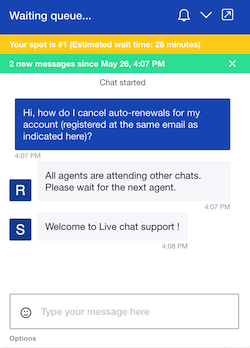
However, I was connected to a support agent almost immediately, and they quickly resolved my first issue.
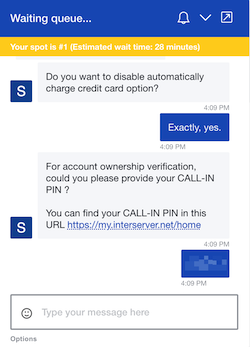
When I had issues with my SSL certificate, the agent just activated it without questions. I also contacted ticket support when my payment didn't go through. Less than an hour later, I received an answer, and the issue was fixed.
The support team did not send me to the knowledge base. They just did everything themselves, which is very efficient and great if you’re a beginner, but I would appreciate more detail.
However, some of my questions went unanswered. InterServer claims to offer a 1-click installer for over 460 apps and even lists them on its homepage. But when I looked for these apps in my account dashboard and DirectAdmin, I couldn’t find a way to install many of them. Support couldn’t explain why or help me, which left me wondering if all of the advertised apps are actually available.
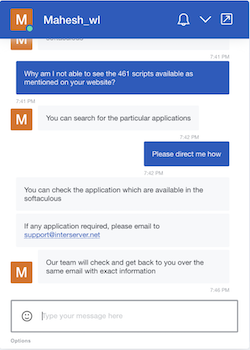
The answers seemed rushed and uninformative. After having tested many hosting providers, I would say that InterServer has some work to do to improve the quality of its support.
Leaving the live chat aside, InterServer has a knowledge base. You’ll find many tutorials and guides. The search bar helps you find what you’re looking for.
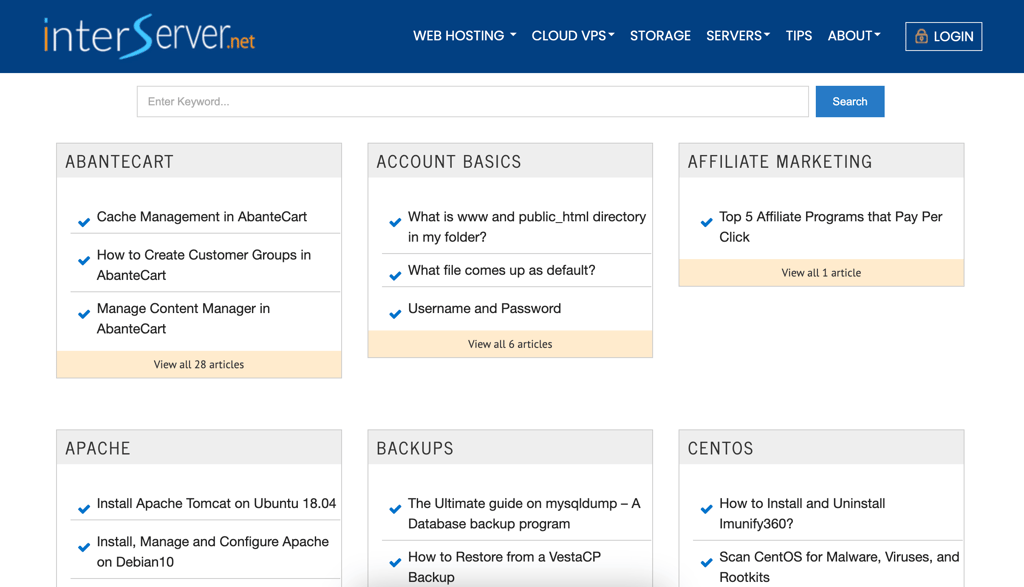
The knowledge base is a little messy. The tutorials themselves are great, but it’s not easy to distinguish which one you should use, as different tutorials are meant for different hosting options and panels, although they are named similarly.
Overall, basic problems are solved on the spot, and there’s a big knowledge base. Nonetheless, not every agent is trained equally well, and you might encounter some disappointing experiences along the way.
Final verdict – Interserver overall rating 4/5
All things considered, InterServer hosting left an okay impression. It may not be a popular choice, but it is definitely worth your attention. While the dashboard and the control panel are not the most user friendly, the host is overall very fast, functional, and showed excellent performance during testing.
Here’s a quick summary of the review:
- Overall rating: 4/5
- Pricing: 5/5
- Ease of use: 3.5/5
- Performance: 4.5/5
- Security: 5/5
- Support: 3/5

InterServer FAQ
Why is InterServer so unpopular?
InterServer isn’t very popular because it doesn’t focus much on marketing. However, recently I have seen more InterServer reviews on YouTube and other platforms. Unfortunately, they are not so good, which also results in users picking other hosting providers.
Who owns InterServer?
InterServer is a private web services company owned by the founders Mike Lavrik and John Quaglieri. It was founded in 1999 in Secaucus, NJ.
Does InterServer offer a money back guarantee?
Yes, InterServer offers a 30-day money-back guarantee for all of its shared hosting plans. However, services like VPS or dedicated servers are non-refundable after the full set up (provisioning) has been completed.
Is InterServer good for beginners?
Yes, InterServer can be a good option for beginners due to its budget-friendly pricing, quick setup process, and access to a 1-click installer. However, the interface isn’t modern or intuitive, and the customer support can be unhelpful. Beginners might prefer a more user-friendly platform with more responsive help.
How reliable is InterServer’s uptime?
InterServer promises a 99.9% uptime guarantee. In fact, our most recent tests showed that it provides a reliable 100% uptime.
What makes InterServer different from other hosting providers?
InterServer stands out for providing price lock guarantees and shared hosting plans with unlimited resources. This offer often attracts customers, as it provides excellent value.
Is InterServer good for WordPress websites?
No, I don’t recommend InterServer for WordPress sites. While it supports WordPress, offering 1-click installation, unlimited SSD storage, and decent performance for smaller sites, it doesn’t offer managed WordPress features like automatic updates, staging environments, or specialized support.
Does InterServer offer free website migration?
Yes, InterServer offers a free website migration service for customers who purchase a hosting plan. Its migration team handles the entire process, transferring all files, databases, and emails from your previous host.