Wix vs Framer: which website builder is better for you?


While both are no-code website builders, Wix and Framer are created with different users in mind. Wix prioritizes ease of use with pre-made templates, drag-and-drop elements, and a wide range of business tools. Meanwhile, Framer gives users more creative freedom, but comes with a steeper learning curve and fewer built-in business features.
To determine which one is ultimately better, our research team and I spent several weeks building websites from scratch on each platform, analyzing their similarities and differences. Below, you’ll find our verdict along with a detailed breakdown of their design, business, and AI features.
Wix vs Framer: overview
| Wix | Framer | |
| Rating: | ||
| Price: | Free or from $11.75/month during sale | Free or from $10.00/month |
| Ease of use: | Easy-to-use | Moderate learning curve |
| Templates: | 2,000+ | 2,000+ |
| Business features: | eCommerce, email marketing, SEO tools, and more | SEO, localization, analytics tools, and more |
| 24/7 live support: | Yes | No |
| Free domain (first year): | Yes | Yes |
| Free SSL certificate: | Yes | Yes |

| Who should choose Wix? | Who should choose Framer? |
| Beginners or time-strapped users looking for an easy-to-use platform to publish their website as quickly as possible | Designers (or any other creative) looking for a Figma-like canvas that provides creative freedom without having to write code |
| Users looking for design guidance with plenty of personalization options | With advanced interactive and animated elements and responsive layouts, Framer is a solid option for those who want to create stunning and engaging user experiences |
| Business owners looking for built-in eCommerce tools, SEO and marketing integrations, which reduce the need for extra plugins | Users looking for advanced AI support that helps them manage behind-the-scenes processes |
| 📢 WIX LIMITED OFFER: Get Wix with 50% OFF | Visit Framer |
What makes Wix and Framer different?
Wix is an all-in-one website builder for your business needs. It’s easy to use, allowing you to publish your site quickly. Meanwhile, Framer is centered around visual design and a publishing workflow, requiring a steeper learning curve that you have to get through.
Both offer free plans, but on paid tiers, Framer has a cheaper entry point at $10.00/month (Basic annual plan) compared to Wix’s $11.75/month (Core annual plan when discounted). However, Wix justifies its higher starting price by providing a suite of built-in business, marketing, and SEO tools right from the get-go.
Their ease of use differs quite a lot. Wix is built for speed and simplicity. Its drag-and-drop editor and AI website builder allow total beginners to launch a functional site in minutes. Framer functions more like a professional design tool, similar to Figma. It offers creative freedom for complex scroll animations and custom breakpoints, but requires more time to master.
If you want to sell products natively, Wix is the better option. It handles everything from inventory and payment gateways to automated email campaigns. With Framer, to add a shopping cart or client portal, you’ll have to rely on external plugins.
Regarding customer support, Wix provides users with 24/7 live chat and phone callbacks, solving issues more quickly. Framer relies heavily on its AI chatbot and email support (which takes 24 to 72 hours), reserving dedicated assistance and fast responses for Enterprise clients.
Read on for a detailed breakdown of Wix vs Framer to help you choose the right tool for your project. To see how these two compare against other top platforms, check out our roundup of the best website builders in 2026.
Wix vs Framer: pricing
Both Wix and Framer let you build and publish a site for free, but their limits mean they are really only good for testing ideas or running simple personal projects rather than for businesses. For instance, neither platform allows you to connect a custom domain or remove platform branding without upgrading to a paid tier.
Each free version also has restrictions on storage and traffic, making them a poor fit for high-traffic sites or pages packed with lots of high-quality visuals. While Wix gives basic SEO tools, it excludes selling online or accepting payments. Framer offers a few perks too, like 500 monthly AI credits, but similarly locks other advanced features behind paid subscriptions.
| Plan | Wix | Framer |
| Free plan | ✅ Yes | ✅ Yes |
| Cheapest plan | $11.75/month at a discount (3-year Core plan) | $10.00/month (1-year Basic plan) |
| Most expensive plan | $79.00/month (1-month Business Elite plan) | Custom (Enterprise plan) |
Let’s compare the providers' entry annual plans next. Framer’s Basic plan is priced lower at $10.00/month, offering 50GB of bandwidth, 30 pages, 1,000 AI credits, and a custom domain. In contrast, Wix’s $17.00/month Light plan provides unlimited bandwidth, 2GB of storage, 150 AI credits, a free domain for one year, built-in marketing tools, and two collaborator seats. Please note that neither entry plan lets you accept online payments.
In terms of mid-level plans, Framer’s Pro plan costs $30.00/month, while Wix’s Core plan costs $11.75/month (when discounted), which is a huge difference. Both expand on previously mentioned features, with Framer adding branching, staging, and A/B testing. These features help to optimize site performance, handle complex technical setups, and test new designs behind the scenes without interfering with the live site. Meanwhile, at this tier, Wix introduces online payment processing, basic eCommerce tools, and five collaborator seats. This makes Wix the better option for small businesses looking to sell products and manage a team from the get-go.
For bigger businesses and enterprises, Framer offers custom pricing while adding various security and authentication features. Unfortunately, it doesn’t natively provide eCommerce tools – to sell products, you’ll need to integrate external tools. Meanwhile, Wix offers Business ($19.50/month at a discount) or Business Elite ($79.00/month at a discount) plans that add analytics features, advanced eCommerce tools, and priority support. Just keep in mind that these prices are available during Wix 50% off sale.
Additionally, Wix offers a 14-day money-back guarantee and 24/7 customer support with any plan. In contrast, Framer's support options vary by subscription level, and its money-back guarantee is 14 days globally, but 7 days within the EU and Turkey.
Wix vs Framer: ease of creating your site
Even though no-code website builders are typically easier to use, the learning curve depends on the platform. Some focus on simplicity so your website is up and running as fast as possible, while others give you more freedom to experiment. Wix and Framer illustrate this perfectly.
Using Wix
Personally, I find Wix to be one of the easiest website builders to use – I relied on it heavily during my master’s studies when I needed to turn in projects with tight deadlines. Users can choose from over 2,000 templates or go straight to the AI Website Builder, which can turn an initial idea into a functioning site in a matter of minutes.
Whether you choose to go with a template or an AI-generated design, you can further customize it by dragging and dropping various elements like text, images, and videos. Overall, each step feels guided, and the learning curve is minimal. I would compare it to Canva just for website building.
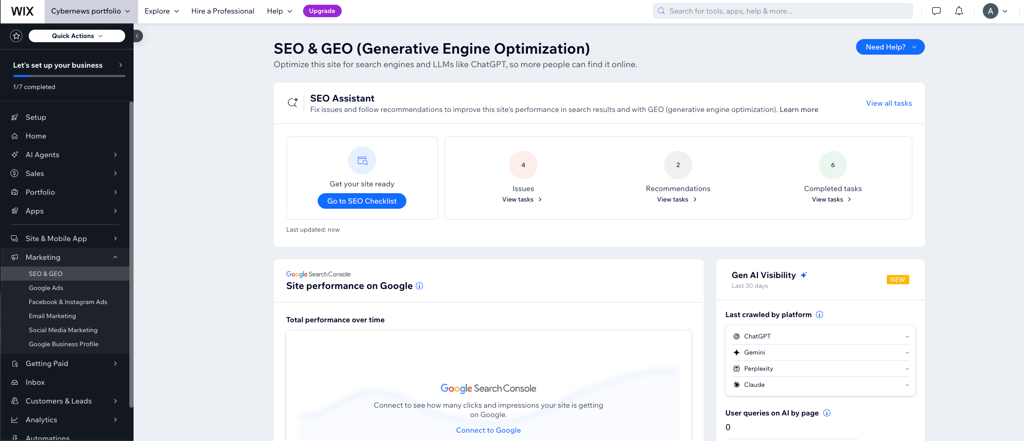
Dashboards, like eCommerce and marketing, are also easy to navigate and provide useful insights into visitor behavior and how AI models use information from your site. I especially like that Wix helps to ensure your site is search-friendly by providing AI-driven tools in content generation and SEO, which is something most beginners are unfamiliar with.
For more beginner-friendly use cases, make sure to check out our full Wix review.
Using Framer
Creatives familiar with digital design tools like Figma, Photoshop, or Illustrator should transition easily to Framer, as they function on a similar basis. However, having learned Photoshop from scratch myself, I can attest that the initial learning phase can be somewhat overwhelming until you grasp the core features.
Navigating Framer required significantly more time to explore and understand the interface. I had to make use of online research and video tutorials, making the learning curve steeper than that of Wix. However, in exchange for this effort, Framer provides greater creative freedom, allowing for more personal and original designs.
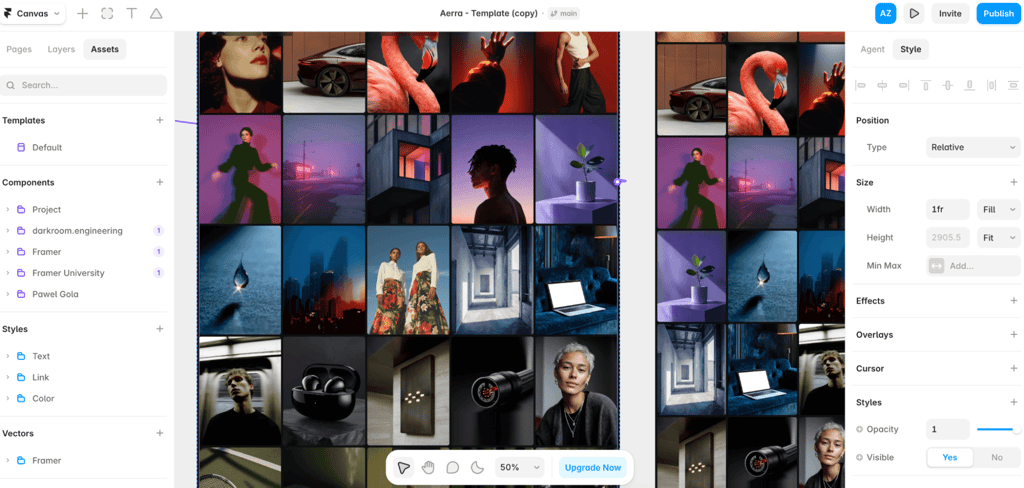
For those who don’t want to start from a blank canvas, Framer also provides templates and an AI agent to assist with the creative process. The platform can be as simple or as complex as your project demands; though, I generally do not recommend it for complete beginners.
Beyond its design capabilities, its other features – such as the SEO and localization dashboards – are straightforward to locate and navigate.
Wix vs Framer: templates and design
Website design creates the first impression of your brand or business and can determine whether a visitor stays or leaves. Of course, you want them to stay and engage with your content, so both Wix and Framer put a lot of focus on design and templates.
Templates of Wix
With Wix, you can choose from over 2,000 design templates sorted by type and industry. You are bound to find one that fits your style and needs, as they offer designs for a wide range of purposes. Even a business as niche as a pool supply store can find what they’re looking for. Each template is built by Wix designers and includes everything you need to get started, like sample content, color themes, galleries, inner pages, and built-in business features.
While personal taste varies, I really appreciate the aesthetics of Wix templates. They are minimal yet effective at translating exactly what website owners want to communicate.
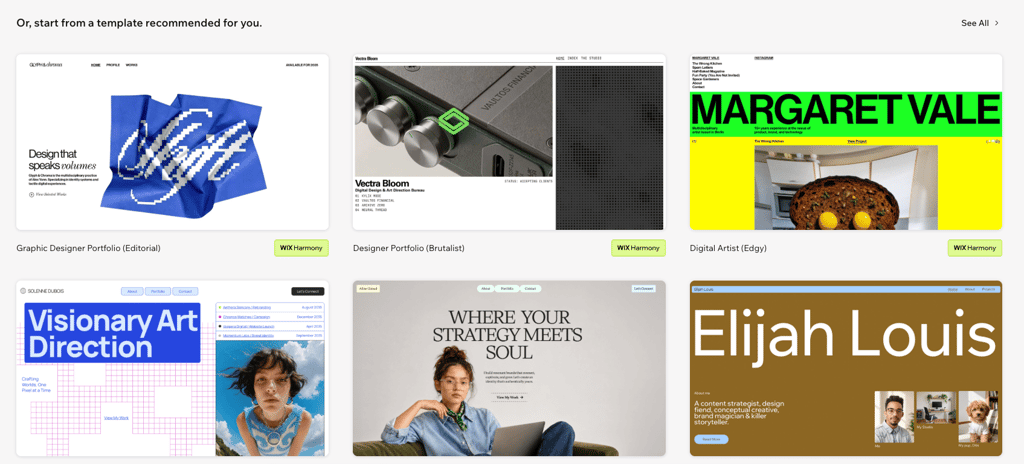
At first, I was worried that with over 300 million users worldwide and 85,000 sites created each day, my website wasn't going to stand out if I used a template. However, I found them to be highly customizable, allowing me to instill some of my own personality into the site. The drag-and-drop editor makes it easy to modify layouts, colors, fonts, and media to match your personal or business identity.
You can also start from a completely blank canvas, so the provided design options don't box you in – they still give you plenty of creative freedom.
Templates of Framer
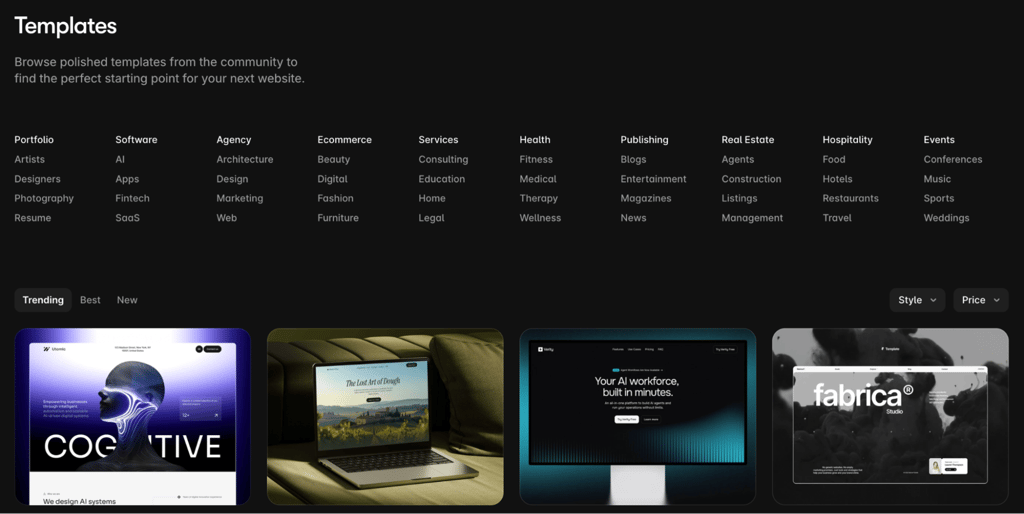
Framer also offers numerous templates to choose from, though some of them are paid. They are created by community creators and official partners, and their aesthetic clearly caters to designers by featuring more complex, elevated layouts.
Just like with Wix, you can fully customize the templates or even start from scratch, giving you total control over your design.
Where Framer really stands out is in its interactive features, like transitions and animations. The platform gives you full control over 3D rotations, perspectives, gradients, and glassmorphism – terms probably only true design enthusiasts care about.
These are useful tools when you want to create stunning, user-experience-centered designs, which tend to perform well when you need visitors to complete a specific action, such as buying a product.

Features for business owners
If you're a business owner, you probably know that having an appealing digital storefront isn’t enough. That’s business 101. Behind the scenes, your site has to include eCommerce solutions, SEO tools, and marketing integrations so your product can reach shoppers and get sold.
Wix shines in this category by offering all these features in one place. Framer, on the other hand, lacks native online selling tools and requires external integrations, which can be time-consuming – especially for beginners. See the table below for a side-by-side comparison of business features offered by Wix and Framer:
| Wix | Framer | Winner | |
| eCommerce features | eCommerce tools, such as product management, payment gateways, inventory tracking, dropshipping support, digital downloads, and subscriptions | Lacks native online selling tools, relies on external plugins for checkout | Wix |
| Email marketing | Built-in email marketing (Wix Ascend) with automated campaigns, customer segmentation, and analytics | No native email marketing tool, requires external integration | Wix |
| Social media integration | Direct integration with TikTok, Instagram, and YouTube Reels, allowing content synchronization and targeted campaigns | Supports social link sharing, embedded social widgets, and custom components, but lacks direct multi-platform campaign tools | Wix |
| Analytics and SEO tools | Built-in SEO tools, AI-powered SEO guidance, Google Analytics integration, keyword tracking, performance reports | Built-in privacy-first analytics, custom meta tags, auto-generated sitemaps, fast SSR performance, and Google Analytics support | Draw |
| App marketplace and integrations | Supports over 250+ business apps for automation, marketing, and CRM tools | Growing Marketplace with plugins, design components, and third-party integrations (Figma, HubSpot, Typeform, Unsplash) | Wix |
| Scalability | Beyond shared hosting, allows scalability with advanced hosting services, suitable for growing businesses | Powered by AWS and Cloudflare edge hosting for fast load times and seamless handling of high traffic spikes | Draw |
| Ease of use for beginners | Templates and AI integration make the platform easy to use for beginners | Intuitive for designers familiar with Figma, but has a steeper learning curve for beginners | Wix |
AI features
All major website builders, including Wix and Framer, are integrating AI features to improve user experience. Both tools use AI to streamline page design, draft text, create visuals, and optimize your SEO. I break down each platform in more detail below.
Wix AI features
Before even starting with your website design, Wix asks you whether you want to begin the process by choosing a template or with the help of the AI Website Builder, powered by a built-in AI agent, Aria. With a simple prompt that is then followed by a few questions from Aria, you can have a website that is relevant to your needs and wants in just a few minutes.
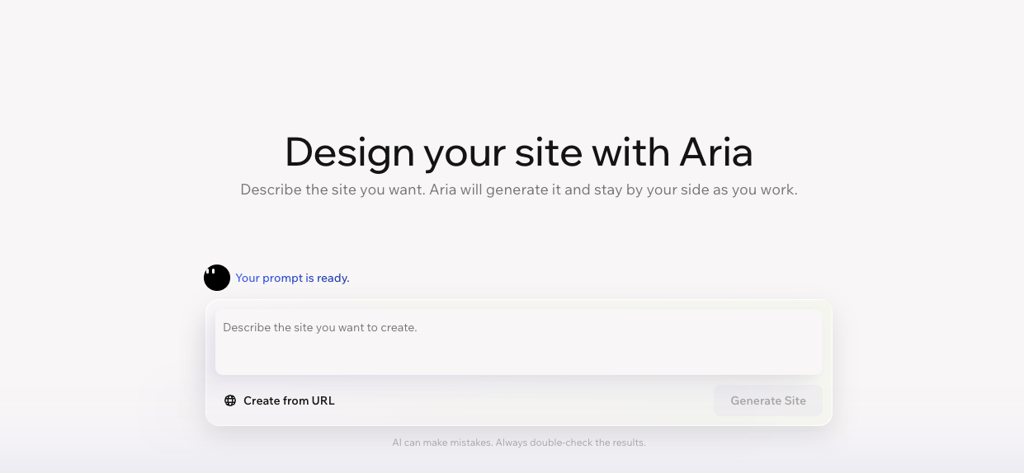
If words aren’t your strong suit, Wix also has built-in AI-powered content generators and editors that help to create text for websites, blog posts, promotional emails, and product descriptions.
In case you need assistance with visuals, like images or even logos, Wix also harnesses AI to help you create them. Images can be created from specific text prompts, while for logos, AI analyzes your business details and design preferences to produce a variety of custom brand logos.
Wix also integrates AI into search engine optimization tools, so your website can be found more easily by visitors. It recommends better keyword placement, improves readability, and optimizes metadata.
Framer AI features
Framer takes the integration of AI features beyond just building your site, creating text or visuals. It makes pages interactive – adding sticky navigation bars, animated menus, and interactive carousels – simply by having you describe what you want.
It can make your site responsive by automatically changing its layout, text, and images to fit any screen size. Just ask the AI agent to, “Make this responsive for tablet and phone.”
You can also manage and organize your website content with AI agents. Since the AI agent works directly with your content management system (CMS), it creates and populates collections so your content, design, and publishing workflows stay connected.
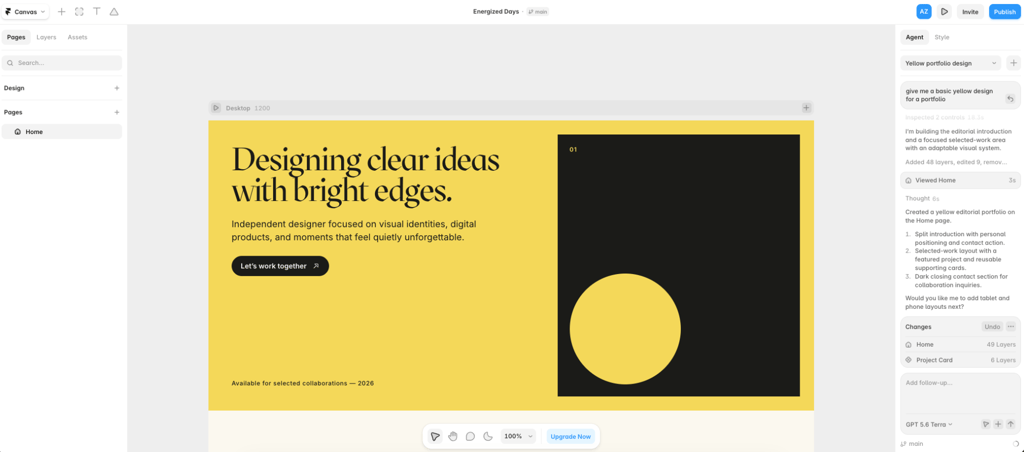
Framer’s AI agent can also review your site before publishing. It can identify contrast issues, typos, missing alt text, SEO gaps, and inconsistent styles, and then help you fix them.
If that’s not enough, the AI agent can help you build custom code for any component you need. Plus, Framer allows you to connect to other AI models like Claude, so you can use your preferred AI tools directly within the platform.
Customer support
If you’re having an issue with your site, you probably want it resolved as quickly as possible. For this, it’s important that customer support is always available through various channels. Check out the customer support options offered by Wix and Framer:
| Support channel | Wix | Framer |
| 24/7 live chat | ✅ Yes | ❌ No |
| Email support | ✅ Yes | ✅ Yes |
| Phone support | ✅ Yes | ❌ No |
| Chatbot assistance | ✅ Yes | ✅ Yes |
| Help center and tutorials | ✅ Yes | ✅ Yes |
With Framer, your first line of defense when experiencing issues is to start a chat with its AI agent. However, AI chatbots are usually only capable of answering predictable, frequently asked questions. For more complex problems, you will need to reach out to Framer's support team through their contact page or by emailing them directly. Keep in mind that the average wait time is estimated to be between 24 and 72 hours.
While the platform does offer emergency channels if your site goes down, its fastest Framer support channels are reserved for Enterprise plans, which receive response times of under 10 minutes.
On the other hand, Wix’s customer support caters to a broader consumer base. It offers more traditional, real-time support options like phone callbacks and live chat, though much of this is locked behind premium plans. As a user, I find Wix’s customer support more approachable, and I really appreciate the faster response times.
Final verdict: which one is better?
After thoroughly comparing the differences between Wix and Framer, Wix wins as an all-in-one solution for anyone wanting to get their site or business off the ground quickly. It’s simple to use, offers enough personalization, and provides the foundation so you can sell your product and get noticed online.
Framer isn’t as universal, catering to creatives and designers who want more freedom with their projects. It requires more experience with design platforms, so if you're looking for an easy-to-use tool rather than creating complex designs, Wix is the better option.