Best headless CMS in 2026

Building digital products in 2026 is very different from what it was a decade ago. Back then, your content usually stayed in one place. Now, you might need it to show up in an app, a storefront, a kiosk, and more recently, an AI assistant or something the frontend team hasn’t built yet. This is why a headless CMS keeps popping up in conversations. It’s a content management system that stores your content and delivers it through APIs to any frontend, rather than tying it to one website.
Your traditional CMS platforms keep content and presentation locked together, so adding a new channel means building. But with a headless CMS, you break that link, so the same content can feed every frontend you run.
Choosing the best one isn’t easy, especially for businesses without much experience with a headless CMS. Some platforms handle eCommerce well, whereas others fall apart as soon as things get a bit complicated. Some can speed your team up, while others add hours of extra integration work.
The Cybernews research team and I reviewed the top five headless CMS solutions developers, digital teams, and eCommerce operators can trust in 2026. I found Wix Headless to be the best headless CMS for most businesses and eCommerce projects. It’s the only platform we reviewed where the same backend powering your content also runs your products, carts, bookings, and more. Still, the other platforms have a lot to offer, as well, which I cover below.
Best headless CMS – shortlist
- Wix Headless – best headless CMS for eCommerce and businesses
- Contentful – top headless CMS for enterprise content operations
- Sanity – top headless CMS option for structured content and real-time collaboration
- Strapi – best open-source headless CMS for max control
- Storyblok – headless CMS for teams that want visual editing
What is a headless CMS?
A headless CMS separates content storage and content display, which are traditionally tied together. You have a backend that organizes your articles, product data, and page content, while the frontend handles how that content appears. This could be any format: a website, an app, a storefront, a screen in a store, or even a smartwatch display.
Your content team just uploads the work, and the CMS delivers it through an API (application programming interface). From there, the frontend you build can decide how to display it. If you ever want to reuse the same product description across your site and a mobile app without copy-pasting it twice or wrestling with templates, a headless CMS architecture makes that possible.
A traditional CMS ties content to one presentation layer, which works fine until you need another one. With a headless setup, the same content can feed every surface you support without requiring you to rebuild every time. That flexibility is particularly useful if you’re running a multi-channel business.
Benefits of a headless CMS
The greatest benefit of a headless CMS, and the reason it even exists today, is that it gives you control over where your content goes and how it looks when it gets there. This frontend flexibility means your content isn’t tied to a theme or template, so you can build whatever interface makes sense for your audience without working around the CMS to get it right.
Omnichannel publishing is another major perk because the same content feeds your website, AI assistant, kiosk, smartwatch app, and whatever channel you plan to add. You publish once through the CMS and send it to the API, and the system handles the rest.
Thanks to the freedom it gives to developers, your team can pick the framework, language, and tools they like best instead of accepting whatever the CMS comes with. APIs also facilitate cleaner integrations, and when you add a new frontend or channel, it’s simply another connection instead of a full system migration.
Also, since content delivery is separated from rendering, heavy traffic on one frontend doesn’t put a strain on the others. Thanks to the headless CMS, each part of the system can scale independently.
Say an article on your website goes viral and the server gets overwhelmed. Your headless CMS makes sure only the site’s frontend servers feel the strain. Since your app is pulling content from its own frontend system, it’s completely unaffected by the website’s traffic. You can even temporarily add more server capacity to handle that spike without touching the app system.
But before you commit to one tool, it’s worth noting that headless CMS benefits come with more planning than your standard site builders. You have to do more work upfront and rely heavily on developers. If you’re just a small startup with a few sites and apps, such complexity may be too much for your lean team with limited resources.
The best headless CMS platforms in 2026
The right headless CMS platform depends on what your team values most. Some need business infrastructure for their eCommerce business, while others care about enterprise-grade governance for large editorial teams. Then there are those seeking structured content with real-time collaboration, open-source control over their own hosting, or a visual editor that lets marketers publish without developer help.
I picked five platforms that cover one or multiple of these requirements, and I’ll explain where each one fits below.
1. Wix Headless – best headless CMS for business-led builds and eCommerce

| Overall rating: | |
| Standout feature: | A production-ready business backend behind any frontend you build |
| Starting price: | $15.50/month for the Business plan |
| Best for: | Teams building a custom frontend with eCommerce or service operations behind it |
Wix tops our list for eCommerce businesses because it’s the only platform here where your content and commerce run on the same backend. Products, carts, checkout, orders, bookings, members, and payments all sit in Wix, so a business-led build doesn’t need a second platform.
A lot of headless CMS platforms solve one problem only: getting content out of a database and into whatever frontend you build. That’s useful, but it’s also where many of them stop. What stood out to me with Wix is that it goes beyond content and considers everything else that goes into a modern build.
You can also build in React, Next.js, Astro, Vue, or whatever framework your team prefers, while Wix handles content, commerce, bookings, members, payments, and administration through REST APIs and a JavaScript SDK.
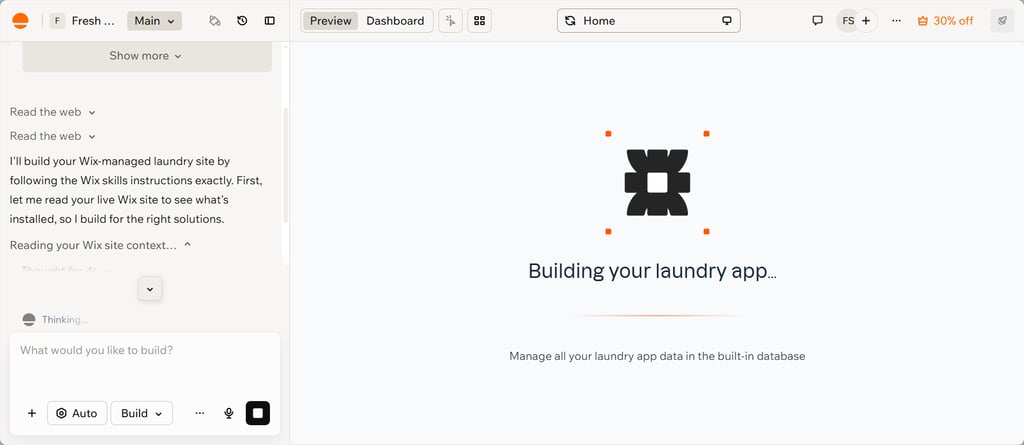
For anyone looking for a headless CMS for eCommerce, Wix makes a particularly strong case. You can design a product-discovery experience that looks nothing like a Wix template. At the same time, checkout and payment flows are handled by infrastructure, so you don’t have to build or secure them yourself.
You can run Wix in two ways. The managed option handles hosting, SSL, CDN, authentication, analytics, and SEO. The self-managed setup, on the other hand, lets you host on Vercel, Netlify, or AWS and keep full control. However, you’re responsible for the configuration and security work that comes with it.
There’s also an AI Toolkit with plugins for Claude Code, Cursor, and VS Code, which can take some of the repetitive integration work off your team’s plate.
However, teams that want a content-only CMS, without the broader business tooling, may find simpler content-first platforms more suitable.
2. Contentful – best headless CMS for enterprise content operations
| Overall rating: | |
| Standout feature: | Environments feature for staging content-model changes safely |
| Starting price: | Lite from $300/month |
| Best for: | Enterprise teams with large editorial operations and multi-market content needs |
Contentful’s governance and scale make it the best fit for enterprise content operations. It’s built for large editorial teams working across multiple markets and brands. As one of the pioneers in the headless CMS industry, I could tell how experienced it was right from the editorial interface. You get a clean dashboard, autosave, versioning, scheduled releases, live preview, and real-time collaboration with approval workflows. Even a team with little technical experience can work autonomously after minimal onboarding.
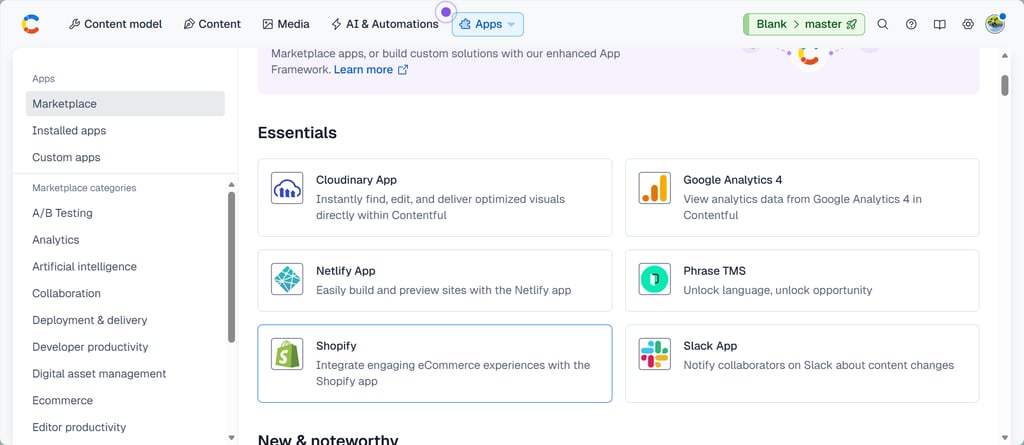
The architecture is built around Content Types and Entries delivered through REST, GraphQL, and a CDN-distributed Content Delivery API. There’s also a Preview API for reviewing drafts against the real frontend, a Marketplace for different tools, and a Management API for migrations. I particularly like the Environments feature, which mirrors Git-style branching and allows you to stage content-model changes without touching live content.
One thing I want to flag is the steep jump from Free to Lite at $300/month, as it can hit early-stage teams pretty hard. Also, keep in mind that Contentful is a content platform at heart, with no native eCommerce, bookings, memberships, or payments, which you get with Wix Headless.
3. Sanity – best headless CMS for structured content and real-time collaboration
| Overall rating: | |
| Standout feature: | Real-time collaborative editing in a fully customizable React Studio |
| Starting price: | Growth from $15.00/user/month |
| Best for: | Developer-heavy teams with complex content models and collaborative workflows |
Sanity’s code-first approach makes it the top option for structured content and real-time collaboration. It’s the most flexible editor experience on this list as long as your team has the developers to configure it.
Instead of shipping a fixed editorial interface like other options on this list, Sanity comes with Sanity Studio, an open-source React app you configure and own, built on top of a real-time structured content store called the Content Lake. The idea is that your content model comes first, and then the tools adapt to it rather than the other way around.
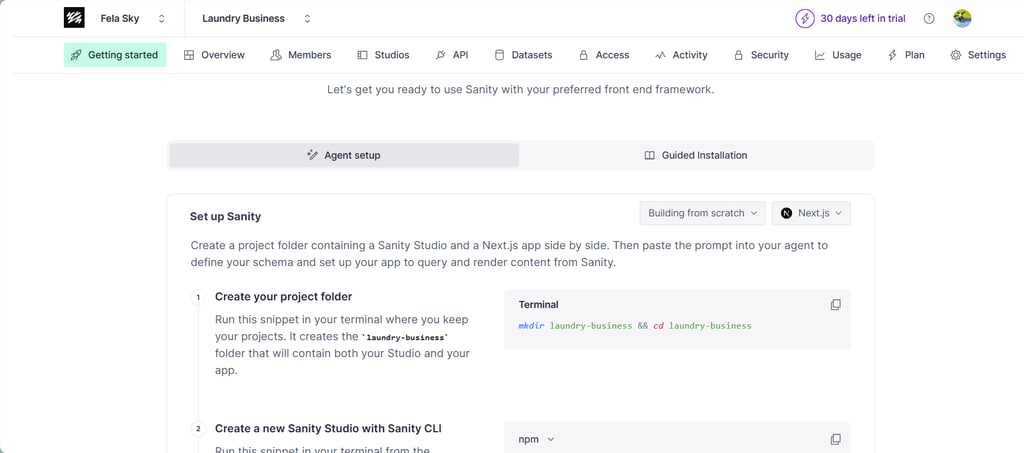
I signed up and set up a test project myself, a laundry business. The AI agent workflow handled most of the scaffolding. I created a project folder with the Studio and a Next.js app side by side and pasted a prompt into my coding agent. It defined the schema and wired the frontend to query Sanity content. That’s a fast start compared to hand-building a schema from scratch.
Real-time collaboration stands out with presence indicators, cursor tracking, and simultaneous editing in the Studio. You also have Canvas, which adds AI-assisted authoring, turning freeform writing into structured content that matches your schema, and Content Releases that let you batch, schedule, and roll back updates without developer help.
However, keep in mind that Sanity might not be the most user-friendly option if your team doesn’t have much coding or web development experience.
4. Strapi – best open-source headless CMS for maximum control
| Overall rating: | |
| Standout feature: | MIT-licensed self-hosting with no usage limits or per-seat fees |
| Starting price: | Growth from $45.00/month for 3 seats |
| Best for: | Developer teams that prioritize ownership, data residency, and long-term cost control |
Strapi’s open-source licensing is exactly why it’s our best pick for maximum control. The platform is good for teams that want to own their content infrastructure. It’s an open-source, API-first headless CMS built on Node.js, and the Community edition is genuinely free forever under the MIT license, with no entry limits, no API call caps, and no per-seat pricing. You pay for your own hosting (which can be as low as a few dollars a month) and nothing else.
The workflow is managed through the admin interface rather than being code-first. You define content types in a visual builder, and Strapi auto-generates REST and GraphQL APIs from your model instantly, with no backend code for standard CRUD operations.
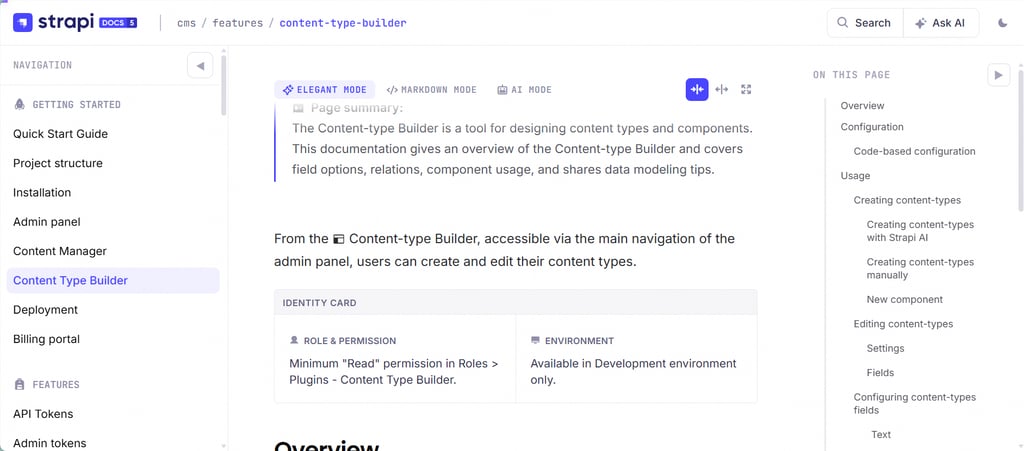
Strapi AI saves hours of tedious work, but it's hidden behind the Growth plan, which starts at $45.00/month for three seats. You can ask it to build a blog structure with a title, author profile field, publication date, and rich-text body, and it will generate the database fields instantly.
But that control comes with more responsibility. Self-hosting means you’re in charge of the backups, security patches, scaling, and upgrades. Major version migrations can also involve breaking changes that could require dedicated developer time.
5. Storyblok – headless CMS for teams seeking visual editing
| Overall rating: | |
| Standout feature: | Drag-and-drop visual editing that keeps marketers out of developer queues |
| Starting price: | Growth from $99.00/month |
| Best for: | Teams balancing developer control with content team autonomy |
Storyblok visual editor makes it the top pick for teams that want editing without developer tickets. Marketers click a page element and edit it inline, drag Bloks to build new pages, and preview across viewports. But there’s still a developer step upfront. The frontend and content setup need to be configured before marketers can work independently.
The platform blends developer flexibility and content team usability. Many headless platforms make editors work in forms, where you fill in the fields, hit publish, and hope the frontend renders it correctly. With Storyblok, you get a visual editor and can click directly on any page element to edit inline, drag and drop components to build new pages, and preview changes across desktop, tablet, and mobile at once.
What I liked most was the AI layer. You have AI Translations that cover 30+ languages while maintaining brand voice, AI Branding that keeps messaging consistent across teams, and even AI SEO/Alt Text for teams that want to automate metadata and accessibility.
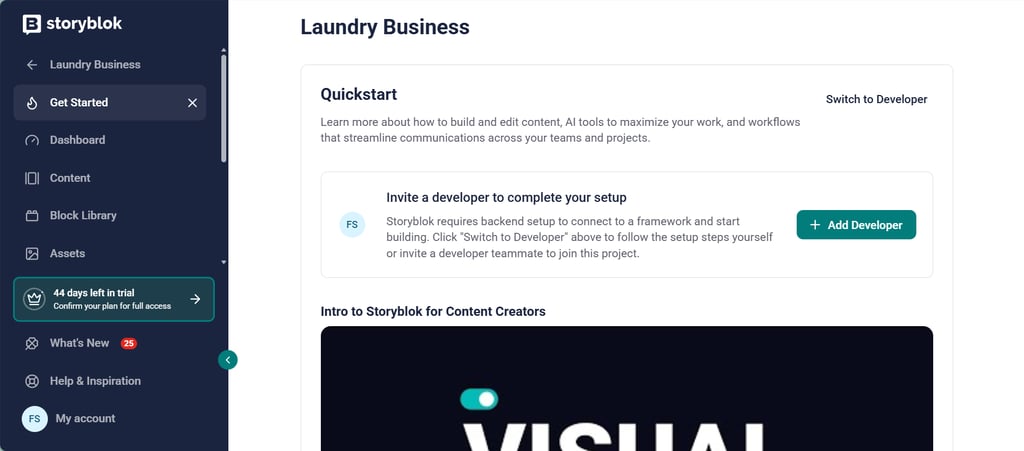
I started a test project and chose the non-developer option during sign-in. It didn’t take long before the setup flow prompted me to invite a developer to connect a framework. That’s actually a pretty accurate reflection of how the platform works. Storyblok requires some backend setup before you can start building, which might be too much for some teams.
Headless CMS comparison table
To help you choose between headless CMS platforms, I put together a table covering key details like standout features, notable limitations, editor experience, developer flexibility, and what type of team each platform suits.
| Provider | Best for | Key strength | Notable limitation | eCommerce fit | Developer flexibility | Editor experience | Ideal team type |
| Wix Headless | Business-led builds that need commerce, bookings, and content together | One backend covering CMS, eCommerce, bookings, members, and payments | Business data and operations tied to the Wix ecosystem | Excellent | High | Familiar Wix dashboard for non-technical staff | Teams that want a custom frontend with a production-ready backend |
| Contentful | Enterprise content operations at scale | Mature APIs and strong governance for large editorial teams | High cost for the premium plan | Moderate | High | Intuitive for non-technical editors | Enterprise teams with large content operations |
| Sanity | Structured content and real-time collaboration | Fully customizable React Studio with real-time editing | Studio needs developer configuration to be editor-friendly | Weak | Very high | Strong once configured | Developer-heavy teams with complex content models |
| Strapi | Maximum control and avoiding vendor lock-in | MIT-licensed self-hosting with no usage limits | Your own hosting, maintenance, and upgrades | Moderate | Very high | Visual admin builder, but less refined compared to others | Developer teams prioritizing ownership and data residency |
| Storyblok | Teams wanting visual editing in a headless CMS | Drag-and-drop Bloks editing for marketers | Requires backend setup | Moderate | High | Visual editor for non-technical teams | Teams balancing developer control with marketer autonomy |
What is the best headless CMS for eCommerce?
eCommerce teams need more than content modeling. Product-related content is only one piece of the puzzle. There are also inventory, carts, checkout, orders, customer accounts, and whatever operational workflow keeps the business running. A content-first CMS handles the first part well, but you still have to assemble the rest.
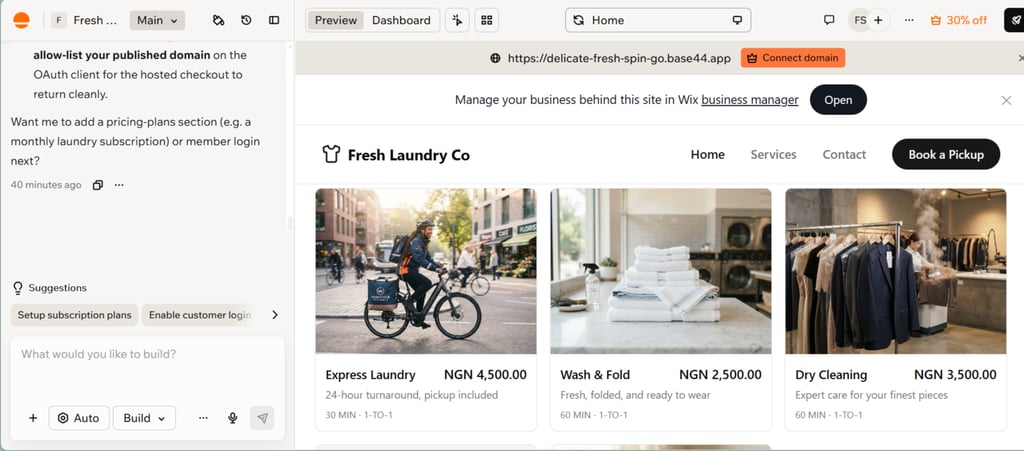
Wix Headless stood out as a headless CMS for eCommerce during my testing. I built a laundry business offering express laundry, dry cleaning, wash & fold, among other services. The frontend was custom, but bookings, pricing plans, member accounts, and payments all ran through Wix – one backend instead of four subscriptions.
Now say you want a DTC brand with a storefront built in Next.js and a browsing experience Shopify’s theme system can’t accommodate. You build that frontend yourself, pull the catalog through the SDK, and let Wix Stores handle carts, checkout, inventory, and orders in a dashboard your team already understands.
A content-first system makes sense only if your commerce is handled elsewhere and you mainly need it for product descriptions and editorial content.
How to choose the best headless CMS platform
Choosing a headless CMS platform comes down to a couple of factors, and getting them right early saves you from having to migrate your system a few months later. Here’s what to consider when evaluating your options.
- API flexibility. Check whether the platform offers REST and GraphQL, how well-documented the APIs are, and whether it supports the frontends and channels you plan to build. A platform that limits how you query or deliver content will hold you back the moment your requirements change.
- Developer experience. If your developers struggle with the tool daily, the rest doesn’t matter much. Look at SDKs, typed clients, framework integrations, CLI tooling, and how quickly a team can get a working prototype up and running.
- Security, hosting model, and business workflows. Review the certifications, data residency options, whether you self-host or use the managed setup, and whether the platform supports the business workflows you actually run.
- Content modeling. Check whether content types can evolve without a rebuild, since a rigid model leads to more work.
- Editorial usability. Editors live in the platform after developers finish building, so confirm the interface works for non-technical staff. Look for virtual previews and check how much configuration it takes before a content team can work independently.
Headless CMS examples and use cases
Take a company like BMW Group, which runs BMW, MINI, and Rolls-Royce as separate brands, for example. A headless CMS lets each site pull from shared vehicle and specification data while also giving regional teams control over their own content.
The approach is the same for a SaaS team that ships API docs and help articles through a headless CMS. This content can appear across the site, a support widget, and an in-app panel. Even a retailer can serve product content on its site, app, and in-store kiosks from one source, so a price change can appear across all channels at once. A headless CMS as a service makes this possible without rebuilding the backend for each channel.
Conclusion: the best headless CMS depends on what you need to power
There’s no single best headless CMS because the right platform depends on what you’re actually looking for. During my testing, Wix Headless came out as the strongest all-around option on this list. It’s the only platform I reviewed where the same backend that powers your CMS collections also runs your products, carts, checkout, bookings, members, and payments. For an eCommerce brand, that combination is hard to beat.
That said, other platforms excel in different areas. If content flexibility at enterprise scale is your goal, Contentful is a safe choice. For structured content and real-time collaboration, Sanity works well, while Strapi gives you the most control over open-source control and data ownership. And if your team needs to publish without filing developer tickets, Storyblok’s visual editor is the strongest in the category.
FAQ
What is a headless CMS?
A headless CMS is a content management system where the content layer is separated from the presentation layer. Content is stored in the backend and delivered through APIs to any frontend, whether a website, app, kiosk, or storefront, rather than rendered as pages in the same system.
What is the best headless CMS in 2026?
Wix Headless is the best headless CMS in 2026 for teams that need frontend freedom alongside real business capabilities, since commerce, bookings, members, and payments run on the same backend. That said, you have Contentful that suits enterprise content operations, Sanity for structured content and real-time collaboration, Strapi for more open-source control, and Storyblok for top visual editing.
What are the benefits of headless CMS?
The main benefits of headless CMS architecture are frontend flexibility, multi-channel delivery, and scalability. Your content isn’t tied to a template, so you get to build any interface you want and feed it through an API.
Which headless CMS is best for eCommerce?
Wix Headless is the best headless CMS for eCommerce. eCommerce teams need more than content APIs, and Wix offers inventory, carts, checkout, orders, member accounts, and more on the same backend you connect your custom storefront to.
Is a headless CMS worth the implementation effort?
Yes, a headless CMS is worth the implementation effort for complex or multi-channel builds. However, it’s not always the right choice for simple sites. If you’re serving one website with straightforward content, a traditional CMS gets you there faster and cheaper.