One.com Aida AI Website Builder review (2026): the conversational AI website builder that does the work for you

Building a website is possible for anyone, but finding a website builder that’s easy to use and provides a polished result isn’t simple. Some website builders, such as Wix or WordPress, provide ample options for customizing your site, but they can be too complex if you’re new to website building. Simpler builders have a smaller learning curve, but they often generate generic-looking sites.
One.com’s Aida AI Website Builder aims to simplify website creation, allowing you to build and manage a website by chatting with AI. All users have to do is describe their business, and Aida can create a complete website with a layout, copy, and images, helping you get online in a few minutes.
In this One.com Aida AI Website Builder review, I’ll explain how the AI builder works, what each plan includes, the costs, and how it compares with competitors such as Wix AI and GoDaddy Airo. By the end, you’ll know if One.com’s Aida is the right AI builder for your business.
What is One.com Aida AI Website Builder?
Aida AI is an AI-powered website builder built into One.com’s hosting platform. It works as an AI agent that goes beyond standard site creation – understanding natural language commands to build pages, write copy, and adjust layouts, while also handling administrative tasks like scheduling social media posts and sending customer emails with a simple request.
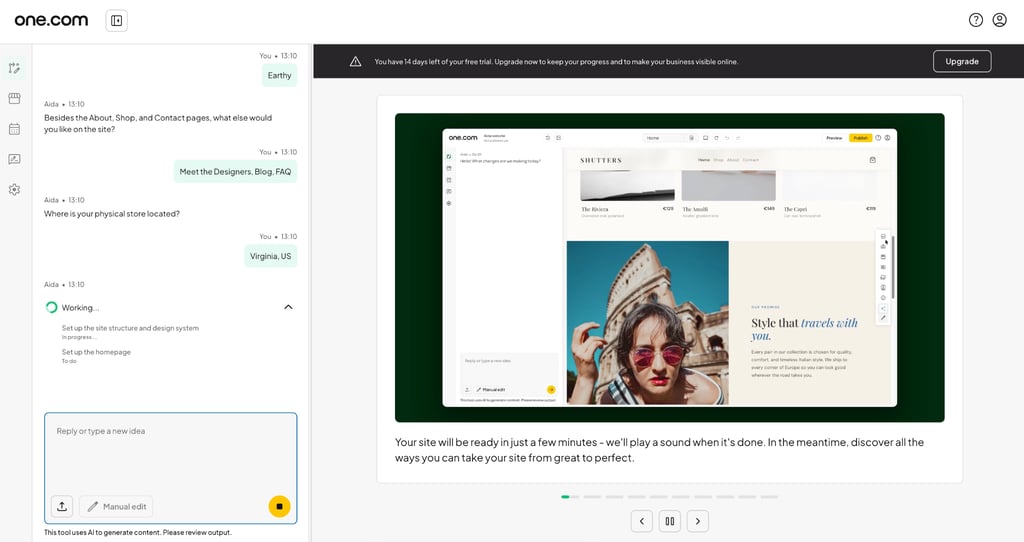
This is a different workflow from classic website builders, where you’re responsible for manually placing sections, uploading images, and aligning every element yourself. With Aida, you can simply focus on describing the outcome you want, for example, “Add an about us page with a focus on our store's goal” or “Create a booking page for consultations”. Using those commands, the AI builds your website accordingly.
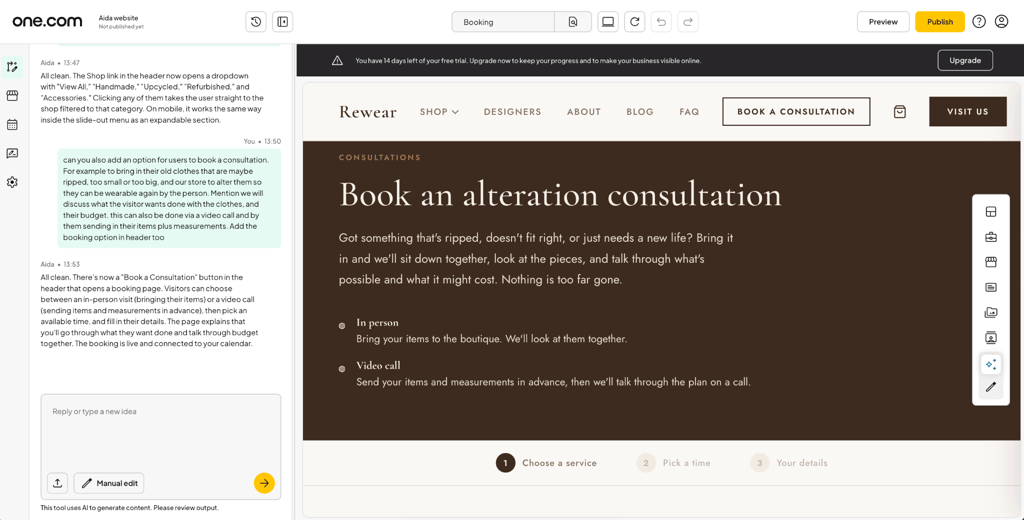
You can also switch to a manual editor to make changes, which is helpful if you have exact bits of copy or blocks that you want to change in mind. However, the manual editor offers only a few editing options, such as changing font size, text color, and visuals.
The core strengths – what makes Aida AI Website Builder different
Aida AI Website Builder includes several features that set it apart from traditional builders. Below, I’ll look at the key ones, explain how they work, and share how they performed during my testing.
- Conversational visual editing. Aida AI Website Builder's main feature is its chat-based editing workflow. Instead of manually moving sections or searching through settings, users can describe what they want changed and let the AI update the website. In my testing, it handled longer requests well. For example, when I asked it to add a clothing alteration consultation service, it created a new header menu item and a ready-to-use three-step booking form based on my brief instructions.
- The Modernize URL feature. Aida can redesign an existing website by analyzing its URL and creating a refreshed version with a more modern layout and mobile-friendly design. This is aimed at businesses that want to update an outdated website without manually rebuilding every page.
- Bundled web hosting and email. Aida is part of One.com's hosting platform, so you get hosting, SSL, SSD storage, a free domain for the first year, and professional email accounts included in the same plan.
- Built-in business agents. Higher-tier plans include AI-powered booking and eCommerce features. The Booking plan adds appointment scheduling tools, while the Commerce plan includes an online shop with product management, payments, shipping settings, VAT handling, and order management. During my testing, Aida was able to create a consultation booking flow, add services, and adjust booking details, including descriptions and durations. However, some calendar management tasks, such as manually blocking unavailable time slots or adding breaks, were not possible directly through the AI chat, and it suggested contacting support regarding these issues.
One.com Aida AI plans and pricing tiers
One.com allows users to create and edit their website for free before publishing and committing to one of Aida’s 3 plans. Below, I’ll tell you more about each plan's differences, so you can decide which one you need.
Portfolio plan
The Portfolio plan, priced at $9.99/month, is designed for individuals and freelancers getting started online. It includes 25GB SSD storage, 1 professional email account with 3GB of storage, unlimited website pages, a free domain for the first year, DDoS protection, and Aida’s AI website creator and editing assistant. You also get access to 3 AI agents, AI-powered blog content generation, and multilingual website support.
Booking plan
The Booking plan, priced at $13.99/month, targets service-based businesses, such as beauty salons, consultants, and agencies. It provides 50GB SSD storage, 5 professional email accounts, and one more AI agent dedicated to bookings.
The AI Booking tool allows you to set up appointment scheduling, manage bookings through AI chat, use calendar views, automatically send confirmation and cancellation emails, and make up to 25 appointments per month.
Commerce plan
The Commerce plan costs $20.99/month, and is the best fit for businesses selling products online. It includes 100GB SSD storage, 25 professional email accounts with 3GB each, and all Booking plan features.
On top of that, you get a fifth AI agent dedicated to eCommerce and access to the AI Shop, which lets you create an online store with unlimited products, product variants, payment processing, order management, custom shipping rules, and VAT handling. One.com also doesn't charge transaction fees on your sales. The plan supports up to 50 bookings per month, making it the best choice for businesses that need to combine online sales with appointment-based services.
Who is One.com Aida AI for – and who it isn't for?
Based on my testing, Aida AI is best for users who want to launch and manage a website without learning traditional website-building software. It focuses on freelancers, small and medium businesses, and first-time website owners looking for an all-in-one solution.
Aida AI is the right choice if:
- You want a professional business website live in minutes without learning drag-and-drop software.
- You prefer managing your website by chatting with AI instead of manually editing layouts.
- You want an all-in-one package with hosting, a domain, email accounts, and clear billing.
- You are a service-based business that needs built-in appointment booking.
Consider alternatives if:
- You are a designer who wants pixel-perfect control to manually drag elements anywhere on a blank canvas.
- You need advanced developer features, custom databases, or extensive third-party integrations.
- You enjoy building websites manually and editing every design element yourself.
One.com Aida AI vs Wix AI vs GoDaddy Airo
One.com Aida AI, Wix AI, and GoDaddy Airo all help users create websites with AI, but each uses a different approach. Aida AI focuses the entire experience around AI chat, while Wix AI relies on a traditional drag-and-drop editor after the initial setup. GoDaddy Airo falls somewhere in between, combining AI-assisted setup with a simplified visual editor.
| One.com Aida Website Builder | Wix AI Website Builder | GoDaddy Airo | |
| Editing interface | Conversational AI chat with an optional manual editor | AI generates your site, then edits can be made in a drag-and-drop editor | AI-assisted setup followed by a section-based visual editor |
| What's included | Hosting, free domain (first year), SSL, and professional email | Hosting; professional email requires a separate Google Workspace subscription | Hosting; professional email is a paid add-on after the trial |
| Standout feature | Allows modernizing an existing website by importing its URL | Extensive drag-and-drop customization after AI generation | AI-assisted business setup integrated with GoDaddy's website and marketing tools |
| Booking and eCommerce | Built-in AI Booking and AI Shop on higher-tier plans | Booking and online stores are available through premium plans and apps | Available on supported plans, with features depending on the subscription |
| Ease of use | Very beginner-friendly thanks to the chat-first workflow | More features, but also a steeper learning curve | Beginner-friendly with a guided setup process |
| Design flexibility | AI-driven editing with limited manual layout customization | Extensive drag-and-drop customization and pixel-level control | Moderate customization using predefined sections |
| Privacy and hosting | European hosting with GDPR-focused infrastructure | Primarily US-focused infrastructure with GDPR tools available | Primarily US-based infrastructure |
Overall, Aida AI is the most AI-driven of the three, so it has the lowest learning curve. It keeps AI at the center of the editing experience, allowing you to make changes through conversation. Wix AI is a better choice for users who want full creative control, while GoDaddy Airo is better suited to those looking for a straightforward website builder and AI-assisted setup.
One.com Aida AI pros and cons
To evaluate Aida AI, I looked at how well it works for its intended audience: small and medium businesses and non-technical users. I evaluated the AI editing experience, business tools, customization options, and control.
Verdict: is One.com Aida AI worth it in 2026?
After my testing, I can conclude that One.com’s Aida AI Website Builder is a helpful choice for beginners and small and medium businesses looking to turn their ideas into reality. Because it combines AI-powered website creation with hosting, a domain, professional email, booking tools, and eCommerce features in one platform, you don't have to juggle multiple services.
During my testing, Aida created a functional and professional-looking website with strong copy and easily handled larger requests, such as adding a consultation booking flow and updating the navigation. However, I found the manual editor fairly limited for more precise design changes.
Overall, I think One.com Aida AI is one of the better all-in-one AI website builders in 2026. It doesn’t offer the same level of design control as traditional website builders, but if you value simplicity, integrated tools, and an AI-first experience, it's a strong option.
FAQ
Is Aida AI different from the classic One.com Website Builder?
Yes. The classic One.com Website Builder uses a traditional visual editor where you manually customize your website with drag and drop. Aida replaces much of that process with conversational AI, allowing you to create and update your website by describing the changes you want in a chat.
Can I build a website on Aida AI for free?
Yes. You can create, edit, and design your website for free using Aida AI. You only need to choose a paid plan when you're ready to publish your website.
What is the Modernize feature in Aida AI?
The Modernize feature lets you rebuild your existing website by pasting the URL into Aida AI. It analyzes your current site and generates a redesigned, more modern version while preserving your existing content, helping you refresh your website without rebuilding it from scratch.
Are professional email accounts included?
Yes, every Aida AI plan includes professional email accounts. The Portfolio plan includes 1 email account, the Booking plan includes 5, and the Commerce plan includes 25.
Does Aida AI support online scheduling?
Yes, the Booking and Commerce plans include a built-in booking system that lets customers schedule appointments through your website. It also includes booking management, calendar views, and confirmation and cancellation emails.
Can I sell products with One.com Aida AI?
Yes, the Commerce plan includes the AI Shop, which supports unlimited products, product variants, payment processing, order management, custom shipping rules, VAT handling, and 0% One.com commission fees.
Is One.com hosting GDPR compliant?
Yes. One.com hosts websites in European data centers and is designed to comply with GDPR requirements, making it a suitable option for businesses operating in the EU.
Do I need coding skills to use Aida AI?
No, Aida AI is a no-code website builder designed for beginners. You can create and edit your website through AI chat without writing code or learning web development.