Bitdefender vs Microsoft Defender: which antivirus is better?
Backed by leading cybersecurity experts and investigative journalists, we deliver independent, real-world antivirus testing and analysis, guaranteeing objective evaluations without undue influence or bias from outside parties.
Our transparent and consistent methodologies ensure objective, up-to-date reviews, empowering readers to make well-informed decisions.
Learn more

Bitdefender and Microsoft Defender (formerly Windows Defender) are two well-known names among antivirus solutions. That’s because both have strong reputations for their security and are favored by various users.
For this Bitdefender vs Microsoft Defender comparison, I tested and evaluated both providers in key areas, including malware detection, system performance, ease of use, features, and pricing. So, if you’re not sure which of these providers fits you best, continue reading to learn more.
Bitdefender vs Microsoft Defender at a glance
During our tests, Bitdefender demonstrated strong protection with a malware detection rate of 88%. In comparison, Microsoft Defender, while a relatively reliable solution, showed considerably lower results, scoring only 42% in malware detection.
Bitdefender also offers better-equipped plans and a good price-to-value ratio, which earned it a high place on our best antivirus software list.
| Bitdefender Antivirus | Microsoft Defender | |
| ⭐ Rating: | ||
| 🥇 Overall rank: | #1 out of #30 | #21 out of #30 |
| 🔥 Coupons: | Bitdefender coupon 78% OFF | Antivirus Coupons 2026 |
| 💵 Price: | From $12.99/year | From $99.99/year |
| ✂️ Free version: | Yes | Yes |
| 🖥️ Platforms: | Windows, macOS, Android, iOS | Windows |





Our team of researchers thoroughly tests antivirus software following a well-established testing process. In unison, our experts combine in-house and independent testing lab findings with first-hand experience to help you make informed decisions about each product. Learn how we test antivirus software.
Bitdefender vs Microsoft Defender: company background
Bitdefender is a Romanian cybersecurity company, founded in 2001. It focuses on advanced malware defense for individuals and businesses. Balancing strong protection with minimal system impact, it’s one of the most globally recognized antivirus solutions.
Microsoft Defender is Microsoft’s built-in security platform for Windows. It started as a basic antivirus solution and evolved into a cloud-based and AI-driven malware protection suite with tight integration within Microsoft 365, protecting individuals and large businesses alike.
Bitdefender vs Microsoft Defender: which offers better protection?
To determine which provider offers better security, I first looked at the latest results from independent labs. AV-TEST evaluated Bitdefender and Microsoft Defender in July-August 2025. Both providers earned a Top Product rating, which means that they offer similar levels of security.
| Bitdefender | Microsoft Defender | |
| Independent tests | Highest marks | Highest marks |
| Real-time protection | 100% | 98.8% |
| Firewall | Effective | Effective |
I also looked at AV-Comparatives, and both Bitdefender and Microsoft Defender scored excellent protection rates: 100% and 98.8% respectively. However, Bitdefender not only has better real-time protection, it also has a higher offline detection rate and a lower false alarm rate compared to Microsoft Defender.
During our in-house tests, we ran various types of tests to see how effective both antiviruses are. The results weren’t as good as those from independent labs, but Bitdefender performed significantly better.
On the other hand, Microsoft Defender’s performance was average. While Bitdefender caught 132 out of 150 malware samples, Microsoft Defender was less effective, catching 63 out of 150 malware samples.
Real-time malware protection
To test Bitdefender’s and Microsoft Defender’s threat prevention systems, AV-Comparatives put them through real-world protection tests.
During the August-September 2025 tests, it detected 1 false positive for each of the providers. Also, both antiviruses demonstrated high scores catching malware, where Bitdefender scored 100% and Microsoft Defender scored 98.8%.
In addition to independent testing, we ran our in-house tests to see for ourselves how effective these antiviruses are. The results weren’t as good as shown by independent labs.

During the full scan, Bitdefender detected 132 out of 150 malware samples we planted on the device. On the other hand, Microsoft Defender caught only 63 out of 150 malware samples.

Despite imperfect results, Bitdefender and Microsoft Defender are still reliable antivirus solutions. However, Bitdefender did better during both independent and our in-house testing.
Firewall protection
Bitdefender offers a firewall that protects your device from unauthorised access. It’s done by blocking inbound and outbound connections, both on local networks and on the internet. You can also manually edit programs or apps that are allowed through the firewall.
Additionally, you can enable port protection, so the firewall blocks any attempts to scan your device’s ports. There’s also alert mode, which allows the firewall to send notifications if any app is trying to access the internet.

In comparison, Microsoft Defender offers a more limited firewall. It allows you to enable or disable the firewall on private, guest, and public networks and troubleshoot your networks in case something on your device isn’t working.
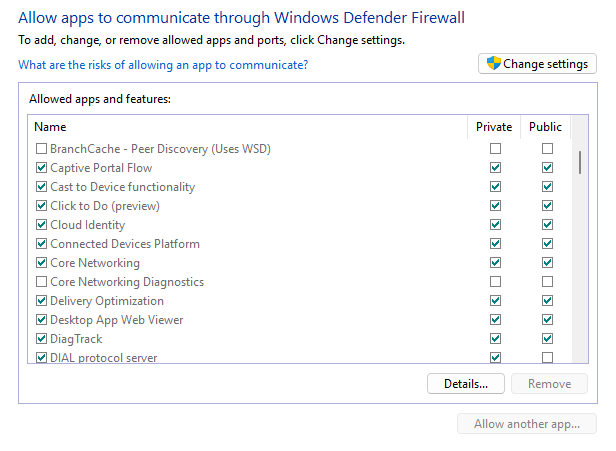
If you find that the default settings are too limited, you can customize them through advanced settings. There, you can further regulate connection security rules and monitor the firewall’s activities.
While both providers have good firewalls, Bitdefender offers a more advanced firewall with better security features.
Scanning
Both Bitdefender and Microsoft Defender offer a variety of scanning options. For example, Bitdefender offers Quick, System, Vulnerability, and Custom scans. Its virus scanner is based on malware directory and machine learning. Since these scans happen in the cloud, this feature is lightweight on your device system.

Microsoft Defender also offers 4 scans, including Quick, Full, Custom, and Offline scans.

Microsoft Defender Offline scan is the provider’s standout feature. It’s tailored to remove malware that is difficult to detect. Since this scan runs outside the normal Windows kernel, it can find the malware that tries to bypass Microsoft shell, such as rootkits.
Plans and pricing
When it comes to pricing and plans, Bitdefender is more flexible than Microsoft Defender. While both providers offer a free version, Bitdefender has a better selection to fit different needs and budgets.
On the other hand, Microsoft Defender is free for Windows users and doesn’t offer standalone subscriptions. However, it can be purchased with the Microsoft 365 suite, which has three plans available: Personal, Family, and Premium.
| Plan | Bitdefender | Microsoft Defender |
| Free | $0.00 | $0.00 |
| Antivirus Plus vs Microsoft 365 Personal | $12.99/year | $99.99/year |
| Total Security vs Microsoft 365 Family | $19.99/year | $129.99/year |
| Premium Security vs Microsoft 365 Premium | $64.99/year | $199.99/year |
Microsoft Defender is a free service for Windows users, yet it's more limited compared to Bitdefender’s free version. While both providers offer free plans that work on Windows only, Bitdefender has a more well-rounded security suite. Even with the free plan, you get essential protection against ransomware, phishing, malicious websites, infected downloads, zero-day exploits, trojans, and rootkits.
Also, Bitdefender can be scaled for an affordable price. It can be upgraded for only $12.99/year to include extra features like a VPN and data breach detection. If you have devices with different operating systems, Bitdefender Total Security ($19.99year) is compatible with the most popular OSes, including macOS, Android, and iOS.
Windows Defender vs Bitdefender: features
Bitdefender provides its users with more security features than Microsoft Defender, making it a winner in this category. Unlike Windows Defender, Bitdefender offers extras, such as a password manager, a VPN, and data breach detection.
| Bitdefender | Microsoft Defender | |
| Ransomware protection | ✅ Included | ✅ Included |
| Phishing protection | ✅ Included | ❌ Not included |
| Wi-Fi security | ✅ Included | ✅ Included |
| Anti-tracker technology | ✅ Included | ❌ Not included |
| VPN | ✅ Included | ❌ Not included |
| Vulnerability assessment | ✅ Included | ❌ Not included |
| Data breach detection | ✅ Included | ❌ Not included |
| Password manager | ✅ Included | ❌ Not included |
| Parental controls | ✅ Included | ✅ Included |
| Anti-theft | ✅ Included | ✅ Included |
| Social network protection | ✅ Included | ❌ Not included |
Microsoft Defender provides basic security features that protect your device from ransomware and malware. It also includes some added features, like Wi-Fi security, parental controls, and identity theft monitoring. However, what’s included in Microsoft Defender antivirus is pretty set. The only upgrade you can do is expand the device coverage by upgrading from a Personal to a Family plan. You can learn more about its features by reading our Microsoft Defender review.
The Bitdefender Antivirus Plus plan is its cheapest tier, which includes fundamental features to protect your device. It’s more extensive than what Microsoft Defender has to offer and includes scam prevention and detection, a VPN, data breach detection, and social media protection. If you want to learn more about these features, check out our extensive Bitdefender review.
Bitdefender’s cheapest plan offers better protection, while its advanced plans offer even more perks, such as webcam and microphone protection, unlimited VPN usage, and a password manager. Therefore, Bitdefender is a better choice than Microsoft Defender, since it can be easily scaled and offers more advanced security features.
Impact on PC performance
To evaluate the impact on system performance, I tested both antiviruses on Windows 10 VM with 4 allocated CPU cores from Ryzen Threadripper Pro 3945WX and 16GB RAM.
Bitdefender’s impact on the system is most noticeable during active scans. During testing, RAM usage ranged from 6.8GB to 7.2GB, and CPU load reached 78%, indicating a moderate impact on your computer resources.
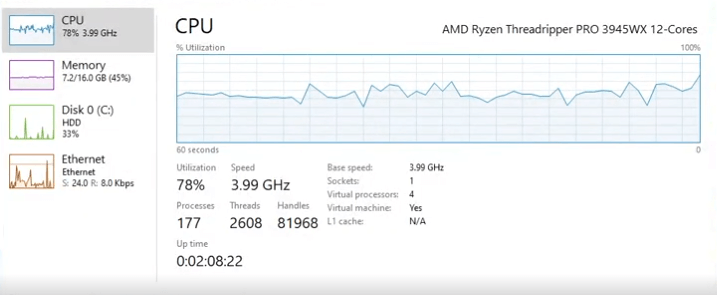
Windows Defender had a slightly lower impact on PC performance. Its RAM usage rose from 3.9GB to 4.5GB, but the CPU usage peaked at 98%, which can temporarily affect system responsiveness. When not scanning, Defender generally remains more lightweight and integrated into Windows operations.
Apps and interface: which is more user-friendly?
Both Bitdefender and Microsoft Defender have simple and easy-to-navigate apps. Bitdefender is also easy to install, while Microsoft Defender is already built into the Windows OS.
The main difference between the providers is that Microsoft Defender is compatible only with Windows and doesn’t have a mobile app. Bitdefender, on the other hand, works with the most popular operating systems and has mobile apps for Android and iOS.
Desktop apps
Bitdefender has an organized and simple-to-navigate interface on Windows and macOS apps. Its homepage looks modern and has no unnecessary clutter. There are 5 different categories on the main dashboard to help you find anything you need in a few clicks.
On the left side menu, you’ll also find Protection, Privacy, Utilities, Notifications, and Settings tabs.

If you want to find more antivirus-related features, including additional scanning options, look under the Protection tab. For parental controls or a password manager, look in the Privacy tab.
In comparison, Microsoft Defender has a very minimalistic interface with no eye-catching design or colors. Yet, it’s still functional and easy to use. All Microsoft Defender’s features can be found on the left-side menu.

However, for additional setup, some of the features are located in harder-to-find spots. Therefore, the app itself is not that user friendly.
Mobile apps
Bitdefender has dedicated apps for both Android and iOS. The apps are easy to download and install, but there are noticeable differences between the two. The Android version is more elaborate, while the iOS one covers only the basics.

Unfortunately, Microsoft Defender is not compatible with mobile devices. Therefore, if you want to secure your mobile device, consider Bitdefender.
Customer support
In terms of customer support, Bitdefender is a clear winner. It offers various ways to get help, including live chat, phone line, and email support for contacting human agents. The same help options are available regardless of whether you’re a free or paying user.
On the other hand, Microsoft Defender’s customer support options are very limited. You can choose from a knowledge base and community support only. However, given that Microsoft Defender is relatively simple to use, such options should be sufficient.
| Bitdefender | Microsoft Defender | |
| ✅ Yes | ❌ No | |
| Live chat | ✅ Yes | ❌ No |
| Phone | ✅ Yes | ❌ No |
| Forum | ✅ Yes | ✅ Yes |
| Knowledge base | ✅ Yes | ✅ Yes |
Final verdict
After a detailed Bitdefender vs Microsoft Defender comparison, Bitdefender stands out as a clear winner. It offers stronger protection, a wider array of features, and better overall value.
| Category | Bitdefender | Microsoft Defender |
| Features | ✅ | ❌ |
| Protection | ✅ | ❌ |
| PC performance | ✅ | ❌ |
| Pricing | ✅ | ❌ |
| User interface | ✅ | ❌ |
| Support | ✅ | ❌ |
Microsoft Defender is a reliable antivirus solution for users who don’t need extensive security. It’s readily available with Windows OS, so there’s no need to install it separately, which is great for beginners. Yet, it offers limited functionality and has weaker malware detection compared to Bitdefender.
How we tested Bitdefender vs Microsoft Defender
To assess Bitdefender’s and Microsoft Defender’s capabilities, we ran in-house tests using real-world malware samples. This allowed us to evaluate their malware detection and removal efficiency. To ensure relevance and accuracy, we focused on key areas like:
- Real-time protection
- Malware detection and removal
- Performance
- False positive detection rates
- Compatibility
- Features
- Customer support
- Price
At Cybernews, we follow a strict testing process to ensure accurate results. If you want to learn more about how we test antivirus software, check out our AV testing methodology guidelines.
FAQ
Is Bitdefender worth it vs Microsoft Defender?
Yes, Bitdefender generally offers stronger zero-day threat protection, better phishing blocking, and useful extras like VPN and advanced ransomware defense. Microsoft Defender is solid, but Bitdefender tends to catch more refined threats and provides a smoother, more proactive security experience.
Do I need Bitdefender if I have Microsoft Defender?
No, Microsoft Defender is capable on its own for everyday use. However, if you want tighter malware detection rates, more frequent updates, better ransomware safeguards, and additional privacy features, Bitdefender gives you that extra security layer and convenience.
What are the disadvantages of Bitdefender?
Bitdefender has disadvantages like using more system resources during scans, and certain features, like a full VPN, require additional payment.