Avira vs Avast: which antivirus to choose?
Backed by leading cybersecurity experts and investigative journalists, we deliver independent, real-world antivirus testing and analysis, guaranteeing objective evaluations without undue influence or bias from outside parties.
Our transparent and consistent methodologies ensure objective, up-to-date reviews, empowering readers to make well-informed decisions.
Learn more

Avast and Avira are two popular cybersecurity tools that were launched in Europe in the late 80s. Both are well-known as reliable security solutions and leaders in the market, but that’s not where similarities end.
Together with cybersecurity experts at Cybernews, I tested both antiviruses to see how they compare. After thorough hands-on testing that covered real-time protection, scans, firewalls, pricing, impact on performance, and other areas, I’d choose Avast due to stronger features and better overall performance.
Continue reading to learn more about Avast and Avira to make your own choice between these two AV giants.
📢 LIMITED OFFER: Get up to 60% OFF Avast Antivirus
Avira vs Avast at a glance
In terms of protection, Avira and Avast are very comparable. There are some minor differences between the two when we look at the latest independent lab test results and internal analysis, but that’s to be expected – every testing environment will produce different results.
Both are compatible with the most popular operating systems, both come with free versions, and both offer relatively budget-friendly pricing.
Before we jump into a more detailed side-by-side comparison, here’s a quick overview:
| Avast Antivirus | Avira | |
| ⭐ Rating: | ||
| 🥇 Overall rank: | #6 out of #30 | #11 out of #30 |
| 🔥 Coupons: | Avast coupon 60% OFF | Avira coupon 65% OFF |
| 💵 Price: | From $31.20/year | From $22.99/year |
| ✂️ Free version: | Yes | Yes |
| 🖥️ Platforms: | Windows, Mac, Linux, Android, iOS | Windows, macOS, Android, iOS |





Our team of researchers thoroughly tests antivirus software following a well-established testing process. In unison, our experts combine in-house and independent testing lab findings with first-hand experience to help you make informed decisions about each product. Learn how we test antivirus software.
Avira vs Avast security: which offers better protection?
| Avast | Avira | |
| AV-TEST | Top product | Certified |
| AV-Comparatives | Advanced+ | Advanced+ |
| SE Labs | AAA | AAA |
I reviewed the most recent Avast and Avira testing results from 3 independent labs: AV-TEST, AV-Comparatives, and SE Labs.
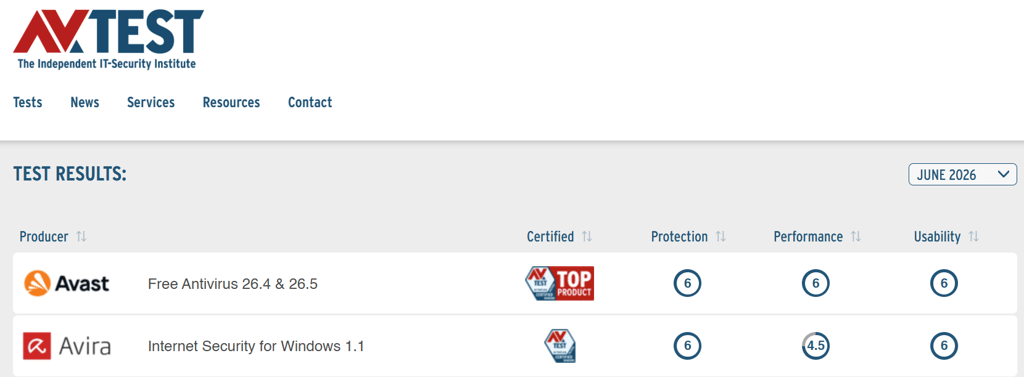
According to AV-TEST’s June 2026 tests, Avast is ranked as a Top Product, and that’s because it has earned perfect 6/6 scores in Protection, Performance, and Usability tests. Avira, on the other hand, has the Certified status, and that’s because of the less than ideal Performance test result (4.5/6).
AV-Comparatives has awarded both Avast and Avira with Advanced+ certification. That said, only Avast was included in the latest real-world protection test (February–May 2026). During this test, Avast proved it can reliably protect users against malware, with a 99.3% protection rate. The last time the lab tested Avira was back in October 2025. At this time, Avira was able to protect against malware at a 99.5% rate.
Finally, we have the SE Labs testing. Avast’s AAA Security Evaluation certificate from April–June 2026 indicates that the AV can offer 98% protection against general and targeted threats. Avira has the same AAA score, but the last certification comes from early 2023, so I wouldn’t consider it relevant in this comparison.
Real-time protection
Both Avast and Avira feature a comprehensive list of features that should be sufficient for removing malware. Whichever you choose, you'll have to initiate a full scan immediately after an install. It sets a baseline for all your further usage. Both Avira and Avast now use AI for malware detection.
While independent lab tests can reveal a lot about antivirus tools, I wanted to test them out myself to see how they actually work. During hands-on testing, I paid extra attention to real-time protection, which, in my eyes, is key in this comparison. Together with the research team, we injected 150 malware samples on a test PC. Avast demonstrated a 68% success rate in real-time protection. During the exact same test, Avira managed to catch 72% of threats.
To sum up, during in-house testing, both Avast and Avira performed very similarly. And might I add, not that spectacularly. I expected better results from both AVs. Of course, as I mentioned already, testing environments differ, so take these numbers as a personal experience of one user, not a complete picture.

Scanning
The difference between Avast and Avira was a bit bigger in terms of internal full system scanning tests. Avast had a 72% full scan detection rate, while Avira had 84.67%.

It's possible to set up custom scans for particular directories with both Avira and Avast. This is handy for when you suspect where the malware is hiding. Otherwise, a quick scan goes through your main system files and resources that could compromise your system if disrupted.
Firewall protection
Avira has one of the least impressive firewall modules that I've seen in antiviruses. Avira’s firewall is like a simplified manager for the built-in Windows Firewall, as it doesn’t have its own filtering technology. That makes it somewhat useless for experienced users, but convenient for less technical users.
On premium versions, the situation is a lot better. You can customize the strictness of protection by changing the computer's visibility on the network, blocking connections from the outside, and preventing flooding and port scans.
Avast offers whitelists in its free version. The Premium version also adds leak protection, port scan alerts, and ARP Spoofing Alerts, resulting in a more complete experience.
Impact on PC performance
According to AV-TEST, Avast is stronger in terms of performance. As previously discussed, this antivirus scored 6/6 during the Performance test. On the other hand, Avira scored 4.5/6. This is why Avast is classified as a Top Product, and Avira as Certified.
When we look at the awards from different, independent testers, Avast is standing strong with such certifications as the Top-Rated Product 2025 by AV-Comparatives, Product of the Year 2026 by AV Lab, and Total Accuracy Rating: 100% (April 2026) by SE Labs.
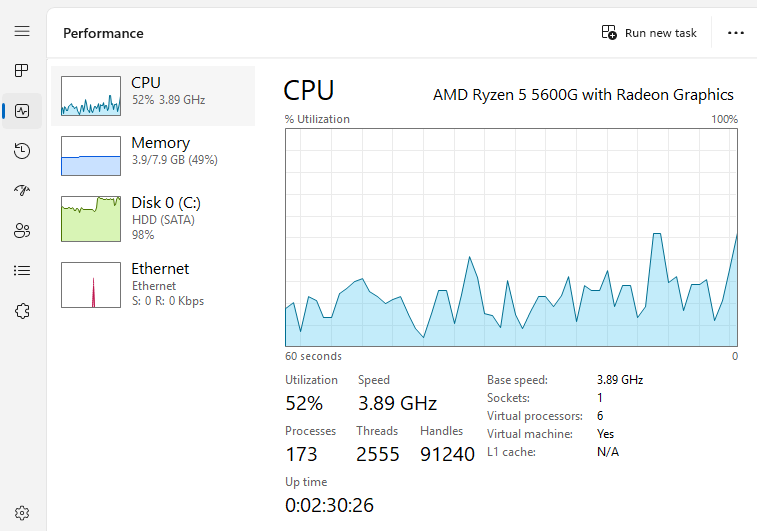
Our experience with full system scanning also favors Avast in terms of performance. Our system included a Windows 11 VM, with 6 allocated CPU cores from a Ryzen 5 5600G, supported by 8GB of RAM.
For Avast, CPU usage was between 11% and 70%, with about 3.8GB of RAM. During testing, Avira’s CPU usage reached 100% on multiple occasions and used about 4.4GB of RAM.
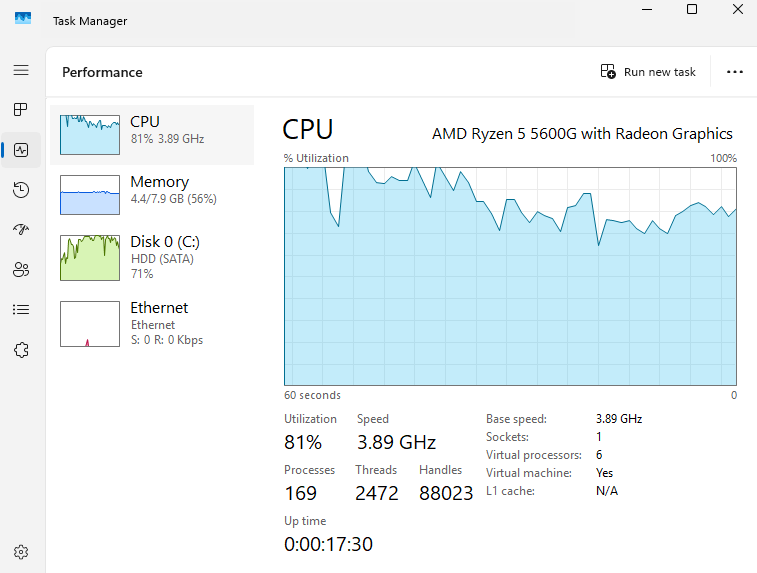
Historically, Avira used to win in performance testing, but the recent results are in favor of Avast. This makes the latter a more interesting choice for less powerful PCs.
Pricing
Because both Avira and Avast have a free version, it makes for an equal comparison.
The prices for Avast Premium and Ultimate listed in the table are for one device. For a minor price increase, you can protect up to 10 devices with Avast. Similarly, while you can protect 1 device with Avira Internet Secure, you can protect up to 5 with Avira Pro and Avira Prime plans.
📢 ONLY NOW: Get up to 60% OFF Avast Antivirus
| Plan | Avast | Avira |
| Free | $0.00 | $0.00 |
| Premium/Pro | $31.20/year | $22.99/year |
| Internet Security | – | $34.99/year |
| Ultimate/Prime | $43.99/year | $59.99/year |
| Check pricing | Check pricing |
Avast offers 2 paid plans. Avast Premium starts at $31.20/year, while the feature-complete Ultimate version is priced at $43.99/year. For 10 devices, the prices change to $39.99/year and $55.99/year, respectively. These are all first-year discounts. Expect higher prices when renewing the subscription.
Avira offers 3 subscription tiers. The Pro version starts at $22.99/year. Avira Internet Security costs $34.99/year, while the subscription for Avira Prime starts at $59.99/year.
One thing to note is that while Avira Pro is cheaper than Avast Premium (when comparing 1 device protection), if you need to secure more than 5 devices, Avast Ultimate offers a much better price than Avira Prime. Overall, Avira offers better prices at tier 1, while the highest tier pricing favors Avast. Ultimately, the choice comes down to the features you need and the number of devices you want to protect.
Feature overview
Below, you can find the table with most notable Avast and Avira features compared. Keep in mind that some of them might be exclusive to more expensive versions.
| Avast | Avira | |
| Real-time protection | ✅ Yes | ✅ Yes |
| Ransomware protection | ✅ Yes | ✅ Yes |
| Web filters | ✅ Yes | ✅ Yes |
| Registry cleaner | ✅ Yes | ✅ Yes |
| VPN | ✅ Yes | ✅ Yes |
| Firewall | ✅ Yes | ✅ Yes |
| Wi-Fi protection | ✅ Yes | ✅ Yes |
| Sandbox mode | ✅ Yes | ❌ No |
| Webcam protection | ✅ Yes | ❌ No |
Both Avira and Avast have free versions and have several pricing tiers. So, it's possible to compare them on equal terms. The free version is the best example, as the bar of entry is non-existent, and everyone can test the service.
Yet, when looking at what you get with a paid version, Avast has subscription benefits worth considering, like Sandbox mode and Webcam protection. Not a lot of top-rated antivirus providers can match what Avast offers.
Feature comparison: Avira and Avast
In the free version, both Avast and Avira offer real-time protection. It may not sound like much, but it's designed to stop malicious processes once they are accessed or started. Needless to say, both tools are very limited in what they offer.
Avast Free Antivirus employs Avast Assistant to detect scam messages and Avast Password to protect your logins. The free version also blocks malware, including ransomware, and scans Wi-Fi for security risks.
Avira Free Security effectively blocks malware and infected sites, can help generate strong passwords to improve the security of your accounts, and claims to fix 200 known privacy settings.

When it comes to paid plans, Avast Premium Security adds various beneficial features. For example, it can block scam SMS messages and calls, identify deepfakes, ensure safer browsing by notifying about fake sites, add advanced firewall protection, and shred sensitive files. That said, if you’re looking to add premium cleanup, VPN, and anti-tracking tools, you will need to purchase the Avast Ultimate plan.
As for Avira subscription tiers, Internet Security can automatically update your software and drivers, warn you about online account vulnerabilities, and block advanced ransomware threats. If you level up to Avira Prime, you can also enjoy access to premium tune-up tools, a VPN, and apps for Android and iOS devices. Needless to say, compared to Avast, these premium-tier features seem quite basic.
You can find more detailed information in our Avira Antivirus review and Avast Antivirus review.
Apps and interface
Most free antiviruses are guilty of sneaking in other products. For example, the Avast installer bundles the Secure Browser addon by default. It's significant because, in the past, this tool was known to collect quite a bit of information about users. Moreover, despite the controversy, paying fines, and backing down on some of the functionalities, Avast Secure Browser continued to pose privacy concerns.
Avira, on the other hand, isn't forcing your hand as much. You may use the free version and encounter reminders that you should upgrade, but they won't be drastic. Avira is user-friendly by virtue of respecting your choices and being more mindful of your data.
Desktop app
When it comes to installation, both Avast and Avira apps are similar. Both first use smaller executables that download the remaining files during setup. However, Avast has the browser privacy issue, whereas Avira seems to be more professional in this sense. The client is clean and only installs the necessary files. If you're using the free version, both apps will remind you about the paid options at random intervals.

In terms of UI, both clients are easy to use. They should be intuitive for most users, and if you're transitioning between Avast and Avira, it won't be painful. The general layout is very similar, so you'll quickly find what you're looking for.
In both cases, you will be navigating between menus with individual icons. If you're on the free version, some of them will be disabled when you click on them, asking you to upgrade.
Mobile app
Neither Avast nor Avira offer mobile apps that are just as powerful as the desktop apps. There's less reason to offer a feature-packed antivirus for iOS because of fewer associated malware risks, as the tight control of Apple's App Store eliminates most of the threats. Android protection, in this sense, remains more important.
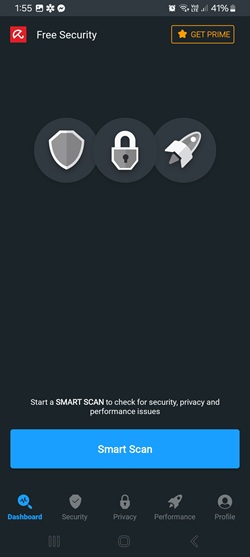
Both Avira and Avast mobile apps look and perform well, even on non-flagship Android devices. Both are feature-rich and, aside from scanning, grant access to other paid and non-paid functionalities. However, most of the unpaid features have very limited functionality. Overall, Avast offers more options on mobile without the need to pay.
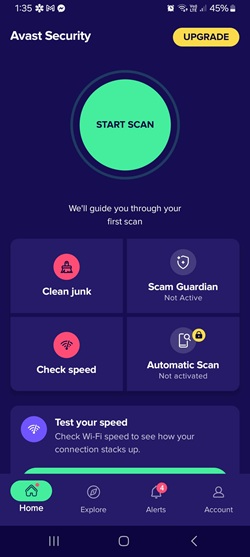
Avast has a secure photo vault to store your most important (or embarrassing) photos. Your passcode will protect them, and it's not uploaded anywhere. If you delete the app, the photos will be deleted as well, so keep that in mind. If you want to block dangerous websites, you'll have to buy Avast’s paid plans.
Customer support
There are a few different ways you can receive customer support from both Avast and Avira. The table below provides an overview of the available options.
| Avast | Avira | |
| ✅ Yes | ✅ Yes | |
| Live chat | ✅ Yes, for paid customers | ❌ No |
| Community forum | ✅ Yes | ❌ No |
| Phone line | ✅ Yes | ✅ Yes |
| Twitter and Facebook | ✅ Yes | ✅ Yes |
| Knowledgebase | ✅ Yes | ✅ Yes |
Both Avast and Avira offer extensive knowledge bases, phone line support, and email support. Both also have social media channels that users can use to seek assistance. Notably, while there are 3.6M followers on Avast’s Facebook page, Avira has 1M. On X, Avast has around 140K followers, while Avira has around 19K.
What sets Avast and Avira apart is the live chat option and the community forum, which only Avast offers. Of course, keep in mind that direct support (via live chat, email, and phone) is reserved for premium users. If you opt for a free version of either AV, you will need to stick to knowledge bases and community channels.
Final verdict
On their own, both services seem solid enough. However, when stacked against each other, the differences are pretty obvious. With better independent lab results, more stable performance, and better pricing for multiple devices and highest-tier plans, Avast outmatches Avira and is the winner of our comparative analysis.
| Category | Avast | Avira |
| Features | ✅ | ❌ |
| Protection | ✅ | ❌ |
| PC performance | ✅ | ❌ |
| Pricing | ✅ | ✅ |
| User interface | ✅ | ✅ |
| Support | ✅ | ✅ |
FAQ
Which is better: Avast or Avira?
Out of the two, Avast Antivirus is a better choice. It offers better protection, PC performance, and pricing for multiple devices and its highest tier.
Does Avira Antivirus slow down your computer?
No. If your system is compatible with Avira, it should not noticeably slow down your device.
Is Avira Antivirus safe?
Yes. It is a reputable program that will protect your PC or smartphone from malware and viruses.
Is Avast Antivirus completely free?
Yes. You can use the free version of Avast indefinitely. However, if you want more features and direct customer support, you can upgrade to one of its paid versions.