NordVPN next-gen antivirus review 2026
Backed by leading cybersecurity experts and investigative journalists, we deliver independent, real-world antivirus testing and analysis, guaranteeing objective evaluations without undue influence or bias from outside parties.
Our transparent and consistent methodologies ensure objective, up-to-date reviews, empowering readers to make well-informed decisions.
Learn more
NordVPN has rebranded its Threat Protection Pro as a next-gen antivirus. That is a pretty bold label, so the obvious question is whether NordVPN has actually built something meaningfully different or if it’s just a new marketing angle.
To figure this out, our research team and I tested NordVPN’s next-gen antivirus against all the threats it claims to protect against, such as phishing pages, malicious URLs, ads, trackers, and other common online threats, and compared my results with independent lab testing. I also checked what features it actually provides and how NordVPN’s approach differs from a more traditional antivirus.
Without giving away my whole NordVPN next-gen antivirus review, it held up to its claims surprisingly well. More importantly, NordVPN has set itself firmly on a path to lead what it means to be the next-gen antivirus in the near future. Keep reading to find out how and why.
NordVPN next-generation antivirus at a glance
Built by NordVPN, its next-generation antivirus is one of the strongest security tools I’ve tested for preventing harm before damage is done. It checks the website before you open it, the link before you trust it, the download before you run it, and even account takeover signals before they turn into a bigger problem.
Here are the main results from our testing:
| NordVPN next-gen antivirus | |
| Starting price | $53.86/year |
| Overall verdict | Best prevention-first next-gen antivirus |
| Malware URLs blocked in our test | 90% (9/10) |
| AV-Comparatives phishing test | 96% block rate |
| Adult site blocker | 100% (3/3) |
| Ad blocker | 100/100 |
| Malicious download scanning | ✅ Yes |
| Scam and fraud protection | ✅ Yes |
| Email protection | ✅ Yes |
| Vulnerability scanning | ✅ Yes |
| Ad and tracker blocking | ✅ Yes |
| Full system scan and threat removal | ❌ No |




Our team of researchers thoroughly tests antivirus software following a well-established testing process. In unison, our experts combine in-house and independent testing lab findings with first-hand experience to help you make informed decisions about each product. Learn how we test antivirus software.
Getting started with NordVPN next-gen antivirus: choosing the right plan
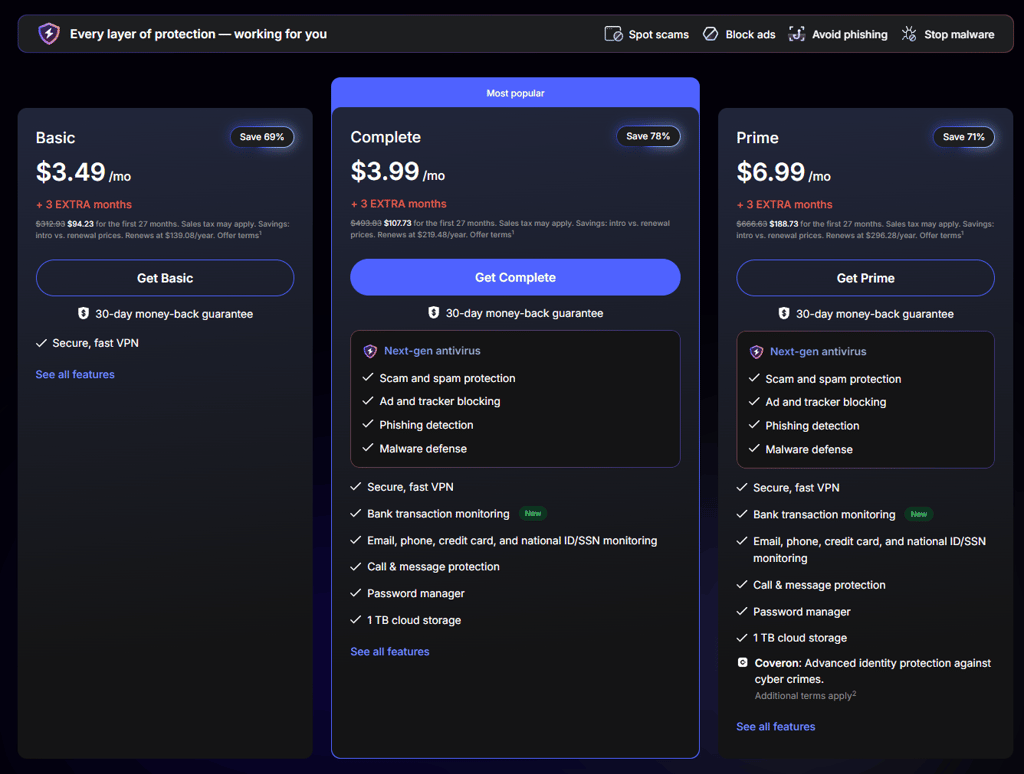
NordVPN keeps its next-gen antivirus pricing simple with two main plans: Standard and Complete. Both include core malware protection, while Complete offers the full package of what NordVPN sees as an all-in-one user protection bundle.
Here are the two main plans:
| NordVPN next-gen antivirus plan | Complete | Prime |
| Malicious website blocker | ✅ Yes | ✅ Yes |
| Ad and tracker blocker | ✅ Yes | ✅ Yes |
| Scam and fraud alert | ✅ Yes | ✅ Yes |
| Virus and malware scanner | ✅ Yes | ✅ Yes |
| Secure high-speed VPN | ✅ Yes | ✅ Yes |
| Password manager with Data Breach Scanner | ✅ Yes | ✅ Yes |
| 1TB encrypted cloud storage | ✅ Yes | ✅ Yes |
| Identity theft insurance | ❌ No | ✅ Yes |
| Credit freeze assistance | ❌ No | ✅ Yes |
| 2-year price | $53.86/year | $94.36/year |
| 1-year price | $71.88/year | $107.88/year |
| 1-month price | $239.88/year | $359.88/year |
| Money-back guarantee | ✅ Yes, 30 days | ✅ Yes, 30 days |
Starting at $53.86/year, the Complete plan is where the full value lies. It includes the best VPN on the current market, a password manager with Data Breach Scanner, and 1TB of encrypted cloud storage.
Additionally, it covers malicious website blocking, scam alerts, ad and tracker blocking, and malware scanning. It’s not the cheapest antivirus option you can find, but it sits in a comfortable mid-range spot for what it offers.
For comparison, Bitdefender Premium Security is the closest traditional antivirus match that offers similar extras but starts at a higher price of $64.99/year. While traditional antivirus software offers robust device-level protection, NordVPN Complete offers a stronger add-on package if you care about VPN quality, broader credential management, encrypted storage, and overall online threat prevention.
NordVPN is also unusually flexible at checkout. You can pay with traditional methods, such as a card or PayPal, but NordVPN also accepts crypto payments if you want a bit more payment privacy.
The one caveat to mention is the steep renewal pricing, which is unfortunately common across the cybersecurity market. Complete renews at $219.48/year. Still, NordVPN offers a 30-day money-back guarantee, so you can test it before fully committing.
NordVPN next-gen antivirus features
Traditional antiviruses are mainly built to deal with threats that are already on your device or actively causing problems. NordVPN’s next-gen antivirus features are built around blocking threats early, like bad links, scam pages, dodgy downloads, ads, trackers, and exposed session data, before they actually have a chance to cause damage.
| Feature | What it does |
| Web threat blocking | Blocks malicious websites, phishing pages, scam sites, and unsafe domains |
| Download malware scanner | Scans files during download and removes dangerous ones before they run |
| Email and search protection | Flags risky email links and adds safety labels next to search results |
| Ad, tracker, and URL blocking | Blocks ads, stops supported trackers, and removes tracking parameters from links |
| Account and crypto alerts | Warns about exposed session cookies and suspicious crypto wallet addresses |
| Vulnerability scanner | Checks installed apps for known security risks |
| Adult site blocker | Blocks adult websites on mobile |
An important thing here is that the desktop and mobile versions are not the same. While both cover the basics, like blocking malicious domains, phishing domains, ads, and trackers, you get the fuller stack of NordVPN’s next-gen antivirus features on desktop.
Windows and macOS add download scanning, email link warnings, search safety labels, URL cleaning, hijacked session alerts, and vulnerability checks. That is where the next-gen antivirus angle is much more complete.
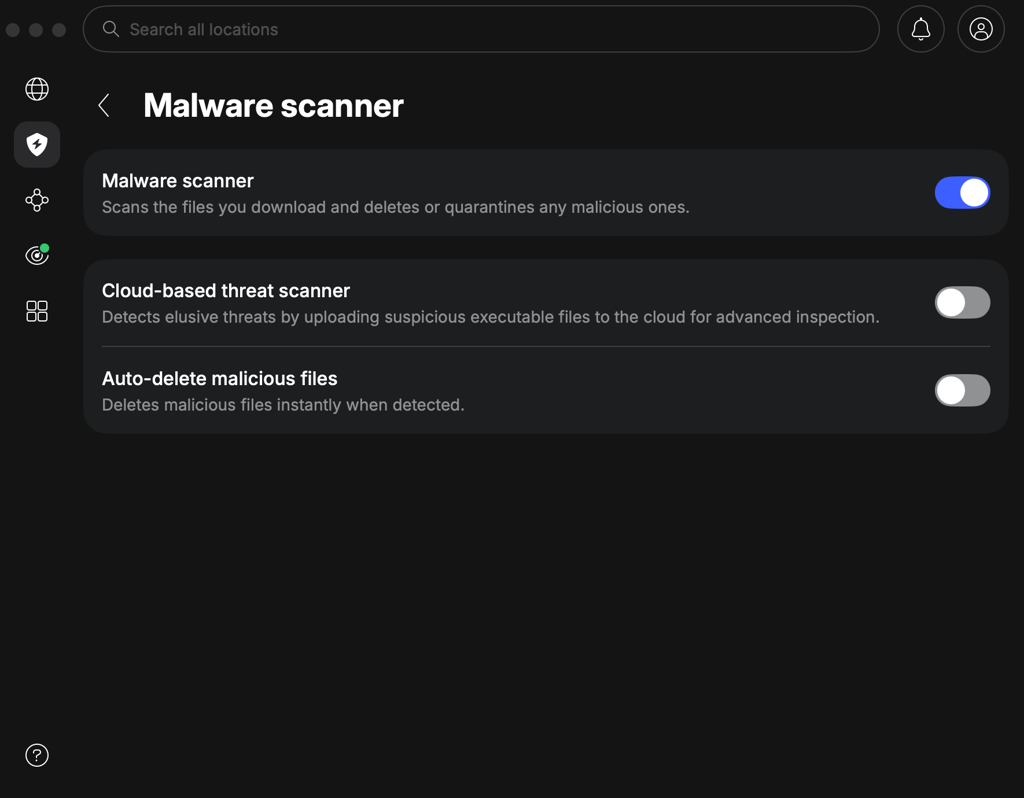
At the current stage, mobile devices are much lighter because antivirus apps are restricted by their providers from working as deeply as they can on desktops. On Android and iOS, NordVPN mostly blocks threats through DNS filtering, which means it can stop malicious domains, phishing domains, ads, and trackers while the VPN is connected. The adult site blocker is the only real mobile-first exclusive feature.
Security and protection
To figure out whether NordVPN’s prevention-first claims actually hold up and whether it can contend for the title of the best next-gen antivirus, I worked with the Cybernews research team and put it to the test. We tested NordVPN against malicious URLs, phishing URLs, ads, adult sites, malware samples, and ransomware samples, then compared our findings with independent lab results to get the full picture.
Here are the main results:
| Test area | Result |
| Malicious URLs | 90% |
| Phishing testing | 30% in-house tests, AV-Comparatives 96% |
| Ad blocking | 100/100 |
| Adult site blocker | 100% |
We tested NordVPN on a Windows virtual machine with 4 CPU cores and 8GB RAM on a Ryzen 5 5600G system. The test was conducted on May 8th, 2026.
Malicious URL and phishing protection
Where NordVPN’s next-gen antivirus surprised me most was malicious URL blocking. I pitted it against harmful links, and NordVPN blocked 90% of the pages before they had a chance to load. While that’s not 100%, compared to similar providers, such as Surfshark Antivirus, which blocked only 20% of malicious URLs in the same test, NordVPN’s next-gen antivirus performed well.
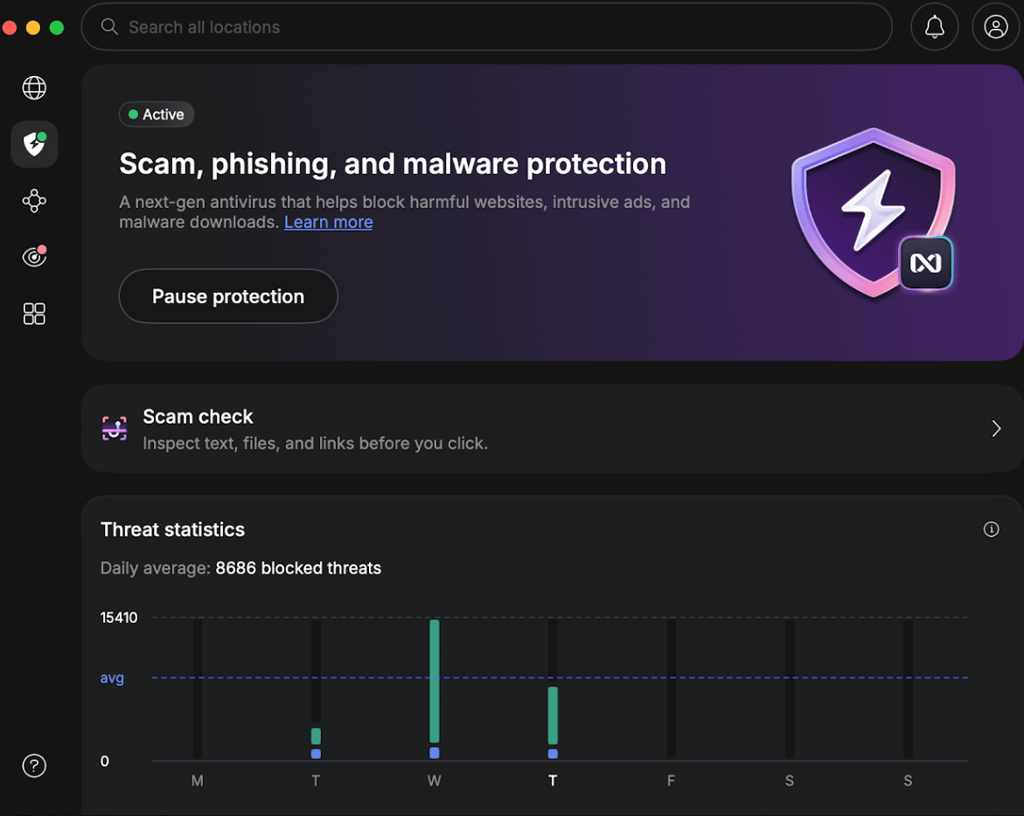
With that said, phishing was weaker in our test. NordVPN blocked only 3 out of 10 phishing URLs, so I would not call that a win. Granted, this test used just 10 samples, and we handpicked fresh phishing attempts rather than relying on a large general dataset.
To get a better picture, I checked independent antivirus tests with a much larger sample size. In May 2026, AV-Comparatives tested NordVPN’s next-gen antivirus against 275 live phishing URLs and recorded a 96% block rate with 0 false positives. Our sample was much smaller, while the larger lab test could give a more realistic view of how NordVPN would perform in regular day-to-day use.
Ads, trackers, and scam protection
NordVPN next-gen antivirus scored 100/100 on adblock-tester.com, which was its cleanest result. That puts it far ahead of industry giants such as Norton and Avast, which scored 48/100 and 43/100 in the same test.
Additionally, unlike top antivirus providers, such as Norton and Avast, which did not block trackers in our comparison, NordVPN’s next-gen antivirus actually blocks trackers. Tracker blocking matters a lot because nowadays browsing is built around invisible data collection, ad profiling, and third-party scripts, which, in the case of a leak, can expose a lot of private information.
Risk alerts
NordVPN also includes hijacked session alerts and other types of risk alerts. In testing, these features are harder to measure with a simple pass-or-fail result than malicious URL blocking or ad blocking.
Hijacked session alerts depend on whether session cookies appear in leak sources. I can confirm the feature is available, but I did not force a real account leak just to trigger it. The same goes for crypto wallet protection, which is more about warning users before they trust a suspicious wallet address than scanning the device for malware. Traditional antivirus tools rarely cover fake wallet addresses or crypto payment scams in any meaningful way. NordVPN does, which is a right step for the next generation of antiviruses.
Overall, NordVPN’s security package works best against threats that start online, such as bad links, scam pages, malicious websites, infected downloads, ads, trackers, exposed sessions, and suspicious account activity. However, it’s not a replacement for traditional antivirus tools, such as Bitdefender, for deep device cleanup. It’s the first line of defense and blocking layer, giving you a better chance to stop the mess before it kicks off.
NordVPN next-gen antivirus setup and interface overview
NordVPN’s full next-gen antivirus feature set is available on desktop, and since I already had the NordVPN app installed, there was no separate antivirus setup to deal with. Everything sits inside the main app, whether you use the VPN connection or not, and NordVPN ngav supports all major platforms, including Windows, macOS, Android, and iOS.
Usability on a desktop
I tested NordVPN’s desktop app first because Windows and macOS get the full next-gen antivirus experience. After logging in, I did not need a separate installer or another app. I just headed to the setup and gave the necessary permissions.
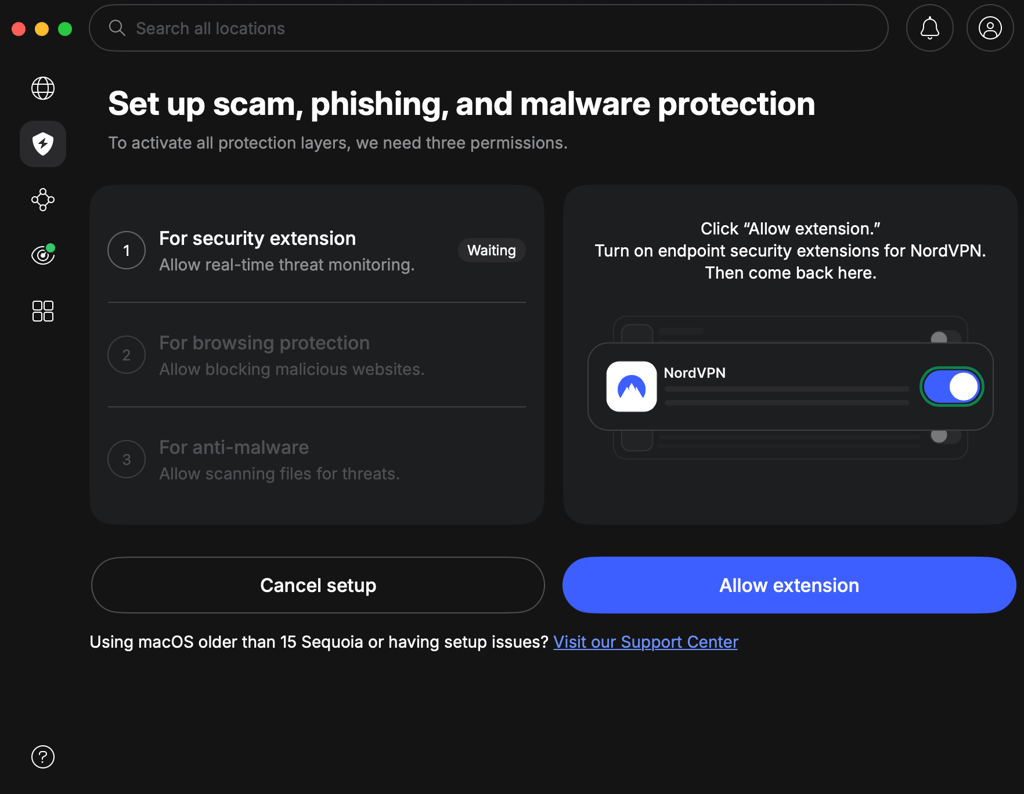
The protection tools are already built into NordVPN, so setup mostly came down to opening the security features and turning on the protections I needed. Since I have its VPN, the interface presents VPN features first, so to get to the next-gen antivirus features, I had to click on the Advanced settings.
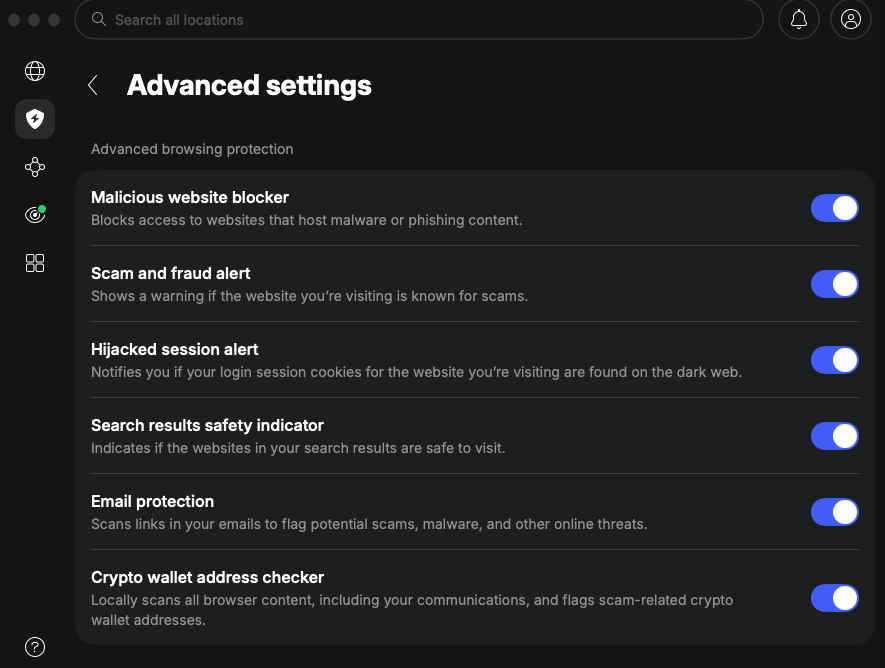
There, I enabled malicious website blocking, phishing protection, malware download scanning, email protection, URL cleaning, ad blocking, tracker blocking, hijacked session alerts, and crypto wallet address checking from inside the NordVPN app.
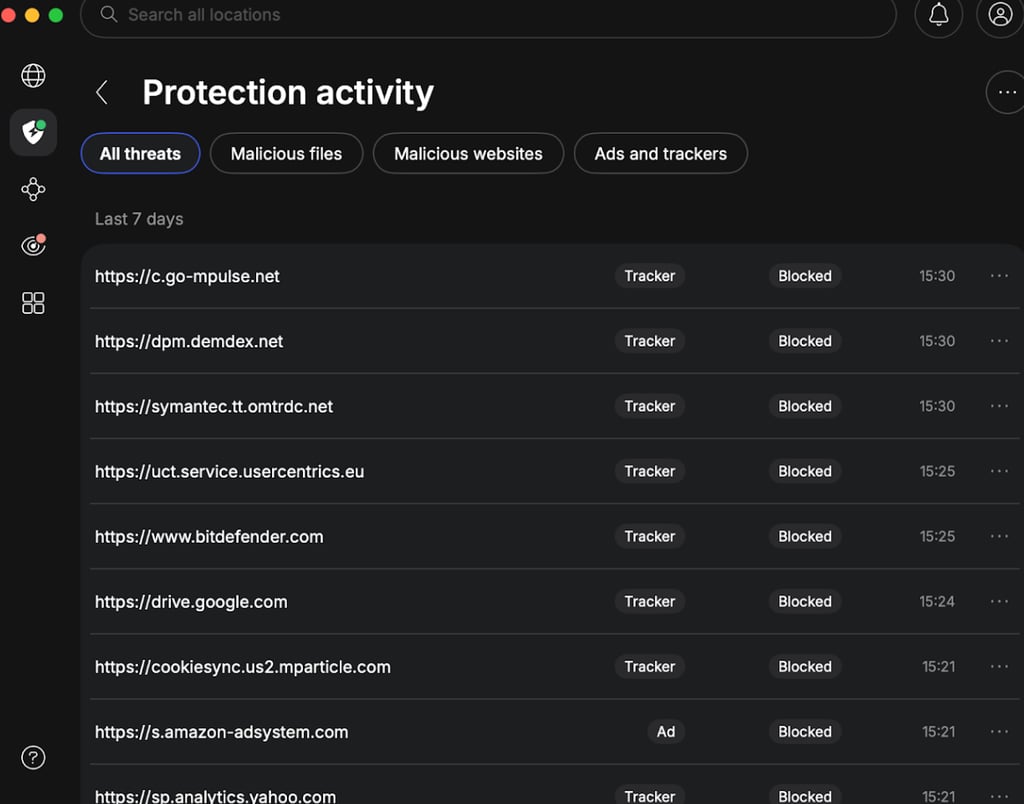
What stood out most was how little NordVPN asks from the user after setup. Once I enabled the protection tools, NordVPN works completely in the background and reacts only when opening risky links, loading ads, triggering trackers, or downloading files. There’s also a protection activity bar where you can see the whole history of all of the blocked threats.
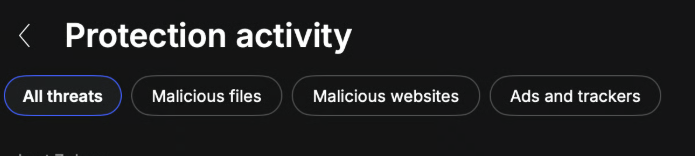
I also liked that NordVPN’s full desktop protection can work without an active VPN connection. This gave me a much cleaner experience than Norton or even Bitdefender, but since it lacks the classic full scan, I could not get the same traditional antivirus dashboard with a full scan button and the typical device cleanup flows.
Usability on a mobile
NordVPN’s mobile app is also easy to set up on iOS and Android, directly via their app stores, but they are also much lighter. I installed the app, logged in, connected to a NordVPN server, and enabled the available protection options.
The process was quick, but the mobile version does not offer the same advanced protection layers, as it primarily uses DNS-based protection to block threats. So it does not show the same wider set of desktop tools, such as download scanning, email link protection, crypto wallet checks, or hijacked session alerts in the same way. At the current stage, it still looks like a regular VPN app with web filtering, not a full mobile antivirus suite.
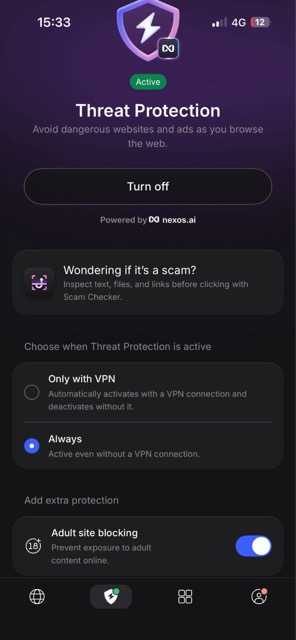
However, you can toggle on the Adult site blocking feature on both Android and iOS, a feature which desktop lacks entirely. I turned it on and tried 3 adult websites, and NordVPN blocked all 3. That is a small sample, but the feature worked as expected during testing.
How does NordVPN's next-gen antivirus compare to traditional antivirus software?
NordVPN’s next-gen antivirus and traditional antivirus software essentially tackle the same problem with different approaches. NordVPN faces threats before they get into the system, while traditional antivirus software tends to tackle viruses once they have already gotten inside.
| Security area | NordVPN next-gen antivirus | Traditional antivirus |
| Phishing protection | ✅ Yes | ✅ Yes |
| Malicious website blocking | ✅ Yes | ✅ Yes |
| Download scanning | ✅ Yes | ✅ Yes |
| Ad and tracker blocking | ✅ Yes | 🟨 Varies |
| Scam alerts | ✅ Yes | 🟨 Varies |
| Hijacked session alerts | ✅ Yes | ❌ Usually no |
| Crypto wallet checking | ✅ Yes | ❌ Usually no |
| Full device scan | ❌ Not the focus | ✅ Yes |
| Local process monitoring | ❌ Not the focus | ✅ Yes |
| Existing malware cleanup | ❌ Limited | ✅ Yes |
| Ransomware remediation | ❌ Not the focus | ✅ Often included |
The overlap is mostly in web protection. NordVPN and traditional antivirus tools can both block phishing pages, malicious websites, and dangerous downloads. The main difference is that NordVPN leans hard into the online threat layer, with ad blocking, tracker blocking, scam alerts, hijacked session alerts, and crypto wallet checks.
However, I would not treat NordVPN next-gen antivirus as a straight Bitdefender or Norton replacement. No prevention-first system can catch every zero-day threat, and NordVPN does not yet offer the same safety net if something gets through, such as full scans, local process monitoring, ransomware remediation, or deep malware cleanup.
Best bet would be to couple NordVPN next-gen antivirus with an antivirus that has those last-resort features. Even Microsoft Defender could do the job.
Is NordVPN’s next-gen antivirus worth it?
NordVPN’s next-gen antivirus is going in the right direction and is really worth considering if most of the threats you worry about start online. Its prevention-first features are built around today’s risks, from fake shopping sites and phishing pages to suspicious downloads and crypto scams, and both my testing and independent lab results showed that the approach holds up.
Overall, NordVPN is really interesting in the direction it is taking. Instead of copying traditional antivirus software tools, NordVPN is building protection around how people actually get caught now, with the goal of stopping threats before they make it onto the device.
However, mistakes happen, and zero-day threats can still slip through, so NordVPN needs stronger device-level protection before it can fully replace a traditional antivirus. Even so, it has moved well beyond the basic threat blocker bundled with most VPNs, and the direction makes sense.
FAQ
Does NordVPN have an antivirus?
Yes, NordVPN offers a next-generation antivirus with some plans. It protects against phishing pages, scam websites, malicious downloads, ads, trackers, unsafe URLs, suspicious crypto wallet addresses, dangerous email links, vulnerable software, and hijacked sessions.
Is NordVPN next-gen antivirus the same as Threat Protection Pro?
NordVPN’s next-gen antivirus is the expanded version of Threat Protection Pro. The same core web and download protection remains, but NordVPN now groups it with newer scam, phishing, account, and payment protection tools under the next-gen antivirus name.
Does NordVPN scan downloaded files?
Yes, NordVPN next-gen antivirus scans files as they are downloaded on Windows and macOS. It can block or remove dangerous files before they run.
Can NordVPN replace a traditional antivirus?
Yes, NordVPN can replace a separate paid antivirus for some users, especially on Windows, where Microsoft Defender already covers device-level threats. NordVPN handles the online layer, while Defender provides full scans, process monitoring, and malware cleanup. I would not rely on NordVPN alone without that backup.
Is NordVPN next-gen antivirus free?
No, NordVPN’s next-gen antivirus requires a paid subscription, starting at $53.86/month with the Standard plan. Complete costs more but adds NordVPN’s VPN, password manager, and encrypted cloud storage. Both plans include a 30-day money-back guarantee.