BrightCanary app review: features, pricing, and parental safety insights
Being behind major reports like The Mother of All Breaches and RockYou2024, our in-house cybersecurity experts and journalists provide unbiased, real-world testing and in-depth analysis.
We maintain complete transparency by openly sharing our testing methodologies with our audience.
Learn more
In the world of parental monitoring and safety control, the BrightCanary app is gaining traction among iOS users. Its keyboard-based monitoring approach for early detection of online risks sets it apart from the sea of competitors. But how trustworthy and effective is it really? That’s what we’re here to find out.
Together with my Cybernews research team, I’ve reviewed piles of publicly available materials on the BrightCanary app, from app store reviews and parental feedback to expert commentary. You can read everything we learned about its use, features, privacy practices, and real-world value in the BrightCanary app review below.
Quick overview of BrightCanary
To help you understand what you can expect from the BrightCanary app, I’ve summarized its main features in a table. Have a look and see what my colleagues and I liked and didn’t like about this parental control tool.
| Overall rating | 4.7 |
| Short description | AI-powered online safety monitoring app for kids |
| Supported platforms | A range of apps used on Apple devices: Social media like Snapchat, TikTok, Instagram, Reddit, Discord, Roblox, and WhatsApp, Google, AI apps, and iMessages |
| Key risk detection categories | Early signs of self-harm, drug references, cyberbullying, predatory behavior, and similar online risks |
| Pricing model | $29.99/year for the Protection plan |
Our methodology
Before I go into our BrightCanary app review, it’s important that you know how we wrote it. At Cybernews, each review is built on thorough desk research and overall sentiment analysis.
In this case, we examined BrightCanary’s official website and app store feedback, cross-checked them with parenting publications, popular review sites, discussion forums, and even competitor articles. Here’s the criteria we used in that process:
- Safety & risk detection capabilities (30%). The aspect we focus on most when assessing parental control apps is their ability to spot and report on potential harm early. We note what the apps look for and how successfully they find it.
- Monitoring coverage & alerts (20%). At the same time, the Cybernews team and I check how much of the child’s digital activity the app actually tracks. This includes the platforms and media covered, how it alerts the parent, and whether those alerts are timely and accurate.
- Ease of setup & usability (20%). I also put effort into finding out how easy it is to set up and use this app. No one wants to spend hours on a tool like this, so a steep learning curve is a clear downside.
- Privacy & data handling (15%). To do their job, parental control apps access a lot of sensitive data. For users’ safety, we prioritize reviewing apps’ data collection and sharing practices and their transparency.
- Pricing & value (10%). My colleagues and I consider how much an app charges for the value it offers. Comparing it with other well-known tools, such as the Aura parental control app, always helps put things into perspective.
- User feedback & reputation (5%). Real users’ overall opinion of the app, as well as how it stacks up against competitors, helps us gauge its reliability and trustworthiness in the real world.
What is the BrightCanary app?
BrightCanary is an AI-assisted tool designed to help parents monitor their children’s online activity for safety.
You download it on your and your child’s device from the App Store and sync the two apps.
From that moment, BrightCanary’s iOS keyboard tracks everything your child types across a range of social media, messaging, and AI platforms.

Unlike more traditional surveillance software, such as Norton Family, this app uses artificial intelligence to scan the texts for concerning content and send parents alerts about detected risks. It also offers insights into your kids’ screen time, interests, and emotions, along with advice on how to approach sensitive subjects and start conversations with them.
In this way, BrightCanary aims to reinforce children’s digital security, provide opportunities for early intervention when safety or mental health risks arise, and support the parent-child relationship overall.
Core BrightCanary features
To help you monitor your children’s digital activity effectively, the BrightCanary app offers a list of features:
- Keyword-based tracking. BrightCanary uses an iOS keyboard to capture all texts, images, and videos your kid sends on their iOS device, without requiring a WiFi connection. This covers all popular social media platforms, as well as received and deleted text messages if you go for the Text Message Plus plan.
- Content blocking. The app blocks content categories, much like a DNS filter with a VPN would, so it doesn’t go as deep into scanning as the Bark control app, for instance. But it offers granular scheduling (like no YouTube after 9 p.m.), which many others don’t.
- AI-powered risk detection. BrightCanary’s AI systems pretty accurately classify content based on machine learning, looking for signals of self-harm, bullying, exploitation, sexually explicit content, and similar. However, it also notes trends in displayed emotions, interests, and friendships.
- Smart alerts and coaching. One of this app’s main selling points is real-time alerts, which usually arrive within 5 minutes of flagged content being detected. However, the AI-powered summaries and full transcripts of your child’s conversations, as well as well-being insights and parenting advice, can be just as handy.
- Parent dashboard and insights. BrightCanary offers one of the simplest dashboards among parent monitoring apps. It puts flagged content front and center while keeping other key features, like recent searches, messages, and emotional insight, just a click away.
What platforms and devices does BrightCanary support?
The BrightCanary app is designed solely for Apple devices, which not only narrows its user pool but also puts it behind many competitors. Compare Bark vs Aura or look into Qustodio, or Boomerang, and you’ll see they’re all compatible with Android, as well.
The good news is that BrightCanary works on all iOS devices, other than desktop computers. It monitors and alerts smartphones, iPads, and iWatches equally well. Plus, it covers a broad range of online platforms.
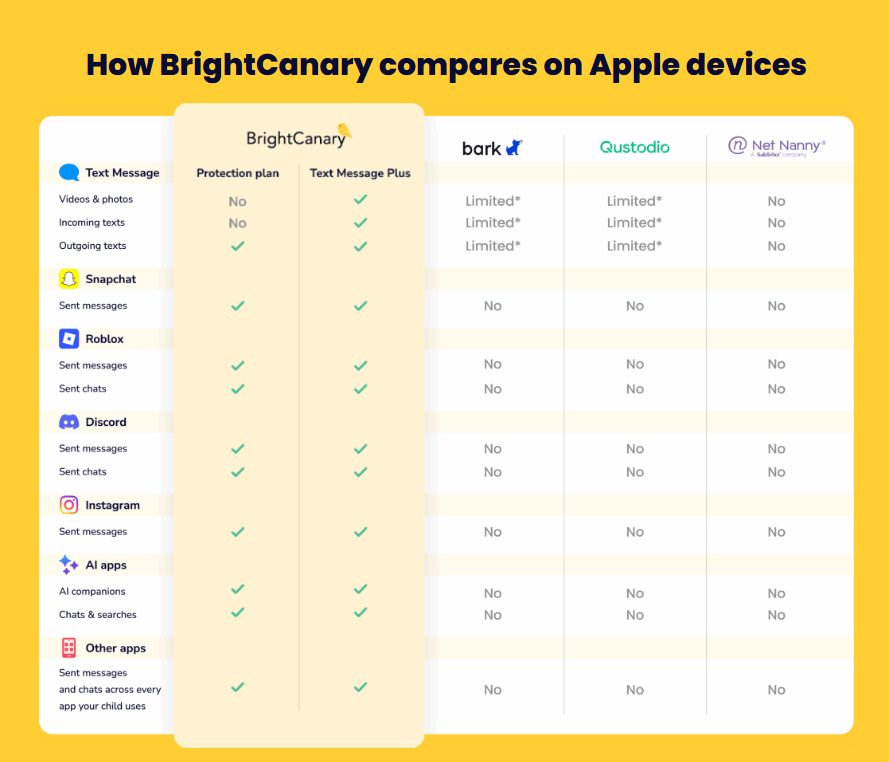
From social media like TikTok, Reddit, and YouTube to email, Google, and iMessages and SMS, the app covers everything sent from your child’s phone because it works through the native keyboard rather than API or permission-based surveillance.
You should keep in mind that this approach does limit BrightCanary’s risk detection in other areas. For instance, the app doesn’t offer location tracking like Qustodio, in-depth web filtering like Norton Family, or VPN and antivirus protection like Aura.
The BrightCanary keyboard is also only available in English for now, so it won’t flag content for any other languages.
BrightCanary pricing and plans
BrightCanary doesn’t offer as many pricing plans as some of its rivals, and limits use to just two parents. But it’s much more budget-friendly. Its standard Protection plan costs just $29.99/year, over $100 cheaper than Bark’s and Aura’s.
Even the Text Message Plus plan, considered more advanced for covering received and deleted iMessages, SMS texts, images, and videos, isn’t much more expensive. It costs $14.99/month or $99.99/year for multiple children.
My team at Cybernews and I were pleased to learn that BrightCanary offers a free trial, so you can test-drive it before you commit. Its official website also lets you explore the app’s functionality to make sure it's intuitive and handy.
One thing worth noting is the lack of a clear refund policy. Looking into BrightCanary’s Terms of Use, it seems that you may only get your money back from Apple if there’s an issue with the software, which is hardly ideal with annual subscriptions like these. On the bright side, we’ve not seen any user testimonials about refund or cancellation issues.
BrightCanary privacy and data handling
According to BrightCanary, its tracking system ensures your child’s data is never exposed. It collects only keystrokes, encrypts them, and sends them to safe servers for AI analysis. It never shares your child’s name, age, or location, nor sends collected data to partners for training.
From their privacy policy, we can see that the company also collects data you share directly with them, such as your name, payment details, and contact information, including your phone number. The only personal information BrightCanary claims to share is your email address, and that’s only with their email provider so they can send you account updates and analytics.
Still, it’s best you read their Privacy Policy and Terms of Use yourself before signing up. It doesn’t matter whether you’re considering Qustodio vs Bark or the less-famous BrightCanary; data protection, especially when your child is involved, shouldn’t be taken lightly.
User praises and complaints
To ensure my BrightCanary app review was accurate and unbiased, my fellow tech experts and I dug through user feedback. While we found that opinions vary, most leaned positive.
Users praise the app for doing exactly what it promises: being a keylogger that sends real-time alerts, giving parents peace of mind. Many also highlight its more affordable pricing plans compared to competitors, as well as the convenience of not relying on Wi-Fi to function.
The complaints we came across were mostly technical in nature. One user struggled to log in after changing their phone number, and another didn’t like that the keyboard didn’t have an off Auto-Correct button, unlike the standard iOS keyboard.
Older comments that mention unresponsive support and unnecessary features like Vibes seemed more concerning until we realized those pain points have since been addressed. That’s actually a great sign, showing that the company listens to its customers and aims to improve.
Who should use BrightCanary?
Taking all its advantages and disadvantages into account, the BrightCanary parental monitoring app seems to be the best fit for:
- Families focused on mental health. It offers real-time alerts on potentially harmful content, insights into children’s emotions, interests, and friendships, and parenting advice.
- Parents of teens and pre-teens. These generations tend to use their devices for texting and social media, which a keylogger like BrightCanary monitors. Families with younger children won’t find it as applicable.
- Parents who prefer a less invasive monitoring approach. Since it tracks digital activity through a keyboard rather than APIs and granted permissions, BrightCanary is much less invasive than other all-in-one parental control services.
If you’re after a full-suite parent control app, however, you likely won’t find BrightCanary comprehensive enough. The same goes for families with very young children, who don’t yet use their devices for texting. In situations like these, looking at other options makes more sense.
BrightCanary alternatives
Compare BrightCanary with its most popular alternatives to see which seems like the best fit for you and your children.
| App | Best for | Key difference | Price range |
| Aura | Traditional online surveillance | Includes antivirus, and VPN, and covers gaming platforms; | $8.33/month to $32/month (billed annually) |
| Bark | Broad feature set for unlimited users | Geo-location fencing with check-ins, API-based monitoring for 30+ social media platforms; | $14.00/month |
| Qustodio | Comprehensive online and offline parental monitoring | Detailed activity reports with screen time information; | $5.00/month or $8.33/month (billed annually) |
| Norton Family | Full-suite parental control for younger children | App blocking and web filtering for 40+ categories; | $49.99/year |
Final verdict: is BrightCanary worth it?
BrightCanary isn’t the most advanced or comprehensive parental control app, so it’s not the best fit for those looking for a full-suite monitoring solution for the whole family. However, if you’re after a straightforward and budget-friendly keylogger, BrightCanary is definitely worth it.
It does a great job logging and reporting on all your child’s keystrokes across popular social media, messaging, and AI platforms, in real time. On top of that, it offers insights into emotional patterns, interests, and other online behavior trends, all without relying on Wi-Fi. Plans range from $29.99 to $99.99/year.
FAQ
Does BrightCanary read all my child’s messages?
BrightCanary doesn’t read all your child’s messages but rather lets a trained AI system analyze them in real time. Depending on the plan you choose, it may look for content that points to self-harm, cyberbullying, or predatory behavior in social media posts, iMessages, and Google searches.
Does BrightCanary work on social media apps?
Yes, BrightCanary works on a range of popular social media apps through its native keyboard. It’ll monitor your child’s keystrokes on YouTube, TikTok, Instagram, Reddit, Roblox, Discord, Snapchat, and various other platforms.
Can BrightCanary replace parental conversations?
No, the BrightCanary app cannot replace parental conversations. It’s only meant to facilitate communication with your child and support a healthier parent-child relationship. However valuable a tool it is, you still have to do the actual parenting.
Is BrightCanary suitable for younger children?
BrightCanary isn’t suitable for younger children because it functions as a keylogger rather than as a traditional online activity monitor. Its strength lies in analyzing sent messages, images, and videos, which typically isn’t how younger children use their devices.