mSpy parental control review 2026: is it more than just a spy app?
Being behind major reports like The Mother of All Breaches and RockYou2024, our in-house cybersecurity experts and journalists provide unbiased, real-world testing and in-depth analysis.
We maintain complete transparency by openly sharing our testing methodologies with our audience.
Learn more

mSpy is a powerful digital activity monitoring tool known for its tracking, keylogging, and surveillance capabilities. That being said, I found it could benefit from several things that many parents look for to help build a safe and balanced online world for their kids. For example, unlike some other parental control apps like Bark and Aura, mSpy lacks crucial features such as category-based content filtering, screen time limits, and usage moderation.
mSpy excels at accessing texts, social media chats, GPS locations, and keystrokes, so if you want strict oversight for your child, it might work for you – especially when safety is of the essence. But remember, mSpy might not be ideal for older kids and teens for whom privacy and digital independence are paramount. Additionally, the app’s hidden monitoring features could risk the all-important trust and communication parents need to foster with their children.
Alternatively, apps like Bark use AI for alerts about potentially harmful content, while Aura’s digital safety suite includes identity protection, antivirus tools, and customizable web filters. Since mSpy is mainly a digital surveillance tool rather than a complete parental control app, it's not a bad idea to explore some alternatives that offer both protection and parenting.
I’ve worked with the Cybernews research team to bring you mSpy’s features, strengths, as well as some strong alternatives to consider. Check it out below.

Quick overview of mSpy
mSpy is an excellent digital monitoring tool that gives parents insight into their child’s phone activity. With it, you can track calls, read messages, monitor social media, and see GPS locations from a single dashboard. Here’s a quick look at what it offers.
| 🌐 Web & app filtering | No |
| 🕓 Screen time limits | No |
| 💬 Conversation monitoring | Yes |
| 📍 Location tracking | Yes |
| 🖥️ Supported platforms | Android and iOS |
| 📲 Number of devices | Up to three with Family Kit |
| ✂️ Free plan | None |
| ⌛ Trial period | None |
| 💵 Price | From $6.66/month for the 12-month plan |
Our methodology for testing parental control apps
To ensure our reviews are based on more than just marketing claims, I worked with the Cybernews research team to put each parental control app through our structured testing process. Here’s how I evaluated them:
- Global access (15%). I checked if the app is available and functional for users in different regions, because it must work in more than just one country.
- Features (25%). I looked for key features every solid parental control app should have: location tracking, content filtering, app and web activity monitoring, screen time limits, and social media oversight. Apps that lacked these essentials lost points.
- Performance (25%). I tested how well the app actually works. For example, does it report accurate GPS data? Do alerts trigger as they should? Can it block sketchy sites or risky apps effectively?
- Bypass resistance (35%). This one's very important. I tried to break the system with techniques such as uninstalling the app, using VPNs, spoofing GPS, and switching browsers. If a teen could easily find a way around it, I noted that.
Want a more detailed look? Here’s how we test parental control apps.
mSpy’s top alternatives
As I mentioned earlier, mSpy provides deep insights into your child’s digital activity, but it’s not the most well-rounded parental control app on the market. If you need key features like content filtering, screen time limits, and broader device support, there are some great tools out there. Below, I’ve compared three top mSpy alternatives:
| Aura | Qustodio | Bark | |
| Our rating | |||
| Price | Starts at $8.33/month | Starts at $5.00/month | Starts at $5/month |
| Number of kids | Unlimited | Up to 5 (Basic), Unlimited (Complete) | Unlimited |
| Content filtering | Yes | Yes | Yes |
| Screen time management | Yes | Yes | Yes |
| Conversation monitoring | No | Yes | Yes |
| Location tracking | No | Yes | Yes |
| Visit Aura | Visit Qustodio | Visit Bark |
What is mSpy?
mSpy is a child monitoring app often used by parents to access their child’s smartphone usage and online activity details. mSpy provides access to location history, call and text logs, and social media apps like Instagram, Snapchat, and WhatsApp. However, complete access to social media content may require rooting or jailbreaking the target device.
How does mSpy work?
mSpy operates discreetly in the background of the target device, allowing you to monitor your child’s activities with minimal visibility – since complete invisibility isn’t guaranteed, particularly on newer Android versions or non-jailbroken iPhones. Once installed, the app silently tracks various data, including call logs, text messages, GPS location, and social media activity on platforms like Facebook, Instagram, and WhatsApp.
mSpy transmits this information to a secure control panel where you can easily access and review it from your device. mSpy is compatible with Android and iOS devices, though iOS devices require jailbreaking for full functionality. Installation steps and available features vary depending on the platform.

mSpy features
After testing mSpy, I found that it has a broad range of monitoring features to track a child’s device activity. Although it lacks screen time or content filtering tools like some top parental control apps, it works very well if you need behind-the-scenes access. Below is a look at its key features.
Call monitoring
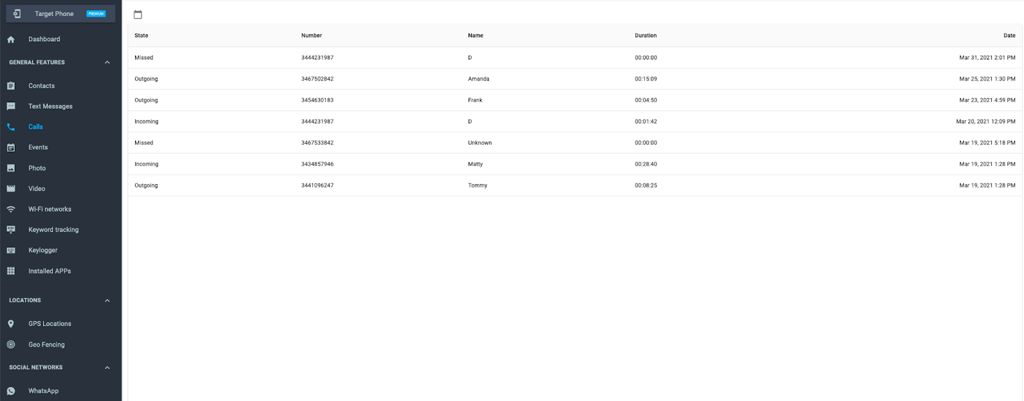
mSpy's call monitoring feature allows you to track incoming and outgoing calls on your child's device, providing details such as call duration, timestamps, and contact information. This feature lets you see who your child communicates with, offering valuable insights into their social interactions.
Remember, some permissions must be manually granted during setup for this feature to work reliably on newer Android devices. iPhones may need to be jailbroken to view deleted logs or third-party call data.
Text message tracking
mSpy allows you to read sent and received text messages on your child’s device, even after deletion (if backed up). On iOS, message tracking requires either jailbreak access or access to the child’s iCloud account with frequent syncing. Textx message tracking provides insights into your child’s communication habits so that you can notice any red flags and intervene as necessary. On iOS, however, message tracking may require jailbreak or iCloud backup with frequent syncing.
GPS location tracking
mSpy’s GPS tracking system shows the target device’s current location and location history. Though it isn’t in real-time, the updates are frequent enough (about every five minutes) that you can keep tabs on your child’s whereabouts. This feature really offers peace of mind, especially to parents of younger children.
Geofencing
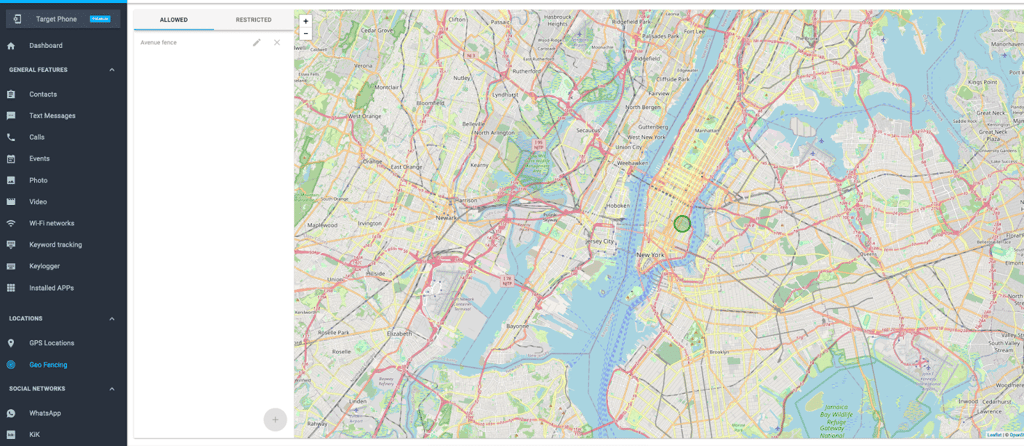
Geofencing is a feature that allows you to create physical zones, such as around home, school, or other important areas. When the target device enters or exits these predefined boundaries, mSpy sends notifications to the parent’s control panel and via email. On iPhone, this feature requires the separate mSpy Lite app. The notifications are typically timely enough to help you monitor your child’s routine or unexpected movements.
Social media monitoring
mSpy can monitor platforms like WhatsApp, Snapchat, Facebook, and Instagram, but that’s only if the target device is rooted (Android) or jailbroken (iOS). Without this, social media tracking is limited to timestamps and browser-based social media use. When fully enabled, this feature can help you pinpoint signs of cyberbullying or inappropriate behavior.
Multimedia access
mSpy gives you access to all photos, videos, and other multimedia files stored on your child's device, if rooting or jailbreaking has been applied – though you can still view recent photos and videos saved in standard folders without it. Therefore, you can identify inappropriate or harmful content, such as explicit images or videos, and take necessary action.
Browser history and internet usage
mSpy tracks visited websites (even in incognito mode), logging bookmarks, timestamps, and search activity. Its keylogger also captures typed search terms. You can manually block specific URLs on both Android and iOS, but there’s no category specific filtering or scheduling. So, this feature is more for spotting risky patterns and starting safety conversations with your child than automatically filtering harmful content.
App blocking
mSpy’s app-blocking feature allows you to restrict access to specific applications on your child’s device, helping them manage screen time and ensure age-appropriate usage. On iOS, blocking is limited to App Store apps and requires iCloud credentials. On Android, most third-party apps can be blocked without rooting (except system apps).

Email monitoring
This feature lets you see the emails sent and received on your child’s device, including sender, recipient, timestamps, and message content – depending on the email app. Therefore, you can manually review any risks, such as phishing attempts or discussions involving cyberbullying or other harmful topics. Full email monitoring on iOS usually requires jailbreaking, while Android access depends on the app’s permissions.
Who is mSpy best for?
mSpy is a specialist at conversation monitoring. For example, if you need behind-the-scenes access to your child’s digital activity, including their messages, social media, and location, you’ll find it quite useful. If you’re concerned about your teen’s use of WhatsApp, Snapchat, Instagram, and iMessage, mSpy provides deep access that few other tools match.
mSpy is especially helpful in situations where transparency isn’t possible, such as early safety concerns, co-parenting arrangements, or monitoring younger children who aren’t yet ready for full digital freedom.
However, mSpy isn’t best for long-term guidance or digital habit-building. It lacks key parental control features like screen time management or content filtering. Also, keep in mind that setting up mSpy requires physical access to your child’s device, and some advanced features may only work on rooted or jailbroken phones (depending on the device model). So, some level of technical-savviness is required to use this app.
mSpy pricing & subscription options
mSpy subscription plans: what you need to know
mSpy currently only offers a Premium subscription (three billing options). Other plans like mSpy Extreme and Family Kit are still mentioned by representatives, but these are not publicly listed and require contacting mSpy support directly for pricing and details.
If you’re interested in advanced tools like ambient listening or remote camera access (offered in the Extreme plan) or need to monitor multiple devices (with the Family Kit), you’ll need to request a custom offer through mSpy’s sales team.
Here’s a breakdown of the only publicly available pricing:
| Duration | Price per month | Total billed upfront |
| 1 month | $48.99 | $48.99 |
| 3 months | $27.99 | $83.97 |
| 12 months | $6.66 | $139.92 |
The features are the same across all subscription lengths, and only the duration affects the price. The features are:
- Social media monitoring
- GPS location tracking
- Call and SMS logging
- Keylogger
- Screen recording
- App blocking
- Browsing history tracking
mSpy setup and installation process: my experience
The setup and installation process for mSpy wasn’t difficult. This first step was done on my own device, not on the target (presumably your child) device. The installation on the child’s device came after I completed this part:
- First, I visited the official website and clicked the Try Now button.
- Then, I created an account using my email address.
- After that, I selected the type of device I want to monitor (Android, iOS, or Decide Later). This part is key, because the installation process is completely different for each platform.
- After these steps, I chose a subscription. mSpy offers one-month, three-month, and 12-month options. If you need a Family Kit or other advanced bundle, contact support directly.
- After completing the purchase page (Submit Order), I got an email with my login credentials, a link to the mSpy Control Panel, and detailed, device-specific instructions.
- From there, I followed the guide provided in the Control Panel based on the type of phone I was monitoring.
Installing mSpy on Android
If your child has an Android device, you must follow these instructions once you complete installation on your own device. So, first, I needed physical access to the phone and a stable internet connection. The device also has to be running Android 5.0 or higher for this to work.
Some advanced features, such as reading chats on Snapchat, LINE, or Skype require the device to be rooted. Still, I could access core features without rooting.
Here’s how the installation went:
- On the target Android device, I opened the Google Play Store, tapped the profile icon in the top right, selected Play Protect > Settings (gear icon), and turned off “Scan apps with Play Protect.” This prevents the system from flagging or auto-removing mSpy.
- I opened Google Chrome on the device and entered the custom download URL address from my mSpy setup email. I completed the CAPTCHA and tapped Download when prompted.
- When prompted, I tapped Open > Settings > Allow from this source. Then, I returned to the previous screen to continue with the installation.
- After that, I tapped Install. Once the app was installed, I opened it. The mSpy installation wizard launched automatically.
- The installation wizard showed me how to grant all the required permissions for mSpy to work (like access to calls, message, location, and media). Then, I entered the registration code from my setup email and tapped Complete Installation.
- At the end, I had the option to hide the mSpy app in stealth mode (optional). If enabled, the app icon disappears and mSpy runs silently in the background.
After these steps, I logged into my mSpy Control Panel on my device. Activity from the target phone (such as texts, calls, GPS) began showing up right away.
Installing mSpy on iPhone or iOS devices
If the target device is an iPhone (iOS), mSpy offers a few ways to monitor, depending on how much access I had to the device and which features I needed. Some methods didn’t require installing anything directly on the phone, while others needed physical access or even jailbreaking.
Here’s how each option worked:
iCloud sync
- I chose iCloud Sync (no jailbreak, remote access) since it didn’t require me to physically install anything on the iPhone. To use this mode, I needed the target iPhone’s Apple ID and password. I also had to ensure iCloud Backup was enabled on the device.
- After selecting iCloud Sync in the Control Panel, I entered the credentials. A 6-digit two-factor authentication code was sent to the target phone, which I entered into the setup page.
- Once verified, my mSpy began syncing data like contacts, notes, calendars, and media. This took about 15 minutes. Note: Location tracking only works with iCloud Sync if Family Sharing is enabled on the device.
Wi-Fi sync (no jailbreak, local access)
Now, this option requires one-time physical access to the iPhone and a PC or Mac.
- After selecting the Wi-Fi Sync in the Control Panel, I downloaded the mSpy Wi-Fi Sync app to my computer (Windows 10 or macOS 10.15 or later).
- Then, I connected the iPhone to my computer using a USB cable and input the passcode. The app created a backup of the devices’ data, including messages, browser history, and media.
- From there, mSpy could continue syncing data whenever the iPhone was connected to the same Wi-Fi network as my computer.
Jailbreak (advanced access)
While using this method, I had full access to all of mSpy’s features, including social media monitoring, keylogging, and screen recording. But, it required me to jailbreak the target iPhone. Jailbreaking removes built-in Apple safety measures and is only supported on iOS 11 to 14.8.1. Remember, it also voids warranties, so I personally chose not to go this route. Then again, if you need full access and you’re aware of the risks, mSpy provides setup instructions and support for the jailbreak process.
mSpy user reviews
Online reviews of mSpy indicate that most users appreciate its comprehensive features and user-friendly interface. Parents often commend the app for its ability to monitor a wide range of activities, including social media, text messages, and location tracking, which provides them with peace of mind regarding their children's safety. As one reviewer put it: “I can now feel at ease when they go for a stroll. The real-time location tracking feature is a game-changer.”
However, users also mention challenges with the installation process, particularly for iOS devices that may require jailbreaking. The subscription cost has also been a point of contention for some users, who feel it could be more competitive, given the app's functionalities. One reviewer noted: “They offer a service that does not exist after purchasing the plan… then demand that we purchase a larger plan that is not listed.” However, it seems that mSpy has since updated its site with a clear pricing structure.
mSpy parental control vs competitors
If you’re wondering how mSpy compares to other popular parental control apps, here’s a quick comparison with some of its competitors:
- Aura - mSpy and Aura both offer parental control features. While mSpy excels in comprehensive monitoring, including text messages, social media, and GPS tracking, Aura focuses on screen time limits and web/app filtering. Identity protection is part of its broader security suite, not the parental controls.
- SpyX - mSpy and SpyX serve similar purposes but differ in features and user experiences. However, while mSpy is comprehensive, SpyX also includes tools like live screen viewing and geofencing, though its “no-install” claim is unverified.
- uMobix - uMobix is particularly known for its real-time updates and broader social media coverage. It’s stronger on Android, with features like live screen view, however mSpy offers better iOS flexibility via iCloud or jailbreak.
Conclusion: Is mSpy the Right Choice for Your Family?
I found that mSpy works well if you want deep visibility into your child’s digital activity. Its call and message tracking, social media monitoring, and GPS location tracking will offer peace of mind, especially if you have younger kids, or if you’re concerned about your child’s safety. However, mSpy can feel a little intrusive for older children and teens, because privacy, transparency, and trust become more important.
So, if you’re looking for a more balanced approach, I highly recommend tools like Bark and Aura for monitoring your children without having to “spy” on them. Bark uses AI to detect cyberbullying or inappropriate content, alerting you without giving you full access to every message. Meanwhile, Aura gives you screen time tools, content filtering, and even identity protection.
Whatever the situation, there’s a parental control app out there for you. Together with the Cybernews team, my goal in this guide was simply to help you make the right choice for your family.
FAQ
Will someone know if I use mSpy?
mSpy runs discreetly in the background of the target device. It is usually undetectable by all but the strongest spyware detection software. However, tech-savvy users may detect anomalies (battery drain, unknown apps).
Is mSpy legal to use?
Yes, mSpy is generally legal to use, provided you have the device owner's consent or are monitoring your child’s device. Laws regarding parental control apps vary by country and state, so it's best to check your local regulations.
How long does mSpy take to work?
mSpy typically starts working almost immediately after installation on the target device. Initial data sync may take 10-20 minutes. Once installed correctly, users can immediately access monitoring data through the control panel.
Can mSpy block apps?
Yes, with mSpy, you can block or restrict specific apps on the target device. However, it doesn’t offer app category filtering or scheduled screen time limits like some parental control apps do, so its blocking features are more manual and surveillance-focused.
Is Bark better than mSpy?
Yes, for most families. In terms of mSpy vs Bark, Bark has alert-based monitoring using AI, helping you spot issues like cyberbullying without full access to private messages. It's less intrusive than mSpy and more attuned to building trust with older kids. mSpy is better for strict, behind-the-scenes oversight.