Phonsee promo codes and coupons for October 2026
Want to save on your Phonsee parental control subscription? This month’s special offer helps you keep your kids safe online for less. Just enter the coupon code PHONSEECNL at checkout to get 10% off your plan and start protecting your child’s devices today.
✅ This coupon is valid and ready to use for October 2026.

How to apply the Phonsee coupon code
It can be tricky to find the best Phonsee discount, especially since new parental control deals pop up all year. To make things easier and help you get the lowest price without searching for deals or typing in promo codes, we’ve picked out the latest offer and coupon for you. Here’s how you can quickly get your Phonsee discount:
-
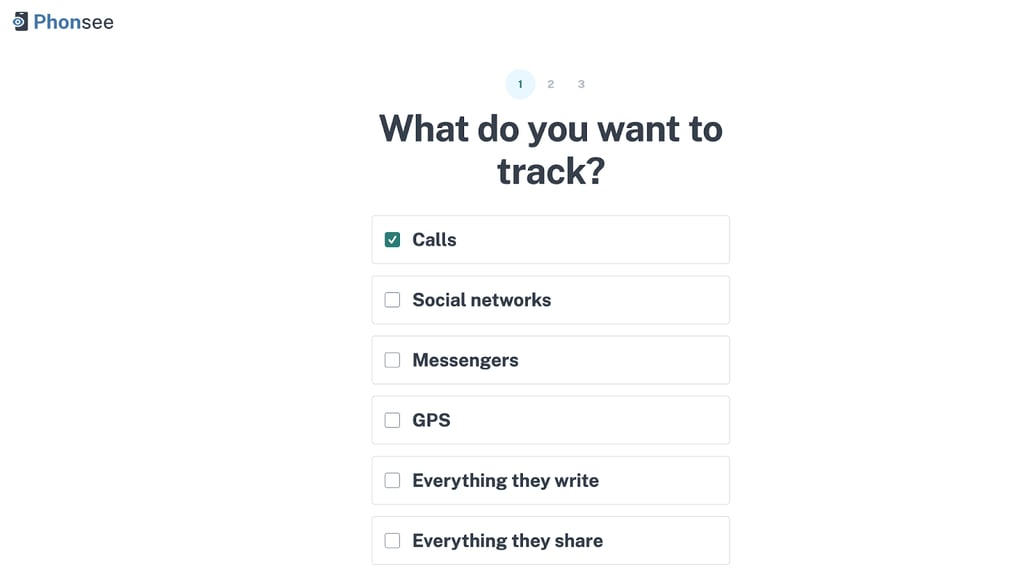
Go to the official Phonesee website and complete a short survey to help choose a tailored solution for you
-
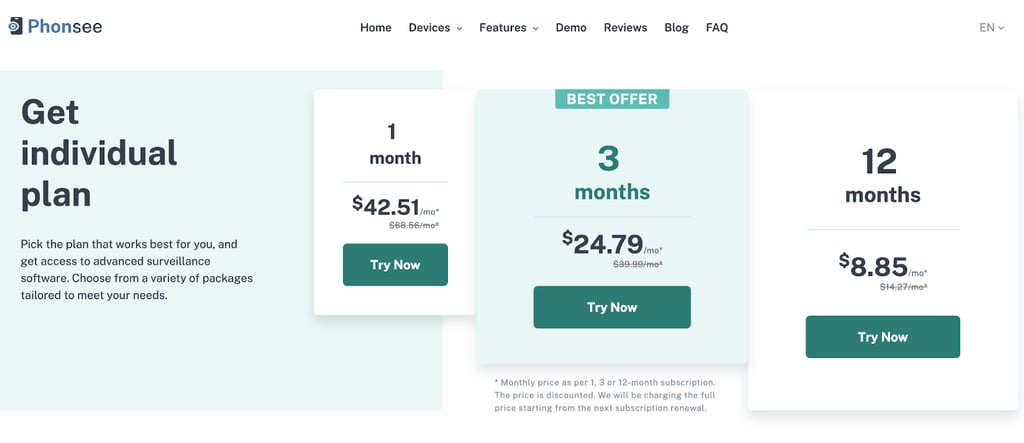
Create an account or sign in and pick an individual plan
-
On the payment page, click “Got a coupon?” and enter the code
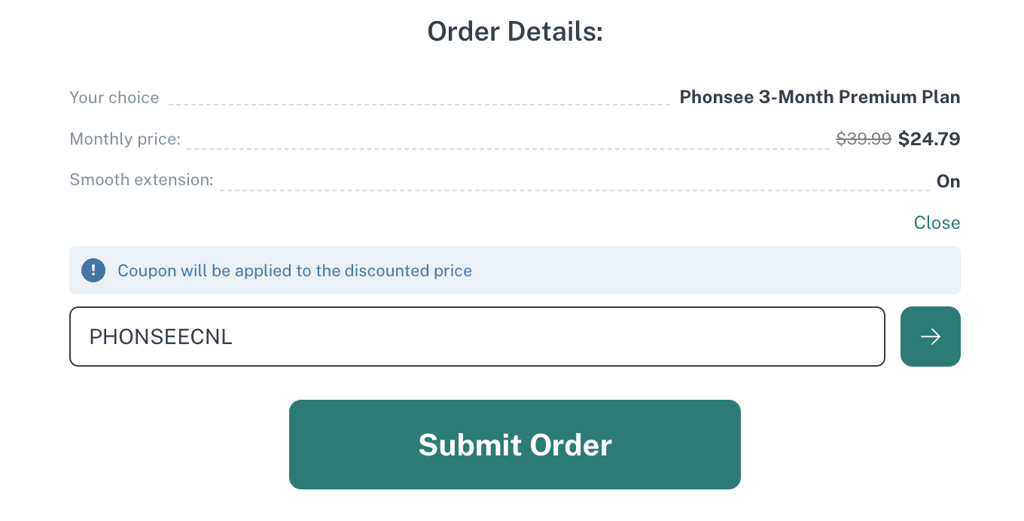
- That’s it, now you got a Phonsee discount
What is the best Phonsee coupon code?
With so many parental control apps and occasional promo offers, it can be difficult to know which deal actually gives you real savings. Right now, the best Phonsee discount is the exclusive code PHONSEECNL, which gives you 10% off your Phonsee subscription when you apply for it at checkout on the official website. Just enter the code on the payment page before confirming your purchase to lock in the discount.
What to do if my Phonsee discount code is not working?
If the PHONSEECNL coupon code isn’t working, here are a few things you can try:
- Double-check the spelling of the code. Even a small typo can cause the code to fail. Rather than typing it manually, copy and paste PHONSEECNL into the promo code field and make sure there are no extra spaces before or after it.
- Make sure the coupon hasn’t expired. All discounts are time-limited. If the code no longer applies, you may see an error or no change in price. In that case, check if there’s a newer Phonsee offer or try again later when a fresh coupon is available.
- Check for an existing promotion. If Phonsee is already running an automatic promotion or special price on a plan, some coupon codes may not stack on top of that. Review the cart to see if a discount is already applied before adding the code.
- Confirm that the discount applies to your plan. Some offers can be limited to specific subscription lengths, regions, or first-time buyers. Make sure you’re choosing an eligible plan and using the same email or account type the offer is intended for.
If you’ve tried all of the above and the code still doesn’t work, consider reaching out to Phonsee support from within the app or website to check your eligibility for the promotion.
Phonsee refund and cancellation policy
Phonsee is a digital subscription service, so its refund and cancellation terms typically depend on the platform or payment method you used (such as the website, App Store, or Google Play). In most cases, you can:
- Cancel your subscription at any time to prevent future renewals. Your access usually remains active until the end of the paid billing period.
- Request a refund within a limited time frame if allowed by the platform’s rules (for example, some app stores let you request a refund shortly after purchase, subject to their own policies).
Refunds are not usually granted for long-term use, misuse of the app, or simply forgetting to cancel before renewal. It’s best to review the terms shown at checkout or in your account settings to see the exact conditions for your region and payment method.
Tips for maximizing savings with Phonsee
Here are a few practical ways to save more on your Phonsee subscription:
- Use the PHONSEECNL coupon code. This is the simplest way to get an instant 10% discount on your plan. Apply it at checkout before paying.
- Choose longer-term plans when available. If Phonsee offers monthly, yearly, or multi-year options, longer subscriptions often work out cheaper per month than paying month-to-month.
- Watch for seasonal or back-to-school promotions. Parental control apps often run special deals around school seasons, holidays, or digital safety awareness campaigns. Buying during these periods can give you an even better effective rate.
- Share across devices and family members. If your plan allows multiple devices or profiles, protect all your child’s devices under one subscription instead of paying for separate solutions.
By combining the PHONSEECNL code with the right plan and timing, you can significantly reduce the cost of keeping your kids safer online.
FAQ
How do I start using Phonsee on my child’s device?
First, create a Phonsee account on the official website or app. Then install the Phonsee app on your child’s device and follow the on-screen setup instructions to grant the necessary permissions. Once connected, you’ll be able to view activity, manage screen time, and adjust settings from your parent dashboard.
Can I use one Phonsee subscription on multiple devices?
Yes, most Phonsee plans are designed to cover multiple devices or child profiles under a single subscription. The exact number may depend on the plan you choose, so check the plan details before purchasing to make sure it matches your family’s needs.
What payment methods does Phonsee accept?
Phonsee typically supports major debit and credit cards, and may also accept payments through popular digital payment platforms depending on your region. Available options are shown on the checkout page before you confirm your purchase.
Is Phonsee available in my country?
Phonsee is available in many regions worldwide. Availability and features can vary slightly by country, so the best way to confirm is to visit the official Phonsee website or app store page and check if you’re able to download and subscribe from your location.