Life360 vs Bark: which parental monitoring app offers better protection?
Being behind major reports like The Mother of All Breaches and RockYou2024, our in-house cybersecurity experts and journalists provide unbiased, real-world testing and in-depth analysis.
We maintain complete transparency by openly sharing our testing methodologies with our audience.
Learn more

These days, children grow up holding smartphones, which is not a problem in and of itself. However, cyberbullying certainly is, and every parent should consider using parental monitoring apps like Life360 or Bark to get ahead of online abuse.
As two of the most renowned options on the market, both offer useful features such as family location sharing and text, email, and social media monitoring. That’s just one of the reasons why I’ve dug deeper into the Life360 vs Bark comparison.
Together with my fellow Cybernews researchers, I’ve summed it all up for you based on monitoring features, pricing details, user experience, and other factors. The headline is that, though they are essentially similar tools, each has a place and purpose, so let’s see which one suits your needs best.
Bark is the ultimate choice for parents looking for advanced AI content monitoring and screen time management features, but Life360 still holds a spot among the top family location apps.




Our Cybernews team of experts always conducts detailed testing of the best parental control apps. All of the information is then checked by our cybersecurity experts, who ensure you only get reliable and accurate data. More so, the testing process is transparent and includes testing and analyzing numerous apps and features and disclosing the methodology. Discover more about our testing process.
Life 360 vs Bark overview
While you’ll need a thorough Bark vs Life360 comparison to make the final call between the two, I thought there’s no better place to start than by giving you a brief overview of the two. Here’s how they stack up:
| App | Bark | Life360 |
| Rating | ||
| Overall rank | #4 in parental control apps | #10 in parental control apps |
| Key features | AI content monitoring, wide coverage of over 30 apps, web filtering, location tracking, online abuse alerts | Real-time location tracking, crash detection, driving reports, SOS alerts |
| Best for | Parental monitoring for children’s online safety | Family location sharing and driving safety alerts |
| Price | Starts at $5/month | Starts at $7.99/month (free tier available) |

About Life360
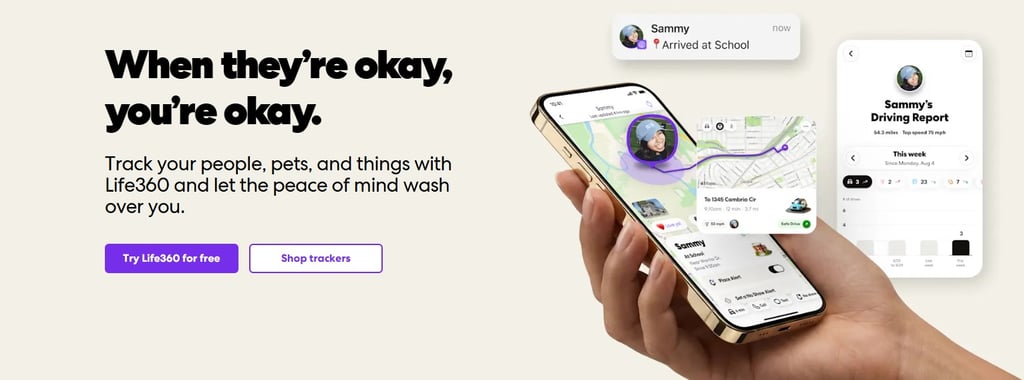
Life360 is one of the best family location-sharing tools on the market, especially if you’ve got one or two fresh drivers under your roof. It’s more of a real-world safety platform than a purely online-based parental controls app, which is one of the main differences compared to Bark.
The app features a system based on "Circles", which allows you to track the live locations and driving patterns of all added family members.
The GPS feature allows you to keep track of every Circle member’s whereabouts in real-time, while location history showcases a timeline of past movements, covering the past 30 days. You can also use geofencing alerts to set virtual boundaries surrounding certain places.
Driving-related tools include crash detection with automatic emergency services dispatch, roadside assistance (on premium plans), and driving behavior reports for detailed summaries of each trip.
About Bark
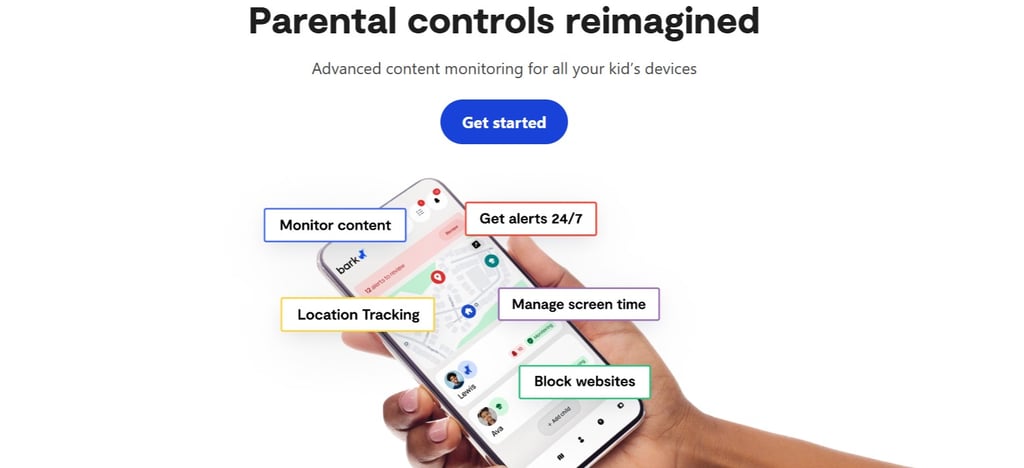
Bark is a handy tool for monitoring your children’s online activity. The first thing that caught my eye is its versatility, as it can be used as a browser extension, a router add-on, or through dedicated Bark devices.
I was amazed to see that you can get a Bark Phone or a Bark Watch with the security system already installed. It helps stay on top of your children’s text messages, emails, social media posts, images, and other online activity.
The app itself scans such media for inappropriate language, signs of online molestation, and other forms of predatory behavior. You can also use it to monitor your kid’s screen time and create customizable daily schedules accordingly. The native system allows you to track activity in over 30 apps.
Bark vs Life 360: features compared
Now that you know a bit more about each tool, the Cybernews research team and I have decided to give you a detailed comparison of their features:
| Feature | Bark | Life360 | Which does it better? |
| Real-time GPS | Basic check-ins and updates | Advanced monitoring for Circle members | Life360 |
| Geofencing | ✅ Available | ✅ Available (limited on low-tier plans) | Life360 |
| Driving reports | ❌ Not available | ✅ Available (speed, braking, phone use) | Life360 |
| Social media monitoring | ✅ Available (over 30 apps) | ❌ Not available | Bark |
| Web filtering | ✅ Available (over 19 categories) | ❌ Not available | Bark |
| Screen time control | ✅ Available (daily schedules and app rules) | ❌ Not available | Bark |
| Emergency features | ✅ Available (limited emergency call alerts) | ✅ Available (built-in SOS button) | Life360 |
The bottom line of the features’ comparison is: Life360 runs the show in terms of physical tracking and driving safety, but Bark takes the throne for parental controls and monitoring. Their core purposes barely overlap, so each app targets a specific user type.
Depending on your needs and your young ones' ages, you might even want to consider using both. On that note, Life360 has extremely limited monitoring features, while Bark’s location tracking barely enters the core circle of features.
Life360 vs Bark: location tracking and activity reports
Considering that Bark is clearly a much better tool for online activity tracking, I wanted to even the playing field by starting my comparison on Life360’s home turf. So, to kick off this Bark app vs Life360 guide, I’ve focused on location tracking and activity reports.
While Bark offers some GPS tracking, Life360 tops it with precise location history and real-time updates. The app constantly refreshes GPS location data, so you can see your kid’s current position at any moment and in a matter of seconds.
With paid plans, location history goes back 30 days, which is more than enough to help you review your child’s movement patterns and frequently visited addresses.
Life360 also has an advantage over Bark in the driving insights category, as you can receive a detailed report on your kid’s driving speed, phone usage, and rapid acceleration.

Bark vs Life360: web filtering
Even though Life360 mainly focuses on real-world safety scenarios, it doesn’t mean it lacks any sort of online safety features. You can still use it to receive digital alerts and protect the identity of your children while they’re browsing online.
Still, it doesn’t have any of the web filtering options that Bark is widely renowned for. For instance, Bark allows parents to block access to certain websites across 19 different categories.
These include online gambling, violence, social media, streaming platforms, adult content, and more. You can also set up keyword alerts to get notified every time your children try searching for certain websites and phrases.
The best thing is that Bark combines passive monitoring with real-time alerts and active blocking of specific websites that you’ve flagged. The only downside is that it requires add-ons to work smoothly on Apple devices.
Bark vs Life360 screen time management
To put it briefly, Life360 has no screen time management features. For that matter, it doesn’t have app blocking or scheduling features, either, so Bark makes an obvious choice in this regard.
You also get granular control and focus on details with Bark. For instance, if your kid goes to school, you can block social media and gaming apps for the duration of the classes, and yet keep educational apps and tools accessible.
At bedtime, you can restrict internet access in full or enable only music-based apps. Bark also features an option for parents to override scheduled restrictions in case of emergency.
Apps and user experience
While Life360 features a map-centric design with live location sharing, Bark focuses on an alert dashboard with monitoring overviews and real-time notifications.
Both apps are praised by existing users for their overall UX, though a few users note Bark’s alert delays.
The onboarding process is also different; while Life360 focuses on a simple process involving parents downloading the app and inviting family members into the Circle, Bark's setup takes a bit more time.
Parents need to create a Bark account, add child profiles, and set up the official Bark Kids app on each device their children use. From there, it takes setting up children’s notification permissions and connecting individual social media and email accounts for monitoring.
Bark comes with a slightly higher risk of parents developing alert fatigue, as it sends out a number of frequent notifications, though the risk level for each is categorized, which enables parents to skip through some. Life360 sends far fewer, and they are mostly location-based.
Plans and pricing
Besides use cases and specific features, pricing is also a major factor that could affect your final decision. That’s why I’ve already done the legwork for you in summarizing available plans and subscription tiers:
| Plan tier | Life360 price | Bark price | Key inclusions |
| Free/trial | Free plan available | 7-day free trial | Life360 - basic GPS tracking, 2-day history |
| Entry-level paid plan | Silver plan - $7.99/month | Bark Jr - $5/month | Life360 - crash detection, 30-day history |
| Mid-tier paid plan | Gold plan - $14.99/month | Product-based plans with purchase and lease pricing | Life360 - roadside assistance, driving reports, ID theft protection |
| Premium plan | Platinum plan - $24.99/month | Bark Premium - $14/month | Life360 - live emergency dispatch, 1M stolen funds reimbursement, medical assistance |
Life360 has more pricing tiers overall, and it’s possible to get a discount using an annual payment, in which case you’d be covering the cost of 10 monthly plan subscriptions by paying for the whole year.
Bark also offers up to 41% off with an annual plan, which comes to $99 for a full year of Bark Premium.
Our methodology
There’s no parental app that guarantees complete online safety, but you at least need to know what you’re looking for in one. Here’s an overview of the criteria I’ve used when ranking Life360 and Bark:
- Feature depth and specialization (25%). I first assessed the amount and quality of core features, including target use cases and real-world/online monitoring capabilities.
- Location tracking reliability (20%). I also checked real-time location tracking efficiency, along with GPS refresh rates.
- Digital monitoring coverage (20%). The number of monitored platforms is also important, along with the effectiveness of alert systems on different devices.
- Ease of use (15%). I also considered setup complexity, dashboard types and differences, as well as onboarding time and requirements.
- Pricing transparency (10%). Moving on, I reviewed pricing plans, structures, the availability of free plans, and total ownership costs for both.
- User sentiment consistency (10%). My final category was based on user reviews and ratings I was able to obtain from forums like Reddit, platforms like Trustpilot, and different app stores.
Life360 vs Bark: which one to choose?
The ultimate decision mainly comes down to preference: if you prioritize real-time location tracking and driving safety insights, you can’t go wrong by choosing Life360. On the other hand, Bark is one of the best Life360 alternatives for online activity tracking.
What it lacks in GPS tracking, it makes up for masterfully with AI-powered content analysis and monitoring in over 30 apps. Web filtering across 19 categories is also handy for those who wish to restrict their children’s access to potentially harmful websites.
Overall, make sure to focus on what type of risks concern you the most, which devices your children use, and how many you need monitored. Ask yourself if you’re comfortable tracking your kid’s location, and you can’t go wrong with either of these two.
FAQ
Is Life360 better than Bark for tracking my child’s location?
Yes, Life360 is better than Bark for tracking GPS locations. It features frequent GPS location updates, detailed movement history, and geofencing.
Can Bark monitor Snapchat and Instagram?
Yes, Bark can monitor both Snapchat and Instagram, along with 30 other apps. Scanning might be limited on Apple devices due to native privacy restrictions, though.
Does Life360 monitor text messages?
No, Life360 doesn’t monitor text messages, as it’s primarily a location-tracking app. It lacks the capability to analyze messages, emails, or social media content.
Which app is better for screen time control?
Bark is the better option for screen time management, as Life360 doesn’t have any such features.
Can I use Life360 and Bark together?
Yes, you can use Life360 and Bark together. Each covers a particular niche, from Life360’s location tracking to Bark’s online activity monitoring.