IPVanish vs NordVPN: which service to choose?
Our in-house cybersecurity experts and journalists, renowned for major reports like The Mother of All Breaches, conduct transparent, unbiased VPN testing and in-depth analysis.
With 750+ articles crafted based on real-world research, we empower readers to make informed purchasing decisions through first-hand expertise.
Learn more

NordVPN and IPVanish are both reliable VPN options, but they target slightly different users. NordVPN is one of the best VPNs on the market thanks to its speed and reliability, while IPVanish is a more affordable alternative that still covers the basics well.
To compare them fairly, I tested both across speed, streaming, security, server network, and overall usability, focusing on real-world performance rather than just specs.
If you’re choosing between the two, this IPVanish vs NordVPN comparison will show which one offers better value and which fits your needs best.
IPVanish vs NordVPN: overview
NordVPN outperforms IPVanish in most categories, including speed, features, security, streaming, torrenting, server locations, ease of use, and customer support. While IPVanish offers competitive pricing and unlimited connections, NordVPN provides a more extensive server network and better access to streaming services.
| NordVPN | IPVanish | |
| ⭐ Rating: |
4.9★★★★★
|
4.2★★★★★
|
| 🥇 Overall rank: | #1 out of #41 | #8 out of #41 |
| 🖥️ Servers: |
Thousands of servers in 225 locations
|
3,400 servers in 112 countries
|
| 📖 No logs policy: | No logs | No logs |
| 💵 Price: |
From $3.49/month
|
From $2.19/month
|
| 🔥 Coupons: |
NordVPN coupon 75% OFF
| IPVanish coupon 85% OFF |
| 🔒 VPN protocols: | OpenVPN, WireGuard (NordLynx), NordWhisper | WireGuard, OpenVPN, IKEv2 |
| 🍿 Streaming services: | Netflix, Hulu, BBC iPlayer, Disney+, and more | Netflix, BBC iPlayer, YouTube, Disney+, Hulu, and more |
| 🖥️ Platforms: | Windows, macOS, Linux, Android, iOS | Windows, macOS, Android, iOS, Linux |
| 📥 Simultaneous connections: | Unlimited | Unlimited |
| 💁🏻 Support: | Knowledge base, FAQs, email, 24/7 live chat | Knowledge base, FAQs, email, 24/7 live chat |





We spare no effort to test the products & their features. All information is gathered by our in-house research team & fact-checked by our team of experts. Discover the ins and outs of our testing procedures.
Recent Updates
Speed, performance, and streaming
Speed and performance are key factors when choosing a VPN, especially for streaming, gaming, or video calls. In this section, we compare NordVPN and IPVanish across multiple regions to see how they handle daily usage.
Speed
I tested both NordVPN and IPVanish using their fastest protocols across multiple regions to compare download, upload, and ping performance. Here’s how they performed in Australia, Japan, the UK, and the US.
NordVPN speeds
| Country | Download | Upload | Ping |
| Australia | 747.73Mbps | 91.37Mbps | 220ms |
| Japan | 618.56Mbps | 76.20Mbps | 278ms |
| UK | 859.51Mbps | 493.05Mbps | 38ms |
| US | 794.30Mbps | 200.83Mbps | 99ms |
IPVanish speeds
| Country | Download | Upload | Ping |
| Australia | 726.33Mbps | 91.51Mbps | 221ms |
| Japan | 653.68Mbps | 75.95Mbps | 269ms |
| UK | 846.57Mbps | 481.91Mbps | 39ms |
| US | 801.41Mbps | 163.78Mbps | 98ms |
Netflix and other streaming platforms
Both IPVanish and NordVPN unblock Netflix US and YouTube TV. NordVPN, however, offers additional capabilities with its SmartPlay feature, designed to bypass streaming media blocks seamlessly, enhancing access to a variety of content, including Netflix, Hulu, BBC iPlayer, Disney+, and more. NordVPN also provides specialized servers like obfuscated and Onion over VPN, tailored for specific needs such as streaming or torrenting.
In contrast, IPVanish does not have specialized streaming servers, utilizing the same servers for all activities. It can be limiting, as IPVanish struggles to bypass restrictions on major streaming sites like Hulu and Amazon Prime Video, frustrating users looking to access a broader range of content.
All in all, NordVPN's SmartDNS is a major advantage. Since using it as a Smart DNS feature means your traffic isn't encrypted or rerouted through a VPN server, the speeds will be significantly better. Additionally, you'll be able to stream on smart TVs, game consoles, and other devices without the VPN app.
Torrenting and P2P
IPVanish and NordVPN are great options for torrenting. Both have a free SOCKS5 proxy, which means you can download without slowing down your connection with encryption.
The main difference is that IPVanish allows P2P on all servers, and NordVPN has a specialized list. However, the provider has almost three times more servers in total, so overpopulation shouldn't be an issue.
Plans and value
IPVanish's and NordVPN's pricing plans differ substantially in length and discounts offered. Let's break it down and see which one wins this round.
| Plan | IPVanish | NordVPN |
| 1-month | From $14.99 | From $14.99 |
| 1-year | From $3.89/month | From $5.49/month |
| 2-year | From $2.19/month | From $3.49/month |
IPVanish and NordVPN prices are the same in the monthly category. However, when looking at longer-term plans, IPVanish offers better value. Its one-year plan starts at $3.89/month, compared to NordVPN's $5.49/month. The price gap remains in the two-year plans, where IPVanish costs $2.19/month, while NordVPN’s deal is $3.49/month.
Both services include a 30-day money-back guarantee, and each offers a 7-day free trial.
In my NordVPN vs IPVanish price comparison, I declare IPVanish the winner, as its first-term discounts make it the more affordable option.
If either VPN still seems too pricey, you might find an extra discount. Check out IPVanish coupons and NordVPN coupons – there could be a special deal waiting for you.

Servers
NordVPN offers a significantly broader range of server locations, covering 149 countries, while IPVanish follows along with 112 countries. Moreover, NordVPN has a much larger server network, boasting over 8,000 servers compared to IPVanish's 3,400+.
| NordVPN | IPVanish | |
| Servers | 8,000 | 3,400 |
| Countries (total) | 149 | 112 |
Looking at regional distribution, both VPNs provide strong global coverage. IPVanish focuses more on the Americas. Meanwhile, NordVPN provides more options in Europe and the Asia-Pacific region and Middle East.
In the end, I give this one to NordVPN due to the sheer quantity and quality of its servers. While all IPVanish servers are physical and owned by the company, NordVPN avoids virtual servers and operates a RAM-only infrastructure, enhancing security and privacy.
Features
Both IPVanish and NordVPN have all the main features that a premium VPN should have. However, NordVPN has something extra that IPVanish doesn't. Check out the feature overview and see for yourself.
Split tunneling
Split tunneling is a useful feature that allows you to choose which apps use the VPN tunnel and which connect directly to the internet. This way, you can use your real IP address for online banking while streaming Netflix Japan simultaneously.
IPVanish is better than NordVPN in this case because it offers more compatibility options. It allows split tunneling on Windows, macOS, Android, iOS, Amazon Fire TV, and even Apple Vision Pro, while NordVPN has it on Windows, Android, and Android TV apps only.
Stealth VPN
This feature helps to hide VPN usage from apps or services. It's also known as a great tool against China's Deep Packet Inspection (DPI).
NordVPN calls this feature Obfuscated servers, and you can find them under the Specialty Servers section. Turning it on will make your traffic look like regular HTTPS traffic. In the case of IPVanish, you turn on this traffic obfuscation by ticking the Scramble OpenVPN traffic box under OpenVPN options, thus enabling the XOR cipher that does all the rest.
However, IPVanish's Stealth VPN seems to have trouble unblocking the internet in China, so NordVPN is superior in this instance.

Free SOCKS5 proxy
The SOCKS5 proxy is particularly favored for torrenting. Essentially, setting it up on your torrent client (or any other app that supports proxies) will hide your IP without encrypting the traffic. This way, you get anonymity plus full-speed downloads.
You can configure the SOCKS5 proxy on all popular P2P clients. However, be aware that your ISP could still see what you're doing if they wanted.
Exclusive features
IPVanish stands out as one of the few premium VPNs offering encrypted cloud storage through two services: SugarSync and LiveDrive.
SugarSync provides up to 500GB of secure cloud storage, allowing you to easily upload and share files. Meanwhile, LiveDrive offers more extensive features, including up to 1TB of storage and continuous backup with remote access to your files.
Both services come with convenient options like email file sharing, making them ideal for users needing secure and accessible storage solutions.
The list of NordVPN-only features starts with SmartDNS. When turned on, it unblocks Netflix and other content platforms without traffic encryption. Most importantly, SmartDNS works as a so-called SmartPlay feature, which will let you unblock content on most smart TVs, game consoles, and other media devices.
Next, NordVPN offers a range of security-oriented features. Its next-gen antivirus (formerly Threat Protection) blocks intrusive ads, trackers, and malware, providing an extra layer of protection while you browse the internet. On top of that, it goes a step further by scanning downloaded files for malware, blocking malicious websites, and preventing any dangerous content from reaching your device. Next-gen antivirus works even without being connected to the VPN, ensuring your device is protected at all times, whether you're connected to NordVPN or not.
Moreover, NordVPN offers a Dark Web Monitor, which scans the dark web for your credit card numbers, national IDs, Social Security numbers, and other personal information. You get immediately alerted if your data is leaked. IPVanish has a similar tool, but it only detects leaked emails.
Additionally, both providers offer a Double VPN (also known as multi-hop or double-hop) feature that gives you extra protection by routing your connection through two VPN servers instead of one, enhancing your privacy and security. However, NordVPN’s Double VPN is more focused on high-security use cases.
Also, you can use Tor network with both IPVanish and NordVPN Onion Over VPN feature for an extra layer of anonymity and unmatched protection, keeping in mind that it is not going to be easy on your upload and download speeds.
Privacy and security
IPVanish offers good security and privacy, but the NordVPN does a better job. Both use advanced encryption and modern tunneling protocols for a strong foundation, but NordVPN offers both application-level kill switches on macOS and a system-level implementation on Windows and Android, giving users more flexibility. However, it's worth noting that NordVPN tends to be slower on macOS compared to other platforms.
IPVanish is registered in the United States. This country is the founding member of the Five Eyes intelligence alliance and creates a whole host of privacy issues for digital businesses. In the meantime, NordVPN is situated in Panama, which has no data retention laws and no connection with the aforementioned surveillance alliance. Meanwhile, the US government can make any company collect data as per the Electronic Communications Privacy Act.
NordVPN has a strict no-logs policy, which is audited frequently, with the most recent audit complete in February 2026. As for IPVanish, the provider has a no-logs policy, and it’s been freshly audited in April 2025. However, unlike NordVPN, the provider doesn't offer the opportunity to pay using anonymous payment methods (such as crypto).
As you can see, NordVPN already looks better. But with features like the next-gen antivirus and Onion Over VPN, the winner becomes obvious.
User experience
| NordVPN | IPVanish | |
| Supported OS | Windows, macOS, Linux, Android, iOS | Windows, macOS, Android, iOS |
| Other software and devices | Android TV, Fire devices | Android TV, Fire devices, Apple TV |
| Browser extensions | Chrome, Firefox | Chrome, Firefox, and Edge |
| Simultaneous connections | 10 | Unlimited |
NordVPN excels in compatibility compared to IPVanish, offering dedicated apps for Linux. It makes NordVPN more versatile, especially if you share it with family or friends.
You can also manually configure both VPNs on routers, firewalls, and NAS devices. I found NordVPN's setup particularly user-friendly. NordVPN's Smart DNS feature is a standout, allowing easy access to geo-restricted content on smart TVs and gaming consoles, which is ideal for seamless streaming without lags.
Desktop apps
NordVPN and IPVanish feature intuitive Windows and Mac apps with a clean layout. Both have a main window that can be maximized to display a server map and list, making it easy to switch servers. I appreciated the left sidebar in both apps, where the settings are neatly organized and ensure consistency across platforms. This design allows easy access to advanced settings on Mac, enhancing usability without complicated navigation.
NordVPN offers two macOS apps, enhancing users' flexibility. The App Store version supports multiple protocols, including NordLynx, while the direct download version offers OpenVPN with additional features. I found the App Store version more user-friendly, especially for those prioritizing speed and simplicity. However, those needing more advanced settings might prefer the direct download version.

IPVanish caters to advanced users with features like keyboard shortcuts: Alt+C to connect and Alt+L to view servers. Its Diagnostics tab under Settings proved useful for troubleshooting, providing insights that helped me resolve connectivity issues without contacting support immediately.

For Linux users, NordVPN provides both .deb and .rpm packages. While it lacks a GUI, which can be challenging for those unfamiliar with terminal commands, the installation process is straightforward, with clear documentation.
While IPVanish lacks a native Linux app, it offers manual setup instructions for various distros like Ubuntu and Fedora, which I found relatively easy to follow. However, the lack of a dedicated app might be a drawback for some users.
Mobile apps
IPVanish mobile apps are pretty bland, while NordVPN retains the look of its well-designed desktop counterparts.
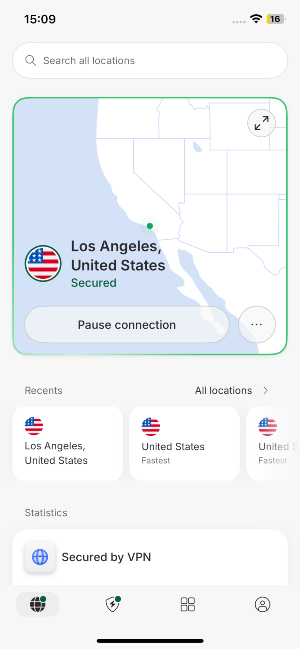
As it often is, the iOS clients have fewer features, but NordVPN does a pretty good job of keeping its apps at a similar level.
On iOS, I really liked NordVPN’s always-on kill switch – a crucial security feature that IPVanish doesn't have. NordVPN also offers a favorites tab on iOS.
On Android, IPVanish gave me more control with features like split tunneling and Stealth VPN. Alerts for insecure networks and the ability to choose ports made me feel safer using the app. IPVanish supports OpenVPN and IKEv2 (still in beta), which is great for flexibility.

NordVPN's Android app doesn't have IKEv2 but includes NordLynx for fast, secure connections. It features split tunneling, a customizable kill switch, and a next-gen antivirus, giving me more control over my security settings. It also offers Stealth VPN, Onion Over VPN, tapjacking protection, Call Protection to detect spam mobile calls, and Custom DNS, providing more security options than IPVanish. These extra NordVPN features made me feel safer and more in control than the simpler IPVanish app.
Customer support
Both providers offer 24/7 live chat support. The agents are polite and resourceful, while the waiting times were minimal. For most users, that's probably more than enough.
Another way to contact IPVanish and NordVPN is by email. This time I found NordVPN to be faster, usually taking less than a day to answer. In contrast, my question for IPVanish took three days to answer.
| IPVanish | NordVPN | |
| 24/7 live chat | ✅ Yes | ✅ Yes |
| Phone line | ✅ Yes | ❌ No |
| ✅ Yes | ✅ Yes | |
| Guides | ✅ Yes | ✅ Yes |
| FAQs | ✅ Yes | ✅ Yes |
Finally, each service has a well-maintained knowledge base to delve into. Here you'll find FAQs, setup guides, and troubleshooting sections. I liked that IPVanish shows system status at the top of the Support Center's page. So if you have trouble connecting, you may check it out to see if the problem is really on your side.
Video review
Final verdict
To make it easier to compare NordVPN and IPVanish, here’s a breakdown of key categories, ratings, and which VPN comes out on top.
| Feature | NordVPN | IPVanish | Verdict |
| Pricing | IPVanish wins for affordability, especially on one-year and two-year plans, while monthly prices are similar. | ||
| Speed | NordVPN is slightly faster overall, with higher download and upload speeds in most regions. | ||
| Privacy | NordVPN is based in Panama and has undergone 6 audits, giving it a clear privacy advantage over IPVanish in the US. | ||
| Features | NordVPN offers advanced features like next-gen antivirus, SmartDNS, and Double VPN; IPVanish shines with split tunneling and encrypted cloud storage. | ||
| Streaming | NordVPN delivers a smoother streaming experience with SmartPlay and specialized servers; IPVanish can unblock Netflix but struggles with Hulu and Amazon Prime. | ||
| Torrenting | Both support P2P and SOCKS5 proxies, making them solid choices for torrenting. | ||
| Support | NordVPN is faster to respond via email and has more flexible support options; both offer 24/7 live chat. | ||
| Ease of use | NordVPN excels with dedicated Linux apps, user-friendly setup, and Smart DNS for streaming on devices. |
FAQ
Is NordVPN faster than IPVanish?
Yes, NordVPN is faster than IPVanish when comparing most of the tunneling protocols. However, IPVanish is also pretty fast and doesn’t fall behind too much – its speeds are definitely enough for streaming and torrenting.
Is IPVanish any good?
Yes, IPVanish is a good VPN service. It’s excellent for torrenting (thanks to the free SOCKS5 proxy), it manages to unblock a couple streaming services, and it offers unlimited simultaneous connections. What’s even better is that it’s quite cheap compared to other VPNs on the market.
Is NordVPN or IPVanish better for gaming?
Both NordVPN and IPVanish are excellent for gaming, as they both offer low ping and will protect you from speed throttling and DDoS attacks.