What is a VPN tunnel and how does it work?
Our in-house cybersecurity experts and journalists, renowned for major reports like The Mother of All Breaches, conduct transparent, unbiased VPN testing and in-depth analysis.
With 750+ articles crafted based on real-world research, we empower readers to make informed purchasing decisions through first-hand expertise.
Learn more

You might be familiar with the term VPN, but can you explain how this technology actually protects your web traffic? Do you know what a VPN tunnel is or how it works? It’s normal if you don’t since we rarely need the specifics to enjoy a service. However, if you are curious, I’ve got you covered.
At its core, a VPN creates a secure, encrypted tunnel between your device and a remote server. This connection is completely private, which is what makes it possible to hide your IP address and lock out eavesdroppers – one of the main reasons people use VPNs in the first place. But did you know that different types of tunnels exist? Keep reading to learn all about it.
What is a VPN tunnel?
A VPN tunnel is an encrypted connection between your device and a VPN server. It's uncrackable without a cryptographic key, so neither hackers nor your internet service provider (ISP) can access your data. This protects users from attacks and hides what they're doing online.
Effectively, VPN tunnels are private routes to the internet via intermediary servers. That's why VPNs are popular among privacy-cautious individuals.

How does VPN tunneling work?
Generally speaking, VPN tunneling means simply using a VPN service. Therefore, the answer to "how does VPN tunneling work?" is virtually the same as to "how does a VPN work?"

And now here's what a VPN tunnel does:
- Traffic encryption. Your data becomes protected against intrusive third-parties.
- IP address hiding. The VPN tunnel funnels your traffic through to a VPN server, hiding your IP address. Without the IP address, there's no way to tell your location.
- Wi-Fi hotspot protection. You no longer have to worry about your safety when using public Wi-Fi.
To make VPN tunneling work, first, you have to get a VPN service. Once you connect to the desired server, a VPN tunnel will be established. Without it, your ISP sees everything you do online, but this is impossible after you connect to a VPN server. That's because of the encryption and hidden IP address.
Most VPN services follow strict no-logs policies, which means they don’t monitor and store personally identifiable information or online activity data. Having said all that, only trust reputable VPN services that have proven their claims through independent third-party audits.
VPN tunnel security: can it be hacked?
If a VPN connection is so secure, is it actually possible to hack it? Unfortunately, yes, but that’s much less common than you think. Plus, hackers usually prey only on high-profit targets like million-dollar companies.
So, how can a VPN tunnel be hacked? Well, as breaking the encryption itself is virtually impossible (unless there’s a known vulnerability), the most common way is stealing the encryption key. This can be done in a lot of different ways; however, using a reputable VPN greatly minimizes the risk.
For example, VPNs like NordVPN use a 4096-bit DH (Diffie-Hellman) key cipher, which makes the key exchange in a VPN connection extremely secure.
How to test a VPN tunnel
Checking your ping will help you know whether your VPN tunnel is working. You’ll need to check your ping twice: when you’re connected to a VPN and when you’re not. Then, simply compare the results to see if the VPN connection was successful. Here’s how you check your ping if you’re using Windows 11:
- Type Command Prompt into Windows Search (on the Taskbar)
- Open the application
- Type in ping 8.8.8.8 (8.8.8.8 is the public DNS of Google)
- Press Enter and wait for the results
The ping received with a VPN in use will be significantly higher than the one you get when disconnected from a VPN.
Types of VPN tunnel protocols
A tunneling protocol, or a VPN protocol, is software that allows securely sending and receiving data among two networks. Some may excel in speed but have lackluster security and vice versa.
At the time of writing this article, the most popular tunnel protocols are WireGuard, OpenVPN, IKEv2/IPSec, and L2TP/IPSec. Some VPNs also have introduced proprietary tunneling protocols, like NordVPN’s NordLynx (built on WireGuard) or ExpressVPN’s Lightway.
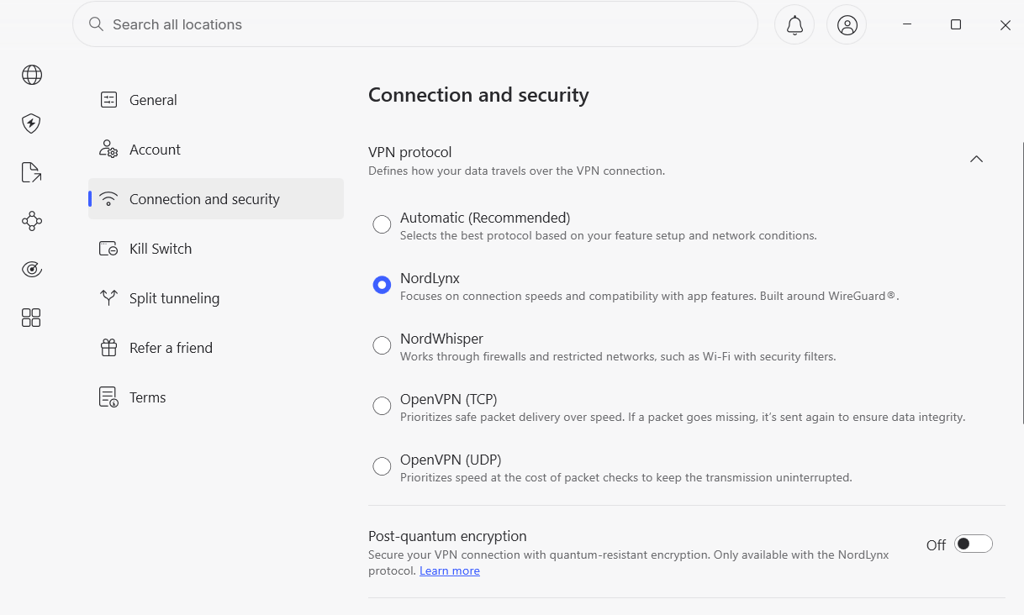
Below you will find a list of VPN tunneling protocols, ranked from best to worst. Don't forget that not all providers offer the same set of protocols, and even if they do, their availability will be different across desktop and mobile devices.
1. WireGuard
Security: Very high
Speed: Very high
WireGuard is hands-down the best tunneling protocol available in 2026. It offers great speed and security, using top-notch encryption. What's more, this open-source protocol is easy to implement and audit thanks to its lightweight code, consisting of only 4,000 lines. That's nearly 20 times less than OpenVPN, which is another popular protocol.
Built from the ground up, WireGuard is free from any disadvantages that come with an old framework. It's also free from the negative impact of network changes, making it a go-to choice for mobile users.
2. OpenVPN
Security: High
Speed: High
Released in 2001, OpenVPN is one of the most popular tunneling protocols. However, because of WireGuard, it's slowly losing its position for good. Despite that, you still get first-class security and fast speeds with this open-source VPN tunneling protocol.
You may encounter two versions of OpenVPN – TCP and UDP. The former is more stable and the latter offers a faster connection.
3. IKEv2/IPSec
Security: High
Speed: High
This combination of protocol rivals OpenVPN in terms of popularity, security, and speed. IKEv2 excels at maintaining your VPN connection whenever you switch from one network to another. Due to the native support, it's especially popular on iPhone and iPad devices.
4. L2TP/IPSec
Security: Medium
Speed: Medium
L2TP/IPSec is a practically-retired VPN tunneling protocol that is still supported by some providers, but it certainly is no longer a default choice. Its main weakness is age, as it’s simply less efficient than newer protocols. Plus, it’s harder to configure securely. For everyday VPN use, I would treat it as acceptable only when newer protocols are not available.
5. SSTP
Security: High
Speed: Medium
When it comes to speed, the difference between SSTP and L2TP/IPSec is not that big. However, the reason why the former sits one place below is compatibility. SSTP was created by Microsoft and works on Windows only. What's more, there's always a chance that its creators have left some unlocked back doors in case the NSA comes calling. On the bright side, SSTP is great for bypassing The Great Firewall of China.
6. PPTP
Security: Poor
Speed: High
PPTP is an outdated VPN tunneling protocol that I don't recommend you use. Just like its younger sibling SSTP, this one was developed by Microsoft back in the days of Windows 95. And unlike SSTP, PPTP is available even without a VPN app on all major platforms, including Linux. Unfortunately, there's more than one widely-known security vulnerability that makes using PPTP risky.
VPN split tunneling
Split tunneling allows you to choose which websites or apps should use a VPN tunnel and which ones should stay outside. This feature is useful when you want to watch a show that's available in the US and read a local version of a news portal. Another example would be using your office's printer while torrenting securely with a VPN.

However, not all VPN providers offer this feature. Even if they do, the chances are that split tunneling is available on certain devices and operating systems only. Therefore, always check your options before committing long-term.
Thinking of trying out a VPN service? Read one of our VPN guides or reviews
FAQ
How does tunneling work on a VPN?
A VPN tunnel links your device with your destination by using a VPN protocol. Your connection becomes encrypted, and your IP address is no longer visible to anyone outside the tunnel. The speed and security of such a tunnel highly depend on your VPN provider’s protocol, encryption type, and additional security and privacy features.
How do I set up a VPN tunnel?
If you’re using a VPN app, you don’t have to set up a VPN tunnel. It will be done automatically, and your only task is to choose between the available VPN protocols (and servers). However, most VPN services offer manual configuration guides on different devices, such as routers or smart TVs. To see your options, visit the provider’s website or contact customer support.
Is tunneling the same as VPN?
No. A VPN merely uses tunneling to connect your device to the VPN server.