Atlas VPN vs NordVPN: can cheaper be better?
Our in-house cybersecurity experts and journalists, renowned for major reports like The Mother of All Breaches, conduct transparent, unbiased VPN testing and in-depth analysis.
With 750+ articles crafted based on real-world research, we empower readers to make informed purchasing decisions through first-hand expertise.
Learn more

Atlas VPN and NordVPN are both strong contenders in today’s VPN market. Each offers reliable performance and useful features, though NordVPN generally stands out for its advanced security and versatility. Atlas VPN, however, provides solid connections and great value for users seeking an affordable option.
For this Atlas VPN vs NordVPN comparison, I examined key factors including security, speed, streaming, torrenting, and overall usability. My testing included real-world performance checks and feature assessments to ensure a fair evaluation of both providers.
Keep reading as we break down their strengths and weaknesses, helping you decide which VPN best suits your needs.
NordVPN vs Atlas VPN – overview
NordVPN and Atlas VPN both deliver reliable VPN services, but they cater to different priorities. NordVPN excels in security, speed, and advanced features, while Atlas VPN focuses on affordability and solid streaming performance. Choosing between them depends on whether you value premium protection or budget-friendly simplicity.
| NordVPN | Atlas VPN | |
| ⭐ Rating: | ||
| 🥇 Overall rank: | #1 out of #41 | - |
| 🖥️ Servers: | Thousands of servers in 225 locations | 1,000+ servers in 42 countries |
| 📖 No logs policy: | No logs | No-logs |
| 💵 Price: | From $3.49/month | From $1.64/month |
| 🔥 Coupons: | NordVPN coupon 75% OFF | Cybernews VPN coupons |
| 🔒 VPN protocols: | OpenVPN, NordLynx, NordWhisper | IPSec/IKEv2 and WireGuard |
| 🍿 Streaming services: | Netflix, Hulu, BBC iPlayer, Disney+, and more | Netflix, BBC iPlayer, YouTube |
| 🖥️ Platforms: | Windows, macOS, Linux, Android, iOS | Windows, Mac, Linux, Android, iOS |
| 📥 Simultaneous connections: | 10 | Unlimited |
| 💁🏻 Support: | Knowledge base, email, 24/7 live chat | Email, FAQ |

Recent Updates
Key differences between NordVPN and Atlas VPN
The main difference between NordVPN and Atlas VPN lies in their scope and capabilities. NordVPN is a full-featured premium VPN with advanced security tools and a massive server network, while Atlas VPN focused on offering a simpler, budget-friendly service with fewer features and a smaller infrastructure.
Choose NordVPN if:
- You want stronger security and privacy. NordVPN uses RAM-only servers, an independently audited no-logs policy, and advanced security features like Next-gen antivirus and Double VPN.
- You need a larger and more reliable server network. With 9000+ servers in 130 countries, NordVPN provides much broader global coverage than Atlas VPN.
- You want more advanced features. NordVPN includes tools like Meshnet, Smart DNS, specialty servers, and additional security layers that deliver a more versatile VPN experience.
For additional information, don’t miss our NordVPN review.
Choose Atlas VPN if:
- You want the cheapest VPN option. Atlas VPN offered one of the lowest prices on the market, with plans starting from $1.64/month, making it appealing to budget-conscious users.
- You prefer unlimited device connections. Unlike NordVPN’s 10-device limit, Atlas VPN allowed unlimited simultaneous connections, making it convenient for large households.
- You only need basic VPN functionality. Atlas VPN included core features like a kill switch, WireGuard protocol, and streaming servers, which were enough for everyday browsing and simple streaming needs.
For more, feel free to read our complete Atlas VPN review.
Speed, performance, and streaming
Both NordVPN and Atlas VPN are considered some of the fastest VPNs on the market. While Atlas VPN offers WireGuard and IKEv2 tunneling protocols, NordVPN includes NordLynx and OpenVPN (UDP and TCP). So, we’ve put both providers to a test to see which one is faster.
Starting from protocols that are some of the fastest available – NordLynx and WireGuard – NordVPN turned out to be faster. That’s all thanks to its proprietary protocol which is an even more upgraded version of WireGuard, ensuring a great combo of speed and security.
- Baseline: 300 Mbps download/300 Mbps upload
| NordLynx/WireGuard | NordVPN | Atlas VPN |
| Download average | 276 Mbps | 232 Mbps |
| Upload average | 265 Mbps | 212 Mbps |
In terms of download speeds, NordVPN experienced a 8% speed drop only, which is a phenomenal result. As for Atlas VPN – the drop was around 23%. While that’s not as fast as NordLynx, it’s still a solid result. However, we were having some instabilities while testing Atlas VPN. This shows that NordVPN is unbeatable in terms of speeds.
Netflix and streaming performance
| NordVPN | Atlas VPN | |
| Netflix | ✅ | ✅ |
| Amazon Prime Video | ✅ | ✅ |
| YouTube TV | ✅ | ❌ |
| Hulu | ✅ | ✅ |
| HBO Max | ✅ | ✅ |
| Disney+ | ✅ | ✅ |
| BBC iPlayer | ✅ | ✅ |
NordVPN and Atlas VPN go on the list of the best VPNs for streaming, and for a good reason. We tested various VPN services on multiple popular streaming services to check which are able to unblock what.
NordVPN effortlessly unblocked various streaming services, including Netflix, Disney+, HBO Max, Hulu, and others. While it was a bit more difficult to access YouTube TV, we managed to do it in a couple of tries as well.
With Atlas VPN, you’ll be able to enjoy Netflix, Disney+, Hulu, and other services as well. However, if YouTube TV is what you’re looking for, you might want to consider NordVPN for that.
It’s also worth reminding that NordVPN includes the SmartDNS feature. So if you have a smart TV or any other device that doesn’t support VPNs, you can easily set up this feature to bypass geo-restrictions.
Torrenting
Another place where NordVPN stands out is torrenting. Thanks to the P2P-optimized servers offered by NordVPN, you can be sure of fast speeds and advanced security. And what sounds more appealing than fast torrenting?
You can even choose between the fastest, nearest, or most secure servers or locations. And – there are no download speed limitations.
Meanwhile, Atlas VPN claims that all of its servers are torrenting-friendly. That’s right – even free servers. This is a plus if you need a VPN for torrenting and are on a budget.
Plans and pricing
Both NordVPN and Atlas VPN have short and long-term premium subscription options. And while Atlas VPN is the owner of the cheapest plan, it only has one package available. Meanwhile, NordVPN is more flexible and offers 3 different VPN plans – Basic, Complete, and Prime – with different subscription terms.
It’s also worth noting that while NordVPN comes with a free 3-day trial on Android devices, Atlas VPN has an unlimited free version. They also provide a 30-day money-back guarantee, allowing you to test both services out for up to a month completely free.
| Plan | NordVPN | Atlas VPN |
| Monthly | $14.99/month | $11.99/month |
| One year | $5.49/month | $3.29/month |
| Two years | $3.49/month | $1.64/month |
| Check NordVPN discounts | Check Atlas VPN discounts |
It’s no surprise that the longer the subscription, the cheaper the plans. NordVPN and Atlas VPN are no exceptions. If you want to try a provider out, I’d recommend opting for annual plans and making use of a 30-day money-back guarantee rather than buying a monthly subscription.
The cheapest option is getting Atlas VPN for 2 years – this way, you’ll have to pay as little as $1.64/month for unlimited simultaneous connections. This is a great choice if all you need VPN services for is data encryption.
Yet, NordVPN offers much better value for your money with its premium plans. An audited no-logs policy, a range of features, excellent streaming and torrenting capabilities – all that for as little as $3.49/month.
But it’s not as simple as that – let me put it briefly how all 3 of NordVPN’s premium plans differ:
- NordVPN Basic (from $3.49/month) – you get the whole VPN package together with malware protection and tracker and ad blocker.
- NordVPN Complete (from $4.49/month) – this is for those who want the high-quality NordPass password manager and a data breach scanner thrown in as well. Considering that NordPass can cost anywhere from $1.29/month when bought separately, this is a much more wallet-friendly option.
- NordVPN Prime (from $7.49/month) – with this plan, you’re given everything that’s in the Complete g plan, plus 1TB of encrypted cloud storage for keeping your files safe.
To get the best deals, feel free to check out our NordVPN coupons.
Server locations
While both providers have servers in a large number of countries, NordVPN provides much better global coverage in terms of, well… everything. For starters, it has around 90% more servers. So, here’s how the servers are distributed globally at the time of writing this comparison:
| NordVPN | Atlas VPN | |
| Servers | 8,000+ | 1,000+ |
| Countries (total) | 149 | 42 |
| Americas | 7 | 6 |
| Europe | 47 | 26 |
| Asia Pacific | 27 | 9 |
| Middle East & Africa | 28 | 128 |
Since NordVPN has almost 9 times more servers than Atlas VPN, they naturally spread throughout more locations. No matter if you need servers in America, Europe, or other regions, NordVPN is a more loaded option.
Features overview
| NordVPN | Atlas VPN | |
| Kill switch | ✅ | ✅ |
| Next-gen AV | ✅ | ✅ |
| Data breach monitoring | ✅ | ✅ |
| Smart DNS | ✅ | ❌ |
| Split tunneling | ✅ (Windows and Android only) | ✅ (Android only) |
| Specialty servers | ✅ | ✅ |
| Presets | ✅ | ❌ |
| Auto-connect and pause | ✅ | ✅ |
| Meshnet | ✅ | ❌ |
Both NordVPN and Atlas VPN have all the essential VPN features needed for daily usage. Yet, NordVPN has significantly more to offer than Atlas VPN, including Smart DNS and Meshnet.
Not to mention NordVPN protects you from more than just malicious websites. You’re also secured from online ads, dangerous files, and trackers. Plus, there are various types of specialty servers for you to choose from.
SmartDNS
One of the exclusive additionalities that let NordVPN stand out from Atlas VPN is the Smart DNS feature. It’s a streaming-focused feature that helps you bypass streaming geo-restrictions, letting you enjoy Hulu, HBO Max, and other similar services. Just keep in mind that you can enable it from your NordVPN account – not the app.

The reason why this feature is so special is that it can be used on devices that don’t support VPN connections. That’s because most devices allow changing DNS settings. When you’re accessing streaming websites, the SmartDNS feature turns on automatically.
However, the only thing you should keep in mind is that using this feature without the client doesn’t encrypt your data.
Split tunneling
Both NordVPN and Atlas VPN include the split tunneling feature, which is extra handy when you want to use the VPN connection partially. What this means is that you can choose which apps go through a regular connection and which – through a VPN.
Starting from NordVPN, you can disable or enable VPN connection for specific apps on the Windows app. Meanwhile, on Android, you can only disable the VPN for certain apps. As for iOS, Linux, and macOS – you don’t get this feature.

Moving on, with Atlas VPN, the split tunneling feature is only available on Android. You can pick which apps you want to disable. This is especially useful when you want to, for instance, view sites in your native language but unblock geo-restricted Spotify albums.
Specialty servers
Specialty servers are something both providers can boast about as well. However, once again, NordVPN takes one step further than Atlas VPN.
Here’s what you get with NordVPN:
- P2P servers – servers optimized for torrenting and P2P file sharing.
- Obfuscated servers – they help you bypass extreme censorship by hiding the fact that you’re using a VPN.
- Double VPN servers – two combined VPN servers for maximum privacy.
- Onion over VPN servers – to make it harder to trace information back to you, your Internet traffic goes through the VPN server and multiple Tor nodes.
Atlas VPN doesn’t fall far behind with specialty servers either. It has servers for both streaming and ensuring extra security.
Here’s what types of servers you can expect to find on Atlas VPN:
- SafeSwap servers – these servers rotate your IP address to make it virtually impossible to trace back to you.
- Streaming servers – if you’re in it for the streaming, these servers will help you ensure better performance to avoid buffering.
- MultiHop+ servers – same as double VPN servers, they create a VPN-VPN like connection.
While both providers have different specialized servers, it’s also worth mentioning that with the Nord Security product, you can purchase dedicated IP addresses separately. This means you’d be the only one with that particular IP address.
Other features
Like all best VPNs on the market, NordVPN and Atlas VPN offer a reliable kill switch. This means that if your VPN connection accidentally drops, your internet will be instantly shut down to protect you from data leaks.

Both of these providers also offer protection from malicious threats, such as dangerous websites, online trackers, ads, and virus-infected files.
Something that NordVPN offers (that Atlas VPN doesn’t) is the Meshnet feature that comes for free even for non-NordVPN users. With it, you can create a secure connection between multiple devices (up to 60, to be exact). This helps access remote files or participate in virtual LAN parties.
Overall, it’s clear that while both providers offer a range of beneficial features, NordVPN is more loaded than Atlas VPN. With lots of specialty servers, SmartDNS, Meshnet, and Next-gen antivirus (formerly known as Threat Protection), you’re guaranteed a much smoother VPN experience.
NordVPN vs Atlas VPN: which is more secure?
| NordVPN | Atlas VPN | |
| Encryption | AES-256-GCM and ChaCha20-Poly1305 | AES-256-GCM and ChaCha20-Poly1305 |
| Hash | SHA-512 | SHA-512 |
| RAM servers | Yes | No |
| Based in | Panama | United States |
| No-logs policy | Audited | Not audited |
Security is a crucial factor to consider when getting a VPN, and when it comes to NordVPN vs Atlas VPN battle, NordVPN guarantees more advanced protection.
Both VPNs rely on one of the strongest encryptions – AES-256 – on the market together with the SHA-512 hash.
Yet, NordVPN offers RAM-only servers, which Atlas VPN can’t boast about. This is very handy for VPNs – data is destroyed after each reboot. This means there’s no information left to steal.
In terms of location, NordVPN is based in privacy-friendly Panama. As for Atlas VPN, it’s a different scenario – the service is based in the United States. It’s a country that belongs to the 5-Eyes surveillance alliance, meaning it’s not a very privacy-friendly location.
However, both providers ensure a no-logs policy, meaning there’s really no information to share. NordVPN’s policy is independently-audited, so privacy is basically a guarantee.
Infrastructure
The entire server network of NordVPN is made of RAM-only servers. Such servers use RAM instead of traditional hard disks (HDDs), meaning it’s much more difficult for malicious actors to access or recover data.
Unfortunately, Atlas VPN doesn’t have RAM servers, but it does encrypt your files with the 256-bit encryption cipher and has a no-logging privacy policy in place.
Privacy
NordVPN is based in Panama – an optimal location for VPN services. It’s a non-privacy-threatening country, so there’s not much to worry about.
Meanwhile, Atlas VPN is based in the United States – a country that belongs to the 5-eyes alliance. To put it simply, it’s an alliance where countries share information about their citizens. They’re often collected with the help of Internet Service Providers (ISPs). Yet, Atlas VPN has a no-logs policy which works as a promise that your data is for your eyes only.
Logging
NordVPN doesn’t log, store, collect, or otherwise use your private data. And, to prove that, their no-logs policy has been audited six times already.
Sadly, Atlas VPN’s policy hasn’t been audited yet. While this doesn’t mean that you should completely distrust this provider, its privacy raises questions. Especially considering the fact that the provider is based in the US. At the same time, if anything, you can even contact Atlas VPN and ask for your account to be permanently deleted.
Platforms, interface, and ease of use
| NordVPN | Atlas VPN | |
| Supported OS | Windows, macOS, Linux, Android, iOS | Windows, macOS, Linux, Android, iOS |
| Other software and devices | Kodi, Android TVs, Fire devices | Android TV, Fire devices |
| Browser extensions | Chrome, Firefox, Edge | N/A |
| Simultaneous connections | 10 | Unlimited |
When it comes to Atlas VPN vs NordVPN in terms of compatibility and apps, both have their advantages. First off, both of them support the most popular operating systems. However, NordVPN has a GUI Linux app, while Atlas VPN has a CLI application.
As for the apps themselves, both providers proved that they’re easy to set up and use. Setting them up took barely a few minutes, and finding all of the features was an effortless task.
Both VPNs also have apps for other software (or devices). Unfortunately, Atlas VPN doesn't have any browser extensions, while NordVPN supports Chrome, Edge, and Firefox. Moreover, with Atlas VPN, you get unlimited simultaneous connections, meaning you can use it on all devices in your household at the same time. While NordVPN offers only 10 simultaneous connections, that’s not a drawback. After all, you can set NordVPN up on a router.
Overall, it all comes down to your needs and preferences. Both NordVPN and Atlas VPN are compatible with most popular operating systems, and since both have such clean interfaces, navigating through them is a piece of cake.
Desktop apps
One of the reasons I like NordVPN desktop apps is the neat interface. You can find and click on a country on a map, or you can simply choose a location from the list. It’s easy to locate all features you might need since the apps aren’t overloaded.
Not to mention that NordVPN desktop apps are quite unified in terms of what they have to offer. Unsurprisingly, the Windows app is the most feature-loaded and brings the best experience.
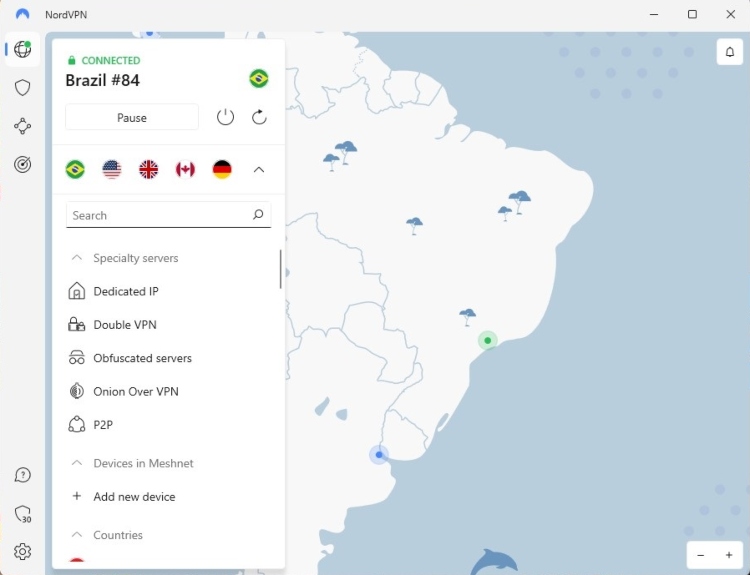
However, there are also two macOS app versions available. You can get the better version from the App store – it supports NordLynx and OpenVPN protocols. Plus, the kill switch is enabled by default.
Moving on, Atlas VPN desktop apps are minimalistic. There’s no country map, you get a list of countries on the side. The Windows app has a built-in 2FA, meaning you’ll get a code in your email address in order to confirm it’s you.

In terms of macOS apps, my experience was very similar. You can switch between light and dark mode, choose a country from the list, and find all features under the “Settings” section. All I can say is that it’s all very neatly organized and suitable even for novices.
Mobile apps
NordVPN has apps with clean interfaces on both mobile devices. The Android app includes a kill switch and the Dark Web monitoring feature. Aside from that, you also get split tunneling, pausing, auto-connect, threat protection, specialty servers, and even the Double VPN feature. Now that’s what I call a feature-rich mobile app.

As for the iOS version, they’re often known to have fewer features. However, that’s not the case with NordVPN. The app is very similar to the Android one in terms of looks and features.
When it comes to Atlas VPN, you can sometimes hear it being called “a mobile device-focused VPN.” The apps are very similar (if not identical). The Shield feature is available on both Android and iOS apps. Plus, there’s a system-wide kill switch.

With Atlas VPN, you can also check whether your email address has appeared in any data breaches. If you need a VPN for everyday use, this may be the right option.
Customer support
| NordVPN | Atlas VPN | |
| 24/7 live chat | ✅ | ✅ |
| ✅ | ✅ | |
| Phone line | ❌ | ❌ |
| Guides or articles | ✅ | ✅ |
| FAQs | ✅ | ✅ |
No matter what VPN you use, you can never guarantee that you’re going to have zero issues. That’s why comparing customer service options is crucial. The good news is – both NordVPN and Atlas VPN have a wide range of support options.
In terms of human assistance, you can contact both providers using their 24/7 live chat. You’re guaranteed to get an answer in a matter of minutes. If you don’t need the issue to be solved immediately, you can simply contact them via their email address.
The only thing both providers are missing is a phone number. However, in a world where more than a third of people are introverts, it doesn’t seem like a big drawback. That is, especially since there are other support options available.
However, all of you Bob-the-Builder type of people will be able to make use of various guides and FAQs that both providers offer.
To sum it all up, both NordVPN and Atlas VPN have a variety of customer support options to choose from. Whether you need human support or tutorials – you’re loaded with options and quality information.
NordVPN vs Atlas VPN – which one wins?
Atlas VPN stood out for its lower price and unlimited simultaneous connections, making it appealing to users who only needed basic VPN protection. However, NordVPN performed better in most important categories, including speed, security, server network, features, streaming, and torrenting. With advanced tools like Meshnet, Smart DNS, and RAM-only servers, NordVPN offers a more complete VPN experience.
Overall, NordVPN is the clear winner because it delivers stronger privacy, better performance, and far more features.
| Feature | NordVPN | Atlas VPN | Verdict |
| Pricing | Atlas VPN offers cheaper plans and unlimited simultaneous connections, while NordVPN costs more but provides better value through advanced features and stronger overall performance. | ||
| Speed | NordVPN is significantly faster thanks to the NordLynx protocol and more stable performance, while Atlas VPN delivers decent speeds but showed some inconsistencies during testing. | ||
| Privacy | NordVPN leads with RAM-only servers and an independently audited no-logs policy, while Atlas VPN offers strong encryption but lacks independent privacy audits. | ||
| Features | NordVPN provides a much broader feature set, including Meshnet, Smart DNS, and more specialty servers, while Atlas VPN focuses mainly on core VPN functionality. | ||
| Streaming | Both VPNs can unblock popular streaming services, but NordVPN performs more consistently and includes Smart DNS for devices that do not support VPN apps. | ||
| Torrenting | NordVPN performs better with dedicated P2P servers and a larger network, while Atlas VPN supports torrenting but lacks specialized infrastructure. | ||
| Support | Both providers offer similar support options, including 24/7 live chat, email assistance, and extensive help guides. |
FAQ
Which is better: NordVPN or Atlas VPN?
NordVPN is a better option than Atlas VPN. That’s because with NordVPN, you get a massive server fleet that will be a great help for streaming and torrenting. Plus, you get more features, such as SmartDNS for streaming and Meshnet for virtual LAN parties. Not to mention that when choosing more expensive plans, you also get a first-class password manager of Nord Security.
Does Atlas VPN unblock Netflix?
Yes, Atlas VPN can unblock various Netflix libraries. In fact, accessing Netflix was an effortless task, and the streaming service didn’t detect the use of a VPN.
What is the difference between NordVPN and Atlas VPN?
There are many differences between NordVPN and Atlas VPN. One of them is that NordVPN has a much bigger server fleet. Second, it offers Smart DNS for streaming, while Atlas VPN has streaming-optimized servers. On the other hand, Atlas VPN doesn’t have P2P-optimized servers. However, in terms of pricing, it does offer the cheapest plan. But that doesn't make up for what NordVPN has to offer – that's why we recommend NordVPN.