OpenVPN vs ExpressVPN: which VPN is better?
Our in-house cybersecurity experts and journalists, renowned for major reports like The Mother of All Breaches, conduct transparent, unbiased VPN testing and in-depth analysis.
With 750+ articles crafted based on real-world research, we empower readers to make informed purchasing decisions through first-hand expertise.
Learn more
ExpressVPN is a premium VPN service offering robust security, excellent streaming capabilities, and user-friendly apps. OpenVPN, conversely, is an open-source VPN protocol that some users deploy as standalone software, particularly to bypass network restrictions or avoid app installations.
I tested both solutions across streaming performance, security features, speed benchmarks, and pricing to evaluate their real-world effectiveness. This OpenVPN vs ExpressVPN analysis examines how each handles common VPN tasks and user scenarios.
While they serve different purposes – one being a complete commercial service, the other a flexible protocol – understanding their strengths helps you choose the right solution. Continue reading to discover which option best fits your needs.
OpenVPN vs ExpressVPN: overview
ExpressVPN dominates with superior speeds, streaming capability, and comprehensive security features, making it one of the best VPNs available. OpenVPN offers free, open-source flexibility but requires technical setup and often paid server access. For most users, ExpressVPN's polished experience justifies its cost over OpenVPN's barebones protocol approach.
| ExpressVPN | OpenVPN | |
| ⭐ Rating: | ||
| 🥇 Overall rank: | #4 out of #41 | #38 out of #41 |
| 🖥️ Servers: | 3,000+ servers in 113 countries | - |
| 📖 No logs policy: | No logs | No logs |
| 💵 Price: | From $2.99/month | Free |
| 🔥 Coupons: | ExpressVPN coupon 80% OFF | Cybernews VPN coupons |
| 🔒 VPN protocols: | OpenVPN, WireGuard, Lightway | OpenVPN |
| 🍿 Streaming services: | Netflix, Hulu, BBC iPlayer, Disney+, and more | Server-dependant |
| 🖥️ Platforms: | Windows, macOS, Linux, Android, iOS | Windows, macOS, Linux, Android, iOS |
| 📥 Simultaneous connections: | 14 | 2 |
| 💁🏻 Support: | Knowledge base, email, 24/7 live chat | Knowledge base, tickets |





We spare no effort to test the products & their features. All information is gathered by our in-house research team & fact-checked by our team of experts. Discover the ins and outs of our testing procedures.
Recent Updates
Key differences between ExpressVPN and OpenVPN
ExpressVPN is a premium VPN service offering robust security, excellent streaming capabilities, and user-friendly apps across all major platforms. OpenVPN is an open-source VPN protocol that requires technical setup but provides flexibility for users who want granular control over their VPN configuration.
Choose ExpressVPN if:
- You want a complete, ready-to-use VPN solution. ExpressVPN provides polished apps for all major platforms, browsers, smart TVs, and Aircove routers. You get up to 14 simultaneous connections and 24/7 live chat support if issues arise.
- Streaming and unblocking content is a priority. ExpressVPN seamlessly unblocks Netflix, HBO Max, Disney+, Hulu, and BBC iPlayer. Plus, its MediaStreamer feature allows streaming on devices that don't support VPNs.
- You need maximum speed and performance. The provider delivers significantly faster upload and download speeds, particularly with its proprietary Lightway protocol.
- Comprehensive security features matter to you. Beyond standard encryption, ExpressVPN includes a kill switch, Threat Manager, split tunneling, and stealth servers to bypass VPN detection.
For more in-depth information, feel free to check out our ExpressVPN review.
Choose OpenVPN if:
- You're technically proficient and want full control. OpenVPN’s manual setup process lets you customize every aspect of your VPN configuration, offering flexibility that pre-packaged services can't match.
- Budget is your primary concern. The OpenVPN protocol itself costs nothing. If you're willing to invest time in setup and can access quality free servers or configuration files, you can potentially avoid subscription fees entirely.
- You need to bypass app installation restrictions. OpenVPN works well in environments where you cannot install dedicated VPN applications, like restricted corporate networks or devices with limited software permissions.
Speed comparison: OpenVPN vs ExpressVPN
For this ExpressVPN vs OpenVPN comparison, we also put their speed to the test to find out which is the faster provider. Between the duo, ExpressVPN showed much better download and upload speeds. Meanwhile, OpenVPN had serious trouble keeping up.
With ExpressVPN, you can choose from its selection of protocol options: Lightway, OpenVPN UDP/TCP, and IKEv2. Among them, ExpressVPN’s proprietary Lightway protocol will return the best results.
In contrast, OpenVPN only allows OpenVPN UDP/TCP protocols. You should see faster upload and download speeds with OpenVPN (UDP).
But, of course, your actual results might vary depending on the server that you use. After all, server location and server load greatly impact speed. So, it’d be impractical to expect amazing speeds if you’re using an overloaded server with OpenVPN like a community-run free server.
Overall, ExpressVPN has better upload and download speeds. Meanwhile, OpenVPN’s multiple pitfalls make it hard for it to keep up with ExpressVPN’s performance.
Netflix and streaming performance
ExpressVPN easily defeat OpenVPN in terms of streaming capabilities. ExpressVPN has absolutely no trouble unblocking countless geo-restricted sites. This includes all the major names in the market, such as multiple Netflix libraries, HBO Max, Disney+, and more.
Moreover, ExpressVPN also offers MediaStreamer – its version of a SmartDNS. It helps to unblock geo-restricted content on devices that don’t support VPN apps natively. This includes smart TVs and even game consoles.
| Platform | ExpressVPN | OpenVPN |
| Netflix | ✅ | ❌ |
| HBO Max | ✅ | ❌ |
| BBC iPlayer | ✅ | ❌ |
| YouTube | ✅ | ❌ |
| Hulu | ✅ | ❌ |
| Amazon Prime Video | ✅ | ❌ |
| Disney+ | ✅ | ❌ |
On the other hand, OpenVPN’s streaming capability is more ambiguous since it doesn’t have its own server fleet. So, the server that you employ – which could be your own, another VPN’s server, or a free community server – will determine if you can unblock a specific geo-restricted site.
For instance, if you use ExpressVPN’s configuration file, as we did for this OpenVPN vs ExpressVPN comparison, you should be able to unblock most streaming sites. We had success with the notoriously-stubborn Netflix, Hulu, Disney+, and more. However, it’s important to note that this success stems from the strength of ExpressVPN’s server network.
In brief, ExpressVPN comes out on top when it comes to streaming, as it can unblock even the most stubborn streaming sites. Meanwhile, OpenVPN’s streaming capability will be decided by the quality of the server you use.
Torrenting
While ExpressVPN is rather reserved about its support for torrenting, it does allow P2P connections on all of its servers. Additionally, ExpressVPN has also created an environment prime for torrenting with its unlimited bandwidth, freedom to download content, and encrypted SSL-secured tunnel to prevent throttling.
Similarly, OpenVPN is also very circumspect when it comes to torrenting in that it doesn’t offer any dedicated features for it. However, it also doesn’t stand in your way with any limitations or restrictions.
Plans and pricing
ExpressVPN and OpenVPN keep their plans and pricing very simple. OpenVPN is free, but you might need to pay for server configuration files, while ExpressVPN offers three subscription durations.
| Plan | ExpressVPN | OpenVPN |
| Monthly | $14.99/month | Free |
| 1-year plan | $4.99/month | Free |
| 2-year plan | $2.99/month | Free |
With ExpressVPN, you can subscribe for a month, 1 year, or 2 years with up to 14 simultaneous connections. You can also make use of our ExpressVPN coupon and save some more.
As with most services, the longer you subscribe for, the lower the monthly price is. Also, ExpressVPN comes with a 30-day money-back guarantee.
OpenVPN, on the other hand, is an open-source solution that’s totally free. However, while OpenVPN itself is free, you’ll still need to procure a configuration file and a server.
There are free options out there, especially for servers, but the decent ones typically come at a cost. So, whether you end up with a cheaper solution than ExpressVPN hangs on the cost of your configuration file and server.


Server locations
| ExpressVPN | OpenVPN | |
| Servers | Undisclosed | ❌ |
| Countries | 113 | ❌ |
| Virtual locations | ✅ | ❌ |
| Specialty servers | ❌ | ❌ |
There’s absolutely no doubt that ExpressVPN takes the crown in the OpenVPN vs ExpressVPN server location comparison. ExpressVPN covers a whopping list of 113 countries. And on the other end of the spectrum, you have OpenVPN, which doesn’t offer a single server of its own.
Additionally, ExpressVPN’s virtual location servers deserve mention, too. This is where the IP of the server doesn’t match the physical location of the server, and it has a few benefits. For starters, virtual location servers allow ExpressVPN to expand its availability. Additionally, they’re incredibly helpful in countries where VPNs are banned.
Features overview
ExpressVPN has the lead if we compare OpenVPN vs ExpressVPN in terms of features. While both providers aren’t particularly generous with their features – between them – ExpressVPN is far more liberal with its offerings. In comparison, OpenVPN really only offers two significant features – a kill switch and a web filter.
| ExpressVPN | OpenVPN | |
| Kill switch | ✅ | ✅ |
| Web filter | ✅ | ✅ |
| Split tunneling | ✅ | ❌ |
| Specialty servers | ❌ | ❌ |
| SmartDNS | ✅ | ❌ |
Kill switch
ExpressVPN and OpenVPN both provide a kill switch as a safety net. Here, the feature is designed to automatically and instantaneously disconnect your device from the Internet if your VPN connection is interrupted. This shields your IP address, location, online activities, and other data from leaks.
In ExpressVPN’s case, its kill switch is called Network Lock. It’s a system-level kill switch, which means that it’ll disable all network traffic rather than just specific apps. Network Lock is enabled by default but while not recommended, you also have the option to switch it off.

Likewise, OpenVPN also has a built-in kill switch, which operates on the system level. The kill switch automatically disconnects your device from the Internet if the VPN connection drops.
Web filters
The duo also offers DNS-based traffic blockers to minimize the risk of tracking and other malicious activities like phishing. With ExpressVPN, you get Threat Manager, which prevents your devices from communicating with servers that are on its constantly-updated blocklist of trackers and malicious sites. It’s currently available on Windows, macOS, iOS, Android, Linux, routers, and smart TVs.
Similarly, OpenVPN’s Cyber Shield also uses DNS to block inappropriate and malicious content. The feature allows quite a bit of control over its parameters. Among other things, you can:
- Monitor or block specific DNS using 43 content categories
- Create, Accept, and Block lists to customize the filtering process
- Prevent intrusion according to the severity or category of threat
ExpressVPN features
On top of a kill switch and a web filter, ExpressVPN has more to offer. Here are some of the more notable features:
- Split tunneling. Lets you include and exclude specific apps from the VPN. Currently, the feature is available on Windows, Linux, and Android. It’s also available on older macOS, which is a rarity.
- Stealth servers. A protocol that masks your VPN usage to bypass censorship and VPN blocks. ExpressVPN states that your connection automatically switches to stealth servers when it detects Deep Packet Inspection (DPI).
- MediaStreamer. A nifty SmartDNS feature that makes the streaming experience easier by unblocking geo-restricted content on devices that don’t support VPN natively. For instance, smart TVs like LG and Samsung TVs, as well as game consoles.
OpenVPN vs ExpressVPN: which is more secure?
ExpressVPN is more secure if we put ExpressVPN vs OpenVPN to the test. That being said, both providers prioritize security, which is reassuring since it’s the cornerstone of a reliable VPN.
| ExpressVPN | OpenVPN | |
| Encryption | AES 256-GCM and ChaCha20 | 256-bit OpenSSL |
| Hash | SHA-512 | SHA-256 |
| RAM servers | Yes | No |
| A member of the Five Eyes alliance | No | Yes |
| No-logs policy | Audited | Not audited |
| Kill switch | Yes | Yes |
| Ad blocker | Yes | No |
| DNS leak protection | Yes | Yes |
To start, both VPNs encrypt your data with advanced algorithms. Plus, their no-logs policies help to protect your privacy as well. Moreover, the pair is armed with some very vital security features like kill switches and web filters, too.
But, where ExpressVPN raced ahead in this OpenVPN vs ExpressVPN security battle is that ExpressVPN offers more encryption options. Additionally, it also took further precautions by operating out of the privacy-friendly British Virgin Islands (BVI) and having its no-logs policy audited.
Infrastructure
Beating others to the punch, ExpressVPN was one of the first VPNs to embrace RAM-only technology. Named TrustedServer, the switch to RAM-only servers means that your data is now stored using volatile memory, and it’ll be wiped each time the server is reset. This makes it that much more difficult for unauthorized parties to access it.
Meanwhile, OpenVPN doesn’t have its own server network, and you’ll need to resort to using your own server, another VPN’s server, or a community-run server. With this in mind, the infrastructure that you’ll see will vary wildly depending on the quality of the server provider.
Privacy
ExpressVPN generally uses AES-256 cipher, which is considered to be unbreakable and the current industry standard. But, you also have the option to choose ChaCha20/Poly1305 if you’re using its Lightway protocol. Lightweight, efficient, and widely supported, the cipher is a good choice for those with entry-level mobile devices or low-powered routers.
Encryption protocol aside, ExpressVPN is based in the privacy-friendly British Virgin Islands. While it’s a British overseas territory, the BVI isn’t part of any intelligence-sharing alliances.
As for OpenVPN, its privacy strategies have pros and cons. On the bright side, it uses 256-bit OpenSSL encryption, which offers strong hard-to-crack encryption. However, on the flip side, it’s headquartered in the US – the big brother among the Five Eyes alliance members. So, there’s always a risk that your data will be surveilled and shared.
Logging
ExpressVPN and OpenVPN pledge that your data is safe from logging because of their no-logs policies. However, only ExpressVPN has backed its claims with independent audits. Its no-logs policy has been audited and verified by Big Four accounting companies PricewaterhouseCoopers (PWC) and KPMG.
In contrast, OpenVPN has been silent on this front. There’s no indication whatsoever that its no-logs policy has been independently audited.
Platforms, interface, and ease of use
| ExpressVPN | OpenVPN | |
| Supported platforms | Windows, macOS, Linux, Android, iOS | Windows, macOS, Linux, Android, iOS |
| Other software and devices | Android TVs, Fire devices, routers | ❌ |
| Browser extensions | Chrome, Firefox, Edge, Vivaldi | ❌ |
| Simultaneous connections | 14 | 2 |
ExpressVPN takes the lead in the OpenVPN vs ExpressVPN compatibility comparison. Having said that, both providers work with all the major operating systems – Windows, macOS, Linux, Android, and iOS.
However, ExpressVPN has the advantage of also supporting all the common software and devices like Android TV, Fire devices, and router. Additionally, it also provides extensions for Chrome, Firefox, Edge, Vivaldi browsers. In contrast, OpenVPN doesn’t offer these options since it isn’t a full-blown VPN.
Moreover, ExpressVPN also continues its winning streak with better ease of use. Whether it's installation, setup, or daily management, ExpressVPN is far easier to use than OpenVPN.
Desktop apps
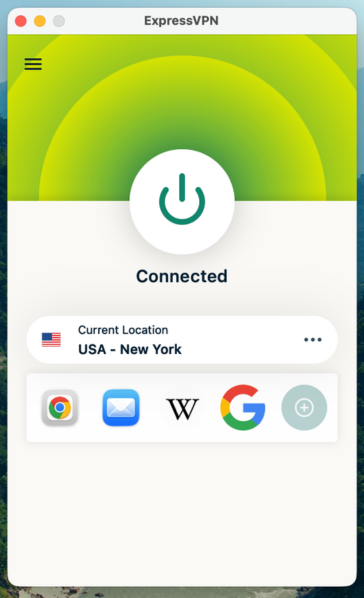
ExpressVPN provides desktop apps for Windows, macOS, and Linux devices. Its Windows and macOS apps are very similar visually and carry the same features. Just like the interfaces, the setup process is simple and straightforward. In contrast, its Linux version is more complicated since it uses command lines for control.
As for OpenVPN, you can expect a long, laborious, and technical setup process. And, as warned by its how-to guide, you’ll have an easier time if you have a prior understanding of basic networking concepts, such as IP addresses, DNS names, netmasks, subnets, IP routing, and more.
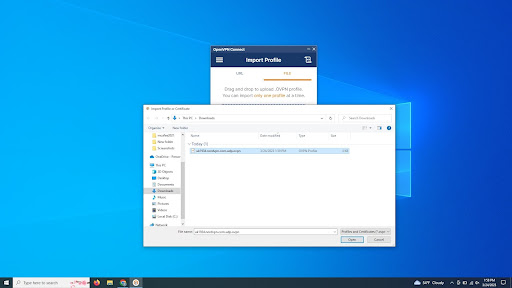
However, if you’re able to get through the setup process, you’ll be greeted by minimalistic and well-organized apps. Surprisingly, navigating the apps isn’t all that tricky either.
Mobile apps
ExpressVPN and OpenVPN’s mobile apps are clean, responsive, and intuitive. In ExpressVPN’s case, its Android version houses more features and tools than its iOS counterpart.

As for OpenVPN’s app, they’re comparatively more old-fashioned visually and also less functional. However, this is through no fault of the apps. Instead, it’s because OpenVPN simply offers fewer features overall.

Overall, OpenVPN apps are made for more advanced users and offer many settings and the ability to import profiles from files and configure and change profiles inside the app. The client is based on the community version of OpenVPN.
Customer support
| ExpressVPN | OpenVPN | |
| 24/7 live chat | ✅ | ❌ |
| ✅ | ❌ | |
| Ticket | ✅ | ✅ |
| Phone line | ❌ | ❌ |
| Guides or articles | ✅ | ✅ |
| FAQ | ✅ | ✅ |
ExpressVPN absolutely dominates this round of the OpenVPN vs ExpressVPN comparison. ExpressVPN offers a wide variety of support options, including 24/7 live chat for immediate assistance. Moreover, it also has plenty of resources like guides, articles, and FAQ to help you along.
In contrast, OpenVPN’s agents are only available via ticketing, which could be time-consuming and frustrating if you require urgent help. Otherwise, your best bet is to search for a solution within its guides, articles, and FAQ.
OpenVPN vs ExpressVPN – which one wins?
ExpressVPN dominates across speed, streaming, features, and user experience. It excels with its global server network, superior unblocking capabilities, and 24/7 support. OpenVPN wins on cost and customization, appealing to technical users who prioritize control and free access.
For the average user seeking seamless protection and streaming, ExpressVPN is the clear winner, offering polish and performance.
| Feature | ExpressVPN | OpenVPN | Verdict |
| Pricing | OpenVPN is free, but ExpressVPN's all-inclusive subscription may cost less than purchasing quality servers and configuration files separately. | ||
| Speed | ExpressVPN delivers significantly faster speeds with its Lightway protocol, while OpenVPN suffers from server quality issues and performance bottlenecks. | ||
| Privacy | ExpressVPN operates from a privacy-friendly country with audited no-logs policies, while OpenVPN's US headquarters raises surveillance concerns despite strong encryption. | ||
| Features | ExpressVPN offers split tunneling, MediaStreamer, and stealth servers beyond basics, while OpenVPN provides only a kill switch and web filtering. | ||
| Streaming | ExpressVPN reliably unblocks all major platforms with MediaStreamer support, while OpenVPN's streaming success depends entirely on server quality. | ||
| Torrenting | ExpressVPN allows P2P on all servers with unlimited bandwidth and anti-throttling protection, while OpenVPN offers no dedicated torrenting features. | ||
| Support | ExpressVPN provides 24/7 live chat and extensive resources, while OpenVPN limits users to ticket-based support and self-help documentation. |
FAQ
Is OpenVPN the same as ExpressVPN?
No, OpenVPN isn’t the same as ExpressVPN. OpenVPN is a protocol that needs to be combined with a configuration file and a server before you can use it in a somewhat similar fashion to a VPN. In contrast, ExpressVPN is a full-fledged VPN service that is ready to be used directly.
Is OpenVPN better than ExpressVPN?
No, OpenVPN isn’t better than ExpressVPN. OpenVPN has considerably weaker security, speed, features, and interfaces because it isn’t a full-service VPN. Plus, OpenVPN also doesn’t have its own servers. Meanwhile, ExpressVPN offers consistent and successful unblocking capabilities, a huge server fleet, strong security, fast speeds, and rich features.
Is OpenVPN free?
Yes, the OpenVPN software is free but you’ll need to pay for the configuration file and server. Alternatively, you could also find a free server run by the OpenVPN community online. However, in this case, you can expect them to have certain drawbacks like limited bandwidth and slow speeds.
How do I connect to ExpressVPN with OpenVPN?
To connect ExpressVPN with OpenVPN, you’ll first need to download the OpenVPN client as well as the ExpressVPN configuration file. Next, open the OpenVPN client, click Get Started, and choose how you want to import the profile. Once importing is done, you’re good to go.