Surfshark VPN price in 2026
Our in-house cybersecurity experts and journalists, renowned for major reports like The Mother of All Breaches, conduct transparent, unbiased VPN testing and in-depth analysis.
With 750+ articles crafted based on real-world research, we empower readers to make informed purchasing decisions through first-hand expertise.
Learn more
Surfshark pricing in 2026 starts at $2.49/month for its entry 2-year Starter plan, and in total, it offers 3 plans to choose from: Surfshark Starter, Surfshark One, and Surfshark One+. All tiers are available as monthly, yearly, and 2-year subscriptions. What’s more, every plan comes with a 30-day money-back guarantee and a 7-day free trial.
During the span of 2 weeks, I tested all Surfshark’s plans, and I can say that Surfshark One is the best available option for most users due to its balanced price-to-value ratio. Starting at $2.79/month, it combines a premium VPN with antivirus protection and personal data alerts. However, if you only need a VPN, its starter plan is enough for users who need privacy and strong streaming unblocking capabilities.
Below, I share a detailed overview of each plan, what it includes, and how Surfshark’s cost compares to other popular VPN providers in 2026. Keep reading to learn more.



We spare no effort to test the products & their features. All information is gathered by our in-house research team & fact-checked by our team of experts. Discover the ins and outs of our testing procedures.
Recent Updates
Surfshark pricing and plan breakdown
Below, I compare all plans across monthly, 1-year, and 2-year billing cycles. Commonly, a discounted rate applies only to your first term and renews at a higher price after that. Getting the 2-year plan locks in the best value for the longest, and all plans are backed by a 30-day money-back guarantee.
| Surfshark Starter | Surfshark One | Surfshark One+ | |
| 1-month price | $16.45 | $18.95 | $20.85 |
| 1-year price | $3.39/month | $3.59/month | $7.49/month |
| 2-years price | $2.49/month | $2.79/month | $4.49/month |
| Get Surfshark Starter | Get Surfshark One | Get Surfshark One+ |
Surfshark Starter plan price 2026
The Surfshark Starter plan is a good option for those who need a VPN for everyday tasks. If you mainly need a VPN for streaming, bypassing geo-restrictions, securing your connection on public Wi-FI networks, Surfshark Starter does it all. Also, you get access to 4,500+ servers in 100 countries, support for unlimited devices, and an ad blocker.
Surfshark Starter pricing is $16.45/month for the monthly plan, $3.39/month ($47.85/year) for the 1-year plan, or $2.49/month ($53.73 total) for the 2-year plan, which makes Surfshark the cheapest premium VPN at the entry level if paid per month ($1.10 cheaper than NordVPN and $1.00 than Proton VPN).
Surfshark One plan price 2026
The Surfshark One plan is a good choice for users who want a comprehensive security suite. In addition to the core VPN features, it includes antivirus and personal data and ID leak alerts. Pricing is $18.95/month for the monthly plan, $3.59/month ($50.85/year) for the 1-year plan, or $2.79/month ($67.23 total) for the 2-year plan.
Surfshark One+ plan price 2026
Surfshark One+ is the most elaborate plan for users who handle sensitive information across multiple devices and want the full privacy suite. It additionally includes Incogni and identity theft coverage, available to US residents (except for New York State). The price for a monthly plan is $21.85/month; for a 1-year plan, $7.49/month ($104. 85/year); or $4.49/month ($113.13 total) for a 2-year plan.
My Surfshark plan recommendation
The best Surfshark plan for most users is Surfshark One. It offers a good balance of price and value. What’s more, the price jump from the Starter plan isn’t that high, while that extra $0.50 gets you all premium VPN features plus an antivirus, an email scam checker, personal data and ID leak alerts, and web content blocking. For $2.79/month, Surfshark One includes all the features useful for everyday use, omitting the situational addons, useful to some users only, from the Surfshark One+ plan.
Does Surfshark offer a free trial?
Yes, Surfshark offers a 7-day free trial that allows you to experience the full power of its VPN and cybersecurity suite before committing to a paid plan. You can activate the trial on Android or iOS devices after subscribing through the Surfshark website.
Note that the free trial is available only on 12-month and 24-month plans, not on the monthly subscription. After 7 days, the subscription will automatically renew, and you will be charged according to the plan you initially selected.
During the free trial, you get access to Surfshark’s complete feature set. This includes not only VPN protection but also CleanWeb ad and malware blocking, the Kill Switch, and additional tools such as Alternative ID and Antivirus (depending on your plan). It’s a full experience, not a limited one.
Here’s how to start your free trial:
- Go to Surfshark’s official website and choose a plan
- Enter your email address and payment details – no charge will be made until the trial ends
- Create your account and download the Surfshark app on your preferred device
- Launch the app and enjoy 7 days of free, secure, and private browsing
Although Surfshark doesn’t offer a permanently free version, every plan comes with a 30-day money-back guarantee, in addition to this 7-day free trial. This means you can test Surfshark risk-free for up to 37 days in total – 7 days free plus 30 days refundable. You can cancel at any time in your account settings or, after the trial period, request a refund through Surfshark’s customer support.
If you want to save even more on your subscription, check our dedicated page for the latest Surfshark deals and coupon codes before making a decision.
Surfshark VPN payment methods, renewals, and cancellation
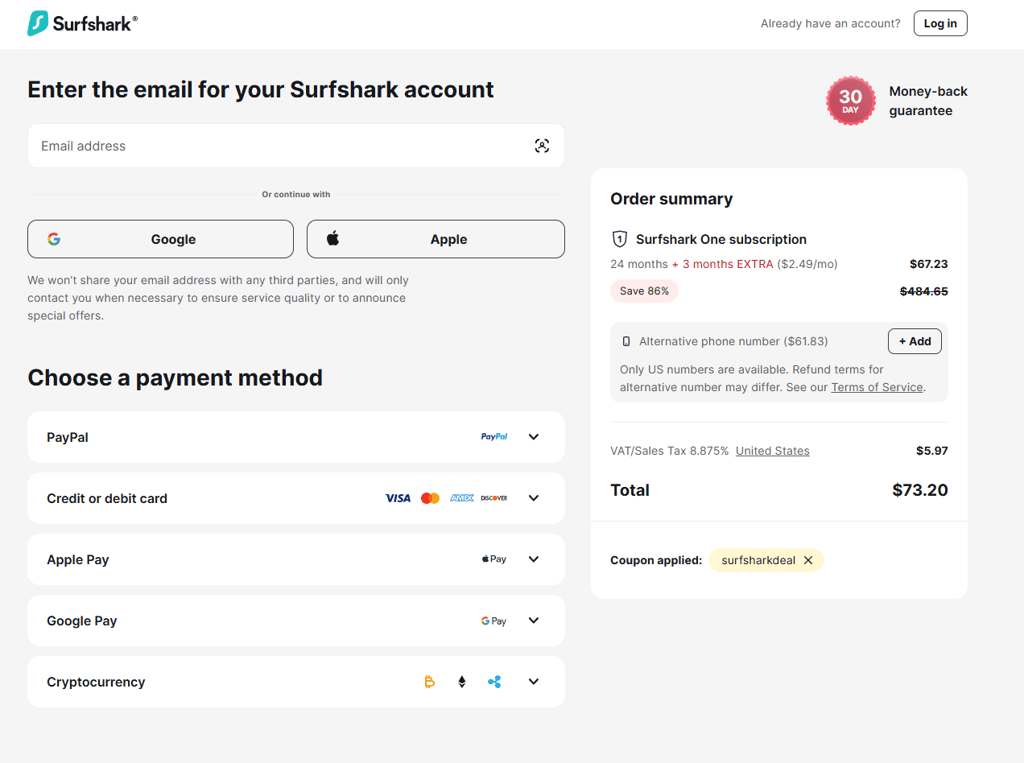
There are multiple ways you can pay for your Surfshark subscription. Here are the main ones:
- Credit/debit card. Paying with major credit or debit cards like Visa, Mastercard, American Express, and Discover is straightforward and secure, making it the most common method.
- PayPal. This payment method offers an extra layer of security by keeping your card details private from Surfshark.
- Google Pay or Apple Pay. These mobile payment options provide quick and convenient checkout with secure authentication.
- Cryptocurrency. Paying with crypto gives you the highest level of privacy, as no personal information is shared, though transaction times may vary, and it can be difficult to get a refund.
Please note that there may be a few other payment options based on your region.
Renewal policy
When you purchase a Surfshark subscription and create an account, auto-renewal is enabled by default. This means your subscription will automatically renew at the end of the term (12 or 24 months, depending on your plan) at the standard renewal price, which is usually higher than the initial discounted rate.
Surfshark will send you an email about the renewal one month in advance, giving you time to cancel if you wish. You can also disable auto-renewal anytime in your account settings. However, after the subscription expires, you will lose access to Surfshark’s services.
Cancellation policy
You can cancel your Surfshark subscription or turn off auto-renewal at any time through your account dashboard or by contacting Surfshark’s customer support. If you cancel auto-renewal, you will still have access until the current subscription period ends, but no refunds are given for the unused time.
For subscriptions purchased via app stores like Google Play or Apple App Store, cancellations must be managed directly through those platforms.
How to cancel Surfshark subscription
If you decide to cancel your Surfshark subscription, the process is quite simple. Just keep in mind that your subscription isn’t canceled immediately, and it remains active until the end of the current billing period.
To complete the cancellation process, follow these steps:
- Log in to your Surfshark account page
- In the top-right corner, click the email address and select Subscription
- Open the Payments section
- Click Cancel auto-renewal and confirm your choice
Why purchase a Surfshark subscription?
Surfshark is one of the best VPNs on the market. It is fast, secure, and affordable, and helps you stay private online, access restricted content, and protect all your devices at once. It’s great for browsing, streaming, and torrenting while keeping your data safe and your identity hidden. It’s also one of the few VPN solutions that allow for unlimited device connections.
Here’s a quick look at how Surfshark performs in key areas:
| Pricing | ⭐⭐⭐⭐⭐ | Very affordable for the features you get, especially with long-term plans that cost less than many other premium VPNs. |
| Privacy | ⭐⭐⭐⭐ | Offers strong encryption and a no-logs policy, but its Netherlands jurisdiction (part of the Nine Eyes alliance) keeps it just short of perfect. |
| Speed | ⭐⭐⭐⭐⭐ | Excellent connection speeds thanks to the WireGuard protocol and 10Gbps servers. |
| Streaming | ⭐⭐⭐⭐ | Works great with most streaming platforms, though its smaller server network can affect availability at times. |
| Torrenting | ⭐⭐⭐⭐ | Fast and secure for P2P sharing, but a limited server variety may slightly impact performance in some regions. |
Surfshark VPN delivers impressive performance and strong value, making it a reliable pick for everyday security, streaming, and file sharing. If you want to learn more about its performance, check out our detailed Surfshark review.
Surfshark VPN price compared to other premium VPNs
If you want to see how Surfshark stacks up against other best VPNs on the market, I put together a table with their side-by-side comparison. It clearly shows the overall price difference between different VPN providers.
| VPN provider | Rating | Starting price | Free trial | Money-back guarantee |
| NordVPN | $3.49/month | 3-day free trial on Google Play | 30 days | |
| Surfshark | $2.49/month | 7-day free trial on Google Play and Apple App stores | 30 days | |
| Proton VPN | $2.99/month | Free version | 30 days | |
| ExpressVPN | $2.99/month | ❌ No | 30 days | |
| CyberGhost | $2.19/month | 24-hour for Windows and macOS, 3-day for Android, and 7-day for iOS | 30 days | |
| IPVanish | $2.39/month | 7-day free trial on Google Play and Apple App stores | 30 days |

More Surfshark guides
FAQ
How much does Surfshark cost in 2026?
Surfshark’s Starter plan costs just $2.49/month and covers all of your basic VPN needs. Its pricier plans, One and One+, include an antivirus, Alternative ID, and other privacy-enhancing tools for $2.79/month and $4.49/month, respectively.
Is Surfshark worth the price?
Yes, Surfshark is worth the price in 2026. For only $2.49/month, it equips your device with a reliable VPN that is great for private browsing, bypassing geo-restrictions, and securing your device on public networks.
Is there a cheaper alternative to Surfshark?
Yes, a cheaper alternative to Surfshark is CyberGhost, starting at $2.19/month. However, it’s also more limited, supporting up to 7 device connections and offering fewer security features than Surfshark.
What is the best price for Surfshark?
The best price for Surfshark is its Surfshark One plan that starts at $2.79/month. It includes all the VPN core features, antivirus, and personal data leaks alerts.
How can I pay for Surfshark?
Surfshark accepts a range of payment methods, including credit and debit cards (such as Visa, Mastercard, American Express, and Discover), PayPal, Google Pay, Apple Pay, and various cryptocurrencies. Depending on your region, you may also find additional local payment options available.
Can I use Surfshark for free?
Yes, you can use Surfshark for free with its 7-day free trial. Also, all of Surfshark’s plans come with a 30-day money-back guarantee, so if you find that the service is not a match, you can get a full refund.
Can I switch between Surfshark plans after subscribing?
Yes, you can switch between Surfshark plans after subscribing. You may need to contact Surfshark support or manage your subscription through your account dashboard to upgrade or change your plan. If you want to downgrade or switch billing cycles, you might need to let your current subscription expire and then purchase a new plan, as direct downgrades are not always supported automatically.