Best VPNs for Peacock in 2026: watch Peacock TV from anywhere
Our in-house cybersecurity experts and journalists, renowned for major reports like The Mother of All Breaches, conduct transparent, unbiased VPN testing and in-depth analysis.
With 750+ articles crafted based on real-world research, we empower readers to make informed purchasing decisions through first-hand expertise.
Learn more
Watching Peacock when living abroad or traveling can be difficult because the service is only available in the US. A VPN can help by changing your virtual location and making it seem like you’re in the US even when you’re really in the UK, Australia, or any other country, so you can stream your favorite shows.
To find the best VPNs for Peacock, our research team and I tested top VPN services for streaming speed, connection reliability, US server coverage, and their ability to unblock Peacock. I picked the top 5 VPNs, with NordVPN coming in first for its fast speeds, large US server network, strong security, and reliable unblocking capabilities. In this article, I’ll look at the best VPNs in more depth and explain what each one offers.
Best VPN for Peacock in 2026 – shortlist
- NordVPN – best VPN for watching Peacock TV outside the US
- Surfshark – affordable Peacock VPN for multiple devices
- Proton VPN – Peacock VPN with a free version
- ExpressVPN – privacy-focused Peacock TV VPN for smooth streaming
- IPVanish – Peacock VPN with unlimited devices




We spare no effort to test the products & their features. All information is gathered by our in-house research team & fact-checked by our team of experts. Discover the ins and outs of our testing procedures.
How to watch Peacock TV from anywhere with a VPN

To stream Peacock TV with a VPN, follow these steps:
- Choose a VPN that can unblock Peacock TV. I recommend NordVPN, now 78% off.
- Download and install the VPN on your device.
- Purchase a Peacock TV subscription. You can use PayPal or gift cards if you don’t have a US-based payment method.
- Open Peacock and sign in to your account.
- Start streaming Peacock as you normally would.
How we selected and tested these Peacock VPNs
The Cybernews research team and I tested dozens of VPN services to find the best VPN for Peacock TV. All tests followed our standard VPN testing methodology, with a focus on real streaming performance rather than raw speed results.
Each VPN was tested for its ability to bypass Peacock’s geo-blocking. I also tracked error messages, failed loads, streaming smoothness, and how often server switches were needed. I prioritized VPNs that could access Peacock reliably with minimal retries.
Based on these tests, a few VPNs stood out for consistent access, stable speeds during longer sessions, and strong US server coverage. Here are the key factors I considered:
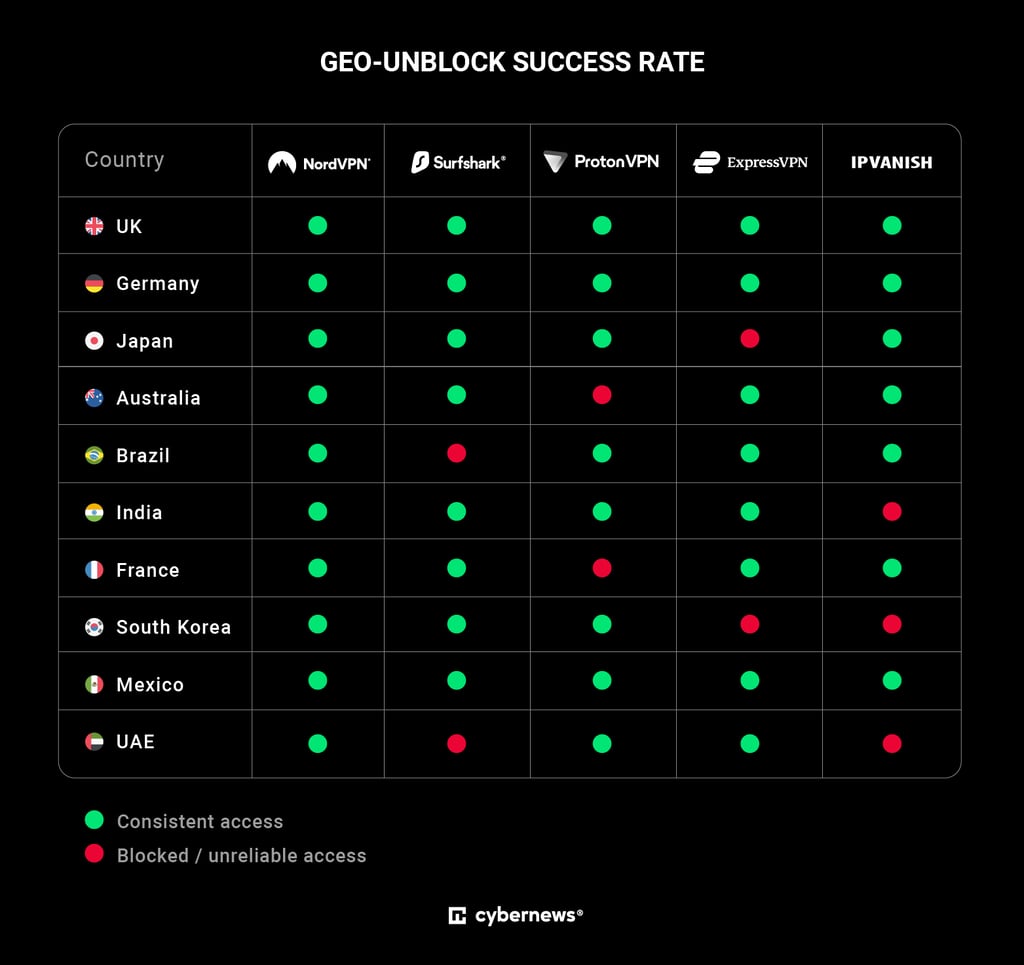
- Unblocking Peacock TV (30%). The most important factor influencing the overall rank was a VPN’s ability to reliably unblock Peacock TV. We tested each VPN from 10 different locations to ensure it could consistently unblock the streaming service with as few reconnection attempts as possible.
Peacock access verification
To confirm access, I used a three-step process for each test. First, I checked if the site loaded without any basic connection issues. Then, I opened Peacock in Chrome and tried to play on-demand content. Finally, I confirmed the stream ran for at least 30 seconds without triggering a geo-block or playback error. All three steps had to be completed for the VPN to be considered accessible.
Consistency measurement
Each VPN was tested daily from each location over 10 days. A service was considered consistent if it passed at least 9 out of 10 days. Since VPN servers rotate and Peacock regularly updates its detection methods, a single test doesn’t tell the full story. The longer window gives a much more realistic picture of how each VPN actually performs over time.
- Server network (20%). Peacock TV is only available in the US, which is why it’s crucial to pick VPNs with servers in the region. To select the top VPNs for Peacock, I only considered providers with plenty of servers in the US. Variety in locations within the country was a determining factor, too.
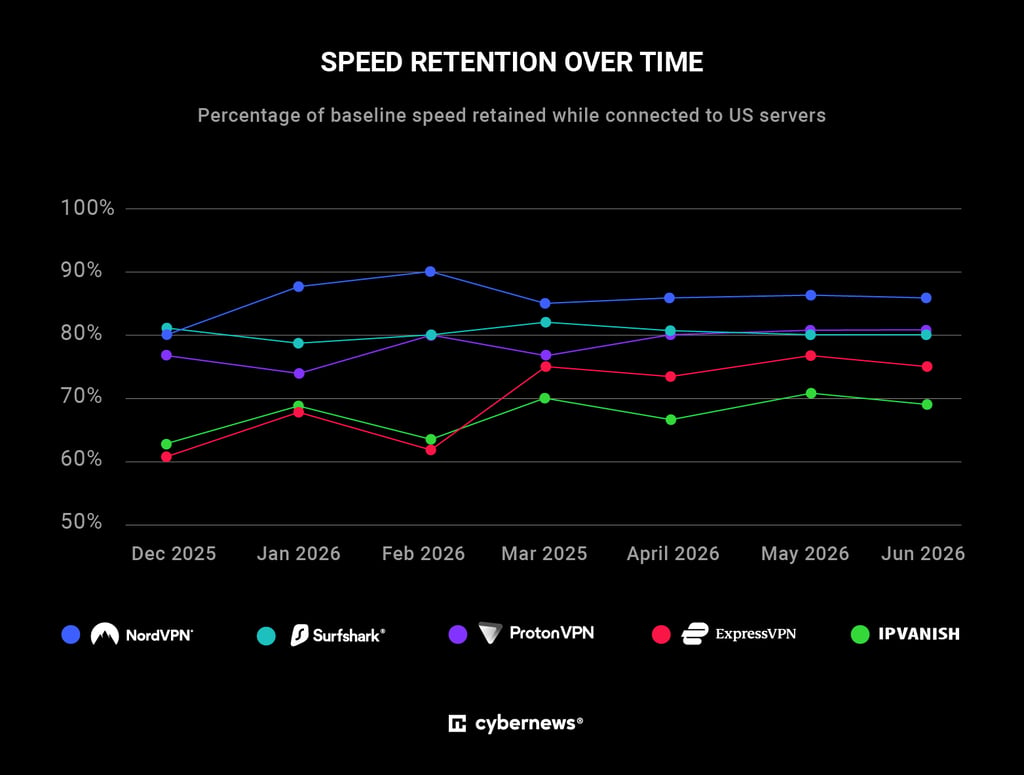
- Connection speed (20%). Speedy connections are vital for streaming video content to ensure minimal lag and stuttering. We evaluated this aspect by conducting speed tests across multiple countries.
VPN speed retention testing
We used the official Ookla Speedtest CLI to measure how well each VPN maintained speed. To keep results consistent, we pinned the same US server for every test using Ookla's server selection tools. That said, it’s worth noting that Ookla servers aren’t Peacock's content servers. These results reflect general VPN tunnel performance, not streaming speed specifically.
Metric calculation
Speed retention was calculated as VPN speed divided by baseline speed, multiplied by 100. The baseline was measured immediately before each VPN test with the tunnel disconnected. Each VPN was tested three times a day over seven days, giving 21 measurements per VPN. The monthly figure is the average of those results.
Streaming startup performance
To balance the limitations of raw speed tests, we also measured Peacock's video start time. For this test, we connected to a VPN server, opened Peacock in Chrome, selected a show, and recorded how long it took for playback to start.
Protocol control
Each VPN was tested using its default-recommended protocol. NordVPN used NordLynx, Surfshark, Proton VPN, and IPVanish used WireGuard, ExpressVPN used Lightway. Protocols weren’t adjusted between tests, which reflects how most users actually run these services. In our testing, NordLynx retained around 86% of baseline speed, Surfshark's WireGuard around 80%, and Lightway around 75%.
- Device compatibility (10%). Most VPNs work with computers and smartphones. However, I think most people will want to watch Peacock on the big screen. Something like a smart TV or Android TV. That’s why we prioritized VPNs that support various home entertainment devices and routers.
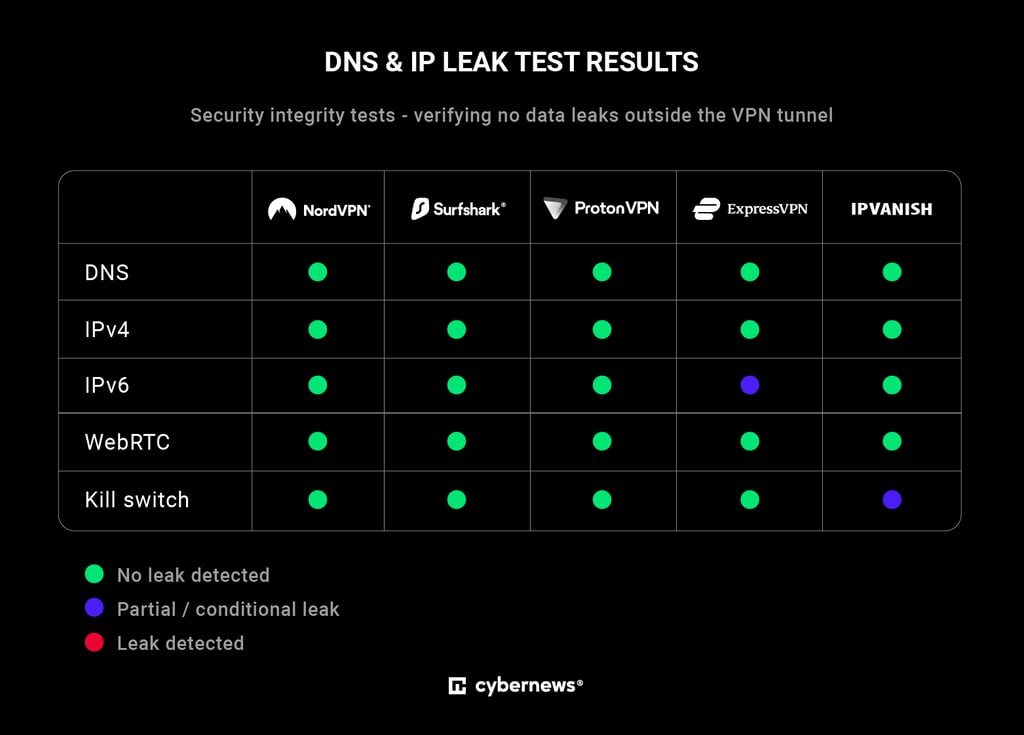
- Security and privacy (10%). Even for streaming, a VPN should protect your data properly. Each provider was tested for DNS, IPv4, IPv6, and WebRTC leaks to confirm no traffic was slipping outside the tunnel. Kill switch behavior was also checked during connection drops. Every VPN on this list passed the core security checks, with only minor differences in how they handle IPv6.
DNS leak testing
To check for DNS leaks, we monitored DNS requests during active browsing sessions while connected to each VPN. The goal was to confirm that all queries were going through the VPN's own servers rather than leaking to the ISP or a public resolver. We ran standard lookup checks to verify which resolver was actually handling the requests.
IPv4 and IPv6 leak testing
Each VPN was tested for both IPv4 and IPv6 leaks by comparing the visible IP address with and without the VPN active. The exposed IP address always had to match the VPN server location, not the original ISP address. We also ran additional browser-based checks to ensure no traffic was slipping out of the tunnel.
- Price (10%). Lastly, we considered whether each VPN’s overall feature package is aligned with its asking price. We prioritized affordable VPNs that offer excellent value for money.
Best Peacock TV VPNs for 2026 – detailed reviews
To discover the top VPNs for Peacock, I teamed up with the Cybernews research team and tested 10 leading streaming VPNs and compared how reliably they unblock Peacock TV. I also evaluated their performance and overall value for the money.
1. NordVPN – best Peacock VPN overall

| Rating: | |
| Based in: | Panama |
| Servers/countries: | Thousands of servers in 225 locations |
| Unblocking success for Peacock: | 100% |
Of all the VPNs I tested, NordVPN stood out as the best VPN for Peacock. It consistently unblocked the platform, delivered fast streaming performance, and maintained a secure connection throughout my tests.
Why I picked NordVPN for Peacock TV
NordVPN delivered everything you’d expect from a top VPN. I tried accessing Peacock 10 separate times using 10 different US servers, and NordVPN succeeded every time. That's impressive, as streaming services regularly identify and block VPN IP addresses, so a 100% success rate is uncommon.
To test real-world performance, I streamed Yellowstone on Peacock. Playback started in about 6 seconds, which felt nearly identical to using a regular connection. The stream remained in HD throughout, with no buffering or interruptions.
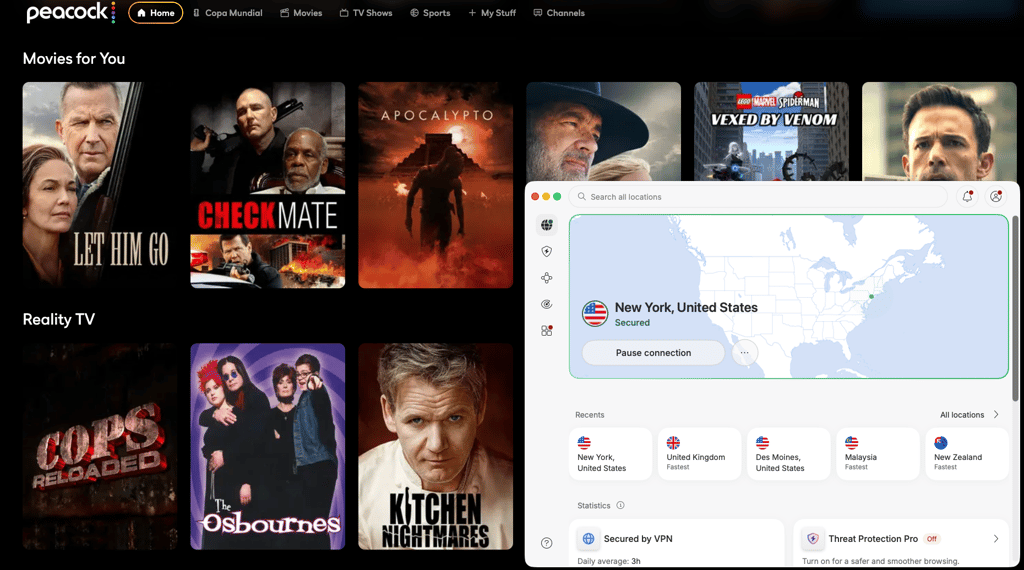
NordVPN also offers more than 2,800 servers across 55 US locations, so you have plenty of options to switch servers. Its SmartPlay feature helps improve streaming reliability, while obfuscated servers conceal VPN usage. It also works reliably with other platforms, including Netflix, Hulu, BBC iPlayer, and Disney+.
NordVPN apps are available for PC, mobile, Android TV, Apple TV, and Amazon Fire TV Stick. Plus, Smart DNS lets you stream on devices that don't support VPN apps, and NordVPN’s support page specifically lists Peacock TV as a Smart DNS-supported service.
NordVPN plans start at $3.49/month and include a 30-day money-back guarantee, plus a 3-day free trial on Android.
2. Surfshark – cheap VPN for Peacock TV

| Rating: | |
| Based in: | Netherlands |
| Servers/countries: | 4,500+ servers in 100 countries |
| Unblocking success for Peacock: | 80% |
Surfshark is another VPN that reliably unblocked Peacock TV in my tests. It's an excellent choice for users on a budget thanks to its low pricing and unlimited device connections.
Why I picked Surfshark for Peacock TV
I ran the same unblocking tests with Surfshark as I did with NordVPN, attempting to access Peacock 10 times using different servers. Surfshark was blocked twice, resulting in an 80% success rate. Occasional blocks are common with streaming, so I don’t consider that a major issue.
More importantly, the streaming performance was superb. I watched Love Island in 4K without buffering or interruptions, and videos started playing in just 4 seconds – even slightly faster than NordVPN.
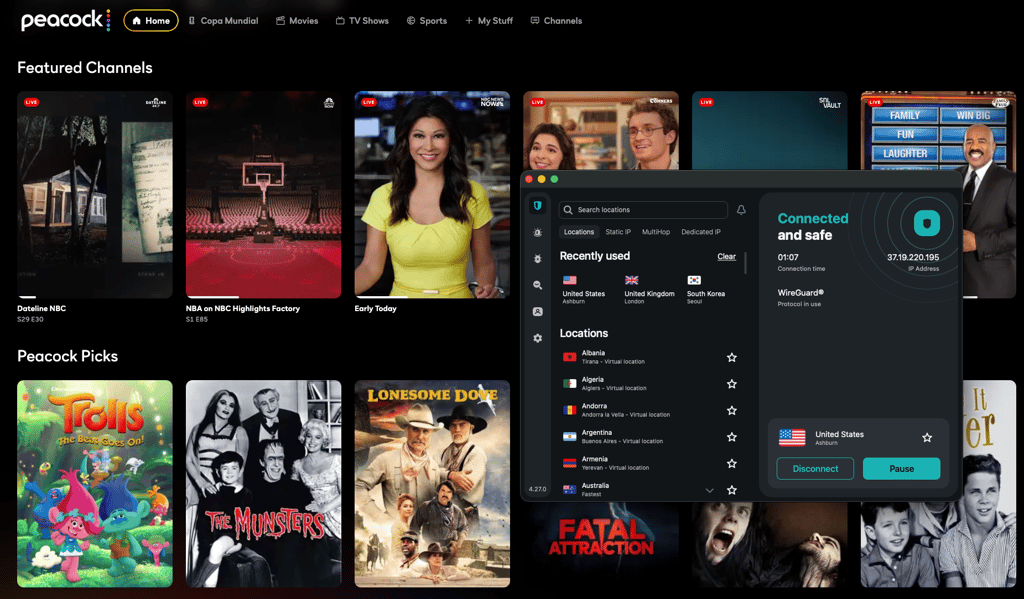
Surfshark has over 600 US servers across 24 cities. While its server network isn't as large as some competitors', Surfshark makes up for it with a robust feature set. Camouflage Mode helps disguise VPN traffic as regular internet traffic, while CleanWeb blocks ads and trackers, making streaming more enjoyable.
The VPN works on all major operating systems and streaming devices, including Apple TV, smart TVs, and Fire TV devices. In our Surfshark review, we also found that it worked with other streaming services like Netflix, HBO Max, and YouTube TV.
Surfshark’s pricing starts at $2.49/month and includes a 7-day free trial on up to 3 devices, plus a 30-day money-back guarantee.
3. Proton VPN – secure VPN for Peacock with a free version

| Rating: | |
| Based in: | Switzerland |
| Servers/countries: | 20,700+ servers in 149 countries |
| Unblocking success for Peacock: | 80% |
For users who want to stream Peacock TV securely, Proton VPN is an excellent choice. It provided reliable access during my tests, and its free plan is a nice bonus for anyone wanting to try the service before committing.
Why I picked Proton VPN for Peacock TV
In my testing, Proton VPN unblocked Peacock TV 80% of the time, matching Surfshark's success rate. Streaming performance wasn't quite as smooth as NordVPN’s or Surfshark’s, though. I occasionally experienced minor lag, and when I streamed All Her Fault, the playback took around 9 seconds to start. Despite that, my overall experience streaming with Proton VPN was positive.
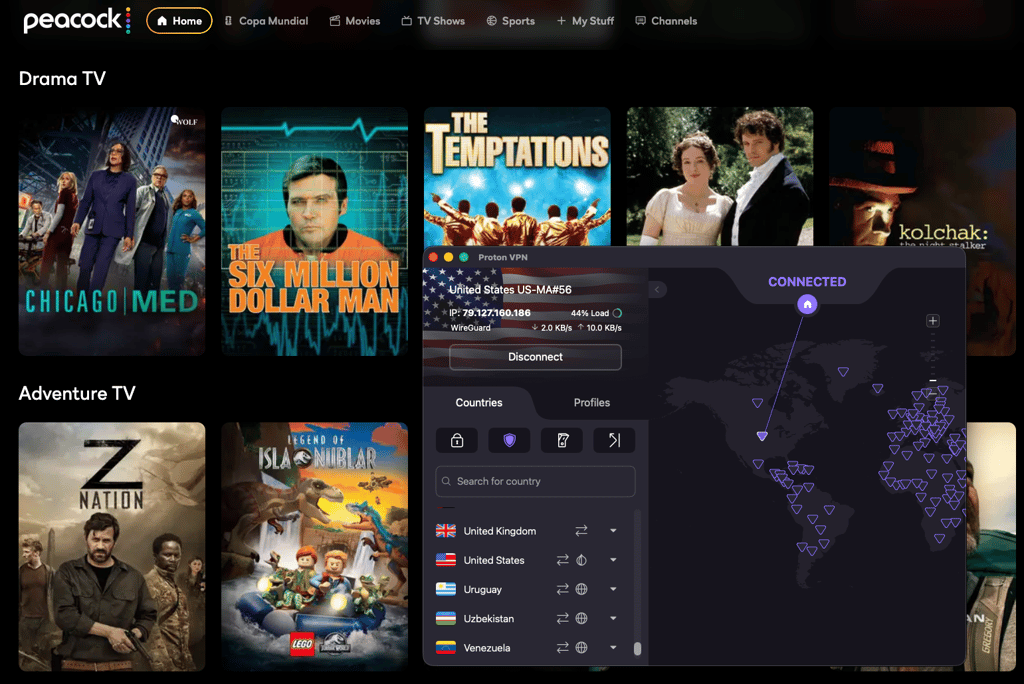
One of Proton VPN's biggest strengths is its server network. It offers more than 6,000 US servers across 22 cities, giving you plenty of options if a particular server doesn't work with Peacock. Plus, it supports Windows, macOS, Linux, Android, iOS, Apple TV, Android TV, and Fire TV Stick devices.
The VPN comes with several useful features. Its built-in kill switch helps prevent accidental IP leaks, while connection profiles let you create custom VPN configurations for different streaming services. Since Proton VPN also works with platforms like Disney+, BBC iPlayer, and HBO Max, this can be a convenient time-saver.
Proton VPN’s pricing starts at $2.99/month and includes a 30-day money-back guarantee. There's also a free plan with servers in 10 locations, but it doesn't support streaming.
4. ExpressVPN – VPN for streaming with privacy

| Rating: | |
| Based in: | British Virgin Islands |
| Servers/countries: | Servers in 113 countries |
| Unblocking success for Peacock: | 80% |
ExpressVPN worked well with Peacock TV, delivering strong results across key streaming metrics. It stands out for having servers in all 50 US states, making it a top choice for bypassing regional blackouts.
Why I picked ExpressVPN for Peacock TV
ExpressVPN successfully unblocked Peacock in 8 out of 10 attempts during our testing. I watched Ted, and playback started in just 6 seconds. Once connected, the stream played in 4K without buffering or interruptions, and I only had to switch servers once at the very beginning.
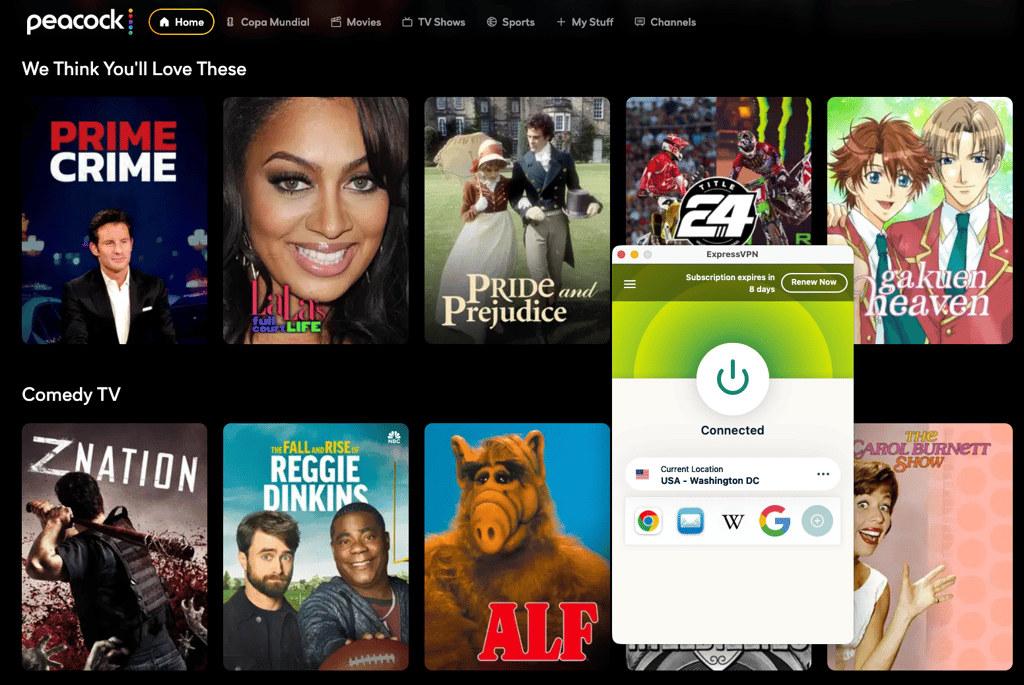
One of ExpressVPN’s standout features is its server coverage across all 50 US states, making it a strong choice not only for Peacock but also for services like Amazon Prime Video and Hulu.
Its apps are exceptionally easy to use thanks to their clean, consistent design across devices. It also includes a kill switch, DNS leak protection, and the proprietary Lightway protocol, all of which helped to have a fast, stable, and secure streaming experience.
ExpressVPN also includes MediaStreamer, its Smart DNS feature for devices that don't support VPN apps. However, after contacting support, I confirmed that MediaStreamer doesn’t work with Peacock, so it’s better suited for services like Netflix or Amazon Prime Video.
ExpressVPN plans start at $2.99/month and support PCs, smartphones, Apple TV, Fire TV, and Android TV. Also, the provider has a 30-day money-back guarantee.
5. IPVanish – Peacock TV VPN with unlimited connections

| Rating: | |
| Based in: | United States |
| Servers/countries: | 3,400+ servers in 112 countries |
| Unblocking success for Peacock: | 70% |
IPVanish is a solid VPN for Peacock TV, offering unlimited simultaneous connections and budget-friendly pricing. In our tests, it unblocked Peacock outside the US with fair consistency and delivered reliable streaming performance.
Why I picked IPVanish for Peacock TV
During our IPVanish testing, it achieved a 70% success rate for unblocking Peacock. When streaming Suits, playback started in 8 seconds. I did experience occasional lag spikes, but they were minor and didn’t significantly impact the viewing experience. The stream maintained HD quality throughout, and switching to a different server quickly resolved any issues.
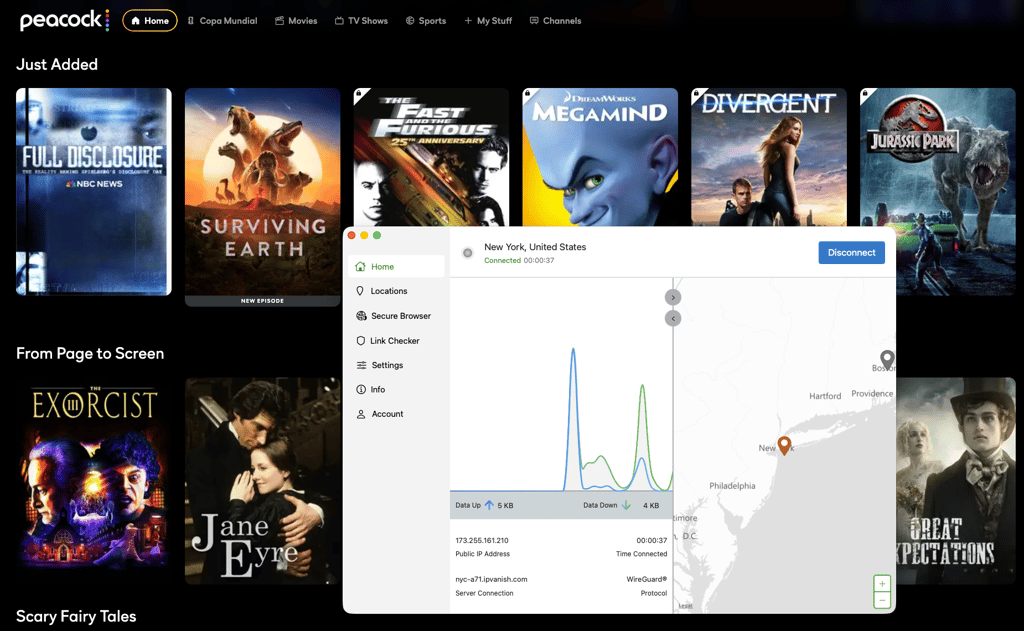
IPVanish operates 1,500 US servers across 23 locations, making it easy to find an alternative server when needed. It covers 112 countries overall, making it a good option for accessing other streaming platforms, including BBC iPlayer, Amazon Prime Video, and Sling TV.
The provider includes a kill switch and DNS leak protection to help keep your connection private and stable while streaming. I also found its split-tunneling feature useful, as it allowed me to route Peacock through the VPN while keeping other apps on my regular connection.
Pricing starts at $2.19/month and includes a 30-day money-back guarantee, plus a 7-day free trial on mobile devices. IPVanish is compatible with Windows, macOS, iOS, Android, Fire TV Stick, Apple TV, NVIDIA Shield, and Android TV, so you can really take advantage of its unlimited simultaneous connections.
Comparing VPNs for Peacock TV
Below is a table summarizing all the key features of the top 5 VPNs for Peacock I’ve selected. You can clearly see the main differences between all providers and which one is better equipped for your needs.
| Provider | Rating | Starting price | Best for | Servers in the US | Max devices | Average speed retention | Money-back guarantee |
| NordVPN | From $3.49/month | Fast Peacock streaming | 2,800+ | 10 | 86% | 30-day money-back guarantee | |
| Surfshark | From $2.49/month | Affordable and reliable streaming | 600+ | Unlimited | 80% | 30-day money-back guarantee | |
| Proton VPN | From $2.99/month | Free Peacock watching and privacy | 6,070+ | 10 | 81% | 30-day money-back guarantee | |
| ExpressVPN | From $2.99/month | Security and ease of use | Undisclosed | 14 | 75% | 30-day money-back guarantee | |
| IPVanish | From $2.19/month | Streaming on unlimited devices | 1,500+ | Unlimited | 69% | 30-day money-back guarantee |

How to get a Peacock TV subscription outside the US
It can be tricky to subscribe to Peacock TV if you’re outside the US. After all, some payment methods only work in specific locations. Luckily, there are some workarounds you can employ to subscribe to Peacock TV anywhere. Here’s a rundown of your options:
- PayPal. If you have a PayPal account created using a US address, you can use this payment method to buy a Peacock subscription from any region outside the United States. You can also create a new PayPal account, but you will still need to provide a US address and phone number.
- Apple App Store or Google Play Store gift card. To do this, you may need to create a new app store account using a US VPN server. Then, top up the App Store/Google Play Store account with the gift card you bought, get the Peacock TV app, and pay for the subscription using the gift card from the app store. However, keep in mind that to continue watching Peacock content, you will need to connect to a US server via a VPN.
- Peacock TV gift card. The streaming service offers gift cards that can be purchased at buyatab.com. The website accepts payments from other regions outside of the US.
Peacock not working with a VPN? Here are some troubleshooting tips
Things don’t always go to plan. Sometimes, you may find that Peacock TV is not working with a VPN. If this occurs, you likely need a more reliable VPN service.
If you’re faced with an error message, such as when Peacock says you don’t meet the US roaming rules or that something went wrong, it means that you’re likely connected to a server in the wrong country. The first step here will be to check if your VPN is actually running correctly. If it is, then it may be time to consider switching providers.
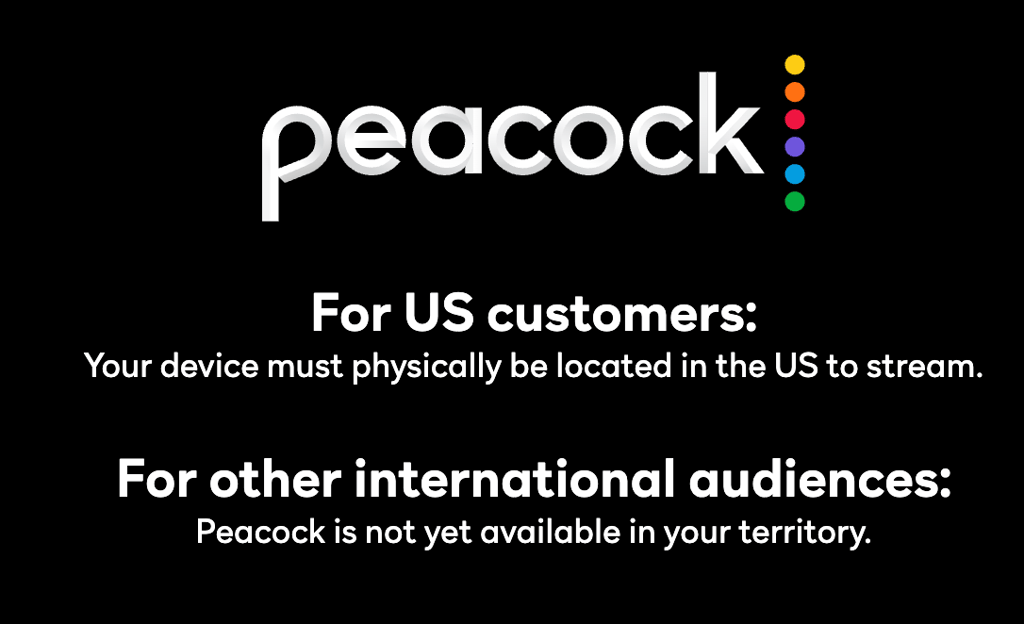
To help you figure out what the problem could be, I listed some of the frequent issues that can occur when trying to watch Peacock TV outside of the US:
- The GPS location of your device and IP address do not match
- Your real IP address is leaking
- Peacock TV has blocked the servers your VPN is using
- There are cookies on your device that show you are not in the US
- Your VPN cannot unblock Peacock TV
To fix the above issues, here are some possible solutions:
- Contact customer support for your VPN to check if your service can unblock Peacock TV; for instance, NordVPN has 24/7 customer support
- Try a different browser
- Find and enable leak protection on your VPN
- Clear cookies on your device
- Try a new VPN provider
Can I use a free VPN for Peacock TV?
You can use a free VPN for Peacock TV, but in most cases, it won't be very reliable. Many free VPNs struggle with streaming, and some come with privacy trade-offs, such as tracking your activity or selling your data. Even the better-known options have limitations, whether that’s slower speeds, fewer servers, or restrictions that make streaming frustrating.
That said, there are still a few free VPNs worth trying. I tested several free VPN providers alongside the Cybernews research team, including Proton VPN, hide.me, and Hotspot Shield, focusing on their free plans and real-world performance.
Proton VPN offers the most balanced free plan. It has no data caps and includes servers in 10 countries, including the US. However, you can’t manually choose a server location, and speeds are lower than those with premium plans.
Hide.me is a strong option for privacy, with free servers in 8 locations, including the US. It doesn’t require registration and includes solid security features, but speeds can vary a lot, and it struggles with streaming.
Hotspot Shield is simple to use and includes a US server on its free plan, but it comes with stricter limits. There’s a 500MB daily data cap, ads, and slower speeds, which makes it less practical for streaming or extended use.
What can you watch on Peacock TV?
Peacock TV frequently updates its catalog with new content to keep things fresh and exciting for its user base. Below is a list of some of the most recent additions currently available on the platform.
| Most popular TV shows now | Love Island USA, All Her Fault, Yellowstone, The Office, Below Deck, Bel-Air, Chicago Fire |
| Sports events | FIFA World Cup 2026, MLB, WNBA, PGA TOUR |
| TV shows | The Capture Season 3, The Five-Star Weekend, The Undeclared War Season 2, Married at First Sight Season 20 |
Final thoughts
Peacock is only available in the US, so if you're traveling abroad, you won’t be able to watch your favorite shows and live events. The same applies if you live outside the US and want to access Peacock's full content library. Fortunately, a VPN provides a simple solution.
By connecting to a US VPN server, you can make it appear as though you're physically there. A high-quality Peacock VPN will keep your streaming speeds high and maintain a stable connection, so you can watch without buffering, lag, or other interruptions.
After extensive testing, I found NordVPN to be the best VPN for Peacock. It offers more than 2,800 US servers, excellent security features, the highest Peacock unblocking success rate, the fastest speeds, and the smoothest viewing experience. Beyond Peacock, it also works exceptionally well with other popular streaming services, including Hulu, Netflix, and BBC iPlayer.
FAQ
Is it legal to watch Peacock TV with a VPN?
Yes, it’s legal to watch Peacock TV with a VPN if you live in a country where VPNs are legal. Peacock TV’s terms of use imply that VPN usage isn’t permitted. However, no case of account termination has been reported in the past.
What countries is Peacock TV available in?
Peacock TV is available in the US and for Sky and NOW subscribers in the UK, Germany, Austria, Switzerland, Italy, and Ireland. To watch outside of these regions, you’ll need to use a Peacock TV VPN like NordVPN to change your IP address.
Is Peacock TV free to watch?
No, Peacock TV no longer offers a free subscription tier. Right now, you can choose from 3 plans: Select with ads ($8.99/month or $89.99/year), Premium with ads ($12.99/month or $129.99/year), and Premium Plus without ads ($19.99/month or $199.99/year).
Can I watch Peacock outside the US?
Yes, Peacock is available outside the US for Sky and NOW subscribers in the UK, Ireland, Austria, Germany, Italy, and Switzerland. If you’re not from these countries, you can use a VPN, such as NordVPN, to get a US IP address and bypass Peacock’s geo-restrictions.
Can I watch Peacock TV from Canada?
Yes, you can watch Peacock TV from Canada if you use a VPN service. With a VPN, like NordVPN, you can change your IP address from a Canadian to a US one and access the streaming service as if you lived in the US.