How to watch Amazon Prime from abroad
Our in-house cybersecurity experts and journalists, renowned for major reports like The Mother of All Breaches, conduct transparent, unbiased VPN testing and in-depth analysis.
With 750+ articles crafted based on real-world research, we empower readers to make informed purchasing decisions through first-hand expertise.
Learn more
Amazon Prime Video actively detects and blocks VPN traffic. So, if you’re trying to access geo-blocked content, it might be harder than on most streaming platforms. To help you find solutions that work, our research team and I tested multiple VPN providers across different Prime Video libraries.
First, it’s important to understand that a VPN only changes your IP address and virtual location. That can help you reach a library in another country, but it won’t give you a local payment method or account. You’ll still need an active Prime account with access to that region, and some titles stay blocked by licensing no matter which server you use.
Based on our in-house tests, NordVPN was the most reliable VPN, which might help you access some region-restricted libraries by changing your IP address. However, keep in mind that no VPN works forever – Amazon regularly updates its detection, so results can change.
What you actually need to access another Amazon Prime Video library
While a VPN can help you access different Amazon Prime Video libraries, it's important to understand what it can and can’t do. To make this clearer, I created a table outlining its capabilities and limitations:
| Requirement | Can a VPN help? | Notes |
| Appear to be browsing from another country | ✅ Yes | A VPN can change the IP address Amazon Prime Video sees |
| Access content that is available in another region | ✅ Sometimes | Changing your IP might help, but availability can depend on Amazon's own location checks and account settings |
| Get a local payment method | ❌ No | A VPN cannot provide a local credit card, bank account, or billing method |
| Change your billing country | ❌ No | Billing and payment information must be managed through your Amazon account |
| Create an eligible regional account | ❌ No | A VPN cannot create or verify account eligibility requirements |
| Bypass Amazon account restrictions or verification requirements | ❌ No | Amazon might use factors beyond your IP address when determining content availability |
How to watch Prime Video from another country
Amazon Prime Video content varies by country due to licensing agreements and geo-restrictions. While a VPN can help you change the IP address the platform sees, content availability might also depend on factors like your Amazon account region or billing information. Keep in mind that a VPN can’t change these details or bypass any account eligibility requirements, and accessing content outside your usual region might be restricted by Amazon's terms of use.
- Find a reliable VPN that works with Amazon Prime Video – I recommend NordVPN, now with a 75% discount
-
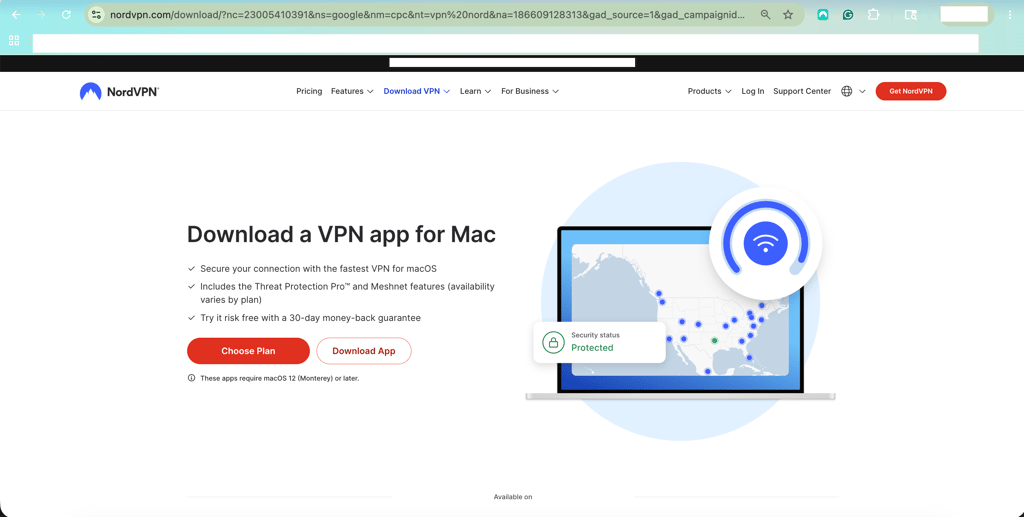
Download and install the VPN app on your device
-
Connect to a server in the country whose Amazon Prime Video library you want to access, such as the US or the UK
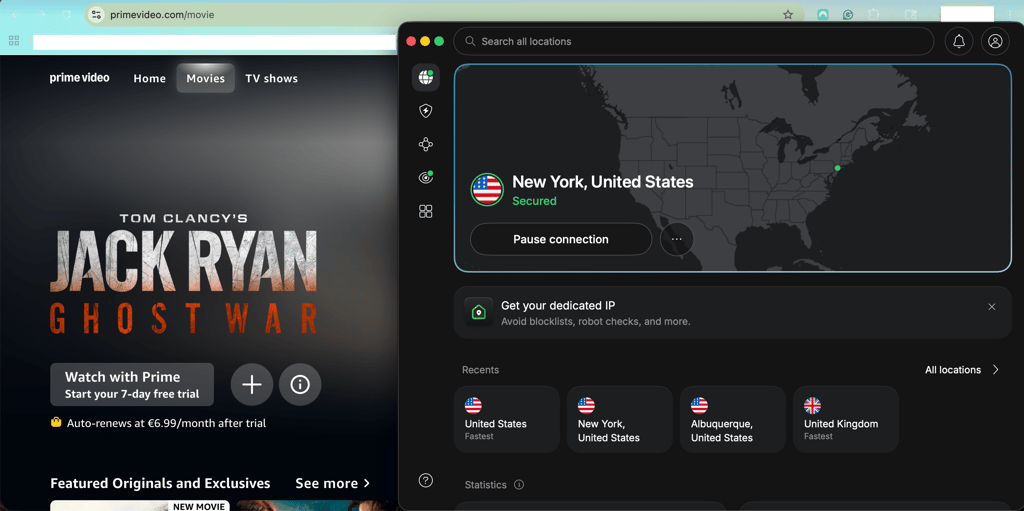
- Go to primevideo.com – the content library shown to you will automatically reflect your VPN server location
- Sign in to your Amazon account and check whether the content you want is available
- If the title is unavailable, verify whether additional account, billing, or regional requirements apply – the most common barrier is your account's billing country, which a VPN cannot change
If Amazon Prime Video still detects your VPN, try a few workarounds: switch to another server or clear your browser cookies and cache before trying again. Keep in mind that changing your IP address alone might not be enough to access every regional content library.
Top 3 VPNs for Amazon Prime – shortlist
- NordVPN – best VPN for Amazon Prime Video based on our tests
- Proton VPN – best privacy-focused VPN for Amazon Prime Video
- Surfshark – budget-friendly Amazon Prime VPN




We spare no effort to test the products & their features. All information is gathered by our in-house research team & fact-checked by our team of experts. Discover the ins and outs of our testing procedures.
Do you even need a VPN for Prime Video?
Before you reach for a VPN, it's worth ruling out the easier routes – many people don't actually need one. Here are a few things I'd try first:
- Just travelling for a bit? Prime Video shows you the library for your current location, so the titles you're missing will be back the moment you get home. For a short trip, I'd download what you want to watch before you leave – it's faster and more reliable than fighting Amazon's VPN detection from a hotel Wi-Fi.
- Sure it's actually blocked? Some titles simply aren't licensed in your country, and no server will conjure them up. Others might already be sitting in your own region's catalogue. Check your local Prime Video first before assuming you need to look abroad.
- Genuinely want another country's full library? This is where a VPN earns its place. It can handle the IP step – but only if you already have a Prime account with access to that library. A VPN changes your IP, not your account's home region or billing country.
Why do you need a VPN for Prime Video?
Not all content on Amazon Video Prime is available to you. Depending on your physical location, the platform offers a different content library. It’s because streaming rights and licensed content agreements vary by country, so a TV show or movie available in the US might be unavailable in the UK or Canada. Even paying subscribers can lose access to certain titles when traveling abroad.
If you’re trying to access geo-restricted content, you might see a message like: “This video is currently unavailable in your location.” Amazon also actively blocks VPN traffic and might show proxy-related errors when it detects location-masking tools.
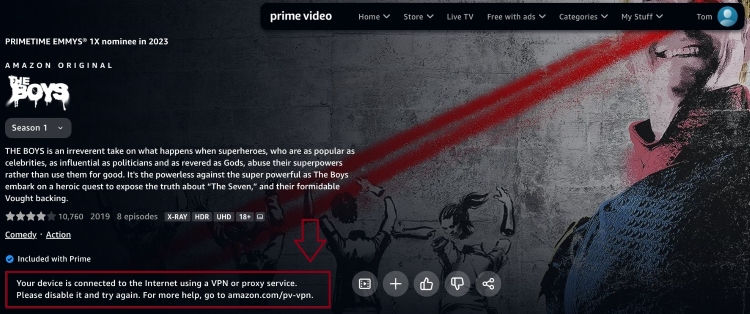
A VPN can help access some region-restricted libraries by changing your IP address and virtual location. This might let you access libraries in other countries, but access isn't guaranteed and still depends on Amazon's checks, your account status, and whether the title is licensed in that region. It's also worth noting that not every VPN works with Amazon Prime Video – Amazon's detection systems can identify and block many VPN services, preventing playback altogether.
In our testing, VPNs with streaming-optimized servers and frequently refreshed IP addresses had the best chance of accessing geo-restricted libraries. Of the multiple services we tested across different Prime Video regions, only 3 worked consistently. However, a working VPN only clears the IP step – you still need an account with access to that library.
It’s crucial to understand that accessing content outside the licensed region might violate Amazon Prime Video’s terms of use. Therefore, if the platform detects any VPN activity, it might restrict your access or even your account, so weigh that before relying on this method.
Why does Amazon block VPNs?
I wasn’t able to find an official Amazon statement regarding the reasoning behind geo-restricted content. The Prime Video terms of use state the following without providing an explanation:
Amazon will use technologies to verify your geographic location. You may not use any technology or technique to obscure or disguise your location.
There are several possibilities why the company blocks VPNs. Its rights to shows and movies may differ between countries, so it can be a licensing issue in some cases. It can have different distribution deals with companies that decide where the content can be viewed. It might also be a step to combat piracy or account sharing, the latter being a common practice worldwide.
Amazon Prime Video not working with a VPN? Try these fixes
Amazon Prime Video actively detects and blocks many VPN connections, which can result in proxy errors or unavailable content libraries. If your VPN isn't working with Prime Video, there are several troubleshooting steps you can try:
- Switch to another VPN server. Amazon may have blacklisted the server you're currently using, so connecting to a different server can provide a fresh IP address.
- Clear your browser cookies and cache. Stored location data can reveal your actual region and interfere with VPN connections.
- Update your VPN app. Outdated VPN software may contain bugs or compatibility issues that affect streaming performance.
- Enable kill switch and DNS leak protection. These features prevent your real IP address and DNS requests from being exposed to Amazon Prime Video.
- Restart your device. A simple restart can resolve temporary issues affecting your VPN or streaming app.
- Change your VPN protocol. Some VPN protocols might work more reliably with streaming services than others.
- Check your internet connection. Slow or unstable internet can disrupt VPN connections and cause streaming issues.
- Check antivirus and firewall settings. Security software may block VPN traffic and prevent Prime Video from loading properly.
- Flush your DNS cache. Clearing stored DNS records can remove location information that may reveal your actual region.
- Contact your VPN provider. Customer support may be able to recommend servers that currently work with Amazon Prime Video.
- Use a better VPN. Free or less reliable VPNs often have IP addresses that streaming services identify and restrict.
If these fixes don't work, the issue might not be related to your VPN connection. A VPN can only change your IP address and location. Content availability might also depend on Amazon account settings, regional entitlements, billing requirements, or other location checks that a VPN cannot change.
Final thoughts
Accessing content from different Amazon Prime Video regions can be challenging because availability varies by country, and Amazon uses location verification systems to enforce geo-restrictions.
A VPN can help by changing your IP address, but it can’t provide a local payment method, change account eligibility, or override other Amazon account requirements that might affect content availability.
Based on our latest testing, NordVPN delivered the most consistent results when accessing multiple regional Prime Video libraries and maintained reliable streaming performance across our test locations. However, results can vary over time as streaming services and VPN providers regularly update their systems.
FAQ
What is the best VPN for changing the Amazon Video country?
In our testing, NordVPN was the most reliable solution that might help you change the Amazon Video country. It has a large server fleet and works across several regions, though no VPN gets past Amazon's detection every time, and results can change as Amazon updates its blocks.
Does NordVPN work with Prime Video?
According to our tests – yes. A VPN like NordVPN can help you reach geo-restricted libraries by changing your IP – connect to a server in the country whose library you want, then open that country's Prime Video site. However, access isn’t guaranteed: Amazon might detect the VPN, and you'll still need an account with access to that library.
Can I watch Amazon Prime abroad?
Yes, you can watch Amazon Prime Video while traveling abroad, but the available catalog depends on your account region and the country you are in. A VPN might sometimes change your visible IP address, but it doesn’t guarantee access to your home library, and some titles can still be blocked due to licensing rules and VPN detection.
How do I watch Amazon Prime UK in the US?
To watch Amazon Prime Video UK content in the US, you need access to a UK-based account/catalog, and many titles remain restricted because availability depends on licensing and your account region. A VPN can sometimes change your visible IP to the UK, but it isn’t reliable for unlocking the full UK library and might be blocked by Amazon or restricted under its terms of use.
Why is my Amazon Prime Video not working?
Amazon Prime Video may not be working due to region restrictions. Learn how to unblock the service by following my step-by-step guide.
Why is my Amazon Video in another language?
Due to the use of a VPN, content may sometimes appear in a different language on Amazon Prime Video. If the shown language doesn’t match the content library you were trying to access, you should connect to a different server and try again.