Best Polymarket VPNs in 2026: how to access Polymarket from different locations
Our in-house cybersecurity experts and journalists, renowned for major reports like The Mother of All Breaches, conduct transparent, unbiased VPN testing and in-depth analysis.
With 750+ articles crafted based on real-world research, we empower readers to make informed purchasing decisions through first-hand expertise.


-
Polymarket is restricted in the US, the UK, Brazil, Australia, Canada, Poland, and many other countries due to local gambling and financial regulations.
-
A VPN for Polymarket can help you reroute your internet connection through a supported location while adding an extra layer of privacy and security to your online activity.
-
Based on my tests, NordVPN is the best Polymarket VPN overall, ExpressVPN is the best for speed, and Proton VPN is the best for privacy-focused users.
As of October 2026, Polymarket is restricted in more than 30 countries, including the United States, Brazil, Netherlands, Germany, France, Italy, Poland, Australia, and the UK. It also lists Alberta, British Columbia, Ontario, and Quebec as restricted regions in Canada.
If you want to securely access Polymarket from the US, Australia, Canada, or other locations, use a premium VPN to connect through a supported server location, such as Mexico. A VPN encrypts your connection and routes your traffic through a different server location for added privacy and security.
Important: This article is intended for users who want to access Polymarket securely while traveling or managing their online privacy. It is not intended as a guide for bypassing local restrictions or accessing Polymarket in jurisdictions where the platform is unavailable or prohibited. Always check local laws and regulations before using prediction market platforms and seek professional advice if needed.
Compare best VPNs for Polymarket
Based on my tests, NordVPN, ExpressVPN, Proton VPN, Surfshark, and IPVanish are the best VPNs for Polymarket, offering a combination of reliable access, strong privacy, and solid speeds.
| VPN for Polymarket | Rating | Best for | Servers | Price |
| 1. NordVPN | 4.9 ⭐⭐⭐⭐⭐ | Overall best VPN for Polymarket | Thousands of servers in 225 locations | From $3.49/month |
| 2. ExpressVPN | 4.3 ⭐⭐⭐⭐ | Best for speed and ease of use | Servers in 113 countries | From $2.99/month |
| 3. Proton VPN | 4.5 ⭐⭐⭐⭐⭐ | Best VPN for secure Polymarket access | 21,200+ servers in 149 countries | From $2.49/month |
| 4. Surfshark | 4.7 ⭐⭐⭐⭐⭐ | Best-value Polymarket VPN for multiple devices | 4,500+ servers in 100 countries | From $2.49/month |
| 5. IPVanish | 4.2 ⭐⭐⭐⭐ | Best for advanced security | 3,400+ servers in 112 countries | From $2.19/month |
After testing 41 VPNs, we found NordVPN to be the best VPN for Polymarket, and you can try it risk-free with a 3-day free trial on Android plus a 30-day money-back guarantee. When trying to access Polymarket, servers in Austria worked best for me.
How to access the international Polymarket platform with a VPN

- Get a reliable VPN. Based on my tests, NordVPN’s cheapest plan works great for Polymarket.
- Download and install the VPN app on your device.
- Connect to a server in a supported Polymarket location, such as Mexico or Austria.
- Then open Polymarket as usual using a secure, stable connection.
Best VPN countries for Polymarket in 2026
Polymarket is accessible from over 100 countries, including Austria, Sweden, Finland, and Mexico. Other countries have a “close-only” policy, allowing you to close your existing positions without opening new ones. Here’s a table breaking down where Polymarket is available:
| Countries where Polymarket is available: | Austria, Canada (excluding Alberta, Ontario, British Columbia, Quebec), Finland, Greece, Mexico, South Africa, Sweden + over 100 others |
|---|---|
| Polymarket restricted countries: | Australia, Belarus, Belgium, Burundi, Brazil, Central African Republic, Congo (Kinshasa), Cuba, Ethiopia, France, Germany, India, Iran, Iraq, Italy, Japan, Lebanon, Libya, Myanmar, Nicaragua, North Korea, Russia, Somalia, Spain, South Sudan, Sudan, Switzerland, Syria, Ukraine (Crimea, Donetsk, and Luhansk regions), the United Kingdom, the United States, Venezuela, Yemen, Zimbabwe |
| Close-only countries: | Poland, Singapore, Taiwan, Thailand |
Choosing the best VPN location for Polymarket is important because availability varies by region. In my testing, Austria and Mexico, offered the most reliable performance, delivering stable, secure connections from the US.
Best Polymarket VPNs for 2026
Not all VPNs are equally suited for Polymarket. The ones that perform best tend to share a few key qualities: a wide network of servers in supported countries, fast and stable connection speeds, strong encryption, and a verified no-logs policy. Leak protection is also worth paying attention to, since Polymarket checks your IP address to determine access, meaning even a brief exposure of your real location can affect your connection.
After testing 41 VPN providers, I found NordVPN, ExpressVPN, Proton VPN, Surfshark, and IPVanish to be the best VPNs for Polymarket in 2026.
1. NordVPN – overall best VPN for Polymarket

| Rating: | |
| Servers in Polymarket available countries: | Mexico, Sweden, Austria, Finland, Greece, and other supported regions |
| Price: | From $3.49/month with a 3-day trial and a 30-day money-back guarantee |
NordVPN is the best VPN for Polymarket, offering thousands of servers across 225+ locations, including countries where Polymarket is available. In my testing, servers in Mexico and Austria delivered the most reliable performance, with average download speeds of 809.72 Mbps.
Using NordVPN for Polymarket
NordVPN is one of the best VPNs for Polymarket thanks to its fast speeds, extensive server network, and strong privacy features. During my tests, its obfuscated servers provided a stable and consistent connection when using Polymarket.
For accessing Polymarket, server location matters. In my tests, the best NordVPN servers for Polymarket in 2026 were in Austria, delivering fast, stable connections across both desktop and mobile.
When it comes to privacy, NordVPN is one of the most secure Polymarket VPNs out there. It has a strict six-times audited no-logs policy, RAM-only servers, AES-256 and ChaCha20 encryption, and an automatic kill switch that worked flawlessly in my tests. These features help keep your identity and activity safe, especially when accessing decentralized platforms like Polymarket.
NordVPN’s dedicated IP option is also a useful feature for Polymarket users who prefer a consistent IP address. Unlike shared VPN IPs, a dedicated IP is assigned exclusively to your account, which can help provide a more stable and predictable connection when accessing Polymarket.
Based on my tests, NordVPN is the best VPN for Polymarket in terms of price-to-value, with its 2-year Basic plan starting at $3.49/month, plus a 3-day free trial and a 30-day money-back guarantee. During my Polymarket testing, it delivered the speed, reliability, and features I expected from a premium VPN.
2. ExpressVPN – fast and reliable VPN to access Polymarket

| Rating: | |
| Servers in Polymarket non-restricted countries: | Austria, Sweden, Greece, Mexico, and other major regions |
| Price: | From $2.99/month |
ExpressVPN stood out as a strong choice for Polymarket in my testing. It delivered fast speeds, stable performance, and a smooth overall experience on both desktop and mobile. Its TrustedServer technology and Lightway protocol also helped keep connections consistent, with average download speeds reaching 784Mbps.
Using Express VPN for Polymarket
ExpressVPN is a top choice for Polymarket users who want fast, reliable access and strong privacy. During testing, its Lightway protocol stood out by delivering excellent speeds and stable connections, making it easy to use Polymarket without interruptions.
ExpressVPN performed exceptionally well in our tests. Its servers in key regions, including Austria and Mexico, provided secure and consistent access to the platform. The VPN also works smoothly on desktop and mobile devices, providing fast and reliable access no matter where you connect.
Regarding privacy, ExpressVPN uses strong AES-256 encryption and follows a strict no-logs policy that has been independently audited. Its kill switch reliably protects your data if the VPN connection drops, keeping your activity on Polymarket secure. Plus, ExpressVPN accepts cryptocurrency payments for extra privacy, although it doesn’t offer anonymous sign-up.
While it supports up to 14 devices at once, ExpressVPN also includes useful features like split tunneling, which lets you choose which apps use the VPN connection. Another standout feature is its TrustedServer technology, which ensures that all servers run on RAM only, meaning no data is ever written to a hard drive for extra security.
ExpressVPN pricing starts at $2.99/month, and the provider offers a 30-day money-back guarantee for risk-free purchases.
3. Proton VPN – privacy-focused Polymarket VPN with a free version

| Rating: | |
| Servers in Polymarket available regions: | Austria, Sweden, Greece, and other supported countries |
| Price: | From $2.49/month with a free plan and a 30-day money-back guarantee |
Proton VPN is the most secure VPN for Polymarket. Its open-source apps, strict no-logs policy, and Secure Core servers provide an extra layer of anonymity when accessing prediction markets online.
In my testing, Proton VPN delivered strong performance, reaching an average download speed of 759.81Mbps while reliably working with Polymarket. Plus, it offers a free plan with unlimited data, making it one of the few free Polymarket VPNs that can still be useful for accessing the platform.
Using Proton VPN for Polymarket
Proton VPN is a privacy-focused VPN for Polymarket users who want maximum control over their online privacy. It has a strict no-logs policy, uses strong AES-256 encryption, and includes a reliable kill switch to protect your data if the connection drops. Paid plans also add extra privacy with Secure Core routing. Additionally, Proton VPN accepts cryptocurrency payments and allows anonymous sign-up, helping you stay private.
Another advantage is Proton VPN’s large server network in supported countries. During my testing, its Mexico server delivered stable, reliable Polymarket access from the US. It also performed strongly in speed tests, with an average download speed of 759.81Mbps.
On the downside, it’s worth noting that Secure Core servers come at the cost of speed. It works as a double VPN, routing your traffic through an additional server, significantly slowing your connection speed. If privacy isn’t your top priority, I'd suggest considering NordVPN or ExpressVPN for a smoother experience.
Another advantage of Proton VPN is its unlimited free plan. Just like the paid plan, it provides strong security and is transparent about protecting your privacy, making it a reliable option for safe and private access.
If privacy is your top priority, Proton VPN is the best VPN for Polymarket, offering free trials for its Unlimited and Business plans, as well as a free version. Proton VPN plans start at $2.49/month, and the provider also offers a 30-day money-back guarantee.
4. Surfshark – affordable Polymarket VPN

| Rating: | |
| Servers in Polymarket-legal countries | Austria, Mexico, Sweden, and many other locations |
| Price: | From $2.49/month with a 7-day trial and a 30-day money-back guarantee |
Surfshark is an affordable Polymarket VPN at just $2.49/month, with a 7 free trial on mobile devices, and a 30-day money-back guarantee. In my tests, its Austria servers delivered reliable, stable Polymarket access from the US with no connection issues.
I tested Surfshark with NoBorders and Camouflage modes enabled, which are designed to improve privacy and connection reliability. Polymarket loaded quickly at an average of 747.72Mbps and ran smoothly throughout.
Using Surfshark for Polymarket
Surfshark is one of the fastest and most reliable VPNs for Polymarket. In my tests, servers in Austria, and Sweden delivered stable, consistent performance from the US, and UK. The platform also ran smoothly on desktop and mobile, with fast browsing and trading speeds throughout.
Surfshark uses AES-256 encryption for security, includes a reliable kill switch, and has a strict no-logs policy. Other helpful features include ad and tracker blocking features, split tunneling, and IP rotation, which help avoid detection. It stood out for its split-tunneling support feature on iPhones. In my tests, it worked smoothly, keeping Polymarket active while I simultaneously browsed social media on a local connection.
If you’re looking for the best VPN for Polymarket and want to keep it budget-friendly, Surfshark offers a 7-day free trial and a 30-day money-back guarantee, giving you plenty of time to test before committing to a subscription. However, Surfshark’s pricing is one of its strongest points overall: it starts around $2.49/month with a 2-year plan, or you can pay monthly if you prefer flexibility. Furthermore, you can reduce the price by using our Surfshark promo code: OFFCN.
5. IPVanish – solid mid-tier Polymarket VPN

| Rating: | |
| Servers in Polymarket allowed countries: | Austria, Sweden, Greece, and other supported locations |
| Price: | From $2.19/month with a 7 free trial and a 30-day money-back guarantee |
IPVanish includes a helpful Scramble obfuscation feature to provide secure, steady access to Polymarket from eligible locations. However, its smaller server network can occasionally result in slower connection speeds.
Using IPVanish for Polymarket
IPVanish is a decent VPN for Polymarket. However, the downsides include slower speeds, a smaller server network, and a reliance on US jurisdiction, which is not the most privacy-friendly region.
On the plus side, like Surfshark, IPVanish also supports split tunneling on iOS since 2026, making it a good choice for iPhone users.
During testing, IPVanish provided stable access to Polymarket across desktop and mobile platforms. Its Scramble feature helped mask VPN traffic, allowing it to work on networks that block or restrict VPN connections.
IPVanish also has a decent infrastructure with 3,400+ servers across 112 countries, which helped maintain stable access during testing. To check Polymarket access, I tested IPVanish servers in Sweden and found that all worked reliably without error messages or blocks. Speeds were consistent across devices, averaging 650.45Mbps, and thanks to unlimited simultaneous connections, I had no trouble using Polymarket on my laptop, phone, and tablet.
IPVanish prices start at $2.19/month/month, and plans are available monthly and yearly. If you want to test one of the best VPNs for Polymarket before committing, IPVanish offers a 7-day free trial for Android and iOS devices. There's also a 30-day money-back guarantee.
How to choose the right VPN for Polymarket
Not all VPNs work the same, especially when accessing geo-restricted platforms like Polymarket. Additionally, since you're dealing with decentralized markets and sensitive financial activity, privacy, reliability, and speed will be crucial. Here's what to look for when picking the right VPN for Polymarket:
- No-logs policy and strong encryption. Your activity on Polymarket can be exposed through your internet provider or network monitoring. A strict no-logs policy ensures your activity isn't recorded, and strong encryption keeps your data safe from prying eyes.
- Obfuscation or stealth protocols. Polymarket access can be blocked on networks that detect VPN usage. These features hide that you're using a VPN, helping you avoid detection by networks that block or restrict VPN traffic.
- Privacy-first features. Since Polymarket involves financial activity, data leaks can be risky. Look for VPNs with leak protection, kill switches, and a solid reputation for user anonymity.
- No tracking of user activity. Some VPNs store metadata that can still identify users. Choose providers with RAM-only servers and no activity logs to ensure no trace of your Polymarket usage is stored anywhere.
- Anonymous payment options. Paying with cash, Bitcoin, or other cryptocurrencies adds another layer of privacy.
- Server availability and reliability. Polymarket is restricted in many countries, so you need a VPN with a wide server network. More servers increase your chances of finding a stable, working connection without blocks or downtime.
- Connection speed and stability. Prediction markets, like Polymarket, require real-time updates. A fast and stable VPN ensures you won't experience annoying lag or dropped connections.
- Cross-platform support. This ensures the VPN works on all your devices, covering Windows, macOS, iOS, Android, and browser extensions. This way, you can access Polymarket anytime, anywhere.
Are free VPNs good enough for Polymarket?
No, using a free VPN to access Polymarket isn't the best choice. Most free VPNs have limitations, such as slow speeds, data caps, and access to only a few servers. They often don't work well with platforms like Polymarket and may compromise your privacy by tracking your activity or showing ads.
Instead of using a free VPN for Polymarket, choose NordVPN’s free trial. It offers 3 days of access on Google Play and a 30-day money-back guarantee, so you can test it risk-free.
How to use a VPN for Polymarket: step-by-step guide
If you are traveling or temporarily located away from home, using a VPN is an excellent way to maintain secure, stable access to your existing Polymarket account. A VPN encrypts your data and routes your connection through a supported region, ensuring your session remains private and consistent.
Here is how to configure a VPN for reliable Polymarket access:
Step 1. Get a reliable VPN
To keep your Polymarket connection secure and consistent while away from home, a reliable VPN helps by routing your traffic through a supported location where the platform is available.
As of October 2026, NordVPN remains the best VPN for Polymarket. It is my top pick for accessing Polymarket smoothly and securely, thanks to its reliable access, strong privacy features, fast speeds, and easy-to-use apps. You can try it with a 3-day free trial on Android and a 30-day money-back guarantee.
Step 2. Install the VPN app on your device
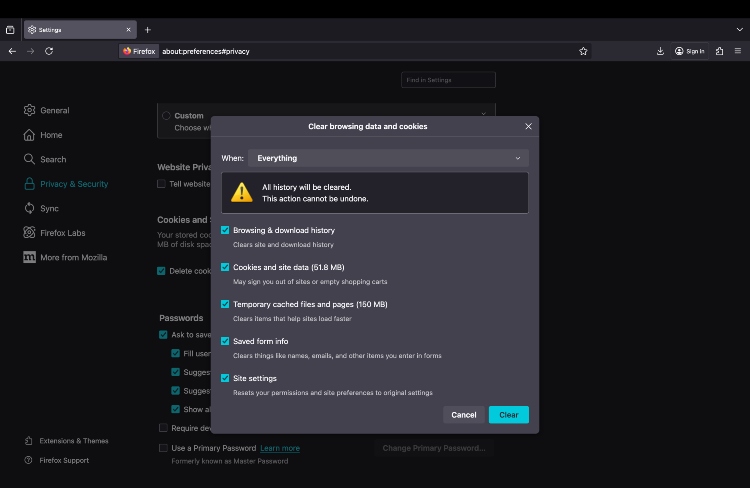
Before you visit Polymarket, first install a VPN app on your preferred device. Once the VPN is active, make sure your connection is stable before opening the platform. After that, clear your browser cache and cookies to remove any stored data that could reveal your location or interfere with the VPN connection.
Step 3. Connect to a server in a country where Polymarket is available
Polymarket is legal in countries like Austria, Mexico, Greece, Sweden, and several other supported regions. Once you turn on your VPN, connect to a server in one of these legal locations to change your IP address and make it look like you’re browsing from there.
Step 4. Access Polymarket and start betting
Go to Polymarket.com. You can sign up using your email or Google account. After that, if you see a Deposit button in the top-right corner – it means that the site is working correctly.

Polymarket restricted countries
Currently, Polymarket is restricted in: United States, Australia, United Kingdom, Germany, Canada (Alberta, British Columbia, Ontario, Quebec), Belarus, Belgium, Burundi, Central African Republic, Congo (Kinshasa), Cuba, Ethiopia, Spain, France, India, Iran, Iraq, Italy, Japan, Lebanon, Libya, Myanmar, Nicaragua, North Korea, Russia, Somalia, South Sudan, Sudan, Switzerland, Syria, Ukraine (Crimea, Donetsk, and Luhansk regions), Venezuela, Yemen, Zimbabwe.
The Czech Republic is expected to join this list after authorities announced plans to block access to Polymarket by the end of July.
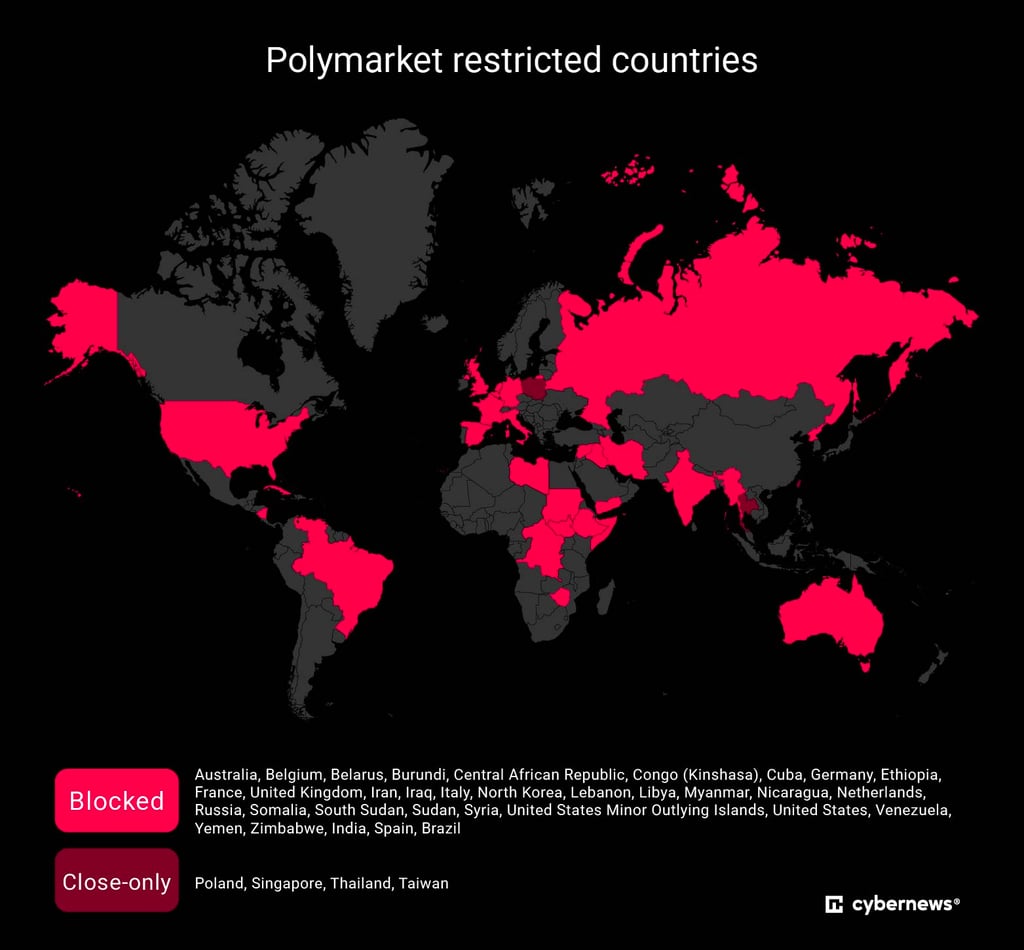
Polymarket determines access based on your IP address rather than your country of residency. If you're traveling or connecting from a location where Polymarket isn't currently available, a VPN can help by routing your connection through a supported region while also improving privacy through encrypted, more secure browsing. For more details, check out our guide on VPNs for gambling platforms.
How to use Polymarket in the US
Polymarket is legal in the US through its separate Polymarket US platform, which operates under federal oversight from the Commodity Futures Trading Commission (CFTC). However, the original international, crypto-based Polymarket platform remains unavailable to US users and blocks US IP addresses.
To access Polymarket in the US, choose a VPN provider, install it, and connect to a server in a country where the international Polymarket platform is available, such as Mexico or Austria. Once connected, open Polymarket and check whether access is available.
How to use Polymarket in Poland
Polymarket is restricted in Poland and is not officially available for trading. The platform states that Poland has a "close-only" restriction status, meaning users may be able to view markets and close existing positions, but new trading activity is not allowed.
Since Poland is among the Polymarket restricted countries, you will need a VPN with servers in locations where Polymarket is available. Among the VPNs I tested, NordVPN stood out thanks to its large server network and strong European coverage. For the best performance, I recommend choosing nearby locations such as Sweden or Austria for faster and more stable connections.
How to use Polymarket in the Netherlands
Polymarket is not currently available in the Netherlands due to local gambling regulations. The Dutch gambling regulator Kansspelautoriteit (KSA) restricted access to Polymarket after determining that the platform was offering gambling-related services without the required license. As a result, the Netherlands is now among the Polymarket restricted countries.
If you are in the Netherlands and want to use Polymarket, a VPN can help you connect through a supported country where the platform is available. NordVPN offers servers in locations such as Sweden and Austria, which are close European options that can provide faster speeds and more stable connections.
How to use Polymarket in the UK
You can't use Polymarket in the UK, as it blocks UK users from accessing its website to comply with British gambling laws. Thus, to access Polymarket from the UK, you will need to change your IP address to one in a country where Polymarket is legal, like Austria. This can be done using our top-rated Polymarket VPNs, such as NordVPN, ExpressVPN, or Proton VPN, for secure and private browsing.
How to use Polymarket in Germany
Similar to the UK, Polymarket voluntarily withholds its services in Germany due to its gambling laws. If you are in Germany and looking for a VPN for Polymarket, choose a provider with servers in nearby supported locations, such as Sweden or Greece, to get a faster and more stable connection.
How to use Polymarket in France
France’s gambling authority, ANJ, has explicitly banned platforms like Polymarket, resulting in access to Polymarket being restricted for French residents. To access Polymarket, you will need to change your virtual location to a country where the website is legal, like Austria.
How to use Polymarket in Australia
Polymarket was officially banned by Australian authorities in August 2025. Since then, the best way to access the website from Australia was by using a VPN like NordVPN to make the website think that you’re located in Austria, where Polymarket is still legal.
Polymarket VPN not working: troubleshooting steps
Polymarket actively blocks known VPN IP addresses and can flag geolocation mismatches to stay compliant with regulations. Fortunately, there are several ways to fix this and ensure your system time matches the server's location.
Here are a few troubleshooting steps to try when Polymarket isn’t working with a VPN:
- Clear your browser cache and cookies
- Disconnect and reconnect to a different VPN server
- Switch to a VPN with obfuscation or stealth features
- Make sure your system time and time zone match the server location
- Try a different browser or open Polymarket in incognito mode
- Disable browser extensions that may reveal your real location
- Check whether your VPN app and browser are updated
- Contact your VPN support team if the issue continues
Can you use Polymarket with a VPN?
Yes, Polymarket can be accessed using a VPN. A VPN changes your virtual location and routes your connection through a different region, which may affect how the platform is accessed.
However, using a VPN may violate Polymarket’s Terms of Service, and accounts can be restricted, placed into limited mode, or banned if VPN usage is detected. This can also carry compliance risks depending on your jurisdiction.
That’s why you need a truly reliable VPN for Polymarket, ideally one with obfuscation features to avoid being mistakenly flagged. The VPNs that worked best for me were NordVPN, ExpressVPN, and Proton VPN.
Wrapping up
Polymarket is a platform that allows users to place bets on the outcomes of future global events. In order to buy or sell shares, in other words, to bet, individuals use cryptocurrency. But due to local laws, Polymarket is blocked in many countries, including the US, Brazil, Australia, the UK, and the Netherlands. For this reason, users need a reliable VPN to access Polymarket.
After testing many VPNs, I found NordVPN to be the best for unblocking Polymarket. It worked every time, was fast, and kept my connection private.
However, if you’re focused on speed, ExpressVPN is one of the fastest VPN for Polymarket. And if you want something completely free, Proton VPN is your best bet. It has no data limits and decent speed, though it doesn't always unblock the site.
FAQ
Is Polymarket legit?
Yes, Polymarket is legit. It lets you use cryptocurrency to bet on real-world events, such as elections, sports games, or news stories. However, this platform is blocked in certain countries because some governments view it as online gambling without a license.
Why is Polymarket in view-only mode?
Polymarket may automatically switch to view-only mode if it detects that you’re accessing the platform from a restricted location. You can still browse active markets and follow live odds, but options to deposit or trade won’t be available. If you’re using a VPN, your connection may still be detected as restricted, even if the VPN shows you’re in a supported region. In that case, the website will automatically keep you in view-only mode. Try reconnecting to the VPN, clearing your cookies and cache, and then accessing Polymarket again.
Can I access Polymarket with a VPN in the US?
Yes, you can access Polymarket in the US with a VPN. In my tests, NordVPN worked best and reliably unblocked the site every time. However, keep in mind that Polymarket’s rules don’t allow using VPNs, and if they detect you’re using one, you could lose access to your account.
How to use Polymarket in Italy?
Since Polymarket is banned in Italy, you will need a VPN like NordVPN or ExpressVPN to access it by selecting a server in a jurisdiction where Polymarket is legal, like Austria.
Can I use Polymarket in Poland?
No, Polymarket is a close-only country in Poland. This means that you can only close existing positions, without opening new ones. If you are a traveler or temporarily located outside your home region, you can maintain seamless, private access to your account by using a high-quality VPN.
Can I use Polymarket in Canada?
Yes, you can use Polymarket in Canada, excluding Alberta, British Columbia, Ontario, and Quebec.
What is the best VPN country for Polymarket access?
You should connect to the country closest to you where Polymarket isn’t blocked. In my tests, Mexico and Austria, worked the best.
Where is Polymarket legal in Europe?
Polymarket is legally or freely accessible in several European countries, including Austria, Estonia, and Lithuania. In these countries, the platform is generally available without direct geo-blocking, although users are still responsible for complying with local financial and gambling regulations, which may vary by jurisdiction.
Is Polymarket banned in Sweden?
Polymarket is not currently banned in Sweden, and users in the country can access the platform. Swedish residents can visit the website and participate in prediction markets and trading activities. Unlike some European countries, such as France, Belgium, Germany, and Spain, which have introduced restrictions or blocked access to Polymarket due to local gambling regulations, Sweden is not listed as a restricted location by the platform.
Does Polymarket detect or block VPNs?
Yes, Polymarket can detect and block VPNs to follow its rules and policies. But when I tested it, I could still access the site easily using some of the best Polymarket VPNs.
Does Polymarket detect VPNs?
Yes, Polymarket may detect some VPN connections. The platform can check IP addresses, locations, and network information to identify VPN or proxy usage. Using a reliable VPN provider and connecting to a stable server may reduce detection issues, but access is not guaranteed. Always follow Polymarket’s terms of service and applicable regulations.
Which VPNs work well with Polymarket?
Based on my tests, the best VPN for accessing Polymarket in the US is NordVPN due to its fast NordLynx protocol, reliable server network, advanced security features, and strong privacy protections. It also offers obfuscated servers designed to improve access reliability in restricted network environments. Other strong alternatives include ExpressVPN (for speed and ease of use) and Proton VPN (for privacy-focused users with a strong security reputation).