Timekettle W4 Plus review

Language barriers make conversations frustrating, especially if you’re traveling, attending an international meeting, or simply speaking with someone who doesn’t share your mother tongue. While translation apps can help, constantly reaching for your phone can interrupt the flow of the conversation.
The Timekettle W4 Plus AI Interpreter Earbuds can make multilingual communication more natural by providing hands-free and real-time translation across conversations, calls, meetings, and media. They support multiple languages and accents, as well as offline translation for supported language pairs.
In my expert Timekettle W4 Plus review, you’ll explore how well they perform, whether their translation is accurate, and what features they offer. I’ll also delve deeper into the user experience, audio quality, and the most common use cases.
Quick overview of Timekettle W4 Plus AI Interpreter Earbuds
| Brief description: | Timekettle W4 Plus AI Interpreter Earbuds are mainly designed for real-time language translation |
| Key specs: | 54 languages and 108 accents, 13 offline language pairs, 2 air-conduction microphones + 1 bone-conduction sensor, up to 3 hours of continuous translation, One-on-One, Listen & Play, Voice Call, Multi-Media, and Offline Translation modes |
| Pricing: | $379.00 or a subscription from $299.00 |
What are Timekettle W4 Plus AI Interpreter Earbuds, and how do they work?
The Timekettle W4 Plus are AI translation earbuds that act as a translation device in an earbud form, rather than traditional earbuds. They make conversations between people who speak different languages much easier due to the real-time translation.
Timekettle W4 Plus AI Interpreter Earbuds support 54 languages and 108 accents and multiple modes for face-to-face discussions, meetings, phone calls, and media. This Timekettle model also offers offline translation for 13 supported language pairs, which comes in handy if you don’t have internet access at that moment.
To do this, the earbuds rely on 2 air-conduction microphones and a bone-conduction sensor that capture speech. More precisely, the key innovation, Bone-Voiceprint Sensor, detects speech vibrations through the user’s jawbone rather than relying only on air microphones.
Thanks to the Vector Noise Cancellation, the device also filters out background noise in loud settings like airports or trade shows. The W4 Plus then processes the captured speech through its translation software and delivers the translated output through the earbuds or through the connected phone (depending on the mode).
Unlike older systems, which wait for a full pause in speech before translating, the W4 Plus Babel OS predicts where a sentence is likely to end and starts generating the translated audio early. This pushes total delay down to about 0.5-1.5 seconds, compared to several seconds or more for competing systems, approaching the speed of human simultaneous interpreters.
Timekettle W4 Plus AI Interpreter Earbuds: hardware
The Timekettle W4 Plus AI Interpreter Earbuds have a semi-in-ear design, unlike the open-ear design of the W4 Pro. Each earbud weighs just 5.7g, making them relatively lightweight for longer translation sessions. The earbuds also come with silicone ear fins designed to improve their fit and stability during use.
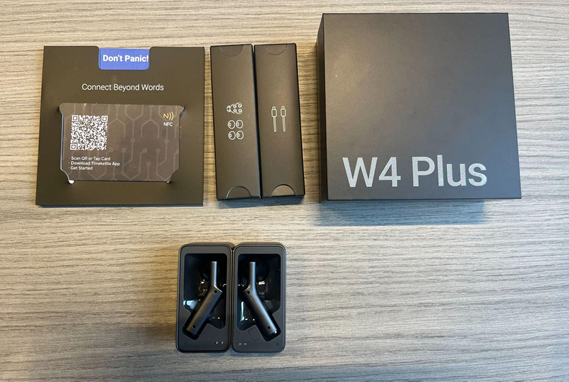
When I peeked under the hood, I discovered that the W4 Plus uses 12mm custom dynamic drivers, while each earbud contains two air-conduction microphones and one bone-conduction sensor. Also, there’s the VoiceFocus technology and dual microphones that further improve voice pickup in noisy environments.
Battery life is another important part of the hardware. According to my research, the earbuds provide more than 3 hours of continuous translation and up to 6 hours of music playback. The charging case extends this to 12 hours of translation or 18 hours of mixed audio playback. Overall, the earbuds need around 50 minutes to fully charge, while the case requires almost 1.5 hours via USB-C.
For connectivity, the W4 Plus uses Bluetooth 5.3 to connect to the Timekettle companion app and support its translation features. The app also lets users access offline language packs when an internet connection isn't available.
However, one thing you should keep in mind is that the tests revealed acceptable audio quality, but I didn’t notice especially strong noise cancellation. There are also no gesture controls or Find Device feature, and the charging case is a bit larger and heavier than a typical wireless-earbud case.
Timekettle W4 Plus AI Interpreter Earbuds: features
For real-time translation to be delivered well, Timekettle W4 Plus offers a rich suite of features. So, let’s see what you can expect.
Technical features
What I liked the most is that compared to the W4 Pro’s support for 42 languages and 95 accents, the W4 Plus offers translation in 54 languages and 108 accents. This means it covers more than 90% of the total population. On top of this, its cloud-based system handles real-time translation.
The earbuds use Bluetooth 5.3 to connect to the Timekettle app on iOS or Android smartphones. Furthermore, the Babel OS reduces perceived delays by predicting sentence endings and starting translated audio earlier. Hence, you can experience a minor delay of around 0.5–1.5 seconds.
Due to this, Timekettle W4 Plus is excellent for international meetings and cross-languages calls, where time is money. You can expect relatively decent translation speed.
Still, my tests showed that performance varies by mode. Face-to-face translation was generally smooth, while Voice Call and Multi-Media translation had more noticeable delays.
Housing and ergonomics
Unlike the open-ear W4 Pro, the W4 Plus has a semi-in-ear design that blocks more outside sound. Each earbud weighs just 5.7g and uses silicone ear fins to help keep it in place, which is why you will feel more comfortable during longer translation sessions.
Operation and functions
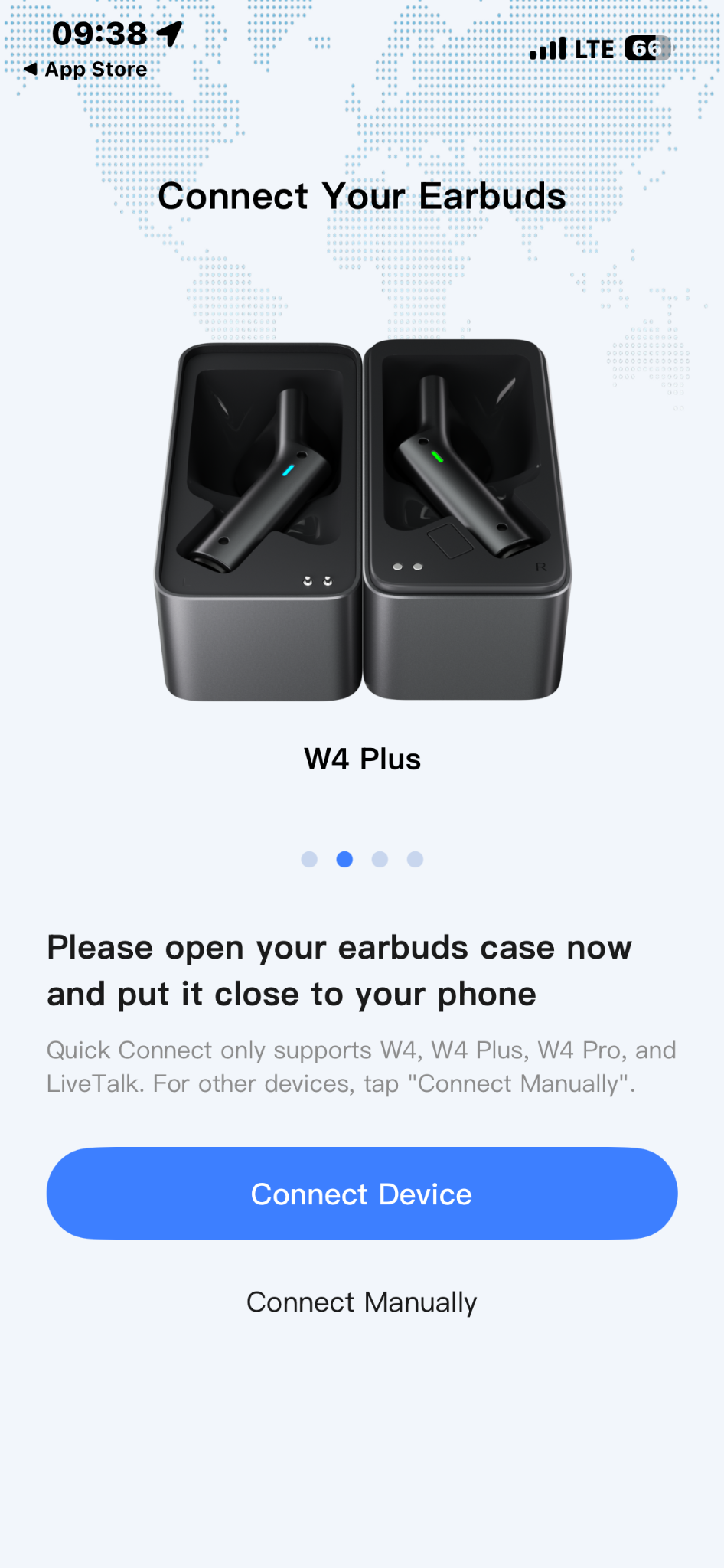
While Timekettle W4 Plus lacks gesture controls, it comes with a native app that you can download on any iOS or Android device. I found the download and setup straightforward, and the connection is also quick and simple. You just open the case and click the “Connect Device” button in the app.
The app itself is very easy to follow, with a clean interface that makes navigation effortless, as everything is organized into clearly defined sections, such as “Home”, “Discover”, “AI”, and “Me”.
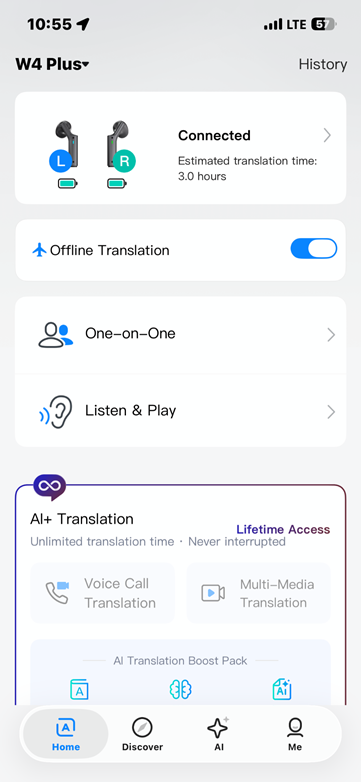
The only disadvantage I could find was the lack of an onboarding process, which I think would be useful. And I would like to see more settings and more customization options.
Language support
In addition to 54 languages and 108 accents, the earbuds support 13 offline language pairs. This lets you translate communications even without an internet connection after you download the relevant package.
However, offline support covers fewer language combinations than the online system. The focus is mostly on the following language pairs:
- Chinese ↔ English/Japanese/Korean/French/German/Spanish/Russian
- English ↔ Chinese/Japanese/Korean/French/German/Spanish/Russian
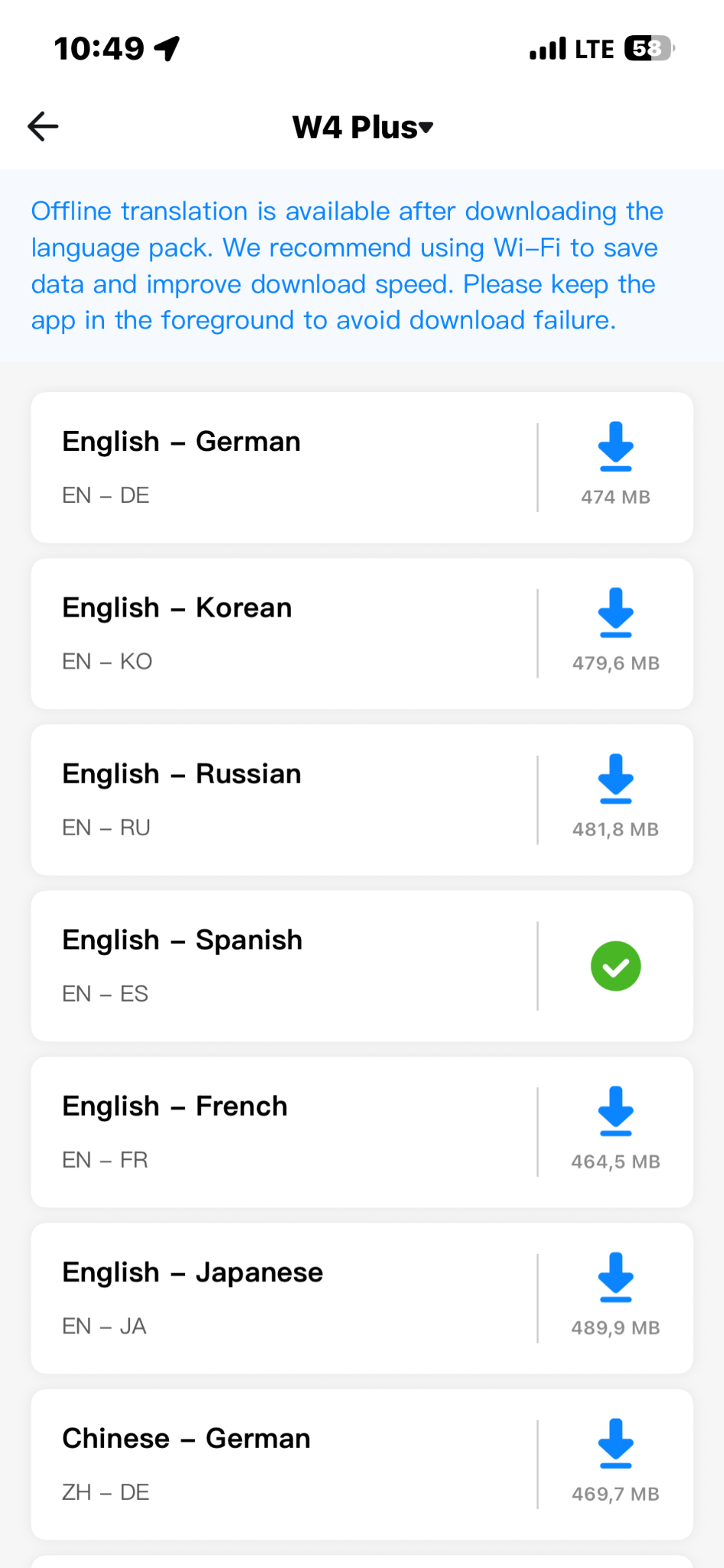
This comes in especially handy if you’re on a business trip, and you don’t have 24/7 internet connection. You can still get your job done without relying on unstable and unsafe networks.
Translation modes
What I especially like is that you can pick from the 4 different translation modes when using Timekettle W4 Plus:
- 1-on-1 Earbud Sharing. Two people can share a pair of earbuds for seamless, real-time, face-to-face bilingual conversations.
- On-Site/Private Listening. Translates spoken language in a room, like a lecture or meeting, into your ear, with the option to use the phone’s speaker for playback. However, this mode worked well in our Spanish-to-English test, but requires pauses between speech and playback.
- Foreign Call Translation. Provides real-time, 2-way translation for phone calls and video meetings across apps like Zoom and WhatsApp, as well as standard phone lines. I liked how functional this is for international calls and meetings, but my testing resulted in choppy audio and a slow start.
- Media Translation. Generates live translated subtitles and audio overlays for online videos, courses, and digital media. Based on my test, this mode successfully followed the plot of an English-to-Lithuanian Netflix video, but the translation lagged behind the video and lacked emotional touch.
So, whether you’re communicating with multilingual teams, having an international meeting or a call, attending a trade show, or anything else, the Timekettle W4 Plus features will help you communicate without worrying about the language barrier.
Additional features
In addition to core features, Timekettle W4 Plus offers extra tools for an even smoother interpretation and translation:
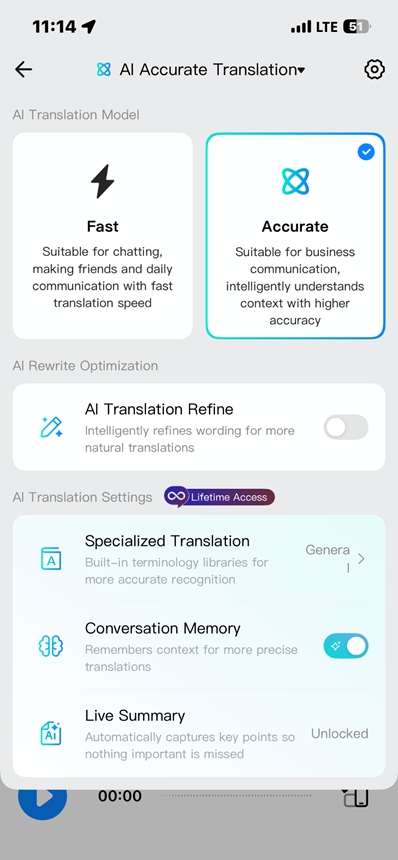
- Automated Meeting Summaries. Thanks to the AI Live Summary, the earbuds can generate key points and meeting notes from conversations. In my testing, the general summaries were useful, although the AI Minutes function did not work successfully.
- Specialized Terminology Support. This feature handles industry-specific terminology, while the Personal Dictionary and Personalized Glossary let you add specific names, brands, acronyms, or technical terms. This is particularly useful because the tests revealed that the earbuds struggled with unfamiliar names.
- Context Retention. Conversation Memory retains information from the conversation and uses the surrounding context to improve subsequent translations. This works alongside the AI’s contextual processing rather than just translating each sentence literally.
- AI Translation Refine. This was one of the standout features during my tests. With Refine enabled, translations were smoother, less repetitive, and more natural. However, the AI sometimes condensed the original speech and removed direct quotes. For example, the name “Cuitlahuatzin” was incorrectly translated as “Quila Watson.” With Refine disabled, the output kept more specific vocabulary but became repetitive, fragmented, and less natural.
How much do Timekettle W4 Plus AI Interpreter Earbuds cost?
Timekettle offers the W4 Plus at two different initial price points depending on how you prefer to pay for the software features:
- One-Time Purchase: Unlocks all advanced AI features, media translation, and call translation permanently with no recurring fees, making it a great option if you’re using the Timekettle W4 Plus every day.
- Subscription Version: Basic modes (1-on-1 and On-Site Listening) remain free forever, but advanced features (Call Translation, Media Translation, and AI summaries) require a monthly subscription after a 7-day free trial.
Here’s a brief overview of the pricing model:
| Version | Current price | Regular price | Included software features |
| One-time purchase | $379.00 | $399.00 | Permanently unlocks all standard and advanced AI features (including Media Translation and Call Translation) without requiring a recurring subscription. |
| Subscription version | $299.00 | $319.00 | Lower upfront cost. Basic translation modes remain free forever, but advanced AI/Call/Media features require a monthly subscription after a 7-day free trial. |
The app subscription costs $14.99/month, and provides unlimited access to all premium features. Regional pricing is automatically adjusted by the app store based on local exchange rates and taxes. Thus, you don’t need to make any manual calculations.
Ultimately, Timekettle offers 30-day returns and a 12-month warranty, so you can test the earbuds and see whether they’re right for your needs and preferences.
So, based on all of this, which W4 Plus version is best for business users? If you regularly use call translation and AI meeting summaries, the one-time purchase version at $379 may offer better long-term value.
That’s because it includes the advanced features without ongoing subscription fees, whereas the $299 Subscription Version requires a $14.99 monthly subscription for premium features after the 7-day free trial. The $80 upfront difference is equivalent to approximately 5.3 months of subscription fees.
If you expect to use these features regularly for longer than those 5 months, the one-time purchase option may be the more economical option. But if you only need basic face-to-face translation or expect to use premium features occasionally, the subscription version’s lower initial price may suit you better.
Timekettle W4 Plus Alternatives
Before I wrap up my detailed Timekettle W4 Plus review, I decided to put it head-to-head with some of the best alternatives and see how it compares. Here’s what I discovered:
| Timekettle W4 Plus: | Traditional translation devices (phone translation apps, handheld translator devices): | |
| Key advantages: | Hands-free experience and combination of face-to-face, call, meeting, and media translation, AI-refined translations, VoiceFocus for clearer voice pickup | Usually free or cheaper options, no requirement for dedicated hardware, some offer offline translation |
| Best for: | People who regularly communicate across languages (international meetings, cross-languages calls, business travel, trade shows, and communication with multilingual teams) | Occasional travelers and basic translation needs (short texts, signs, basic communication) |
Final verdict: are Timekettle W4 Plus AI Interpreter Earbuds worth it?
My in-depth review as a Cybernews expert shows that the Timekettle W4 Plus AI Interpreter Earbuds are worth it for professionals who regularly communicate across languages.
With support for 54 languages and 108 accents, they can help you with one-on-one business discussions, international meetings, trade shows, business trips, and everyday communication with international colleagues or clients.
The Personal Dictionary and Personalized Glossary also help you prepare industry-specific terminology, names, and acronyms in advance.
However, performance varies by mode. That said, face-to-face translation was generally smooth in my testing, while voice calls sometimes had choppy audio and noticeable delays. Multimedia translation also lagged behind the original content. Despite its noise-filtering technology, the earbuds may struggle in particularly noisy environments, and complex terminology can still cause inaccuracies.
For contract negotiations and other high-stakes discussions requiring word-for-word accuracy, I’d say that the W4 Plus should support, not replace professional interpretation. Then, make sure you verify all crucial details by yourself before making a decision. Overall, it is a practical translation device for businesses, if you understand its limitations.
FAQ
How accurate is the Timekettle W4 Plus translation?
Timekettle W4 Plus achieves over 95% accuracy for high-resource language pairs, whereas low-resource pairs drop to around 78%. Additionally, offline processing reduces accuracy when dealing with tonal complexities.
Can I use Timekettle W4 Plus offline?
Yes, you can use Timekettle W4 Plus offline. You can download 13 language pairs, focusing on English and Chinese to Japanese, Korean, French, German, Spanish, and Russian.
What’s the battery life?
The battery life of Timekettle W4 Plus is more than 3 hours of continuous translation at 50% volume, plus 6 hours of music playback.
Which languages are supported by Timekettle W4 Plus?
Timekettle W4 Plus supports 54 languages and 108 accents. The available languages are Albanian, Arabic, Azerbaijani, Bengali, Bulgarian, Burmese, Cantonese, Catalan, Chinese, Croatian, Czech, Danish, Dutch, English, Filipino, Finnish, French, German, Greek, Hebrew, Hindi, Hungarian, Icelandic, Indonesian, Italian, Japanese, Korean, Lao, Latvian, Lithuanian, Malay, Mongolian, Norwegian, Persian, Polish, Portuguese, Romanian, Russian, Serbian, Slovak, Slovenian, Spanish, Swahili, Swedish, Tamil, Telugu, Thai, Turkish, Ukrainian, Urdu, Uzbek, and Vietnamese.