Your devices get cold, too. How to protect them during winter season?
You may no longer need to rub your smartphone to revive it after being in cold weather, but it certainly doesn’t improve its battery life. What else should you know about carrying devices in winter?
Image by Cybernews

 Follow us
You may no longer need to rub your smartphone to revive it after being in cold weather, but it certainly doesn’t improve its battery life. What else should you know about carrying devices in winter?
- Cold weather can significantly impact the performance of smartphone batteries.
- Rapid temperature changes are more damaging than the cold itself, as moving a cold device into a warm environment can cause condensation that may harm internal components.
- Proper storage is crucial in winter. Devices should be kept in dry, heated spaces at a temperature of around 18–20°C (64–68°F) to prevent long-term damage and extend their lifespan.
- Battery care is especially important in winter, as charging takes longer in cold conditions, and overcharging accelerates battery wear. Short, controlled charging is better for maintaining battery health.
- Users can protect devices by insulating them in sleeves or bags, limiting background apps, avoiding overnight charging, and using slow or trickle chargers to preserve battery performance.
Key Takeaways by nexos.ai, reviewed by Cybernews staff.
Back in the day, when I owned an iPhone 7, which was released almost ten years ago, one of the problems I used to encounter was that my phone would often shut down in winter, especially if it wasn’t fully charged.
I wasn’t the only one who had to deal with that, which made me dread going for a longer walk or run, or being outside in general, because my phone would die on me in the middle of a call or while using applications like Maps or Spotify.
One way out of this technological misery was to get a newer phone model, so that’s what I did. Since then, I haven’t faced this issue.






While we no longer experience extreme colds (or at least not yet), recalling these times has made me wonder whether some consumers still have to deal with their phones shutting down in cold weather, why it happens, and what we can do about it.

It’s not the cold you should worry about, but changes in temperature
More phones these days may be considered resistant to cold weather. How? They include better batteries, better sealed components, and are designed to operate in lower temperatures.
Despite the updates, most electronic devices, especially smartphones, are powered by lithium-ion batteries, which are affected by cold weather, slowing their chemical reactions and reducing their effective capacity.
While this explains why I used to struggle using my iPhone outside, devices are also heavily affected by temperature changes.
Perhaps most of us have heard the advice to let our laptops, tablets, or even smartphones sit at room temperature for a bit before turning them on, after coming in from cold weather.
That is because “moisture is the biggest threat to our server hardware, and it is not the cold itself that is the problem,” notes Michael Pedrotti, the co-founder of GhostCap.
“When you take a cold piece of hardware like a laptop or console into a warmer room, rapid temperature changes create condensation, or simply stated, water forms directly on the motherboard. Water and active electronics are the fastest ways I know to completely destroy your equipment,” the expert explains, advising to leave your device for 30 minutes to an hour at room temperature before plugging it in.
During this time, the device reaches the same temperature that it is in, “allowing any internal moisture to evaporate without creating a short circuit when you turn it back on.”
Storing devices incorrectly may cost you in the long run
“When we complete IT audits, a recurring theme we see is schools storing around £100,000 worth of bulk hardware in an unheated, damp store rooms,” shared Mark Friend, who, together with Paresh Ghedia, is the director of Classroom 365, which provides IT support for schools, multi-academy trusts, and federations.
The experts shared their insights after working with institutions that use multiple devices simultaneously, such as schools with classrooms equipped with laptops and tablets for each student.
One of the main concerns that Friend and Ghedia had was how such electronics are stored, especially during colder months, and how it affects their lifespan.
Even though your devices aren’t outside anymore, the climate and the temperature indoors can also affect them, if it’s cold or damp. What to do in such a situation?
Ghedia shared that in this case, they “move technology according to the season.”
“The Department of Education in the United Kingdom recommends that your devices should not be stored in damp areas or areas that are prone to floods. [...] So what we do is when it's when it's sort of winter time in our schools, we specifically have designated areas.”
Such places can include breakout rooms or photocopier rooms.
The experts also shared that the best temperature for keeping your devices remains around 18 to 20°C (64.4 to 68°F).






It all comes down to keeping the battery alive
These insights, with many simply related to battery life, can also be applied to individual users.
Ghedia noted that during colder months, it takes twice as long to charge a device powered by a lithium battery compared to charging during warmer months.
The expert also reminded that overcharging your device doesn’t help its battery life. Keeping the device charged overnight can accelerate its battery aging because it maintains it in a high-voltage state and provokes chemical wear.
The experts have already tested this by charging 32 iPads or a bank of 16 laptops used in a classroom for just a few hours, rather than keeping them charged for a whole day.
“What we found is that not only has that complemented the battery life on those devices, but it also allowed the teacher in the classroom to be carried out with hardly any issues,” said Ghedia.
When asked about new battery life-extending features, such as Apple’s Adaptive Power Mode (APM), the expert noted that these are “fantastic” features, since they prevent devices from overcharging. However, these features aren’t so common, often limited to newer smartphones.
Expert advice: How to protect your device’s battery in winter?
The experts also shared some tips for everyday tech users. One of these tips is related to laptop owners.
“If you’re taking your device outside of your home into extreme conditions, then we'd recommend a heavy-duty kind of sleeve or case for your laptop to keep it at least warm,” Ghedia said, reminding not to overcharge your device during winter.
For smartphones and tablets, Friend recommends getting a trickle charger, which slowly delivers a low, steady current to a battery. This type of charging will help prolong battery life.
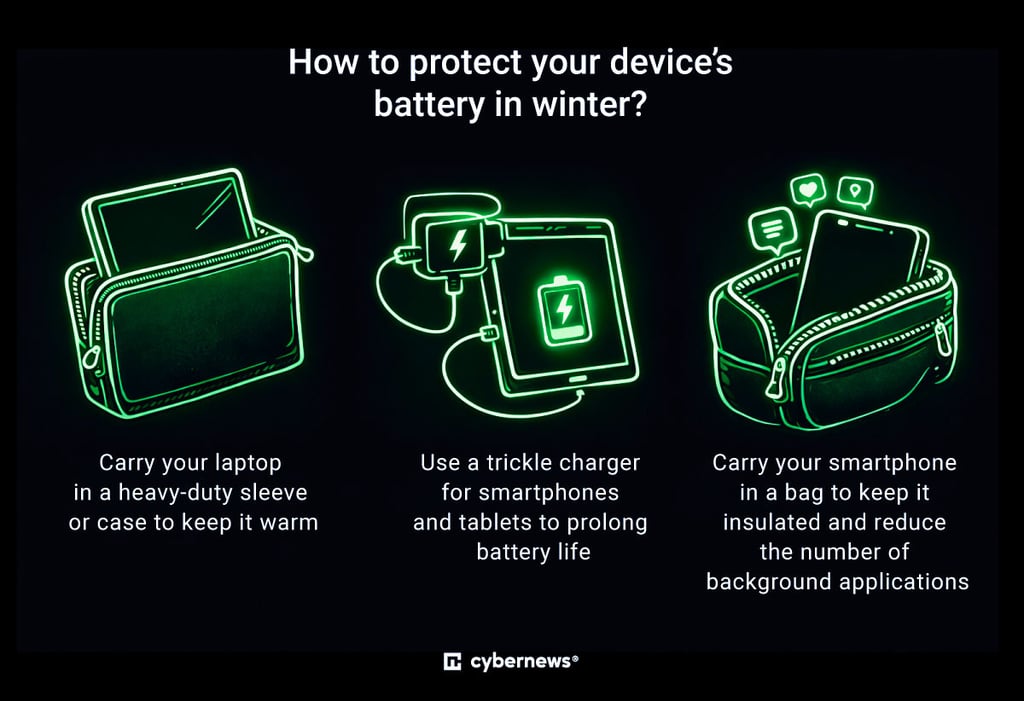
When it comes to smartphones, Ghedia notes that placing one in a pocket may not be very effective because it isn’t well insulated. Carrying it in a bag is usually a better option.
“There's no doubt that in the winter, even the best of phones, no matter how good their battery are, the performance of the battery will degrade,” Ghedia said, stating that it can degrade by around 20% due to phones also running applications in the background, “having to work twice as hard to function because of the coldness.”
Considering this, it’s also important to limit the number of background applications you have open on your smartphone.
Unlock more exclusive Cybernews content on YouTube.