ASUS ExpertBook Ultra Review (2026): The Business Laptop That Takes Security Seriously

 Follow us
Buying a premium business laptop has become much harder than you would expect. And that’s not because of a short supply; rather, the opposite. Many models promise all-day battery life, lightweight designs, AI features, and enterprise-grade security, yet many end up feeling remarkably similar once you start using them. No matter if you're presenting to a client, working from a café, or catching up on emails between meetings, it’s likely that you simply want a laptop that stays out of your way while keeping your work secure. That's exactly where the ASUS ExpertBook Ultra aims to stand out. Instead of focusing on a single headline feature, it combines an exceptionally lightweight design, a striking OLED display, and one of the most advanced hardware security platforms we've seen in a commercial laptop.
We tested the ASUS ExpertBook Ultra hands-on, putting it through various tasks and not showing it any mercy when it comes to performance and usability. And while it did prove to be a real powerhouse, it was probably the small details that truly changed the game. The laptop felt light enough to carry all day, the haptic touchpad worked without compromise, and the matte OLED display proved its worth even in bright environments. At the same time, the security features built directly into the hardware effectively reduced downtime and protected sensitive data without requiring any additional thought.
That said, no laptop is perfect. The webcam is simply good rather than exceptional, the RAM cannot be upgraded later, and the battery life, while still very solid, did not quite reach ASUS’s headline figures. Despite all that, after spending considerable time with the ASUS ExpertBook Ultra, we felt that it is one of the most well-rounded business laptops currently on the market. Especially if you’re looking for a professional, truly lightweight, and impeccably secure device for a small business.
Security – where the ExpertBook Ultra is in a class of its own
Security isn’t usually the most exciting topic when choosing a laptop. However, it’s one of the most important things in case something goes wrong. Things like a failed firmware update, a stolen laptop, ransomware, or even a hardware fault can cost you hours, if not days, of lost productivity.





And if you still don’t want to think about it too much, the ExpertBook Ultra will do it for you. We were very impressed by ASUS's approach, as instead of relying solely on antivirus software or operating system protections, it has built multiple layers of robust security directly into the hardware. It’s very likely you won’t even notice these features doing their job, but together they're running to protect both your data and the laptop itself, even before Windows starts loading. In our opinion, this is the exact spot where small businesses without dedicated IT departments may benefit the most.
Self-Healing BIOS – your laptop fixes itself so you don't have to
Most laptops use a single BIOS chip, which is the software that starts the computer. However, if that single piece of firmware becomes corrupted by a failed update, malware, or another issue, the laptop will not boot. Simply put, you won’t be able to use the device at all until it’s repaired.
So, instead of just one BIOS chip, the ExpertBook Ultra uses two. One of them runs the laptop during daily use, while the other one acts as a protected backup. If the primary firmware encounters issues, the laptop will automatically restore from the backup. ASUS calls this its Self-Healing BIOS, and it's built around the NIST SP 800-193 firmware resiliency standard. This is much more commonly associated with enterprise and government systems than with everyday business laptops. For users, this may mean much less downtime as there’s a high chance the laptop will actually heal itself before needing to see an IT specialist.
Microsoft Pluton – security that starts at the processor
Most modern computers use a security chip called a Trusted Platform Module (TPM). It stores sensitive information such as passwords, encryption keys, and logins. However, it also introduces a slight security weakness because the chip must communicate with the processor whenever authentication is required. Microsoft Pluton, which ASUS uses, changes this design by integrating the security processor directly into the CPU itself. This seemingly simple change removes that communication pathway, and with it, a potential point of attack.
We also saw this security-first approach in action during our testing. When we attempted to boot Linux from an external USB drive, the act immediately triggered Secure Boot protections. In turn, this prevented the operating system from loading until we intentionally changed several security settings. Even after disabling BitLocker and Secure Boot, we still couldn't access the contents of the internal NVMe drive, showing that multiple hardware-level security layers remained active even beyond Windows itself.
Post-quantum cryptography – preparing for tomorrow's threats
Buying a laptop knowing it may become outdated from a security standpoint in a couple of years is not something most users are willing to live with. ASUS clearly understands this by including post-quantum cryptography, which uses encryption designed to withstand future quantum-computing attacks.
Unlike the display or battery life, this isn't a feature you can easily see or test during everyday use. Quantum computers may still sound like something from the future, but many security experts believe it's worth preparing for them today. The concern is that encrypted data stolen today could potentially be decrypted years from now. ASUS is not waiting around for that to become the new reality. Instead, it aims to keep the ExpertBook Ultra secure for the four- to five-year lifespan many businesses expect from a premium laptop.
Secured-core PC Level 3 – protection below Windows
The ASUS ExpertBook Ultra comes with Microsoft Secured-core PC Level 3 certification. In short, it’s the highest security classification currently available for Microsoft business devices, meaning sensitive information is isolated from the operating system via hardware-level protections.
The laptop stores passwords, encryption keys, and biometric credentials in protected hardware environments. So, even if malware were able to compromise Windows, accessing that data becomes significantly more difficult because it's stored below the operating system rather than inside it. It's another example of ASUS focusing on preventive security rather than relying on antivirus software to solve every threat after the fact.
What this means for your business
Features like Self-Healing BIOS, Microsoft Pluton, and post-quantum cryptography may sound highly technical. However, when combined, they address very real concerns many businesses face.
First, they reduce dependence on IT support. Self-resolving firmware issues can mean less time waiting for repairs and more time being productive.
Second, they lower security risks. With multiple hardware-level security layers, such as Microsoft Pluton and Secured-core PC Level 3 accessing or compromising stored assets becomes significantly harder than with software protection alone. For businesses handling client information or financial records, that extra layer of security can help build trust and support stricter security requirements.
Finally, they help future-proof your investment. Most businesses expect a premium laptop to remain in service for 4 or 5 years, and the ExpertBook Ultra’s security platform, specifically its future-oriented post-quantum encryption, has been designed with that in mind.
How it compares to the competition
The market for high-end business laptops offers many choices, and the best one for you really depends on what you want from it. The ExpertBook Ultra is not trying to completely reinvent the category, but it does do things a little differently. First and foremost, the ExpertBook Ultra emphasizes portability and hardware-level security, unlike most other business laptops.
Compared to the Lenovo ThinkPad X1 Carbon Gen 12, ASUS has two serious advantages. First is portability. Even though our review unit weighed just over a kilogram, it still felt much lighter and compact than Lenovo’s flagship model. The second is the display. The ExpertBook Ultra's 3K Tandem OLED panel, with its matte finish and touchscreen option, is simply more pleasant to work on than the display options available on the ThinkPad. ASUS also goes much further with built-in security, including Self-Healing BIOS, Microsoft Pluton, and post-quantum cryptography, which Lenovo doesn't currently match. That said, the ThinkPad still maintains its iconic status for business reliability and what is probably the best keyboard available on any laptop. So, if your main priority is typing comfort, then not many others do it better than Lenovo.
Meanwhile, the Dell Pro 14 Premium focuses on collaboration features. For example, its Collaboration Touchpad offers dedicated Teams and Zoom controls, which can be very useful for users spending most of their workdays in meetings. However, at around 1.35 kg, it's noticeably heavier to carry around than the ExpertBook Ultra. Plus, it does not offer the same quality OLED display as ASUS or the same comprehensive security platform. So, if long-term security, better display quality, and portability are your key considerations, then the ExpertBook Ultra may be the better choice.
The HP EliteBook X G1i 14 is probably the closest competitor. HP’s Wolf Security platform is a well-regarded enterprise security stack, and the brand offers strong fleet management tools for IT teams overseeing multiple devices. So, businesses that have already invested in HP’s ecosystem may find the EliteBook to be the easier-to-integrate choice. However, the ExpertBook Ultra also comes with its own advantages. It’s lighter, has a noticeably better display, and includes hardware-level security features that are still quite rare even in premium business laptops.
All of these laptops are excellent choices and among the best business machines currently available. That said, compared to them, the ExpertBook Ultra still stands out with its combination of portability, near-perfect everyday usability, and one of the most comprehensive security packages in its class.
Design and build – small enough to forget you're carrying it
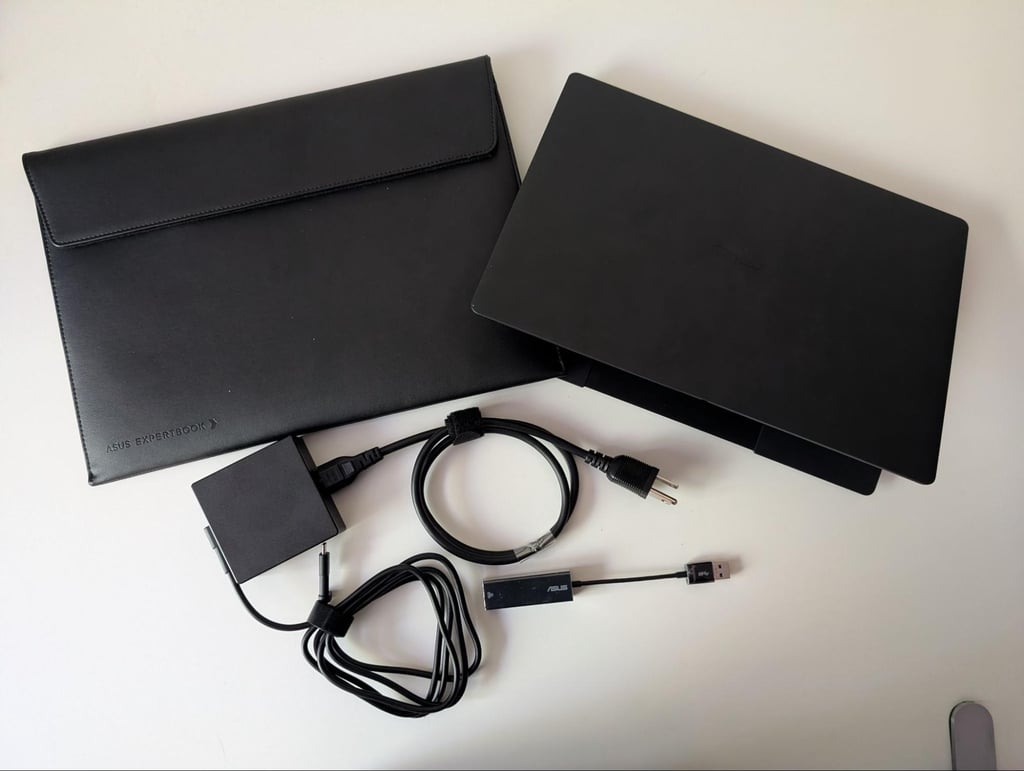
The first thing you'll notice about the ExpertBook Ultra is its weight, or rather, the lack of it. At 2.43 lbs (1.10 kg), it is remarkably light for a fully featured, 14-inch business laptop and noticeably easier to carry around than many enterprise models. Although the supplied 90W USB-C charger adds another 0.77 lbs (350 g) to the package, the set is still light enough to comfortably carry in a backpack.
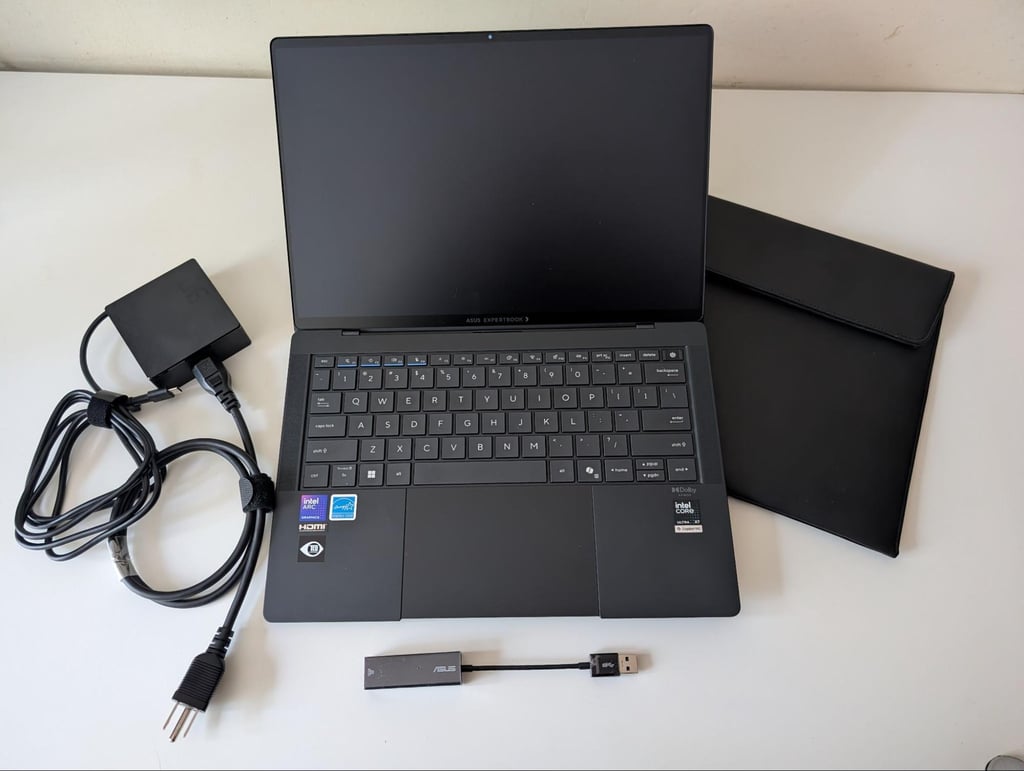
To put this into perspective, a typical work laptop weighs between 3.30 and 3.90 lbs (1.5 and 1.8 kg), which made the difference very noticeable when picking up the ExpertBook Ultra. Plus, the profile is built very slim at 0.42 to 0.64 inch (1.09 to 1.64 cm), and you can slide it into a bag like a slim notebook. The main factor contributing to this lightweight design is the magnesium-aluminum chassis, which reduces weight without sacrificing rigidity, so the laptop does not, by any means, feel fragile.
The body of the ExpertBook Ultra has an ASUS nano-ceramic coating, giving it a somewhat unusual texture that almost feels like running your fingers across a chalkboard. At first, the texture made us wonder about its wear resistance, but we found our doubts unfounded. Despite the grippier texture showing fingerprints from oily hands a little more readily than smoother metal surfaces, we couldn't scratch it with a fingernail, and ASUS itself rates the coating at 9H hardness for everyday scratch resistance.
Overall, we thought the laptop looked understated rather than flashy, and it fit easily into almost any backpack or briefcase. That said, it still looks appropriate in almost any setting – from a boardroom to a coffee shop.
Another thing we greatly appreciated was that ASUS seems to have resisted the recent trend of removing ports. Instead, we found two Thunderbolt 4 USB-C ports, two USB-A ports, HDMI 2.1, a 3.5mm audio jack, and even a USB-to-Ethernet adapter in the box. For anyone who regularly connects external displays, USB drives, or wired networks, this can make everyday life considerably easier, as you don’t necessarily need a docking station with this laptop.
Lastly, we found several other small but important touches that clearly reinforced the business focus. For example, while the physical webcam privacy shutter seems like a simple addition, we think it’s an important feature, particularly after years of remote work made people much more conscious of camera privacy. Additionally, ASUS has also replaced the traditional second Windows key with a dedicated Copilot button, making Microsoft's AI features easier to access. The keyboard also left a good impression. While one of our testers slightly preferred typing on a MacBook, the difference came down to personal preference rather than any obvious shortcomings.
Overall, our impressions of the ExpertBook Ultra's design and build quality were very positive. The keyboard felt premium, while the haptic touchpad was short of outstanding. Its responsiveness and tactile feedback reminded us of Apple's implementation, which is about as high a compliment as we can give a Windows laptop.
The Display – why OLED matters for everyday work
The ExpertBook Ultra’s display is easily one of its biggest strengths. On paper, the 14-inch 3K Tandem OLED touchscreen features a 120Hz refresh rate, a matte Gorilla Glass coating, and up to 1,400 nits of peak HDR brightness. The specifications are already impressive, but it all really came down to simply how pleasant it was to use the laptop throughout the day.
Typically, OLED laptops use glossy panels, but the ExpertBook Ultra features a matte finish that nicely reduces reflections without noticeably affecting image quality. In practice, this meant that we rarely had to adjust the screen angle to avoid glare even after several hours of working near bright windows. We think that’s a very solid advantage for day-to-day use, especially if you regularly work outside an office.
Color accuracy is another significant highlight. ASUS promises 100% coverage of both the sRGB and DCI-P3 color spaces, which should make the laptop suitable for much more than everyday office work, including creative tasks like photo editing, graphic design, and video production. During our own calibration tests, we confirmed full 100% sRGB coverage, while DCI-P3 coverage ranged from 97% to 99%. Given our use of a generic OLED correction profile rather than a display-specific calibration, we don’t believe the slight difference from ASUS's advertised figure is likely to have any weight in real-world use. For practical purposes, the display delivers excellent color reproduction and should satisfy most creative professionals.
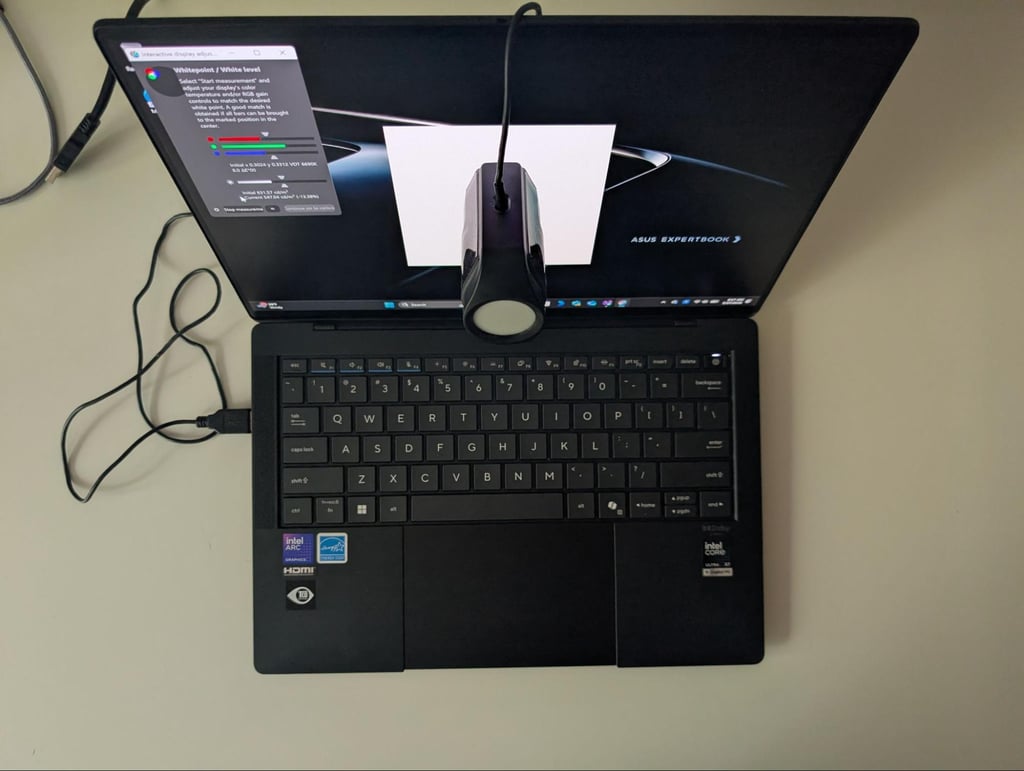
Additionally, the ExpertBook Ultra’s display appeared noticeably brighter than those of other laptops we tested, and we usually used only about half its maximum brightness. That leaves plenty of headroom for bright offices, meeting rooms with large windows, or even outdoor environments where many laptop displays may begin to struggle. We should note that newer MacBook Pro models have improved brightness, so this comparison shouldn't be taken as a universal win for Apple's latest hardware. However, it does demonstrate just how bright the ExpertBook Ultra's panel is.
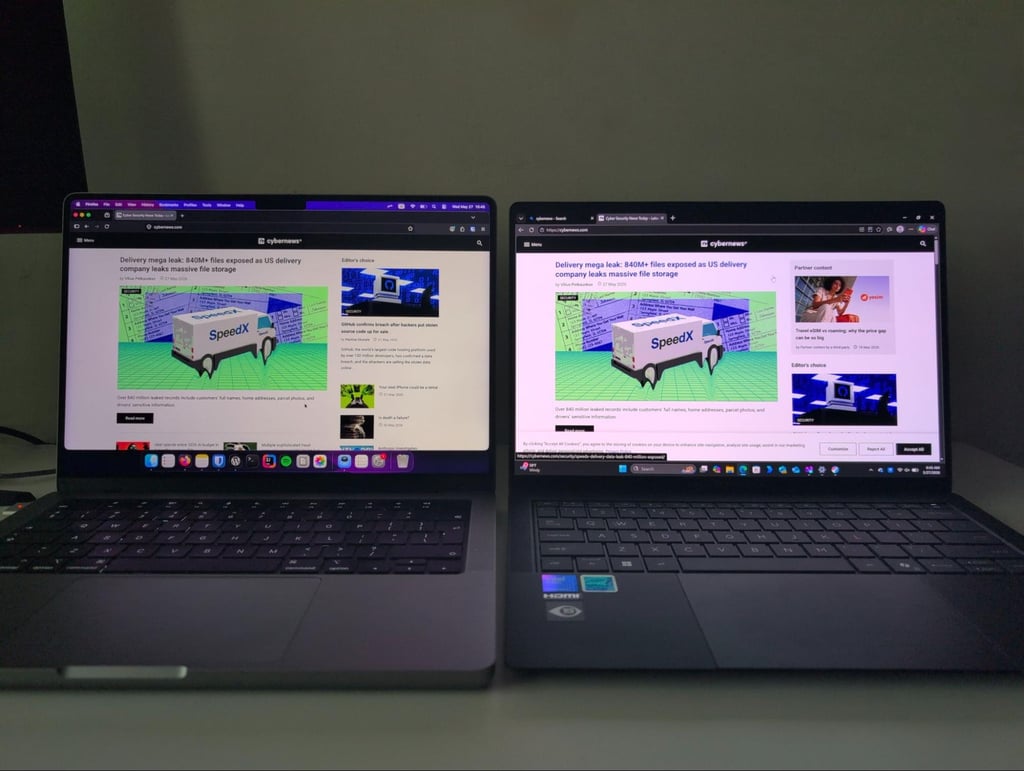
The 120Hz refresh rate may sound a bit like a feature aimed at gamers, but we think it benefits productivity just as much. For example, scrolling through long documents feels smoother, dragging windows across the desktop is more fluid, and even video calls appear slightly more responsive compared to standard 60Hz displays. It’s easily one of those features that makes the most difference once you actually start using the machine.
Another pleasant surprise was the touchscreen. At first, we even forgot it was there, as the matte finish looked so nice. And while we do not consider touchscreen support essential for a business laptop, it’s still a very welcome addition for users who annotate documents, sketch ideas, or work with creative apps.

The audio system also deserves a brief mention. The six-speaker Dolby Atmos setup won't replace a good pair of headphones or external speakers, but it performs well for its class. Voices during video calls are clear, and music sounds full enough for casual listening. Perhaps most importantly, the speakers can get surprisingly loud without any obvious distortion.
Performance – fast Enough to keep up with your workload
The ASUS ExpertBook Ultra is undeniably powerful, but instead of chasing benchmark records, it simply performs for tasks and workloads most business users actually face. This includes tens of open browser tabs, large spreadsheets, video conferencing, multitasking, creative applications, and AI-assisted workflows.
Our ExpertBook Ultra review unit was equipped with the Intel Core Ultra X7 processor, 32GB of LPDDR5x memory, and a 1TB NVMe SSD. Throughout testing, the laptop showed excellent responsiveness, including when we jumped between multiple applications, ran display calibration software, storage benchmarks, or performed longer stress tests. At no point did it feel sluggish or struggle to keep up with typical productivity workloads.
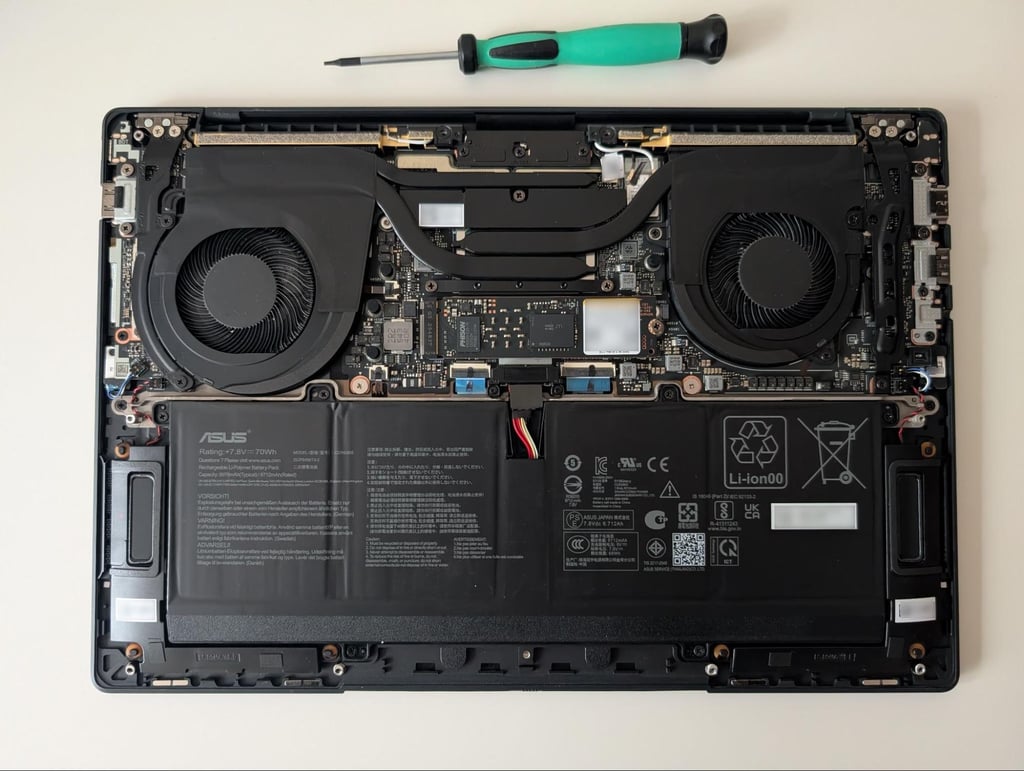
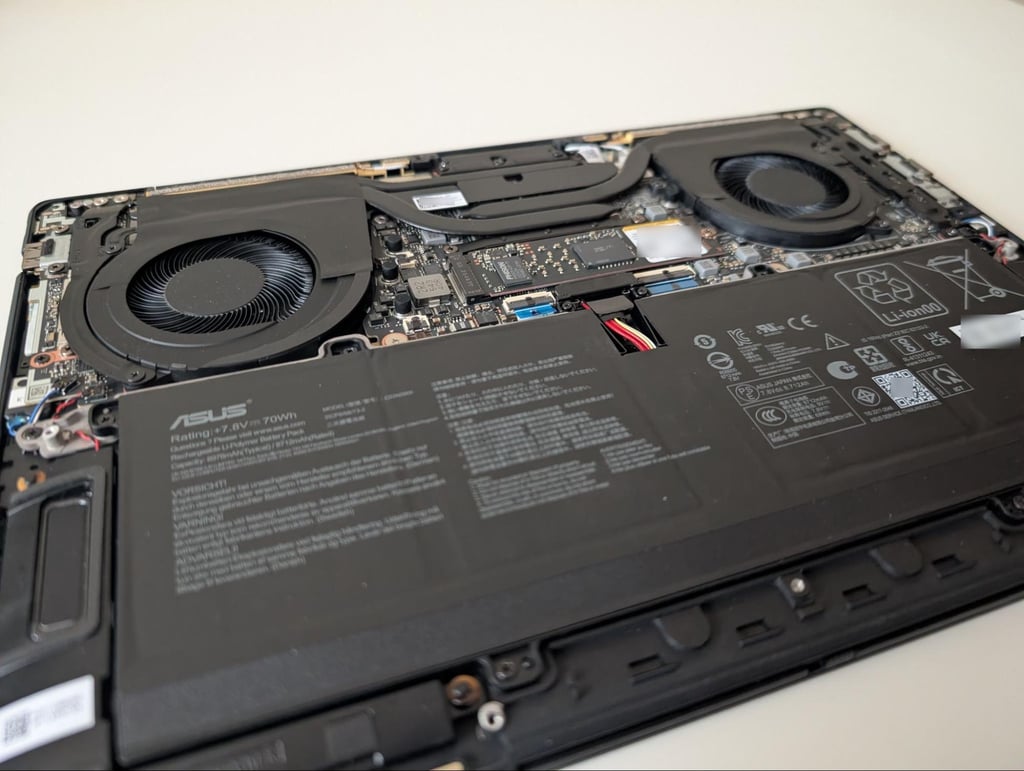
However, we found one memory configuration decision that’s worth mentioning. The 32GB of RAM is soldered directly to the motherboard, meaning it can’t be upgraded later. It may be a bit disappointing from a future-proofing perspective, but the 32GB RAM is already sufficient for almost all business workloads today. On a more positive note, ASUS kept the SSD user-replaceable, allowing owners to expand storage capacity if needed. We should also note that the laptop detected the chassis opening during our testing, and users planning hardware upgrades should carefully check how this may affect their warranty.
Inside the laptop, there’s a dual-fan cooling system connected by flattened copper heatpipes that distribute heat across the processor before exhausting it through both rear corners of the chassis. This is a fairly standard cooling system, and even with the laptop's slim profile, it proved effective during our use. At idle, CPU package temperatures remained around 96.8–98.6 F (36–37°C), with only brief spikes from routine Windows background activity. Even while running more demanding tasks, temperatures stayed well under control, and the chassis felt warm rather than uncomfortable to the touch or placed on a lap.
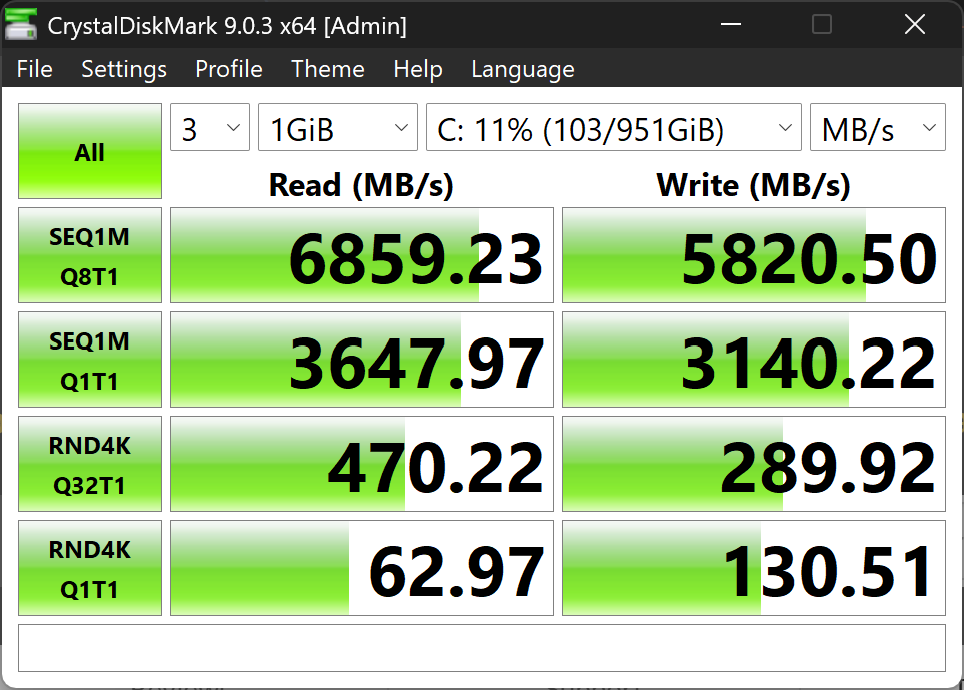
The SSD performed exactly as we'd hoped. Using CrystalDiskMark, the Micron NVMe SSD reached sequential read speeds of approximately 6.9 GB/s and write speeds of approximately 5.8 GB/s. While these numbers may not tell you much about actual performance on their own, they translate into noticeably faster file transfers, quicker application launches, and less waiting when working with large project files. The drive also cooled down rapidly after testing, dropping from around 147.2 F (64°C) back to the mid- 80s (30°C) within roughly a minute, suggesting the thermal design is doing its job effectively.
Next, we did some stress testing. During Cinebench 2024 testing, CPU temperatures typically stayed between 156 and 172.4 F (69°C and 78°C), briefly reaching 197 F (92°C) during heavier bursts before settling back down. FurMark testing produced a similar outcome, with the system reaching higher temperatures before intelligently reducing performance just enough to maintain comfortable operating temperatures.
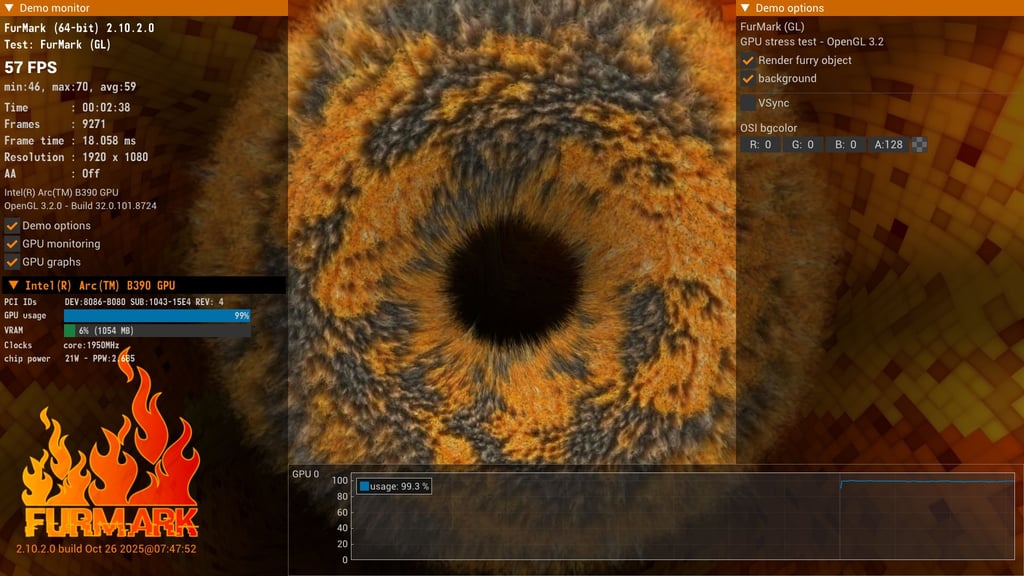
Importantly, we never heard excessive fan noise or felt the chassis become uncomfortably warm to the touch. It seems that instead of chasing headline benchmark scores, ASUS has prioritized long-term stability, efficiency, and comfortable operating temperatures. For us, that feels entirely appropriate for a laptop designed primarily around business productivity rather than gaming or content rendering.
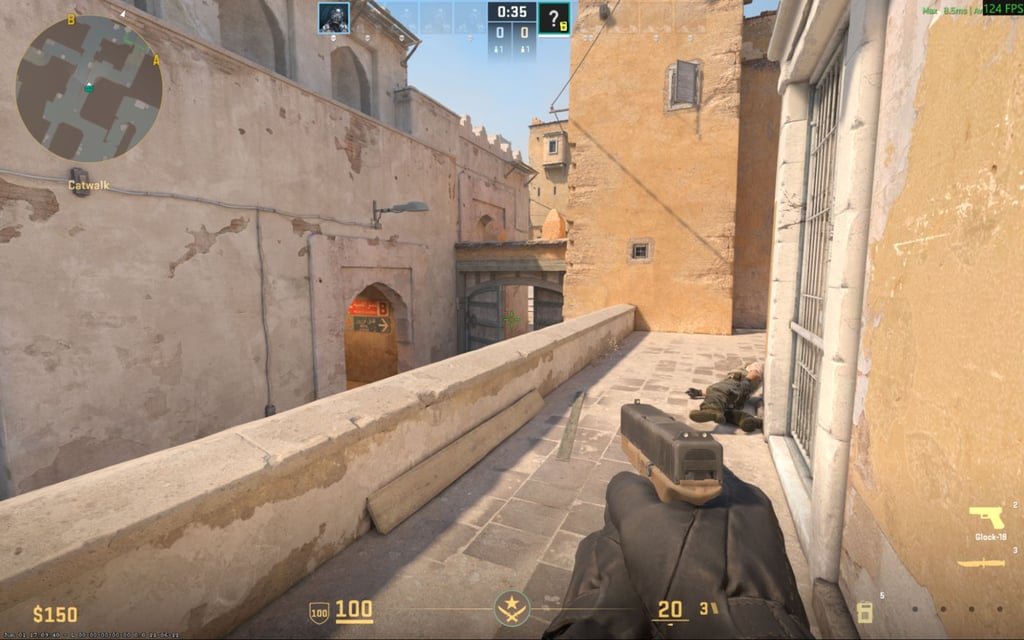
Gaming isn't the ExpertBook Ultra's intended purpose, but we couldn't resist running a few graphics benchmarks. Counter Strike 2 remained playable, averaging around 68 FPS at the native 2880×1800 resolution with high settings, while lowering the resolution to 1920×1200 increased performance to roughly 120 FPS. For broader graphics testing, we used 3DMark’s Steel Nomad benchmark, which produced results that accurately reflected the laptop’s integrated graphics. In other words, you can definitely use this machine for lighter games after work, but if you’re looking for a dedicated gaming laptop, you should look at other options.
The ExpertBook Ultra is also a Copilot+ PC with a dedicated Intel AI Boost NPU, which delivers up to 50 TOPS of AI performance. In practice, this means Windows AI features such as live captions, intelligent search, and on-device image generation can run locally instead of relying entirely on cloud processing. ASUS also includes AI ExpertMeet, which offers features like meeting transcription, translated subtitles, and AI-generated meeting summaries. However, we found that some of ASUS's more advanced AI features do require an internet connection, an ASUS account, and a paid subscription, but many everyday AI tools are available directly on the device. If you work with heavier creative or computational workloads, you may like to note that ASUS plans to launch a higher-performance Intel Core Ultra X9 configuration later in Q2/early Q3 2026.
Battery life – how far will it take you?
ASUS advertises up to 26 hours of battery life per charge. However, as with almost every laptop, that figure represents ideal conditions rather than a typical working day. During our testing, the ExpertBook Ultra delivered much more realistic, though still very respectable, results.
Our review unit came with a 70Wh Li-Polymer battery that actually measured slightly above its rated capacity. This usually means that the battery is fresh and with close to no wear. Under real-life conditions, such as heavy web browsing, document editing, music playback, varying brightness settings, and allowing the laptop to go into sleep mode, we got around 8 to 9.5 hours of active runtime. Windows itself estimated just under 10 hours of remaining battery life after installation, which almost precisely matched our own experience.
We should note that our very first day of testing also included setting up Windows, which consumed around 10% of the battery. But, even accounting for that initial overhead, we weren’t concerned about getting through a normal working day without a charger. Overall, if your usual workday consists of using a laptop for writing documents, replying to emails, and joining occasional video calls, you’ll find the ExpertBook Ultra’s battery lasts the whole day. However, if you do heavy multitasking or extensive video conferencing, you may want to keep that charger around just in case.
As we found out, recharging the laptop doesn't take much patience. ASUS claims the battery reaches 50% in around 30 minutes, and in our experience, we got to 53% from 5% in around 33 minutes using the included 90W USB-C charger. Fast charging may raise concerns for battery longevity, but modern charging systems are designed to limit stress by slowing down charging speeds as the battery fills. In turn, this manages temperatures nicely throughout the process, and we wouldn’t be too concerned about this charging behavior shortening the battery’s lifespan.
Another practical thing we noticed is ASUS's decision to use USB-C charging rather than a standard connector. That means you can charge the ExpertBook Ultra using compatible USB-C chargers or docking stations you may already own. It might seem like a small convenience, but we found it useful when traveling with multiple devices.
Pros and cons
- Exceptionally lightweight, around 2.43 lbs (1.10kg) for a 14-inch business laptop.
- Outstanding 3K Tandem OLED display with a matte finish that’s comfortable to use in bright environments and even outdoors.
- One of the most advanced hardware security feature sets in the consumer business laptop category, including Self-Healing BIOS, Microsoft Pluton, post-quantum cryptography, and Secured-core PC Level 3.
- Excellent haptic touchpad that rivals some of the best implementations we have used.
- Good port selection, including two Thunderbolt 4 ports, two USB-A ports, and an HDMI 2.1 port.
- Fast USB-C charging and healthy real-world battery life.
- Quiet, efficient cooling system that keeps temperatures well under control.
- Copilot+ PC with dedicated AI hardware ready for current and future Windows AI features.
- Memory is soldered, so the 32GB configuration cannot be upgraded later.
- The webcam is good, but doesn't stand out as much as the display or touchpad.
- No cellular/LTE option mentioned.
- At $3,599.99, it's firmly positioned at the premium end of the business laptop market.
Who should buy the ASUS ExpertBook Ultra?
In a nutshell, the ASUS ExpertBook Ultra is for professionals who want portability, security, and a smooth everyday working experience in one lightweight package. The laptop does not pretend to be a gaming machine or a mobile workstation, and we commend it for it.
Buy it if:
- You are a small business owner who travels frequently and wants one of the lightest premium business laptops available without compromising performance.
- Your business stores sensitive client information, financial records, or other confidential data, and you value the comprehensive hardware-level security this laptop provides.
- You don't have a dedicated IT department and appreciate features like the Self-Healing BIOS, which can reduce downtime caused by firmware issues.
- You spend long hours at your laptop and want an excellent matte OLED display that’s pleasant to use in bright offices or near windows.
- You want additional features for a more comfortable experience, such as a great haptic touchpad, a good port selection, and USB-C charging.
Consider alternatives if:
- Keyboard feel is your top priority. Lenovo's ThinkPad X1 Carbon still offers one of the best typing experiences in the business laptop category.
- You want the flexibility to upgrade your memory later, as the ExpertBook Ultra's 32GB of RAM is soldered.
- Your organization already relies heavily on another ecosystem and fleet management tools.
- You need dedicated graphics for demanding 3D rendering or modern AAA gaming.
Verdict – a new standard for business laptop security
The ASUS ExpertBook Ultra isn't the cheapest business laptop on the market, and it doesn't try to be. Instead of dropping the price, it delivers an excellent and consistent everyday experience. With a lightweight design, a superb matte OLED display, strong battery life, an outstanding haptic touchpad, and one of the most comprehensive hardware security platforms currently available, it really stands out from the competition.
Just as importantly, our testing showed that ASUS hasn't forgotten to include high-quality basics. Things like a well-functioning cooling system and a good port selection may seem like small details at first, but they make a noticeable difference over time. And although the battery didn't quite match ASUS's advertised figures, it still easily lasted through a full working day.
If you're looking for a premium business laptop that's expected to serve you well for years, the ExpertBook Ultra should take a place on your shortlist. Its combination of portability, an excellent display, and hardware-level security makes it one of the strongest current options.
Frequently Asked Questions
What is the ASUS ExpertBook Ultra?
The ASUS ExpertBook Ultra (B9406) is a premium 14-inch business laptop designed for professionals, freelancers, and small businesses. It combines a lightweight magnesium-aluminum chassis, a 3K Tandem OLED display, Intel Core Ultra processors, and one of the most advanced hardware security platforms in its class.
How much does the ASUS ExpertBook Ultra cost?
The ASUS ExpertBook Ultra with the Intel Core Ultra X7 processor launches at $3,599.99 through the ASUS Store. A higher-performance Intel Core Ultra X9 configuration is planned to arrive later in Q2 or early Q3 2026.
What makes the ASUS ExpertBook Ultra different from other business laptops?
The ExpertBook Ultra combines portability and performance with an unusually comprehensive hardware security platform. You’ll rarely find features such as Self-Healing BIOS, Microsoft Pluton, post-quantum cryptography, and Secured-core PC Level 3 combined together in a single commercial laptop.
Is the battery good enough for a full working day?
In our testing, yes. We got between 8 and 9.5 hours of mixed use, including web browsing, document editing, media playback, and general office work. Heavy workloads or maximum screen brightness can reduce those figures.
Can you upgrade the ASUS ExpertBook Ultra?
Partially. The SSD can be replaced if additional storage is needed, but the 32GB of memory is soldered to the motherboard and cannot be upgraded later.