Best VPN for Kirgo Casino in 2026
Our in-house cybersecurity experts and journalists, renowned for major reports like The Mother of All Breaches, conduct transparent, unbiased VPN testing and in-depth analysis.
With 750+ articles crafted based on real-world research, we empower readers to make informed purchasing decisions through first-hand expertise.

-
Kirgo Casino restricts users from several jurisdictions, including the United States, the United Kingdom, Australia, Brazil, Germany, France, Spain, and the Netherlands.
-
VPN can help you securely connect to a Kirgo location where the service is legally available, such as Canada or Ireland.
-
Based on my tests, NordVPN is the best VPN for Kirgo Casino because it offers fast connections, obfuscation features, and broad global server coverage.
Kirgo Casino is an online crypto casino and sportsbook, offering users slots, live dealer games, and sports betting. However, due to Kirgo’s licensing rules and local gambling regulations, the site restricts access from several jurisdictions, including all 50 US states and US territories.
If Kirgo Casino is not available in your country or state, you can use a VPN to change your IP address connect from a different location where Kirgo is available. This makes it appear as though you are accessing the site from an allowed location while helping protect your privacy and adding an extra layer of security while you browse.
Important: This article explains how VPNs can help protect your connection when accessing Kirgo Casino, particularly while traveling or using unfamiliar networks. Kirgo prohibits using VPNs to conceal your location or bypass regional restrictions. This is not a recommendation to use gambling services where online gambling is restricted or illegal. Always check Kirgo’s terms and the gambling laws in your country or region.
Compare our recommended Kirgo Casino VPNs
| VPN for Kirgo Casino | Rating | Why recommended | Servers | Servers in Kirgo legal countries | Price |
| 1. NordVPN |
| Best overall Kirgo Casino VPN with obfuscated servers | Thousands of servers in 225 locations | Canada (Calgary, Montreal, Toronto, Vancouver), Ireland (Dublin), Finland (Helsinki), Norway (Oslo), Iceland (Reykjavik), Malta (Valletta), Poland (Warsaw), and more | From $3.49/month |
| 2. Surfshark | Budget-friendly Kirgo Casino VPN with unlimited connections | 4,500+ servers in 100 countries | Canada (Montreal, Toronto, Vancouver), Ireland (Dublin), Finland (Helsinki), Norway (Oslo), Iceland (Reykjavik), Malta (Valletta), Poland (Warsaw, Gdansk), and more | From $2.49/month | |
| 3. Proton VPN | A highly secure VPN for Kirgo Casino access abroad | 21,200+ servers in 149 countries | Canada (Montreal, Toronto, Vancouver), Ireland (Dublin), Finland (Helsinki), Norway (Oslo), Iceland (Reykjavik), Malta (Valletta), Poland (Warsaw), and more | From $2.49/month | |
| 4. IPVanish | Affordable option with reliable Kirgo access | 3,400+ servers in 112 countries | Canada (Calgary, Montreal, Toronto, Vancouver), Ireland (Dublin), Finland (Helsinki), Norway (Oslo), Iceland (Reykjavik), Malta (Luqa), Poland (Warsaw), and more | From $2.19/month | |
| 5. Norton VPN | User-friendly Kirgo Casino VPN for casual bettors | Undisclosed number of servers in 65 countries | Canada (Calgary, Montreal, Toronto, Vancouver), Ireland (Dublin), Finland (Helsinki), Norway (Oslo), Iceland (Reykjavik), Poland (Warsaw), and more | From $3.33/month |




We spare no effort to test the products & their features. All information is gathered by our in-house research team & fact-checked by our team of experts. Discover the ins and outs of our testing procedures.
How to access Kirgo Casino in the US with a VPN

- Choose a reliable VPN for Kirgo Casino. I recommend NordVPN for its fast speeds and obfuscation features
- Download and install the VPN app
- Connect to a server where Kirgo isn’t restricted, such as Canada or Ireland
- Clear your browser cache and cookies, or use incognito mode
- Open Kirgo Casino and log in to your account
- Choose a game or sportsbook market and check whether access works
Best VPNs for Kirgo Casino – my detailed list
The best VPNs for Kirgo Casino should offer the same essentials as other betting VPNs: servers in non-restricted countries, stable connections, fast speeds, and privacy tools like obfuscation. Based on my research, NordVPN, Surfshark, Proton VPN, IPVanish, and Norton VPN are the strongest choices for accessing Kirgo Casino.
1. NordVPN – best VPN for Kirgo Casino overall

| Rating: | |
| Based in: | Panama |
| Servers in Kirgo non-restricted countries: | Canada, Ireland, Finland, Norway, Iceland, Malta, Poland, and more |
| Price: | $3.49/month with a 3-day free trial and a 30-day money-back guarantee |
NordVPN is my top VPN for Kirgo Casino because it combines reliable access, excellent speeds, broad server coverage, and strong privacy features. In my tests, servers in Canada, Ireland, Finland, and other non-restricted locations accessed Kirgo without server switching or geo-block errors, making NordVPN the most consistent of the five providers I tested.
| NordVPN server location | Accessed Kirgo Casino? | Download speed | Notes |
| Montreal, Canada | ✅ Yes | 177Mbps | Fastest result |
| Dublin, Ireland | ✅ Yes | 174Mbps | Fast |
| Helsinki, Finland | ✅ Yes | 169Mbps | Stable |
| Oslo, Norway | ✅ Yes | 172Mbps | Fast |
| Reykjavik, Iceland | ✅ Yes | 166Mbps | Slowest result |
| Valletta, Malta | ✅ Yes | 173Mbps | Fast |
| Warsaw, Poland | ✅ Yes | 176Mbps | Very fast |
Canada was the only tested country where NordVPN offered several city-level server options. I tested the Montreal server, while Calgary, Toronto, and Vancouver are also available. NordVPN achieved a 100% Kirgo access rate across all 7 tested countries. Using the NordLynx protocol, it averaged 173Mbps from my 182Mbps baseline, retaining around 95% of the original download speed – the best result in my tests. In practice, I noticed no meaningful slowdown while using Kirgo across the tested locations.
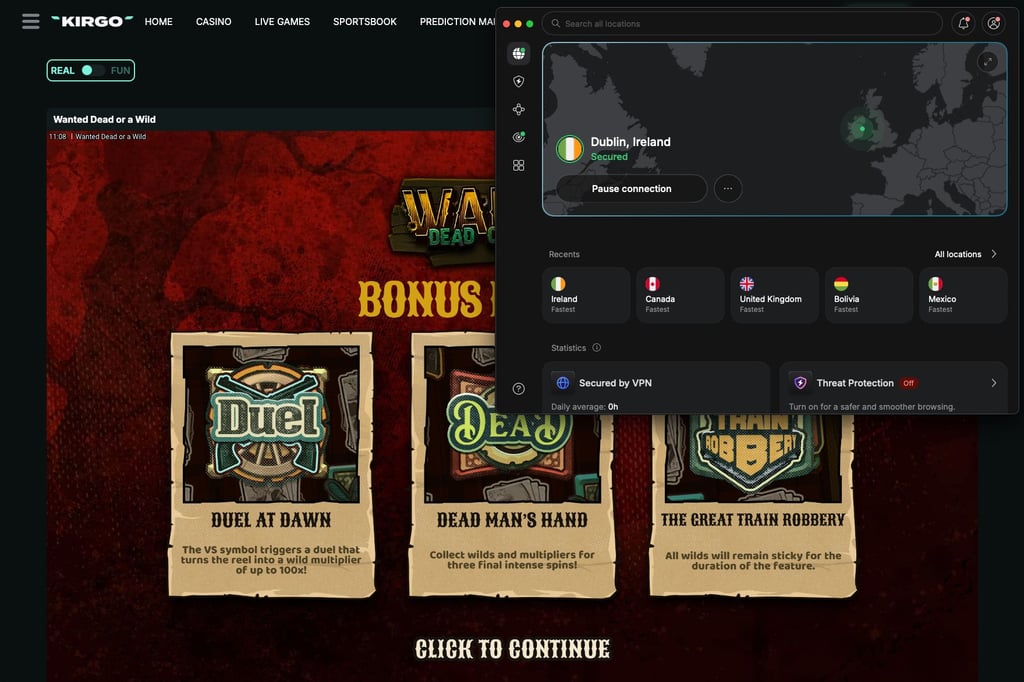
During leak testing, NordVPN exposed no IP, DNS, or WebRTC data. Its kill switch helps prevent accidental IP exposure if the connection drops. Since Kirgo uses VPN and proxy detection, NordWhisper and obfuscated servers also provide alternative connection options if standard VPN traffic is detected.
Compared with Surfshark, NordVPN delivered faster and more consistent speeds. That makes it my best Kirgo Casino VPN at $3.49/month, with a 3-day free trial on Android and a 30-day money-back guarantee for risk-free testing.
2. Surfshark – best Kirgo VPN for multiple devices

| Rating: | |
| Based in: | Netherlands |
| Servers in Kirgo non-restricted countries: | Canada, Ireland, Finland, Norway, Iceland, Malta, Poland, and more |
| Price: | $2.49/month with a 7-day free trial and a 30-day money-back guarantee |
Surfshark is a strong VPN for Kirgo Casino, particularly if you want to use the VPN across multiple devices. It accessed Kirgo through every country I tested, while its 4,500+ servers in 100 countries provide plenty of alternative locations. Unlike NordVPN, Surfshark also supports unlimited simultaneous connections.
| Surfshark server location | Accessed Kirgo Casino? | Download speed | Notes |
| Montreal, Canada | ✅ Yes | 171Mbps | Fastest result |
| Dublin, Ireland | ✅ Yes | 163Mbps | Stable |
| Helsinki, Finland | ✅ Yes | 163Mbps | Stable |
| Oslo, Norway | ✅ Yes | 170Mbps | Fast |
| Reykjavik, Iceland | ✅ Yes | 140Mbps | Largest speed drop |
| Valletta, Malta | ✅ Yes | 165Mbps | Stable |
| Warsaw, Poland | ✅ Yes | 169Mbps | Stable |
Surfshark reached Kirgo successfully in 7 out of 7 tested countries, giving it a 100% access rate. For more location flexibility, Surfshark offers Canadian servers in Montreal, Toronto, and Vancouver, while Poland includes Warsaw and Gdansk. In speed tests using WireGuard, it averaged 163Mbps, retaining around 90% of my 182Mbps baseline. Iceland was noticeably slower at 140Mbps, but Kirgo remained responsive and worked without interruptions.
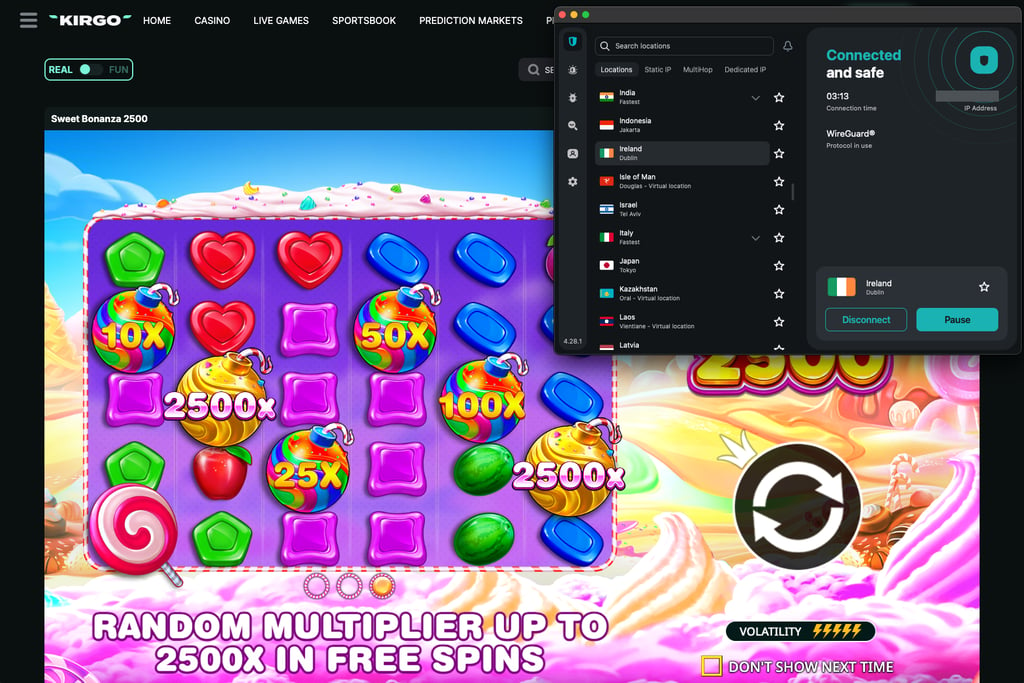
During my leak tests, Surfshark exposed no IP, DNS, or WebRTC data. I also kept the kill switch enabled throughout testing to reduce the risk of my real IP address being exposed if the VPN connection dropped. One minor drawback was that the app sometimes spent a little longer checking server options automatically, although I never had to switch servers manually.
Surfshark starts at $2.49/month and includes a 7-day free trial on up to 3 devices, plus a 30-day money-back guarantee, making it easy to test before committing long-term. While Surfshark was slower than NordVPN in my tests, its unlimited simultaneous connections make it the more flexible choice for using a VPN across several devices.
3. Proton VPN – privacy-focused VPN for Kirgo Casino

| Rating: | |
| Based in: | Switzerland |
| Servers in Kirgo non-restricted countries: | Canada, Ireland, Finland, Norway, Iceland, Malta, Poland, and more |
| Price: | $2.49/month with a free version and a 30-day money-back guarantee |
Proton VPN is a privacy-focused choice for Kirgo Casino that also performed exceptionally well in my speed tests. It accessed Kirgo from every selected country and came close to NordVPN’s overall performance. Its paid network spans 21,200+ servers across 149 countries, giving plenty of location options for server switching when needed.
| Proton VPN server location | Accessed Kirgo Casino? | Download speed | Notes |
| Montreal, Canada | ✅ Yes | 172Mbps | Fast |
| Dublin, Ireland | ✅ Yes | 169Mbps | Stable |
| Helsinki, Finland | ✅ Yes | 168Mbps | Stable |
| Oslo, Norway | ✅ Yes | 177Mbps | Very fast |
| Reykjavik, Iceland | ✅ Yes | 173Mbps | Fast |
| Valletta, Malta | ✅ Yes | 165Mbps | Slowest result |
| Warsaw, Poland | ✅ Yes | 178Mbps | Fastest result |
Proton VPN also achieved a 100% Kirgo access rate across all 7 tested countries. Using WireGuard, I recorded an average download speed of 172Mbps, retaining about 94% of my 182Mbps baseline. That put Proton VPN ahead of Surfshark on speed and only slightly behind NordVPN, with no noticeable slowdown while using Kirgo.

Privacy performance was equally solid. I detected no IP, DNS, or WebRTC leaks during testing, while the kill switch remained enabled to reduce the risk of exposing my real IP if the connection dropped. A few connections made Kirgo take slightly longer to load, but I encountered no blocks or server-switching issues.
Proton VPN also stands out for its free plan, which has no data caps and covers 10 countries. These include Canada, Norway, and Poland, where Kirgo isn’t explicitly restricted. However, server selection is automatic, and you can only use the free plan on one device at a time.
Overall, Proton VPN is a fast and privacy-focused Kirgo Casino VPN with a free plan, while its paid subscriptions start from $2.49/month and come with a 30-day money-back guarantee.
4. IPVanish – affordable VPN for Kirgo Casino

| Rating: | |
| Based in: | United States |
| Servers in Kirgo non-restricted countries: | Canada, Ireland, Finland, Norway, Iceland, Malta, Poland, and more |
| Price: | $2.19/month + 7-day free trial on Android and iOS, and 30-day money-back guarantee |
IPVanish is a capable VPN for Kirgo Casino if keeping subscription costs down is your main priority. It accessed Kirgo in every country I tested and allows unlimited simultaneous connections. However, compared with NordVPN and Proton VPN, its performance varied more between locations, particularly in Canada and Iceland.
| IPVanish server location | Accessed Kirgo Casino? | Download speed | Notes |
| Montreal, Canada | ✅ Yes | 154Mbps | Noticeable speed drop |
| Dublin, Ireland | ✅ Yes | 172Mbps | Fastest result |
| Helsinki, Finland | ✅ Yes | 166Mbps | Stable |
| Oslo, Norway | ✅ Yes | 166Mbps | Stable |
| Reykjavik, Iceland | ✅ Yes | 143Mbps | Slowest result |
| Luqa, Malta | ✅ Yes | 170Mbps | Fast |
| Warsaw, Poland | ✅ Yes | 167Mbps | Stable |
I successfully accessed Kirgo from all 7 tested countries with IPVanish, resulting in a 100% success rate. WireGuard delivered an average of 162Mbps, or around 89% of my 182Mbps baseline. Ireland and Malta came closest to my regular connection speed, while Iceland dropped to 143Mbps. Despite that difference, Kirgo still worked without noticeable interruptions.
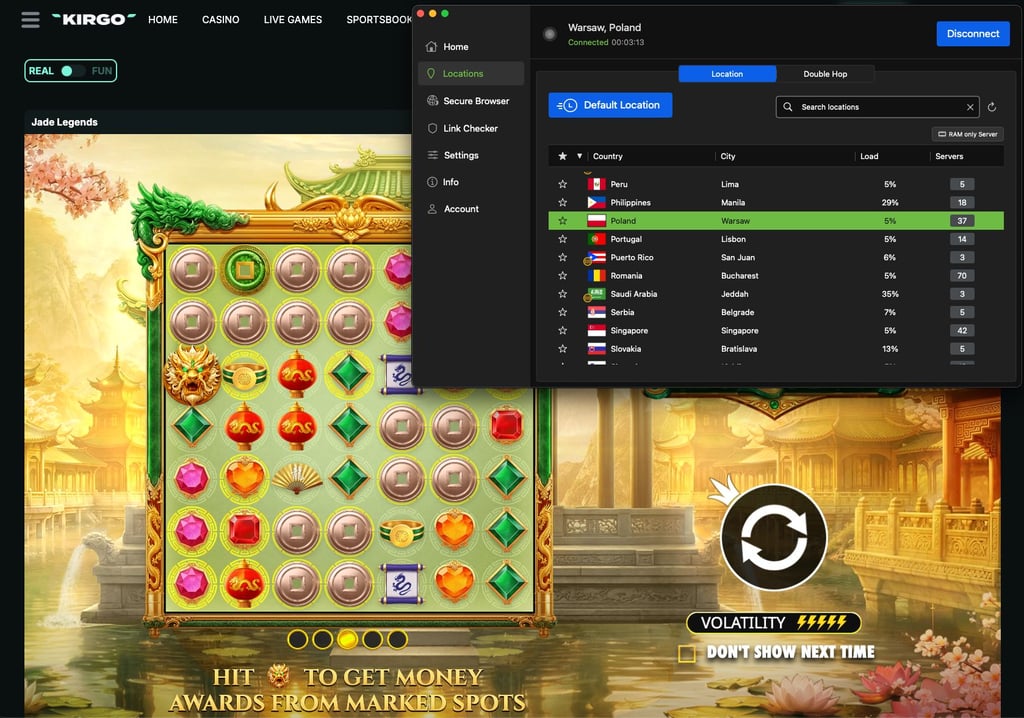
Connection setup was less consistent than with the higher-ranked providers. A few servers took longer to establish a connection, although once connected, I didn’t encounter geo-block errors or need to switch locations. Additionally, IPVanish passed my IP, DNS, and WebRTC leak checks. I kept its kill switch active during testing so my regular IP wouldn’t be exposed if the VPN connection unexpectedly dropped.
Where IPVanish really has an advantage is price. It was slower than Proton VPN and less consistent than NordVPN, but it costs less and still accessed every Kirgo location I tested. IPVanish is a solid low-cost VPN for Kirgo starting at $2.19/month, with a 7-day free trial on Android and iOS, and a 30-day money-back guarantee on qualifying long-term plans.
5. Norton VPN – simple Kirgo VPN with decent performance

| Rating: | |
| Based in: | United States |
| Servers in Kirgo non-restricted countries: | Canada, Ireland, Finland, Norway, Iceland, Poland, and more |
| Price: | $3.33/month + 30-day free trial and 60-day money-back guarantee |
Norton VPN is a straightforward VPN for Kirgo Casino that ultimately worked in every country I tested. However, it was less consistent than the higher-ranked providers: the Iceland server triggered Kirgo’s “Wrong region?” warning and required an IP switch. It also delivered the slowest average speeds of the five VPNs in my tests.
| Norton VPN server location | Accessed Kirgo Casino? | Download speed | Notes |
| Montreal, Canada | ✅ Yes | 160Mbps | Stable |
| Dublin, Ireland | ✅ Yes | 160Mbps | Stable |
| Helsinki, Finland | ✅ Yes | 157Mbps | Moderate slowdown |
| Oslo, Norway | ✅ Yes | 163Mbps | Stable |
| Reykjavik, Iceland | ✅ Yes | 147Mbps | Slowest result |
| Warsaw, Poland | ✅ Yes | 164Mbps | Fastest result |
Norton VPN was the only tested provider without a server location in Malta, so I tested it across 6 countries instead of 7. Norton VPN eventually accessed Kirgo in all 6 tested countries, giving it a 100% success rate across the tested locations. Despite the initial detection issue, switching servers resolved the problem, and I encountered no further access errors.
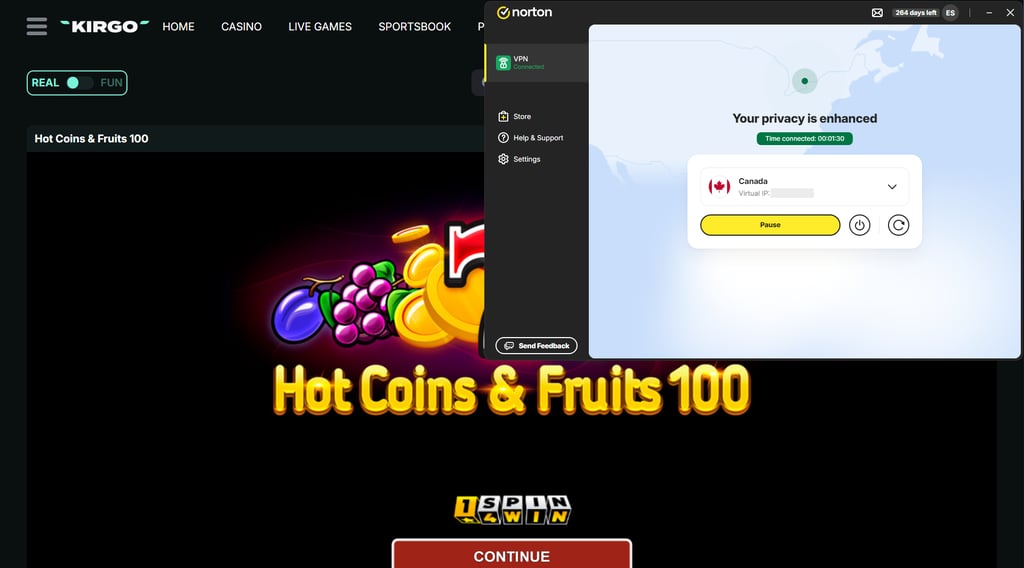
Speed was another weaker point. Norton averaged 158Mbps, retaining around 87% of my 182Mbps baseline. That was slower than IPVanish and considerably behind NordVPN and Proton VPN, although Kirgo still worked without noticeable interruptions.
On the security side, Norton passed my IP, DNS, and WebRTC leak checks. Its kill switch also helps prevent your regular IP from appearing if the VPN disconnects unexpectedly.
Norton VPN is a usable Kirgo Casino VPN starting at $3.33/month, with a 30-day free trial and a 60-day money-back guarantee. However, its slower speeds and the fact that one server was detected make it less reliable than the four providers above.
Can I use a free VPN with Kirgo Casino?
Finding a reliable free Kirgo Casino VPN can be difficult. Free VPNs usually offer fewer server locations and less control over which region you connect to. Additionally, sites like Kirgo use VPN detection systems. As a result, free VPNs can get blocked quickly because their small IP pools are shared between many users and often lack obfuscation features.
That said, Proton VPN is one of the better free VPNs for Kirgo, with its free plan covering 10 countries, including Canada, where Kirgo isn’t explicitly restricted. However, Proton VPN’s free plan automatically selects your server location and limits you to one device at a time. While I had to reconnect a few times to finally connect to Canada, it eventually did work.
Instead of relying on a free VPN for Kirgo Casino, I recommend choosing NordVPN or Surfshark. Both provide much broader server coverage and come with a 30-day money-back guarantee, so you can test the full paid service and request a refund if it doesn’t suit your needs.
Where is Kirgo legal?
Kirgo doesn’t publish a complete list of countries where the platform is legally authorized to operate. Instead, similarly to sites like Rainbet and Roobet, Kirgo notes in its terms the jurisdictions where access is explicitly restricted. These include the United States and its territories, the United Kingdom, Australia, Austria, France and its territories, Germany, the Netherlands and its territories, Spain, and the Union of the Comoros. Countries included on the FATF blacklist, such as Iran, Myanmar, and North Korea, are also prohibited.
In the US, Kirgo Casino is unavailable in all 50 states and US territories, with no state-level exceptions. Additionally, unlike state-regulated sportsbooks, Kirgo doesn’t offer separate US platforms or state-specific versions. As a result, users in states like California, Texas, Florida, New York, and others can’t access Kirgo and its products under its current rules.
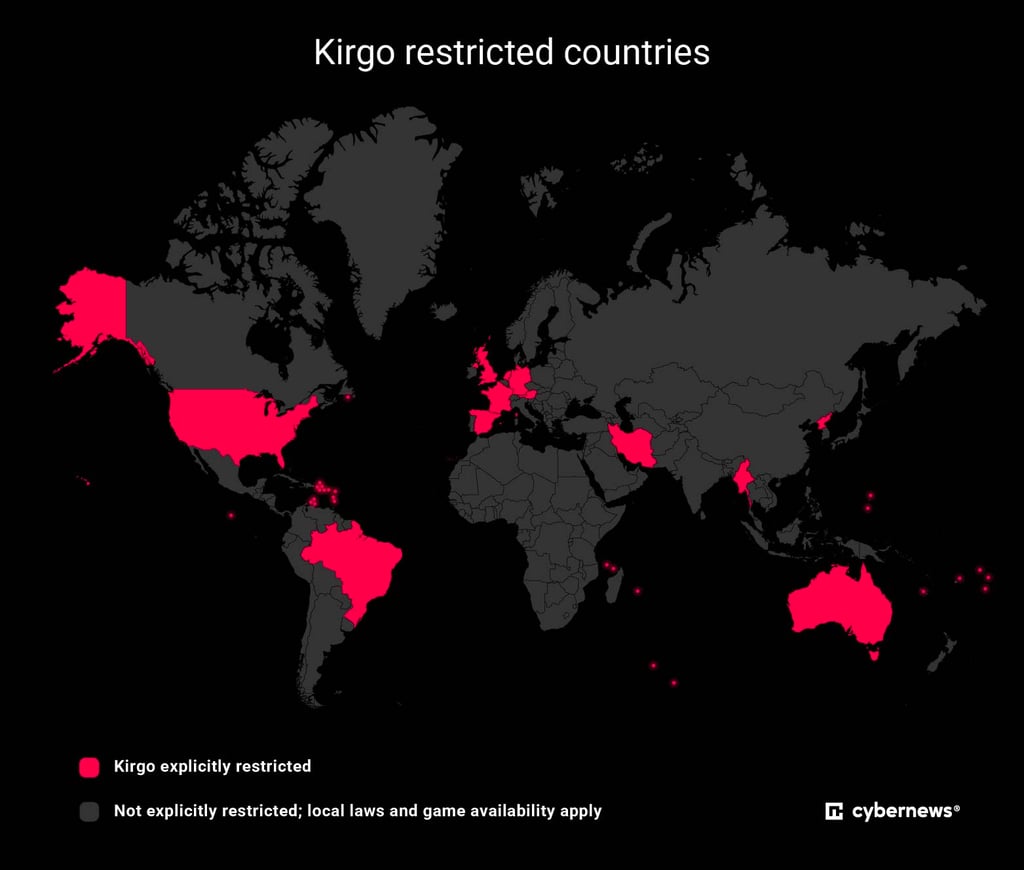
A VPN can give you an IP address from a country where Kirgo is available, which may let you access the site from a restricted location.
While a VPN by itself is generally legal, using one does not automatically override local gambling laws or Kirgo’s rules. Kirgo prohibits using VPNs to conceal your location or bypass regional restrictions, so always check local regulations and Kirgo’s terms before accessing the platform. Cybernews does not encourage bypassing gambling laws or platform restrictions.
How to use Kirgo Casino in a restricted state: detailed guide
Kirgo restricts access from every US state, so users in the US can’t access the platform normally. However, with a VPN for geo-blocking, you can change your IP address to a non-restricted country. Here’s how to do it:
Step 1. Subscribe to a VPN that works with Kirgo
Since Kirgo is unavailable throughout the US, you’ll need a reliable casino VPN with plenty of servers in countries where Kirgo isn’t restricted. In my testing, NordVPN accessed Kirgo through servers in Canada, Ireland, and Finland, while its fast speeds, broad coverage, and obfuscation features made it my top overall choice.

Step 2. Download and install the VPN
After subscribing, download the VPN app from the provider’s official website or your device’s app store. If you’re using NordVPN, you can get it from www.nordvpn.com. Then install the app, open it, and log in with your account details. Always use official sources to avoid modified or unsafe apps.
Step 3. Connect to a server where Kirgo isn’t restricted
Once logged in, choose a VPN server in a country where Kirgo isn’t restricted. In my testing, servers in Canada, Ireland, Finland, Norway, Iceland, Malta, and Poland worked with the site. After connecting, your IP address will change to match the VPN server location, making your traffic appear to come from that country.
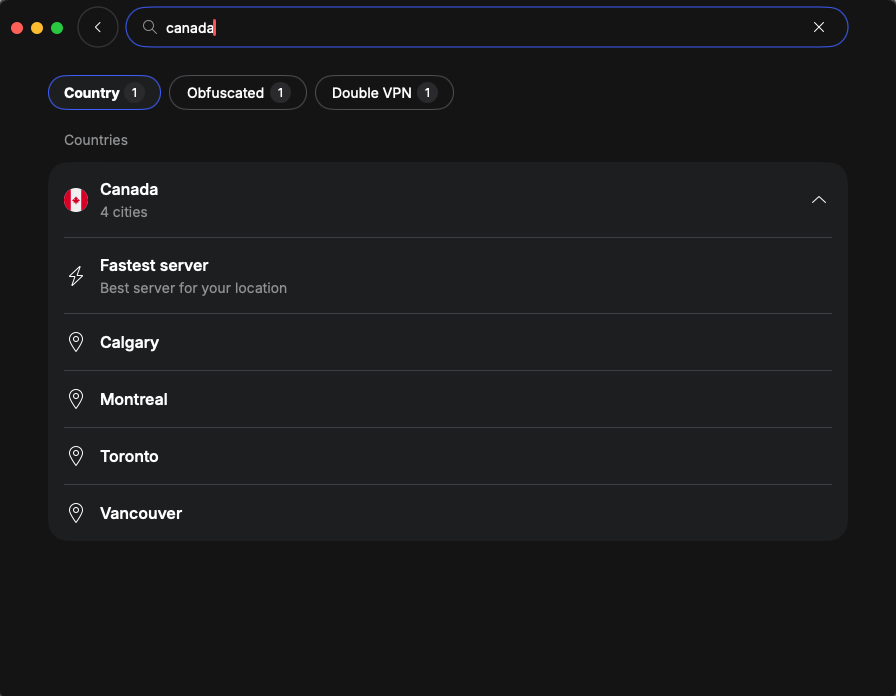
Step 4. Open Kirgo Casino and check access
With the VPN connection active, go to Kirgo Casino and log in as usual. If you run into an error, switch to another server in the same country or clear your browser cookies before trying again. Avoid changing server locations repeatedly during the same session, as sudden IP changes can trigger additional checks.
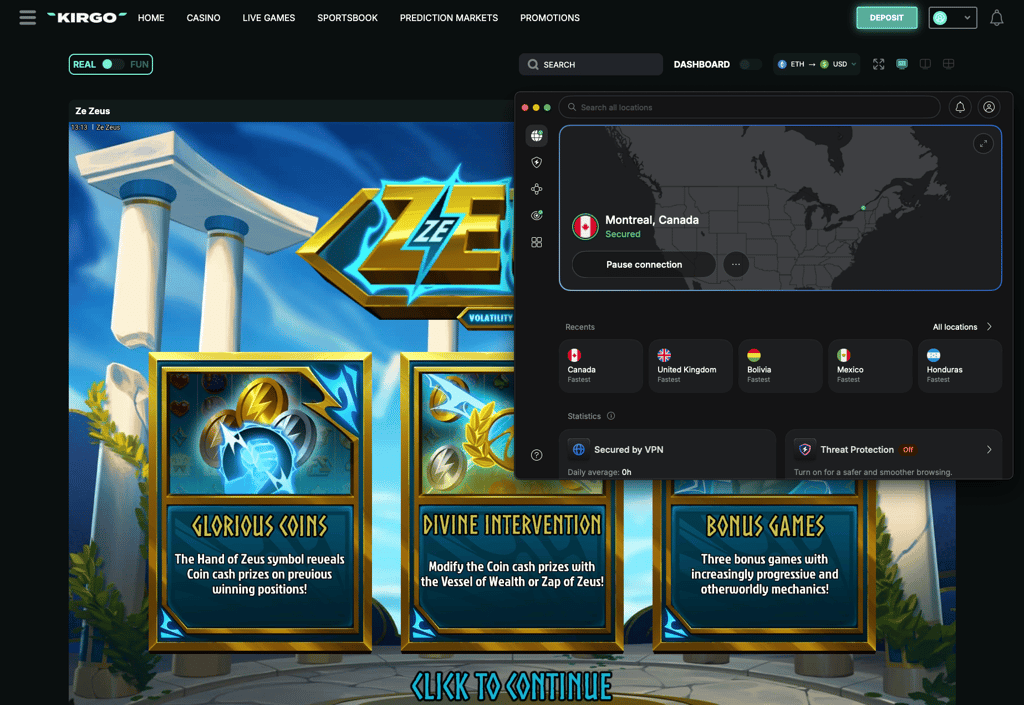
How to use Kirgo Casino on iPhone in the USA
If you’re in the US, you can access Kirgo through Safari instead of using its dedicated iOS app. To use Kirgo from the USA on an iPhone, follow these steps:
- Get a reliable VPN for Kirgo. My top choice is NordVPN for its fast speeds, extensive server network, and obfuscation features, now 78% off.
- Download and install the VPN app on your iPhone from the App Store.
- Launch the VPN and connect to a non-restricted country, such as Canada or Ireland.
- Open Kirgo Casino in Safari while the VPN connection is active.
- Add Kirgo to your Home Screen by tapping the Share button in Safari and selecting Add to Home Screen.
- Open Kirgo and sign in to your account or create a new one if needed.
How to fix Kirgo Casino not working with a VPN
If Kirgo Casino isn’t working with your VPN, the platform may have detected the VPN server, your browser could still contain data linked to your previous location, or the VPN connection itself may be unstable. Kirgo also uses VPN and proxy detection, so some servers may work while others get rejected. Here’s how to fix it:
- Switch to another VPN server. The IP address you’re using may already be blacklisted – connecting to a different server in the same country could restore access.
- Try a different VPN protocol. Switching protocols can improve connection stability and change how your VPN traffic appears. If available, try an obfuscation-focused option, such as NordVPN’s NordWhisper or Proton VPN’s Stealth protocol.
- Clear your cookies and cache. Stored browser data may still be linked to your previous location even after your IP address changes. Clear it before reopening Kirgo.
- Check for IP and DNS leaks. A leak can expose your real location despite an active VPN connection. Check for leaks on sites like dnsleaktest.com and reconnect if your actual IP or DNS information is visible.
- Change your DNS settings. Incorrect or ISP-provided DNS servers can reveal location information or interfere with the VPN connection. Try using your VPN provider’s DNS servers or switch your DNS settings back to automatic before reconnecting.
- Restart the VPN and browser. Disconnect completely, close your browser, reconnect to the VPN, and then reopen Kirgo.
If none of these fixes work, try another VPN server or reach out to your VPN’s customer support.
Is it legal to use a VPN on Kirgo?
Using a VPN with Kirgo is generally legal on its own, as VPNs are allowed in most countries and are commonly used as privacy tools. However, that doesn’t automatically mean you can use Kirgo from anywhere. Online gambling laws vary a lot between regions, and Kirgo itself restricts access from several countries, including the US, UK, Germany, France, and Australia.
Kirgo’s own policy on VPN usage is also strict: its Terms of Use prohibit using a VPN, proxy, or similar tools to hide your real location or to get around regional restrictions. If Kirgo detects this, it may permanently close your account and withhold or remove funds that are linked to it. However, what’s interesting is that Kirgo’s own “Wrong region?” message suggests trying a VPN if the site detects a location issue.
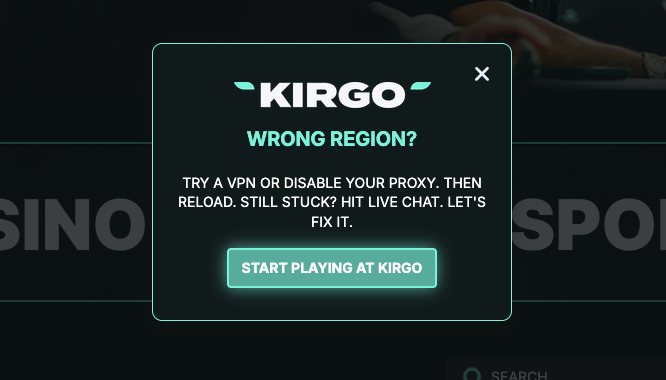
A VPN can still be useful for protecting your privacy and securing your connection, especially on public or unfamiliar networks. Just keep in mind that it doesn’t override local gambling laws or Kirgo’s own rules, so always check both before using the platform.
Final tips for using Kirgo Casino with VPN
Using Kirgo Casino with a VPN can be tricky since the platform restricts several regions, including the US, UK, Germany, France, and Australia. On top of that, Kirgo uses VPN and proxy detection tools, so not every VPN server will necessarily work.
For a smoother connection, choose servers in countries where Kirgo isn’t explicitly restricted, such as Canada, Ireland, Finland, or Norway. If possible, try recently added VPN servers, which may use IP addresses that are yet to be flagged by Kirgo’s VPN detection.
Don’t forget to keep your VPN’s kill switch enabled to prevent accidental IP exposure, check for IP and DNS leaks, and clear your browser cache and cookies if Kirgo still detects your previous location. In case one server is blocked, try another server or use an obfuscation feature.
From my tests, NordVPN is the best overall Kirgo Casino VPN due to its fast speeds and consistent access. Surfshark is a better choice for users with multiple devices, while Proton VPN stands out for strong privacy and its useful free plan.
Whichever VPN you choose, don’t forget to review Kirgo’s platform rules and your local laws first.
FAQ
Is Kirgo Casino legal in the USA?
No, Kirgo Casino is not legally authorized to operate in the USA, and its Terms of Use restrict access from all 50 states and US territories. Unlike regulated US sportsbooks, Kirgo doesn’t operate separate state-licensed platforms or offer exceptions for individual states.
Does Kirgo Casino allow VPNs?
No, Kirgo does not allow VPN use for bypassing geo-restrictions. Its Terms of Use state that this can result in permanent account closure and potentially losing funds linked to the account. So while VPNs can still be used for general privacy and security, if detected, Kirgo may permanently close the account and withhold or remove associated funds.
What is the best VPN for Kirgo Casino?
NordVPN is the best VPN for Kirgo Casino thanks to reliable access, fast connections, and extensive server coverage. It also includes NordWhisper and obfuscated servers, which can help when standard VPN connections are detected or blocked.
Can I use a free VPN with Kirgo Casino?
Yes, you can try a free VPN with Kirgo Casino, but free services may not work consistently. For instance, while Proton VPN is a decent free option, its limited server control and shared IP addresses can make access to Kirgo less reliable. For more consistent performance, a paid VPN like NordVPN or Surfshark is a better choice.
How can I use Kirgo Casino in the USA?
To access Kirgo Casino from the USA, a VPN like NordVPN can replace your US IP address with one from a country where Kirgo isn’t restricted. Servers in Canada, Ireland, Finland, and Norway worked in my testing. However, keep in mind that bypassing Kirgo’s location restrictions violates its terms.
Will a VPN slow down Kirgo Casino?
Yes, a VPN can slow down Kirgo Casino a little, especially if you connect to a distant or crowded server. Choosing a fast VPN and a nearby non-restricted location can help minimize speed loss and keep games, streams, and sportsbook pages running smoothly.
Where is Kirgo Casino allowed?
Kirgo Casino is allowed in countries where the platform is not explicitly restricted and local laws permit access. While Kirgo doesn’t publish a full allowlist, locations such as Canada, Ireland, Finland, Norway, Iceland, Malta, and Poland are not on its current restricted list.
Can I use Kirgo Casino while traveling?
Yes, but Kirgo Casino availability can change when you travel. If your destination is on Kirgo’s restricted list, you may lose access to the site. A VPN can protect your connection while abroad, but it does not override Kirgo’s rules or local gambling laws.
What should I do if Kirgo Casino is not working with my VPN?
If Kirgo Casino is not working with your VPN, try switching servers, changing VPN protocols, clearing browser cookies and cache, and checking for IP or DNS leaks. Kirgo may detect and block some VPN IP addresses, so another server in the same country may work better.
Is Kirgo Casino legit?
Yes, Kirgo Casino is a legitimate offshore gambling platform operated by Raining Games LLC under an Anjouan license. However, that offshore license does not mean Kirgo is locally authorized in every country, so availability and legality still depend on your jurisdiction.