Yoga-Go app review: is this fitness app the right fit for your wellness goals?
Being behind major reports like The Mother of All Breaches and RockYou2024, our in-house cybersecurity experts and journalists provide unbiased, real-world testing and in-depth analysis.
We maintain complete transparency by openly sharing our testing methodologies with our audience.
Learn more

At-home fitness has surged in popularity over the past few years, with more people in my circle turning to apps for accessible and personalized workouts. Yoga apps, in particular, have become essential for anyone looking to improve flexibility, reduce stress, and build strength. They also allow you to avoid getting a gym membership while staying on top of your wellness without overspending or even leaving your house.
Among the many options available, Yoga-Go has emerged as one of the most popular apps. It aims to differentiate itself by combining traditional yoga with guided fitness routines and personalized wellness coaching. As part of my research for Cybernews, I explored the app’s features, pricing, and user experience to evaluate how well it fulfills these promises.
As such, the goal of this review is straightforward: to help you decide if Yoga-Go is worth your time and attention.
Quick overview of the Yoga-Go app review
Before diving deeper, here’s a quick snapshot of what Yoga-Go offers – from its overall rating and features to pricing and compatibility. This table gives you the essentials at a glance.
| ⭐ Rating: | 4.2 |
| 📝 Description: | Yoga and fitness app with guided workouts and habit tracking |
| 💲 Subscription price: | From $9.99/month |
| 📱 OS compatibility: | iOS, Android |
| 🧘 Content variety: | Yoga, Pilates, stretching, cardio, weight loss programs |
| 🌿 Ease of use: | Simple, beginner-friendly interface |
| 🎨 Customization: | Plans adapt to fitness level, goals, and schedule |
| 🏆 Best for: | Beginners/intermediates seeking structured yoga routines |


Our team of in-house researchers, writers and editors reviews and analyzes health tech products using a research-driven approach. We gather data from multiple sources, fact-check all information, and conduct our research based on peer-reviewed studies, expert opinions, consumer ratings, and regulatory approvals.
You can learn more about how we test health tech products here.
Our methodology
At Cybernews, we follow a structured evaluation process to make sure our app reviews are both fair and practical. Each app is rated against specific criteria, with percentage weights that reflect their importance to the overall experience.
Here’s how we broke it down for Yoga-Go:
- Feature set (35%). We placed the highest importance on features because they determine the app's daily usefulness. This involved evaluating the variety of workouts available, the quality of guided programs, and whether extras like nutrition plans or progress tracking were included.
- User experience (25%). A fitness app should be simple and user-friendly, not stressful. We assessed how easy it was to navigate the app, whether the interface was modern and beginner-friendly, and how well it adapted to different user needs.
- Accuracy and performance (20%). Users want an app that operates smoothly without lag or miscalculations. Therefore, we tested the app's reliability, focusing on smooth syncing and tracking as well as overall stability. Strong performance builds trust in the results provided.
- Value for money (15%). Subscription costs can add up, so we compared the pricing of the app against similar offerings. Our goal was to determine whether Yoga-Go provided sufficient quality to justify the monthly or yearly subscription cost.
- User feedback (5%). Finally, we considered verified customer reviews. Although this factor had less weight in our evaluation, real user experiences helped identify recurring issues or notable positive aspects.
What is the Yoga-Go app?
Yoga-Go is an innovative fitness application that aims to make yoga and guided workouts accessible to individuals of all experience levels. The primary objective of the app is to blend traditional yoga practices with contemporary fitness programs, creating personalized routines that seamlessly fit into busy lifestyles.
The app caters to various users, including beginners who require clear and easy-to-follow guidance and advanced practitioners looking for well-structured plans to enhance consistency in their practice.
By incorporating elements such as yoga, Pilates, stretching, and weight-loss programs, Yoga-Go establishes itself as a comprehensive wellness resource.
Yoga-Go app pricing and subscriptions
Yoga-Go follows a subscription-based model. The platform offers several plans, with monthly and annual options designed to suit different budgets and levels of commitment.
When it comes to flexibility, Yoga-Go provides a short free trial so new users can explore the app before committing. There is also a 30-day money-back guarantee for those who feel the app doesn’t meet their expectations, making it a risk-free option to test.
While the core subscription unlocks most features, you should also be aware of potential in-app purchases tied to premium meal plans or specialized workout add-ons.
| Plan | Price (approx.) | Specifications |
| Monthly plan | $9.99/month | Full app access with workouts, tracking, and programs |
| Annual plan | $59.99/year | Same as monthly, but billed once for savings |
| Free trial | 7 days, credit card info required | Limited trial access to explore workouts and features |
| Refund policy | 30-day money-back guarantee | Applicable if the app doesn’t meet expectations, proof of reason required |
Yoga-Go app features review
I researched the Yoga-Go app’s main features to see if it can bring the yoga studio experience into anyone’s home. I explored its key components – ranging from personalized routines to guided video sessions – to assess how well they can support your daily practice. Let’s explore it in more detail below.
Personalized workout plans
Yoga-Go excels at creating a workout plan tailored to your needs. It will ask you about your fitness level, goals, age, and availability, then generate a routine that fits seamlessly into your lifestyle.

One will appreciate this personal touch, as daily sessions then can feel relevant and neither too easy nor too difficult.
Time-efficient sessions
According to my research, Yoga-Go has short workout options. The app offers sessions lasting from 7 to 30 minutes, allowing you to fit in a quick session even on busy days.
Despite their brevity, these workouts were effective, since a 7-minute routine can give a noticeable boost.
Workout Builder tool
If you enjoy customizing workouts, you might find the app’s Workout Builder feature particularly appealing. It allows you to mix and match exercises to create your own yoga flows, where you can choose the practice type, difficulty, and focus area. This can be especially useful on days when you want to deviate from the preset routines.
Extensive pose library
Yoga-Go features a comprehensive library of 640+ workouts, each accompanied by a description or video demonstration showcasing the correct form.
As you progress in your practice, this library can become your go-to reference for any unfamiliar poses.
Multi-discipline approach
Yoga-Go claims to have a multi-disciplinary approach. The app isn’t limited to traditional yoga, since it also incorporates Pilates, stretching, meditation, and even elements like chair yoga and tai chi.
This variety can help you keep your routine fresh, considering you might choose a gentle stretching session one day and a challenging Pilates workout the next.
Audio-visual instruction
Yoga-Go provides audio-visual instruction in every workout you try. Each session includes a video demonstration by a professional trainer, along with voice cues for posture and breathing.
Ideally, it should feel like having a personal instructor in the room, as certified yoga coaches design the sessions to ensure that exercises are performed safely and correctly.
Goal-specific programs
The app offers programs targeting specific goals, such as weight loss, improving flexibility, building strength, or relieving stress. If your goal is to enhance your flexibility, you can follow a stretching-focused plan and have a structured program that can help you stay motivated.

Types of exercises the Yoga-Go app offers
While researching Yoga-Go, I soon realized that the platform goes beyond simple yoga classes. It mixes restorative sessions with higher-intensity options. You can pick a relaxing meditation one day and switch to strength-based yoga the next, depending on your energy level and goals.
The app blends different exercise styles to create a more balanced and versatile fitness routine. This variety can keep your workouts engaging and help you stay consistent.
| Exercise type | What it offers |
| Yoga | Traditional yoga flows and stretches aimed at improving flexibility, posture, and relaxation. Great for beginners and experienced users alike. |
| Pilates | Low-impact routines focused on strengthening the core, improving balance, and building lean muscle tone. |
| Cardio-infused yoga | Faster-paced yoga sessions with cardio elements to elevate heart rate and support weight loss goals. |
| Strength-focused sessions | Bodyweight-based workouts that target major muscle groups, combining yoga poses with strength training principles. |
| Meditation | Guided practices with breathing and mindfulness exercises designed to reduce stress and improve focus. |
Yoga-Go app: user reviews
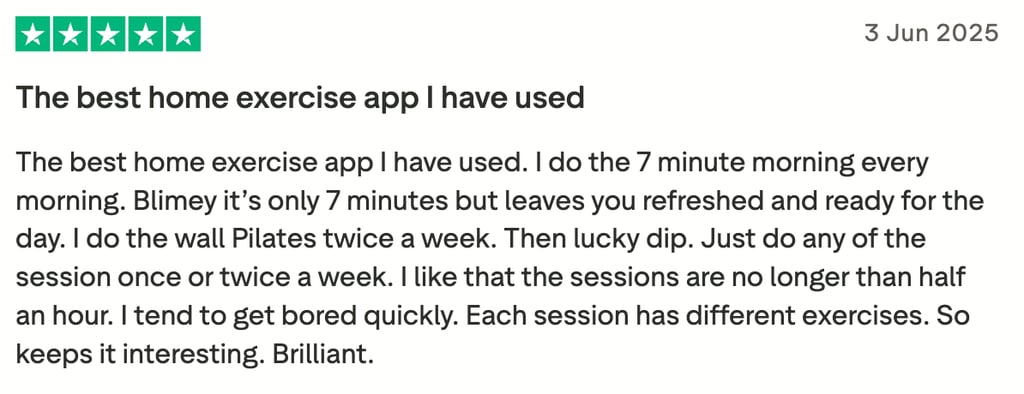
To get a better idea of how Yoga-Go works, I also looked into what other users were saying. Overall, I can say that the feedback is mixed but leans toward the positive, with many praising the app’s variety and ease of use.
On the positive side, users often highlight the personalized workout plans and the short, flexible sessions that fit into busy schedules. Beginners especially appreciate the extensive pose library and the clear video instructions, which make it easier to follow along without prior yoga experience. Some also mention that the multi-discipline approach – blending yoga, Pilates, and meditation – helped them stay motivated and avoid workout boredom.
That said, there are recurring complaints. A number of users find the subscription pricing confusing or expensive, especially compared to other fitness apps. Others note occasional technical glitches, such as app crashes or syncing issues. A few reviewers also wished for more in-depth tracking features to monitor long-term progress.
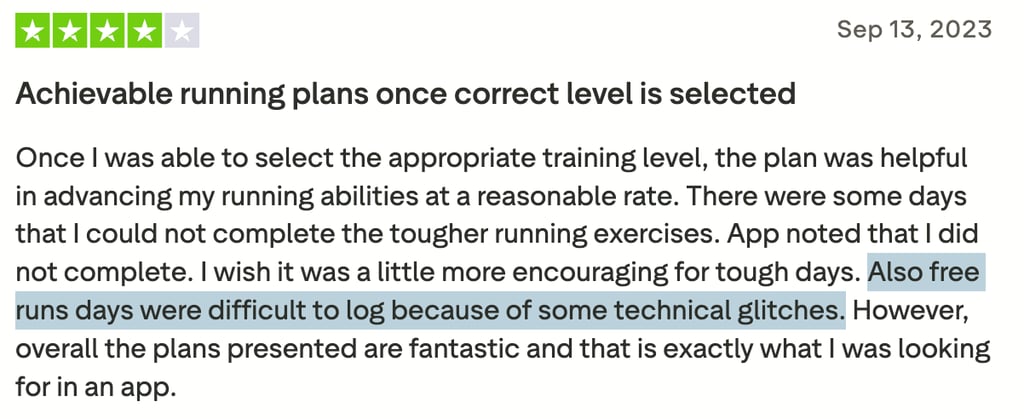
Overall, most agree Yoga-Go is a helpful tool for at-home fitness, though its cost and technical issues may give some people pause.
Yoga-Go vs competitors
I looked at how Yoga-Go compares with other popular yoga and fitness apps. Well-known platforms like Down Dog, Glo, and Alo Moves have built strong reputations, so putting Yoga-Go side by side with them highlights both its strengths and weaknesses.
Here’s a quick comparison:
| App | Strengths | Weaknesses | Price |
| Yoga-Go | Personalized plans, multi-disciplinary approach, short sessions | Higher subscription costs, occasional technical issues | Around $9.99/month, 7-day free trial |
| Down Dog | Highly customizable, affordable, offline access | Less variety beyond yoga | $7.99/month |
| Glo | Expert instructors, broad class library, meditation options | Interface can feel overwhelming for beginners | $23.99/month, 7-day free trial |
| Alo Moves | Premium production quality, advanced classes, strength + yoga | Pricey, geared more toward advanced users | $20/month, 14-day free trial |
From what I was able to gather from reviews online, I can say that Yoga-Go stands out for its personalized workout plans and variety of disciplines. However, its subscription cost is higher than that of many competitors.
Meanwhile, Down Dog is usually praised for customization and affordability, while Glo and Alo Moves shine with professional instructors and polished content libraries. That said, those alternatives can feel less beginner-friendly compared to Yoga-Go’s guided programs.
Final verdict: is the Yoga-Go app worth it?
After researching the Yoga-Go app and reviewing user feedback online, I’d say Yoga-Go is worth it for convenience and accessibility. It is best suited for beginners and busy individuals who want structured, time-efficient workouts at home. Its personalized plans, diverse disciplines, and clear guidance make it easy to stay consistent, even with a tight schedule.
However, the higher subscription cost and occasional technical hiccups may be drawbacks for some. If you’re looking for advanced yoga classes or a budget-friendly option, competitors like Down Dog or Alo Moves might be a better fit.
Other reviews you might be interested in:
WalkFit app review 2026: can this walking tracker really boost your fitness?
BetterMe app review 2026: can this wellness app really transform your health?
FAQ
Is Yoga-Go suitable for beginners?
Yes, Yoga-Go is suitable for beginners. The app starts by tailoring workouts to your fitness level and offers clear instructions, making it easy to follow even if you’re new to yoga.
Can I use Yoga-Go without internet access?
No, you cannot use Yoga-Go without internet access. Since workouts stream through the app, you need a connection to load sessions and track your activity properly.
Does Yoga-Go offer meditation or mindfulness sessions?
Yes, Yoga-Go offers meditation and mindfulness sessions. These include guided breathing exercises and relaxation practices designed to reduce stress and support overall wellness.
How often should I use Yoga-Go for the best results?
For best results, you should use Yoga-Go at least three to five times per week. Regular practice ensures steady progress toward flexibility, strength, and stress relief.
Can I track my progress within the Yoga-Go app?
Yes, you can track progress in Yoga-Go. The app provides workout history and completion stats, helping you stay consistent and see improvements over time.