How to delete your Cash App account in 2026
Our in-house experts test identity theft protection services themselves, using real-world scenarios and established testing methods. We look at how well each service monitors personal information, how quickly and clearly it sends alerts, what recovery support it offers, and how it handles customer data.
We assess every provider using the same criteria and explain our testing process clearly, so readers can compare services and make a more informed choice.
Learn more
Deleting the Cash App from your phone doesn't close your account. Your balance stays put, your Cashtag stays searchable, and your bank details remain linked – until you go through the actual closure process inside the app.
In this guide, I walk you through every step, including what to do before you close to avoid losing funds or transaction records you'll need for taxes.
Before you close your Cash App – quick checklist
- Cash out your full balance to your linked bank account
- Sell stocks and Bitcoin (or transfer Bitcoin to an external wallet)
- Export your transaction history as a CSV file from cash.app/account
- Unlink your bank accounts and debit cards
- Cancel any recurring payments tied to Cash App
What is Cash App?
Cash App is a mobile payments platform launched by Block, Inc. in 2013. It lets users send and receive money, pay with a linked debit card, invest in stocks, and buy and sell Bitcoin – all from a single app. As of 2023, the platform had approximately 57 million monthly active users, per Block’s 2024 earnings report.
People leave for plenty of reasons: switching to another payment app, simplifying their digital footprint, or wanting tighter control over where their financial data lives. Whatever the reason, closing the account requires a few deliberate steps.
How to delete your Cash App account
Once your balance is cleared and your history is downloaded, the closure itself takes under two minutes.
- Tap the profile icon on your Cash App home screen
- Click Support
- Go to Account & Settings
- Tap Close Your Cash App Account
Cash App will send a confirmation to your registered email address. If nothing arrives within a few minutes, check your spam folder – or contact support to verify the closure went through.
Once closed, your Cashtag is permanently disabled and can't be recovered or transferred to a new account.
Remove your data before closing (optional but recommended)
Before confirming closure, you can request deletion of your personal information directly through the app:
- Tap the profile icon on your Cash App home screen
- Go to Support
- Click Account & Settings
- Select Delete Your Personal Information
This initiates a separate data deletion request alongside the account closure.
Delete your Cash App account using a computer
You can't close the account entirely through a browser, but you can log in at cash.app/account to export your transaction history before closing via mobile.
Sign in, click Documents on the left-hand side, and select Account Statements to download monthly records as a PDF. For a full transaction history file, use the Export CSV option instead.
What to do if the in-app process doesn't work
The most common reason closure gets blocked is a remaining balance – even a fraction of a cent in Bitcoin can trigger the check. If you've cleared everything and still can't close the account, contact Cash App support directly:
- Phone. Call Cash App at 1-800-969-1940. You'll need to answer security questions to verify your identity.
- Web chat. Log in at cash.app/help and start a live chat. Tell the agent you want to close the account and – if you have a micro-balance – that you formally forfeit it. Using that specific language gets the agent to clear the balance manually and complete the closure.
What happens to your data after you close
Closing the account deactivates your Cashtag permanently, revokes your login access, and stops all marketing communications. But it doesn't wipe your financial history from Cash App's servers.
Cash App’s Privacy Notice confirms it retains data after closure “to comply with applicable laws and regulations” – covering fraud prevention, dispute resolution, tax reporting, and legal requests.
The notice doesn’t specify a fixed number of years, but financial services companies must generally retain transaction records for several years under federal and state law – including the Bank Secrecy Act’s five-year rule.
Export anything you need before closing, because you won’t be able to access those records through the app afterward.
Things that go wrong – and how to fix them
Stuck on a micro-balance
This trips up more users than anything else. You've cashed out your balance, but Cash App is still blocking closure because $0.18 or a trace amount of Bitcoin remains – too small to withdraw through normal channels. Contact support via phone or web chat and explicitly tell the agent you want to forfeit the remaining balance. That language matters – it gives the agent permission to clear it manually.
Suspended accounts
A suspended account still lets you withdraw your balance to a linked bank account. Don't assume a suspension locks you out entirely. Transfer the funds, then contact support to request closure.
Wanting to delete transaction history only
Cash App doesn't allow deletion of individual transactions or the full history without closing the account. Federal law requires the platform to keep records regardless. If privacy is the goal, the only path is full account closure – export what you need first, then close.
Using Incogni to remove your data from data brokers (recommended)
Closing your Cash App account removes you from one platform. Your personal information – name, phone number, email, and financial associations – is likely circulating across hundreds of other sites that have nothing to do with Cash App.
These sites are run by data brokers who collect and sell your personal data. Each one has its own removal process, and they reliably re-add data after initial opt-outs.
Incogni handles this automatically. It sends legally valid removal requests to 420+ data brokers and people search sites on your behalf, tracks each response, and re-submits every 60–90 days as your data resurfaces. If you're closing Cash App for privacy reasons, Incogni addresses the broader exposure that account deletion can't reach.
Here's how to get started:
-
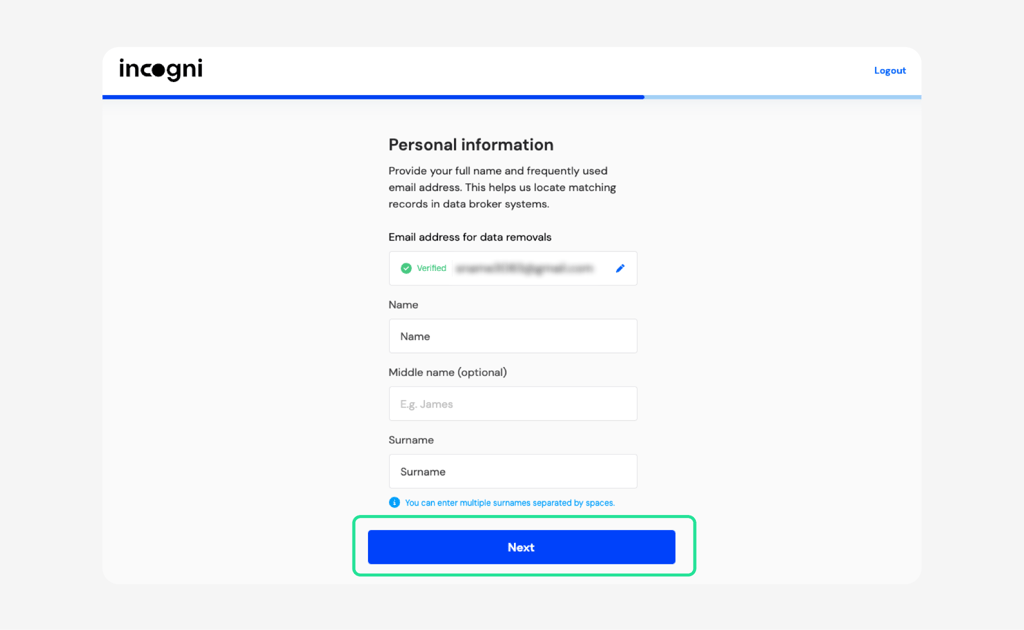
Sign up at Incogni’s website and provide your name, registered address, and email address – the minimum needed to locate your exposed profiles. You’ll need to verify your email address to activate the service.
-
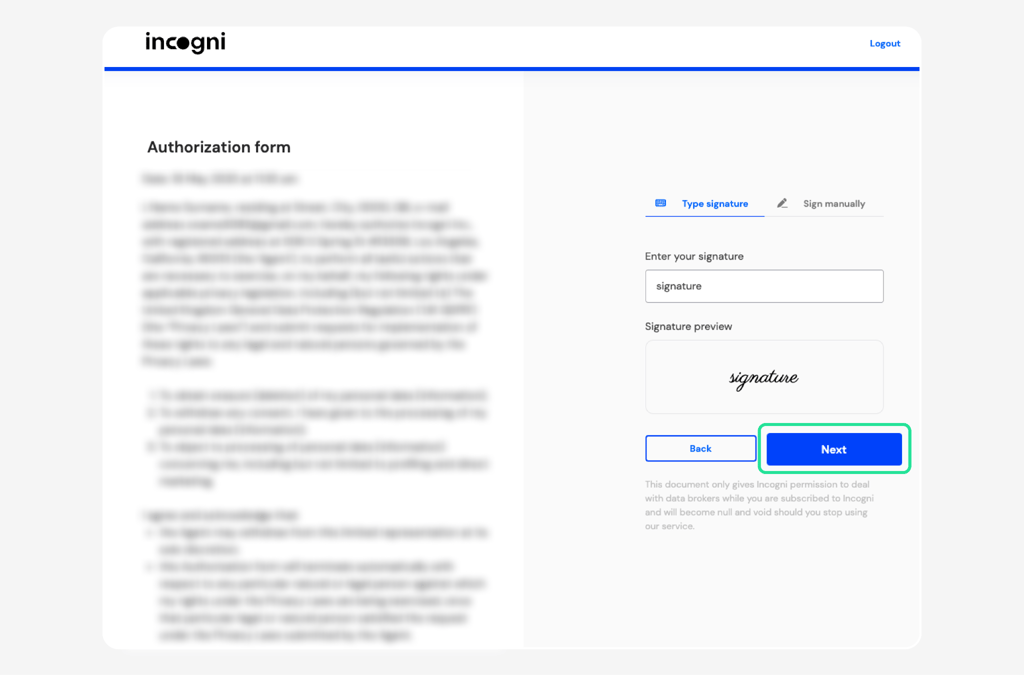
Sign the authorization form granting Incogni legal permission to contact data brokers on your behalf.
- Let Incogni run. It scans for your profiles, automatically sends removal requests, and keeps working in the background – no manual follow-up needed.
Manual data broker opt-outs
If you'd rather handle removals yourself, Spokeo, WhitePages, BeenVerified, and Intelius all have opt-out forms. The process works – but it takes hours, needs repeating every few months, and only covers the brokers you find. Manual opt-outs make sense as a backup, not a plan.
Conclusion
Deleting Cash App takes a few minutes once the balance is clear and the history is saved. The steps that trip people up – micro-balances, suspended accounts, the assumption that uninstalling the app is enough – all have straightforward fixes.
If privacy drove the decision, closing the Cash App account is a good first step. But your data extends well beyond any single app. Incogni handles the broader cleanup – removing your information from data brokers and people-search sites that collect and sell personal data, regardless of which apps you use.
FAQ
Can I reopen a deleted Cash App account?
No, the closed account can’t be reopened or reactivated. To use Cash App again, you’ll need to create a new account with a new Cashtag. Your old transaction history and contacts won’t carry over.
How long does it take for the account to close?
Most closures process immediately, but Cash App may take up to 10 business days to fully deactivate the account. You'll receive a confirmation email when it's done.
Does closing my account cancel active subscriptions?
No. If you use Cash App's Cash Card or have recurring payments linked to the app, those won't cancel automatically. Cancel them separately before closing to avoid continued charges.
Will Cash App still send me a 1099 after I close?
Yes, if you had qualifying transactions during the tax year, the Internal Revenue Service (IRS) requires Cash App to issue a 1099-K regardless of whether the account is still open. Make sure your mailing address is current before closing, or export your statements first so you have the records.
What if I can't remember my login?
If you can’t remember your login, use the Forgot Password option on the login screen to reset via your registered phone number or email. Complete this before initiating closure – you won't be able to log back in after the account is closed.
Can I delete a deceased person's Cash App account?
Yes. Contact Cash App support and provide proof of the account holder’s passing (such as a death certificate) along with documentation establishing your relationship to the deceased. Support will handle the closure manually once identity and authorization are confirmed.