NinjaOne review 2026: is it worth it?
Being behind major reports like The Mother of All Breaches and RockYou2024, our in-house cybersecurity experts and journalists provide unbiased, real-world testing and in-depth analysis.
We maintain complete transparency by openly sharing our testing methodologies with our audience.
Learn more

At a glance, NinjaOne is one of those software and IT management tools that tend to get more recognition as time passes. Back in 2013, it started off with a simple premise: simplifying daily management and communication and boosting company productivity and service delivery.
This sounds good and simple on paper, but why risk it with an older and manual solution in the sea of management tools powered by generative AI? Well, perhaps that’s the whole point of it: NinjaOne does everything your way, without using any AI solutions that may struggle with the human side of IT operations.
Having read numerous NinjaOne reviews and the feedback of existing users, I’ve decided to give it a go.
Together with my team of Cybernews experts, I’ve examined the tool for its endpoint management, remote control, and other applications. In this guide, I’ll discuss all of these features, as well as give you my firsthand impressions of the pricing, intuitiveness, and customer reviews.
Quick overview of NinjaOne
With NinjaOne, there’s more than meets the eye, as it’s a complex IT management solution. So, the best way to start would be by going over its key details:
| Brand | NinjaOne |
| Overall rating | 4.5/5 |
| Description | NinjaOne, an automated endpoint management platform, delivers visibility, security, and control over all endpoints for over 30,000 customers in 130+ countries. |
| Pricing | Custom (usually between $1.50 and $3.75, depending on the number of endpoints) |


Our team of researchers and IT specialists put IT tools through real-world tests. From cloud management to workflow automation, we check how well they perform, how secure they are, and whether they’re worth your time. Here’s how we test IT tools.
What is NinjaOne?
NinjaOne empowers IT teams to seamlessly manage, secure, and support all endpoints, including Windows, macOS, and Linux, from a single, cloud-native platform.
Whether devices are in-office, remote, or hybrid, NinjaOne delivers real-time visibility, policy-based automation, and powerful RMM tools that reduce complexity and eliminate silos across IT operations.
Still, its main purpose is endpoint automation, which means it’s designed to handle software improvements, app installation, and security updates. With NinjaOne, these tasks are as simplified as can be, which reduces the need for extensive manual intervention from the IT staff.
Most importantly, NinjaOne is cross-OS compatible, which means it unifies all endpoints. For instance, it’s capable of updating a certain application on both macOS and Windows devices and doing it in a synchronized manner, leaving you with more time to focus on your company’s projects.
Not only is the endpoint management aspect useful for IT businesses, but so is the real-time management feature. It brings live monitoring of all devices, focusing on alerts to solve potential problems and help you maintain uptime throughout your operations.
Key features of NinjaOne
As mentioned, NinjaOne monitoring is just one of the functions that this tool performs for your company. It also excels in remote access and control, IT automation in general, and patch management. So, I’ve decided to look into it through all these aspects individually.
Endpoint management and RMM
Let’s face it, if you’ve got at least a couple dozen endpoints in your company, it’s probably extremely tough to keep them all secure and managed. Well, NinjaOne provides a solution with its dedicated suite of endpoint management products.
This is especially important for companies with loads of endpoints looking to cut IT operation costs, even more so if we consider the fact that NinjaOne does in minutes what used to take several IT experts days.
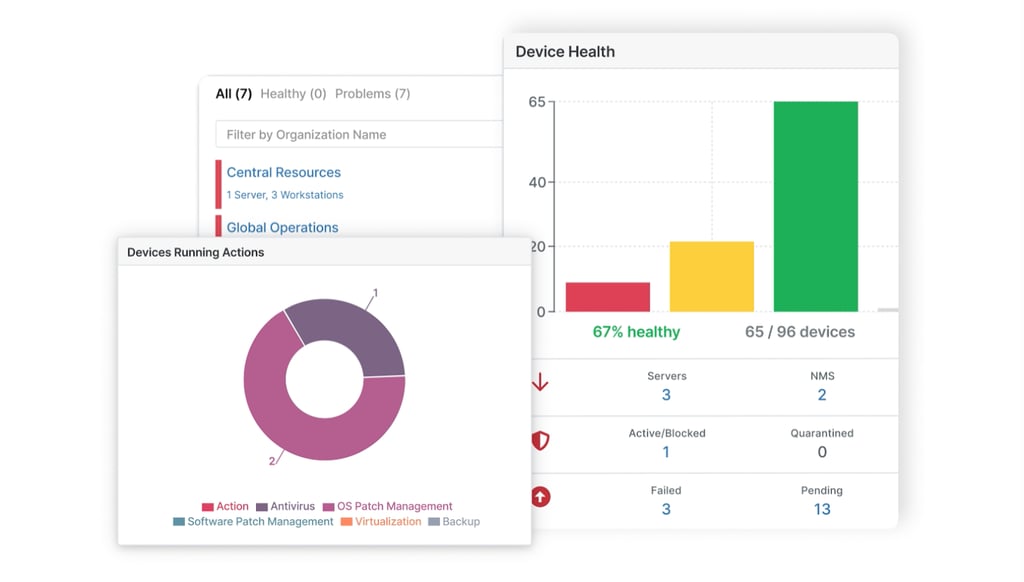
NinjaOne truly excels in this aspect, as it provides a single, intuitive dashboard for complete automation of all your internal IT operations. Plus, you get the benefit of real-time management, which allows you to react promptly. You can set up custom alerts or simply do everything manually.
You can count on this tool to help you handle it all, from antivirus management to remote access, control, and monitoring. Still, the lack of AI-powered features makes it most useful for mid-market and enterprise companies, primarily because it requires some manual work via the dashboard.
Automated patch management
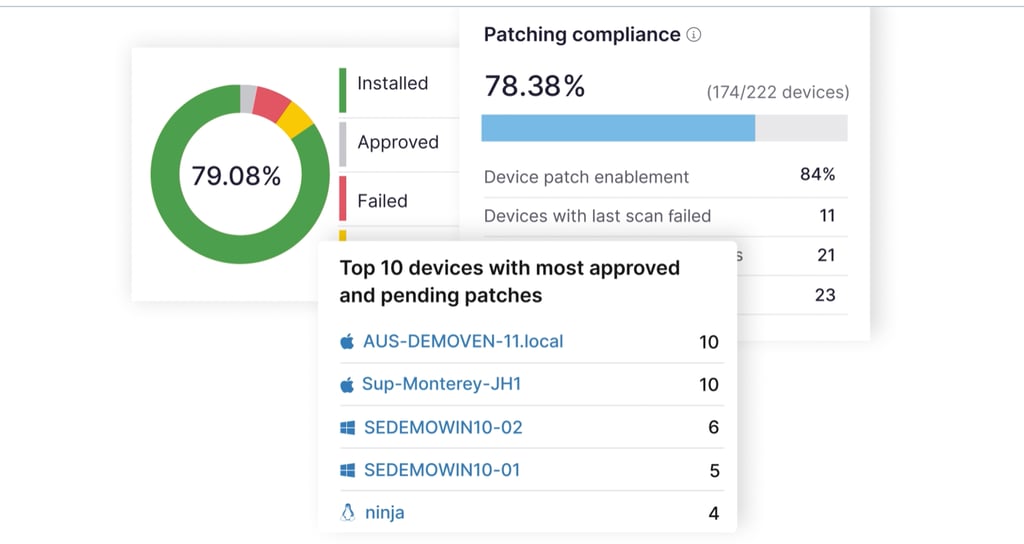
Along with endpoint management and RMM, the most prolific function of NinjaOne is patch management. I’ve done some digging on this, and it turns out that it's cross-platform-compatible with optimization for over 6000 tools and apps. Because of that, you can count on timely patch management and updates on Windows, macOS, and even Linux devices.
If you’ve got a mix of endpoints with the mentioned operating systems, don’t worry: NinjaOne is able to manage patches on multiple devices at the same time. This is especially important when updating the system for security-related reasons. This way, you can install a single security solution across all devices, regardless of their operating system.
I’d also point out the AI side of things, as automated global sentiment analysis helps administrators make informed decisions on patch deployment. You can particularly see this through risk-based prioritization, considering that the automated software helps you conduct the most critical updates and install patches based on data vulnerability to ensure that your systems are running safely and smoothly.
Backup and data protection
NinjaOne also allows you to manage backups for all endpoints from a single dashboard, supporting both digital and cloud-based options for saving your data. NinjaOne has the ability to patch more than 6,000 third-party applications, keeping apps secure and up to date.
With NinjaOne, you can also set up a fast and easy recovery system. To make this possible, the brand didn’t go the usual route but rather went with embedded backup, which allows simpler management. From what I’ve seen, you can use it to manage cloud storage in terabytes.
Remote access and control
Now we come to one of my favorite features of NinjaOne, and it is remote access. I was amazed at how seamless and simple the process is. You just need to open your NinjaOne console, and it’s possible to log in and manage Windows, macOS, and Linux endpoints all from a single dashboard.
Simply load your infrastructure and select an endpoint that you’d like to control remotely. It only takes one click to reach another device via the console, which is especially important when it comes to servicing and repairs.
Of course, the same can be said for any other action that would take away from your company’s productivity, but NinjaOne truly manages to ensure that your systems are up to date and running smoothly.

IT automation and scripting
With all the mentioned features, NinjaOne helps you maintain complete automation of your company’s everyday tasks. Sure, it’s not exactly on the level of some AI-powered tools, but the fact that it even comes close is admirable.
One thing that can help you keep software going like a well-oiled machine is the Automation Library. The tool features ready-to-use scripts, and you can use them for IT automation on Linux, Windows, and macOS. They are perfect for those who are not exactly experts in remote management and automation, but are willing to learn.
Plus, NinjaOne has a dedicated, human team that produces new and updated scripts with each release, all of which are readily available for application in your specific environment.
That’s exactly what each script lets you do, as they touch upon some important bits that you might not have even realized are crucial for your workflow. For instance, you can use a pre-defined script to figure out how to find failed Windows login attempts.
This way, you can gain insider insight into potential security breach attempts or simply monitor your team’s activity on Windows.
Likewise, it’s possible to use NinjaOne and set up automatic Windows 11 updates. As a result, all endpoints will get updated at the same time, which helps with project planning and eliminates downtime during individual updates.
Mobile device management
Another neat feature of NinjaOne is the dedicated MDM feature, which allows seamless operation of mobile devices within a company. The tool allows for centralized management with the option to access servers and manage storage remotely.
As you might have expected, the MDM solution is also cross-system-compatible, which means it works the same for iOS, Android, and macOS devices. Onboarding is plain and simple, and it’s possible to manually add devices into the dashboard. From there, you can continue to manage them according to compliance and at-scale application.
Let’s say you wanted to add an extra layer of security for mobile devices within your company. With NinjaOne, it’s possible to integrate a new security solution at scale and update all devices within the company at once. Besides security, this is especially important when it comes to employee training and inventory management.
Integrated ticketing and documentation
Lastly, I liked NinjaOne’s custom ticketing system, which allows you to optimize the workflow in your company according to your preferences. As with the other aspects, I’ve found plenty of positive feedback on the fact that you can manage all workflow and end-user devices from a single dashboard.
Besides, you can also create a ticketing system for testers and enhance end-user productivity. It all works like a charm: an employee can simply submit a new ticket and send a public or a private note. You can then submit a response, as well as adjust the status of the query. NinjaOne also uses advanced filtering options for ticket prioritization.
NinjaOne: interface and ease of use
The entire process of using NinjaOne is so smooth that you’ll never need another IT management platform. I truly mean that, since it’s by far the simplest tool of this type I’ve stumbled upon. And trust me, I’ve seen a lot, from Azure to Jira.
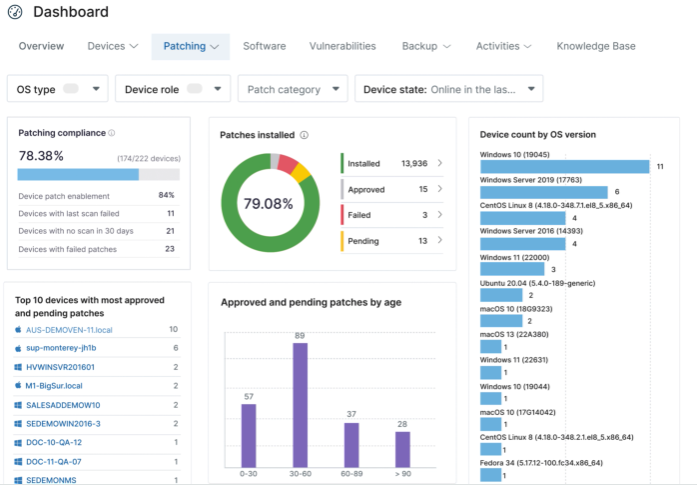
The intuitiveness of the main dashboard is something that sets NinjaOne apart. You’ll get the chance to customize it depending on the services needed for your company. On top of that, you’ll be able to see a detailed Overview dashboard at the top, and you can go through linked devices, software, backups, and the activity log with a single click.

NinjaOne: plans and pricing
After all the NinjaOne reviews and tests, we’ve reached the boiling point: the pricing aspect. Now, I’m not saying it’s an expensive tool (nor is it affordable, for that matter), but I’d still love seeing a more transparent overview of the pricing plans.
From what I can tell, NinjaOne pricing starts at $1.50, but only if you’ve got 10,000 or more endpoints. On a smaller scale, it’s a bit more expensive, coming at around $3.75 for 50 endpoints or fewer.
Overall, you’ll have to submit a pricing request first, and that will be your ticket into getting a tailored NinjaOne quote for your company.
Before you do that, you can also get a 14-day free trial to test the solution.
Security and compliance
In terms of security, I’d say that NinjaOne is a top-notch option. It comes with a complete package, from ransomware protection to integrated tools and the chance to use them on all endpoints at once to ensure simple security incorporation at scale.
Among some of the standout features, I’d point out role-based access control, where you, as a system’s administrator, assign the roles. Moving on, you can also monitor and manage encryption, which is pretty cool, since you’d get to watch as the data encryption status changes while using tools like FileVault.
There’s also a chance to set up custom security alerts and handle vulnerabilities according to the pre-set remediation guide.
Customer reviews
Overall, nearly every NinjaOne review on platforms like Reddit and Trustpilot repeats my own take: it’s a great tool for small and mid-size businesses, and it’s especially convenient for beginners. So, even if you’ve never used an IT management tool before, I’m confident you’ll be able to get into the admin’s shoes fast.
On the flip side, the pricing structure itself, as well as on-demand pricing and demos, somewhat take away from the brand’s commendable transparency. It would be great if you could get an overall idea of the price before you go any further with the process.
Either way, the feedback is mostly positive, with just a couple of negative remarks regarding the price here and there.
NinjaOne: final verdict
Ultimately, I’d say that NinjaOne is a perfect IT management tool for those looking for a scalable, relatively cost-efficient solution.
I’d recommend it to smaller and mid-size teams, whereas AI-powered solutions are perhaps a better option for corporations. I’d especially suggest it to business owners looking for a great remote management and monitoring tool with custom security alerts.
Plus, if you have to do a lot of employee training or simply want to keep up with software updates and compliance, it makes for a well-rounded solution. I also liked its handy dashboard with clear visual representations and graphs that make data easily digestible. I’d just prefer it if they added a clear pricing structure somewhere down the line.
FAQ
What is NinjaOne used for?
NinjaOne is an IT management tool used for remote access, control, and monitoring. It’s also a complete IT solution with an integrated ticketing system, backups, patch management, and documentation.
How much does NinjaOne cost per device?
Although NinjaOne features on-demand pricing, the brand suggests the cost ranges from $1.50 to $3.75 per endpoint, depending on the number of endpoints in your company.
What type of devices can I monitor with NinjaOne?
You can monitor desktops, laptops, and mobile devices with NinjaOne. On top of that, it’s also possible to manage devices with different operating systems, including Linux, macOS, iOS, and Windows.
Is there a free version of NinjaOne?
Yes, NinjaOne features a free trial for 14 days without any obligations to sign a contract after testing it. It’s also possible to get free demo videos, but those are on-demand only.