How to stop a Spotify email scam in 2026

If you received an email urging you to update your Spotify payment or your account will be downgraded, then you’re most likely dealing with a Spotify scam. While Spotify uses email to send failed-payment notices, it never demands urgent billing information updates or personal details via email. These types of fake alerts are designed by cybercriminals to steal your login credentials and credit card information.
In this guide, I’ll show you how to spot Spotify scam emails and protect your device from phishing. Here, you’ll also learn how to prevent future attacks by using a trusted email scam checker tool.

What is a Spotify email scam?
A Spotify email scam is a phishing message cybercriminals send to steal your personal data. These deceptive emails mimic a real message sent from Spotify, notifying you about a failed payment and stating that your account will be suspended and downgraded to the free version within 24 hours.
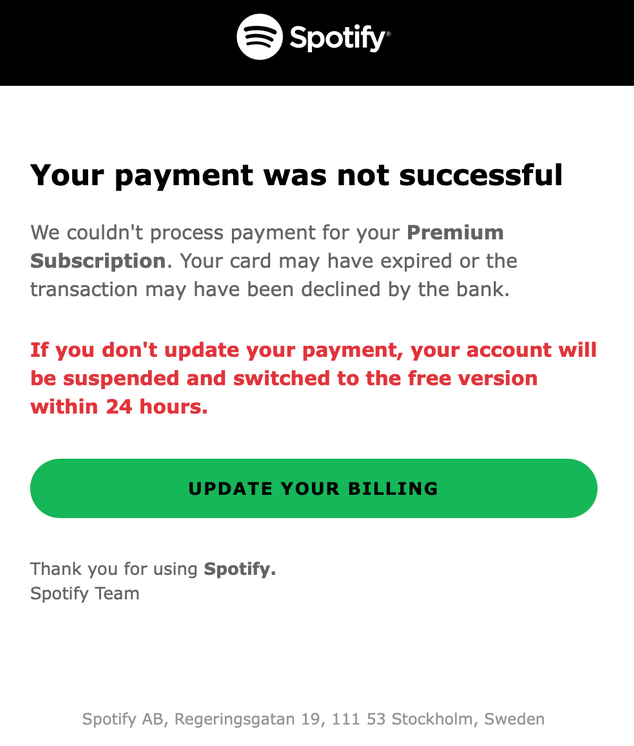
This email may at first look legitimate. If you fall for the scam and follow the link, the attackers will scan the information you provide. This includes not only credit card information but also your login and password. Because many people reuse the same password across multiple platforms, a single stolen password can help access other accounts.
| Name | Spotify scam email |
| Threat type | Phishing, social engineering, scam |
| Targeted devices | Windows, macOS, iOS, Android, Linux, Chromebook |
| Symptoms | Phishing email |
| Damage | Stolen account credentials, financial loss |
Although Spotify communicates failed payments via email, it’s worth checking your account status in the dedicated Spotify app. Go to Settings and privacy > Account > Billing, and if you see a payment issue there, the email is real, and you can resolve it in your Spotify account. But if your account looks normal, the email is a Spotify scam.
Why am I seeing a Spotify scam email?
If you received a Spotify scam email, it's because you are or were a service user. However, people who have never used the service may often get these messages because their contact details were exposed elsewhere.
Cybercriminals obtain email lists from dark web leaks and data brokers and send mass phishing emails at once. As there are millions of Spotify users, the email recipient may happen to have an active account and provide valuable data for scammers.
Is that Spotify alert real or fake?
Spotify alerts can be legitimate or fake, and there are ways you can detect them. The platform uses emails and text messages to notify you about failed billings or privacy policy updates. However, cybercriminals use Spotify’s branding to convince you their scam emails are real. Below are some warning signs to confirm whether the received email alert is real or fake:
- Email address. Check the sender’s email address. Spotify official emails come from @spotify.com addresses. Treat anything other than this as a scam.
- Website address. Spotify scam emails include a lookalike website address. To check whether the address is genuine without clicking anywhere, hover your cursor over the link or button on your computer to preview the link destination. On mobile, press and hold the button to make sure it directs to spotify.com.
- Urgency. Scam emails play on human emotions with rushing tactics. If you receive an email asking for immediate updates or rushing you to give personal details, pause and think twice. Legitimate notifications are typically sent days in advance, giving you time to take action.
- Password change requests. Spotify will never ask you to change your password or provide verification codes via email. If you are unsure, you can always change your password through the official website or app.
How to spot a fake Spotify payment email
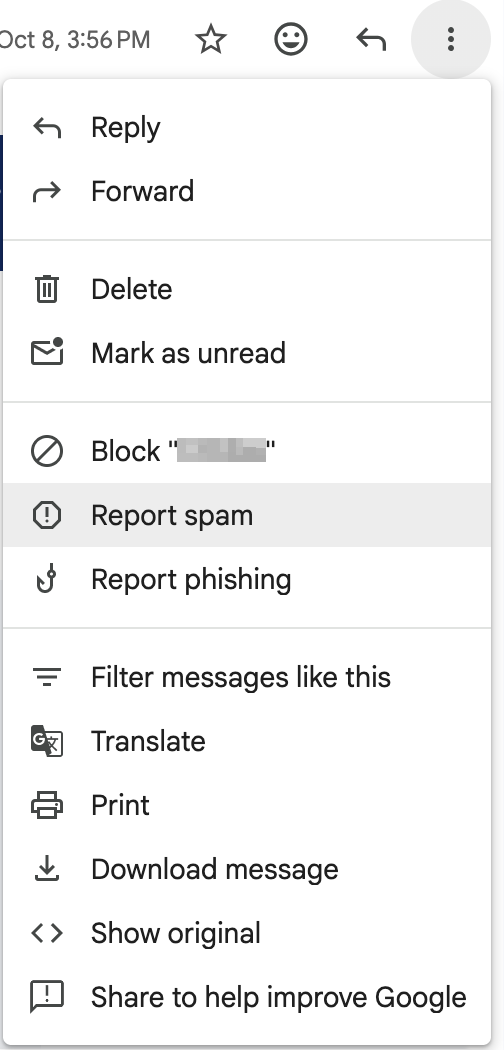
If you received an email from Spotify and suspect it to be a scam, don’t click on any link to avoid handing your account data to scammers. Follow the steps listed below to inspect and report a Spotify scam:
- Click on the three dots next to the sender name or reply button
-
From the dropdown menu, select Report spam
-
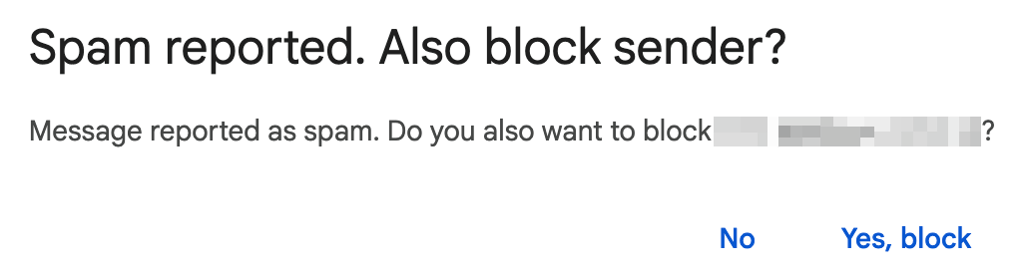
3. Block the sender to stop receiving emails from that address
- Spotify also recommends reporting the email by forwarding it to [email protected]
If you already clicked a link in the scam email, you should act fast to secure your account. Open the official Spotify website, change your account password, and click Sign out everywhere to end sessions on other open devices.
In case you’re reusing the same password on other platforms, update them too. Finally, if you provided any credit card information, freeze your card and contact your bank to monitor for any unauthorized payments.
How can I protect my device against a Spotify scam?
Follow these steps to secure your Spotify account and device against future phishing attacks:
- Report the email as spam and block the sender on your email client.
-
Use phishing email detection tools, such as the Surfshark Email Scam Checker. These tools will alert you if an email has any signs of a phishing attack.
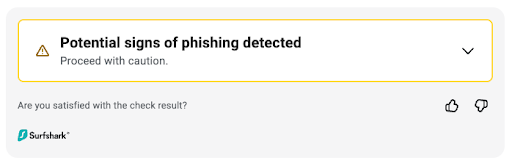
- Sign up for personal data removal services, such as Incogni. These tools scan for leaked credentials and notify you to take quick action and update your passwords before scammers take advantage of them.
Most importantly, never use links in emails to change your passwords or make payments. Open Spotify’s official website to check your account status.
Conclusion
Spotify email scams can look almost identical to legitimate emails. However, there are several ways to identify real and fake notifications. Always pause before clicking on any link received via email and check your account through Spotify’s official website or app.
When I first received one of those alert emails, I genuinely thought it was real. But instead of acting out of fear of losing my Spotify account, I did my research and found that many people encountered the same scam. I immediately reported the email and blocked the sender. To help me detect these types of scam messages faster, I installed an antivirus.
Create smart habits to protect your inbox from scam emails. You can also use tools like Surfshark Email Scam Checker for extra help detecting phishing emails.
FAQ
How to tell if a Spotify email is a scam or real?
Click the sender’s email address to check if it comes from domains ending with @spotify.com. Don’t click any link in the email. Check the legitimacy of the message on Spotify's official platforms or use Surfshark antivirus with an email checker to spot scams immediately.
What should I do if I clicked on a Spotify scam link and entered my details?
If you clicked on any link in the email, go to the official website, change your password, sign out everywhere, freeze your credit card, and monitor your bank account for future unauthorized payments.
Does Spotify send emails when a subscription payment fails?
Yes. Spotify sends a notification email that your payment didn’t go through successfully and gives you a few days to resolve the issue. These emails never ask for urgent password changes or payments. Also, a suspended payment doesn’t mean you lose your premium subscription in 24 hours.
Can your device get infected just by opening a Spotify scam email?
No. The Spotify scam emails are mainly designed to steal your account username, password, and financial information. Rarely, if you download a malicious attachment from the email, it can infect your device.