Alternative Number and Alternative ID review
Being behind major reports like The Mother of All Breaches and RockYou2024, our in-house cybersecurity experts and journalists provide unbiased, real-world testing and in-depth analysis.
We maintain complete transparency by openly sharing our testing methodologies with our audience.
Learn more

We all know the frustration of receiving unwanted marketing texts or spam calls just because you submitted your details online. It’s a strong reminder that our personal information isn’t always as private as we’d prefer. That’s where Surfshark’s Alternative ID and Alternative Number come in.
Surfshark’s alternative ID and number is a privacy-oriented service that gives you a virtual phone number to use on the internet, hiding your real phone number. You can use this number to sign up for websites, apps, or deals, and it’s a great way to avoid unwanted exposure and protect your identity.
In this alternative number review, we walk you through what the Alternative Number is, how it functions to protect your data, the pros and cons of using it, and how you can use it to protect your identity and prevent spamming.
Surfshark Alternative Number and Alternative ID overview
Surfshark's Alternative Number is a privacy tool that gives you a virtual US phone number to help protect your real number from spam, robocalls, and identity theft. It's perfect for signing up for websites and handling online transactions without exposing your personal information.
When you use your real phone number online, companies can collect and sell your data, leading to unwanted marketing messages and scams. Alternative Number acts as a protective layer, so you can sign up for services, receive calls, and get messages without sharing your private info. However, keep in mind that it doesn't support verification codes. Its key features include:
- Virtual US phone number. Get a separate number for online use.
- Avoid spam & scams. Protect your real number from robocalls and smishing attacks.
- Get deals without the spam. Use it for sign-ups without receiving endless marketing texts.
- Use it on websites you don't trust. Keep your real number private when dealing with online listings or unfamiliar platforms.
- Bundle or add-on. New users can access Alternative Number by bundling it with Surfshark’s Alternative ID service, while current customers can add it to their ongoing subscription.
| Availability | Available worldwide, but only US phone numbers are offered. |
| Price | From $3.49/month for Surfshark Starter pack bundle with Alternative ID and VPN (if committing to 24+4 months subscription) |
| Money-back guarantee | A 30-day money-back guarantee applies to all Surfshark plans, including the Alternative Number add-on. |



The Cybernews team consists of professional and highly skilled writers and an in-house research team. They’re the core of all our reviews, bringing the performance of each tool closer to you. Additionally, we stick to a transparent testing process, which includes investigating various services, their features, and disclosing our testing methodology with everyone. Discover more about our testing process.
Alternative Number and Alternative ID: pros and cons
Surfshark’s Alternative ID & Alternative Number offers a great way to safeguard your privacy online. The Alternative Number provides you with an entirely new US phone number to conceal your actual personal information when signing up online, while the Alternative ID offers you a new identity featuring a new name, email, and even address, to safeguard your personal data better. Here's a simple breakdown of the good and the not-so-good.
What is Surfshark's Alternative Number and Alternative ID?
Alternative ID provides an alternative identity and an email address to keep your real information hidden when creating accounts on websites and applications. Alternative Number is a virtual phone number that allows you to receive calls and texts without revealing your actual phone number. You can pay for Alternative Number independently or as a bundle with Surfshark’s VPN subscription for better privacy and protection against spam, scams, and unwanted marketing messages.
Right now, Alternative Number only offers US-based numbers, but you can use it from anywhere in the world. Since this is a new feature, Surfshark may expand to more countries in the future.
New users can enjoy it as a part of the Alternative ID + VPN bundle for ultimate security. If you’re an existing user, then you can easily access Alternative Number as an add-on to your current subscription.
If you're tired of spam calls, scam texts, and random companies getting your personal number, Alternative Number is a great way to stay private. While it doesn't support verification codes or two-factor authentication, it's still a handy tool for keeping your personal number safe. Since it's a new feature, we can expect more improvements in the future.
How to use Alternative ID and Number together
Combining Alternative ID and Alternative Number gives you peace of mind and privacy protection when you're online. Here’s how to use them together.
- Get your Alternative ID. Begin by signing up for Surfshark and creating your Alternative ID. This ID includes a new name, email address, and other details. You can either customize this identity or auto-generate it.
- Add your Alternative number. Next up, you can add an Alternative Number feature to your Surfshark plan for an extra cost. This alternative phone number allows you to receive calls and messages securely without sharing your personal phone number.
- Use both for online sign-ups. You can use your Alternative ID to mask your identity when signing up for websites, apps, or online services, and your Alternative Number to receive calls or texts, ensuring your personal details stay private.
- Change or delete when done. To enjoy additional privacy, you can change your Alternative Number free of charge every 30 days and delete it when no longer required. You can pause or delete your Alternative ID after using it once.
Difference between Alternative ID and Alternative Number
Here’s a comparison table highlighting the key differences between Alternative ID and Alternative Number.
| Feature | Alternative ID | Alternative Number |
| What it offers | Generates a fake identity, including name, email, and address | Provides a virtual US phone number for receiving calls and texts |
| Best for | Avoiding spam and masking email | Masking phone numbers and avoiding spam calls |
| Use case | Sign up for websites, subscribe to newsletters, and create accounts anonymously | Receive calls and texts without exposing your real phone number |
| Customizability | Allows auto-generation or manual editing of identity details | Can change your virtual phone number every 30 days for privacy |
| Privacy focus | Protects your email and personal identity online | Protects your phone number and communication privacy |
| Available as a bundle | Included in all Surfshark plans (Starter, One, and One+) | Sold as an add-on to Surfshark plans |
| Supported locations | Global use | Currently, only US-based numbers are available |
If you're thinking of the best for avoiding spam vs masking email, Alternative ID keeps your email safe from unwanted messages, while Alternative Number masks your phone number and protects you from spam calls.
Why should you use an Alternative Number and Alternative ID?
You can expose yourself to risk of spam, unwanted calls, and scams by giving out your real phone number and email online. Surfshark provides anonymity and security by hiding your personal information using their Alternative Number and Alternative ID. Here are some situations where you might find them useful.
- Booking travel: When booking flights or hotel reservations, it might be better to use your Alternative Number. This is to prevent cases of spamming directed to your real number further down the line.
- Online shopping & discounts: You can use your Alternative ID and Alternative Number when signing up for store discounts or creating accounts with online stores. This allows you to enjoy mouth-watering deals without worrying about the endless promotion texts or emails.
- Selling online: For anyone selling items on Facebook Marketplace, eBay, or Craigslist, you can use an Alternative ID to protect your real phone number from potential scammers.
- Work and freelancing: Having an Alternative number keeps spam calls away and allows you to focus on your small business or freelancing. An Alternative ID further helps you protect your professional email and details when signing up on client platforms or job boards.
- Signing up on websites: Sign up for websites and their newsletters using an Alternative ID and Alternative Number. This ensures your inbox is spam-free while still getting the information you want, and keeps your personal information safe from getting sold or exposed.
- Creating multiple accounts: If you need to create multiple accounts on a website for testing purposes, use an Alternative ID for each account and an Alternative Number to keep them separate and secure.
Learning how to use both services together can help you secure your identity and carry out your daily activities on the web without unwanted exposure online.
How to set up your Alternative Number and Alternative ID?
Setting up your Alternative Number and Alternative ID is simple and only takes a few minutes. Here's how to do it:
Setting up Alternative Number:
Step 1: Buy the Alternative Number
- First, make sure you already have a Surfshark subscription.
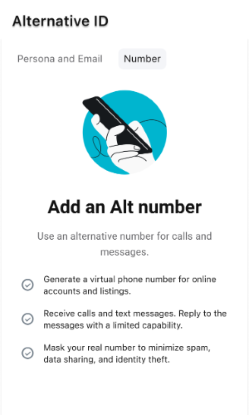
- Open the Surfshark app, tap on Alternative ID.
-
Then select Number.
-
Tap Learn more, then go to the checkout page.

- Pick a US-based number (currently, only US numbers are available).
-
Choose a payment method and complete your purchase.

-
Tap Start.

-
Then Continue to finish.

Step 2: Set it up in the Surfshark app
- Open the Surfshark app on your phone.
- Tap Start to begin setup.
-
Give the app permission to:
- Use your microphone (for calls).
- Send notifications (for incoming messages).
- Access your contacts (optional, for easier use).

- Tap OK to confirm.
Step 3: Make sure it's working
-
Messages sent to your Alternative Number will show up in the Alternative Number tab in the app.

-
If someone calls your Alternative Number, it will appear as a regular phone call on your phone.

That's it. Now, you can use your Alternative Number to keep your real number private while making and receiving calls and texts.
Setting up Alternative ID
You can set up your Surfshark Alternative ID using the browser extension or through the Surfshark web app. Here are the steps you can follow:
Setting up Alternative ID in the Surfshark browser extension
- Open the Surfshark browser extension and tap on the Alternative ID tab.
- Click Create to start creating your alternative persona.
- Fill in the gender, date of birth, country, and state for your new identity and then click “Continue.”
- Next up, you’ll see your alternative email. You can decide to use the generated one or keep regenerating to get a better one.
- Link your real email by filling in the provided field and clicking Create Alt ID.
- Surfshark will send a verification code to your real email. Copy the code, enter the Verification Code, and click Confirm.
- Once you’re verified, you’ll see a confirmation of your new Alt ID email.
Setting up Alternative ID in the Surfshark web app
- Log in to your account and go to the Alternative ID tab.
- Click Create to start creating your alternative persona.
- Select the gender, date of birth, country, and state. Click Create Alt Persona.
- Next up, you’ll see your alternative email. You can keep the generated one or click Regenerate if you want a different email. When you’re satisfied, click Continue.
- On the next page, type in your real email to link it with your new Alt ID. Once done, click Create Alt Email.
- Check your inbox for a verification email from Surfshark and follow the instructions to complete the verification.
- After verifying your email, you’ll see a confirmation of your Alt ID email. Emails sent to your Alt email will be forwarded to your real inbox until you choose to regenerate your alternative email.
Surfshark Alternative Number and Alternative ID pricing
For all new users, Surfshark's Alternative Number can be bundled with Alternative ID and VPN, as well as other perks based on the subscription tier. The longer you commit to a subscription, the cheaper it gets. Check out a simple breakdown of plans and pricing when bundled with Alternative Number below:
| Length of subscription | Starter | One | One+ | Alternative ID |
| 24+4 months | $3.49/month ($97.72 total) | $3.99/month ($111.72 total) | $4.99/month ($139.72 total) | Included with all plans |
| 12+4 months | $4.99/month ($79.84 total) | $5.49/month ($87.84 total) | $6.99/month ($111.84 total) | Included with all plans |
| 1 month | $17.99/month | $19.99/month | $21.99/month | Included with all plans |
- Go for Surfshark Starter if you just want a VPN and an Alternative Number add-on to keep your real phone number private.
- Choose Surfshark One if you also want Incogni, which removes your personal details from company databases.
- Pick Surfshark One+ if you want maximum privacy, with extra data removal protection.
All plans come with a 30-day money-back guarantee so that you can try it out without any risk.
Alternative Number and Alternative ID user reviews
I read several Alternative Number review threads on platforms such as Reddit and discovered that it has mixed reviews from various users. The convenience of creating a second phone number (without sharing their real one) is appreciated by many users. It is easy and relatively fast to set up, and you can obtain a US-based number within minutes. This ease of use makes it accessible even to non-tech-savvy users. Also, it’s all built into the Surfshark app, so you don’t have to download anything additional.
However, it has some drawbacks. The first issue is that Surfshark provides US-only numbers, making it inconvenient for users outside the US who require a local number. Most users would like to see Surfshark extend its service to other countries. The second most frequent complaint is that verification codes do not go through. When using the Alternative Number to sign up on websites or applications that require text verification, you may not always receive the code. However, Surfshark discloses this to its customers up front.
Opinions about pricing are divided. Some users consider the small monthly fee to be worth the additional privacy, others think it should be a complimentary feature to the Surfshark VPN subscription.
The Alternative ID provided by Surfshark has also received positive reviews on its ease of use and effectiveness. One user stated that the setup process was easy. Upon access (or after signing in to their Surfshark account and accessing the Alternative ID section), they were pleased with the chance to personalize the information and choose a particular country address and nationality. This option is especially effective if you want to create a tailored identity.
Another feature that users liked is the disposable email option. One of the users described that they subscribed to some newsletters and made a few online purchases using their new disposable email, and all the messages were automatically forwarded to their main account. This meant that they could view the content without having to provide their actual email address, and the effect was a visible decrease in spam and unwanted emails. Most of the users expressed similar sentiments, saying that Alternative ID assists in safeguarding their privacy by limiting their exposure to unwanted messages.
Both Alternative Number and Alternative ID offer a decent level of privacy protection. Although Alternative Number is an excellent tool to hide your phone number, it has a lot of potential for improvement. Alternative ID is simple to use and provides a convenient method to retain your privacy and stay safe online.
Video review
Watch our video review for an in-depth look at Surfshark’s Alternative Number and Alternative ID, explaining how these features work and what benefits they offer for your privacy and security.
Other privacy tools you might be interested in:
Incogni review: easy way to remove your data from the Internet
NordLocker review: reliable cloud storage solution
Conclusion
Surfshark’s Alternative Number and Alternative ID are excellent additions to your online privacy, as they both serve a unique purpose depending on the situation. Alternative Number helps prevent scams, spam, and robocalls when buying tickets, selling things, or registering on different websites with your phone number. It is easy to configure, cheap, and offers a US-based virtual number to keep your real number hidden. Although it does not support verification codes, it works fine in most everyday scenarios.
Alternative ID allows you to mask your email and personal identity when you sign up for online services or subscribe to newsletters. It reduces the amount of undesirable emails and spam you receive, giving you that extra shield without disclosing your actual information.
Ultimately, if you need to hide your phone number, I recommend Alternative Number, but if you’re leaning towards masking your email and identity, then you should go for Alternative ID. This Alternative Number review has revealed that the two services complement each other well, and using them together offers maximum privacy for your online affairs.
FAQs
What is an alternative phone number?
An alternative phone number is a secondary number you use instead of your real one. It helps protect your privacy when signing up for services, making online purchases, or communicating with strangers. This way, you avoid spam calls, unwanted messages, and potential security risks.
What does alternative ID mean?
Alternative ID is a Surfshark service that masks your online identity by creating an anonymous profile and email address. It allows you to get a new identity, such as a new email account, and connect it to your actual email. This helps protect your personal data when visiting websites, signing up for newsletters, or completing a shopping transaction online. With an Alternative ID, you can hide your own identity and reduce exposure to spam, phishing, and data breaches.
What is an example of an alternative number?
An example of an alternative number is a temporary or virtual phone number provided by services like Google Voice or Surfshark Alternative Number. You can use it for online registrations, business communications, or dating apps without exposing your phone number.
How does the Surfshark alternative number work?
Surfshark Alternative Number provides a virtual US-based phone number you can use instead of your real one. It forwards calls and texts to your main number, keeping your personal details private. However, it doesn't support verification codes for apps like WhatsApp or banking services.
What is the best free second phone number app?
Google Voice is one of the best free second phone number apps. It provides a virtual number for calls, texts, and voicemail. Other options include TextNow and Burner, though they may have limitations like ads or paid features for better functionality.