NordLayer Browser review: is it worth it for your business?
Being behind major reports like The Mother of All Breaches and RockYou2024, our in-house cybersecurity experts and journalists provide unbiased, real-world testing and in-depth analysis.
We maintain complete transparency by openly sharing our testing methodologies with our audience.
Learn more
Workplaces keep changing, and the way companies organize work has shifted a lot in recent years. Teams now rely on remote workers, contractors, and personal devices. As such, the browser is where today’s work happens, and increasingly where data leaves the company. 95% of SaaS and AI tools run inside it, but Chrome, Edge, and Firefox weren’t built to give IT visibility of control over any of it.
NordLayer Browser is an enterprise browser built to close that gap. It lets IT teams control clipboard actions, downloads, uploads, and extensions, block phishing pages, and see every web app in use – on company and personal devices alike.
To see how well it works, our in-house research team and I put NordLayer Browser to the test. In this review, I cover its key features, setup, pricing, who it’s really for, and whether it’s actually worth it.
NordLayer Browser: an overview
Here’s a quick look at what NordLayer Browser offers.
| ⭐ Rating: | 4.8/5 |
| 🎯 Best for: | Small and mid-sized companies with remote workers, contractors, or bring-your-own-device (BYOD) policies |
| 📝 Brief description: | A centrally managed enterprise browser that gives IT visibility and control over web activity, SaaS access, and data movement inside every browser session |
| 💰 Price: | From $4.00/user/month (5-user minimum), plus a required dedicated IP server from $40.00/month |
| 🛡️ Data protection: | Controls for file uploads and downloads, copy and paste, camera, and microphone |
| 👀 Visibility: | Web activity monitoring, extension tracking, and a browser activity log |
| 🔐 Access control: | SSO, MFA, session timeouts, policy-based routing, and dedicated IP |
| 💻 Devices: | Company and personal devices, with no MDM enrollment required |
| ⚙️ Deployment: | MDM push or self-serve download, set up in minutes |
| ✅ Compliance: | ISO/IEC 27001:2022 certified, SOC 2 Type 2 audited, aligned with HIPAA objectives |
| 💸 Money-back guarantee: | 14 days |
What is NordLayer Browser?
NordLayer Browser is a centrally managed enterprise browser for securing web traffic, SaaS access, and online work activity using Zero Trust principles. It comes from NordLayer, the business security brand of Nord Security, the company behind NordVPN and NordPass.
Simply put, the browser is a downloadable app that looks and works like a regular browser. Behind the scenes, though, IT admins manage it from the same NordLayer Control Panel used for NordLayer VPN. From there, they can set rules for websites, extensions, downloads, and clipboard actions, either for whole teams or for individual users.
Once the rules are set, they apply in every NordLayer Browser session, whether an employee works from the office, home Wi-Fi, or a public network. Admins can then see which sites employees visit, which extensions they use, and which actions were blocked, all in one place.
Since NordLayer Browser doesn’t require separate endpoint security agents or MDM enrollment, it’s especially useful for companies with remote employees, contractors, and BYOD users. In other words, it secures work on devices that IT doesn’t fully control.
NordLayer Browser: key features
NordLayer Browser groups its features into 5 areas: shadow IT management, data loss prevention, Zero Trust browsing, SaaS access control, and secure browsing.
Shadow IT management
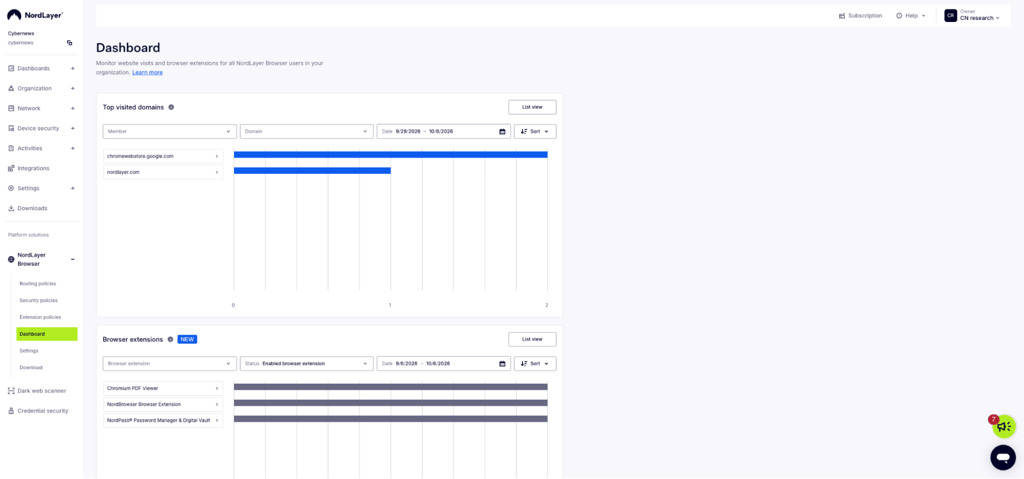
NordLayer Browser’s web activity monitoring shows which domains employees visit, so IT can spot unapproved SaaS and AI tools. The Dashboard displays top visited domains and browser extensions in use, with filters for member, domain, and date.
During my testing, it picked up my visits to the Chrome Web Store and NordLayer’s site. It also listed every extension installed, including the Chromium PDF Viewer, NordPass, and NordLayer’s own browser extension.
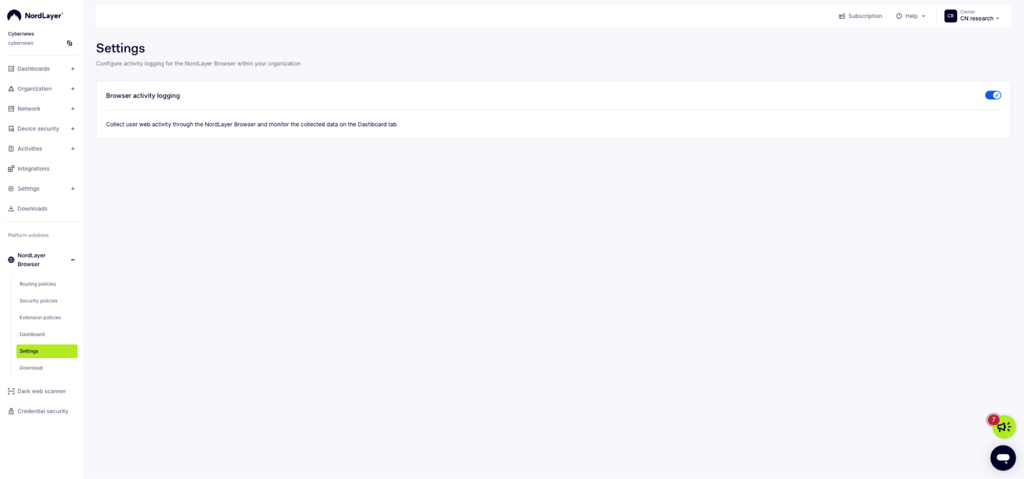
Admins can also block specific domains and review a detailed activity log for audits and investigations. Activity logging is a single toggle on the Settings page, so you can turn it on or off for the whole organization in seconds.
Data loss prevention
NordLayer Browser’s security policies let admins allow or block 6 browser actions: file downloads, file uploads, copy to clipboard, paste from clipboard, microphone, and camera. Each policy applies to selected teams and covers either all websites or up to 100 specific destinations.
For example, I created one policy that blocks camera and microphone access everywhere and another that allows copying on all websites. In a real company, you could allow the microphone and camera only on Zoom or Google Meet while blocking uploads to unknown sites.
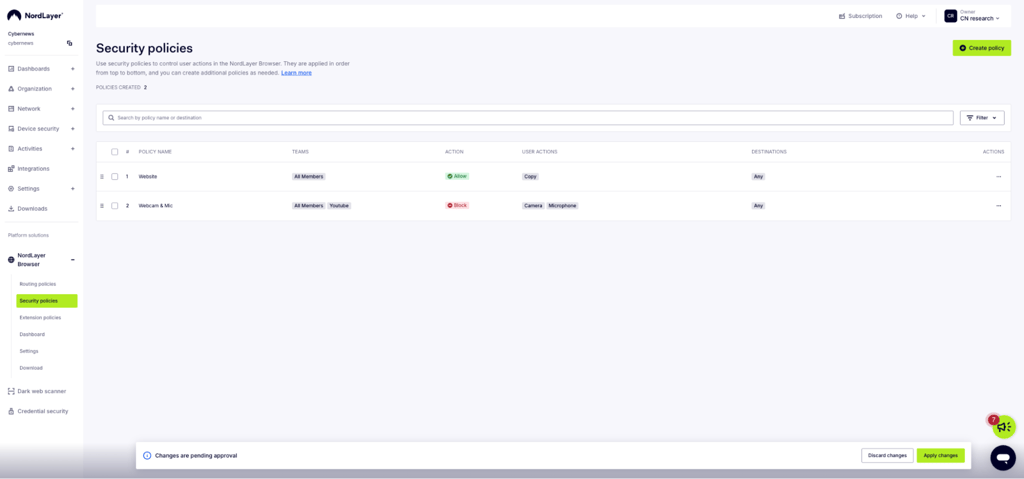
If a user belongs to several teams with conflicting rules, the most restrictive policy wins. That’s a smart default, since a gap in one team’s rules can’t accidentally loosen another’s.
These controls still work at the action level, though. NordLayer is extending browser DLP this year with DLP Labs, which adds content-aware controls. Pattern and keyword detection catches things like credit card numbers, source code, or personal data pasted into AI prompts. That shifts DLP from blocking the action to blocking the content itself.
Start with clipboard and upload rules for teams that handle sensitive data, like finance, HR, and sales. These are the most common ways customer lists and financial records end up in unapproved AI tools.
Extension control
Malicious and compromised extensions are one of the most common browser attack vectors. For instance, in late December 2024, attackers phished a Cyberhaven developer and pushed a poisoned update of its Chrome extension to around 400K users.
The example shows that a single bad update can turn a trusted tool into a data thief overnight. So, the safest approach is to decide upfront which extensions are allowed to run.
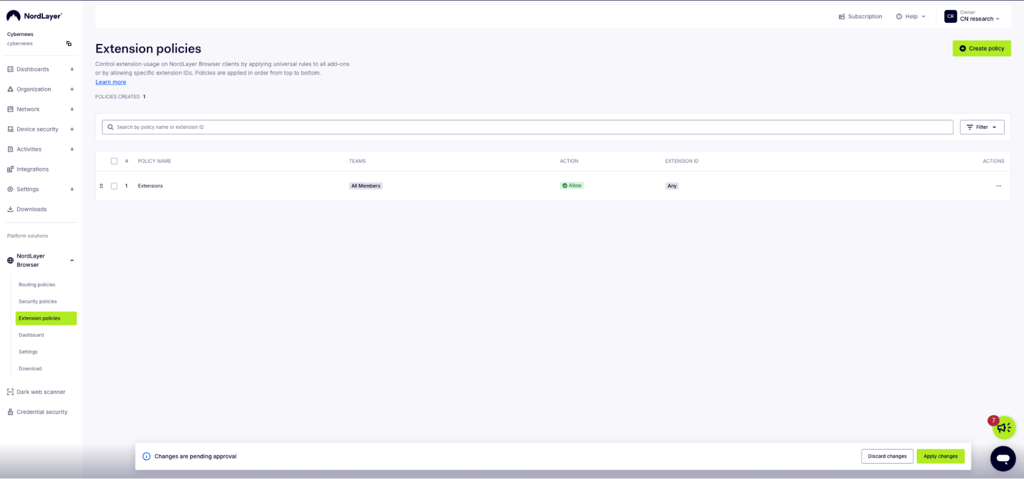
That’s what NordLayer Browser’s extension policies are for. Admins can allow or block specific Chrome Web Store extensions by their ID, or block all extensions at once. Each organization can create up to 200 extension rules, and each rule can cover up to 100 extension IDs.
Rules run from top to bottom, the first matching rule applies, and you can reorder them by dragging. A Block rule set to Any blocks every extension, including locally unpacked ones.
Zero Trust browsing and routing
NordLayer Browser applies Zero Trust principles at the browser level by verifying users, ending sessions after a set time, and limiting each team to the resources it needs.
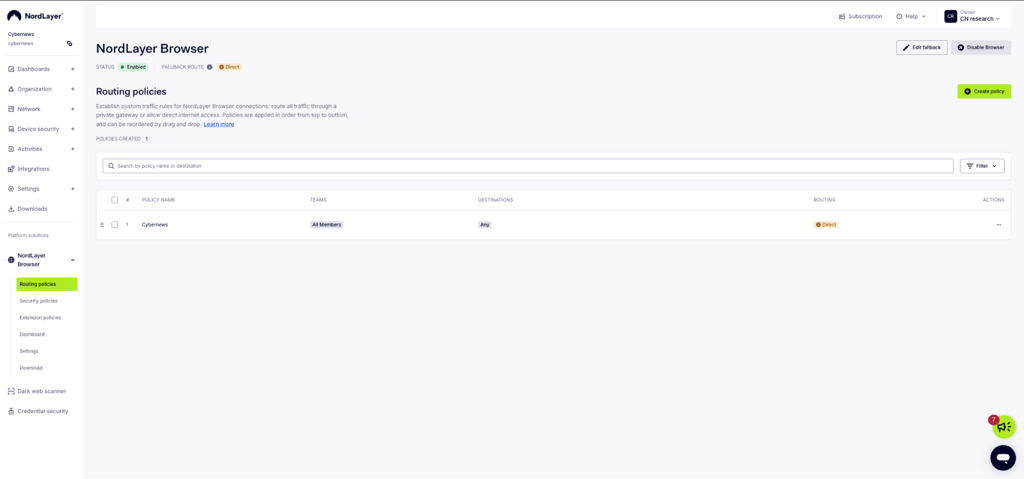
Routing policies decide where browser traffic goes. Admins can send traffic for selected domains or IP addresses through a private gateway, or let it go straight to the internet.
This is handy when different teams need different rules, or when a gateway should only handle browser traffic without affecting NordLayer’s desktop and mobile apps.
Other Zero Trust features include:
- Browser traffic segmentation. Routes each team’s traffic through specific private gateways, so users only reach the resources assigned to them.
- Browser secure tunneling. Lets employees reach internal web tools without making them publicly available.
- Browser firewall. Specifies which connections are allowed or blocked at the browser level.
- Session timeout. Ends sessions automatically after a set period.
SaaS access control
NordLayer Browser ties web access to your existing identity setup. It supports SSO with Okta, Entra ID, OneLogin, Google, and JumpCloud, adds MFA on top, and automates onboarding and offboarding through user provisioning with Entra ID and Okta.
The dedicated IP feature assigns a fixed IP address to browser traffic. You can allowlist that IP in your SaaS tools, so only users coming through NordLayer Browser can reach them.
Instant web access preconfigures internal web apps behind a private gateway. So, no employees reach them with one click – no VPN configuration, no manual bookmarks.
Secure browsing
Finally, NordLayer Browser adds a layer of everyday threat protection. Here’s what’s included:
| Feature | What it does |
| Web threat protection | Blocks phishing, malware, and malicious sites based on threat intelligence feeds |
| DNS filtering by category | Blocks 50+ website categories, like gambling or adult content |
| Web application control | Detects and blocks web apps that break company policy |
| Custom DNS | Routes DNS requests through your own or a trusted third-party resolver |
| IP masking | Hides users’ real IP addresses from the websites they visit |
Testing NordLayer Browser: my experience
I tested NordLayer Browser from both sides: as an admin setting up policies and as an employee using the browser. Here are my key NordLayer Browser testing takeaways.
Admin experience
NordLayer Browser lives in the same Control Panel as NordLayer’s VPN, under Platform Solutions. It has its own section with 6 pages: routing policies, security policies, extension policies, Dashboard, Settings, and Download.
Since I’ve worked with firewall rules before, setting up policies felt easy. Each rule is a row with a team, an action (allow or block), what it covers, and where it applies, so creating a new policy is quick.
One thing to note, though, is that saving a policy doesn’t automatically activate it. A bar at the bottom of the screen marks changes as pending until you click Apply changes. This stops half-finished rules from reaching users, but it’s easy to miss if you’re moving fast.
It’s also worth knowing that NordLayer Browser starts with minimal protection. Routing defaults to direct internet access, all extensions are allowed, and no restrictions apply until you create policies. So, the browser is only as strict as you make it.
After creating or editing a policy, always check the bottom of the screen for the Changes are pending approval bar and click Apply changes. Otherwise, your new rules won’t reach users.
User experience
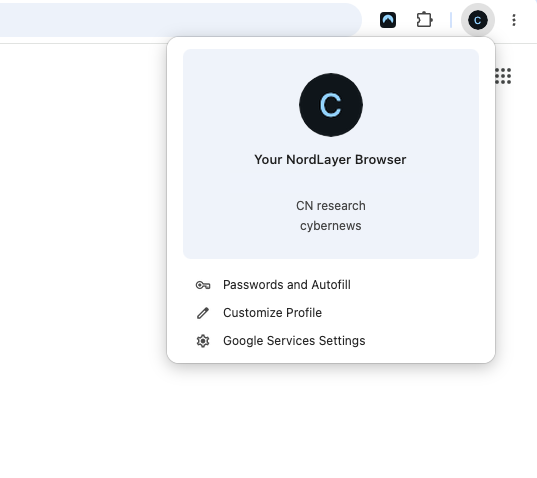
For employees, the experience is simple. I downloaded the browser from the Control Panel’s Download page, logged in with my NordLayer credentials, and started browsing within minutes. The browser opened with my organization’s profile already attached.
How to set up NordLayer Browser
Getting NordLayer Browser running takes 4 steps:
- Sign up and choose a plan. Create a NordLayer account, or log in if you already use NordLayer
- Enable the browser. In the Control Panel, go to Platform Solutions and turn on NordLayer Browser
- Set your policies. Create security, routing, and extension policies for each team, then click Apply changes
- Roll it out. Push the browser through your MDM tool, or let employees download it and sign in themselves
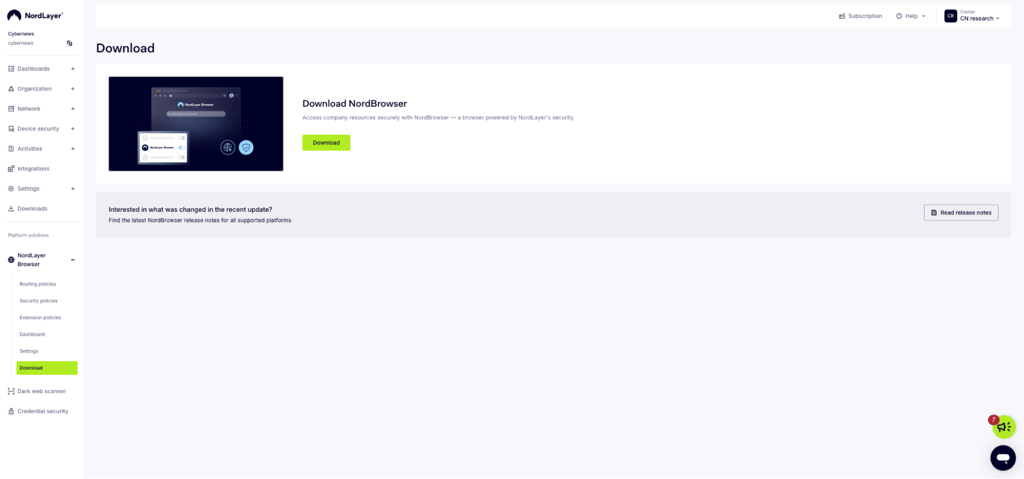
NordLayer says the average deployment takes about 10 minutes, and in my experience, it really was that fast. This means you can have your whole team protected within a day.
NordLayer Browser pricing
NordLayer Browser keeps pricing simple, with one self-serve plan and a custom option for larger organizations.
| Plan | Price | Minimum users | What’s included |
| Premium | From $4.00/user/month | 5 | All features, plus 24/7 live chat and email support. Requires a dedicated IP server from $40.00/month |
| Custom | Tailored pricing | 50 | A setup built around your team’s specific security requirements |
NordLayer says the full feature set comes standard, with no add-ons. The catch is the dedicated IP server, which is required. A 5-person team pays $20.00 for seats plus $40.00 for the server, or $60.00/month in total. The server cost matters less as your team grows, but it noticeably raises the entry price for small teams.
Every plan comes with a 14-day money-back guarantee, and you can cancel anytime from the NordLayer Control Panel. Companies with 30 or more licenses also get a dedicated account manager.
NordLayer Browser vs other browsers
Most companies stick with Chrome or Edge because they’re free and already installed. But without proper management, these browsers give IT no visibility into web activity and no control over where company data goes.
Here’s how NordLayer Browser compares with a regular browser and its 2 closest enterprise rivals:
| NordLayer Browser | Chrome Enterprise Premium | Prisma Browser | Unmanaged Chrome or Edge | |
| Price/user/month | From $4.00/user/month | $6.00/user/month | $10.00/user/month | Free |
| Data loss prevention | ✅ Yes | ✅ Yes | ✅ Yes | ❌ No |
| Shadow IT visibility | ✅ Yes | ✅ Yes | ✅ Yes | ❌ No |
| Extension control | ✅ Yes | ✅ Yes | ✅ Yes | ❌ No |
| Built-in routing and dedicated IP | ✅ Yes | ❌ No | ✅ Yes | ❌ No |
| Minimum seats | 5 | None | None | None |
Chrome Enterprise Premium is the lowest-friction option, since employees keep using Chrome, but it lacks NordLayer’s routing and dedicated IP features. Prisma Browser is the closest direct competitor and suits companies already using Palo Alto Networks, but it costs more per seat.
From my perspective, NordLayer Browser’s biggest advantage is that it combines browser security with NordLayer’s private gateways and VPN capabilities in one product, at a lower price per seat, which makes it a clear winner in the comparison.
Who is NordLayer Browser for?
NordLayer Browser is built for organizations that run most of their work in the browser and want control without a complex rollout.
I recommend NordLayer Browser to:
- Small and mid-sized companies. Teams without a dedicated security engineer can manage everything from one dashboard.
- Companies with contractors and BYOD users. Personal devices get the same controls as company ones, and access ends the moment you revoke it.
- Remote and hybrid teams. The same policy applies on home Wi-Fi, in a client’s office, or in a coffee shop.
- Existing NordLayer customers. The browser lives in the same Control Panel, so there’s no new platform to learn.
I don’t recommend NordLayer Browser to:
- Individuals. It’s not a personal privacy browser and requires at least 5 users.
- Very small teams on a tight budget. The required server pushes the entry price up for teams of 5 to 10 people.
- Companies invested in Google or Palo Alto. Chrome Enterprise Premium or Prisma Browser may fit better into your existing stack.
NordLayer Browser: pros and cons
Final verdict: is NordLayer Browser worth it?
In my opinion, NordLayer Browser is definitely worth it. It gives IT clear visibility into web apps and extensions, controls how data leaves the browser, and protects personal and contractor devices without heavy endpoint agents. Setup takes minutes, and employees can keep working the way they always have.
Starting at just $4.00/user/month, it combines DLP, Zero Trust access, shadow IT visibility, and threat protection in one product. It also offers private gateways and dedicated IP features that rivals like Chrome Enterprise Premium don’t have.
For small and mid-sized companies with remote workers, contractors, or BYOD policies, NordLayer Browser is one of the most affordable ways to secure work where it actually happens.
FAQ
Why do I need an enterprise browser instead of Chrome or Edge?
An enterprise browser gives IT control over security policies, data access, and user activity that Chrome and Edge don’t offer out of the box. Instead of patching gaps with extensions and group policies, you get built-in protection managed from one place.
Is NordLayer Browser worth it for small businesses?
Yes, NordLayer Browser is worth it for small businesses. From just $4.00/user/month, it gives you DLP, shadow IT visibility, Zero Trust access, and threat protection in one browser, with no dedicated security team needed. It sets up in minutes, works on personal and contractor devices, and comes with a 14-day money-back guarantee, so you can try it risk-free.
Can NordLayer Browser prevent data leaks?
Yes, NordLayer Browser can prevent data leaks. Its DLP controls let admins restrict file uploads and downloads, copy and paste actions, and camera and microphone access by team and website.
Does NordLayer Browser work on personal devices?
Yes, NordLayer Browser works on personal devices without MDM enrollment. Contractors and BYOD users download the browser and sign in, and they get the same policies as company devices.
What is NordLayer Browser’s refund policy?
NordLayer Browser offers a 14-day money-back guarantee from your initial purchase. To request a refund, contact NordLayer’s support at [email protected].
How do I cancel my NordLayer Browser subscription?
You can cancel your NordLayer Browser subscription anytime through the NordLayer Control Panel. Your access continues until the end of the current billing period, but unused time isn’t refunded.