Best digital calendars (2026): stay organized and boost productivity


Trying to keep track of everything can feel overwhelming, and it’s easy to lose sight of what matters most. The best digital calendar brands help you bring order to that chaos by ensuring your schedule stays stress-free and organized.
Most digital calendars do more than just remind. They integrate with your email and communication tools and make it easy to organize projects, coordinate with teams, and manage personal goals from a single point.
The Cybernews research team and I teamed up to evaluate the best options on the market. We analyzed usability, integrations, and overall value. In this guide, I’ll highlight these picks to help you choose the best digital calendar that fits your lifestyle.
Best digital calendars – shortlist
- ApoloSign Digital Calendar – best for keeping all of your schedules in one place
- LQN Digital Calendar (10.1") – best affordable family planner for smaller spaces
- BSIMB 21.5” Digital Calendar – best large wall calendar for shared family spaces
- JSUSOU Magnetic Fridge Smart Digital Calendar (15.6”) – best flexible calendar for kitchens and multi-purpose spaces
- Canupdog Digital Calendar – overall best digital calendar in 2026
- LOOFII Smart Digital Calendar – best for smart features and real-time reminders
- AKImart Wall Planner – best for visual organization in large spaces
- BQQJDD Digital Calendar – best for interactive chore charts
- Telonixium Smart Digital Calendar – best for integration with multiple apps
9 best digital calendars – my detailed list
Here’s my in-depth look at each of the top digital calendars of 2026. I’ll walk you through their features, ideal use cases, and what stood out to me when analyzing them with the Cybernews research team.
1. ApoloSign Digital Calendar – best digital calendar that acts as a smart hub
| Display size: | 21.5" |
| Customization: | High |
| Best for: | Simple shared calendars on a budget |
Key features
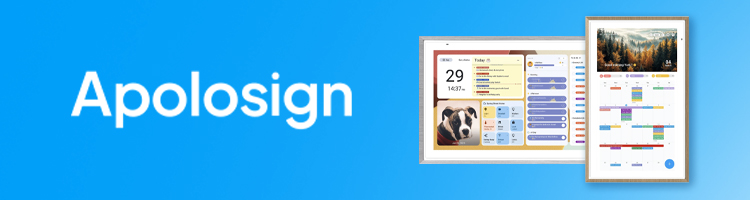
The ApoloSign Digital Calendar stood out to me due to its blend of powerful organization tools with the flexibility of a smart hub. More precisely, this calendar automatically syncs with Google, Outlook, iCloud, and other major apps. The best part is that you can switch to Android Mode and turn it into a fully customizable dashboard where you can manage widgets, monitor routines, and create a central smart-home hub for the whole household.
Another great feature is the rewards-based chore chart. This makes task management engaging for kids, while the colour-coded lists will simplify the shopping, planning, and day-to-day organization of routines for parents.
Why I recommend it
One of the main reasons why I recommend the ApoloSign Digital Calendar is that it turns organizing your tasks into a fun and interactive activity. Its customization options and rewards-based chore chart make day-to-day tasks an engaging activity for the whole family, especially your kids.
User reviews
When it comes to the user reviews, most people like the ApoloSign Digital Calendar due to its sleek design, bright display, and excellent organization features. However, while they praise its effortless syncing, some claim that it requires some setup effort for ultimate functionality.
2. LQN Digital Calendar (10.1") – best affordable family planner for smaller spaces
Key features
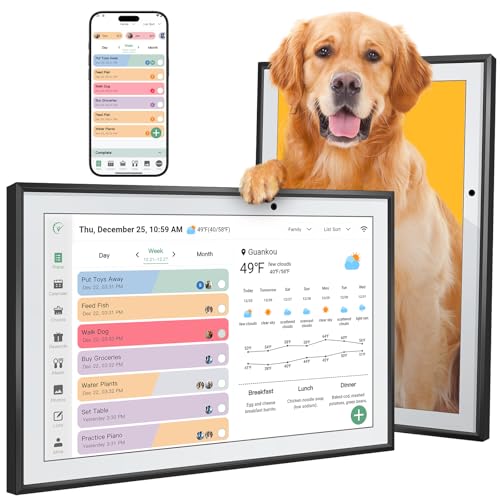
The LQN Digital Calendar is designed to replace paper planners by bringing work schedules, personal to-do lists, and family activities into one shared 10.1-inch IPS HD touchscreen.
What I’ve learned is that this device also supports both horizontal and vertical placement, which can make it really easy when it comes to fitting it into different rooms, such as kitchens, home offices, or shared living areas. Through Wi-Fi connectivity, this calendar can sync with Google Calendar, Outlook, iCloud, Yahoo, and Cozi, which should allow the entire household to stay updated without manually copying events between apps.
Also, beyond these basic scheduling features, I can say that this model focuses heavily on family-oriented features. The LQN calendar includes interactive chore charts with a rewards system that turns daily tasks into engaging challenges for kids, helping parents encourage responsibility more playfully. Many people liked the feature that the calendar also works as a digital photo frame, so family photos and videos can stay on display when the screen is idle.
On top of that, what I’ve also found great is that this device offers audible reminders for important events and routines, as well as an AI-based meal planning feature that can create daily meal suggestions based on entered family data.
Why I recommend it
Truth to be told, I would recommend the LQN Digital Calendar because it delivers many of the features people look for in a smart family planner at a much more accessible price point. This device combines shared scheduling, task management, visual reminders, and family-focused tools into one compact device, which makes it a practical choice for households that want better organization without investing much money.
User reviews
Based on user feedback, the LQN Digital Calendar leaves a very positive impression, with many buyers highlighting its ease of use, clear display, and helpful family organization features. Users also often mention that syncing with major calendar platforms works smoothly and that the chore chart and photo-sharing functions make the device more engaging for everyday family life.
3. BSIMB 21.5” Digital Calendar – best large wall calendar for shared family spaces
Key features
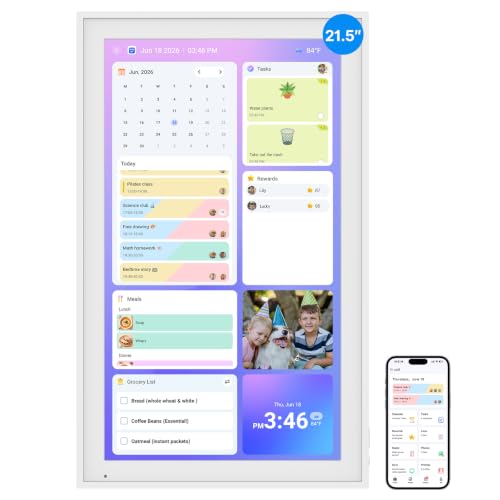
While going through the product description and user feedback, I noticed that the BSIMB Digital Calendar is clearly positioned as a wall-mounted family hub rather than just a simple scheduling screen. So, this calendar uses a large 21.5-inch touchscreen, which makes events, chores, and reminders easy to see from across the room. From what I could tell, the setup process is meant to be straightforward, since you only need to plug it in, connect it to Wi-Fi, and sync it with services you use like Google Calendar, iCloud, Outlook, Cozi, or Yahoo.
When I looked more closely at its feature set, it became obvious that BSIMB focuses heavily on everyday family routines. Several descriptions and reviews also mention that it works as a digital photo frame, which can allow your family to share photos and videos through the companion app.
While doing my research about its app features, I also came across the fact that BSIMB offers both free and paid tools. The free version covers essentials like chore charts, meal plans, photo display, and rewards, while some advanced options, such as Magic Import, sit behind a paid upgrade.
Why I recommend it
Truth to be told, I would recommend the BSIMB Digital Calendar mainly because of its large screen and strong focus on shared family organization. Based on what I found during my research, this model makes the most sense for households that want a central, always-visible place for schedules, chores, and reminders, especially in kitchens, hallways, or living rooms where smaller displays can feel limiting.
User reviews
After going through a large number of reviews, I found that many users appreciate how easy the BSIMB Digital Calendar is to set up and use with the app, and several people also mention that it offers good value for the price. At the same time, some users report mixed experiences with reliability and screen quality, including issues like flickering, poor viewing angles, or the device stopping unexpectedly, which can suggest that long-term screen performance can be a concern.
4. JSUSOU Magnetic Fridge Smart Digital Calendar (15.6”) – best flexible calendar for kitchens and multi-purpose spaces
Key features
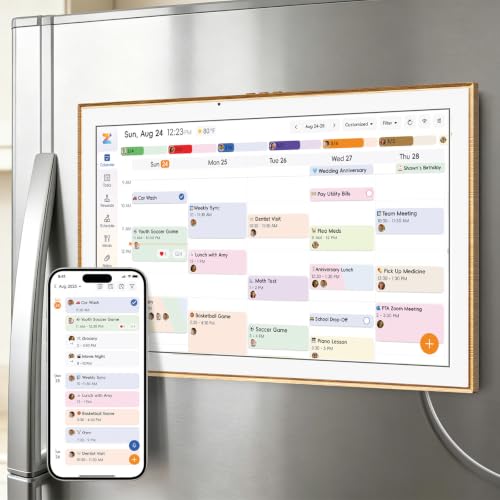
While going through the product description and customer feedback, I noticed that the JSUSOU Digital Calendar is clearly built around flexibility and everyday convenience. It uses a 15.6-inch HD touchscreen that shows the whole family’s schedule.
From what I could tell, the magnetic back is one of its main selling points, since it can allow the calendar to be mounted directly on a fridge, while you can also use the adjustable stand and wall-mount option to make it easy to move between a kitchen, an entryway, or a desk setup.
When I looked more closely at its feature set, it became clear that JSUSOU is trying to position this model as more than just a calendar, because the device combines chore assignments with color labels and task rewards, weekly meal planning with shopping lists, habit tracking, to-do lists, alarms, and multi-calendar syncing in one interface.
While researching the smaller details, I also came across several points that make this model easier to live with day to day. The calendar includes smart reminders and even weather alerts, which should help you with everyday planning, and the brand also emphasizes that the app, cloud storage, and syncing features come without a subscription.
Why I recommend it
The JSUSOU Digital Calendar lands on this list mainly because of how many placement options it offers compared to most other models. Based on what I found out, this is a good fit for families who want one screen that can live on the fridge, move to a wall, or sit on a desk, while still covering shared schedules, chores, and daily reminders in one place.
User reviews
After going through many reviews, I found that many users mainly appreciate the clear display, easy syncing, and the overall convenience of having a shared family hub in a visible spot like the kitchen. The overall rating suggests strong satisfaction, although, as with most smart devices, some users note that getting used to all features can take a bit of time at first.
5. Canupdog Digital Calendar – best digital calendar for work and families
Key features
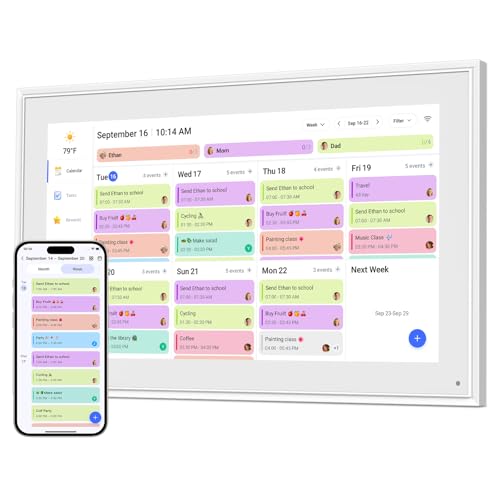
The Canupdog Digital Calendar is one of the newest smart family calendars. It combines a digital planner, clear scheduling views, and a bright 15.6" HD touchscreen. Due to this, you’ll enjoy effortless organizing of your chores.
What I really liked is that it has daily, weekly, and monthly layouts, plus built-in chore charts and to-do lists. Due to this, each of your family members can easily track their tasks and routines. Additionally, the intuitive interface makes planning a breeze, as you can check the schedule and even view photos from any angle.
Why I recommend it
I highly recommend the Canupdog Digital Calendar because it simplifies the daily coordination of your whole family. Thanks to its automatic syncing across major calendar platforms, you don’t have to navigate different apps and potentially miss an update. You’ll have everything in a single place.
User reviews
After going through multiple reviews, I’ve learned that Canupdog Digital Calendar reviews are generally positive. Users highlight its clear touchscreen, seamless sync with Google or iCloud, and love its family organization features, such as color-coding, chore charts with rewards, meal planning, and photo display. Still, some report occasional sync delays.
6. LOOFII Smart Digital Calendar – best for smart features and real-time reminders
Key features
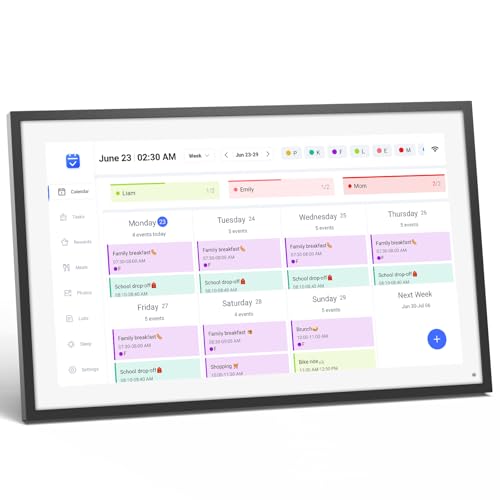
The LOOFII is a modern, slim smart digital calendar designed for connected homes, featuring a 15.6″ Full HD touchscreen with crisp resolution and an intuitive design. It syncs effortlessly with Google, iCloud, and Outlook calendars via the free eCalendar app, displaying your appointments, tasks, and notes on its large screen. You can add events directly on the calendar or remotely using the companion app, making it easy to keep the whole family organized and on the same page.
In addition to being a calendar, it also functions as a digital photo frame when not in use, showing off your favorite pictures. It has an interactive chore chart with a rewards feature to help motivate kids to get their tasks done, a meal planner function to simplify weekly meal prepping and planning, and smart sensors for automating brightness, weather alerts, and sleep mode. Through its over-the-air firmware updates, LOOFII will keep improving over time, ensuring lasting value for homes that prioritize technology advancements.
Why I recommend it
LOOFII has the intelligence, flexibility, and polish that make it the best digital calendar for smart home enthusiasts. It has the full functionality of a tablet, with the crispness of a Full HD display and the versatility of a connected home smart device, all wrapped up in one convenient package. I especially like its smart sensor automation and integration of productivity features (calendar syncing, task reminders) with lifestyle applications (meal planner, photo display). It’s perfect for those who appreciate design, multi-platform connectivity, and all-in-one solutions for staying productive and managing daily life.
User reviews
Customers are overwhelmingly positive about LOOFII, often calling it a “game-changer for family organization.” Many are impressed with its sharp display, responsive touchscreen, and easy syncing across platforms. One user said mounting it in their kitchen made it the natural hub for appointments, chores, and meal planning. Several customers bought it as a gift for their parents or for their own busy households.
Customers also value that it offers premium features without requiring a subscription or a monthly fee like more expensive alternatives. A few people found the setup to be a pain point and said the app interface could be better, but most thought it was worth the initial effort. The LOOFII Smart Digital Calendar operates without problems after installation and reliably helps families to maintain order and engagement. Overall, it’s a feature-packed, sleek, and budget-friendly option compared to higher-end smart calendars like Skylight or Dakboard.
7. AKImart Wall Planner – best for visual organization in large spaces
Key features
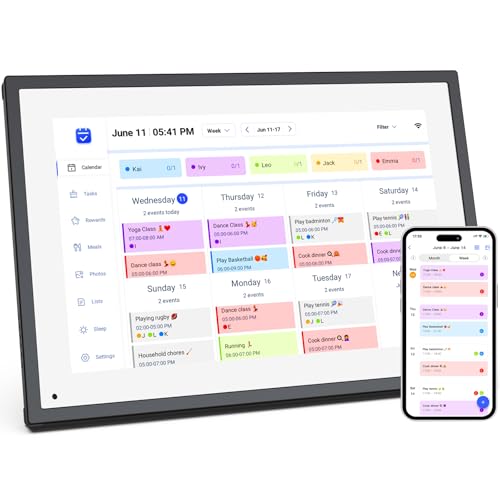
The AKImart Wall Planner is a Wi-Fi digital planner, touchscreen calendar, and digital picture frame all-in-one. It features a 10.1-inch 1080p touchscreen display that provides clear visibility and brightness for active household and office settings. Google, iCloud, Outlook, Cozi, and Yahoo calendars integrate fully with the AKImart Wall Planner to ensure synchronization of all appointments and reminders.
It’s also great as a family planner, as you can color-code schedules, make interactive chore charts, and even meal plan with its built-in recipes and cooking tutorials. The frame also allows you to share photos and videos with your family through the companion app. Its compact design also works great on a tabletop for your kitchen or office desk.
Why I recommend it
The AKImart Wall Planner is such a multi-functional tool. This calendar stands as a lifestyle companion that integrates organization into your daily routine instead of functioning only as a planning tool. The ability to plan together as a family is great, but sharing photos and videos makes those moments more special.
I like the high-quality build and ease of setup on the planner as well. You just plug it in, connect to your Wi-Fi, and all of your calendars sync. In a larger home or shared office, it’s a simple visual way to ensure everyone is on the same page without taking up much space or being cluttered.
User reviews
Families who aren’t tech-savvy have given excellent feedback about the AKImart Wall Planner due to its straightforward setup and operation. There are many comments on the screen resolution, connection to the app, and ease of sharing photos and videos.
A consumer praised the product as “incredibly robust” because it survived multiple drops without damage and continues to function perfectly in a home with kids. Other users called it “way better than conventional picture frames” and were impressed at the ability to display videos in addition to auto-scheduling. The AKImart Wall Planner offers strong durability and user-friendliness despite not being wall-mountable, according to most reviewers.
8. BQQJDD Digital Calendar – best digital calendar for a high level of customization
Key features
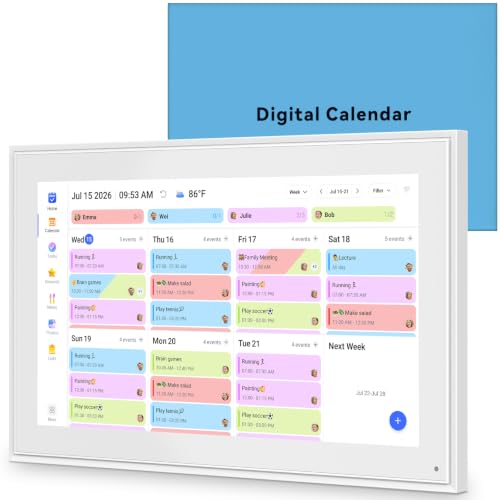
Another worth-trying digital calendar is the BQQJDD one. This smart calendar will bring you ultimate clarity and convenience, as it syncs all the major calendar apps, such as Google, iCloud, Outlook, Cozi, and Yahoo, in a single platform. One of its best features is that each family member can have a personalized color, which makes it easy to spot who’s doing what.
But the BQQJDD Digital Calendar also goes beyond scheduling. With its interactive chore charts, a built-in meal planner, and a versatile digital photo frame, it will enrich your home, as your kids can stay motivated through visual progress tracking.
Why I recommend it
The first thing I’d recommend about this digital calendar is its ease of use and excellent customization. So, if you don’t want to spend time switching between apps and having a hard time figuring out which task is for whom, this product can be your perfect choice.
User reviews
Overall, the BQQJDD Digital Calendar has positive user reviews. The things users like the most are its simple setup, automatic syncing, and bright touchscreen. The only minor issue some users report is about the app’s functionality, as some users claimed they couldn’t figure out how to access some of the features.
9. Telonixium Smart Digital Calendar – best affordable digital calendar
Key features
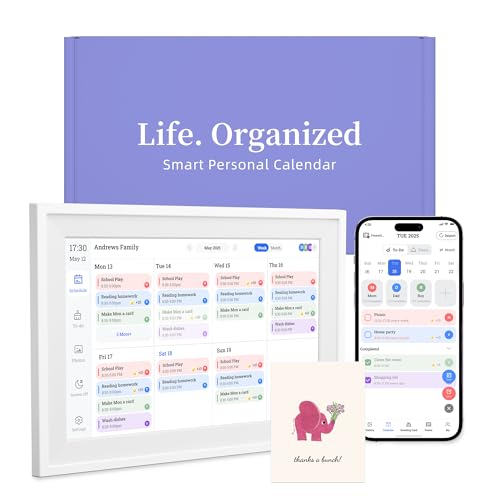
Ultimately, the Telonixium Smart Digital Calendar helps you activate it quickly via Wi-Fi and connect to your Google Calendar, iCloud, Outlook, Cozi, Yahoo, TeamSnap, and other calendar apps. On top of this, it lets you personalize your profiles with colors and emojis, making routines easy to understand.
Aside from this, the digital calendar is a 3-in-1 solution. More precisely, it acts as a planner, a dynamic photo frame, and a digital art displayer. You won’t need to pay any subscription costs for this, which is why it’s very cost-effective.
Why I recommend it
All of the available features of the Telonoxium Smart Digital Calendar make it an excellent choice for tech-savvy users who like to further enhance the organization of their tasks. Plus, don’t forget that it turns dull tasks into an interactive experience.
User reviews
Users like the Telonixium Smart Digital Calendar for many reasons, such as its ease of use, management of busy schedules, large display, and even its photo-sharing feature. However, the most common issues were the initially confusing app and the required subscription for some features.
Our methodology
To find the best digital calendars, I worked with the Cybernews research team to evaluate each option based on these weighted criteria:
- Ease of use and accessibility (30%). We looked at how intuitive each calendar is to navigate, the clarity of its interface, and whether it syncs smoothly across multiple devices like smartphones, tablets, and desktops.
- Integration capabilities (25%). We considered the breadth of integrations with email, Slack, Zoom, and project management tools. Devices that connect with both professional apps and personal tools such as family organizers or Alexa assistants gained stronger ratings.
- Customization and features (20%). We compared advanced functions, including recurring events, smart reminders, color-coding, collaboration tools, and AI scheduling.
- Pricing and value (15%). We weighed the balance between cost and benefits, comparing free versus premium versions and assessing whether the device delivers strong long-term value for its price tier.
- User feedback (10%). We analyzed verified customer reviews to check reliability, durability, and satisfaction over time. Recurring complaints or positive patterns influenced our assessment significantly.
By weighing these criteria, we made sure that recommended calendars provide measurable value and real-world usability.
What is a digital calendar?
A digital calendar is an electronic scheduling tool that replaces traditional paper planners – but it goes far beyond simply showing dates. Unlike a paper calendar, it syncs across multiple devices, integrates with apps, and ensures that events stay consistent everywhere. Modern options include automated reminders, recurring events, collaboration features, task management, and even AI-powered suggestions to make scheduling smarter and more efficient.
For me, a digital calendar simplifies daily planning with alerts, visual layouts, and customizable categories that make it easy to stay on top of commitments. For teams and families, it becomes a central productivity hub that coordinates tasks, prevents scheduling conflicts, and keeps everyone aligned across home, school, and work environments.
Reasons to use a digital calendar
From my experience, digital calendars bring a number of tangible benefits that make them more than just digital replacements for paper planners. By syncing across devices, they ensure you can always access the latest version of your schedule. Many platforms also offer offline functionality, automatically updating events once you reconnect, which means you stay organized even without constant internet access.
- Sync across devices. I like that I can access and update my schedule in real time from my phone, tablet, or computer, so I never have to manually duplicate entries. Many advanced calendars even allow offline edits that automatically update once you reconnect.
- Collaboration tools. Sharing calendars with colleagues, friends, or family members saves time and prevents confusion. Assigning tasks and creating shared event reminders has helped me coordinate projects and family commitments effortlessly.
- Automated reminders. Getting alerts reduces missed meetings or deadlines. I find it useful to customize how and when I’m reminded – from push notifications to email alerts – so nothing slips through the cracks.
- Time management. Blocking focus time and adding recurring appointments helps me balance workloads. Some calendars even suggest optimal times for tasks based on past behavior.
- Customization. Personalizing views, recurring events, and layouts makes the tool feel truly mine. Color-coded categories and drag-and-drop features give me full control over how I organize my day.
Used effectively, digital calendars help me save time, reduce stress, and streamline my schedule. They also allow me to centralize personal, family, and work commitments in a single interface, giving me a clearer overview of everyday life.
Features to look for in a digital calendar
When I choose a digital calendar, I look beyond the basics. The right features can make the difference between a tool that simply stores dates and one that actively supports productivity, collaboration, and security. Below are the key features that stood out to me during my analysis:
- Cross-platform availability. I want a calendar that works seamlessly across iOS, Android, Windows, and web platforms, so I can manage schedules from any device without compatibility issues. This flexibility is crucial since I often switch between work and personal devices.
- Smart integrations. I value calendars that connect with collaboration tools like Slack, Zoom, or Trello, as well as personal apps such as Google or Outlook. Strong integrations reduce the need to constantly switch between apps.
- AI or smart suggestions. I appreciate calendars that can detect conflicts, recommend optimal times for meetings, and automate recurring tasks based on my habits. Some even provide predictive suggestions to help me optimize time blocks.
- Offline access. It’s important to me that my calendar continues working even without internet access, syncing updates once I reconnect. This is especially useful when traveling.
- Security & privacy. I always look for reliable encryption and privacy safeguards, especially when handling sensitive business or family data. Devices that offer two-factor authentication get higher marks from me.
- Affordability. I weigh whether free features are enough or if premium upgrades justify the investment by offering better integrations, larger displays, or enhanced customization.
Together, these features make a digital calendar not just a date tracker but a powerful system for managing modern life.
Alternatives to digital calendars
You don't need to choose from our list of the best digital calendar brands to stay organized. Here are some less-digital and hybrid suggestions for when you’re looking to mix it up:
Smart assistants
You can use voice assistants (like Alexa, Google Assistant, or Siri) to schedule appointments, make reminders, and announce upcoming tasks or events. These are great for hands-free updates when you’re multitasking and don’t have time to manually open an app or device.
Physical calendars and planners
For more tactile and visual reminders, physical calendars and paper planners are classic for good reason. Writing information down can help it stick in your memory, and it’s nice to have an at-a-glance view of the week or month without staring at a screen.
Digital and physical sticky notes
If you like short, focused reminders, digital sticky notes (such as Apple Notes, Microsoft Sticky Notes, or Google Keep) are great for quickly adding tasks or deadlines. Or, for more physical options, a set of sticky notes on your desk or monitor can be just as useful for daily reminders or motivational quotes.
Smart displays and TVs
Many smart displays or smart TVs offer the option to display your calendar or reminders on the screen, essentially turning your device into a personal organization station. This is convenient and also very visible, which can be useful for shared spaces (such as a kitchen or office).
Final word on the best digital calendar
After comparing calendar brands for usability, integrations, pricing, and real user feedback, I’ve narrowed down the top contender. In my opinion, the best digital calendar is the LQN Digital Calendar (10.1") because it combines a clear IPS HD touchscreen with strong family-friendly tools and wide syncing support. It connects over Wi-Fi and works with major platforms like Google Calendar, Outlook, iCloud, Yahoo, and Cozi, making it easy for the whole household to stay updated.
Ultimately, the best digital calendar is the one that fits your lifestyle. Some people want advanced collaboration tools, while others prioritize simple syncing across devices. Families often benefit from readable displays and features like chore charts, reminders, and photo display. Larger models can work better in shared spaces, while compact options like the 10.1-inch LQN are easier to place and more budget-friendly. Carefully evaluate your options to choose the model that feels most intuitive for everyday family use.
Other reviews you might be interested in:
Skylight Calendar review 2026: can this smart display really organize your life?
9 best Skylight Calendar alternatives
20 Best tech gifts for kids in 2026: cool, fun, and educational tech toys
Best digital photo frames of 2026 – expert picks for your memories
FAQ
What is the most reliable digital calendar for work?
From my perspective, the Canupdog Digital Calendar is the most reliable option for work. Its bright display, multiple integrations, and available collaboration make it the perfect option for work, despite your home.
Are there free digital calendars worth using?
Yes, but most free digital calendars have limited features. In my experience, Google Calendar or Outlook cover the basics, but dedicated devices like Canupdog or LOOFII deliver better visibility and collaboration tools. If you want a shared family hub or a professional team tool, I’d lean toward a dedicated device.
Can I share a digital calendar with others?
Yes, almost all modern digital calendars support sharing. I’ve found this feature invaluable for coordinating family commitments or managing group projects without endless back-and-forth communication. It keeps everyone updated in real time and reduces confusion.
How secure are digital calendars?
While many digital calendars use encryption to protect data. I always advise checking the provider’s privacy settings carefully, since security can vary. I recommend choosing calendars that include two-factor authentication for stronger protection.
What’s the difference between a digital planner and a digital calendar?
A digital calendar focuses on scheduling, while a digital planner covers more. From my perspective, planners are great if you want journaling, to-do lists, and habit tracking alongside scheduling. Digital calendars, on the other hand, are best when your priority is efficient time management, seamless syncing, and collaboration across devices and users.
What is the best digital calendar for productivity?
If you value productivity, consider both the Canupdog Digital Calendar and the LOOFII Smart Digital Calendar. They both offer large screens, simple navigation, integration with Google, calendars, and help you keep track of all your work to-dos, meetings, and reminders from the same platform.
What’s the best digital calendar to organize my family’s schedule?
The Canupdog Digital Calendar is one of the best digital calendars for families. Use color-coded schedules along with meal plans and chore charts displayed on a single family-oriented screen. Sync it with your favorite calendar apps, and the entire family stays on the same page.
How do I choose a digital calendar?
First, figure out what's most important to you: screen size, integrations, or smart features. If you're juggling multiple people's calendars, search for one with shared access, color coding, and cloud syncing. For personal productivity, you may care more about speed, app compatibility, and user friendliness. Families may want a device with chore charts or meal planners, while professionals will likely care more about integrations with Google Workspace or Outlook. The best digital calendar is the one that fits seamlessly into your daily life and makes you feel effortlessly organized.