Best TV Box with All Channels: Top 5 Picks


Are you looking for a TV box with all channels? If you’re like me, then you may want a one-time purchase device that unlocks live TV, sports, movies, and premium channels without subscriptions.
A TV box can refer to anything from a certified streaming device, which is safe and stable, to a generic Android box, which may have variable quality, to “fully loaded” boxes that can often be risky and sometimes illegal depending on content sources.
Due to this, I, together with the Cybernews research team, reviewed how TV boxes work, what ‘all channels free’ claims typically mean, and what users report across forums. Also, we researched the TV boxes users trust most.
In this guide, you’ll learn more about the best TV box with all channels, preview different types, benefits, what to look for, what users recommend, and a practical bottom line.
Best TV box – shortlist
- WaveTune – overall best TV box with all channels free
- Amazon Fire TV Stick 4K Plus – best free TV box with all channels for streaming millions of movies and shows
- Generic H.V – best TV box with voice control
- Google TV Streamer 4K – best TV box with all channels free for a cinematic experience
- NVIDIA SHIELD TV Pro – best TV box for streaming in 4K and playing multiple video games
5 best TV box with all channels free – our detailed list
Now, it’s time to move on to the main things, which is exploring the best TV box with all channels free in more detail. Let’s see which can be the perfect choice for you.
1. WaveTune – best TV box with all channels free in 2026
| Brand: | WaveTune |
| Special features: | Full HD broadcast quality, endless channel selection, no subscription fees, compact and portable |
| Max number of supported devices: | 1 |
| Compatible devices: | Any TV set |
| Price: | Mid-tier |
| Best for: | Channel selection |
WaveTune is the best solution if you want to enjoy a wide channel selection. More precisely, you can enjoy over 100 free HDTV channels, allowing you to watch movies, shows, sports, and a lot more.
What’s more, this compact yet powerful antenna can broadcast the channel signals from as far as 120 miles away, providing you with endless viewing fun.
2. Amazon Fire TV Stick 4K Plus – best TV box with all channels for streaming, free, and live TV
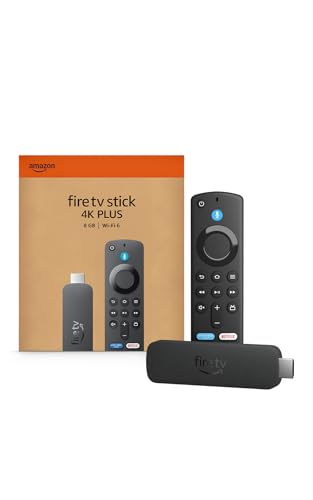
Another reliable TV box is the Amazon Fire TV Stick 4K Plus. This newest model enables you to stream more than 1.8 million movies and TV episodes, allowing you to watch favorites from Netflix, Prime Video, Disney+, Max, and more.
Due to the Wi-Fi 6 support, you can also enjoy smooth 4K streaming, even when other devices are connected to your router.
3. Generic H.V – best TV box with free channels for remote control
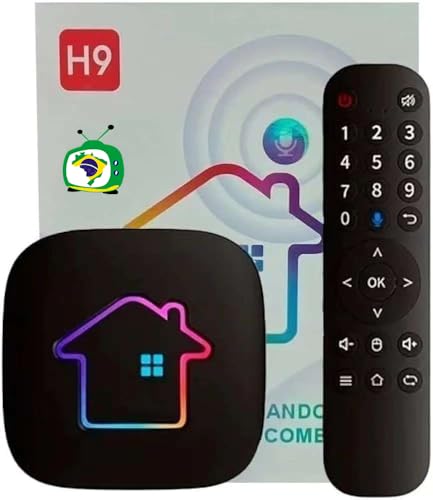
The H8 H9 Brazil TV Box is great if you want to benefit from voice control. Plus, you can enjoy a 7-day, 24-hour playback functionality.
On top of this, this TV box enables smooth streaming due to its dual-band Wi-Fi, plus Bluetooth 5.0 pairing capability for using your compatible wireless accessories.
4. Google TV Streamer 4K – best TV box with support for streaming content from multiple apps

The main reason why I picked the Google TV Streamer 4K is that it delivers quality of up to 4K HDR. Plus, it utilizes Dolby Vision that delivers captivating and true-to-life details.
Moreover, you can watch live TV and access more than 800 free channels from Pluto TV, Tubi, etc. Additionally, you can add any show or movie in a watchlist, so you can watch it later.
5. NVIDIA SHIELD TV Pro – best TV box with all channels free for unlimited entertainment
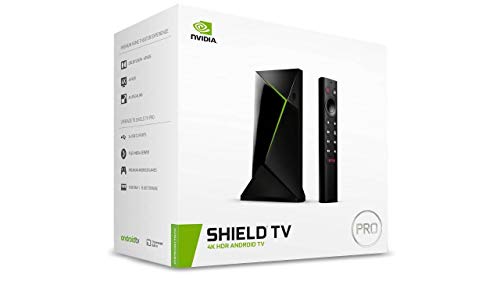
Last but not least is the NVIDIA SHIELD TV Pro, which comes with voice control and Dolby vision.
The best part is that you can enjoy the content of any streaming media player, and access thousands of apps and games, including top apps like Netflix,YouTube, Prime Video, Disney + and Hulu.
Our methodology
The evaluation of the best TV box with all channels free was research-based only, conducted by me together with the Cybernews research team. Here’s the criteria that we focused on:
- Transparency of claims and marketing accuracy (30%). First of all, I assessed whether the provider clearly explains how content is accessed, avoids unrealistic promises, and discloses limitations.
- Content access model and legality clarity (20%). I also reviewed whether the TV box relies on official apps, user-installed services, or third-party IPTV sources, and how clearly this is communicated.
- Device software, updates, and security considerations (15%). Another thing that I evaluated was the operating system type, update policy (if stated), and potential security risks highlighted in reputable sources.
- Ease of use and setup expectations (15%). With the help of my team, I analyzed setup instructions, required accounts, and common friction points reported by users.
- Price, purchase terms, and refund transparency (10%). Of course, I didn’t forget to review the pricing structure, shipping fees, return policies, and overall purchase clarity of each TV box.
- User feedback patterns (10%). Ultimately, I summarized recurring themes from forums, Reddit threads, and online reviews, focusing on consistency rather than isolated opinions.
What is a TV box?
A TV box is a set-top device that delivers streaming apps and media playback through a TV interface. Sometimes, it may come with voice search/casting.
The key components are actually crucial for the overall performance of the TV box. That said, the operating system matters because Android TV/Google TV is mainly for TVs, while generic Android is better for a phone UI. Also, the app store access can vary, as legit devices use Google Play or Apple App Store, whereas others can rely on limited apps or sideloading.
What’s more, TV boxes come with digital rights management (DRM) support, which is crucial for streaming services like Netflix, Hulu, or Prime Video in 4K or HD. Additionally, the best boxes come with a remote control for voice search, regardless of whether you’re using the best TV box with all channels free in Canada or the best TV box with all channels free in the UK.
Ultimately, the key ports that these devices include are HDMI, USB, Ethernet, and even microSD for extra storage.
Moreover, there are different types of TV boxes. One of them is the legit streaming devices, like Android TV, Google TV, and Fire TV, which use official apps and licensed DRM. There are also IPTV boxes that are legal or illegal depending on the content source, and “fully-loaded” boxes that are marketed as “free everything.”
Regardless of your choice, you need to be aware that a TV box doesn’t magically unlock paid channels for free. “All channels free” claims are usually a content-source issue, usually with apps and IPTV subscriptions, rather than the hardware itself.
Different types of TV boxes
To make the right choice, you must be aware of the different types of TV boxes on the market. Don’t worry. I’ve got your back. Let’s go through the most common ones and see how they differ:
- Certified streaming boxes/sticks (Android TV/Google TV, Apple TV-style). These TV boxes have official app support, better DRM, and more consistent updates.
- Generic Android TV boxes (non-certified). The generic Android ones may run Android but not “Android TV,” making them better for mobile usage. Plus, app support and updates vary widely.
- IPTV boxes/players. These TV boxes utilize hardware that runs IPTV apps. However, the legality depends on the IPTV provider and content rights.
- Operator/cable TV boxes. These devices are provided by ISPs or cable companies. Usually, they’re designed for their ecosystem.
- Media center boxes (DIY/enthusiasts). Last but not least, the media center boxes are built for local playback, and they have a higher level of customization. Yet, they often require more setup.
Each type of TV box offers different benefits. With this in mind, you’ll get stable performance and HD or 4K streaming with the certified streaming boxes/sticks. The generic Android boxes are more flexible, but they have weaker app support.
When it comes to IPTV boxes/players, you can expect access to IPTV apps, but a bit of risky legality and reliability. Operator/cable boxes are stable, but they’re limited to the ISP’s ecosystem. Lastly, media boxes focus on local playback and customization.
However, keep in mind that the term TV box is sometimes used loosely in ads, especially when it comes to promoting that they’re entirely free.
Benefits of using a TV box
TV boxes come with numerous benefits. The most legit ones include:
- Make an older TV “smart” without replacing it. A TV box enables access to streaming apps, menus, and internet features to any TV with an HDMI port. Therefore, you don’t need to buy a new TV.
- Consolidates apps into one interface. Instead of switching between different apps, TV boxes let you browse, search, change profiles, and manage watchlists from one home screen.
- Often faster/more updated than built-in smart TV software. Certified streaming services provide better performance and more frequent updates than many TV brands with built-in smart software.
- Better remote/voice control and casting. You can also benefit from remote control via voice search from your phone, which makes navigation much faster and easier.
- Potential privacy upside vs some smart TVs. TV boxes can even help you reduce the tracking from your TV manufacturer, especially if it enables adjusting the privacy settings and limiting data sharing. Still, this depends on the box’s ecosystem.
Although a TV box with free channels sounds nice, the real value is the convenience and stable app access, not the “free premium content.”
Why TV boxes matter in today’s streaming era?
TV boxes matter in today’s streaming era because they reduce the fragmentation and subscription hub. More precisely, people receive a central hub, where they don’t need to switch between various apps and access all of their favorite movies and shows from the same place.
More precisely, TV boxes solve a lot of practical pain points. TVs stop getting updates after some time, which you can easily overcome with the best TV box. Also, they help you solve the issue with apps that disappear on older sets. Ultimately, built-in systems may have performance lags, whereas TV boxes often have better performance and more frequent updates.
Features to look for when choosing a TV box
The feature suit can easily help you determine which TV box to choose. That’s why I created a practical checklist that will help you understand the most crucial features:
- Certified OS and official app store support. Make sure you look for TV boxes that have certified OS and official app store support. This will help you reduce app and DRM headaches.
- Update policy. Explore for how long security and OS updates are supported, so you can enjoy better performance for a longer time.
- Performance basics. Always check out the RAM and storage, supported Wi-Fi standards, and whether there’s an Ethernet option for even faster streaming speeds.
- 4K/HDR support. Look for 4K and HDR support, as well as Dolby Vision/HDR10, but only if your TV supports it.
- Audio passthrough. If you have a sound system, ensure the TV box comes with audio passthrough like Dolby Atmos for crystal-clear sound.
- Ports. Check out whether the TV box has USB, microSD, and HDMI ports, so you can connect it with any TV you own.
- Remote + voice features. Explore the availability of remote and voice features. Also, check out whether voice can be disabled.
- Privacy controls. Look for privacy features, like ad tracking toggles, permissions, and guest mode for ultimate safety.
- Transparent warranty/returns. Lastly, ensure that the TV box isn’t on “no-name” listings with vague policies.
Certification and updates typically matter more than flashy “8K/ultra speed” marketing.
Best TV box with all channels free according to users
Before I wrap things up, let’s see the best tv box with all channels free Reddit. Keep in mind that this section summarizes discussion trends, not endorsements and not testing.
The best overall mainstream pick, which users praise for stability, long-term updates, and broad app support across services is the Apple TV 4K.
If you’re more into basic streaming, which is still certified, then you can check out Onn 4K Pro or Onn 4K as the best budget pick among users.
Furthermore, the NVIDIA SHIELD TV Pro stands out as the best solution for power users. Users mainly highlight its powerful hardware, advanced formats, Plex/IPTV use and media flexibility.
Ultimately, you can again go for the Apple TV 4K if you want the best device for the Apple ecosystem.
Bottom line: is a TV box with all channels free worth it?
A TV box with all channels free is worth it if your TV is slow or outdated, you want better app support, or you want a consistent streaming experience across TVs. However, they’re not worth it if your smart TV already gets updates and performs well, or you only watch 1-2 apps and it runs fine.
Still, you need to consider the main risks if a box promises that all premium channels are free. More precisely, legal or copyright risk when content sources are unauthorized, cyber risk, which includes malware, botnet, or proxy abuse, and scam risk, like fake discounts, shady checkout pages, or unclear support.
With this in mind, if you want to buy a TV box with all channels free, make sure you buy from reputable retailers and avoid unknown brands with no update policy. Also, don’t sign in with primary Google/Apple accounts on questionable devices. Lastly, consider isolating IoT/TV devices on a guest network if your router supports it.
Based on my research, the best TV box with all channels free is WaveTune. It offers 4K streaming, multiple available channels, and a lot more, which you can explore in the WaveTune TV antenna review.
FAQ
Is a “TV box with all channels free” legal to use?
A TV box with all channels free can be legal to use if it’s certified and has app store support from official sites like Google Play and Apple App Store.
Can a VPN make an illegal IPTV service legal?
No, a VPN can’t make an illegal IPTV service legal. The VPN can only mask your IP address, but won’t grant you the right to access copyrights legally.
What are the biggest red flags when buying a “free TV” streaming box online?
The biggest red flags when buying a “free TV” streaming box online is that many manufacturers promote it as entirely free. However, you can’t access all of the channels entirely for free. You still need to make a one-time purchase.
Are Android TV boxes safe, and how do I tell if one is compromised?
Android TV boxes are relatively safe. Luckily, you can easily tell if one is compromised just by checking out whether there are security certifications and frequent updates.
What’s the difference between a TV antenna and an IPTV box for “free channels”?
The main difference between a TV antenna and an IPTV box for “free channels” is that the TV antenna enables you to access legal local channels directly from broadcast towers, whereas an IPTV box streams channels via the internet, but comes with subscriptions, reliability issues, or legal gray areas.