OBDeleven 2 vs 3: what’s the real difference and which one should you buy?

Automotive technology has come a long way from the old days when you had to pull into your mechanic’s driveway for every minor diagnostic check. Nowadays, you can look up the meaning of DTC error codes and remove factory software blocks with a few taps on your smartphone, thanks to brands like OBDeleven.
As a driver myself, I always carry a portable OBD scanner. It may not fix all your problems, but at least you’ll be able to diagnose potential issues without taking your car to a shop.
After scanning the internet for the best option, I came across OBDeleven. It was initially designed for use on vehicles from the VAG group, but it has evolved to support a range of models. I’ve created this detailed OBDeleven 2 vs 3 comparison guide to help you decide which one is best for your vehicle. Together with my team of Cybernews researchers, I compared their pricing, specs, compatibility, and other details.
OBDeleven 3 features faster scan speeds and an update that covers Ford vehicles via one-click apps. It also packs more powerful hardware, but OBDeleven 2 remains a solid option for VAG vehicle owners.
OBDeleven 2 vs 3 overview
Before I delve into the specs any further, let’s take a moment to compare the key details about each of these scanner tools at a glance:
| Model | OBDeleven 3 | OBDeleven 2 |
| Overall rating | 4.7/5 | 4.5/5 |
| Key features | Deep vehicle diagnostics, faster and smoother software, one-click apps for customization, support for VAG, BMW, Toyota, and Ford vehicles | Bluetooth OBD2, iOS & Android support, one-click apps |
| Best for | Future-proof diagnostics and multi-brand coverage | VAG vehicle owners |
| Price | From $98.69 | From $266.99 (only available in the Ultimate pack) |

About OBDeleven 2
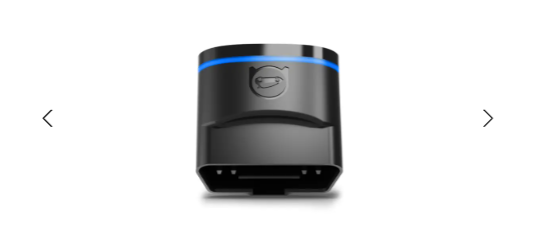
To understand the OBDeleven 3 vs 2 comparison, you need to learn more about their respective use cases and features. I thought it best to start with the breakdown of OBDeleven 2, the second-gen model of the device, and the first to break the boundaries of VAG group compatibility.
It included official licenses from the BMW and Toyota groups, which meant users could diagnose error codes and customize different models of VW, Audi, Skoda, Seat/Cupra, BMW, and Toyota.
Of course, premium branches of these brands were also included, featuring compatibility with Bentley, Rolls-Royce, and Lexus. Also dubbed “NextGen”, the second-generation model featured a compact OBD2 adapter that paired via Bluetooth with the official One-Click app.
The thing is, the site now only lists it as an available option in the “Ultimate” pack. More on that later on in this guide. In conclusion, I find the OBDeleven 2 to be a solid pick for VAG-group drivers and BMW and Toyota owners.
About OBDeleven 3
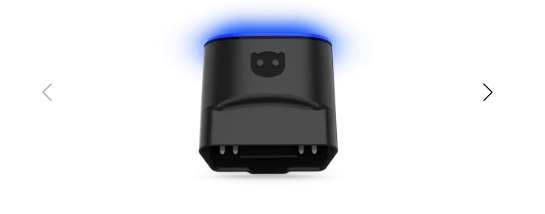
The OBDeleven 3 launched in 2025 and is built on the OBDeleven 2 platform. The main thing that sets the two apart is the brand’s commitment to creating future-proof hardware compatible with the latest vehicle models.
One of the most notable additions is the Ford Group compatibility. It goes along with cosmetic and hardware improvements, including a faster CPU and a second-gen 5x CAN-FD interface. For those scratching their heads like I did the first time I found out about this, 5x CAN-FD stands for 5 Controller Area Network Flexible Data-Rate channels, which support faster communication and higher data loads.
This also means it won’t drain your car’s battery as quickly as older-generation models, which is important. The device works with official OBDeleven apps, and it’s compatible with Android 8.0+ and iOS 16.6+ phones.
OBDeleven 2 vs 3: features compared
To understand which product offers more value, I compared their key features side by side with the Cybernews research team. I’ve compiled our joint findings in an easily digestible format, so take a peek below before we move on:
| Feature | OBDeleven 3 | OBDeleven 2 | Notes |
| Basic OBD2 diagnostics | ✅ Yes | ✅ Yes | Both are suitable for most vehicles using CAN-bus, from 2008 onward |
| Advanced diagnostics | ✅ Yes | ✅ Yes | Available in all plans |
| Ignition detection | ✅ Yes | ❌ No | OBDeleven 2 lacks ignition detection |
| Smart sleep mode | ✅ Yes | ❌ No | Only available on OBDeleven 3 |
| One-Click apps | ✅ Yes (Credits or Ultimate) | ✅ Yes (Credits or Ultimate) | Thousands of apps added in 2025 |
| Subscription required | For advanced features | For advanced features | Free plan offers basic diagnostics |
| Brand coverage | VW, Audi, Skoda, Cupra, Seat, BMW, Mini, Rolls-Royce, Toyota, Lexus, Ford | VW, Audi, Skoda, Cupra, Seat, BMW, Mini, Rolls-Royce, Toyota, Lexus | OBDeleven 3 added Ford Group compatibility |
One-Click apps are available for both devices. They include pre-made coding modifications that allow you to adjust and customize software and driving features.
Both devices require OBDeleven credits, which you can obtain with a subscription. The difference is that OBDeleven 3 features Ford-specific apps.
Manual coding is only available via VAG group apps on both devices. At the same time, diagnostic scanning offers a full-system scan for licensed brands, though the OBDeleven 3's faster CPU yields much faster scans.
It’s possible to read and clear fault codes with all devices, and this feature is even included with the Free plan. Plus, both devices feature cloud backup, which is especially important for DIY enthusiasts who wish to save factory settings in case something goes wrong.
OBDeleven 2 vs OBDeleven 3: brands and coverage
The OBDeleven 2 vs OBDeleven 3 difference in terms of brand coverage is quite subtle, but there’s something even more important than that. My advice would be always to check compatibility with your vehicle's model.
There’s an official Supported Vehicles section on the website where you can check compatibility by VIN. Other than that, brand coverage is pretty much the same, as both tools are compatible with VW, Audi, Skoda, Seat/Cupra, Lamborghini, Bentley, BMW, Mini, Toyota, and Lexus cars.
The only difference is the addition of Ford Group compatibility with the OBDeleven 3. It’s a notable addition for the North American market. That being said, OBDeleven is future-proof because it supports firmware updates that would make it compatible with other brands, unlike the second-gen model.
Hardware and build
In terms of hardware, both devices use Bluetooth OBD2 connection dongles. You can just plug them into the diagnostic port of your car, and that’s where that story ends. It’s a whole different ball game in terms of internal hardware and build, though.
As I’ve already highlighted, the OBDeleven 3 uses a more advanced 5x CAN-FD interface, allowing it to access control units more quickly and smoothly. The upgraded CPU also contributes to faster scanning, while only this tool features automatic ignition detection and a smart sleep mode to preserve battery life.
In contrast, the OBDeleven 2 uses a previous-generation Bluetooth connectivity standard, coupled with a single CAN-FD interface. Firmware updates are delivered through the app for both models. Another important consideration is that your subscription plan might matter more than the hardware itself, especially if you wish to unlock factory blocks. This is only possible via higher-tier Pro and Ultimate plans.
Mobile apps
Both OBDeleven 3 and OBDeleven 2 are compatible with the Android and iOS OBDeleven app that supports all brands, and the VAG group app. All it takes is for your device to have Android OS 8.0 or later, or iOS 16.6 or later.
These apps are your doorway to manual coding and long coding with the Pro or Ultimate plans, while the general app provides access to the mentioned One-Click apps. As for app store ratings, the reviews are mixed, with most praising the intuitive interface and complaining about potential connectivity issues.
It’s also possible to export data history via diagnostic logs and send them to your email. Still, OBDeleven 3 excels in terms of cloud-based support, which is easier to manage.
Plans and pricing
Before we take a deep dive into the pricing, it’s important to note that the device itself offers most of the functionality. Subscription plans only add value to those who wish to use advanced options like manual coding.
The Free plan provides unlimited diagnostics and live data monitoring. It’s mainly used to clear fault codes and run basic scans. The Pro plan adds manual coding adaptations for VW Group vehicles, SFD unlock, and output tests.
Finally, the Ultimate plan includes everything in Pro, plus unlimited One-Click apps at no extra cost. For drivers who frequently customize their vehicles, 12-month to 36-month Ultimate subscriptions are available at a discount.
| Plan | OBDeleven 2 | OBDeleven 3 | Key difference |
| Free plan | $0 | $0 | Diagnostics, data, log history |
| Pro plan | $5.81/month | $5.81/month | Manual VAG coding, adaptations, SFD unlock, output tests |
| Ultimate plan | $18.38/month | $18.38/month | Advanced features and unlimited credits for One-Click apps |
What do people think about each model?
To get the other side of the story, I also checked user reviews on VAG forums and Ford threads. The 2nd-gen model is commonly praised for its proven reliability and strong foundation for VAG coding.
It’s also said to be cost-effective for VAG vehicle owners, but the lack of a standalone device purchase option in 2026 takes away from that benefit. On the flip side, users commonly complain about higher subscription costs and potential app connectivity issues.
The 3rd-gen model is often praised for its higher scan speeds and Ford support, though the product has only been on the market for a short time, and it will probably take a few more months before we get factual reviews.
How to use OBDeleven
To show you how to use either of these devices, I’ve created a quick start-up guide. Just make sure to note that it’s recommended to create a backup of any coding changes, so that you can restore your vehicle’s factory settings if anything backfires:
- Plug the device into the OBD port. The port is usually under the dashboard on the driver’s side.
- Turn the ignition on. The OBDeleven 3 recognizes ignition immediately, and engine start might be required for some functions.
- Pair via Bluetooth. Open the OBDeleven app and pair with the device via Bluetooth.
- Open the app and select the vehicle. If necessary, enter the vehicle’s VIN code.
- Run the scan. Do a diagnostic scan to check the control units, monitor live data, or read fault codes.
- Choose coding/app function. You can then remove error codes or connect with One-Click apps.
- Save changes and confirm. Remember to always save changes before unpairing to verify the modifications.
How we test
I’ve come up with a specific set of criteria for testing these devices, focusing on the following categories:
- Feature transparency (25%). I’ve evaluated how clearly the device communicates and checked the features included in all plans.
- Brand coverage & future support (20%). I then compared the number of compatible brands and vehicle models.
- Pricing & subscription clarity (20%). Moving on, I compared the total cost of ownership, plan tiers, and credit costs for different functions.
- App usability & stability (15%). Since the app is crucial for the tool’s functionality, I also compared app store ratings, update frequency, and user reviews.
- Hardware improvements (10%). I compared real-world performance based on hardware upgrades from the brand’s spec sheets.
- User sentiment consistency (10%). By checking all the user reviews on reputable forums, I assessed alignment with the brand’s official claims.
Final verdict
Overall, you should stick with the OBDeleven 2 if you mainly need VW Group support and are looking for a lower entry point. On that note, using an OBDeleven promo code also helps bring the price down.
On the other hand, go with the OBDeleven 3 if you need expanded coverage to the Ford brand group, as well as future-proof hardware with regular firmware updates. As you can see from my OBDeleven 3 review, the latest model is the best option for faster scans, improved Bluetooth connectivity, and standalone purchases. Remember to use this checklist when making the final call:
- Verify VIN compatibility
- Decide on subscription tier
- Compare the total yearly cost
FAQ
Is OBDeleven 3 faster than OBDeleven 2?
Yes, OBDeleven 3 is faster than OBDeleven 2 due to an upgraded CPU and a quicker CAN-FD interface.
Does OBDeleven 2 still receive updates?
Yes, OBDeleven 2 still receives feature updates and full app support. With that in mind, it’s important to note that all the new features are made primarily for the 3rd-gen model.
Do both devices require a subscription?
No, you can use both devices with the Free plan. Diagnostics and code scanning are completely free, while subscription plans may be needed for users who need credits for advanced features.
Can OBDeleven damage my car if used incorrectly?
Yes, incorrect manual coding with these devices could cause electronic issues. That’s why OBDeleven recommends creating a backup before any manual modifications.
Which OBDeleven model supports Ford vehicles?
Only OBDeleven 3 supports Ford vehicles due to the latest updates. Still, support is only available for the US market and for vehicles with American VINs, at least for now.