Canupdog vs Skylight vs LOOFII: which digital family calendar is right for you?


Choosing a digital family calendar isn’t just about replacing paper on the fridge. Over the past couple of years, it’s been more about keeping busy households on the same page. Wall-mounted smart calendars like Canupdog, Skylight, and LOOFII promise to simplify schedules, organize chores, plan meals, and reduce the daily confusion and chaos that many families know too well.
To figure out which one actually delivers, I teamed up with the Cybernews research team, compared specifications, pricing pages, product documentation, and aggregated user feedback. The goal was to see how these 3 popular options stack up for real family use, not just on paper.
In this comparison, I break down how each calendar works, what features matter most for families, how chores and meal planning are handled, how easy setup really is, and which option offers the best value. By the end, you’ll know which digital family calendar fits your household best.
In the Skylight vs Canupdog vs LOOFII comparison, Skylight comes out on top for its polished design, reliable family tools, and seamless calendar syncing. Canupdog is a good budget option, while LOOFII trails behind.
Canupdog vs Skylight vs LOOFI overview
Before getting into the details, it helps to see these three digital family calendars side by side. The table below shows how Skylight, Canupdog, and LOOFII stack up in terms of core features, positioning, and value for families.
|
Top choice
|
|
|
|
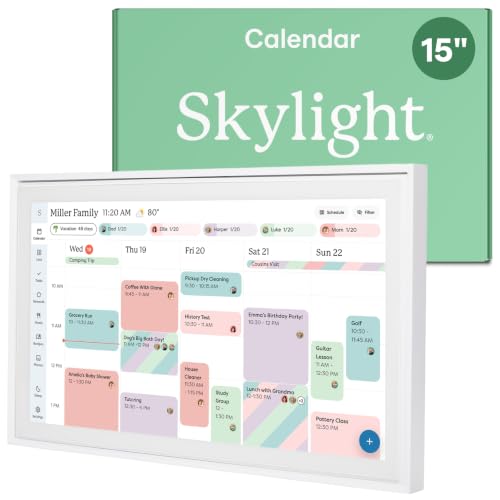
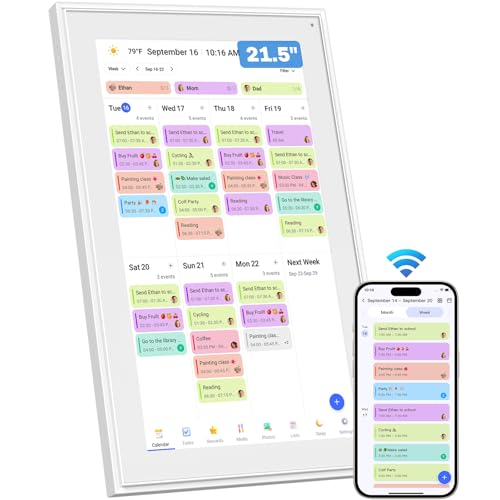
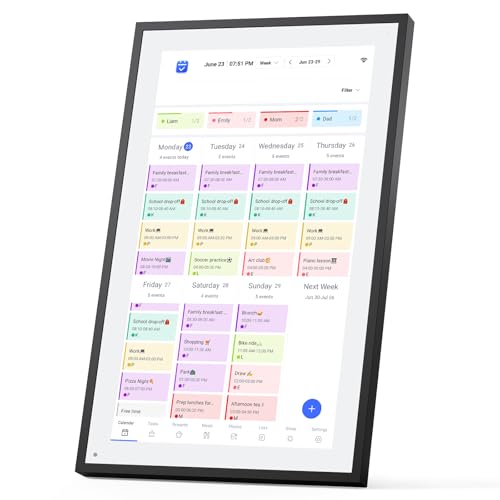
| Title | Skylight Calendar 15-Inch | Canupdog | LOOFII 21.5" Smart Digital Calendar |
| Price | $299.00 | $249.99 | |
| Core focus | Dedicated family calendar hub | Family organization with tasks and rewards | Basic digital family display |
| Key features | Shared calendar, chores, meal planning, mobile app, AI imports | Chore charts with rewards, meal planner, digital photo frame, auto-brightness, G-sensor rotation, weather updates, multi-user profiles, OTA updates | |
| Integrations | Google, iCloud, Outlook, Cozi, Yahoo | Google, iCloud, Outlook, Cozi, Yahoo | Google, iCloud, Outlook. Additional third-party options available |
| Display type | Large wall-mounted touchscreen (multiple sizes) | Mid-size HD wall-mounted touchscreen | Smaller smart display |
| Best for | Families wanting a polished, long-term family command center | Families focused on chores and rewards | Large families, high-traffic walls |
| More info | Buy on Amazon Details | Buy on Amazon Details | Buy on Amazon Details |
About Canupdog
Canupdog is positioned as a family-focused digital calendar designed to sit at the center of everyday household planning. At its core, it’s meant to replace the cluttered fridge calendar with a shared, wall-mounted screen where schedules, chores, and meals live in one place.
The emphasis is clearly on tasks and accountability – Canupdog puts a lot of weight on chores, to-do lists, and reward systems, which makes it especially appealing for families with kids. The display comes in multiple screen-size options, making it flexible for kitchens, hallways, or shared family spaces.
Beyond basic scheduling, Canupdog supports two-way calendar syncing, so changes made on a phone show up on the main screen and vice versa. Extras like weather, meal planning, and sleep mode help it feel more like a household dashboard than just a calendar.
One of Canupdog’s biggest selling points is pricing simplicity. There’s no mandatory subscription to access core features, which makes it attractive for families who want predictable costs without ongoing fees. Some add-ons or future features may expand functionality, but the essentials are available out of the box.
About Skylight
Skylight is one of the most well-known names in the digital family calendar space, and it’s built with one clear goal – keeping busy households organized with as little friction as possible.
As our Skylight review revealed, at its heart, Skylight is a shared family calendar that lives on a large, wall-mounted screen, making schedules visible to everyone at a glance. It’s especially popular with families juggling school events, sports, work shifts, and recurring routines.
Beyond calendars, Skylight leans heavily into family organization. It supports chores, task lists, meal planning, and even photo display, turning the screen into both a planning hub and a shared family space. Everything syncs through the Skylight mobile app, so parents can update events on the go and see changes reflected instantly on the home screen.
Skylight uses a subscription-based model for advanced features. There are different plan tiers that unlock things like expanded integrations, automation, and premium tools. Pricing and renewal terms can change, so it’s worth checking Skylight’s official site before committing. While the upfront cost and ongoing subscription may be higher than some alternatives, many families see it as a long-term investment in smoother daily coordination.
About LOOFII
LOOFII positions itself as a more affordable entry point into the digital family calendar space. It’s aimed at households that want a shared screen for schedules, chores, and meal planning without paying premium prices or committing to ongoing subscriptions. In many ways, LOOFII tries to cover the basics well rather than compete on advanced automation or ecosystem depth.
From a hardware perspective, LOOFII offers a 21.5-inch Full HD touchscreen that can be wall-mounted or placed on a surface, making it suitable for kitchens or common areas. The display is bright and easy to read, and when it’s not showing calendars, it can switch into a digital photo frame mode. Core features include calendar syncing, chore charts with rewards, meal planning, weather display, auto-brightness, and sleep mode.
That said, user reviews point to a few limitations. While many praise the value and screen quality, some mention inconsistent syncing, occasional software glitches, and mixed long-term reliability. Others note that the interface feels less refined compared to premium options. Overall, LOOFII works best for families who want a simple, budget-friendly digital calendar and are comfortable with fewer advanced features.
Canupdog vs Skylight vs LOOFII: features compared
To understand which option delivers the most value for families, I compared Canupdog, Skylight, and LOOFII side by side with the Cybernews research team, focusing on their core features and everyday usability.
| Product | Display size | Integrations | User interface | Collaboration | Customization | Calendar syncing (Google/Apple/Outlook) | Multiple user profiles | Chores/tasks | Meal planning | Photo display | Mobile app | Subscription required | Mounting options | Price | Best for |
| Skylight | 15 in, 27 in (Max) | Google, iCloud, Outlook, Cozi, Yahoo | Polished, family-first | Strong family sharing | High (more with plans) | Yes | Yes | Yes | Yes | Yes | Yes | Yes (for advanced features) | Wall or tabletop | Premium | Families wanting the most refined experience |
| Canupdog | 10.1 in, 15.6 in, 21.5 in | Google, iCloud, Outlook, Cozi, Yahoo | Functional, task-focused | Shared family use | Moderate (labels, rewards) | Yes | Yes | Yes (strong focus) | Yes | Yes | Yes | No mandatory subscription | Wall or tabletop | Mid-range | Families prioritizing chores and value |
| LOOFII | 10.1 in, 15.6 in, 21.5 in | Google, iCloud, Outlook | Basic | Shared family use | Limited | Yes | Yes | Yes | Yes | Yes | Yes | No mandatory subscription | Wall or tabletop | Budget | Simple family scheduling needs |
As you can see from the table provided, Skylight delivers the most polished interface, the widest integrations, and the best long-term experience, but it comes at a higher upfront cost and adds a subscription for premium features. Canupdog offers strong family tools – especially chores and rewards – without ongoing fees, making it a solid middle ground. Meanwhile, LOOFII covers the essentials at a lower price, but with fewer refinements and mixed reports on software stability.
Skylight stands out for its polished interface, reliable syncing, and family-first design that works well long term for busy households.
Canupdog vs Skylight vs LOOFII: chore chart and meal planning features
When it comes to chores and meal planning, the differences between the best digital calendars really start to show – and this is where families tend to care the most.
Skylight approaches chores and meals as part of a larger family system. Chores are easy to assign, clearly visible, and simple to track, with reminders that help routines stick without constant nagging. Parents can adjust expectations based on age, and kids can see exactly what’s expected of them.
Meal planning feels equally intentional, with weekly layouts that stay visible and reduce last-minute questions over what is being served for dinner. User feedback consistently points to how smooth and dependable this setup feels over time.
Canupdog, by contrast, puts more emphasis on motivation. Its chore system is tightly tied to rewards, which can be a big win for families with younger kids. Task tracking works well, but it’s less flexible for nuanced routines. Meal planning is functional, though it feels more like a supporting feature than a core strength.
LOOFII offers chore charts and meal planning in a more basic form. Tasks can be listed and meals displayed, but customization is limited, and users report less consistency when managing more complex family schedules.
Skylight – the most balanced, adaptable, and reliable option for long-term family routines.
Canupdog vs Skylight vs LOOFII: setup and ease of use
Setup and everyday usability can make or break a digital family calendar. Looking at all three side by side, the biggest differences show up during initial setup, daily navigation, and how forgiving each system is for non-technical users.
In terms of setup, Skylight generally feels the most streamlined. Account creation, Wi-Fi connection, and calendar syncing – all guided step by step, and most families are up and running quickly.
Compared to that, Canupdog’s setup takes a little more hands-on effort, especially when syncing multiple calendars, but it’s still manageable with clear prompts. LOOFII, on the other hand, can feel less predictable. I’ve seen users report occasional sync delays and less clarity during app pairing, which makes the first-time setup feel rougher than the other two.
When it comes to daily use, Skylight again feels the most forgiving. The interface is clean, text is easy to read from a distance, and navigation makes sense even for kids or grandparents. Canupdog is functional and readable, but it takes a bit of getting used to, especially around tasks and rewards. LOOFII’s interface works, but it feels more crowded, with fewer accessibility adjustments like font scaling or contrast controls.
Skylight – the smoothest setup and the easiest long-term experience for mixed-age households.
Canupdog vs Skylight vs LOOFII: value for money
When choosing a digital family calendar, value isn’t just about the sticker price – it’s about what you pay over time and how much usefulness you actually get out of it. Looking at Canupdog, Skylight, and LOOFII through that lens makes their differences much clearer.
Skylight sits firmly in the premium tier. The upfront hardware cost is higher, and many of its best features live behind a recurring subscription. If you're comparing options, exploring some of the best Skylight alternatives can help clarify whether the upgrade is worth it for your household.
Canupdog lands in the mid-tier and feels more predictable long term. The hardware is more affordable, and there’s no required subscription for core features. That makes total ownership costs easier to manage, especially for families who want strong chore tools without committing to monthly fees.
LOOFII is clearly the budget option. It keeps upfront costs lower and avoids subscriptions, but the trade-off is fewer refinements and less consistency over time.
How to choose the best digital calendar for your needs
Choosing the right digital calendar comes down to how your household actually functions on a day-to-day basis. Before picking a model, it helps to think through your routines, expectations, and how much structure you really need.
- Family size and routines. Larger families or households with busy schedules benefit from clearer layouts and strong multi-user support, while smaller families may only need basic visibility.
- Need for chores and meal planning. If chores and meals are a big part of your daily coordination, look for calendars with built-in tracking and reminders rather than simple schedule displays.
- Subscription tolerance. Some platforms rely on ongoing subscriptions for advanced features, so consider whether you’re comfortable with recurring costs long term.
- Display size and mounting location. Wall-mounted screens work best in high-traffic areas like kitchens, while smaller displays may suit desks or apartments.
- App and calendar integrations. Smooth syncing with Google, Apple, or Outlook calendars saves time and reduces double entry.
- Privacy expectations. Shared household screens show a lot of personal information, so think about profile separation and what data you’re comfortable displaying publicly.
How we compared Canupdog vs Skylight vs LOOFII (methodology)
To compare Canupdog vs Skylight vs LOOFII fairly, I worked with the Cybernews research team to review official product pages, technical documentation, and publicly available feature descriptions. We examined pricing pages and plan structures to understand not just upfront costs, but how expenses add up over time.
In addition, we analyzed aggregated user feedback from major retailers and online forums to identify recurring strengths, common frustrations, and long-term reliability trends. This approach helped us move beyond marketing claims and focus on real household use.
We then evaluated each product using weighted criteria to keep the comparison structured and objective:
- Features and family tools (30%). We looked at how well each platform supports shared calendars, chores, meal planning, and customization. Extra weight was given to tools that help families build routines rather than just display events.
- Ease of use (20%). We assessed interface clarity, navigation flow, and how accessible each system is for children, seniors, and non-technical users. Simpler layouts and clear visual cues scored higher.
- Value for money (20%). We compared hardware positioning, subscription requirements, and long-term ownership costs. Products that delivered core features without recurring fees rated more favorably.
- Setup and reliability (15%). We considered reported setup experiences, Wi-Fi connectivity, and syncing stability. Consistent performance over time mattered more than one-time setup speed.
- User feedback consistency (15%). We analyzed how often the same praise or complaints appeared across reviews. Repeated patterns carried more weight than isolated opinions.
Canupdog vs Skylight vs LOOFII: which one should you choose?
Digital family calendars have become one of the best digital calendars for keeping busy households organized, visible, and on the same page. The right choice can simplify schedules, reduce daily friction, and make routines easier to manage.
That said, there’s no single perfect option – each of these calendars excels in certain areas and makes trade-offs in others. The best pick depends on what your family values most.
- Choose Skylight if you want a polished ecosystem with premium features, strong integrations, and a refined experience that works well long term – even if it comes with a subscription
- Choose Canupdog if you prefer a straightforward family organization with solid chore and task tools, predictable costs, and no unnecessary complexity
- Choose LOOFII if you’re working with a tighter budget and want a basic shared calendar without advanced features
The trade-off is clear: Skylight offers depth and polish at a higher cost, Canupdog balances features and value, and LOOFII prioritizes affordability.
Overall, my personal winner in this comparison is Skylight because it offers the most polished experience, reliable syncing, and a family-first design that actually holds up long term. While it costs more, it delivers the fewest compromises for busy households.
FAQs
Do digital family calendars require a monthly subscription to work?
No, most digital family calendars do not require a monthly subscription to work. Some devices offer optional premium features, but most core functions – event sharing, reminders, and syncing – are available without ongoing fees. Always check the product details, since subscription perks vary by provider.
Which digital calendar is best for large families with kids?
The best digital calendar for large families with kids is usually the one with color-coding, multiple user profiles, and simple visual layouts. These features make it easy for big households to track chores, school events, and appointments without confusion. Models with touchscreen boards tend to work best.
Can these digital calendars sync with Google or Apple calendars?
Yes, most digital family calendars can sync with Google or Apple calendars. Syncing ensures that events added on phones or tablets show up instantly on the wall display. Just verify compatibility first, as some models only support one platform.
Are digital family calendars safe from a privacy standpoint?
Yes, digital family calendars are generally safe from a privacy standpoint, but security varies. Look for encrypted syncing, secure account logins, and reputable brands. Avoid models with unclear data policies or weak cloud protections.
Is a digital calendar better than using a shared smartphone app?
Yes, a digital calendar can be better than a shared smartphone app for households needing a central, always-visible hub. Wall displays help families stay coordinated without relying on individual devices. Apps still work well, but physical boards reduce missed reminders and screen-related distractions.