Best digital calendar for families in 2026: how to choose the right one


Coordinating family life is harder than ever. Between work schedules, school timetables, activities, appointments and reminders, it’s easy for things to slip through the cracks – especially when everyone relies on different devices or paper notes.
I, together with the Cybernews research team, analyzed popular digital calendars for families by reviewing provider information, trusted third-party reviews and aggregated user feedback. In this guide, I explain what digital family calendars are, why many households rely on them, which models stand out according to users, and how to choose the right option for your family’s routine.
Best digital calendars for families – shortlist
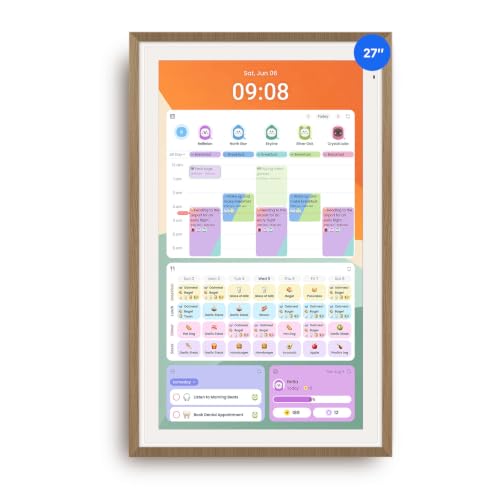
- ApoloSign 27” – best for large families who want a clear, shared overview
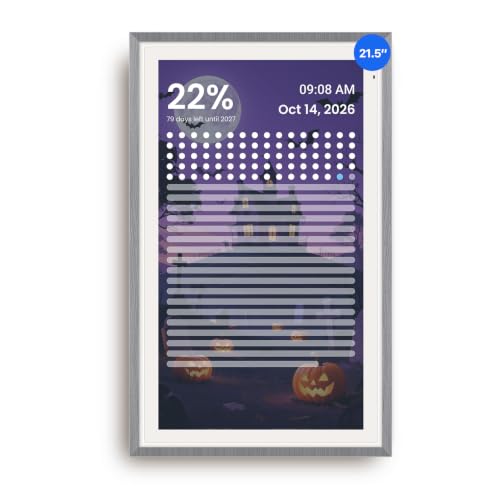
- ApoloSign 21.5" – flexible option for wall or desk use
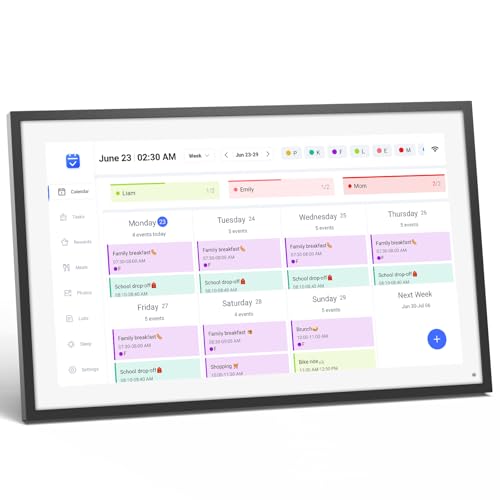
- LOOFII 15.6"– compact and affordable for smaller households
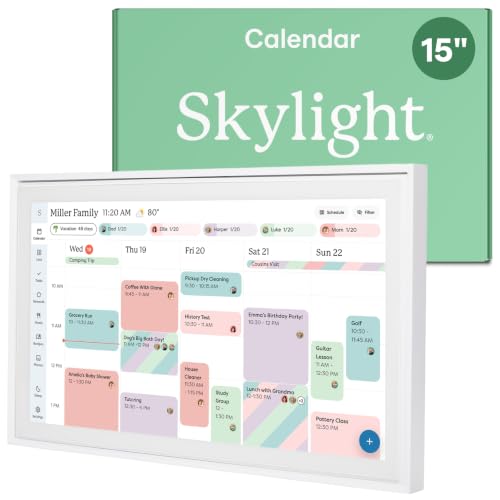
- Skylight 15" – best for kid-friendly planning and chores
- LOOFII 21.5" – balanced size for shared family spaces
- Canupdog 15.6" – entry-level option for basic family scheduling
The best digital calendars for families compared
|
|
|
|
|
|
|
| Title | ApoloSign 27” Digital Calendar | ApoloSign 21.5" Digital Calendar | LOOFII Smart Digital Calendar | Skylight Calendar 15-Inch | LOOFII 21.5" Smart Digital Calendar | Canupdog Digital Calendar |
| Compatibility | iOS, Android | iOS, Android | iOS, Android | iOS, Android | iOS, Android | iOS, Android |
| Best for | Large families | Flexible placement | Medium kitchens or living rooms | Families wanting a polished, long-term family command center | Large families, high-traffic walls | Busy families |
| More info | Buy on Amazon | Buy on Amazon | Buy on Amazon | Buy on Amazon | Buy on Amazon | Buy on Amazon |
6 best digital calendar for families – our detailed list
Each of the digital calendars below is broken down individually, with a focus on the type of family it suits best, how it fits into everyday routines, and where it stands out compared to similar options.
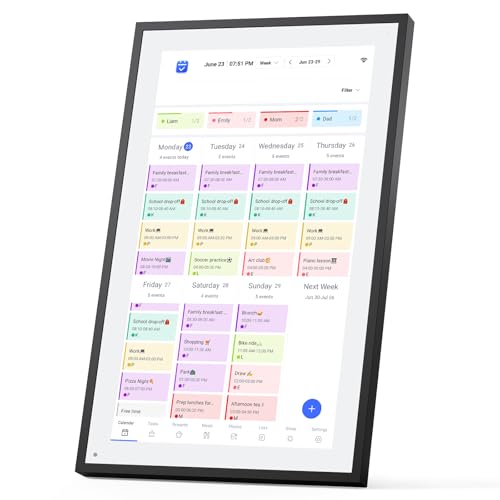
1. ApoloSign 27" – best for large families coordinating busy schedules
This large-format calendar is designed for families that need maximum visibility. The generous screen space makes it easier to see overlapping schedules, school events and activities without constant scrolling.
Families often highlight that the clear layout helps reduce scheduling conflicts, especially in households with multiple children and busy routines.
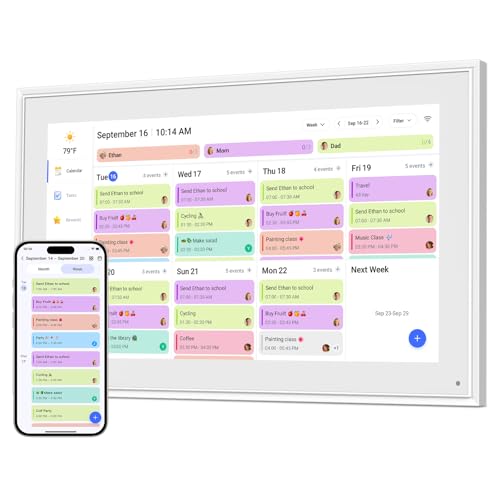
2. ApoloSign 21.5" – best for flexible placement
This model stands out for its dual placement options, making it suitable for families that don’t want permanent wall mounting. The 21.5-inch screen still provides enough space to see daily schedules without feeling overwhelming.
Families often choose this version when they want a shared calendar that can adapt to changing living spaces. It fits well in kitchens, entryways, or shared home offices, especially in homes where flexibility matters more than a fixed wall setup.
3. LOOFII 15.6" – best for smaller families
This compact model is often chosen by couples or families with one child who want a shared calendar without dedicating too much wall space. Its smaller display keeps schedules readable without visual clutter.
It covers core scheduling needs without taking over wall space, making it a practical option for apartments, condos, or smaller shared areas where simplicity matters.
4. Skylight 15" – best for kids
Skylight is widely discussed in parenting communities thanks to its built-in chore and routine features. It’s designed to make schedules more visual and engaging for younger family members.
Parents often mention that the visual format helps children understand daily responsibilities and routines better than phone-based calendars, especially when the screen is placed in a common area.
5. LOOFII 21.5" – best for shared family spaces
This version offers more space than the smaller LOOFII model while keeping the same familiar interface. The larger display makes it easier to view multiple events at once.
It works especially well in kitchens or hallways where family members naturally pass by throughout the day and can quickly check what’s coming up.
6. Canupdog 15.6" – best budget option
This entry-level calendar focuses on basic shared scheduling without extra customization or advanced features. It’s aimed at families who want a straightforward digital alternative to paper planners.
It suits households that prioritize affordability and simplicity, especially if the main goal is keeping everyone aware of key dates and reminders.
Our methodology
To find the best digital calendars for families, I worked with the Cybernews research team to evaluate each option based on these weighted criteria:
- Ease of use (35%). Intuitive controls that are easy to understand for adults and accessible enough for kids to follow daily schedules without frustration.
- Family features (25%). Shared calendars, individual profiles and reminders that help everyone stay aligned on school, work and activities.
- Display and readability (15%). Screen size, brightness and clarity that ensure schedules are visible from a distance in shared family spaces.
- Integration and compatibility (15%). Reliable syncing with phones, tablets and common calendar apps so updates appear instantly for all family members.
- User feedback (10%). Long-term satisfaction, stability and real-world reliability based on aggregated user reviews.
This ensures we recommend family calendars that are practical, inclusive and easy to keep up with every day.
What is a digital calendar?
A digital calendar is an electronic tool that helps users plan events, reminders and routines across multiple devices in real time. For families, it usually means a shared system everyone can access, update and rely on throughout the day, whether they’re at home, at work, or on the go.
Unlike traditional paper planners, digital calendars sync automatically and update instantly when changes are made. This allows parents to adjust schedules on the fly, add school events or appointments remotely and make sure everyone is working from the same up-to-date plan.
Family digital calendars are commonly used as a central household hub, often displayed in shared spaces like kitchens or hallways. By keeping schedules visible and accessible, they help reduce misunderstandings, missed events and last-minute coordination stress.
Benefits of digital calendar for families
Digital calendars offer several practical benefits that help families stay organized and reduce everyday friction.
- Shared visibility of schedules. Everyone can see upcoming events, activities and commitments in one central place, which helps prevent overlaps and confusion.
- Fewer missed events. Visual access to schedules makes it easier to remember school events, appointments and activities without relying on verbal reminders.
- Remote updates by parents. Parents can update the calendar from their phones in real time, ensuring changes are instantly visible at home.
- Visual reminders for kids and seniors. A large, shared display supports family members who may struggle with phone notifications or app-based calendars.
Together, these benefits help families spend less time coordinating logistics and more time focusing on daily routines, activities, and time spent together.
Best digital calendar for families according to users
Feedback from families across review platforms and online forums often highlights better coordination and fewer scheduling conflicts once a shared digital calendar is in place. Many users say having a visible, centralized schedule reduces last-minute confusion around school events, activities and appointments.
Specific brands tend to stand out for different reasons. Skylight is frequently praised by parents for its chore charts and kid-friendly routines, making it popular with families that want children actively involved. ApoloSign, especially the 27-inch model, is often mentioned by larger households that value a big, easy-to-read display for tracking multiple schedules at once. Meanwhile, LOOFII models are commonly recommended by smaller families looking for a balance between screen size and affordability.
At the same time, common complaints tend to focus on the initial setup process and, in some cases, ongoing subscription costs. Less tech-savvy family members may need time to adjust, and some users note that premium features can feel expensive over time if they’re not fully used.
How to choose the best digital calendar for families
Choosing the right digital calendar starts with understanding how your family actually functions day to day. Different households benefit from different features, so it’s worth thinking through these factors before committing to a specific model.
- Number of users. Larger families need calendars that support multiple profiles so parents and kids can have their own schedules without cluttering a single view.
- Shared vs individual calendars. Some families prefer one fully shared calendar, while others benefit from individual calendars that roll up into a shared overview.
- Device compatibility. Make sure the calendar syncs smoothly with the phones, tablets and apps your family already uses to avoid manual updates.
- Reminder options. Visual reminders, notifications and recurring alerts can make a big difference in keeping everyone on track.
- Budget and subscriptions. Consider not just the upfront cost but also whether ongoing subscription fees make sense for how you’ll use the calendar.
Taking the time to weigh these factors makes it easier to choose a digital calendar that fits naturally into your family’s routine, rather than one that adds extra friction or goes unused.
Common concerns of using digital calendars
Using a digital calendar can raise a few concerns for families, especially when switching from paper planners or simple app reminders. Most of these issues are manageable once expectations and settings are adjusted.
- Learning curve. Some family members, particularly younger kids or less tech-savvy adults, may need time to get comfortable with a new interface. Simple layouts and consistent daily use usually help smooth this transition.
- Notification fatigue. Too many alerts can feel overwhelming if reminders aren’t customized. Most families find it helpful to limit notifications to important events and routines.
- Internet dependency. Many digital calendars rely on an internet connection for syncing and updates, which can be limiting during outages or connectivity issues.
- Data privacy. Since family calendars may store personal details like names, routines and photos, it’s important to review privacy settings and account access regularly.
Overall, these concerns tend to be trade-offs rather than deal breakers. With thoughtful setup and clear household habits, most families find the benefits outweigh the drawbacks.
Privacy and data sharing in family digital calendars
Family digital calendars often store personal information such as names, daily routines, photos and scheduled activities. Because this data reflects real household habits, it’s important for families to understand how it’s stored and who can access it.
Most calendar platforms allow users to manage account permissions, limit child access and control what information is shared across profiles. Reviewing these settings during setup – and revisiting them occasionally – helps ensure data stays visible only to the right people.
Taking a few minutes to check privacy policies and account controls can give families more confidence in using a shared digital calendar as part of their everyday routine.
Bottom line: best digital calendar for families
Digital calendars help families manage busy routines by bringing schedules, reminders and activities into one shared, visible place. For households juggling school, work and extracurriculars, this can significantly reduce daily friction and last-minute confusion.
Based on our analysis, the ApoloSign 27" stands out as the top choice for large, busy families that need maximum visibility and a true central planning hub. Its oversized display makes it easier to track overlapping schedules at a glance, which is especially helpful in households with multiple children.
That said, the best digital calendar for families still depends on practical factors like available space, preferred screen size, feature set and budget. Rather than looking for a one-size-fits-all solution, it’s worth focusing on how your family communicates and plans day to day. Choosing a calendar that fits naturally into those habits makes it far more likely to be used consistently and actually improve coordination.
FAQ
Are digital calendars safe for children to use?
Yes, most digital calendars are safe when parents manage permissions properly. Parental controls, profile settings and restricted access help limit what children can see or edit.
Do family digital calendars require a subscription?
No, not all models require subscriptions. Many work with a one-time purchase, though some offer optional paid features or premium plans.
Can digital calendars work offline?
No, most digital calendars require internet for syncing. Some may display existing schedules offline, but updates usually need an active connection.
What’s the difference between a shared app calendar and a wall-mounted digital calendar?
A shared app calendar lives on personal devices, while a wall-mounted digital calendar acts as a visible household hub. App calendars are checked individually, while wall-mounted calendars stay in a shared space for quick, at-a-glance updates.
How many family members can use one digital calendar at the same time?
Most family digital calendars support anywhere from 5 to 15 profiles, depending on the model. This is usually enough for parents, children, and even extended family members to manage separate schedules within one shared system.