Skylight Calendar review 2026: can this smart display really organize your life?


The Skylight Calendar is a smart family organizer designed to bring order to busy households. Instead of juggling paper planners, phone reminders, and sticky notes on the fridge, Skylight puts everything in one place: a sleek, wall-mounted display that shows schedules, to-dos, meal plans, and more. The idea is simple – when everyone can see what’s coming up, it’s easier to avoid missed appointments and last-minute chaos.
In this Skylight Calendar review, I walk you through what makes it stand out as a family planning tool. I also cover its main features, ease of use, and how it compares to other smart calendars competing for your attention.
My goal is to help you decide whether Skylight is the right fit for your household or if another option better suits your needs.
Quick overview of Skylight Calendar
To give you a quick sense of what Skylight Calendar offers, I’ve summarized its core details in the table below. This way, you can see how it fits within the smart family calendar market in terms of features, usability, and pricing tier.
| ⭐ Overall rating: | 4.5/5 |
| 📝 Description: | A wall-mounted smart family calendar designed to centralize schedules, tasks, and reminders |
| 💲 Pricing tier: | Mid-to-premium. More expensive than basic wall displays like DakBoard but cheaper than full smart hubs like Google Nest Hub Max |
| 📱 Compatibility: | Syncs with Google, Outlook, iCal, Apple |
| 📺 Display: | 15-inch HD touchscreen |
| 🔔 Key features: | Shared calendar, to-do lists, meal planning, chore tracking, reminders |
| 📦 Subscription: | Free basic tools; premium subscription for advanced features |
| ⚡ Ease of use: | Quick plug-in setup, intuitive interface |
| 👨👩👧👦 Best for: | Busy families, parents with kids, households that need a visible central hub |
Key features of Skylight Calendar
The Skylight Calendar focuses on visibility, shared accountability, and fewer missed commitments. Below, I break down the core features families care about most and how they help keep everyone aligned day to day.
Easy syncing with calendar apps
Skylight connects to popular services — Google, Outlook, Apple, and iCal feeds — so events flow into one screen automatically. You avoid duplicate entry and keep school, work, and personal calendars in sync without extra effort.
Large touchscreen display
A wall-mounted, HD touchscreen makes plans visible at a glance. The size and tap controls help kids and adults check what’s next, add items quickly, and move on with their day.
Color-coded events
Assign colors by person, category, or activity. Color coding turns a crowded schedule into a readable snapshot — who’s up next, where they need to be, and how the day stacks up.
Chore and meal planning integration
Skylight goes beyond dates with built-in chores and meal plans. You can pair practice times with dinner prep or assign tasks alongside pickups, reducing back-and-forth texts and last-minute confusion.
Shared access for family members
Everyone gets a voice. Parents and kids can add, edit, or acknowledge items from the app, so updates don’t bottleneck with one person. Shared access fosters ownership and fewer “I didn’t know” moments.
Daily and weekly views
Toggle between Today for the minute-by-minute rush and Week for the bigger picture. I like this split for planning busy mornings while still seeing weekend games, appointments, and travel.
Reminders and notifications
Set alerts for individuals or the whole household. Timely nudges — for departures, deadlines, and recurring chores — help prevent missed events and keep routines on track.
What are the different options of Skylight Calendar?
Skylight offers multiple calendar models tailored to different home setups. From compact wall displays to large-format organizers, each version delivers the same smart scheduling features while varying in size and presence.
Skylight Calendar 15"
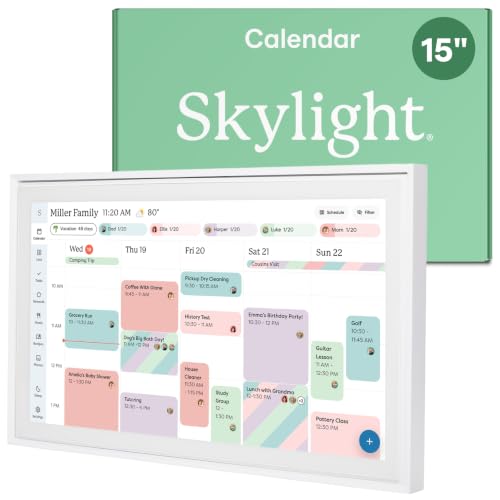
The 15-inch Skylight Calendar is the brand’s best-selling model. It’s compact enough for kitchens, hallways, or desks, yet large enough to keep everyone’s schedule visible at a glance. With wall-mount and countertop options, this version balances practicality and flexibility for smaller homes.
Skylight Calendar Max 27" (Charcoal Frame)
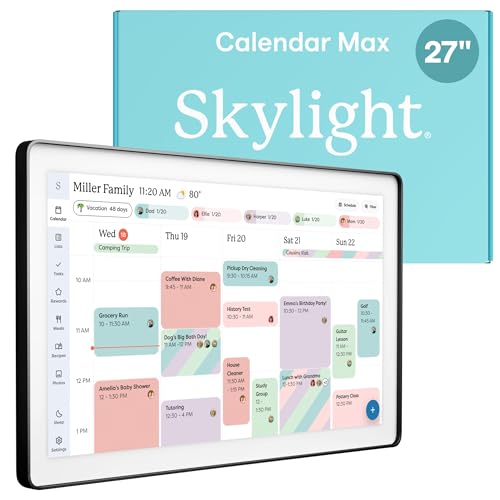
For households that want maximum visibility, the 27-inch Calendar Max in Charcoal offers a bold, modern hub. The full HD display can be mounted vertically or horizontally, giving you a highly adaptable layout for chores, events, and meal plans. It’s ideal for larger families who need clarity from across the room.
Skylight Calendar Max 27" (Classic White)
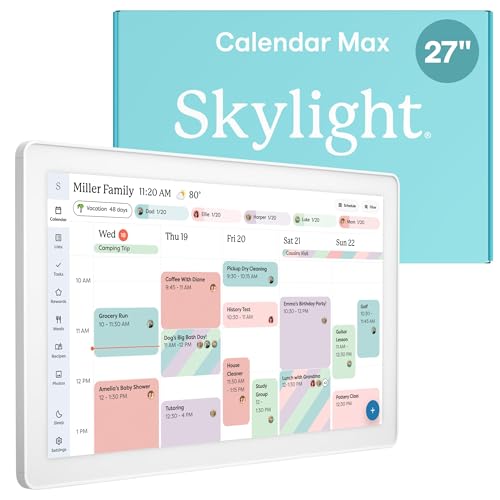
The Classic White Max provides the same oversized 27-inch display with a softer, minimalist finish. This version blends naturally into bright or modern interiors, making it less of a tech statement and more of a seamless part of your décor while still keeping schedules highly visible.
Skylight Frame + Calendar
This hybrid model merges Skylight’s smart scheduling tools with its digital photo frame. Alongside events, chores, and lists, it doubles as a rotating gallery for family pictures. It’s a practical yet personal option for families who want their calendar hub to feel both functional and warm.
Who should buy the Skylight Calendar?
The Skylight Calendar is designed for anyone who wants to cut through daily chaos and keep schedules visible in one central place. While it can be useful for a wide range of households, it’s especially helpful for these groups:
- Families with kids. Parents can assign chores, color-code activities, and make meal planning visible to everyone. Kids benefit from seeing their routines clearly laid out and can take more responsibility.
- Couples managing busy schedules. Shared access means both partners stay on the same page with work meetings, social plans, and appointments, reducing double-bookings and last-minute surprises.
- Professionals working from home. A large wall display doubles as a productivity hub, making it easier to track deadlines, video calls, and daily priorities without constantly checking a phone.
- People who prefer a visual daily planner. If you find smartphone-only apps too hidden or distracting, Skylight’s large touchscreen offers a clear, always-on overview that brings structure and focus to your day.
Skylight Calendar: user reviews
Most buyers highlight Skylight Calendar’s ease of use, saying setup only takes a few minutes and that even children can quickly learn how to check or add events. Families also appreciate how well it supports coordination, helping them keep school, work, and activities visible in one central place.
Another common praise is its sleek design, which blends easily into kitchens or entryways without appearing bulky or overly technical. For many, it has replaced paper planners and whiteboards as the household command center.
On the other hand, some reviewers are less happy with the subscription requirement for certain features, such as meal planning, chore rewards, or photo slideshows. Others mention occasional syncing delays with Google or iCal, which can be frustrating for households relying on instant updates.
Overall, though, most users agree it simplifies routines and works well as a shared family hub.
Skylight Calendar: price
The Skylight Calendar falls into the mid-to-premium range of smart family organizers. It costs more than app-only solutions such as TimeTree, but is still more affordable than most large-format smart hubs. The 15-inch version sits comfortably in the mid tier, while the 27-inch Calendar Max is clearly positioned as a premium household hub.
Subscriptions are optional rather than required. Out of the box, families can use core features like calendar syncing, task lists, and basic reminders. However, unlocking advanced functions – such as meal planning, photo screensavers, and chore reward systems – requires the optional Skylight Plus Plan.
When compared to competitors, Skylight strikes a balance. From what I can tell, Skylight’s more polished and feature-rich than budget digital calendars. It also offers a sleeker design and simpler setup than general-purpose smart displays. This positions it as a strong choice for families seeking a dedicated, all-in-one planner.
Skylight’s privacy and data security
Skylight is designed to manage sensitive household information, so its approach to privacy and security is an important factor.
The device relies on Wi-Fi to sync with third-party apps like Google Calendar, iCal, Outlook, and Cozi. Data flows securely between the Skylight app, the device, and these platforms. It uses standard encryption protocols to protect events, lists, and personal details during transfer.
The company states in its privacy policy that it doesn’t sell user data to advertisers. Instead, information is used to provide and improve the service, such as syncing calendars and supporting optional features like photo slideshows.
Skylight also offers transparency on how long data is stored and how users can request deletion if they choose to stop using the service.
Skylight Calendar vs competitors
The market for digital calendars is saturated with options that aim to simplify daily organization. Skylight Calendar mostly compares to Google Nest Hub, Amazon Echo Show, and Dakboard – each taking a different approach to how schedules are displayed and managed.
Below is a table with a full breakdown of the most popular Skylight alternatives and how these devices stack up against one another.
| Product | Display size | Calendar sync | Ease of use | Extra features | Voice assistant | Subscription required? | Price range | Best for |
| Skylight Calendar | 10”, 15” touchscreen, and 27” Max | Google, iCal, Outlook | Very user-friendly, family-focused | Chores, meal planning, reminders | None | Optional (premium features) | Mid-to-premium | Families and households |
| Google Nest Hub | 7” (2nd gen) and 10” Max | Google Calendar | Easy for Google users | Smart home controls, Google Assistant | Google Assistant | No | Budget to mid-tier | Google ecosystem fans |
| Amazon Echo Show | 5.5” (Show 5), 8” (Show 8), 10.1” (Show 10), 15.6” (Show 15), and 21” (Show 21) | Limited (via Alexa Skills) | Strong Alexa integration, steeper setup | Smart home controls, video calls | Alexa | No | Budget to mid-tier | Alexa ecosystem fans |
| Dakboard | Varies (monitor setup) | Google, iCal, Outlook | Requires DIY setup | Custom dashboard widgets | None | No (optional paid add-ons) | Low + software fee | DIY & tech-savvy users |
As you can see, Skylight is the clear winner in terms of simplicity and family focus. It’s built specifically for households that want shared visibility of schedules, chores, and meal plans, something neither Google Nest Hub nor Amazon Echo Show emphasizes.
While the Google Nest Hub and Amazon Echo Show excel at smart home controls, their calendars feel more like add-ons rather than the main feature. Dakboard provides more customization, but its DIY setup requires extra time and technical comfort.
On the other hand, Skylight falls behind when it comes to flexibility and cost. It doesn’t double as a voice assistant or smart home hub, which means fewer all-in-one features compared to the Echo Show or Nest Hub. Pricing also leans mid-to-premium, especially if you opt for subscription-based extras.
Final verdict: is the Skylight Calendar worth it?
The Skylight Calendar is worth it if your priority is a family-focused hub that simplifies daily planning. Unlike smart assistants that try to do everything, Skylight stays focused on one task. It keeps schedules, chores, and meal plans visible and accessible for everyone at home. Also, its sleek design and intuitive interface make it easy to adopt, even for kids.
That said, there are some drawbacks. Skylight sits in the mid-to-premium price tier, which makes it more expensive than DIY or app-based solutions. Some of its most appealing extras, like meal planning and chore rewards, are locked behind an optional subscription. It also lacks the versatility of the Google Nest Hub or the Amazon Echo Show.
Still, the 15-inch Skylight Calendar has become the brand’s most popular model, and that’s a testament to its quality and balanced design. In 2026, it remains one of the best choices for families who want clarity and structure.
Other reviews you might be interested in:
Ratepunk review 2026: can this travel app really save your money?
Most secure cloud storage in 2026: expert picks for ultimate data protection
Best indoor air quality monitor 2026: expert picks for a healthier home
Boya BY-M1 microphone review: affordable audio for creators?
FAQs
Does Skylight Calendar work without a subscription?
Yes, Skylight Calendar works without a subscription. You can still sync events, create to-do lists, and manage chores. The subscription only unlocks premium extras like meal planning, photo slideshows, and chore rewards.
Can Skylight Calendar sync with Google Calendar or Outlook?
Yes, Skylight Calendar syncs with Google Calendar, Outlook, Apple, and iCal. Updates appear automatically on the device, so you don’t need to enter events twice.
Is Skylight Calendar easy for kids to use?
Yes, Skylight Calendar is designed to be kid-friendly. Its large touchscreen and color-coded events make it simple for children to check schedules or mark off chores.
How secure is the data on Skylight Calendar?
Skylight uses encrypted connections for syncing and doesn’t sell user data. Information is only used to provide services, and users can request data deletion if needed.
Is Skylight Calendar better than using a tablet with a calendar app?
It depends on your needs. Tablets offer flexibility, but Skylight provides a dedicated, always-on hub with family features like chores and meal planning that typical apps don’t prioritize.