MailerLite review – does it make email marketing easier?


The name fooled me, and I was surprised to find that MailerLite isn’t just for automating email campaigns. It’s actually a comprehensive email marketing platform with a newsletter editor, website and landing page builders, appointment booking tools, and much more.
In my experience, most all-in-one products deliver a subpar experience across all features. I decided to see if that’s the case with MailerLite and tested its main tools firsthand. In my review, you’ll find out if its email marketing features are worth it, how much it costs, and my honest impressions after using it.
MailerLite pros and cons
What is MailerLite?
MailerLite is an email marketing platform that lets you build, sell, and promote your products from a single place. Basically, it provides small businesses and solopreneurs with all the necessary tools for email and ad campaigns and website building. It offers 140+ integrations, including Zapier, and you can request any tools that are missing. Moreover, there’s a public API and webhooks to integrate with your other business software.
This is how it’s different from other marketing platforms: MailerLite doesn’t take commissions from any of your sales, has a simple drag-and-drop interface, and offers multi-step, complex workflows for marketing automations.
You can sell your services and digital products from MailerLite’s websites, landing pages, and newsletters without any third-party tools. All payments are processed via Stripe, and delivery is handled automatically upon purchase. What’s more, the newsletter itself can be monetized.
MailerLite’s features
MailerLite offers tools for four main aspects of email marketing. I’ve gathered the best ones in each category.
- Drag-and-drop newsletter builder
- Customizable email templates
- Automated email workflows with time and activity-based triggers
- HTML email editor with live preview
- AI agent that builds emails and newsletters as you give simple prompts
- MCP integration to manage email marketing directly from AI tools like Claude
- Customizable website templates
- Hosting is included
- Built-in tools for SEO optimization and sharing across social media
- Full website analytics with click maps
- Pop-up templates, including spin-the-wheels and teasers
- Photo editor and comprehensive content manager
- Landing pages with 70+ customizable building blocks, custom HTML injection for advanced customization, and text and image generation with AI
- A/B testing with up to 5 landing page variations
- Customizable sign-up forms, pop-ups, slide-ins, and sticky bars
- Email verification tool to contact only verified subscribers
- Connects to all your online stores for unified email campaigns
- Built-in integrations with Zapier, WooCommerce, Shopify, and others
- Sales performance data organized by orders, email campaigns, and landing pages
- Appointment booking tool synced with Google and Outlook calendars
What about MailerLite’s security?
In brief, it’s strict. MailerLite operates through two legal entities: the one in Ireland serves customers in the European Union, the UK, and Switzerland, while the one in the US serves everyone else. It’s GDPR-compliant and ISO 27001-certified, and all data is stored in the EU, ensuring strong compliance.
I read MailerLite’s privacy policy, and it states that it doesn’t sell or rent personal data. While it uses third-party services like Stripe, PayPal, Intercom, OpenAI, and Google Vertex, MailerLite has agreements so customer data isn’t used to train those providers' models.
It also claims that all subscriber and payment data is processed solely to run the service and that it doesn’t share customer lists with advertisers. Generally, as a user, you’re protected under GDPR and CCPA, including the right to review any personal data MailerLite has collected and ask it to update it or delete it from its system.
My experience with MailerLite
I’ll walk you through my path across MailerLite exactly as it went: from contact list creation to contacting support.
Arranging the list of subscribers
The first thing I noticed was easy navigation. At the start, MailerLite provided a step-by-step tutorial on everything I had to do to set up my account. Adding subscribers was super flexible, letting me import contacts via .txt, CSV, Excel copy-paste, Mailchimp, or API.
Once my contact list was finished, I organized it into groups and segments. Groups are broad and based on factors that don’t change, e.g., location and email address. Segments, in turn, let you target specific behaviors, like users who opened an email in the last 15 days or bought a specific product. Since creating your own conditions for segments can be too overwhelming, I could just customize one of the seven templates.
I liked that the platform tracks each subscriber’s stats and action history, automatically updating the segments. Basically, it lets you send highly targeted messages to the right audience.
There’s also a useful Clean up inactive button that removes unengaged contacts (e.g., those who didn’t open my emails in the last 6 months), so I could maximize my plan limits.
Creating an email campaign
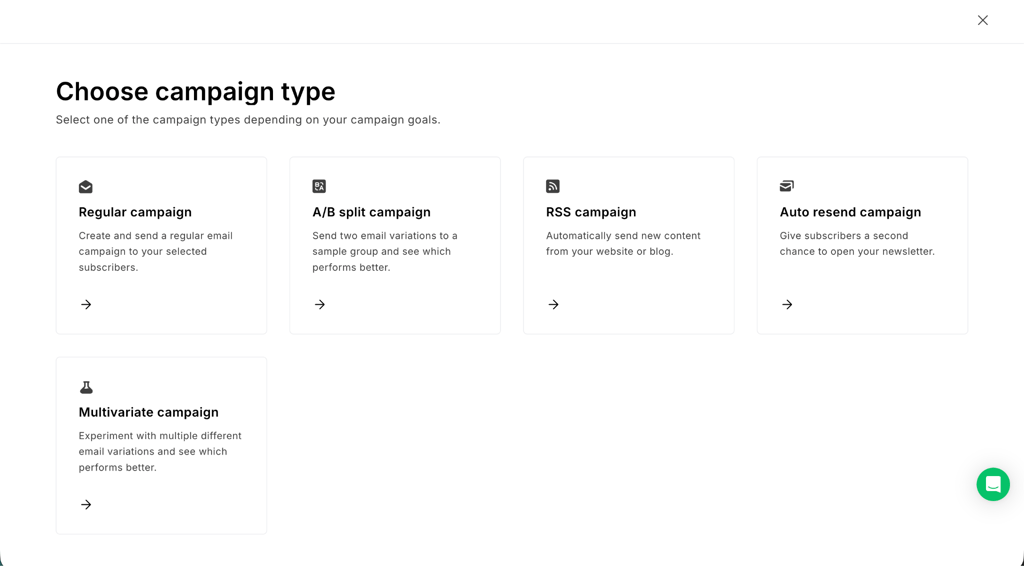
Creating the first email campaign was straightforward, too. I went for the Regular campaign type and tested the drag-and-drop editor to design my first newsletter, which was highly intuitive.
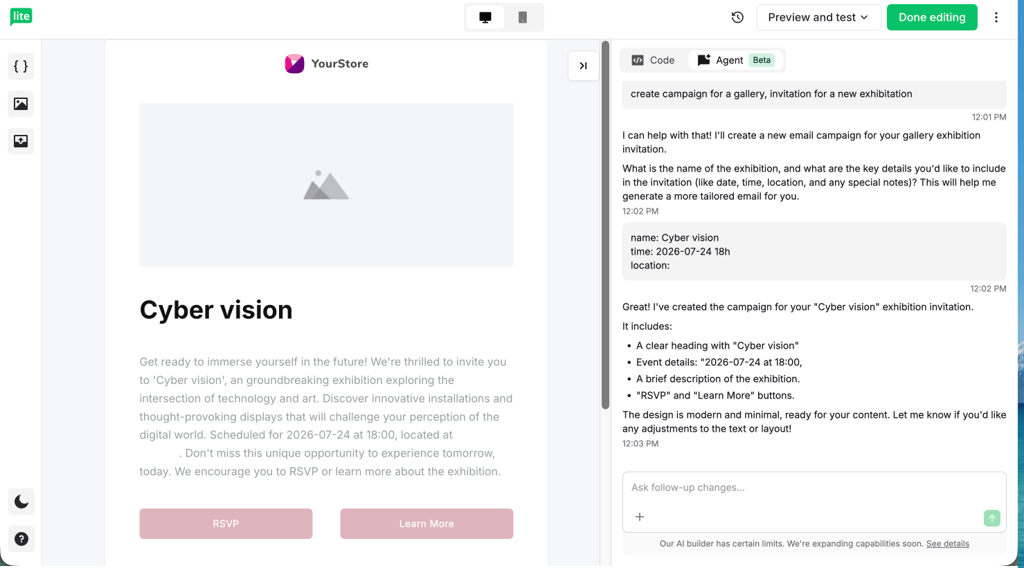
To try something more challenging, I also tested the HTML builder with AI functionalities. It was great that I could just give a prompt, and the AI would build all the needed elements for me – it even asked additional questions to get it right. Even though the AI can do most of the job, you obviously need to have some basic coding knowledge to manually edit HTML.
Testing automation workflows
Of course, I couldn’t resist testing automations, an essential part of successful email marketing routines. So, first, I set up a simple workflow with an automatic welcome message when someone joins a group.
I absolutely loved that I could go further than this and add even more conditions and actions, like waiting three days to see if they opened that initial email and automatically sending a follow-up with a special discount code if they didn't.
Based on my experience with automation tools, I’m sure that MailerLite will be simple to handle even for beginners with its clear controls and 18 customizable templates.