Android malware is wiping credit cards
Fake banking apps can empty your bank account, hijack calls and SMS, and spy on your phone.

Image by Cybernews

 Follow us
Fake banking apps can empty your bank account, hijack calls and SMS, and spy on your phone.
When you open your banking app, you’re probably not thinking about malware. You're thinking about your balance, your transactions, and your rent.
However, a growing number of Android phones in India are being attacked by malicious apps that impersonate legitimate banking apps. An investigation conducted by CYFIRMA’s threat intelligence team has uncovered a sophisticated Android malware campaign in which malicious apps can wipe bank accounts, steal credentials, and hijack SMS and even calls.
The researchers have not specified which Indian banking apps have been impersonated in the campaign, but potentially, most of the Indian population is at risk. Due to the high adoption rates, a significant portion of the population relies on banking apps for various financial transactions.






How are victims tricked into downloading malware?
No one downloads a banking trojan on purpose. Behind nearly every infection is a combination of social engineering and technical manipulation, each designed to bypass both human skepticism and Android's built-in defenses.
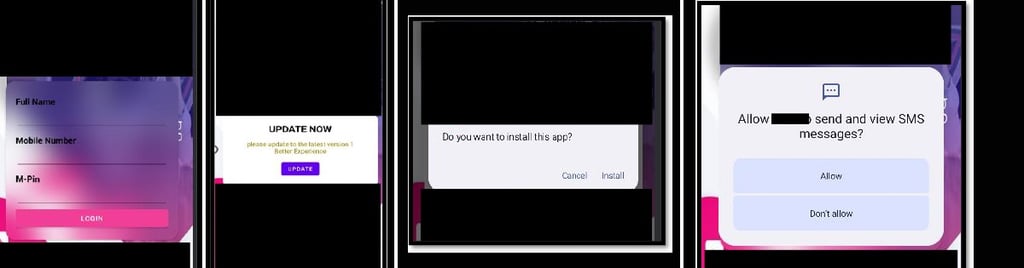
The indicated attack begins with a “dropper,” an Android Package (APK) that users are socially engineered into installing. The key tactics for making victims fall for the bait include phishing messages via messaging apps, such as WhatsApp, or malicious emails.
The malware is also spread via fake banking websites, malicious QR codes, and Trojan dropper apps disguised as system updates. Third-party stores that mimic Google Play are also used to distribute trojanized banking apps.




Exploiting Android permissions to hijack devices
Once installed, the main payload requests a suite of powerful Android permissions that give it near-complete control over the infected device’s communications and behavior.
It can read, send, and intercept SMS messages, making it capable of stealing one-time passwords, hijacking two-factor authentication, and even verifying banking actions on the victim’s behalf.
By capturing both incoming and outgoing messages, the malware takes over control of any financial transaction, silently forwarding one-time passwords and 2FA codes to a Firebase Realtime Database controlled by attackers.
With access to phone state and numbers, the malware can fingerprint the device, monitor calls, initiate call forwarding, and execute USSD codes – functions typically reserved for legitimate carrier operations.
Malware bypasses battery optimization settings to ensure it never shuts down and auto-restarts itself after each reboot. Notification access allows malware to spoof banking alerts or hide OTPs.
“These capabilities enhance its stealth and operational impact, highlighting the urgent need for user vigilance and robust, layered security measures within financial ecosystems to counter advanced mobile threats,” write CYFIRMA researchers.
Always pay attention to what you allow an app to do
While even legitimate app requires permissions to provide services, always stay cautious about what permissions you grant.
Cybernews research has shown that many airlines, hospitality, health, financial, and educational apps ask for more permissions than necessary for the app to function. An investigation of 50 popular Android apps showed that apps, on average, require 11 dangerous permissions, including the user’s location, files, or camera data.
Privacy is primarily at stake, as your harvested device data could be used for targeted marketing. But in the case of cyberattacks, permissions might become a gateway for attackers.