GhostPoster malware campaign exploits live Firefox extensions
A live malware campaign called GhostPoster is hiding malicious JavaScript inside Firefox extension logo files, resulting in over 50,000 unsuspecting users to download more than a dozen compromised add-ons so far.

Image by Cybernews.

 Follow us
A live malware campaign called GhostPoster is hiding malicious JavaScript inside Firefox extension logo files, leading over 50,000 unsuspecting users to download more than a dozen compromised add-ons so far.
- GhostPoster malware hides in Firefox extension logos, infecting more than 50,000 users via 17 live add-ons.
- The code lies dormant up to 48 hours, giving attackers full browser control while evading detection.
- It hijacks affiliate links, injects tracking, and keeps persistent C2 access, turning users’ browsers into covert money-making tools.
Key Takeaways by nexos.ai, reviewed by Cybernews staff.
Once installed, the co-opted extensions allow attackers to gain full control of the victim’s browser, according to a new research blog post by Koi Security published Tuesday.
What’s more, the now malicious extensions are still live on the Firefox Add-ons marketplace, Koi says.
At least 17 compromised add-ons are circulating, allowing attackers to hijack links and inject tracking code, all done using steganography to conceal a malicious loader that delivers malware or tracking code, the research says.






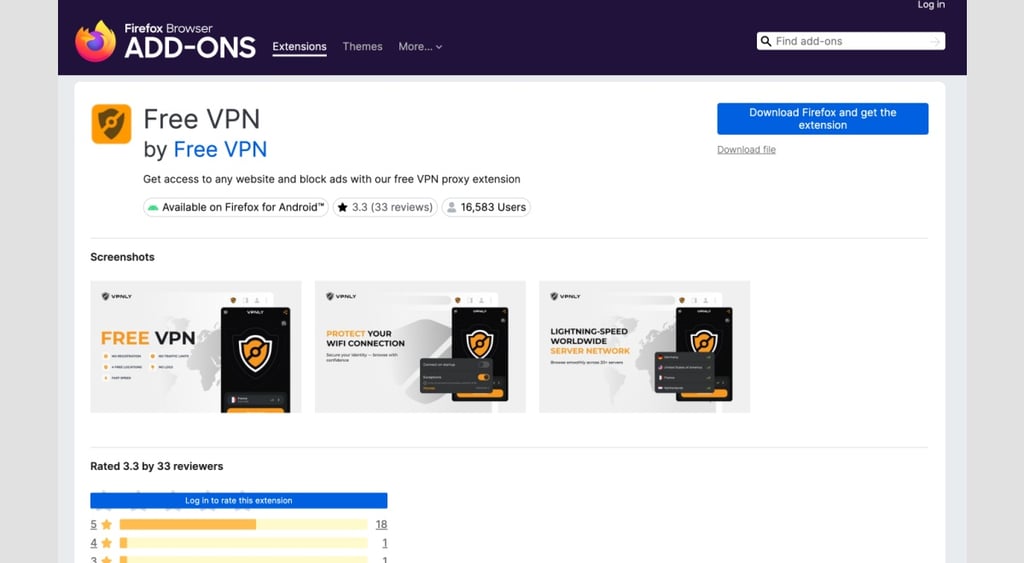
The “experimental” attackers are said to have structured the campaign to start when the user downloads a “free” VPN browser extension for Firefox, first observed by Koi Security with one add-on named “Free VPN Forever.”

Essentially, the attackers have hidden the loader in the extension’s logo (that sits on the user’s toolbar) – “embedded in the bytes of the PNG file itself” – a process known as stenography, the research describes.
Koi says standard behavior dictates that, when an extension loads, “it fetches its own logo file logo.png.”
But in this campaign, the malicious code is “extracted and executed” without the user ever knowing, ultimately connecting to a Command and Control (C&C) server.
A total of 16 other infected extensions were found, including more free VPN add-ons, as well as those for translation tools, weather forecasts, ad blocking, and others.
Ironically, Koi says the loader only “fetches its payload” 10% of the time, making it much more difficult for security teams to detect, if at all.
Ross Filipek, CISO at Corsica Technologies, labels GhostPoster "a unique kind of attack" campaign. "Since the malicious code resides in the Firefox logo, rather than automatically triggering when a link is clicked, it's only able to trigger the payload 10% of the time," he points out.
"However, GhostPoster trades frequency of download for stealth, as the loader is mostly dormant and activates 48 hours after initial access, making it extremely difficult for monitoring tools to detect it," Filipek says.
What’s the end goal?
Koi says the entire campaign is designed to monetize the victim’s browser, again without their knowledge.
The malware is said to watch for visits to major e-commerce platforms, for example, Taobao and JD[.]com, then hijacks affiliate links the user has clicked on, redirecting any commissions straight to the attackers' accounts.
“The original affiliate, or whoever is supposed to earn a commission from your purchase, gets nothing. The malware operators get paid instead," Koi says.

Filipek notes that once the malware activates within the host’s network, “threat actors could run lucrative ad and click-fraud campaigns that are difficult to detect.”
Besides intercepting affiliate commissions, Koi says the malware additionally injects Google Analytics tracking into every page the user visits, collecting information such as the date the extension was installed, how many days the user has been infected, which merchant networks they visit, and the unique identifier tied to their browser.
The attackers “strip your browser's security headers on every site you visit. They inject code into every page. They maintain a persistent connection to attacker-controlled servers, waiting for instructions. The payload can be updated at any time. What runs in your browser tomorrow is entirely up to them,” Koi warns.
Filipek also says that "bypassing CAPTCHA and stripping security headers could allow attackers to pass as legitimate human traffic to defenses, enabling easier exploitation through script injections or leading to credential stuffing or web scraping."






Filipek recommends that maintaining proper cyber protocols is crucial to preventing these near-untraceable attacks from infecting devices and exploiting victims.
“Individuals should remove any untrusted or unnecessary browser extensions that could potentially serve as attack vectors,” the CISO says.
Furthermore, “Organizations should enforce thorough application control and least-privilege policies, while also implementing endpoint detection and response tools and scanning for irregular browser behavior, ” Filipek says.